Artificial Intelligence
Amazon Bedrock AgentCore Observability with Langfuse
The rise of artificial intelligence (AI) agents marks a change in software development and how applications make decisions and interact with users. While traditional systems follow predictable paths, AI agents engage in complex reasoning that remains hidden from view. This invisibility creates a challenge for organizations: how can they trust what they can’t see? This is where agent observability enters the picture, offering deep insights into how agentic applications perform, interact, and execute tasks.
In this post, we explain how to integrate Langfuse observability with Amazon Bedrock AgentCore to gain deep visibility into an AI agent’s performance, debug issues faster, and optimize costs. We walk through a complete implementation using Strands agents deployed on AgentCore Runtime followed by step-by-step code examples.
Amazon Bedrock AgentCore is a comprehensive agentic platform that can deploy and operate highly capable AI agents securely, at scale. It offers purpose-built infrastructure for dynamic agent workloads, powerful tools to enhance agents, and essential controls for real-world deployment. AgentCore is comprised of fully managed services that can be used together or independently. These services work with any framework including CrewAI, LangGraph, LlamaIndex, and Strands Agents, and any foundation model in or outside of Amazon Bedrock, offering flexibility and reliability. AgentCore emits telemetry data in standardized OpenTelemetry (OTEL)-compatible format, enabling easy integration with an existing monitoring and observability stack. It offers detailed visualizations of each step in the agent workflow, enabling inspection of an agent’s execution path, audit intermediate outputs, and debugging performance bottlenecks and failures.
How Langfuse tracing works
Langfuse uses OpenTelemetry to trace and monitor agents deployed on Amazon Bedrock AgentCore. OpenTelemetry is a Cloud Native Computing Foundation (CNCF) project that provides a set of specifications, APIs, and libraries that define a standard way to collect distributed traces and metrics from an application. Users can now track performance metrics including token usage, latency, and execution durations across different processing phases. The system creates hierarchical trace structures that capture both streaming and non-streaming responses, with detailed operation attributes and error states.
Through the /api/public/otel endpoint, Langfuse functions as an OpenTelemetry Backend, mapping traces to its data model using generative AI conventions. This is particularly valuable for complex large language model (LLM) applications utilizing chains and agents with tools, where nested traces help developers quickly identify and resolve issues. The integration supports systematic debugging, performance monitoring, and audit trail maintenance, making it easier for teams to build and maintain reliable AI applications on Amazon Bedrock AgentCore.
In addition to Agent observability, Langfuse offers a suite of integrated tools covering the full LLM application development lifecycle. This includes running automated llm-as-a-judge evaluators (online/offline), organizing data labeling for root cause analysis and evaluator alignment, track experiments (local and in CI), iterate in prompts interactively in a playground, and version control them in UI using prompt management.
Solution overview
This post shows how to deploy a Strands agent on Amazon Bedrock AgentCore Runtime with Langfuse observability. The implementation uses Anthropic Claude models through Amazon Bedrock. Telemetry data flows from the Strands agent through OTEL exporters to Langfuse for monitoring and debugging. To use Langfuse, set disable_otel=True in the AgentCore runtime deployment. This turns off AgentCore’s default observability.
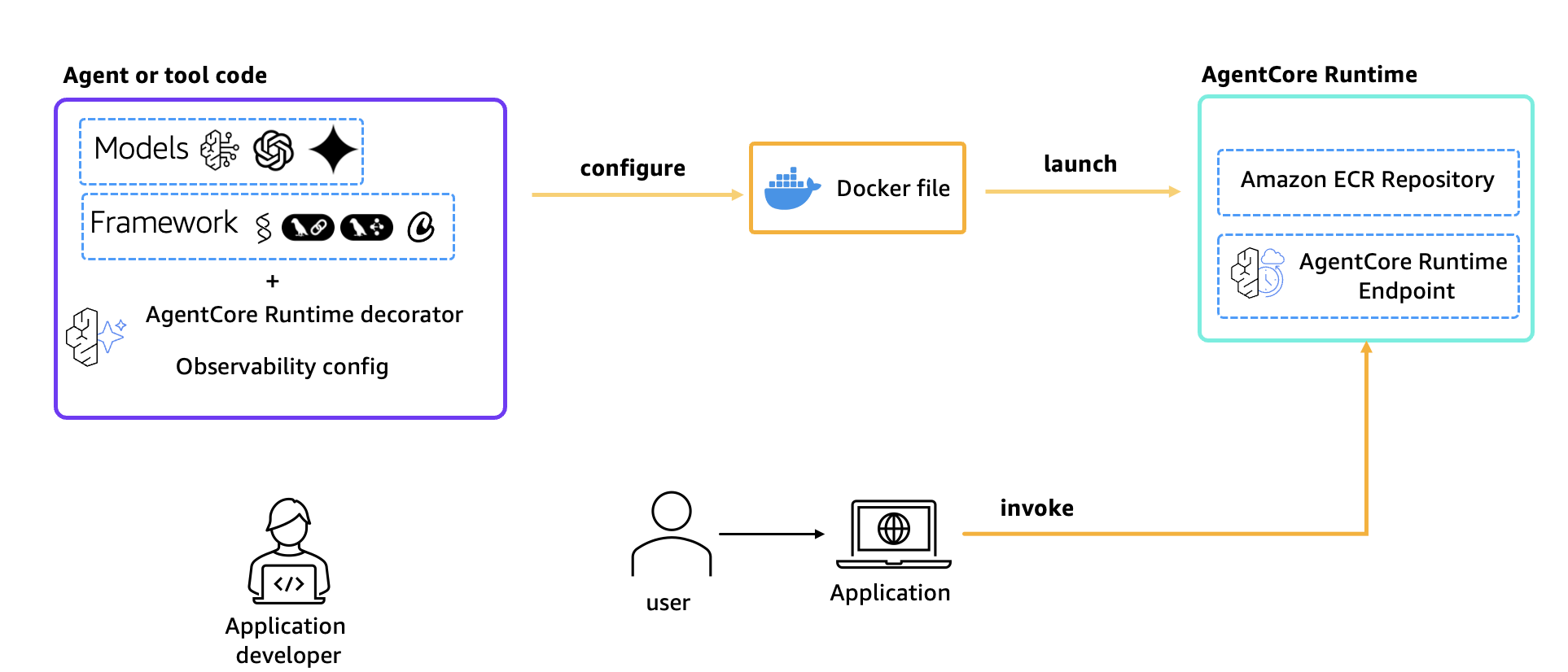
Figure 1: Architecture overview
Key components used in the solution are:
- Strands Agents: Python framework for building LLM-powered agents with built-in telemetry support
- Amazon Bedrock AgentCore Runtime: Managed runtime service for hosting and scaling agents on Amazon Web Services (AWS)
- Langfuse: Open-source observability and evaluation platform for LLM applications that receives traces via OTEL
- OpenTelemetry: Industry-standard protocol for collecting and exporting telemetry data
Technical implementation guide
Now that we have covered how Langfuse tracing works, we can walk through how to implement it with Amazon Bedrock AgentCore.
Prerequisites
- An AWS account
- Before using Amazon Bedrock, confirm all AWS credentials are configured correctly. They can be set up using the AWS CLI or by setting environment variables. For this notebook we assume that the credentials are already configured.
- Amazon Bedrock Model Access for Anthropic Claude 3.7 in us-west-2 region
- Amazon Bedrock AgentCore permissions
- Python 3.10+
- Docker installed locally
- A Langfuse account, which is needed to create a Langfuse API Key.
- Users need to register at Langfuse cloud, create a project, and get API keys
- Alternatively, you can self-host Langfuse within your own AWS account using the Terraform module.
Walkthrough
The following steps walk through how to use Langfuse for collecting traces from agents created using Strands SDK in AgentCore runtime. Users can also refer to this notebook on Github to get started with it right away.
Clone this Github repo:
Once the repo is cloned, visit the Amazon Bedrock AgentCore Samples directory, find the notebook runtime_with_strands_and_langfuse.ipynb and start running each cell.
Step 1: Python dependencies and requirements packages for our Strands agent
Execute the below cell to install the dependencies which are defined in the requirements.txt file.
Step 2: Agent implementation
The agent file (strands_claude.py) implements a travel agent with web search capabilities.
Step 3: Configure AgentCore Runtime deployment
Next, use our starter toolkit to configure the AgentCore Runtime deployment with an entry point, the execution role we created, and a requirements file. Additionally, configure the starter kit to auto create the Amazon Elastic Container Registry (ECR) repository on launch.
During the configure step, the docker file is generated based on the application code. When using the bedrock_agentcore_starter_toolkit to configure the agent, it configures AgentCore Observability by default. Therefore, to use Langfuse, users should disable OTEL by setting the configuration flag as “True” as shown in the following code block.
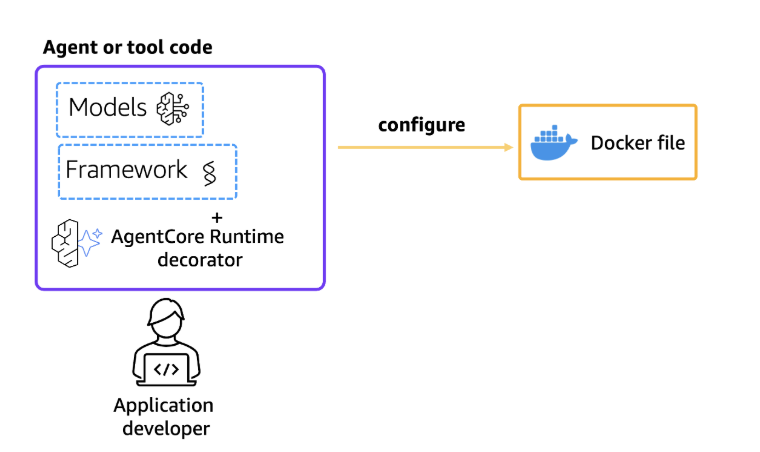
Figure 2: Configure AgentCore Runtime
Step 4: Deploy to AgentCore Runtime
Now that a docker file has been generated, launch the agent to the AgentCore Runtime to create the Amazon ECR repository and the AgentCore Runtime.
Now configure the Langfuse secret key, public key and OTEL endpoints in AWS Systems Manager Parameter Store, which provides secure, hierarchical storage for configuration data management and secrets management.
The following table describes the various configuration parameters being used.
| Parameter | Description | Default |
|---|---|---|
langfuse_public_key |
API key for OTEL endpoint | Environment variable |
langfuse_secret_key |
Secret key for OTEL endpoint | Environment variable |
OTEL_EXPORTER_OTLP_ENDPOINT |
Trace endpoint | https://cloud.langfuse.com/api/public/otel/v1/traces |
OTEL_EXPORTER_OTLP_HEADERS |
Authentication type | Basic |
DISABLE_ADOT_OBSERVABILITY |
AWS Distro for Open Telemetry (ADOT). The implementation disables Agent Core’s default observability to use Langfuse instead. | True |
BEDROCK_MODEL_ID |
AWS Bedrock Model ID | us. anthropic.claude-3-7-sonnet-20250219-v1:0 |
Step 5: Check deployment status
Wait for the runtime to be ready before invoking:
A successful deployment shows a “Ready” state for the agent runtime.
Step 6: Invoking AgentCore Runtime
Finally, invoke our AgentCore Runtime with a payload.
Once the AgentCore Runtime has been invoked, users should be able to see the Langfuse traces in the Langfuse dashboard.
Step 7: View traces in Langfuse
After running the agent, visit the Langfuse project to view the detailed traces. The traces include:
- Agent invocation details
- Tool calls (web search)
- Model interactions with latency and token usage
- Request/response payloads
Traces and hierarchy
Langfuse captures all interactions from user requests to individual model calls. Each trace captures the complete execution path, including API calls, function invocations, and model responses, creating a comprehensive timeline of agent activities. The nested structure of traces enables developers to drill down into specific interactions and identify performance bottlenecks or error patterns at any level of the execution chain. To further enhance observability capabilities, Langfuse provides tagging mechanisms that can be implemented in agent workflows.
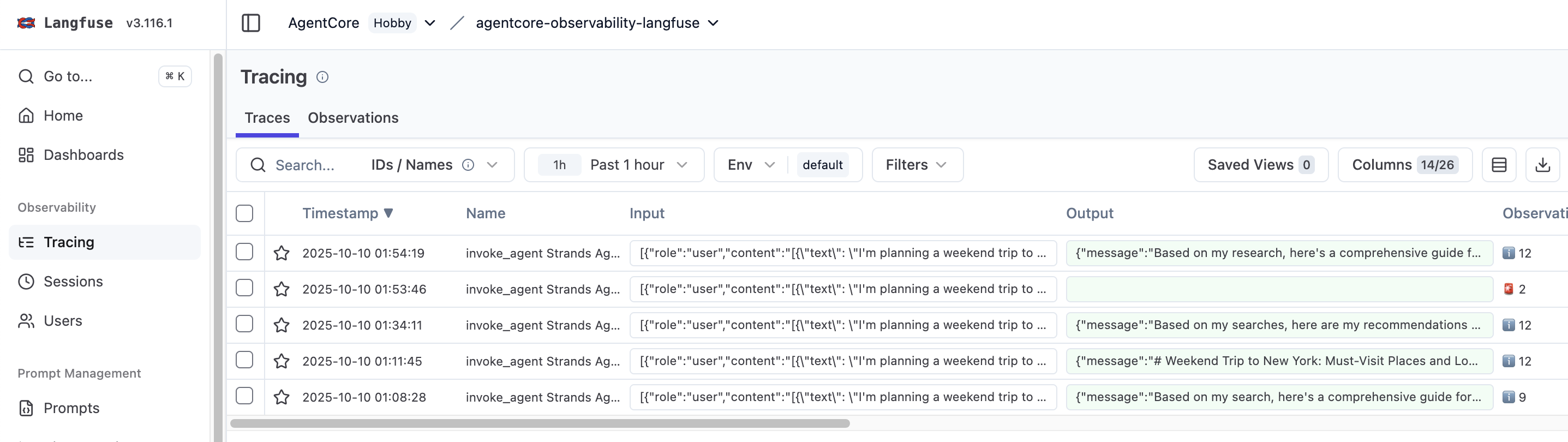
Figure 3: Traces in Langfuse
Combining hierarchical traces with strategic tagging provides insights into agent operations, enabling data-driven optimization and superior user experiences. As shown in the following image, developers can drill down into the precise timing of each operation within their agent’s execution flow. In the previous example, the complete request took 26.57s, with individual breakdowns for event loop cycle, tool calls, and other components. Use this timing information to find performance bottlenecks and reduce response times. For instance, certain LLM operations might take longer than expected, or there may be opportunities to parallelize specific actions to reduce overall latency. By leveraging these insights, users can make data-driven decisions to enhance agent’s performance and deliver a better customer experience.
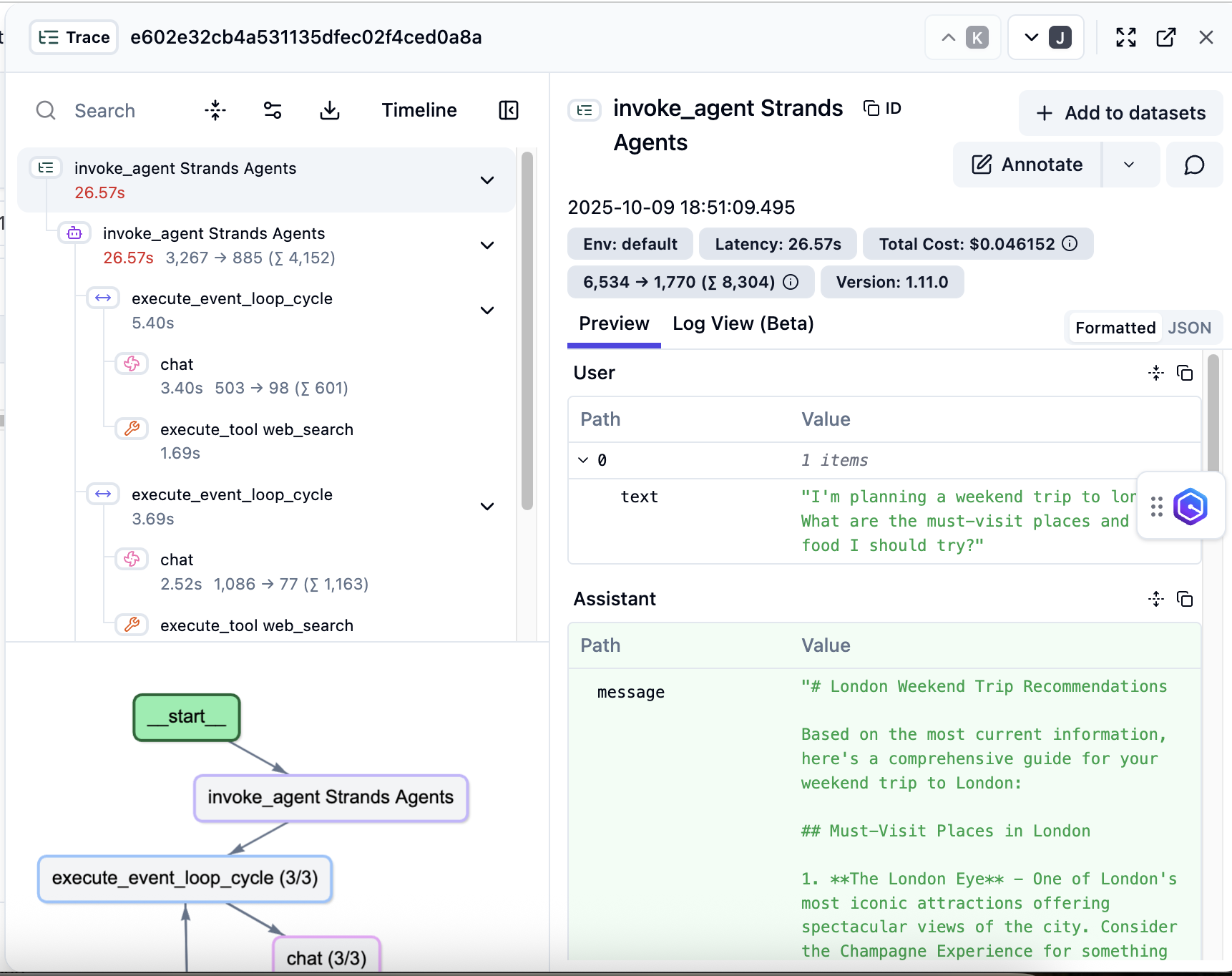
Figure 4: Detailed trace hierarchy
Langfuse dashboard
The Langfuse dashboard features three different dashboards for monitoring such as Cost, Latency and Usage Management.
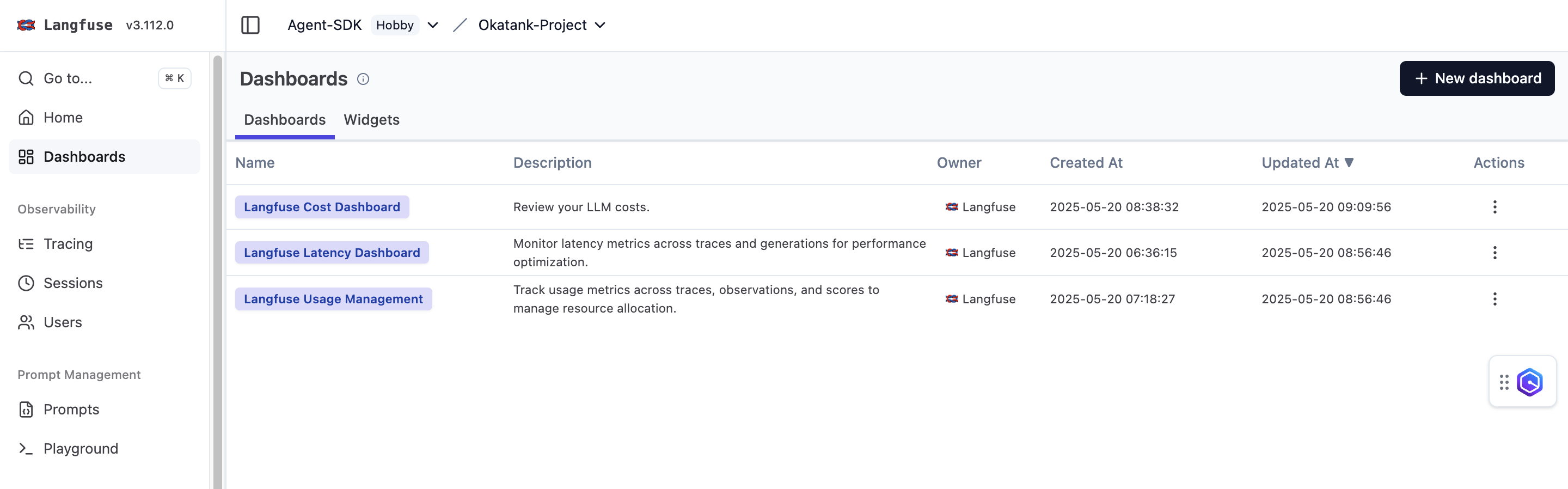
Figure 5: Langfuse dashboard
Cost monitoring
Cost monitoring helps track expenses at both the aggregate and individual request levels to maintain control over AI infrastructure expenses. The platform provides detailed cost breakdowns per model, user, and function call, enabling teams to identify cost-intensive operations and optimize their implementation. This granular cost visibility helps in making data-driven decisions about model selection, prompt engineering, and resource allocation while maintaining budget constraints. Dashboard cost data is provided for estimation purposes; actual charges should be verified through official billing statements.
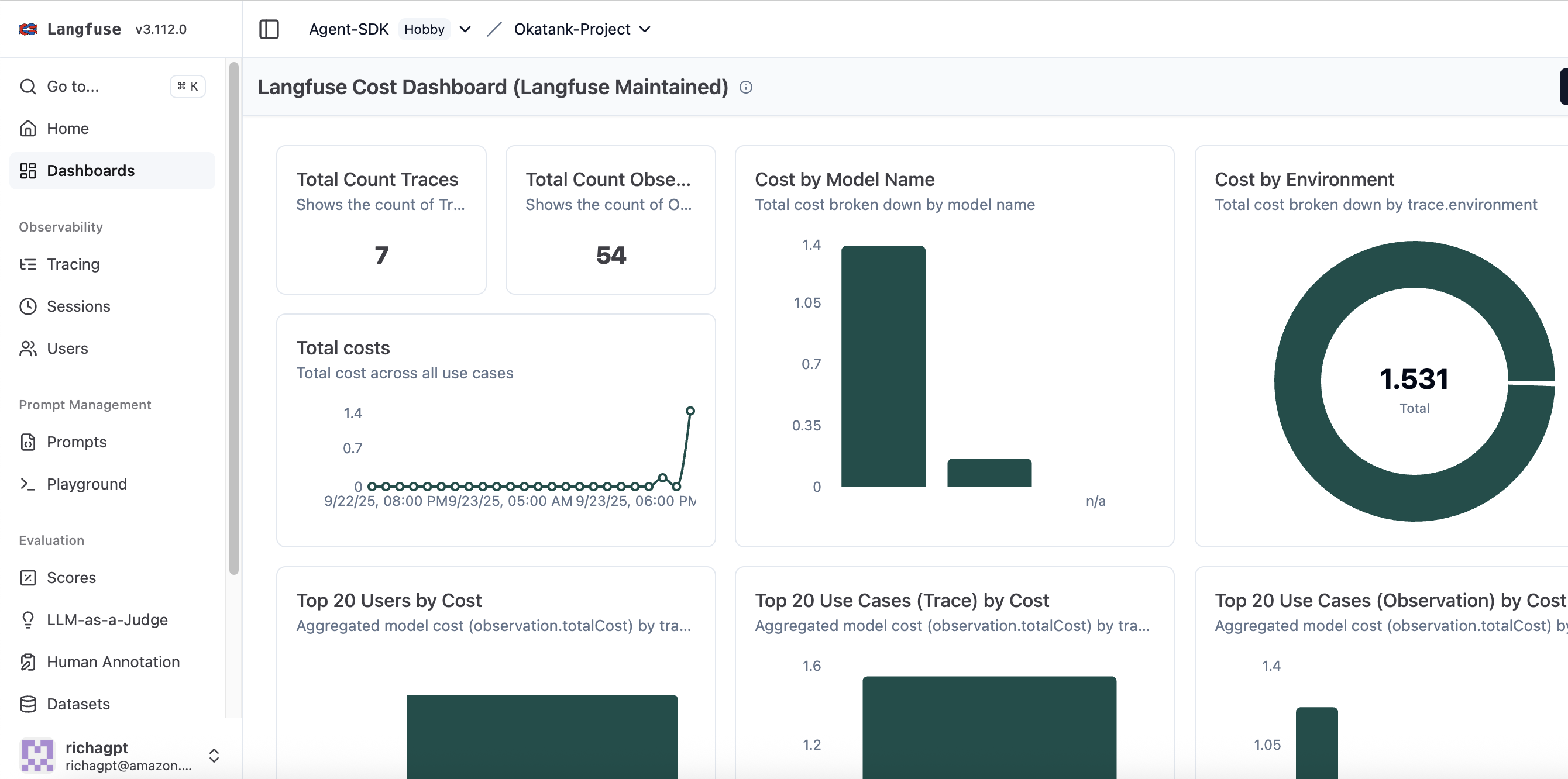
Figure 6: Cost dashboard
Langfuse latency dashboard
Latency metrics can be monitored across traces and generations for performance optimization. The dashboard shows the following metrics by default and you can create custom charts and dashboard depending on your needs:
- P 95 Latency by Level (Observations)
- P 95 Latency by Use Case
- Max Latency by User Id (Traces)
- Avg Time To First Token by Prompt Name (Observations)
- P 95 Time To First Token by Model
- P 95 Latency by Model
- Avg Output Tokens Per Second by Model
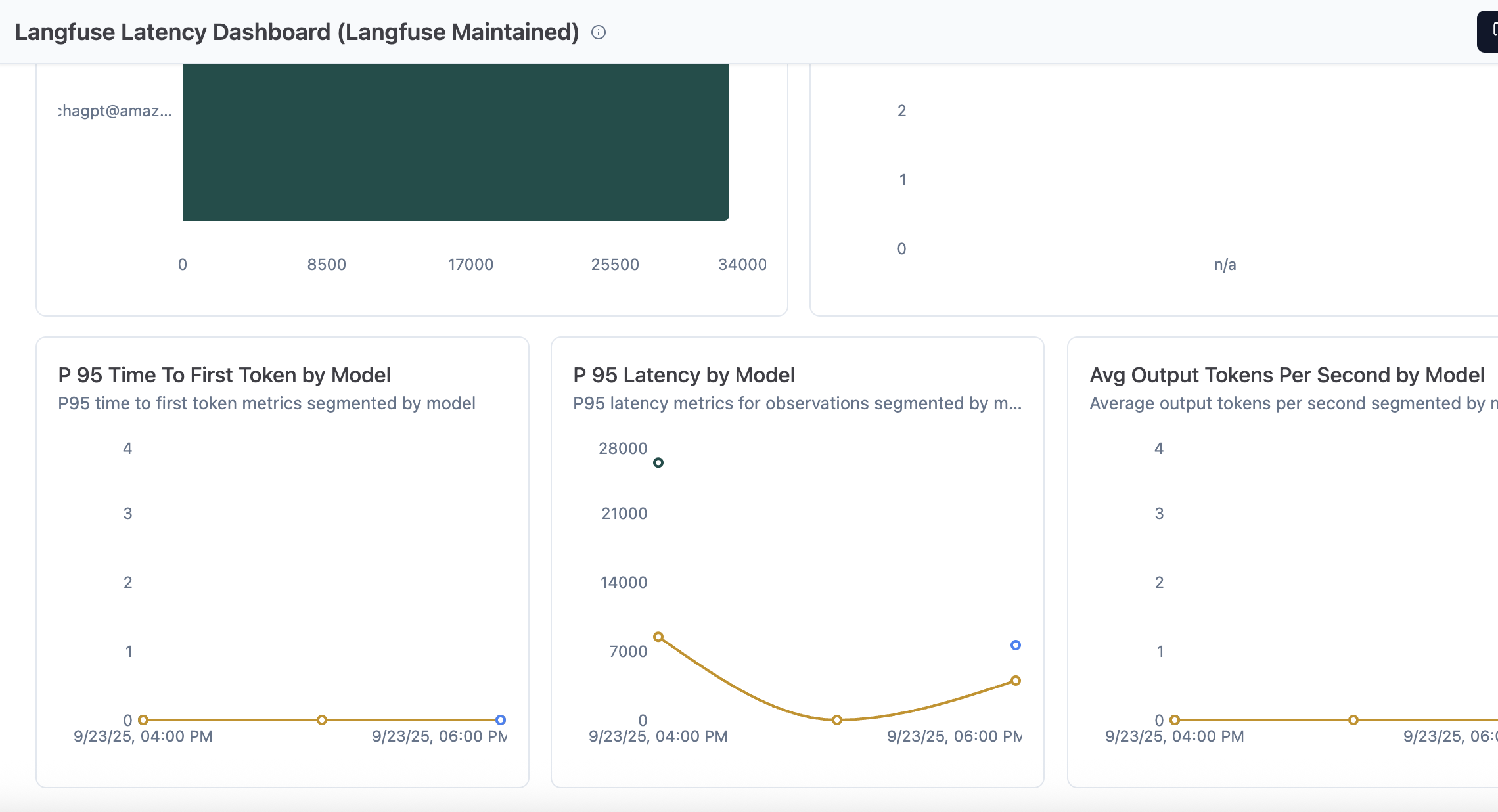
Figure 7: Latency dashboard
Langfuse usage management
This dashboard shows metrics across traces, observations, and scores to manage resource allocation.
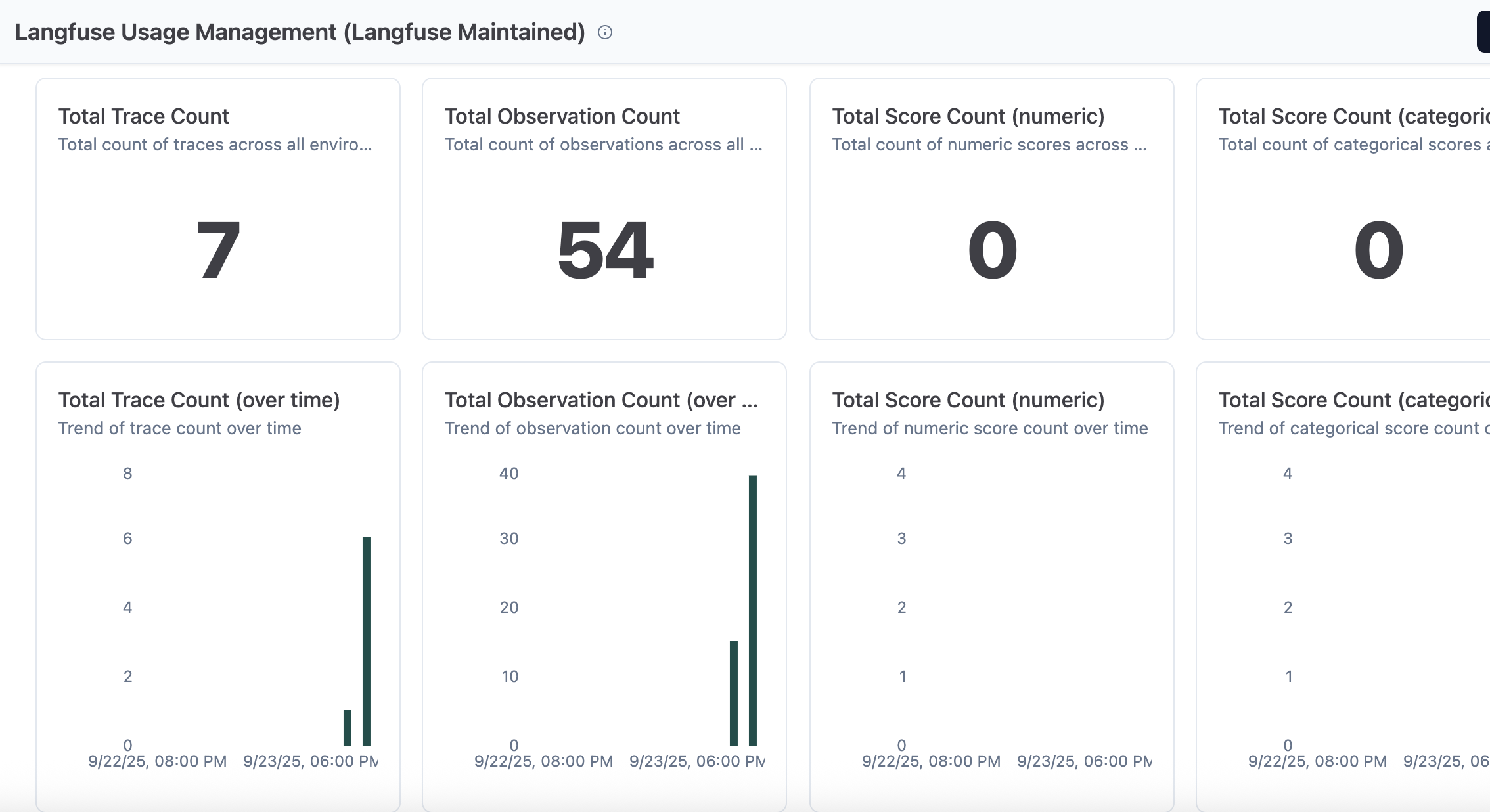
Figure 8: Usage management dashboard
Conclusion
This post demonstrated how to integrate Langfuse with AgentCore for comprehensive observability of AI agents. Users can now track performance, debug interactions, and optimize costs across workflows. We expect more Langfuse observability features and integration options in the future to help scale AI applications.
Start implementing Langfuse with AgentCore today to gain deeper insights into agents’ performance, track conversation flows, and optimize AI applications. For more information, visit the following resources:
- Amazon Bedrock AgentCore FAQs
- Amazon Bedrock AgentCore Integration
- Skip the Infrastructure Headaches: Deploy Production-Ready Multi-Agents Systems in Minutes with Bedrock AgentCore
About the authors
 Richa Gupta is a Senior Solutions Architect at Amazon Web Services, specializing in AI/ML, Generative AI, and Agentic AI. She is passionate about helping customers on their AI transformation journey, architecting end-to-end solutions from proof-of-concept to production deployment and drive business revenue. Beyond her professional pursuits, Richa loves to make latte arts and is an adventure enthusiast.
 Ishan Singh is a Sr. Generative AI Data Scientist at Amazon Web Services, where he partners with customers to architect innovative and responsible generative AI solutions. With deep expertise in AI and machine learning, Ishan leads the development of production Generative AI solutions at scale, with a focus on evaluations and observability. Outside of work, he enjoys playing volleyball, exploring local bike trails, and spending time with his wife, kid, and dog, Beau.
 Yanyan Zhang is a Senior Generative AI Data Scientist at Amazon Web Services, where she has been working on cutting-edge AI/ML technologies as a Generative AI Specialist, helping customers use generative AI to achieve their desired outcomes. Yanyan graduated from Texas A&M University with a PhD in Electrical Engineering. Outside of work, she loves traveling, working out, and exploring new things.
 Madhu Samhitha is a Specialist Solution Architect at Amazon Web Services, focused on helping customers implement generative AI solutions. She combines her knowledge of large language models with strategic innovation to deliver business value. She has a Master’s in Computer Science from the University of Massachusetts, Amherst and has worked in various industries. Beyond her technical role, Madhu is a trained classical dancer, an art enthusiast, and enjoys exploring national parks.
 Marc Klingen is the co-founder and CEO of Langfuse, the Open Source LLM Engineering Platform. After building LLM Agents in 2023 together with his co-founders, Marc and team realized that new tooling is necessary to bring agents into production and scale them reliably. With Langfuse they have built the leading Open Source LLM Engineering Platform (Observability, Evaluation, Prompt Management) with over 18,000 GitHub stars, 14.8M+ SDK installs per month, and 6M+ Docker pulls. Langfuse is used by top engineering teams such as Khan Academy, Samsara, Twilio, and Merck.