Artificial Intelligence
Building agentic workflows with SageMaker AI and Bedrock AgentCore
A common challenge in building agentic workflows is mixing managed foundation models (FMs) with your own cost-optimized or domain-specific models, without rewriting your agent framework to do it. In this post, we show you how to combine OpenAI-compatible endpoints on Amazon SageMaker AI with Amazon Bedrock AgentCore runtime, a capability of Amazon Bedrock AgentCore, and its managed deployment. Specialized agents can collaborate on complex tasks while each uses the model best suited to its job. This combination gives you cost optimization, data residency, and model flexibility in a single production-ready architecture.
We walk through deploying Qwen 3.5 9B on Amazon SageMaker AI, integrating it into a Strands Agents multi-agent system alongside models on Amazon Bedrock, and shipping the entire workflow to Amazon Bedrock AgentCore runtime. The focus is on the integration mechanics including how to get token-level observability from SageMaker endpoints, which Strands doesn’t provide by default.
Solution overview
The architecture connects three model-hosting paths through a single Amazon Bedrock AgentCore container:
- Orchestrator agent (Claude Haiku 4.5 on Bedrock) – Classifies user intent and routes tasks through Global cross-Region inference.
- Budget agent (Claude Sonnet 4.6 on Bedrock) – Handles 50/30/20 budget breakdowns with structured Pydantic output.
- Financial analysis agent (Qwen 3.5 9B on Amazon SageMaker AI) – Stock analysis and portfolio construction using tool-calling.
Amazon Bedrock model availability varies by AWS Region. See Supported models by AWS Region in Amazon Bedrock.
A user request enters the orchestrator agent running inside the Amazon Bedrock AgentCore runtime. The orchestrator uses the agents as tools pattern from Strands Agents to route the request to either the budget agent or the financial analysis agent. Both specialized agents call their respective models. The budget agent invokes Claude Sonnet 4.6 through Amazon Bedrock, and the financial analysis agent invokes Qwen 3.5 9B through a SageMaker AI real-time endpoint using the OpenAI-compatible API. Results flow back through the orchestrator to the user. For the complete source code, see the accompanying GitHub repository. The following diagram illustrates this architecture.
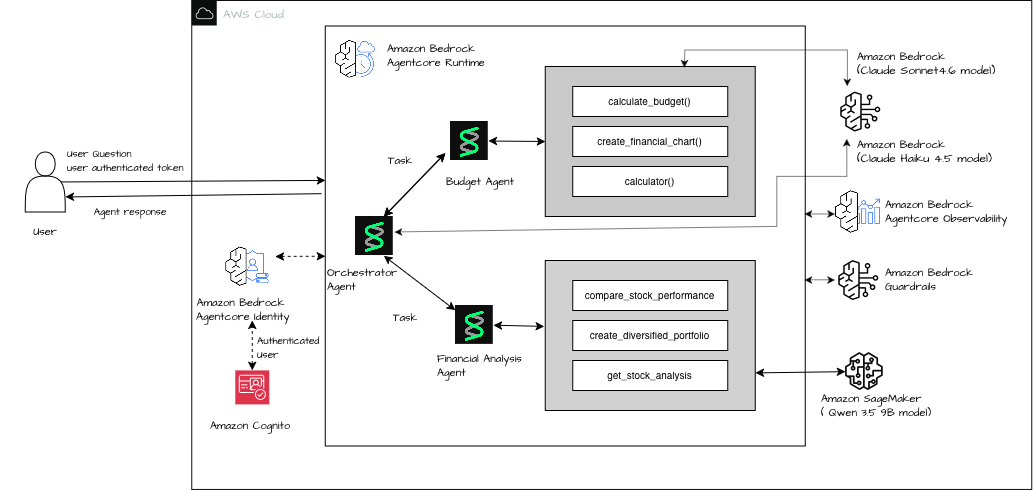
Figure 1: Architecture of the multi-agent workflow across Amazon Bedrock and Amazon SageMaker AI
Prerequisites
You must have the following prerequisites to follow along with this post.
- An AWS account with permissions for Amazon SageMaker AI, Amazon Bedrock, and AgentCore.
pip install sagemaker-core openai httpx strands-agents[otel] yfinance pydantic bedrock-agentcore.
- An AWS Identity and Access Management (IAM) role with
sagemaker:InvokeEndpointandsagemaker:CallWithBearerToken. - Bedrock model access for Claude Haiku 4.5 and Claude Sonnet 4.6.
- Python 3.12+.
Step 1: Deploy Qwen 3.5 9B on SageMaker AI
Deploy Qwen 3.5 9B using the vLLM Deep Learning Container (DLC), image vllm:0.22.1-gpu-py312-cu130, on ml.g6e.2xlarge.
Step 2: Build the multi-agent system
The OpenAI-compatible API of SageMaker AI expects a bearer token. Tokens expire, so for any long-running agent session you need a way to refresh them on every request. Set up auto-refreshing bearer tokens with an httpx.Auth subclass:
Build using Strands Agents’ agents as tools pattern with fresh agent instances per invocation.
Step 3: Deploy to Amazon Bedrock AgentCore runtime
Deploy using the bedrock-agentcore-starter-toolkit. See deploy_agentcore.ipynb for the full deployment notebook.
Configure observability for SageMaker endpoints
Amazon Bedrock AgentCore runtime instruments your agents with OpenTelemetry automatically, but that instrumentation doesn’t extend equally to every model provider. Before you can monitor cost and latency for the Qwen model on Amazon SageMaker AI, you must understand where the default instrumentation falls short and how to close that gap.
The challenge: Invisible token usage
Amazon Bedrock AgentCore runtime automatically instruments agents using OpenTelemetry. However, there is a critical gap:
- Amazon Bedrock model calls get full generative AI spans with token counts automatically. No extra work is needed.
- Amazon SageMaker OpenAI-compatible endpoints (through Strands
OpenAIModel) don’t get automatic token telemetry. The instrumentation doesn’t recognize them as generative AI calls.
This means tokens consumed by the financial analysis agent calling Qwen 3.5 9B on Amazon SageMaker are completely invisible in traces. You cannot monitor cost, detect regressions, or debug latency.
Root cause: Strands’ OTEL integration emits spans for tool calls and agent lifecycle events, but it doesn’t emit gen_ai.chat spans with token attributes for the OpenAIModel provider. The auto-instrumentation of AgentCore only recognizes Amazon Bedrock model inference calls (made through boto3) as generative AI operations.
The solution: Custom OpenTelemetry spans
Manually emit a gen_ai.chat span that wraps the Amazon SageMaker agent invocation and extracts token usage from Strands’ internal AgentResult.metrics.accumulated_usage:
Key detail: Strands tracks token usage internally with keys inputTokens, outputTokens, and totalTokens. This dict is populated only if the model provider returns usage data.
Why stream_options is mandatory for vLLM
By default, vLLM doesn’t include a usage chunk in streaming responses. Strands receives text chunks but never a final usage object. As a result, accumulated_usage stays at zero. Adding stream_options: {"include_usage": True} tells vLLM to send an extra final chunk with token counts:
Without this parameter, your gen_ai.chat spans report 0 tokens. This defeats the purpose of the custom span.
Step-by-step configuration
- Turn on Amazon CloudWatch Transaction Search (one-time per account or Region):
- Install Strands with OTEL extras:
strands-agents[otel]>=1.0.0. - Set
AGENT_OBSERVABILITY_ENABLED=truein your code or env vars. - Use
opentelemetry-instrumentas the container CMD. - Add
stream_options: {"include_usage": True}toOpenAIModelparams. - Create custom
gen_ai.chatspan wrapping the SageMaker agent call.
Example trace output
Agent trajectory on Bedrock AgentCore Observability dashboard
This trace view shows the gen_ai.chat span for the Amazon SageMaker AI hosted Qwen model alongside the automatically instrumented Amazon Bedrock AgentCore spans, with token counts now visible for both. Building this end-to-end observability surfaced several implementation details worth calling out.
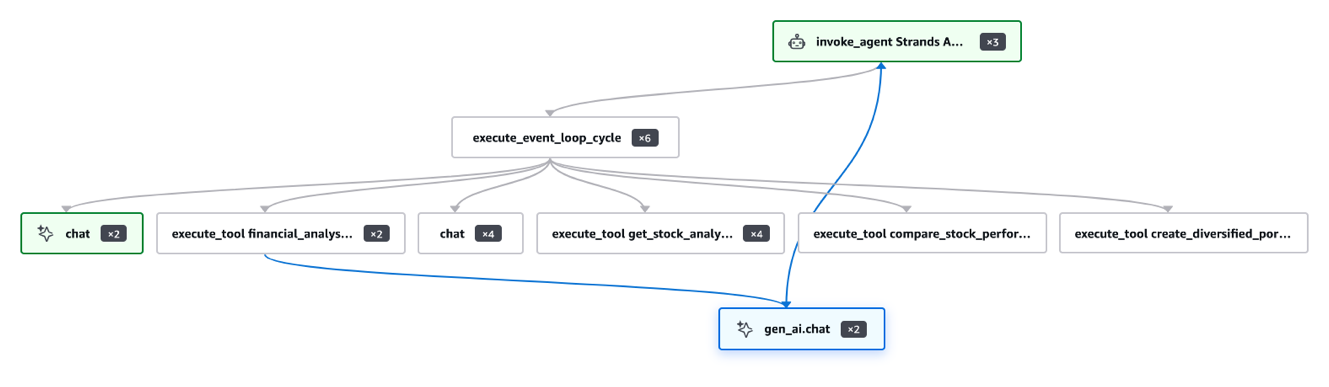
Figure 2: AgentCore observability trace with token counts for the SageMaker-hosted model
Key learnings
- Amazon Bedrock AgentCore auto-instruments Bedrock calls – No extra work for Claude or Amazon Nova.
- SageMaker OpenAI endpoints need manual spans – Strands doesn’t emit
gen_ai.chatspans forOpenAIModel. - Token usage requires stream_options – vLLM doesn’t send usage in streaming by default.
- Use result.metrics.accumulated_usage – Keys:
inputTokens,outputTokens,totalTokens. - AWS X-Ray sampling rate matters – Default 1 percent drops most traces. Use 100 percent during development.
- Fresh agent instances per request – Singletons cause concurrent invocation errors.
Extending the pattern
This architecture is composable. A few directions to explore:
- Swap in fine-tuned models: Point
SM_VLLM_MODELto your fine-tuned checkpoint on Amazon Simple Storage Service (Amazon S3). The auth layer, OTEL spans, and AgentCore deployment stay unchanged. - A/B test with inference components: Deploy base and fine-tuned variants on the same Amazon SageMaker endpoint. Add a variant attribute to your OTEL span to compare quality in traces.
- Cost-aware routing: Check query complexity before dispatch. Route simple lookups to Haiku on Amazon Bedrock. Reserve the Amazon SageMaker GPU endpoint for multi-step reasoning tasks.
Cleaning up
To avoid incurring future charges, delete the resources:
Conclusion
In this post, we showed how to connect a self-hosted model on Amazon SageMaker AI to Amazon Bedrock AgentCore runtime, and critically, how to get full token-level observability from Amazon SageMaker endpoints that Strands Agents doesn’t instrument by default.
httpx.Auth+generate_token()+AsyncOpenAI– Production-ready SageMaker authentication inside AgentCore.- Custom
gen_ai.chatOTEL span +stream_options: {"include_usage": True}– Full token visibility for Amazon SageMaker endpoints. result.metrics.accumulated_usage– The Strands API for extracting token counts.
To get started, clone the accompanying repository and see OBSERVABILITY.md for the complete reference.
Related resources
- OpenAI-compatible API for SageMaker AI
- Strands Agents — agents as tools
- Amazon Bedrock AgentCore Observability
- OpenTelemetry generative AI semantic conventions