Artificial Intelligence
Deploying quantized models on Amazon SageMaker AI with Unsloth
This post was co-written with Daniel Han and Michael Han from Unsloth.
Deploying large foundation models (FMs) stored at their original 16-bit floating-point precision (BF16 or FP16) is expensive. They need large GPU instances, driving up serving costs, and slowing down iteration cycles. Quantization addresses this by reducing the numerical precision of a model’s weights (for example from 16-bit to 4-bit), which shrinks the memory usage significantly. The drawback of quantization is that it can reduce the accuracy of a model, which is where dynamic quantization becomes compelling. When done correctly, dynamic quantization can reduce memory usage while maintaining accuracy. The savings in instance cost, storage, and startup time can compound quickly at scale.
In this post, you will learn four deployment patterns for taking models that have already been quantized with Unsloth and deploying them on AWS infrastructure. The patterns use Amazon Elastic Compute Cloud (Amazon EC2) for direct instance access, Amazon SageMaker AI inference endpoints for managed serving, and Amazon Elastic Kubernetes Service (Amazon EKS) or Amazon Elastic Container Service (Amazon ECS) when inference needs to fit into an existing container framework. You also learn operational practices for production deployments.
What is Unsloth Dynamic quantization?
As Daniel Han, co-founder of Unsloth, explains:
“The biggest problem of a powerful model is it’s very big and you need 1.5TB to run this model. By using some tricks you can make the model 217GB in size. You might think because it’s 86% smaller, accuracy will degrade by 86%, but that’s not the case, it only degrades by 14% accuracy. This methodology we call it dynamic quantization and we show many benchmarks where you can reduce the disk space of the model, by not quantizing all weights down to 4-bit etc. but some layers remain in higher 8-bits.”
In practical terms, quantization reduces the number of bits used to store each weight. A standard BF16 model uses 16 bits per parameter. Quantizing to 4-bit shrinks the size by 75 percent, though real-world file sizes are slightly larger because of quantization metadata. For an 8-billion parameter model, that takes the memory footprint from approximately 16 GB down to approximately 5 GB. That’s often the difference between needing a multi-GPU instance and fitting comfortably on a single GPU.
Unsloth is a tool for fine-tuning and quantizing foundation models. Unsloth Dynamic is a quantization methodology that goes beyond uniform compression. Rather than applying the same bit reduction to every layer, it works in three steps:
- Layer-by-layer analysis – Unsloth measures how sensitive each layer is to precision loss.
- Dynamic bit allocation – Important layers (those where precision loss causes meaningful output degradation) are kept at higher precision (for example, 16-bit), while less sensitive layers are quantized aggressively (4-bit or lower).
- Precision tuning – The quantization is tuned so that the combined output quality remains as close as possible to the original, while keeping disk space usage as small as possible.
The end goal of this process is to make the accuracy differences between the quantized model and the standard model as small as possible, while also compressing the model size by a meaningful amount. With the open source Unsloth package, you can fine-tune, run, export, and deploy models in one unified workflow.
When you deploy on AWS, quantization matters because it changes three things simultaneously. First, the instance decision: a large model that would otherwise require larger GPUs might become practical on a smaller one, or even on CPU. Second, the startup and storage profile: smaller model files move, store, and promote across environments faster. Third, the deployment flexibility: you can choose a smaller model file for cost-sensitive inference, a higher-fidelity export for quality-sensitive inference, or a merged representation for higher-throughput GPU serving. That flexibility is what makes Unsloth useful in an AWS environment. With it, you can adapt the model to the serving path instead of forcing every deployment into the same runtime and hardware assumptions.
Which model format to use
A key principle in the Unsloth deployment workflow is that the output artifact should drive the serving design. Infrastructure selection comes second. First, choose the artifact and runtime, then place that runtime on the AWS service that matches your operating model.
Unsloth supports multiple deployment-oriented output types:
- GGUF files – GGUF is a single-file format that packages model weights, tokenizer, and metadata together, making it self-contained and ready to load without additional files. Use these for lightweight runtimes such as llama.cpp, Ollama, and Unsloth. On AWS, this maps to Amazon EC2 or an Amazon SageMaker AI custom container.
- Merged safetensors weights – (16-bit, 8-bit, FP8 4-bit, NVFP4) can be created through Unsloth for higher-throughput engines such as vLLM and SGLang. On AWS, this maps to Amazon SageMaker AI Large Model Inference (LMI) containers, Amazon EKS, or Amazon ECS.
A practical deployment map
The following table maps each artifact type to its best-fit runtime and AWS target, so you can quickly identify which deployment pattern matches your requirements.
| Artifact | Best-fit runtime | Best-fit AWS target | Use when |
| GGUF | llama.cpp / llama-server or Unsloth | Amazon EC2 | Fastest path to hands-on testing with direct instance access |
| GGUF | llama.cpp in a custom container or Unsloth | Amazon SageMaker AI | Managed endpoints with autoscaling, lightweight runtime |
| Merged 16-bit or 4-bit weights | vLLM / SGLang / LMI backends | Amazon SageMaker AI | High throughput, batching, autoscaling, production GPU serving |
| Any containerized stack | Your preferred runtime | Amazon EKS or Amazon ECS | Inference must integrate into an existing container framework |
Each deployment pattern in this post follows the same general workflow:
- Fine-tune or download a model in Unsloth.
- Export the model file that matches the runtime you want.
- Validate the runtime locally or on Amazon EC2.
- Promote the same model file and runtime combination to a managed or environment-native deployment.
That sequencing helps avoid unexpected behavior later, especially around memory use, prompt formatting, and latency behavior.
Pattern 1: GGUF on Amazon EC2 with llama.cpp and Unsloth
Use this pattern to validate quantization levels quickly with direct instance access. For many use cases, Amazon EC2 is a strong starting point because you get maximum control with minimum abstraction. Benchmark several quantization levels, test prompt formatting, compare CPU versus GPU behavior, and understand the actual memory footprint before you commit to a managed endpoint design.
A typical Unsloth export looks like this:
This produces a GGUF file ready for local llama.cpp-based inference. The companion repository uses q4_k_xl for its quantized endpoint. Different quantization methods control the trade-off between file size and output fidelity: use q8_0 for higher output fidelity at roughly double the file size, or f16 for a full-precision GGUF with no quantization loss. See the Unsloth GGUF documentation for the complete list of quantization methods and their characteristics.
After you have the GGUF, a minimal llama-server launch requires the following configurations:
At that point, your application can talk to the model through an OpenAI-compatible interface:
⚠️ Important: This configuration is suitable for isolated testing. For production, restrict the security group to known Classless Inter-Domain Routing (CIDR) blocks, bind to a private interface (for example, 127.0.0.1), and place the endpoint behind an authenticated API gateway or load balancer.
This path is attractive for three reasons. It is transparent to debug, it stays close to upstream runtime behavior, and it gives you a clean place to test quantization choices before you add container contracts, autoscaling policies, or endpoint governance.
Amazon EC2 is also the most direct place to evaluate practical deployment questions:
- Quantization quality – Compare outputs across quantization levels (for example, q4_k_m versus q8_0) against your specific evaluation criteria. Quality impact varies by model architecture and task.
- Hardware requirements – If the model’s memory footprint exceeds available CPU RAM, you need a GPU-backed instance. Check peak memory usage during inference, not only model load. For best performance, have sufficient RAM or VRAM to load the entire model into memory. For example, if the model is 128 GB disk, aim for more than 128 GB of available RAM or VRAM.
- Context length trade-offs – Longer context windows increase both latency and memory consumption. Test with representative prompt lengths to find the right balance for your workload.
- Chat template validation – Verify that the structured prompt format (which maps roles such as “system” and “user” to the token sequences the model expects) produces consistent behavior outside the training environment.
For evaluation, internal tools, proof-of-concept work, and early production pilots, Amazon EC2 is often the right starting point.
Pattern 2: GGUF on Amazon SageMaker AI with a custom container
Amazon EC2 is recommended for fast iteration, but it doesn’t give you a managed inference service out of the box. When you want a production endpoint with autoscaling, monitoring, AWS Identity and Access Management (IAM) integration, and a stable API surface, Amazon SageMaker AI inference endpoints become the better fit.
For GGUF deployments, the most practical design is usually a custom inference container that packages the GGUF model file together with llama.cpp or another lightweight runtime. The container then exposes the Amazon SageMaker AI hosting interface, which requires that the container listen on port 8080, implement /ping for health checks, and /invocations for inference requests.
The companion GitHub repository includes a complete working example of this pattern. It deploys a side-by-side comparison of Unsloth’s dynamically quantized Qwen3-VL-8B-Instruct (Q4_K_XL GGUF served with llama.cpp on ml.g5.xlarge, approximately $1.41/hr) against the full-precision BF16 variant (served with vLLM on ml.g5.12xlarge, approximately $7.09/hr). Pricing as of June 2026; see the Amazon SageMaker AI pricing page for current rates. The entrypoint script starts llama-server on an internal port and uses nginx as a reverse proxy to satisfy the Amazon SageMaker AI interface:
Nginx then maps /ping to the llama-server health check and /invocations to the chat completions endpoint, giving Amazon SageMaker AI a standard interface while keeping the runtime lightweight:
# SageMaker health check endpoint
location /ping {
    proxy_pass http://llama_backend/health;
}

# SageMaker inference endpoint -> llama.cpp chat completions
location /invocations {
    proxy_pass http://llama_backend/v1/chat/completions;
    proxy_read_timeout 120s;
}
A common architecture might look like this:
- Store the finalized GGUF model file in Amazon Simple Storage Service (Amazon S3).
- Start the Amazon SageMaker AI container and place the model under /opt/ml/model.
- Launch llama.cpp or Unsloth against the local model file.
- Expose a thin API layer that translates Amazon SageMaker AI requests into local inference calls.
The following architecture diagram from the companion GitHub repository shows how the sample deploys both a quantized GGUF endpoint (this pattern) and a full-precision vLLM endpoint (Pattern 3). The flow works as follows:
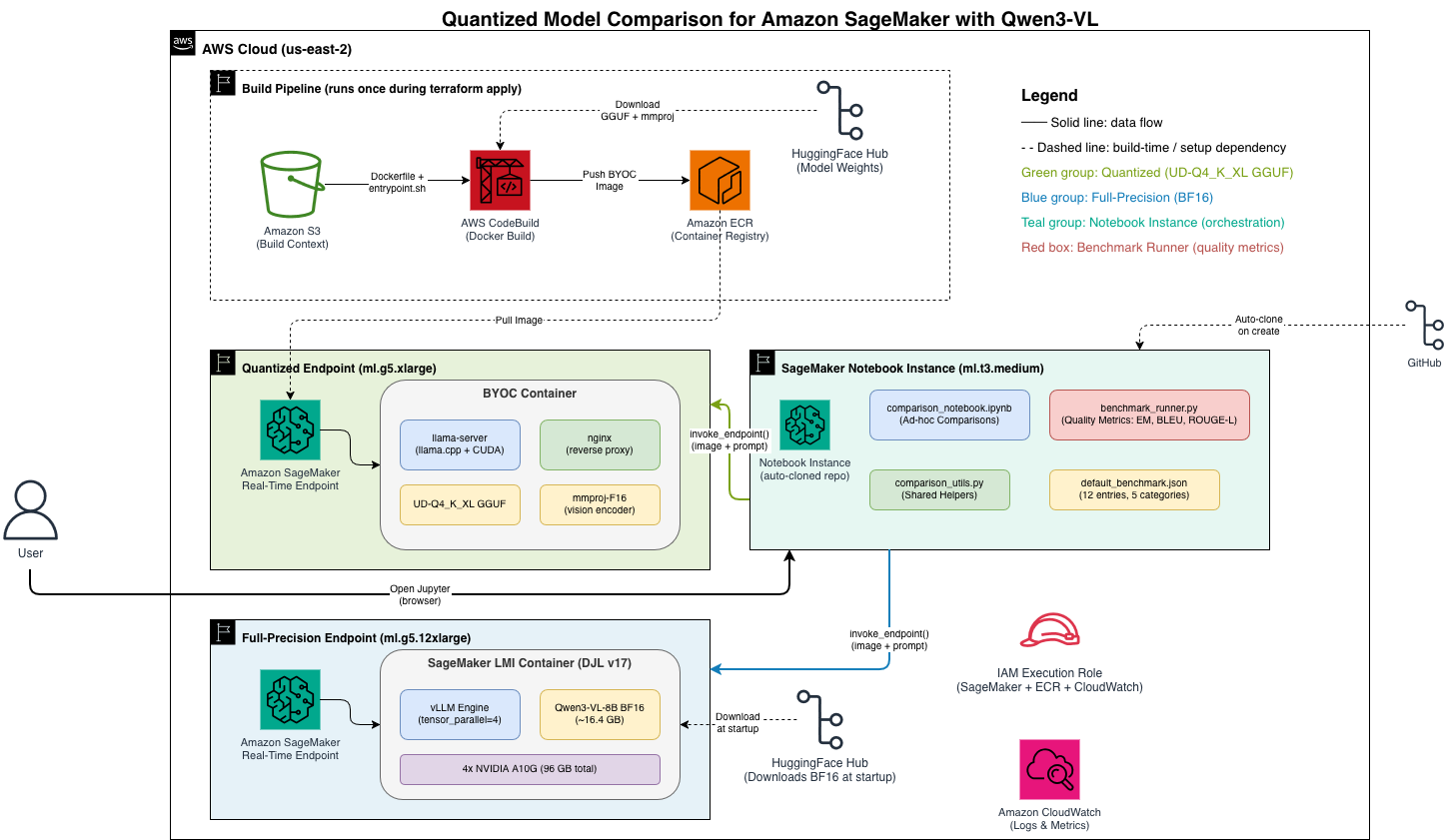
Figure: Architecture diagram of the companion sample deployment.
- Terraform provisions all infrastructure including Amazon Elastic Container Registry (Amazon ECR), AWS CodeBuild, and Amazon S3 resources.
- AWS CodeBuild builds the custom container image and pushes it to Amazon ECR.
- Amazon SageMaker AI creates two real-time endpoints within a virtual private cloud (VPC): one for the quantized GGUF model (Pattern 2) and one for the full-precision model (Pattern 3).
- Both endpoints pull their respective model files from Amazon S3 at startup.
- An Amazon SageMaker Notebook Instance provides access to the comparison notebook for running evaluations against both endpoints.
This pattern works well because it keeps the runtime lightweight while letting Amazon SageMaker AI handle the operational concerns that matter in production, such as endpoint lifecycle and autoscaling. For smaller models, this path is especially compelling on CPU-backed endpoints. For larger quantized models or lower-latency requirements, you can move the same design to GPU-backed endpoints.
A trade-off is that llama.cpp is the inference/deployment engine, but not the whole serving system. In Amazon SageMaker AI, you still need a container that behaves like an Amazon SageMaker AI endpoint. That wrapper layer does not require significant implementation effort, but it’s an important part of the production design.
Pattern 3: Merged weights on Amazon SageMaker AI with GPU-optimized serving engines
GGUF is excellent when model file size and lightweight serving are the priorities. It’s not always the right choice when you prioritize throughput and GPU efficiency. Merged weights become more attractive in those scenarios.
Merged weights refer to a model saved as a single unified set of safetensors weights. This is often the result of combining a fine-tuned adapter (such as a Low-Rank Adaptation (LoRA), adapter) with the base model, but it also applies to base models saved directly in a deployment-ready format. Unsloth supports save paths for merged 16-bit and merged 4-bit outputs, along with LoRA-only exports. Those are more aligned with runtimes such as vLLM and SGLang that are built around production GPU serving patterns such as batching, high token throughput, and multi-GPU scaling.
A representative export looks like this:
The serving path is:
On AWS, the LMI containers available for Amazon SageMaker AI are especially relevant here. For the full-precision endpoint in the companion sample, the LMI container for Amazon SageMaker AI is configured entirely through environment variables on the Terraform model resource:
No custom container is needed. The LMI container downloads the model from Hugging Face at startup and serves it through vLLM with tensor parallelism across 4 A10G GPUs. Tensor parallelism splits a model across multiple GPUs so each GPU handles a portion of the computation in parallel. If the workload demands continuous batching, higher concurrency, or larger model footprints, a vLLM-style path is often a better production choice than a lightweight GGUF runtime. The deployment priorities shift from fit the model cheaply to serve the model efficiently at scale, and this pattern addresses that shift directly.
A useful rule of thumb: use GGUF and llama.cpp when you want the lightest deployment path and the runtime fits the workload. Use merged weights (the combined base model and adapter output) with vLLM, SGLang, or an LMI backend when throughput, batching, concurrency, or hardware topology become the dominant constraints.
Pattern 4: Use Amazon EKS or Amazon ECS when inference must fit the environment you already run
If you want inference to look like every other service you operate, running within the same orchestration, networking, and observability stack, this pattern fits. If you already standardize on Kubernetes or Amazon ECS, package the Unsloth runtime into that environment instead of introducing a separate serving surface only for models.
This pattern is particularly useful when:
- Inference needs to live next to other application services.
- You already have strong tooling around Amazon EKS or Amazon ECS.
- You have already standardized deployment, networking, observability, and security at the infrastructure layer.
In those environments, the practical question becomes less “Should I use Amazon SageMaker AI?” and more “Which Unsloth export best fits the runtime I want to containerize?”
For teams that need managed cluster infrastructure for large-scale model training and inference, Amazon SageMaker HyperPod is also worth evaluating, though this post focuses on inference-only deployment patterns.
Operational practices that matter most
No matter which AWS path you choose, a few practices have an outsized effect on whether the deployment works well in production. For detailed guidance on each topic, see the Amazon SageMaker AI hosting documentation.
Keep prompt formatting consistent end to end
Inconsistent prompt formatting is one of the most common ways to misdiagnose a good model as a bad deployment. When an exported model behaves worse outside Unsloth, the problem is often not the quantization method. It’s usually a mismatch in the chat template, end-of-sequence (EOS) handling (the logic that tells the model when to stop generating tokens), or prompt structure between training and inference. If the model is coherent in one environment and unstable in another, check prompt formatting before investigating the model file. See the Unsloth chat templates documentation for details on export-time template configuration.
Benchmark the full deployment shape, not only the quantization level
A quantization benchmark on its own isn’t enough. Real behavior depends on context length, concurrency, request mix, streaming behavior, startup path, and the runtime itself. A smaller model file might not produce the best production outcome if the application requires longer contexts or burstier traffic. Likewise, a more accurate model file might not be worth the extra memory cost if the workload is latency-sensitive and cost-constrained. Evaluate the full deployment picture: file size, runtime behavior, hardware fit, and request pattern. Amazon SageMaker AI also provides inference recommendations that can help you identify optimal instance types and configurations.
Use stable artifact delivery
After you finalize the model, promote it through a predictable storage path. On AWS, that usually means storing the chosen model file in Amazon S3 and loading it from there rather than depending on runtime downloads from external sources during startup. That makes endpoint initialization more predictable and simplifies governance, especially in restricted network environments.
Monitor the service, not only the model
Production performance is not only about token quality. It’s also about startup time, tail latency, concurrency, scaling behavior, and model-loading characteristics. Managed endpoints make this more visible because you can watch invocation metrics, concurrency behavior, and scaling signals directly through Amazon CloudWatch. On self-managed Amazon EC2 deployments, expose and track the equivalent signals.
Validate the container contract early
If you’re deploying on Amazon SageMaker AI with a custom container, validate the container locally before you deploy it. Make sure /ping and /invocations behave correctly, the model loads from the expected path, and the runtime survives realistic prompt sizes. That step catches many integration issues before they turn into endpoint debugging sessions. See the Amazon SageMaker custom container guide for the full interface specification.
Design for security and networking from the start
Model serving often becomes part of a larger application environment, which means networking, IAM role scoping, internet access, AWS Key Management Service (AWS KMS) encryption, and VPC placement matter as much as runtime performance. Make these decisions up front rather than retrofitting them after the endpoint is already in use. Enable AWS CloudTrail for API-level audit logging across deployed resources. See the Amazon SageMaker infrastructure security documentation for VPC configuration and encryption guidance.
Conclusion
The best way to deploy Unsloth-quantized models on AWS is to begin with the model file you actually want to serve. GGUF gives you a lightweight path into llama.cpp and llama-server, which makes Amazon EC2 the most direct place to validate a model and Amazon SageMaker AI a practical next step when you need managed endpoints. Merged weights give you a more natural path into vLLM, SGLang, and LMI containers when throughput and scale matter more than a minimal runtime.
Although this post uses Qwen3-VL-8B-Instruct as the example, Unsloth supports a wide range of open-source model architectures including Llama, Qwen, Mistral, Gemma, and others. The deployment patterns apply regardless of which model you choose.
That is the real advantage of combining Unsloth with AWS. You can adjust for cost, throughput, or environment fit without changing the core model workflow. Start with the model file, align it to the runtime, and then choose the AWS service that matches how you want to operate inference in production.
Next steps
To see these patterns in action, clone the companion GitHub repository and run terraform apply to deploy both a quantized GGUF endpoint and a full-precision vLLM endpoint on Amazon SageMaker AI. Terraform provisions the infrastructure and an Amazon SageMaker Notebook Instance with the repository pre-cloned, so you can start running the comparison notebook immediately.
The notebook sends identical image prompts to both endpoints, demonstrating multimodal vision-language inference with Qwen3-VL, and produces side-by-side comparisons of output quality, latency, throughput, and cost. It also includes a benchmarking framework that evaluates both models against a structured dataset using objective quality metrics (exact match, BLEU, ROUGE-L). With this framework, you can quantify degradation from quantization rather than relying on subjective judgment. For automated instance selection and configuration tuning beyond what the notebook measures, Amazon SageMaker AI also provides inference recommendations that can identify optimal deployment configurations for your workload. To avoid ongoing charges when you are done, run terraform destroy to remove the provisioned resources.
To learn more:
- Unsloth Dynamic 2.0 GGUF documentation – quantization methods and export options.
- Companion GitHub repository – Terraform templates, custom container code, and the comparison notebook.