Artificial Intelligence
End-to-end lineage with DVC and Amazon SageMaker AI MLflow apps
Production machine learning (ML) teams struggle to trace the full lineage of a model through the data and the code that trained it, the exact dataset version it consumed, and the experiment metrics that justified its deployment. Without this traceability, questions like “which data trained the model currently in production?” or “can we reproduce the model we deployed six months ago?” become multi-day investigations through scattered logs, notebooks, and Amazon Simple Storage Service (Amazon S3) buckets. This gap is especially acute in regulated industries. For example, healthcare, financial services, autonomous vehicles, where audit requirements demand that you link deployed models to their precise training data, and where individual records might need to be excluded from future training on request.
In this post, we show how to combine three tools to close this gap:
- DVC (Data Version Control) for versioning datasets and linking them to Git commits
- Amazon SageMaker AI for scalable processing, training, and deployment
- Amazon SageMaker AI MLflow Apps for experiment tracking, model registry, and lineage
We walk through two deployable patterns, dataset-level lineage and record-level lineage, that you can run end-to-end in your own AWS account using the companion notebooks.
Solution overview
The architecture integrates DVC, SageMaker AI, and SageMaker AI MLflow App into a single workflow where every model is traceable back to its exact training data.
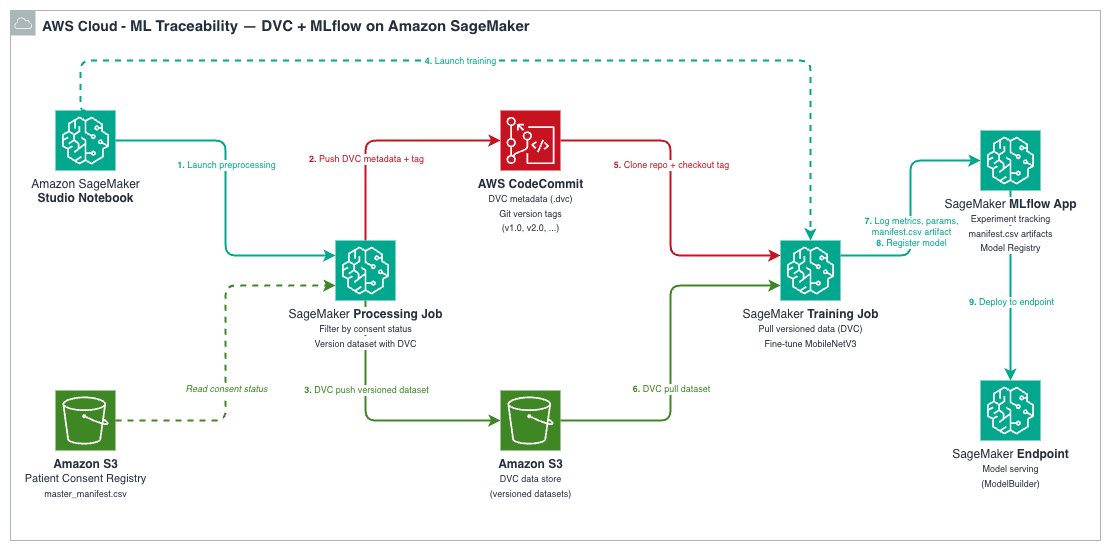
Each tool plays a distinct role:
| Tool | Role | What it stores |
| DVC | Data and artifact versioning | Lightweight .dvc metafiles in Git; actual data in Amazon S3 |
| Amazon SageMaker AI | Scalable compute for processing, training, and hosting | Processing/Training job orchestration and model Hosting |
| Amazon SageMaker AI MLflow App | Experiment tracking, model registry, lineage | Parameters, metrics, artifacts, registered models |
The data flows through four stages:
- A SageMaker AI Processing job preprocesses raw data and versions the processed dataset with DVC, pushing the data to S3 and metadata to a Git repository.
- A SageMaker AI Training job clones the DVC repository at a specific Git tag, runs
dvc pullto retrieve the exact versioned dataset, trains the model, and logs everything to MLflow. - Every MLflow training run records the
data_git_commit_id, which is the DVC commit hash that points to the exact dataset in Amazon S3. - The trained model is registered in the MLflow Model Registry and can be deployed to a SageMaker AI endpoint.
This creates a complete traceability chain: Production Model → MLflow Run → DVC commit → exact dataset in Amazon S3.
Prerequisites
You must have the following prerequisites to follow along with this post:
- An AWS account with permissions for Amazon SageMaker (Processing, Training, MLflow Apps, Endpoints), Amazon S3, AWS CodeCommit, and AWS Identity Access Management (IAM).
- Python 3.11 or Python 3.12.
- The SageMaker Python SDK v3.4.0 or later.
The companion repository includes a requirements.txt with all dependencies. If running outside SageMaker Studio, your IAM role must have a trust relationship allowing sagemaker.amazonaws.com to assume it.
Note on Git providers: The notebooks use AWS CodeCommit as the Git backend for DVC metadata. However, DVC works with other Git providers (GitHub, GitLab, Bitbucket). All you need to do is replace the
git remote add originURL and configure appropriate credentials. For example, by storing tokens in AWS Secrets Manager and fetching them at runtime or by using AWS CodeConnections. The key requirement is that your SageMaker AI execution role can access the Git repository or has permissions to use AWS CodeConnections.
How DVC and SageMaker AI MLflow work together
The key insight behind this architecture is that DVC and MLflow each solve half of the lineage problem, and together they close the loop.
DVC (Data Version Control) is a no cost, open source tool that extends Git to handle large datasets and ML artifacts. Git alone can’t manage large binary files because repositories become bloated and slow, and systems like GitHub block files over 100 MB. DVC addresses this through codification: it tracks lightweight .dvc metafiles in Git (content-addressable pointers) while the actual data lives in remote storage such as Amazon S3. This gives you Git-like versioning semantics (branching, tagging, diffing) for datasets that can be gigabytes or terabytes in size, without bloating your repository.
Storage efficiency:
DVC uses content-addressable storage (MD5 hashes), so it stores only new or modified files rather than duplicating entire datasets. Files with identical contents are stored only once in the DVC cache, even if they appear under different names or across different dataset versions. For example, adding 1,000 new images to an existing dataset only uploads those new files to S3. The unchanged files aren’t re-uploaded. However, if a preprocessing step modifies existing files, the affected files get new hashes and are stored as new objects.
Beyond data versioning, DVC also supports reproducible data pipelines, experiment management, and can serve as a data registry for sharing datasets across teams. In this architecture, we use DVC specifically for its data versioning capability. Every time you version a dataset with dvc add and commit the resulting .dvc file, you create a Git commit that maps to a specific dataset state. Tagging that commit gives you a stable reference you can return to with git checkout <tag> && dvc pull. For a deeper dive into DVC’s versioning capabilities, see the Versioning Data and Models guide.
SageMaker AI MLflow App is a fully managed AWS service offered within SageMaker AI Studio, for managing the end-to-end ML and generative AI lifecycle. Its core capabilities include experiment tracking (logging parameters, metrics, and artifacts for every training run), a model registry with versioning and lifecycle stage management, model evaluation, and deployment integrations. In this post’s architecture, we use MLflow for full experiment tracking including DVC results and the model registry. By logging the DVC commit hash as a parameter (data_git_commit_id) on every training run, we create the bridge: models in the MLflow registry can be traced back to the exact Git tag, which maps to the exact dataset in S3.
While DVC can handle both data versioning and experiment tracking on its own, MLflow brings a more mature model registry with model versioning, aliases for lifecycle management, and deployment integrations. By using DVC for data versioning and MLflow for model lifecycle management, we get a clean separation of concerns: DVC owns the data-to-training lineage, MLflow owns the training-to-deployment lineage, and the Git commit hash ties them together.
Pattern one: Dataset-level lineage (foundational)
Before building the integration, it’s essential to understand how DVC’s dataset versioning and MLflow’s run tracking complement each other in forming a full lineage. The foundational notebook demonstrates the core pattern by simulating a common scenario: starting with limited labeled data and expanding over time.
The workflow
The notebook runs two experiments using the CIFAR-10 image classification dataset:
- v1.0: Process and train with 5% of the data (~2,250 training images)
- v2.0: Process and train with 10% of the data (~4,500 training images)
For each version, the same two-step pipeline executes:
Step 1 — Processing job: A SageMaker Processing job downloads CIFAR-10, samples the configured fraction, splits into train/validation/test sets, saves images in ImageFolder format, and versions the result with DVC. The processed dataset is pushed to S3 via dvc push, and the Git metadata (including a unique tag like v1.0-02-24-26_1430) is pushed to CodeCommit.
The processing job receives the DVC repository URL and MLflow tracking URI as environment variables:
Inside the processing script, after preprocessing, the dataset is versioned with DVC and the commit hash is logged to MLflow:
Step 2 — Training job: A SageMaker AI Training job clones the DVC repository at the exact tag from Step 1, runs dvc pull to download the versioned dataset, and fine-tunes a pretrained MobileNetV3-Small model. The training script logs the parameters (including the DVC commit hash), per-epoch metrics, and the trained model to MLflow. The model is automatically registered in the MLflow Model Registry.
The critical lineage bridge (logging the DVC commit hash to MLflow), happens in the training script:
What you see in MLflow
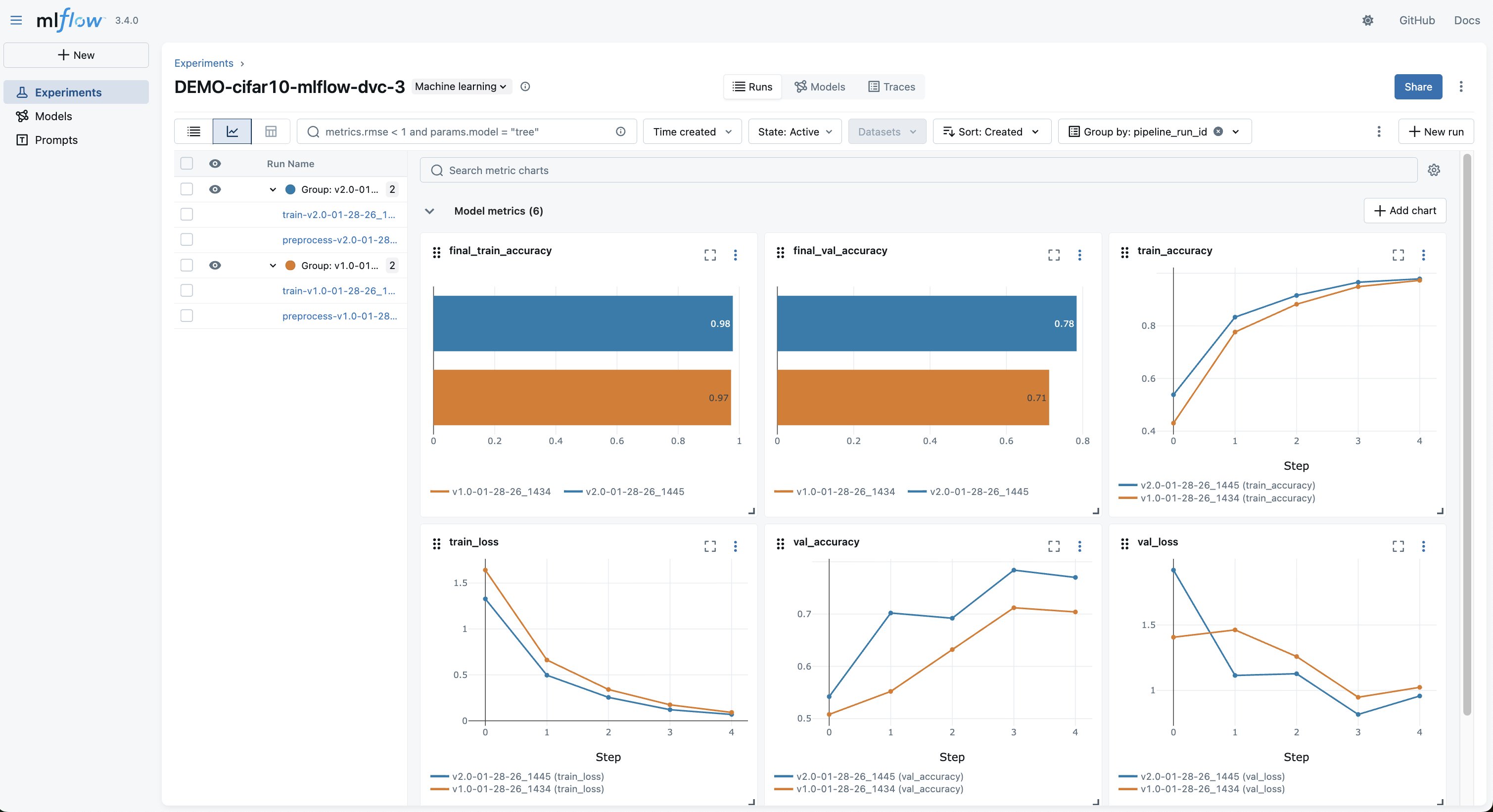
After both experiments complete, the MLflow UI shows both runs side-by-side, as shown in the following screenshot. In the MLflow experiment, you can compare:
- Training and validation accuracy curves across data versions
- The exact hyperparameters and data version for each run
- The
data_git_commit_idthat links each model to its DVC dataset
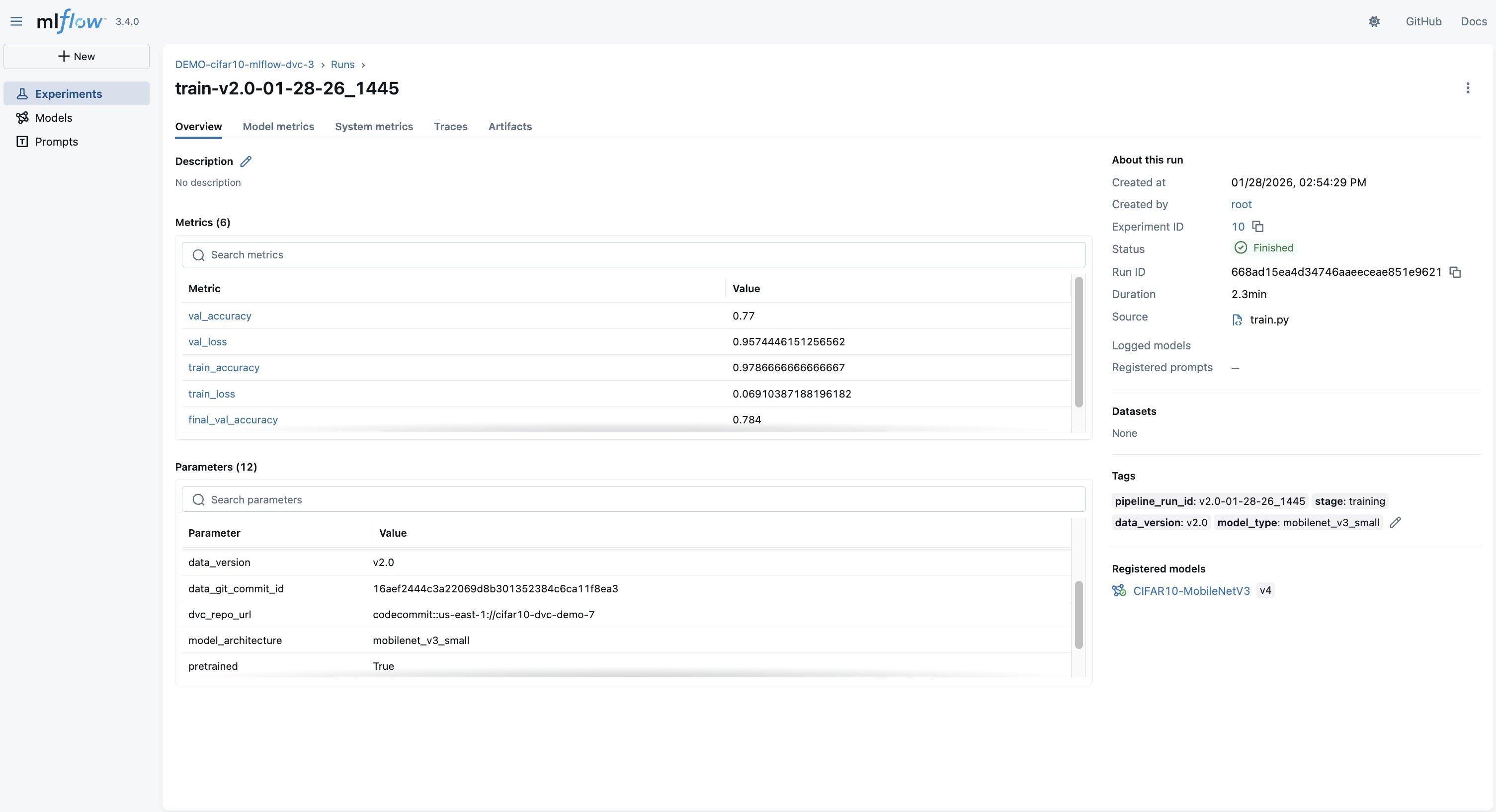
Selecting into a run shows the full detail, loss curves, parameters, and the DVC commit linking to the exact dataset in S3, as shown in the following screenshot.
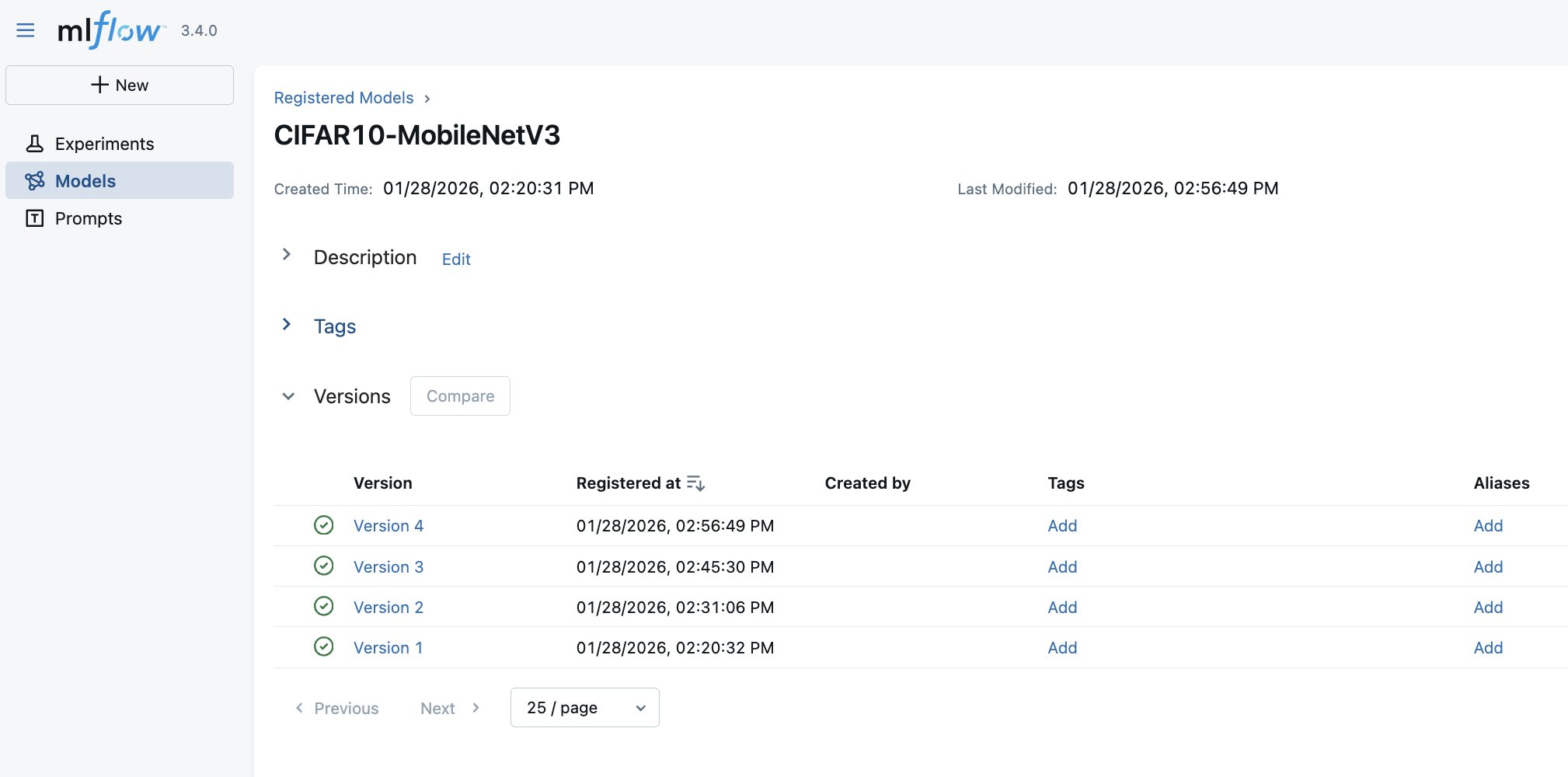
Finally, trained artificial intelligence and machine learning (AI/ML) Models are automatically registered in the MLflow Model Registry with version history and links to the training run that produced them, as shown in the following screenshot. Furthermore, with SageMaker AI MLflow App integrated with SageMaker AI Model Registry, the MLflow automatically logs the registered model into SageMaker AI Model Registry.
Deploying the model
The notebook deploys the recommended model (v2.0, trained on more data) from the MLflow Model Registry to a SageMaker AI real-time endpoint using ModelBuilder. After deployed, you can invoke the endpoint with raw image bytes and get back class predictions. The full deployment and inference code is in the notebook.
What this pattern answers
With dataset-level lineage, you can answer:
- “Which dataset version trained this model?” — Look up the
data_git_commit_idin the MLflow run - “Can I reproduce this model’s training data?” — Run
git checkout <tag> && dvc pullto restore the exact dataset - “Why did model performance change?” — Compare runs in MLflow and trace each to its data version
What it doesn’t answer without extra work: “Was record X in this model’s training data?” You’d need to pull the full dataset and search through it. That’s where Pattern two comes in.
Pattern two: Record-level lineage (healthcare compliance)
Pattern 2 builds directly on the dataset-level approach, adding record/patient-level traceability through manifests and consent registries. The example healthcare compliance notebook extends the foundational pattern for regulated environments where you need to trace individual records, not only datasets, through the ML lifecycle.
The key addition: a manifest
The difference is a manifest. A manifest is a structured CSV listing every individual record in each dataset version:
This manifest is saved inside the DVC-versioned dataset directory and logged as an MLflow artifact on every training run. This makes individual records queryable directly from MLflow without pulling the full dataset from DVC.
The consent registry
The workflow is driven by a consent registry, which is a CSV file listing each patient and their consent status. In production, this would be a database with transactional commitments, its own audit trail, and potentially event-driven triggers to initiate re-training. The CSV approach here is streamlined for demonstration purposes, but the integration pattern is the same: the processing job reads the registry and only includes records with active consent.
The processing code is idempotent. It doesn’t know or care about opt-outs, it filters for consent_status == "active" and processes whatever remains. An opt-out is an input change that produces a new, clean dataset when the same pipeline runs again.
The opt-out workflow
The notebook demonstrates a complete opt-out cycle:
- v1.0 — Baseline – Process and train with all consented patients. The manifest lists the patience scans. The model is registered in MLflow with the manifest as an artifact.
- Opt-out event – Patient
PAT-00023requests to opt out. Their consent status is updated torevokedin the registry, and the updated registry is uploaded to S3. - v2.0 — Clean dataset – The same processing job runs with the updated registry.
PAT-00023‘s images are automatically excluded. DVC versions the new dataset (137 patients). The model is retrained and registered as a new version in MLflow. - Audit verification – Query MLflow to confirm
PAT-00023appears only in the v1.0 model and is absent from models trained after the opt-out date.
Audit queries
The companion utils/audit_queries.py module provides three query functions that work by downloading manifest artifacts from MLflow:
find_models_with_patient("PAT-00023")— Searches the training runs for a patient ID. Returns only the v1.0 run.verify_patient_excluded_after_date("PAT-00023", "2025-06-01")— Checks the models trained after a date and confirms that the patient is absent. Returns PASSED or FAILED with details.get_patients_in_model(run_id)— Lists the patient IDs in a specific model’s training data.
These queries don’t require a DVC checkout — they operate entirely on MLflow artifacts, making them fast enough for interactive audit responses.
Production note: The previous queries download the manifest.csv artifact from every training run and scan it. This works for a handful of runs but doesn’t scale. In production, consider writing (record_id, run_id, data_version) tuples to Amazon DynamoDB at training time, pointing Amazon Athena at the MLflow artifact prefix in S3, or using a post-training AWS Lambda to populate an index.
What this pattern answers
Beyond everything the foundational pattern provides, record-level lineage answers:
- “Which models were trained using patient X’s scans?” — Instant query across MLflow runs
- “Verify that patient X was excluded from all models after their opt-out date” — Automated pass/fail audit
- “List every record in model Y’s training data” — Download the manifest artifact
While this demo uses healthcare terminology, the pattern applies to other domains requiring record-level traceability: financial services, content moderation (user-submitted content), or other ML systems subject to data deletion requests.
Best practices and governance
The three-layer traceability chain
The integrated workflow creates traceability at three levels:
- Git + DVC layer – Every dataset version is a Git tag pointing to a DVC commit. Running
git checkout <tag> && dvc pullrestores the exact processed data. - MLflow layer – Every training run records the
data_git_commit_id, linking the model to its DVC data version. The record-level manifest (when used) makes individual records queryable. - Model Registry layer – Every registered model version links to its training run, which links to its data version.
Security considerations for regulated environments
DVC and MLflow provide traceability and experiment tracking but aren’t tamper-evident on their own. For regulated deployments (HIPAA, FDA 21 CFR Part 11, GDPR), layer on infrastructure-level controls:
- S3 Object Lock (compliance mode) on DVC remotes and MLflow artifact stores to avoid modification or deletion of versioned data and model artifacts
- AWS CloudTrail for independent, append-only logging of access to storage and training infrastructure
- IAM policies enforcing least-privilege access to production buckets, MLflow tracking servers, and Git repositories
- Encryption at rest using AWS Key Management Service (AWS KMS) for S3 buckets storing DVC data and MLflow artifacts
Speeding up iteration
When running repeated experiments (like the v1.0 → v2.0 flow), two SageMaker AI features help streamline the process:
- SageMaker Managed Warm Pools — Keep training instances warm between jobs so back-to-back training runs reuse already-provisioned infrastructure. Add
keep_alive_period_in_secondsto yourComputeconfig to enable it. Note that warm pools apply to training jobs only, not processing jobs. - SageMaker AI Pipelines — Orchestrate the processing → training → registration workflow as a single, repeatable pipeline. Pipelines handle step dependencies, pass artifacts between steps automatically, and can be triggered programmatically (for example, when a patient opts out and the manifest is updated).
Cleanup
To avoid ongoing charges, delete the resources created during the walkthrough: the SageMaker AI endpoint, the MLflow App (optional), the AWS CodeCommit repository, and the S3 data. The notebooks include cleanup cells with the exact commands. The primary cost driver is the SageMaker AI real-time endpoint. Make sure to delete it promptly after testing.
Conclusion
In this post, we demonstrated how to build an end-to-end MLOps workflow that combines DVC for data versioning, Amazon SageMaker AI for scalable training and orchestration, and SageMaker AI MLflow Apps for experiment tracking and model registry.The key outcomes:
- Full reproducibility – Models can be traced back to its exact training data via DVC commit hashes stored in MLflow.
- Record-level lineage – The manifest pattern enables querying which individual records trained a given model. This is critical for opt-out compliance and audit responses.
- Stateless compliance alignment – The consent registry pattern handles record exclusion without changing processing code. An opt-out is an input change that flows through the same pipeline.
- Experiment comparison – MLflow provides side-by-side comparison of models trained on different data versions, with full parameter and metric tracking.
The two notebooks in the companion GitHub repository are deployable as-is. The foundational pattern suits teams that need dataset-level traceability. The healthcare compliance pattern extends it for regulated environments requiring record-level audit trails. Both share the same SageMaker AI training code and architecture.
While the notebooks demonstrate an interactive workflow, the same pattern integrates directly into automated pipelines. SageMaker AI Pipelines can orchestrate the processing and training steps, with DVC tagging and MLflow logging happening identically inside each job. The lineage chain remains the same whether triggered from a notebook or a SageMaker AI Pipeline.