Artificial Intelligence
From siloed data to unified insights: Cross-account Athena Access for Amazon Quick
Amazon Quick is an AI-powered unified intelligence service that brings together an organization’s data, structured data and unstructured enterprise content like documents, emails, and knowledge bases into a single service where anyone can explore, analyze, and take action. With over 40 application integrations, Quick bridges the last-mile gap between insights and action so users can understand their data and act on it directly.
Amazon Quick Sight, the business intelligence (BI) capability of Amazon Quick, is a unified BI service. It provides modern interactive dashboards, natural language querying, pixel-perfect reports, machine learning (ML) insights, and embedded analytics at scale. Amazon Quick brings together AI agents for business insights, research, and automation in one integrated experience, helping you work smarter and faster while maintaining security and access policies.
Amazon Athena is a serverless, interactive query service that’s used to analyze data directly in Amazon Simple Storage Service (Amazon S3) using standard SQL, with no infrastructure to manage and no data to load. You point Athena at your data stored in Amazon S3, define the schema using the AWS Glue Data Catalog, and start querying.
Many enterprises centralize their Amazon Quick deployment in a single AWS account while their data resides across multiple business unit accounts. A financial services company might run Quick in a central AWS account, while retail banking data lives in Account A, investment banking in Account B, and risk management in Account C. Until now, querying Amazon Athena data across these accounts meant either managing multiple Quick subscriptions or absorbing all query costs in the central account.
Today, we’re announcing cross-account Athena access for Amazon Quick. With this feature, customers can query Athena data in other AWS accounts using AWS Identity and Access Management (IAM) role chaining, with query costs billed to the account where the data resides. In the context of cross-account Athena access, role chaining enables Amazon Quick in a publisher account to assume a role in the customer’s consumer account, which in turn has permissions to query data in Athena and the AWS Glue Data Catalog without sharing long-term credentials across account boundaries. In this post, we walk through the end-to-end setup: creating the IAM roles, configuring trust policies, creating the cross-account data source in Quick, and building datasets from it.
Term definitions
- Central Quick Account (Source Account): The AWS account where Amazon Quick is deployed
- Consumer Account: An AWS account where Athena data assets (databases, tables, S3 data) reside, accessed from the central Quick account
- RunAsRole (Role A): An IAM role in the central Quick account that Quick assumes first; holds no data permissions, only permission to chain into consumer account roles
- Consumer Account Role (Role B): An IAM role in each consumer account that grants Athena, AWS Glue, and S3 access; trusts Role A
- Role Chaining: A two-step credential process where Quick assumes the RunAsRole, then uses those credentials to assume the consumer account role
- ExternalId: A security condition (set to the DataSource ARN) used in trust policies to prevent confused deputy attacks during role assumption
- Scope-Down Policy: An inline IAM policy attached at runtime to restrict chained credentials to only assuming the specific consumer account role
- Athena Workgroup: The Athena execution environment in the consumer account under which queries run and costs are tracked
Solution overview
The solution uses a two-step role chaining mechanism involving two IAM roles:
- Role A (RunAsRole) – lives in the central Quick account. Quick assumes this role first.
- Role B (Consumer Account Role) – lives in the consumer account where Athena data resides. Role A chains into Role B to execute queries.
When a Quick user runs a query, the service assumes Role A, then uses those credentials to assume Role B in the consumer account. Athena executes the query using Role B’s credentials, so compute costs are billed to the consumer account.
Prerequisites
Before you begin, make sure the following are in place:
- Amazon Quick Enterprise Edition active in the central account
- IAM administrative access in both accounts. You will create and configure roles in each
- AWS Command Line Interface (AWS CLI) installed and configured with credentials for both accounts, or access to the AWS Management Console
- Familiarity with IAM concepts, specifically trust policies, permission policies, and role assumption (sts:AssumeRole)
- Athena workgroup configured in the consumer account (the default primary workgroup works for getting started)
- S3 bucket in the consumer account for Athena query results (typically prefixed aws-athena-query-results-*)
Note: To connect multiple consumer accounts, repeat the role setup steps for each account. Plan your IAM role naming convention in advance to streamline management at scale.
Technical architecture
As organizations adopt lakehouse architectures and distribute data across business units, AWS Regions, and AWS accounts, they need a way to query that data centrally without moving it. Cross-account Athena access for Amazon Quick addresses this requirement. Using IAM role chaining, a central Quick deployment can reach into distributed data stores across account boundaries without data replication, shared long-lived credentials, or multiple Quick subscriptions. The architecture scales from a two-account proof of concept to an enterprise-wide deployment. In this section, we describe three patterns, each building on the previous one.
Pattern 1: Basic two account setup
The most straightforward deployment connects one central Quick account to one consumer account. This is the minimum viable configuration and maps directly to the step-by-step walkthrough in this post. The role chain described in the Solution Overview (Quick assumes Role A, Role A chains into Role B using sts:AssumeRole, and Athena executes the query under Role B’s credentials) applies directly here. This pattern is well suited for initial validation or for connecting a single business unit’s data to a shared (central) BI AWS account.

Pattern 2: Hub and Spoke
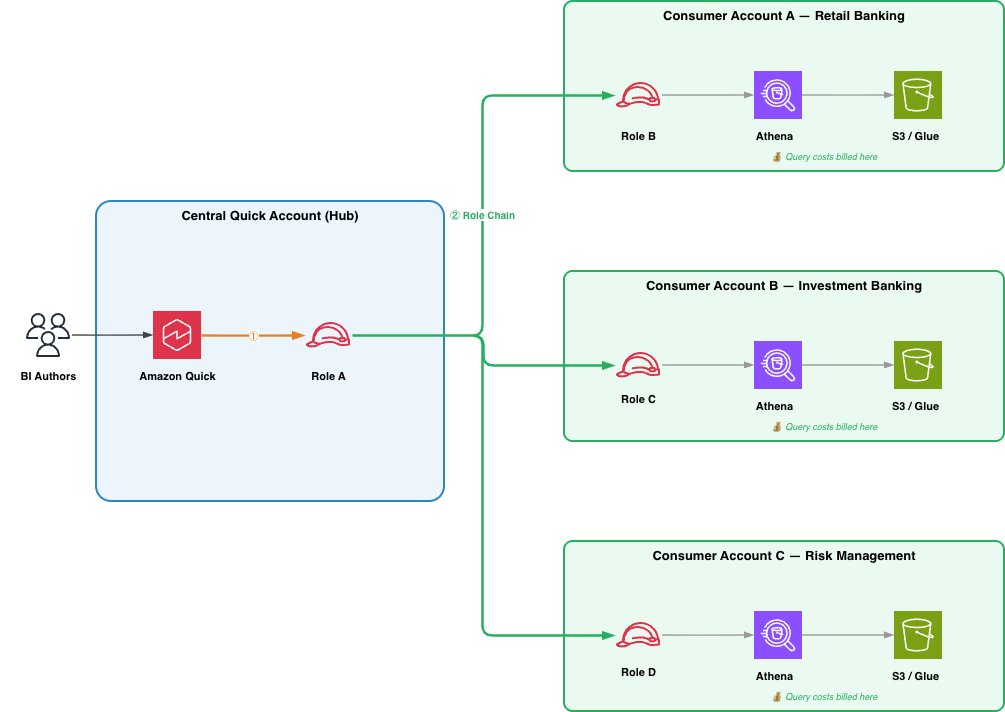
Most enterprises centralize their Quick deployment in a single account (the hub) while data is distributed across multiple business unit accounts (the spokes). The hub-and-spoke model extends the basic setup: Role A’s permission policy lists multiple consumer role ARNs, which can reside in the same account or across different accounts, and a separate data source is created in Quick for each. The key advantage of this pattern is independence between spokes. Adding a new business unit requires creating a new Role B in that unit’s account and registering a new data source in Quick, with no changes to existing spokes. Each spoke controls its own Role B permissions, determining which tables and S3 prefixes are exposed to the central BI AWS Account. Cost attribution follows naturally, each spoke’s Athena queries are billed to its own account. Because a single Quick dashboard can reference data sources from multiple consumer accounts, BI authors can build cross-business-unit analytics without leaving the unified Quick experience. This is the recommended pattern for most enterprises.
As you scale beyond a handful of spokes, consider templatizing the consumer-side setup. An AWS CloudFormation or CDK template for Role B, the Athena workgroup, and the required trust and permission policies allows business unit teams to self-service their onboarding, or the central BI team to provision new spokes with a single stack deployment.
Pattern 3: Data Mesh
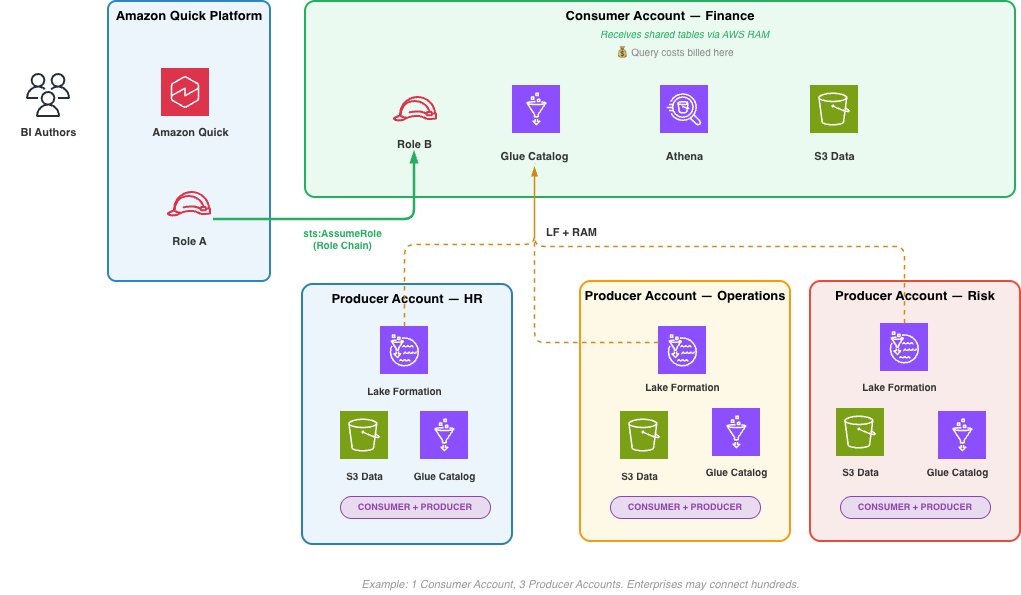
In a data mesh, producers and consumers are distinct accounts. A producer account owns and manages its raw data, provisioning it into a Consumer Account. For example, using AWS Lake Formation with AWS Resource Access Manager (AWS RAM) to share tables across account boundaries. The specific provisioning mechanism is the domain team’s choice and outside the scope. The Consumer Account, containing Role B, AWS Glue Data Catalog, and Athena workgroup, is what Amazon Quick connects to through role chain. The account publishes governed data products to other Consumer Accounts using AWS Glue Data Catalog resource policies, making its data available for cross-domain analytics. This peer-to-peer sharing between Consumer Accounts, each acting as both producer and consumer of data products, is what defines the mesh.A BI author in Quick can query across multiple Consumer Accounts in a single dashboard, with query costs attributed per Consumer Account. At enterprise scale, a single Amazon Quick deployment can connect to hundreds of Consumer Accounts. How domain accounts provision raw data into Consumer Accounts is outside of scope.
Choosing a pattern
The right pattern depends on your data strategy. The basic two-account setup validates the role chain end to end. Most enterprises will adopt hub-and-spoke as they onboard additional business units because it keeps spokes independent, cost attribution clean, and trust policies straightforward. Organizations with strong data ownership boundaries or dedicated domain teams will naturally evolve into the data mesh pattern, where Consumer Accounts are distinct from the producer accounts that supply the data, and Amazon Quick serves as the unified analytics layer across all of them. We recommend starting small and expanding as requirements grow.
Looking ahead
As agentic AI capabilities mature and AI agents begin to autonomously query, transform, and act on data across organizational boundaries, the ability to access data where it lives, governed, cost-attributed, and auditable, becomes foundational. Cross-account Athena access is a building block for that future. Today, it connects Quick dashboards to distributed data lakes. As agentic patterns evolve, the same IAM role chaining mechanism can extend to AI agents that query Athena on behalf of business users, apply governance rules in real time, and route compute costs to the data owner without centralizing data into a single account.
Solution
Cross-account Athena access for Amazon Quick uses IAM role chaining to bridge your central Quick account with one or more consumer accounts where your data lives. Rather than consolidating data into a single account or managing separate Quick subscriptions per business unit, you configure two IAM roles that work in tandem (one in each account) to route queries and attribute costs correctly.
Create Role A (RunAsRole) in the Central Quick account
Role A lives in the central Quick account. Amazon Quick assumes this role when a user initiates a query. Role A holds no data permissions of its own; its sole purpose is to chain into the consumer account. It needs two things:
- A trust policy allowing the Quick service to assume it.
- A permission policy allowing it to assume Role B in the consumer account.
Create the trust policy and name it as role-a-trust-policy.json. This allows the Quick service principal to assume Role A, scoped to data source operations in your account. Sample policy:
Create the role using the AWS CLI
Create the permissions policy and name it role-a-permission-policy.json.
Attach the permission policy as an inline policy using AWS CLI. This allows Role A to assume Role B in the consumer account. The ExternalId condition ensures only Quick data sources can trigger the role chain:
Additionally, the IAM principal creating the Quick data source needs iam:PassRole permission on Role A.
Create Role B in the Consumer Account
Role B lives in the consumer account where your Athena tables, AWS Glue Data Catalog, and S3 data reside. Role A assumes Role B to execute the query.
Create the trust policy and name it role-b-trust-policy.json. This allows the Quick account to assume Role B, with an ExternalId condition tied to the data source ARN. Sample policy:
Create the role using the AWS CLI:
Create the Athena, AWS Glue, and S3 permissions policy and name it role-b-permission-policy.json. Scope these to the specific databases, tables, and S3 locations relevant to your data.
Attach the permission policy as an inline policy using AWS CLI
Create the Cross-Account Athena Data Source in Quick (central or source account)
Using the AWS CLI, enter the following:
Or using Python (Boto3):
Verify the data source was created successfully:
Expected output:
Share the Data Source and Create Datasets
After the data source is active, share it with Quick authors using the following sample code:
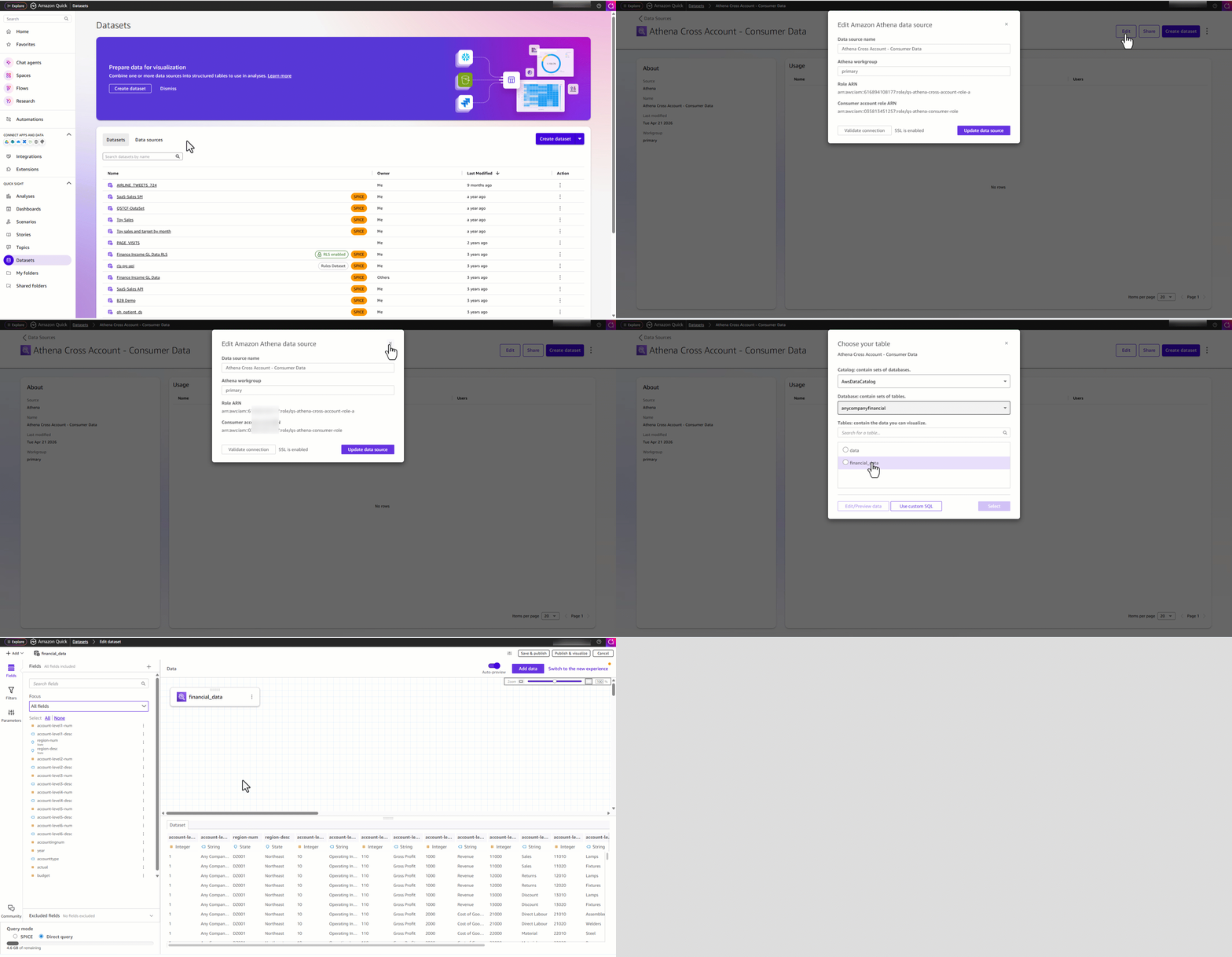
Authors can now open Quick, navigate to Datasets, create a new dataset, select the Athena Cross Account data source, and browse the AWS Glue databases and tables from the consumer account. They can build datasets, apply transformations, and create dashboards all from the central Quick account, with query costs billed to the consumer account.
Connecting multiple consumer accounts
To connect additional consumer accounts, repeat above solution for each role/account
- Update Role A’s permission policy to include the new consumer account role ARN (or use a wildcard pattern if your consumer roles follow a naming convention).
- Create Role B in the new consumer account with the appropriate trust and data access policies.
- Create a new data source in Quick with the new ConsumerAccountRoleArn.
- Share the datasource.
- Each data source maps to one consumer account. Authors select the appropriate data source based on which business unit’s data they need.
Security considerations
The security model for cross-account Athena access is designed to enable distributed data access at scale while ensuring that every query is authorized, scoped, and auditable. As described in the walkthrough, the ExternalId condition on Role B’s trust policy prevents confused deputy attacks. Only Quick data sources from the authorized (central) account can complete the role chain. In addition, Quick applies an inline scope-down policy each time it assumes Role A, restricting each session to a single consumer role even when Role A’s standing permissions cover multiple accounts. Together, these mechanisms ensure that each query chain is both authenticated and narrowly scoped. The consumer account maintains its own least privilege boundary through Role B’s permissions. Each business unit determines independently which tables, databases, and S3 prefixes are visible to the central BI AWS account. We recommend scoping AWS Glue and S3 permissions to specific resources rather than using wildcards, restricting Role B to a designated Athena workgroup with query result encryption and cost limits enabled, and using separate Role B instances when the consumer account contains data at different classification levels.
The full role chain is captured in AWS CloudTrail across both accounts from the initial AssumeRole in the central account through the chain into the consumer account and the Athena queries that follow. This provides a complete audit trail from query initiation to data access and supports alerting on anomalous patterns such as unexpected source accounts or spikes in data scanned.
As noted in Step 1 of the walkthrough, the IAM principal creating the data source requires iam:PassRole on Role A, which prevents administrators from associating arbitrary roles with data sources. These mechanisms (ExternalId, scope-down, least privilege, CloudTrail, and PassRole) form a defense in depth model that is entirely policy-driven and programmatic, making it well suited for automated governance as tooling in this space matures.
Cost attribution
Because Athena queries execute under Role B’s credentials in the consumer account, all associated AWS API calls occur in that account. Standard AWS billing handles cost separation automatically. The consumer account sees Athena query charges, S3 access costs, and AWS Glue catalog calls on its own bill. The central Quick account incurs only Quick session costs and SPICE storage. Before this feature, organizations either absorbed all query costs centrally (losing per-business-unit visibility) or operated separate Quick subscriptions per business unit, fragmenting the BI experience. Cross-account Athena access removes that trade-off: a unified Quick deployment with per-business-unit cost visibility that requires no custom chargeback logic.
Clean up
To avoid incurring ongoing charges, delete the AWS resources (IAM roles, Quick Sight data sources, policies) that you created as part of experimentation. For instructions, see the service documentation.
Conclusion
Cross-account Athena access for Amazon Quick enables enterprises to maintain a centralized BI AWS account while respecting multi-account data governance and cost boundaries. The role chaining approach provides proper cost attribution, maintains data sovereignty per business unit, and integrates with existing IAM security controls.
To get started, create the IAM roles in your Quick and consumer accounts as described in this post, then create the data source using the ConsumerAccountRoleArn parameter. For more details, see the Amazon Quick User Guide.