Artificial Intelligence
Migrating a text agent to a voice assistant with Amazon Nova 2 Sonic
Migrating a text agent to a voice assistant is increasingly important because users expect faster, more natural interactions. Instead of typing, customers want to speak and understand in real time. Industries like finance, healthcare, education, social media, and retail are exploring solutions with Amazon Nova 2 Sonic to enable natural, real-time speech interactions at scale.
In this post, we explore what it takes to migrate a traditional text agent into a conversational voice assistant using Amazon Nova 2 Sonic. We compare text and voice agent requirements, highlight design priorities for different use cases, break down agent architecture, and address common concerns like tools and sub-agents for reuse and system prompt adaptation. This post helps you navigate the migration process and avoid common pitfalls.
You can also find a Skill in the Nova sample repo that works with AI IDEs like Kiro and Claude Code to automatically convert your text agent into a voice agent.
Text agents and voice agents aren’t the same problem
While migrating from a text agent to a voice assistant might seem like adding a voice interface while keeping the business logic unchanged, it’s important to understand the differences from the following perspectives.
| Aspect | Text agent | Voice agent |
| User input | Typed text: user reads, scrolls, copy-pastes at own pace | Spoken audio stream: real time, can interrupt (barge-in), pauses matter |
| Response style | Paragraphs, lists, tables, links: rich formatting, all info delivered at once | Short spoken phrases, one thing at a time: “Want me to continue?” with confirmation loops |
| Latency budget | Mid-latency tolerance: typing indicator masks wait time | Ultra-low latency required: silence feels like something is broken |
| Turn-taking | Strict request → response: user types, hits enter, waits | Fluid, overlapping, interruptible: voice activity detection (VAD) + turn detection, barge-in required |
| Transport | HTTP / REST / Server-Sent Events: stateless request-response | Bidirectional streaming: persistent connection, real-time audio in both directions |
To better navigate these challenges, let’s break down the key differences between text agents and voice assistants and how those differences impact design and implementation.
Response design
A text agent is built to deliver paragraphs that users can read at their own pace. Scrolling back, copying content, and following links as needed. A voice agent operates in a fundamentally different medium. Responses must be conversational, concise, and carefully structured for listening rather than reading.Consider a banking agent that returns account information:
Text agent response:
Voice agent response:
“You have three accounts. Your checking account ends in 4521 with a balance of three thousand two hundred forty-five dollars. Want me to go through the others or would you like details on this one?”.
The voice agent breaks information into digestible chunks and asks for confirmation before continuing. It uses an autonomous conversation style, proactively guiding the user rather than dumping everything at once.
Latency budget
Text users have mid-latency tolerance. They see a typing indicator and wait. Voice users notice delays almost immediately. Silence in a voice conversation feels like the line went dead. This changes how agents must be architected:
| Factor | Text agent | Voice agent |
| Acceptable response time | Mid-latency tolerance: a few seconds wait with a loading indicator is acceptable. | Low-latency tolerance: conversation should be in the hundreds of milliseconds, with first audio ASAP; delays of a few seconds, especially during tool calls, feel unresponsive. |
| Tool call tolerance | Multiple sequential calls OK | Each call adds noticeable silence |
| Streaming | Nice to have | Essential |
| Asynchronized tool handling | Good to have | Critical to have |
Amazon Nova 2 Sonic supports asynchronous tool calling, so the conversation continues naturally while tools run in the background. It keeps accepting input, can run multiple tools in parallel, and gracefully adapts if the user changes their request mid-process, delivering all results while focusing on what’s still relevant.
Turn-taking and interruption
Text conversations are inherently turn-based. The user types, hits enter, waits for a response. Voice conversations are fluid. Users interrupt (barge-in), pause mid-sentence, and expect the agent to handle overlapping speech naturally.Native speech-to-speech models like Amazon Nova 2 Sonic handle this internally with built-in voice activity detection (VAD) and turn detection. Nova 2 Sonic manages conversation context without requiring the full history to be sent on each turn.
Migration from an architectural view
With these differences in mind, let’s break down the migration from an architectural perspective by dividing the system into three major components and examining how each evolves.A conceptual design of a text agent consists of three components:
- A client application (such as web, mobile, or IoT interfaces).
- A text orchestrator that manages the system prompt, tools, and conversation context.
- The tool integrations that connect to your systems, such as APIs, databases, workflows, Retrieval Augmented Generation (RAG) pipelines, or sub-agents.
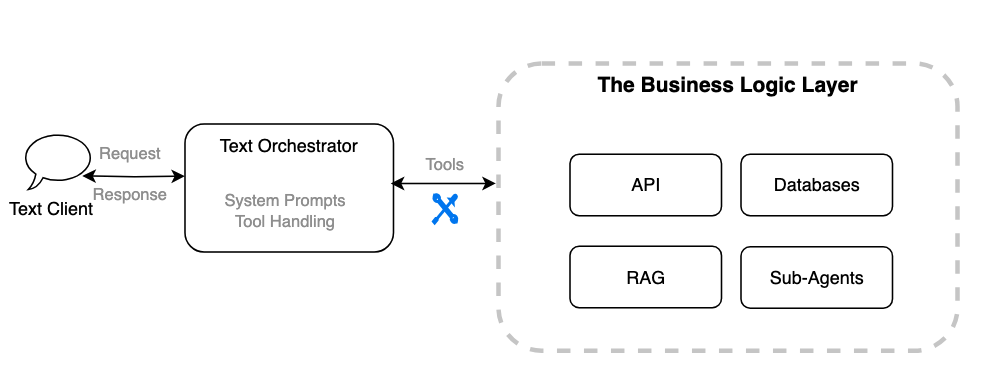
When migrating this architecture to a voice agent, these components remain the same, but each requires different changes to support voice-specific logic.
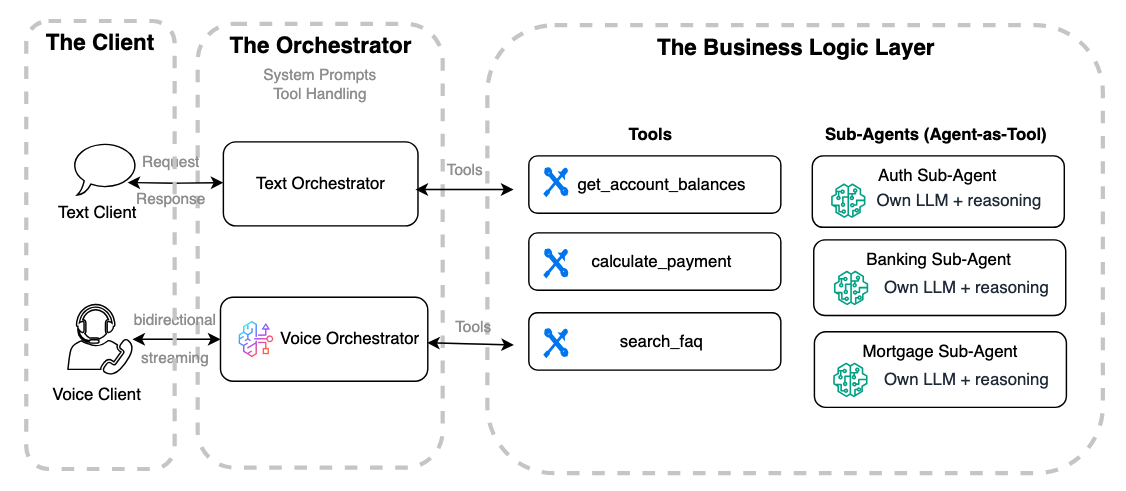
The client application
Agent clients are typically implemented in programming languages and systems used for web browsers, mobile apps, or IoT devices, depending on the deployment context.A voice agent client requires a persistent bidirectional connection (such as WebSocket or WebRTC) and handles audio encoding/decoding, client events, barge-in logic, noise control, and transcription display. This is significantly more complex than a text client, which typically communicates with the agent through a stateless REST or one-way HTTPS streaming interface.
As a result, this component usually requires refactoring or a full rewrite. For example, a PoC built with a Streamlit frontend would likely need to be rebuilt using a JavaScript framework like React to support bidirectional connections.
For a lightweight voice agent web client application in REACT using WebSocket, refer to this sample.
The orchestrator
An agent orchestrator is the central hub when building text or voice agents. It manages the system prompt, selects and routes tools or sub-agents, and maintains conversation context to keep interactions coherent and aligned with the agent’s role. In text agents, the orchestrator handles requests and responses between the client and the reasoning model while integrating tools to trigger business logic. Voice orchestrators follow the same principles but add audio streaming, Voice Activity Detection (VAD), Automatic Speech Recognition (ASR), reasoning, and Text-to-Speech (TTS). Amazon Nova 2 Sonic offers a bidirectional streaming interface that combines these features, so users can migrate reasoning prompts and tool triggers from text agents for a smoother transition to voice.
One key difference from a traditional text-agent architecture is that Amazon Nova 2 Sonic can accept both text and audio inputs in the same model interface. This means Sonic can directly replace the standalone text reasoning model typically used in a text orchestrator. Instead of chaining separate ASR → LLM → TTS components, Sonic unifies speech recognition, reasoning, tool use, and speech synthesis into a single bidirectional model. With this, teams can reuse existing prompts and tools while streamlining the architecture, reducing latency, and removing the need to manage a separate text reasoning model in the voice stack.
The following code snippets show a sample text agent built with Strands Agents using Amazon Nova 2 Lite as the large language model (LLM). It has defined tools and a sample using Strands BidiAgent and Nova 2 Sonic to create a voice agent orchestrator available through WebSocket. You will notice that the coding style for both text and voice agents in Strands is highly similar. While the sample uses Strands, the same approach applies to text agents built with other frameworks such as LangChain, LangGraph, or CrewAI, because the key inputs required from the text orchestrator are the system prompt and tool definitions.
Before running the samples in the following sections, install Python and the required dependencies, including strands-agents and Boto3, and make sure your IAM setup has the necessary permissions for the required services.
from strands import Agent, tool
from strands.models import BedrockModel

# ---- Mock tools will be used in both text and voice agents ----
@tool
def authenticate_customer(account_id: str, date_of_birth: str) -> str:
    """Verify customer identity and return an auth token."""
    # In real implementation, call your auth service / API
    if account_id == "123456":
        return "AUTH_TOKEN_ABC123"
    return "Authentication failed"

@tool
def get_account_balance(auth_token: str) -> str:
    """Return the customer’s current account balance."""
    if auth_token == "AUTH_TOKEN_ABC123":
        return "Your current checking account balance is $5,420."
    return "Unauthorized request"

@tool
def get_recent_transactions(auth_token: str) -> str:
    """Return recent transactions."""
    if auth_token == "AUTH_TOKEN_ABC123":
        return "Recent transactions: $45 groceries, $120 utilities, $18 coffee."
    return "Unauthorized request"
Using Strands Agents, you can create a text agent orchestrator with Nova 2 Lite as shown in the following sample:
# ---- Nova 2 Lite model ----
model = BedrockModel(model_id="amazon.nova-2-lite-v1:0")

# ---- Banking assistant text agent ----
bank_agent = Agent(
    model=model,
    system_prompt="""You are a banking assistant. Answer user questions about account balances, recent transactions accurately. Always validate user identity before providing sensitive information.
""",
    tools=[authenticate_customer, get_account_balance, get_recent_transactions],
)
Using the Strands BidiAgent, you can build a voice agent orchestrator in a similar coding style with the Nova 2 Sonic model and reuse the same tools:
# voice_orchestrator.py — BidiAgent with sub-agents as tools
from strands.experimental.bidi.agent import BidiAgent
from strands.experimental.bidi.models.nova_sonic import BidiNovaSonicModel

# ---- Nova 2 Sonic model ----
model = BidiNovaSonicModel(
    region="us-east-1",
    model_id="amazon.nova-2-sonic-v1:0",
    provider_config={"audio": {"voice": "tiffany", "input_sample_rate": 16000, "output_sample_rate": 16000}},
)

# ---- Banking assistant voice agent ----
agent = BidiAgent(
    model=model,
    system_prompt=""" You are a banking assistant. Speak naturally and answer questions about account balances, recent transactions. Confirm the customer’s identity before sharing sensitive details. Use short, clear responses and acknowledge when retrieving data.
""",
    tools=[authenticate_customer, get_account_balance, get_recent_transactions],
)
await agent.run(inputs=[ws_input], outputs=[ws_output])
The system prompt is the foundation for both text and voice agents. It defines the agent’s role, tone, and guardrails, ensuring responses are consistent, reliable, and aligned with business goals and user expectations across written and spoken interactions.When moving from text to voice, adapt the system prompt for real-time audio. Keep it concise and conversational, consider latency and multi-turn context, and break complex guidance into smaller steps.
Text prompt (original):
“You are a banking assistant. Answer user questions about account balances, recent transactions accurately. Always validate user identity before providing sensitive information.”
Voice-adapted prompt:
“You are a banking assistant. Speak naturally and answer questions about account balances, recent transactions. Confirm the customer’s identity before sharing sensitive details. Use short, clear responses and acknowledge when retrieving data.”
Note, that in a voice orchestrator with Nova 2 Sonic, you’re using the Sonic built-in reasoning capability to manage the system prompt and tool selection and session context. You no longer need to provide your own LLM for reasoning at the orchestrator level.
The business logic layer
Tool integration is a key aspect of connecting an agentic assistant to the business layer, using protocols like Model Context Protocol (MCP), Agent-to-Agent (A2A), and standard HTTP. In a text-based agent, the orchestrator sends text input to tools, like REST APIs, RAG system, or databases and receives text responses to generate user-facing replies.
In the Strands Agents samples, the same tools used for the text agent can be reused for the voice agent with no code changes. However, reusing tools and sub-agents for voice involves more than just implementation details.
If you already use a multi-agent architecture, your specialized business logic agents can often be reused for voice with some updates. The following diagram shows a banking assistant where a voice orchestrator calls sub-agents for authentication and mortgage inquiries.
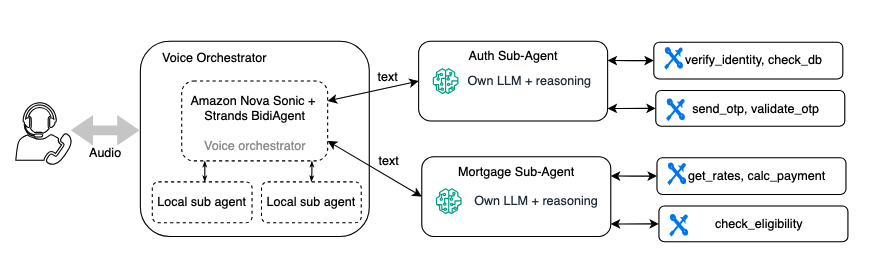
Although these sub-agents don’t require a complete rewrite, they do need tuning for voice:
Shorter responses – a text sub-agent might return a detailed paragraph. A voice sub-agent should return 1–2 sentences that the orchestrator can speak naturally. For example, you update the sub-agent’s system prompt to say, “Summarize in 1 to 2 concise sentences” instead of “Provide a comprehensive answer.”
Latency improvement – choose smaller, faster models for sub-agents (for example, starts from Nova 2 Lite instead of a larger model). In a voice conversation, every extra inference hop adds noticeable silence. For Nova 2 Lite, we recommend limiting or avoid using thinking mode, to reduce latency. For more information, see the Amazon Nova Developer Guide for Amazon Nova 2..
Reduced verbosity in tool results – some Sub-agents designed to return large raw payloads, such as JSON with more data than requested, leaving the orchestrator to filter the response. This isn’t ideal, especially for voice. Larger payloads increase latency, can reduce accuracy, and can expose sensitive data. Lean, targeted responses are critical, particularly for latency-sensitive voice experiences.
Use filler messages to keep conversations natural during longer tool processing. With Amazon Nova 2 Sonic, you can make asynchronous tool calls and customize these interim messages, ensuring users stay engaged while the agent completes tasks.
Most of these adjustments involve prompt and configuration changes rather than architectural modifications. The sub-agent’s tools, business logic, and deployment remain the same.While sub-agent architectures provide clarity, reusability, and portability, and are especially useful when migrating a text agent to voice. Each sub-agent call adds latency due to its own model of inference and tool calls. In a voice conversation, this can translate to noticeable pauses for sub-agent reasons.
Refer to this blog for more voice agent architecture patterns and best practices for managing latency.
Conclusion
Migrating a text agent to a voice assistant isn’t a wrapper job. The interaction model is fundamentally different, from response design to latency budgets to turn-taking behavior. But with a well-structured multi-agent architecture and Amazon Nova 2 Sonic, the business logic layer stays intact.
Start your migration project and convert your text agent into a voice assistant with Amazon Nova 2 Sonic. For a complete working example of a voice agent using Amazon Nova 2 Sonic, see the Amazon Nova 2 Sonic in Strands BidiAgent. Find more documentation and resources here:
- Amazon Nova 2 Sonic
- Amazon Nova 2 Sonic sample code and repeatable patterns
- Amazon Nova 2 Sonic user guide
- Amazon Nova 2 Sonic technical report and model card