Artificial Intelligence
Retrofit, don’t rebuild: Agentic overlays for transforming legacy enterprise services
The opinions expressed in this post are the authors’ views and not those of Cisco.
Enterprise architectures have long been centered on REST APIs and microservices. These systems are stable, well-tested, and deeply embedded in production environments. They weren’t designed for Agent-to-Agent (A2A) communication, the emerging standard for autonomous agents that collaborate, reason, and coordinate through structured messaging. That worked in the absence of a common agent protocol, but it means many existing agents now sit outside the emerging A2A framework. The challenge today is no longer only adding A2A to traditional services. You also need to bring these REST-based agents into a standardized agent-to-agent world.
In this technical collaboration between AWS and the authors, we present a pragmatic solution: agentic overlays. Agentic overlays are thin wrapper layers that transform traditional REST-based services into agents capable of participating in A2A interactions. They also expose REST APIs as tools compatible with the Model Context Protocol (MCP). Together, they let enterprises add A2A capabilities to existing REST services without rewriting business logic, without duplicating code, and without running parallel infrastructures. This reduces agent sprawl in the infrastructure by reusing existing services as agents. We provide reference architectures and sample code that show how to build agentic overlays.
Background: REST vs. A2A
REST APIs are designed for deterministic, client-server integration. A client calls a well-defined endpoint, passes parameters, and receives a predictable response, typically in a stateless request-response flow governed by HTTP semantics. This makes REST excellent for exposing business capabilities (such as create, read, update, and delete) with clear contracts, strong compatibility, and operational simplicity.
A2A is designed for interoperability between autonomous agents. Agents discover one another through metadata (such as an agent card), negotiate capabilities, and exchange structured messages (often through JSON-RPC) to coordinate multi-step tasks. Where REST optimizes for stable service interfaces and direct execution, A2A optimizes for reasoning-driven coordination, task-oriented messaging, and agent collaboration. The result is systems that can plan, delegate, and compose actions across multiple services rather than invoking isolated endpoints.
Challenges with moving towards agentic systems
REST APIs and agentic systems are based on orthogonal paradigms, which makes it hard for enterprises to move existing services into standardized agentic communication. Yet enterprises need to use both without a major overhaul. Although newer agent communication through A2A introduces coordination models for enterprise systems, adoption has been slowed by the need to deploy and operate agentic infrastructures alongside existing enterprise systems. This parallel operation increases operational complexity and cost, creating barriers to adopting AI effectively.
Before A2A was standardized, enterprises commonly deployed agents as REST-based or proprietary services. They treated them as conventional APIs with agent-specific logic embedded in request-response endpoints. As a result, many existing agents today aren’t A2A-native, which creates a new migration challenge: making these agents interoperate using standardized A2A protocols without rewriting their core logic.
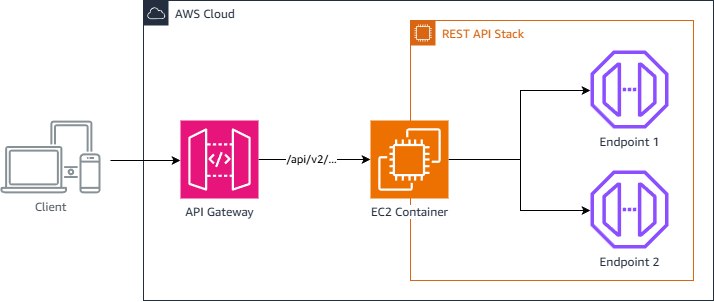
Fig 1: REST-based application
The preceding figure shows a REST-based application. The REST API stack might be a monolith or a set of distributed endpoints. The REST API controller doesn’t need to be an explicit broker that delegates requests outside the application. It can be part of the framework itself. For example, in a Flask application, the framework provides the controller abstraction out of the box, as you typically see when using @app.route() or Flask’s RESTful extensions. The idea here is to capture the REST stack with a set of endpoints.
Solution approaches
In this section, we discuss the different approaches you could take to add an agentic capability to a legacy enterprise system. We compare them to the approach of using agentic overlays.
Maintain separate REST and A2A stacks: One approach is to develop and maintain two parallel ways to expose the same capabilities. This could mean:
- Two sets of endpoints:
/api/v2/...and/a2a/.... - Two implementations of auth, validation, and error mapping (unless carefully reused).
- Two deployment pipelines (build, test, release, rollback).
- Double observability work: logs, metrics, and tracing for both paths.
- Higher risk of inconsistency. A2A may return a different output for the same operation carried out by REST.
- Higher cost and operational complexity over time.
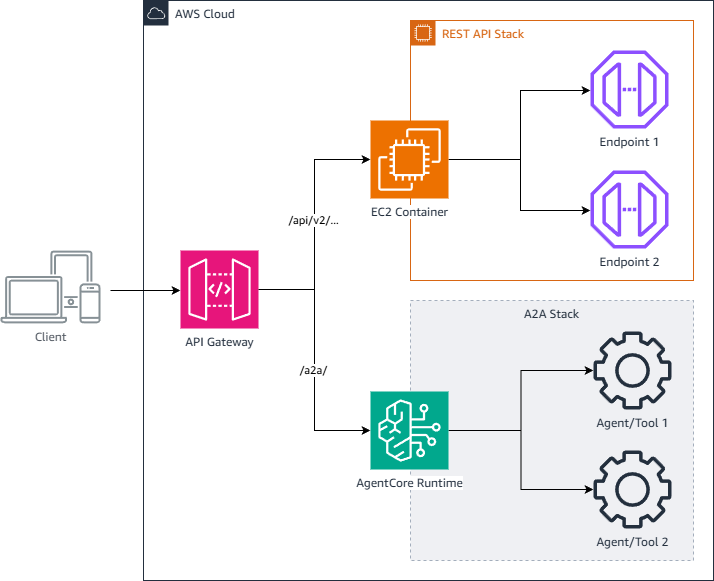
Fig 2: Separate REST and A2A stacks
Separated stacks, but shared business logic: Refactoring existing endpoints means you change your current REST API code structure (and sometimes behavior) so it can be reused by a new interface such as A2A. Instead of leaving REST endpoints as-is, you reorganize them, usually by extracting business logic into shared services and updating controllers and handlers to call those services. Even if the external REST paths remain the same, refactoring can introduce regressions, behavior drift, and a large test burden.
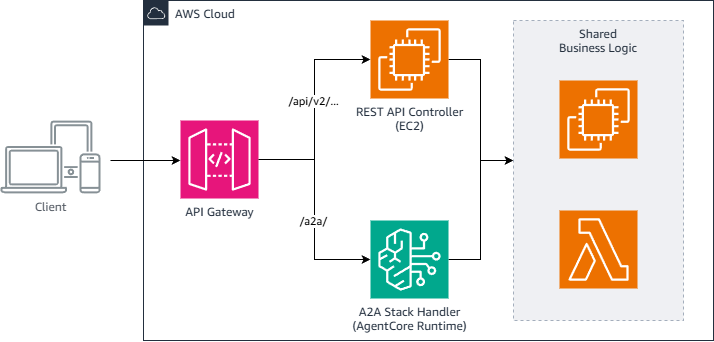
Fig 3: Separated stacks, shared business logic
The core idea: Agentic overlays
An agentic overlay is a thin wrapper layer that lets REST-based services participate in A2A communication. The overlay:
- Transforms an agentic message into a REST payload, and the reverse.
- Exposes REST endpoints as agent tasks or tools.
Most importantly, A2A isn’t a new API. It’s a new interface to an existing API. The underlying REST service remains unchanged.
Adding an agentic overlay within the application
In this approach, you have two sets of endpoints, /api/v2/... and /a2a/... (REST vs. A2A), as shown in the following diagram, but a single deployment pipeline for build, test, release, and rollback. With this pattern, traditional REST API endpoints can be transformed into agentic endpoints without rewriting the core business logic. The deployment process doesn’t change for the service. For the same host and same port, you add new routes, although the systems might need to be scaled to handle increased traffic.
You can apply the agent skills themselves for routing. An MCP server can be used to invoke external services, but agent skills can route requests within the agent scope directly without importing APIs into an MCP server as skills. Whatever endpoints you have can be exposed as agent skills without needing a separate MCP server.
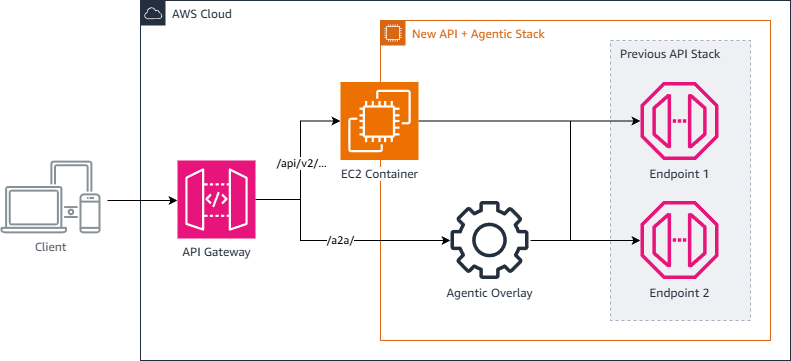
Fig 4: Agentic overlay within an application
This approach reduces agent sprawl in the infrastructure by reusing existing services as agents. This design pattern works well for supervisor agents that need both REST-based and agentic capabilities with limited functional scope, such as intent classification and routing.
Agentic overlay example implementation
As a proof of concept, this section shows how to port an example legacy REST-based calculator service that uses Flask into an agentic system using an overlay. For the overlay, we add the standard A2A components (or routes), such as a well-known agent card, agent message endpoint, capabilities, skills, and health. We also introduce a message transformation design pattern that converts agentic messages to REST API messages, then issues REST invocation calls from the agent. The A2A message translation workflow is as follows:
- Receives JSON-RPC 2.0 requests.
- Maps A2A tasks to REST endpoints.
- Forwards authentication headers.
- Calls REST endpoints internally.
- Translates REST responses to JSON-RPC format.
Step 0: Request-response format
This section compares the request-response format for the REST and A2A protocols, using the calculator example demonstrated in the following sections.
REST vs. A2A input request:
| REST | A2A |
| { “operation”: “add”, “operands”: [5, 3] } | { “jsonrpc”: “2.0”, “method”: “SendMessage”, “params”: { “message”: { “role”: “user”, “parts”: [ { “kind”: “data”, “data”: { “operation”: “add”, “operands”: [5, 3] } } ] } }, “id”: 1 } |
REST vs. A2A output response:
| REST | A2A |
| {“result”: 8} | { “jsonrpc”: “2.0”, “result”: { “messageId”: “uuid”, “contextId”: “uuid”, “role”: “agent”, “parts”: [{“kind”: “data”, “data”: {“result”: 8}}], “kind”: “message”, “metadata”: {} }, “id”: 1 } |
Step 1: Set up the agent
In this step, you create the calculator agent example with a well-known agent card and agent skills loaded. The build_agent_card function builds the agent card dynamically.
Step 2: Implement the internal REST caller
Step 3: Implement message payload extraction (A2A Spec 0.3)
Note on Server-Sent Events (SSE) for streaming:
The preceding extract_message_payload() function works the same way for both SendMessage and SendStreamingMessage.
For operations that are instant (like our calculator), both methods return a single result. For long-running operations (for example, report generation or data analysis), SSE streaming allows the server to push incremental updates.
Step 4: Implement JSON-RPC response builders
Step 5: SendMessage — A2A-to-REST delegation
Step 6: Set up A2A routes (Spec 0.3)
The official A2A SDK provides A2A libraries for FastAPI and Starlette applications that abstract away the complexity of adding A2A-specific routes. Although A2A libraries are also available for Flask apps, we don’t use them in our sample code. We want to make it straightforward for you to understand what it takes to host an A2A overlay over a Flask app. The following code snippet adds the routes needed for A2A.
Step 7: Finally, initialize in your application
Step 8: Run your application
From the project base directory, run the following commands.
Adding an agentic overlay using Amazon Bedrock AgentCore Gateway
Amazon Bedrock AgentCore is a service for building, connecting, and optimizing agents at scale without managing infrastructure. As shown in the following diagram, AgentCore Gateway can decouple the agentic overlay from the application by serving as a single access point for endpoints and services. This separation lets one agentic overlay serve multiple services or applications, not only one. AgentCore Gateway supports up to 10 targets per gateway, with native integration into existing AWS services and support for OpenAPI endpoints.
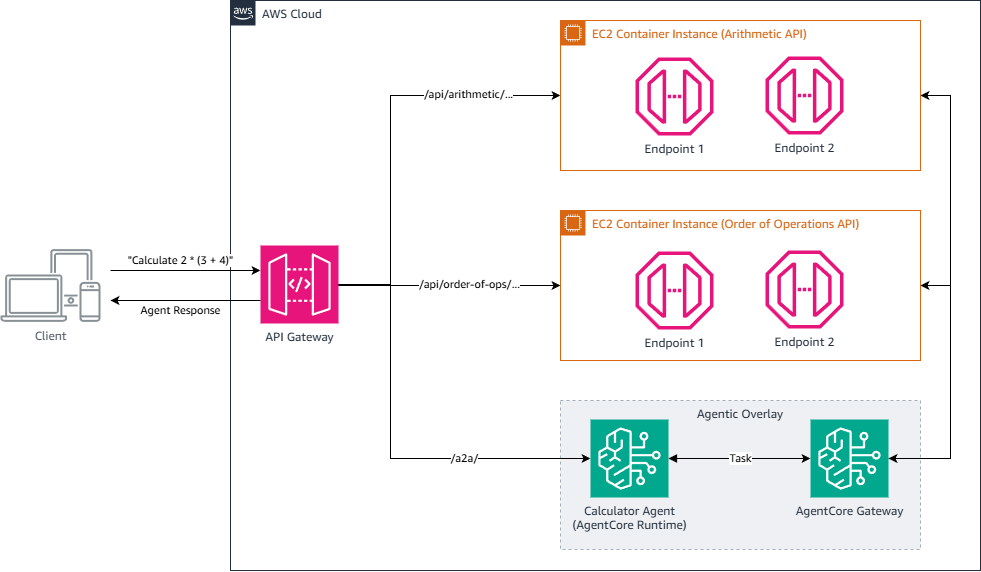
Fig 5: Decoupling the agentic overlay using Amazon Bedrock AgentCore Gateway
Enterprise-scale applications often orchestrate multiple services to handle complex tasks. For example, a calculator application processing “Calculate 2 * (3 + 4).” As shown in the following diagram, the system first queries an order-of-operations endpoint (such as /api/order-of-ops/...) to determine the order of evaluation. It then makes sequential calls to an endpoint (such as /api/arithmetic/...) to calculate “3 + 4” followed by “2 * 7.” Adding an agentic overlay to each service would introduce its own overhead. Instead, you can tie both services together into a single agentic overlay that orchestrates the calls as needed.
You can separate the agentic overlay from your application to organize your agentic overlays based on functionality rather than only by application. The agentic overlays act as an agentic way to interact with your applications and your systems, an agentic way to interact with functionality.
Beyond AgentCore Gateway, additional AgentCore capabilities simplify monitoring, iteration, and deployment of your agentic overlay. AgentCore Identity handles authentication for both agent and gateway components, supporting OAuth 2.0 providers with managed integrations for Okta, GitHub, and Slack. AgentCore Observability monitors agent performance through metrics, logs, and span visualizations. You can view high-level data such as tool calls and latency, or inspect granular execution paths across components, with native Amazon CloudWatch integration. AgentCore Runtime deploys models through a container image, whether open-source, custom, or Amazon Bedrock LLMs such as Nova and Anthropic Claude, without requiring you to manage large language model (LLM) infrastructure.
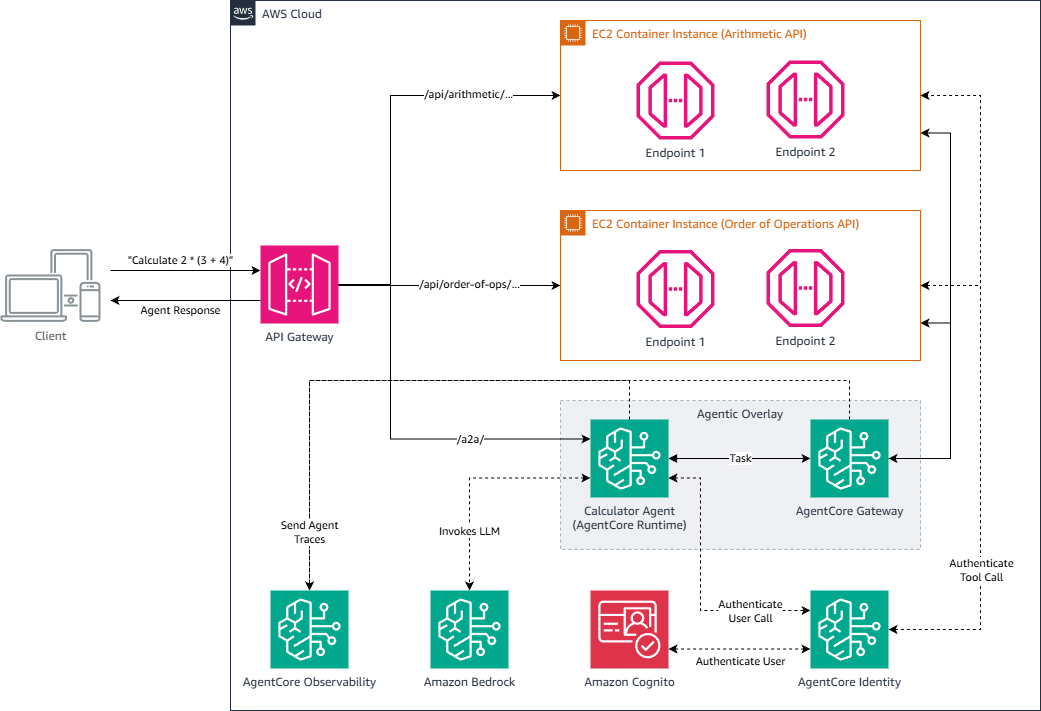
Fig 6: Decoupling the agentic overlay using Amazon Bedrock AgentCore capabilities — runtime, gateway, identity, and observability
By using the different capabilities of AgentCore, you can simplify the deployment of your agent and your agentic overlay, with straightforward integration into your existing AWS stack. Because it’s a managed service, it also reduces the work needed to implement your agentic overlay.
Partnering to accelerate enterprise AI adoption
This agentic overlay pattern represents a broader collaboration between the authors and AWS to help enterprises bridge the gap between existing infrastructure and emerging AI capabilities. Successful AI adoption requires pragmatic solutions that respect existing investments and support incremental transformation. Together, AWS and the authors are developing reference architectures, implementation patterns, and tooling that let enterprises adopt A2A communication without wholesale infrastructure replacement. The agentic overlay pattern exemplifies this philosophy: preserve what works, extend where needed, and provide clear migration paths that minimize risk while maximizing value.
Conclusion
Agentic overlays give enterprises a pragmatic path to adopt Agent-to-Agent communication without abandoning their REST API investments. By adding a thin translation layer that converts A2A messages to REST payloads, organizations can participate in the emerging agentic landscape while preserving stable, production-tested business logic. The two implementation patterns offer flexibility to match organizational needs: within-application overlays for focused use cases, and AgentCore Gateway for enterprise-scale deployments. Whether you’re enabling a single supervisor agent or orchestrating complex multi-service workflows, agentic overlays reduce the operational overhead of parallel infrastructures and the regression risk of wholesale refactoring.
As enterprises navigate the transition from deterministic REST APIs to reasoning-driven agentic systems, the key insight remains: A2A isn’t a new API. It’s a new interface to your existing API. This perspective shifts the adoption challenge from rebuilding everything to retrofitting incrementally, so organizations can realize AI value faster while managing risk effectively. For organizations ready to explore agentic overlays, the calculator example provides a concrete starting point, and AgentCore offers infrastructure for production deployments.
Next steps
- Evaluate your architecture – Audit REST services for A2A enablement candidates. Within-application overlays fit single-service agents. AgentCore Gateway fits multi-service workflows.
- Review the reference implementation – The Flask calculator example demonstrates the translation pattern with agent card setup, message extraction, REST invocation, and response building.
- Explore Amazon Bedrock AgentCore – AgentCore Gateway, Identity, and Observability provide infrastructure for production agentic overlays.
- Join the A2A community – The A2A Protocol specification and SDK documentation are available at a2a-protocol.org, with libraries for Flask, FastAPI, and Starlette applications.
The future of enterprise AI lies not in replacing existing systems, but in extending them with agentic capabilities. Agentic overlays make that future accessible today.