AWS for M&E Blog
Implement a generative AI Andon Cord for live media workflows on AWS
In live media and entertainment workflows, generative AI powers a growing set of real-time features: automated metadata generation, intelligent content tagging, AI-assisted commentary enrichment, and personalized recommendations served during broadcasts. As more media and entertainment organizations move these features from pilots into production, the cost of an AI failure during a live event grows with them.
But AI behavior can degrade unexpectedly. In a live pipeline, failures are visible, immediate, and high-stakes. A model version update may introduce subtle quality regressions. Unusual input patterns (a penalty shootout generating atypical commentary) can push outputs outside acceptable bounds. Upstream data quality issues can cascade into incorrect AI-generated content.
Production teams building these architectures have learned to include multilayered verification: data source validation, metadata cross-checks, contextual scoring, and human-in-the-loop review. The generative AI Andon Cord pattern serves as the final safety net. It’s a mechanism that operators can pull to override AI behavior quickly when upstream safeguards pass but output quality still degrades. The term comes from manufacturing, where an Andon Cord lets workers stop the production line when something goes wrong.
In this post, I show how to implement this pattern on AWS with AWS Lambda environment variables and Amazon Bedrock. With these runtime controls, you can disable, roll back, or constrain AI features quickly, without redeploying your application.
The challenge: AI in live pipelines needs a fast override
Media and entertainment workloads use generative AI for a growing set of real-time tasks. Common production patterns include AI-powered content tagging and metadata enrichment, automated highlight ranking, intelligent content moderation, and personalized recommendations during live streams. You can build these features on Amazon Bedrock with foundation models such as Amazon Nova. Model availability varies by AWS Region. For details, see Regional availability by models in the Amazon Bedrock User Guide.
In these architectures, AWS Lambda commonly serves as the event-driven compute layer. It processes incoming stream events, triggers downstream workflows, and serves real-time inference APIs. Its per-invocation execution model suits the burst-driven traffic of live broadcasts. It also means that a configuration change reaches new invocations shortly after the update completes.
The problem is that AI behavior can change unexpectedly. In a live pipeline, you need three capabilities that a standard deployment cycle can’t provide:
- Fast disable: Turn off AI features without waiting for a deployment.
- Model rollback: Revert to a known-good model version without redeploying. Model rollback is a well-established practice in machine learning operations (MLOps). For example, a fan-facing application can revert to the previous model version when output quality metrics fall below defined thresholds, while the team investigates.
- Safe mode: Constrain AI creativity during sensitive moments (breaking news, controversial events) by capping the inference temperature. Temperature controls how varied and creative model outputs are. A value of 1.0 produces diverse, sometimes unpredictable responses. A lower value like 0.3 makes outputs more deterministic and closer to the most probable answer. In safe mode, the Andon Cord enforces this lower temperature to reduce output variability when reliability matters most.
Solution overview
The Andon Cord pattern uses four Lambda environment variables as runtime control switches. When you update a function’s environment variables, Lambda applies the new values to invocations that start after the update completes. Until then, invocations keep using the previous configuration. Operators can therefore change AI behavior across the application without deploying new code. Environment variables belong to a function’s version-specific configuration, so if you invoke functions through published versions or aliases, publish a new version and point the alias to it. Measure how long a change takes to apply in your environment, and record it in your runbooks.
Figure 1 shows the architecture. Operators change the control values, each AI-powered Lambda handler checks them before it calls Amazon Bedrock, and the handler returns a fallback response when AI is disabled.
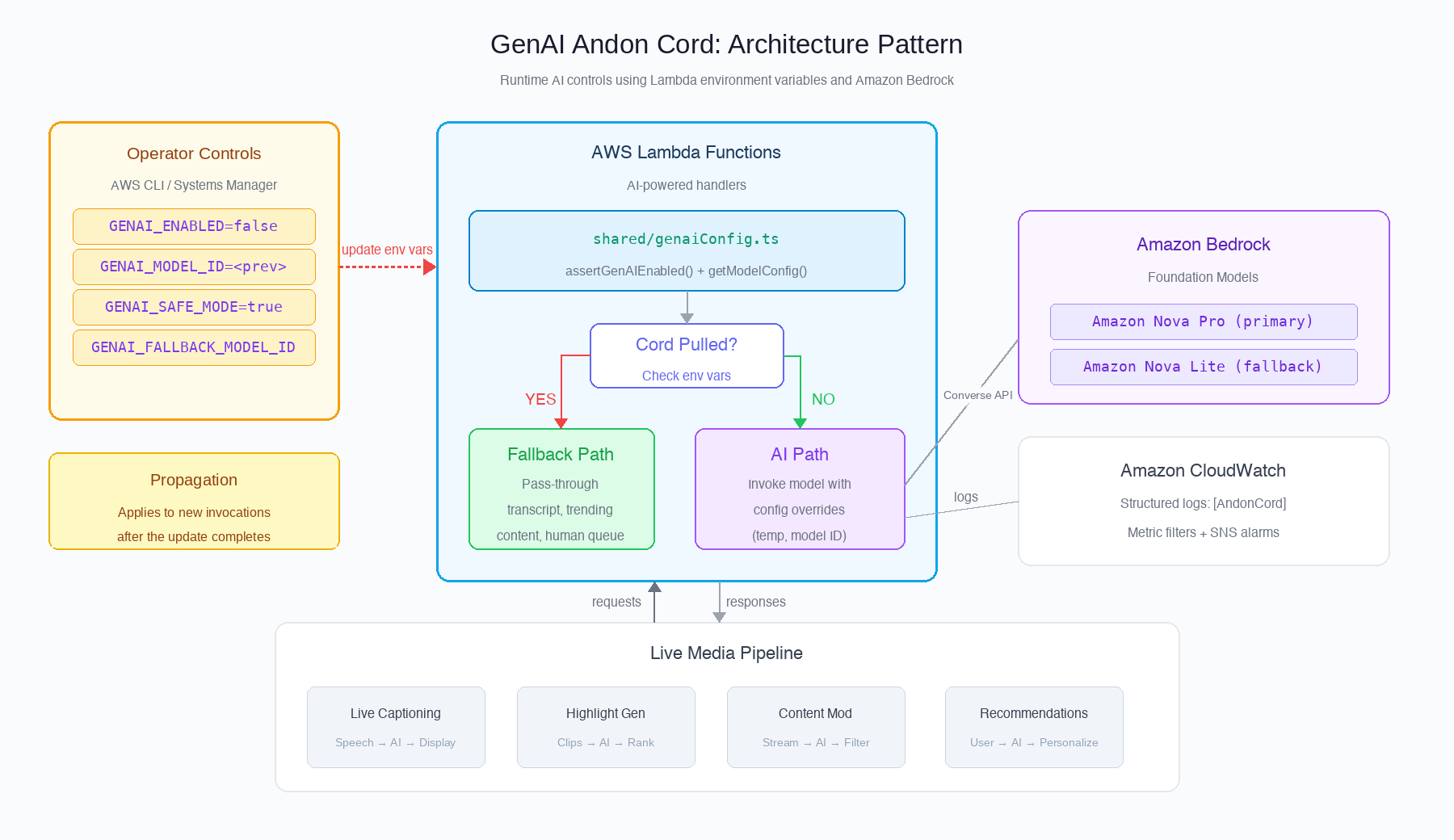
Figure 1: Generative AI Andon Cord architecture showing operator controls, Lambda runtime checks, and graceful fallback paths
| Control | Environment variable | Effect |
| Kill switch | GENAI_ENABLED=false |
AI features return graceful fallbacks |
| Model rollback | GENAI_MODEL_ID=<previous-version> |
Override the model for Lambda functions in the deployment |
| Automatic retry | GENAI_FALLBACK_MODEL_ID=<backup> |
Retry with a backup model on failure |
| Safe mode | GENAI_SAFE_MODE=true |
Cap inference temperature at 0.3 |
A shared configuration module enforces these controls at the top of each AI-powered Lambda handler. The application continues to function. Viewers still see the broadcast and the platform still serves content, while AI-powered features degrade gracefully to deterministic fallbacks.
This post uses environment variables because they add no new service and no extra call in the request path. If you manage many functions, or you need validation and staged rollout of changes, AWS AppConfig feature flags provide the same runtime switches as a managed service. Lambda functions can read them through the AWS AppConfig Agent Lambda extension. The handler logic stays the same. Only the source of the switch values changes.
Prerequisites
To implement this pattern, you need:
- An AWS account with permissions to create and update Lambda functions.
- Amazon Bedrock model access enabled for Amazon Nova models in your Region.
- AWS Command Line Interface (AWS CLI) v2 installed and configured with appropriate AWS Identity and Access Management (IAM) credentials.
- IAM permissions:
lambda:UpdateFunctionConfiguration,bedrock:InvokeModel.
How the pattern works
The pattern has four building blocks. The following sections describe each one so that you can adapt it to your own Lambda-based media pipeline.
The shared Andon Cord module
Each AI-powered Lambda function imports a shared configuration module. This module provides two core functions:
- A kill switch check: reads the
GENAI_ENABLEDenvironment variable and throws a typed error if it is set tofalse. This stops AI processing for that invocation and allows the handler’s catch block to return a graceful fallback. - A model configuration resolver: reads
GENAI_MODEL_ID,GENAI_SAFE_MODE, andGENAI_FALLBACK_MODEL_IDto determine the effective model ID and inference temperature. When safe mode is active, it caps the temperature at 0.3 to produce more deterministic outputs with lower variability. The default configuration uses Amazon Nova Pro as the primary model with Amazon Nova Lite as the fallback.
Both functions emit structured log messages with a consistent prefix (for example, [AndonCord]) so you can filter and alert on activations in Amazon CloudWatch.
Handler integration
Each AI-powered handler calls the kill switch check at the top of its execution. Figure 2 shows the decision flow for each invocation:
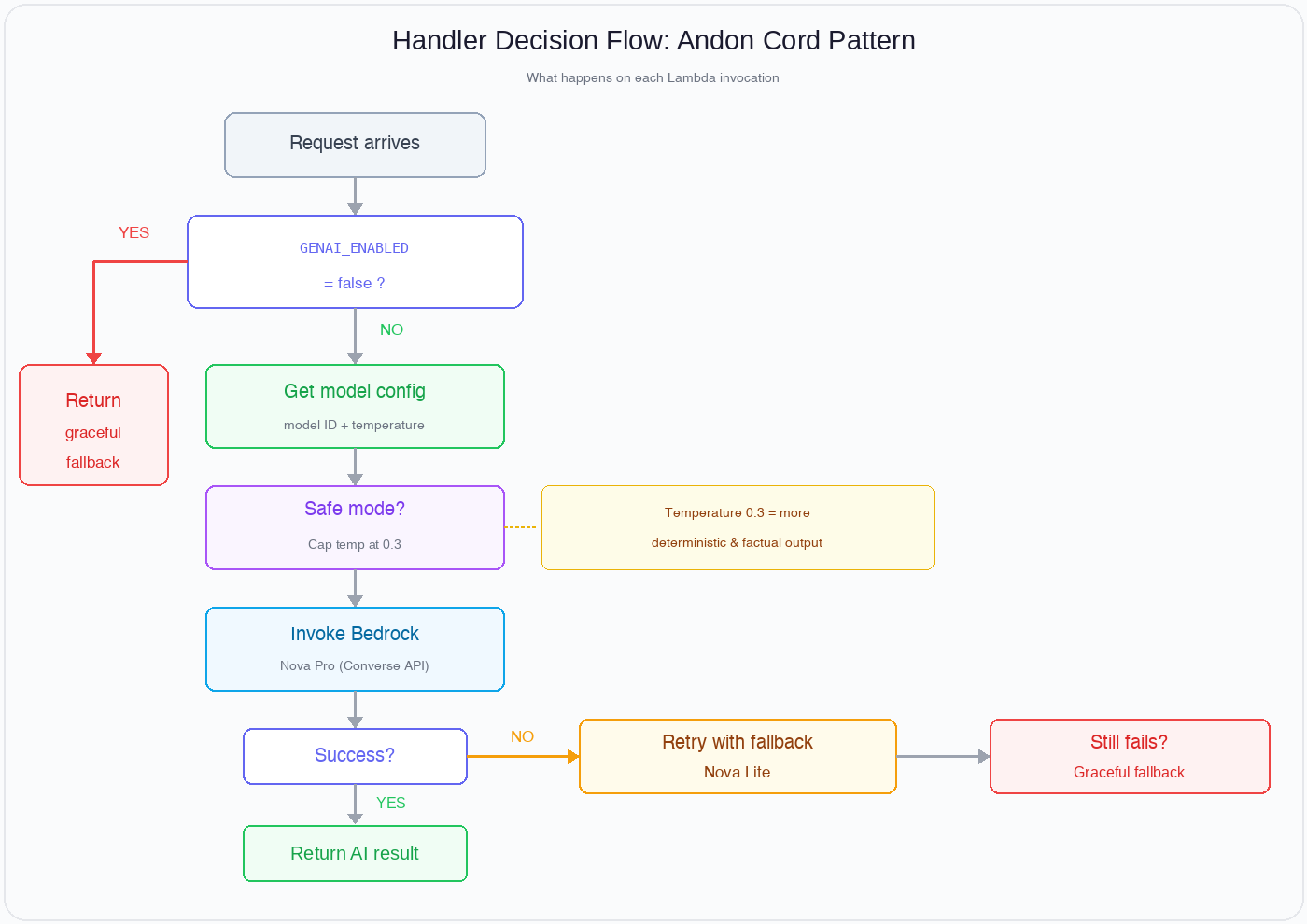
Figure 2: Handler decision flow for each Lambda invocation
The integration follows this flow:
- Call the kill switch check (
assertGenAIEnabled). - If enabled, retrieve the model configuration (model ID, temperature, fallback model).
- Invoke Amazon Bedrock using the Converse API with the resolved settings.
- If the invocation fails and a fallback model is configured, retry with the backup model.
- If the kill switch is active, catch the typed error and return the graceful fallback.
For example, a content tagging handler would return basic category metadata derived from existing structured data instead of AI-generated rich descriptions. The downstream system still receives valid tags, without AI-powered semantic enrichment.
Graceful fallbacks
Define a meaningful fallback for each AI feature that keeps the application functional:
| AI feature | Fallback behavior |
| Content tagging / metadata | Return structured metadata from existing sources without AI enrichment |
| Highlight ranking | Show chronological clips without AI-ranked relevance scoring |
| Content moderation | Queue content for human review instead of auto-approving |
| Personalized recommendations | Show trending/popular content instead of personalized picks |
The key principle: The application continues to function. It degrades gracefully to a non-AI path that still serves the user.
Operational procedures
When an operator needs to pull the cord, they use the AWS CLI or AWS Systems Manager to update the relevant environment variable on the Lambda function:
- Identify the affected Lambda function(s).
- Use the
update-function-configurationCLI command to set the appropriate environment variable (for example,GENAI_ENABLED=false). - Verify the change took effect by checking CloudWatch for the
[AndonCord]log prefix. - For multi-function deployments, use a Systems Manager Automation runbook or a script to update all affected functions in one action.
Monitoring and observability
Andon Cord activations are logged to Amazon CloudWatch with a structured prefix. The shared module emits log lines such as “GenAI functionality is DISABLED”, “Model override active,” and “Safe mode active” whenever a control is engaged.
Create a CloudWatch metric filter on this prefix to track activations over time, and set up an Amazon Simple Notification Service (Amazon SNS) alarm to notify the operations team when someone pulls the cord. This gives the team visibility and consistent alerting during live events.
When to use each control
The following table maps common live-event scenarios to the control to use and how to recover.
| Scenario | Action | Recovery |
| AI producing unexpected outputs during broadcast | Set GENAI_ENABLED=false |
Investigate root cause, validate fix, re-enable |
| Model version causing quality regression | Set GENAI_MODEL_ID to previous version |
Test new version offline, update when ready |
| Model provider experiencing intermittent failures | Set GENAI_FALLBACK_MODEL_ID to backup |
Monitor until primary stabilizes |
| High-profile live event with low risk tolerance | Set GENAI_SAFE_MODE=true |
Disable after event concludes |
Key takeaways
- Build the kill switch before you need it. The Andon Cord pattern is quick to implement and can help you respond to incidents that unfold in seconds.
- Design fallbacks for each AI feature. The application must keep working when AI is disabled. Before you ship, define what working without AI means for each feature.
- Pick the right place to store the switches. Environment variables are a lightweight option for a small number of functions. Move to AWS AppConfig feature flags when you need validation, staged rollout, or fleet-wide control.
- Log activations consistently. Structured logging with a consistent prefix lets you audit when and why someone pulled the cord.
- Practice pulling the cord. Include Andon Cord activation in your runbooks and game days. The first time you use it shouldn’t be during a real incident.
Conclusion
In this post, I showed how to implement a generative AI Andon Cord pattern for live media workflows using Lambda environment variables and Amazon Bedrock. With the pattern, you can disable, roll back, or constrain AI behavior quickly, without a deployment. That speed matters for live broadcasts and real-time media pipelines, where audiences see AI failures immediately.
The implementation is lightweight (a single shared module), the controls take effect without a deployment, and the fallbacks are designed to keep your application functional. For media and entertainment (M&E) workloads using generative AI in a live or near real-time pipeline, I recommend building this pattern in from day one.
To learn more about building responsible AI applications, see Create your guardrail in the Amazon Bedrock User Guide. For operational best practices with Lambda, see Managing Lambda function environment variables. Contact an AWS Representative to discuss how we can help build resilient AI pipelines for your media workloads.
Further reading
- Amazon Nova on Amazon Bedrock
- Amazon Bedrock Guardrails
- Lambda environment variables
- AWS Well-Architected Framework: Reliability pillar
- AWS responsible AI
- AWS Systems Manager Automation