AWS for M&E Blog
Introducing File Mover Express: Open source, high-performance file transfer to Amazon S3 for media workflows
Media production teams routinely move terabytes of assets between on-premises storage and the cloud. Whether it’s a digital imaging technician (DIT) offloading camera cards on set, a postproduction facility feeding an archive, a content creator pushing dailies for review, or the production operations and pipeline engineers who keep all of that running, these workflows share a common set of challenges: transfers are large, deadlines are tight, and the person who starts a transfer is often not the person, or the machine, that finishes it. Traditional transfer clients tie the transfer to a desktop session, so a closed laptop lid or an expired session can mean hours of lost progress. Commercial alternatives solve some of these problems, but often at the cost of per-seat licensing, proprietary protocols, or routing your content through third-party infrastructure.
Today, we’re announcing File Mover Express, an open source, high-performance file transfer application that accelerates media asset workflows between local systems and Amazon Simple Storage Service (Amazon S3). File Mover Express is available now on GitHub under the Apache 2.0 license, with pre-built packages for macOS, Windows, and Linux.
In this post, we introduce File Mover Express, explain the value it delivers for media workflows, and show you how to get started with your first transfer.
Solution overview
At the core of File Mover Express is a daemon-based transfer engine that decouples transfers from your desktop session. The daemon can run on the machine of your choice, whether that is your workstation, a server in the data center, or an Amazon Elastic Compute Cloud (Amazon EC2) instance, while you control it from a drag-and-drop graphical user interface (GUI) or a scriptable command line interface (CLI) over an encrypted, password-protected connection. You can start a transfer from your laptop on set, disconnect, and check on its progress from the facility later. The daemon continues the work. File Mover Express also provides an optional downloadable Model Context Protocol (MCP) server, so you can manage transfers conversationally through an AI assistant such as Claude Desktop, Kiro, or Cursor.
Transfers go directly to Amazon S3 using built-in S3 APIs, with no intermediary servers, no relay infrastructure, and no third-party services in the data path. Large files are automatically split into chunks and uploaded in parallel using multipart upload. Transfer autotuning dynamically adjusts the number of parallel streams and the chunk size to optimize transfer speed for your connection, so you get high throughput without manual tuning. Transfers also support configurable retries and the ability to pause and resume at the file level. Transfers work in both directions: the same engine that uploads camera originals can pull footage back down from Amazon S3 for conform, review, or restore. File Mover Express runs everywhere your pipeline does, including headless Linux servers, and works with the AWS Regions where Amazon S3 is available.
Why File Mover Express
Those built-in capabilities add up to more than a feature list. They change what media teams can count on when moving assets to the cloud. File Mover Express is built around the realities of production work: unattended transfers that finish on their own, integrity you can prove frame by frame, direct to Amazon S3 economics with no lock-in, security that fits how you already run AWS, and a single engine that meets everyone on the team where they work. Here’s what that means in practice.
Get your time back with transfers that finish without you
The most expensive part of a slow transfer is rarely the bandwidth. It’s the person waiting on it. Because autotuning keeps the available connection fully utilized and the daemon keeps running after you disconnect, transfers finish on the network’s schedule instead of yours. An interrupted overnight ingest resumes from the last completed file rather than restarting the whole batch, and transient network failures are retried automatically instead of waking someone up.
Hot folders extend this further: point File Mover Express at a folder and it automatically uploads anything new that appears. A DIT can offload camera cards into a hot folder and walk away. Footage flows to Amazon S3 with no manual step, turning camera-to-cloud from a job someone does into something that happens on its own.
Fully using the connection doesn’t have to mean monopolizing it. With bandwidth throttling, you can set a target bandwidth cap (in MB/s) so a large overnight archive push shares a facility connection with video calls and remote editing sessions instead of competing with them.
Trust in every frame: Verification built for media
Media workflows depend on a verifiable chain of custody because an unverified transfer is a liability, not a backup. File Mover Express includes optional checksumming with XXH3 for speed, plus XXHash, XXHash64, and MD5 for workflows that require them. It also reads Media Hash List (MHL) files, the industry-standard manifest format for camera originals, so integrity can be confirmed continually from card to bucket. When the footage lands in Amazon S3, you can prove it’s bit-for-bit what came off the camera.
Lower cost and no lock-in: Direct to Amazon S3, open source, and standard formats
File Mover Express transfers data directly between your systems and your S3 buckets. There are no per-seat licenses, no subscription fees, and no third-party relay servers adding cost or latency. You pay only for the AWS resources you already use. Because content lands in Amazon S3 as standard objects, it’s immediately available to the rest of your pipeline: AWS media services for processing or tools that speak the S3 API. You can also upload directly to the Amazon S3 storage class of your choice, so archive footage can go straight to Amazon S3 Glacier storage classes and get archive storage pricing immediately, with no lifecycle transition step.
For archivists and media asset managers, built-in Amazon S3 inventory generation produces detailed reports of bucket contents, so you always know what’s in the archive. Your assets aren’t held in a proprietary format or a third party’s cloud.
The application itself is Apache 2.0 licensed and developed in the open. You can audit the code that handles your content, build it yourself, extend it to fit your pipeline, and contribute improvements back. For studio IT and security teams evaluating tools against content-security requirements, an open codebase and a data path with no third-party services in it make the review straightforward: there’s no black box between your storage and your bucket. That is a level of transparency and control that closed transfer tools can’t offer.
Security aligned with how you already run AWS
File Mover Express provides security features including file encryption in flight, file encryption at rest, and encryption for the control plane. All transfers use HTTPS, and access to your S3 buckets is governed by AWS Identity and Access Management (IAM) with a documented minimum-permission policy. That means the same credentials, policies, and audit story you use for the rest of your AWS environment, with no separate account system to manage. For teams that centralize identity, File Mover Express supports single sign-on through OpenID Connect (OIDC), so users authenticate with your existing identity provider and assume a scoped IAM role, with no long-lived credentials on the workstation.
File Mover Express also works with Amazon S3 server-side encryption, including SSE-S3 and SSE-KMS with customer managed AWS Key Management Service (AWS KMS) keys, so content is protected at rest under your key policy.
Remote daemon connections require TLS, which can’t be disabled, and are protected by a pre-shared key that isn’t stored in plain text. macOS builds are signed and notarized with the Amazon Apple Developer ID, and Windows installers are Authenticode signed, so your team installs verified software without operating system security warnings.
One engine, three ways to drive it
File Mover Express meets each member of the team where they work. Artists and DITs get a drag-and-drop GUI. Pipeline developers and operations engineers get a full CLI for scripting, automation, and headless server deployments, so File Mover Express can slot into existing media asset management and orchestration workflows rather than replace them. And through the built-in MCP server, anyone with an MCP compatible AI assistant can manage transfers conversationally:
- “Upload everything in
/Volumes/Media/DailyRushesto my production profile.” - “List my active transfers and pause the one going to the archive bucket.”
- “Browse my S3 bucket and download the footage from last Tuesday.”
All three interfaces connect to the same daemon, so there’s no duplicate transfer logic to maintain. After a short one-time setup, transfer profiles, checksums, hot folders, and tuning settings work identically whether the request comes from a mouse, a script, or a sentence. The daemon even watches its configuration file and applies changes automatically, with no restart required. For teams adopting AI assistants in their pipelines, this helps to standardize their AI-based infrastructure for file movement workflows.
Getting started
To start transferring files with File Mover Express, complete the following steps:
- Set up AWS – Create an S3 bucket, apply the minimum IAM policy, and configure your credentials using the AWS Command Line Interface (AWS CLI) with
aws configureor sign in through your identity provider if your team uses single sign-on. - Install File Mover Express – Download the pre-built package for your platform from the File Mover Express page or the Releases page on GitHub and install it.
- Configure a destination – Launch File Mover Express and add a Remote Configuration (a saved transfer profile) pointing to your S3 bucket.
- Start transferring – Drag files into the GUI, script transfers with the CLI, or ask your AI assistant.
The following screenshot shows the File Mover Express interface.
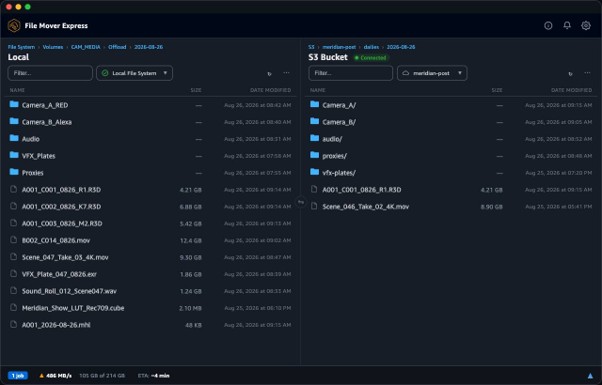
Figure 1: File Mover Express GUI handling a live transfer of a camera upload, with a running throughput and ETA summary
For a complete walkthrough of your first transfer, see the Getting Started guide. Dedicated guides are available for the GUI, the CLI, and the MCP server.
Conclusion
In this post, we introduced File Mover Express, an open source, high-performance file transfer application for media workflows built on Amazon S3. By decoupling transfers from the desktop session, automating ingest with hot folders, verifying integrity with MHL-aware checksumming, and offering GUI, CLI, and AI assistant interfaces over a single engine, File Mover Express helps media teams move large assets to the cloud faster, more reliably, and at lower cost, without giving up control of their content or their tooling.
File Mover Express is developed in the open under the Apache 2.0 license, and contributions are welcome. See the contributing guidelines and Development guide to get involved.
To learn more and get started today, visit the File Mover Express page, access the code on GitHub, or download File Mover Express from the Releases page.