Migration & Modernization
Automate MAP Tagging at Scale with Amazon Nova and AWS Serverless
Learn how to automate AWS MAP tagging at scale using Amazon Nova and serverless architecture. Deploy a self-service solution that generates correct tag values, CLI commands, and discovers untagged resources in ~5–8 minutes. | 31 August 2026 | Amazon Bedrock, AWS Lambda, AWS CloudFormation, Migration Acceleration Program (MAP), Generative AI.
Introduction
MAP tagging determines whether your migration earns credits. The AWS Migration Acceleration Program (MAP) provides methodology, tools, and financial investments, but realizing credits requires every migrated resource to carry a correctly formatted map-migrated tag. The tag value encodes your MPE ID, credit program, and source environment across 9 distinct patterns (for example, migF7TZW2LR76 for general migration). Teams apply incorrect prefixes, miss post-migration resources, or spend significant time on service-specific CLI or Terraform syntax.
To address this, this post presents a serverless solution using Amazon Bedrock (Amazon Nova Pro), AWS Lambda, Amazon Cognito, and AWS Config. It guides you through deploying a MAP tagging engine that infers the correct tag value from natural language, generates CLI and Terraform commands for 55+ MAP-eligible services. The engine also discovers untagged resources, all via a single CloudFormation template deployed in 5–8 minutes.
Solution overview
This diagram shows the solution architecture.
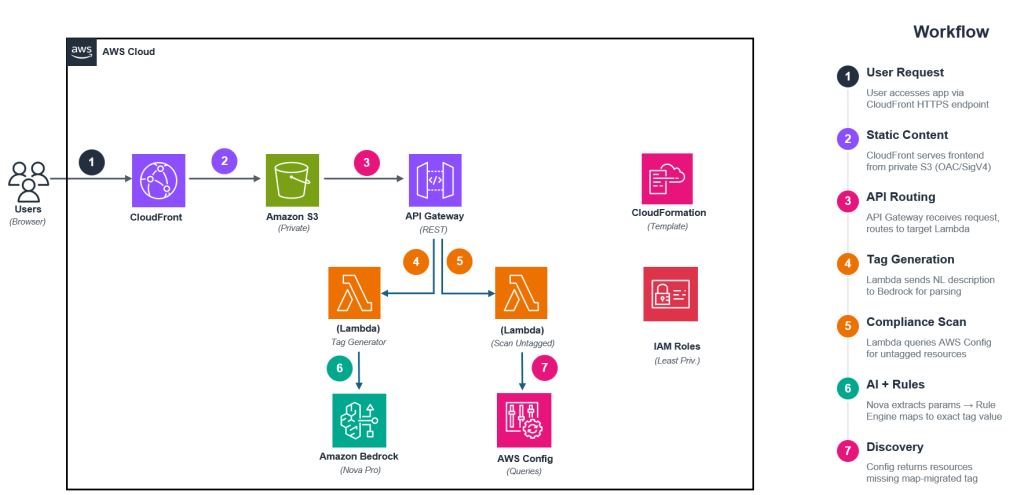
Figure 1: MAP Tag Generator — Solution Architecture
This architecture workflow includes these steps:
- A user accesses the application via Amazon CloudFront (HTTPS). CloudFront serves the static frontend from a private Amazon S3 bucket using Origin Access Control (OAC).
- The user authenticates via Amazon Cognito (hosted UI). Only admin-created users can access the application (self-registration is disabled).
- The user enters their MPE ID and describes their migration in natural language. Alternatively, they use the guided Wizard Mode to select services directly.
- The frontend sends a POST to Amazon API Gateway (/generate endpoint), which invokes the Tag Generator Lambda. The Cognito authorizer validates the JWT token before processing.
- The Lambda calls Amazon Bedrock (Amazon Nova Pro) to extract the credit program, source environment, and MPE ID as structured JSON. The model never generates the tag value itself.
- A deterministic rule engine maps the extracted parameters to the correct tag value (nine patterns). This two-phase approach reduces hallucination risk.
- The Lambda returns the tag value with ready-to-run AWS CLI and Terraform commands for all selected services.
- For compliance scanning, the Scan Untagged Lambda (/scan-untagged endpoint) queries AWS Config to find resources missing the map-migrated tag created after the MAP start date. Cross-account scanning is supported via sts:AssumeRole.
This table shows the 9 tag value patterns:
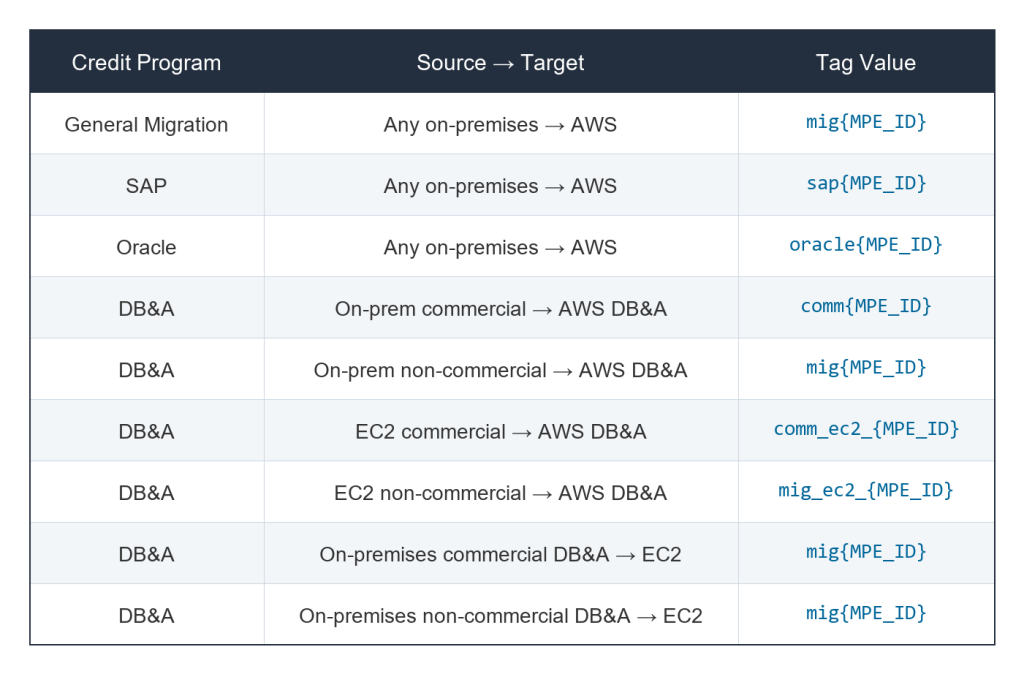
For the complete and current list of MAP tag value patterns, see the MAP tagging documentation
Prerequisites
To deploy this solution, you need:
- An active AWS account
- IAM permissions to create named IAM roles (you must check the “I acknowledge that AWS CloudFormation might create IAM resources with custom names” box during deployment)
- AWS Config recording enabled in your target Region (required for the scanner feature)
- Your MAP MPE ID (needed to generate tags after deployment, not during deployment)
- A valid email address for the initial admin user (Amazon Cognito will send a temporary password)
- Cost awareness: Deploying this solution incurs charges for CloudFront, S3, API Gateway, Lambda invocations, Amazon Bedrock (Nova Pro), Amazon Cognito, AWS KMS, and Config queries. Estimated cost: less than $10/month for typical usage (~500 generations, ~50 scans/month).
Note: Amazon Nova Pro model access is enabled automatically during deployment. You only need to activate manually if your account has SCPs blocking Bedrock agreement APIs.
Deployment guide
Deploy the solution in any AWS account. For cross-account scanning, deploy a companion scanner role template in each target account.
Deploy via Console
Create the CloudFormation stack
To create the stack:
- Download map-tagging-app-standalone.yaml from the GitHub repository.
- Open the AWS CloudFormation console and choose Create stack > With new resources.
- Select Upload a template file, choose the downloaded .yaml file, and choose Next.
- For Stack name, enter map-tag-generator.
- For AppName, keep the default value.
- For BootstrapAdminEmail, enter the email address for the initial admin user.
- Choose Next.
- On the Review page, acknowledge IAM resource creation.
- Choose Submit.
- Wait for CREATE_COMPLETE (~5–8 minutes).
Verify deployment and sign in
- Copy the FrontendUrl from the Outputs tab.
- Open the FrontendUrl in your browser.
- Sign in with the email address you provided. Check your inbox for a temporary password from Amazon Cognito.
- Set a permanent password when prompted.
- Verify the MAP Tag Generator interface loads successfully.
To deploy using CloudShell
Step 1 — Download the template
Download map-tagging-app-standalone.yaml from the GitHub repository.
Step 2 — Upload the template to AWS CloudShell
Open AWS CloudShell in your target Region, then choose Actions → Upload file and select the downloaded map-tagging-app-standalone.yaml file.
Step 3 — Set variables, create the bucket, and deploy
Copy the entire block below and paste it into CloudShell. When prompted, enter your admin email address and press Enter. The script uses your configured AWS CLI region (defaults to us-east-1). Verify Amazon Nova Pro availability in your preferred region via the Amazon Bedrock console.
AWS_REGION=$(aws configure get region 2>/dev/null || echo "us-east-1")
STACK_NAME=map-tag-generator
DEPLOYMENT_BUCKET_NAME=map-tag-deploy-$(aws sts get-caller-identity --query Account --output text)
read -p "Enter admin email: " ADMIN_EMAIL && \
aws s3 mb s3://${DEPLOYMENT_BUCKET_NAME} --region ${AWS_REGION} && \
aws s3 cp map-tagging-app-standalone.yaml s3://${DEPLOYMENT_BUCKET_NAME}/map-tagging-app-standalone.yaml && \
aws cloudformation deploy --template-file map-tagging-app-standalone.yaml --stack-name ${STACK_NAME} --capabilities CAPABILITY_NAMED_IAM --s3-bucket ${DEPLOYMENT_BUCKET_NAME} --region ${AWS_REGION} --parameter-overrides BootstrapAdminEmail=${ADMIN_EMAIL}
Step 4 — Retrieve the application URL
Wait for the deployment to complete (~5–8 minutes), then retrieve the application URL:
aws cloudformation describe-stacks --stack-name ${STACK_NAME} --region ${AWS_REGION} --query "Stacks[0].Outputs[?OutputKey=='FrontendUrl'].OutputValue" --output textFor full variable details, see the repository README.
Security
This solution implements these security controls:
- Authentication: Amazon Cognito user pool with admin-only user creation (no self-registration). Passwords require 12+ characters with uppercase, lowercase, numbers, and symbols. Temporary passwords expire after 7 days.
- API protection: Amazon API Gateway Cognito authorizer validates JWT tokens on all protected endpoints. A usage plan enforces rate limiting (20 requests/second, burst 50).
- Encryption at rest: S3 buckets use AES-256 server-side encryption. An AWS Key Management Service (AWS KMS) customer-managed key encrypts Amazon CloudWatch Logs with automatic annual rotation. The Amazon SQS dead-letter queue uses Amazon SQS-managed SSE.
- Encryption in transit: CloudFront enforces HTTPS (redirect-to-https) with TLS 1.2 minimum protocol version. S3 bucket policies deny all non-HTTPS requests.
- Access logging: CloudFront access logs, S3 access logs (90-day lifecycle), and API Gateway access logs (request ID, source IP, timestamp, method, path, status) are stored with KMS encryption.
- Error handling: Lambda functions use an Amazon Simple Queue Service (Amazon SQS) dead-letter queue for failed invocations.
- Least privilege: Each Lambda function has its own IAM role with a dedicated managed policy. Permissions include: bedrock:InvokeModel (specific model ARN), config:SelectResourceConfig (region/account scoped), sts:AssumeRole (scoped to map-tag-scanner-read-role for cross-account scanning). No IAM modification or administrative permissions are granted.
- No credential handling: The application never accepts, stores, or transmits IAM access keys. Cross-account scanning uses temporary STS credentials via AssumeRole (15-minute duration).
AI safety controls
The solution implements a two-phase architecture to prevent hallucination:
- Phase 1 (AI extraction): Amazon Nova Pro extracts structured parameters (MPE ID, credit program, services, output format) from natural language. The prompt instructs the model to output only JSON, never tag values or commands directly.
- Phase 2 (Deterministic generation): A rule engine maps extracted parameters to the correct tag value using a predefined lookup table. The engine generates commands from verified, per-service templates.
The rule engine validates model output against the lookup table before returning any result. The system rejects invalid or unexpected model responses and shows an error rather than incorrect tag values.
AI opt-out: AWS Bedrock with on-demand inference does not use customer inputs or outputs for model training. For additional assurance, apply an AI services opt-out policy in AWS Organizations. See AI services opt-out policies.
Using the tag generator
Interaction modes
When you enter your MPE ID and credit program in the form, then open the chat panel, the application offers two modes:
Wizard Mode: A guided, click-through experience with no AI interaction required:
- Select AWS services from categorized pill buttons (Compute, Storage, Database, AI/ML, Networking, Analytics, etc.).
- Choose your output format (AWS CLI or Terraform).
- Receive generated commands instantly.
Wizard Mode uses client-side logic only. No Amazon Bedrock API calls are made, resulting in instant response times and zero cost per generation.
Conversational Mode: A natural-language chat powered by Amazon Nova Pro:
- Describe your migration.
- The AI extracts your intent and asks clarifying questions one at a time.
- Format selection buttons (AWS CLI / Terraform) appear automatically when ready.
- For DB&A programs, source and destination pill buttons appear for selection.
- The engine generates commands when all details are confirmed.
Both modes support:
- Service deduplication across multiple generations in the same session.
- Conversation summary with PDF export.
- “Tag more services” continuation without re-entering MPE ID or credit program.
- Context persistence: the chat is designed to avoid re-asking for information you have already provided.
Generating tags
- Enter your MPE ID (10 uppercase alphanumeric characters).
- Select your Credit Program (General Migration, SAP, Oracle, or DB&A).
- For DB&A: select the source and destination from the dropdown menus.
- Open the Chat panel and choose your mode (Figure 2):
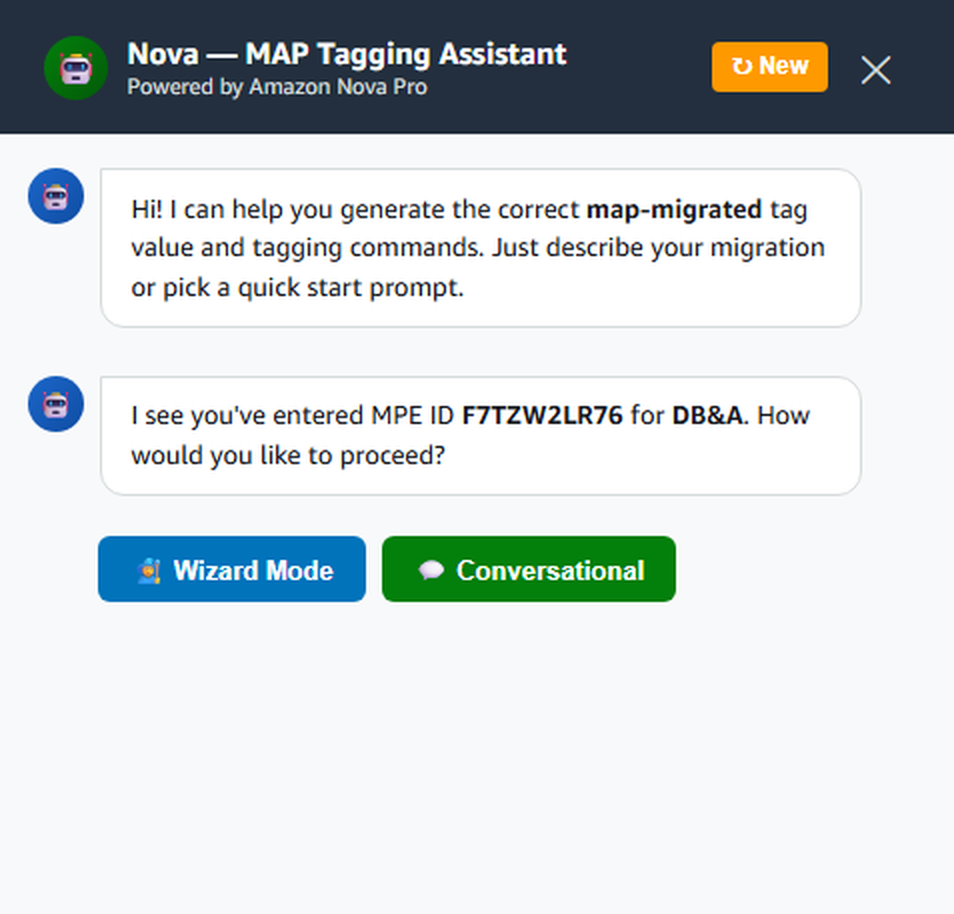
Figure 2: MAP Tag Generator chat interface with Wizard and Conversational mode options
These examples show how natural-language descriptions map to tag values:
Prompt: Tag my EC2 and RDS for General Migration with MPE F7TZW2LR76
Expected results as shown in Figure 3:
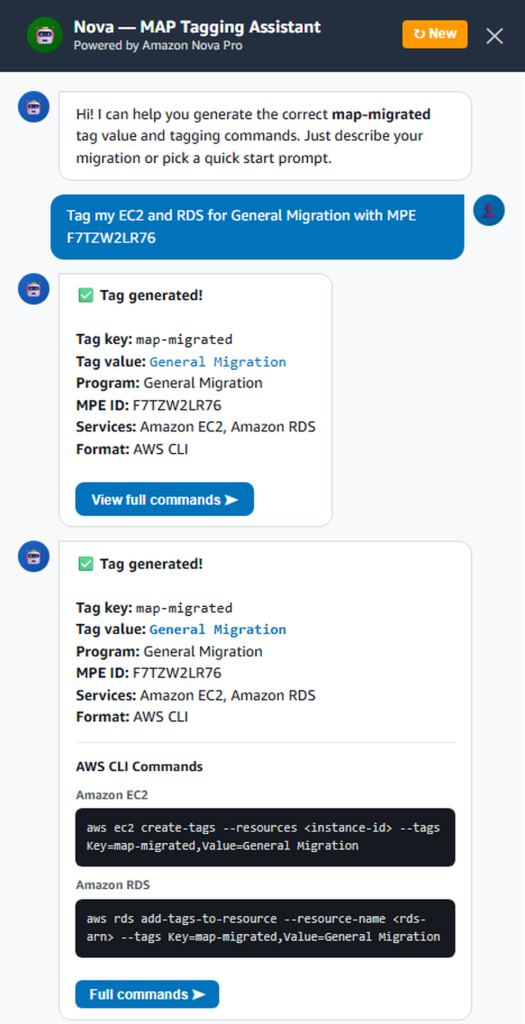
Figure 3: Generated AWS CLI and Terraform tagging commands
Tagging Amazon Bedrock workloads
Amazon Bedrock and Amazon Bedrock AgentCore require specialized MAP tagging methods that differ from standard resource tagging. When you select Amazon Bedrock in the service picker, the application reveals a dedicated Bedrock MAP Tagging section that walks you through the correct approach based on your endpoint:
bedrock-runtime / AgentCore (InvokeModel, Converse, AgentCore APIs): choose between these two methods:
A. IAM Principal Tagging (recommended):
Tag the IAM role used for Bedrock API calls with map-migrated. No code changes or additional Bedrock resources needed.
B. Resource Tagging (Application Inference Profiles):
Create an application inference profile, tag it with map-migrated, and invoke models through the profile ARN. This provides per-model and per-region cost granularity.
bedrock-mantle (Responses API, Chat Completions API, Messages API): Use Projects Tagging. Create an Amazon Bedrock project with the map-migrated tag and pass the project ID in your API calls via the OpenAI-Project header.
The section generates ready-to-run commands for your chosen method, pre-filled with your MPE ID. For standard (non-Bedrock) services selected alongside Bedrock, the application generates standard aws tag-resource or Terraform commands as usual.
Important: If both a resource tag and an IAM principal tag are present on a Bedrock workload, the resource tag takes precedence for MAP spend. Choose one method per workload. For the full reference, see Amazon Bedrock MAP Tagging using the AWS CLI.
Using the untagged resource scanner
Same-account scanning (default)
- Navigate to the Explore Un-Tagged Resources section.
- Enter your MAP Agreement Start Date (resources created on or after this date will be checked).
- Choose Scan This Account.
Note: The MAP Agreement Start Date picker prevents future date selection, so only today or past dates are allowed.
The Lambda queries AWS Config in the deploying account using its own execution role. No credentials are needed (Figure 4).
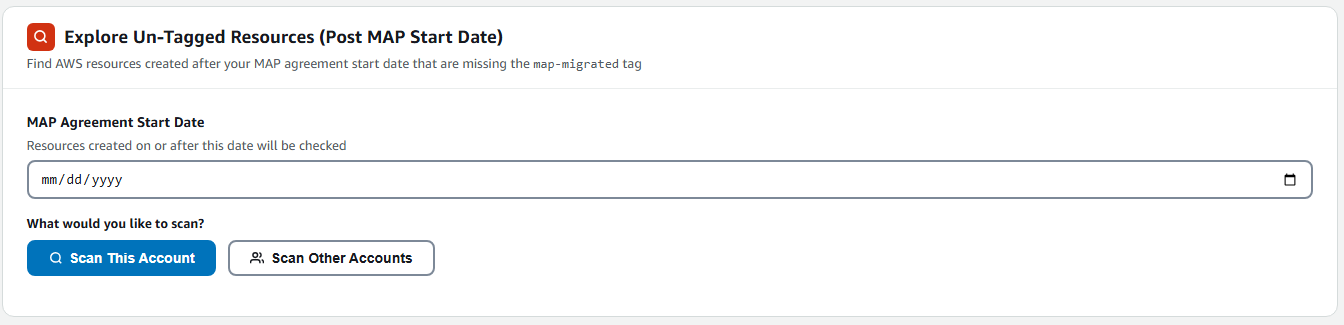
Figure 4: Untagged Resource Scanner interface
Cross-account scanning
To scan resources in other AWS accounts within your organization:
- Choose Scan Other Accounts to reveal the cross-account panel.
- Download the Scanner Role Template (map-tag-scanner-role.yaml).
- Deploy it in each target account via CloudFormation. Provide the Account ID where the MAP Tagging Engine is deployed as the AppAccountId parameter.
- Copy the Role ARN from the target stack’s Outputs tab.
- Paste the Role ARN into the Target Account Role ARN field.
- Choose Scan Remote Account.
The Lambda uses sts:AssumeRole to obtain temporary credentials (15-minute duration) for the target account, then queries AWS Config. No long-lived credentials are stored or transmitted.
Scan results
Results are grouped by MAP service category (Figure 5) (Compute, Storage, Database, Networking, Analytics, etc.):
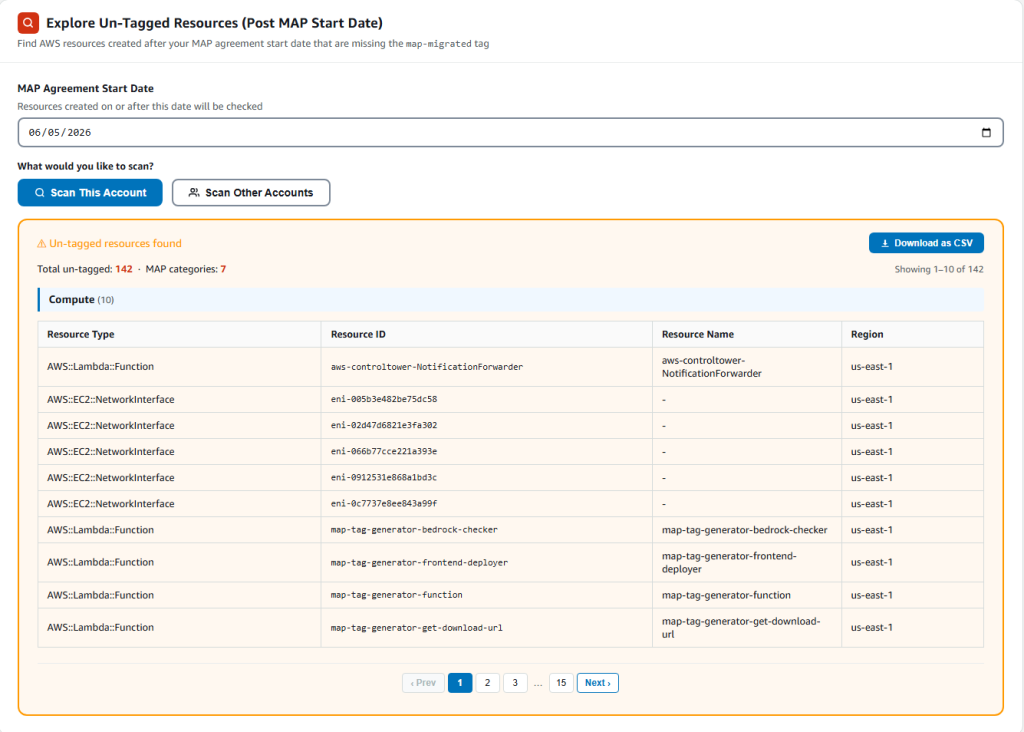
Figure 5: Scan results grouped by MAP service category
- Download results as CSV for remediation tracking
- Feed discovered resources back into the tag generator to produce remediation commands
Governance artifacts
The solution includes downloadable governance policies: a Service Control Policy (SCP), a Tag Policy, and a Scanner Role Template. Each is available from the application interface.
Clean up
Important: These steps permanently remove all resources and data. Save any governance files from S3 before proceeding.
Deleting the CloudFormation stack removes all resources created by this solution. CloudFormation empties S3 buckets automatically before deletion.
- Delete the stack:
aws cloudformation delete-stack --stack-name map-tag-generator - Verify deletion:
aws cloudformation describe-stacks --stack-name map-tag-generator
Expected result: Stack with id map-tag-generator does not exist
If deletion fails, check the Events tab in the CloudFormation console for the blocking resource, resolve it, then retry the delete-stack command.
Conclusion
In this post, you deployed a self-service MAP tagging engine that automates tag value inference. It generates CLI and Terraform commands for 55+ services, and discovers untagged resources across accounts. The single CloudFormation template deploys in under 10 minutes and combines Amazon Nova Pro’s natural-language understanding with deterministic rule-based generation, eliminating manual tag lookup errors while maintaining KMS encryption, Cognito authentication, and API rate limiting. Choose Wizard Mode for instant generation without AI calls, or Conversational Mode for natural-language assistance.
Deploy it and share your feedback. For additional resources:
-
-
- MAP Documentation – AWS Migration Acceleration Program: https://aws.amazon.com/migration-acceleration-program/
- Amazon Bedrock – Amazon Bedrock Product Page: https://aws.amazon.com/bedrock/
- AWS Config Advanced Queries – Querying AWS Resources: https://docs.aws.amazon.com/config/latest/developerguide/querying-AWS-resources.html
- GitHub Repository – sample-map-tagging-generator-engine: https://github.com/aws-samples/sample-map-tagging-generator-engine
- To discuss MAP tagging automation for your organization, contact an AWS Migration specialist: https://aws.amazon.com/contact-us/
-