Microsoft Workloads on AWS
Accelerating the migration of end-of-support applications
Introduction
Migrating your applications to the cloud is tough. In this blog post, we show you how Amazon Web Services (AWS) helps customers modernize applications even when the source code is no longer available. This is a common challenge with end-of-support, legacy, and third-party workloads. Traditional refactoring isn’t an option without source code, leaving these applications stuck on aging platforms with growing security, compliance, and operational risk. We’ll show how AWS supports every pattern of migration, including rehost, replatform, and refactor, so you can modernize on your own terms, even for the applications you can no longer rebuild from the ground up.
Challenges with migrating applications to the cloud
Organizations face several interconnected barriers when migrating applications.
- Skill gaps. The expertise to develop, maintain, and operate traditional applications is diminishing, while migration demands new cloud skills that many organizations lack in-house.
- Technical constraints. Legacy applications are tightly coupled to their underlying OS and infrastructure. Missing source code, unsupported operating systems, and outdated hardware dependencies further slow modernization.
- Modernization complexity. Lift-and-shift can deliver initial savings, but deeper modernization unlocks additional cost and agility benefits. Outdated, monolithic applications only deepen the problem: hard to manage, slow to release, and difficult to adapt.
Faced with these challenges, many organizations fall back on extended support for their legacy operating systems and applications. But this only postpones the inevitable end-of-support deadline, it doesn’t resolve the underlying problem.
How AWS helps customers to overcome these challenges
If you have access to the application’s source code, AWS provides specialized tools and services to accelerate application modernization while eliminating time-consuming manual refactoring bottlenecks.
- AWS Transform uses AI-powered automation to accelerate modernization across discovery, planning, and execution. Through a conversational AI experience, it analyzes your environment, recommends migration strategies, and adjusts plans in real time – speeding up .NET, mainframe, and VMware transformations. As shown in Figure 1, AWS Transform modernizes every layer of the stack, application, database, and deployment, shifting a Windows-based .NET workload to a cloud-native, open-source equivalent.
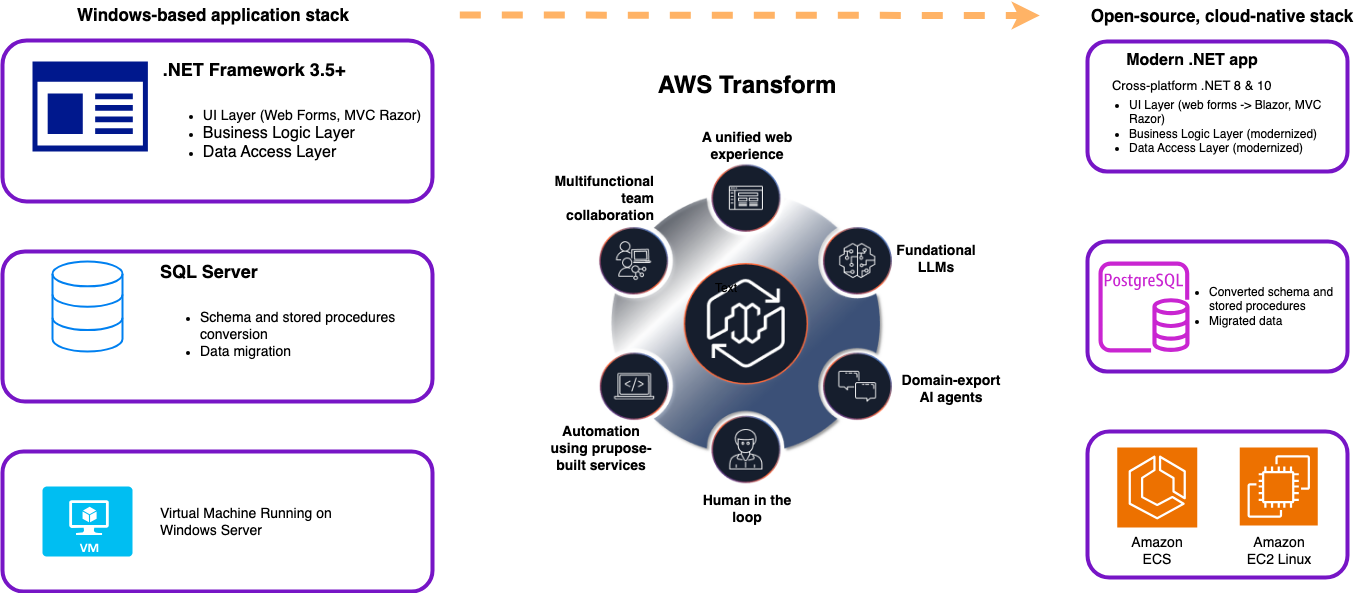
Figure 1. AWS Transform modernizes each layer of the stack – rehosting a .NET Framework application to cross-platform .NET 8 & 10, converting SQL Server to Amazon Aurora PostgreSQL, and moving from Windows Server VMs to Amazon ECS or EC2 Linux
- Containerization (Figure 2) offers another modernization path – repackaging monolithic applications into containers that run on modern cloud infrastructure. This decouples applications from their operating systems and standardizes tooling for monitoring, operations, and software delivery.
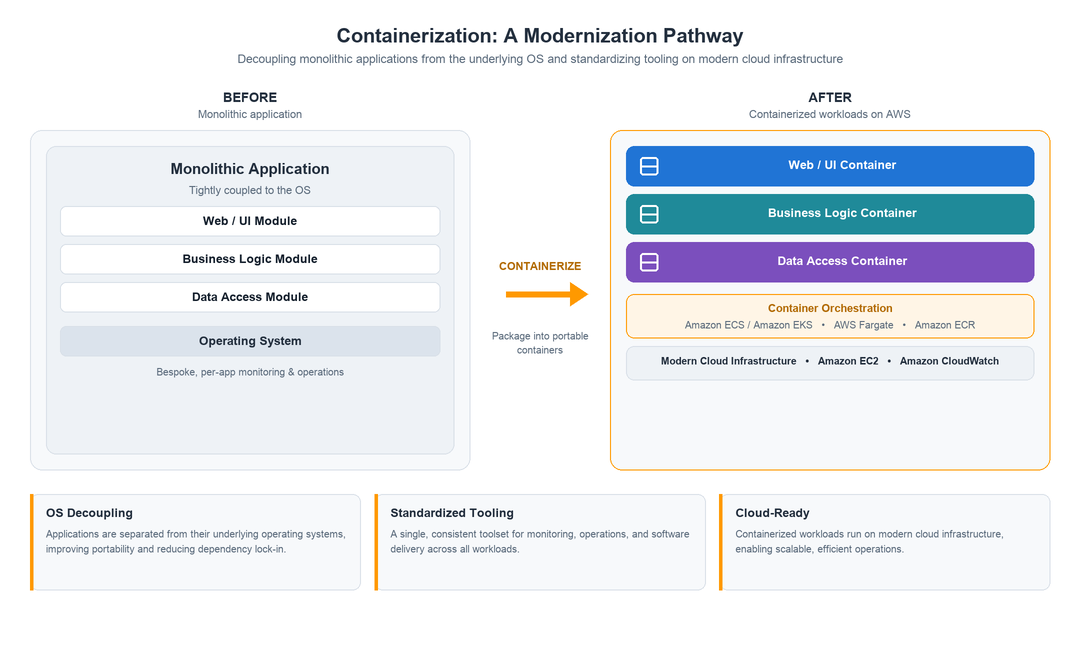 Figure 2. Containerization repackages a monolithic application into portable containers on AWS, decoupling it from the underlying OS and standardizing tooling for monitoring, operations, and software delivery
- Kiro – (Figure 3) supports teams that prefer full refactoring. Kiro is an AI-powered development environment with a familiar Visual Studio Code-like interface that provides autonomous and supervised code generation, speeding up development cycles, and reducing the manual effort of large-scale refactoring.
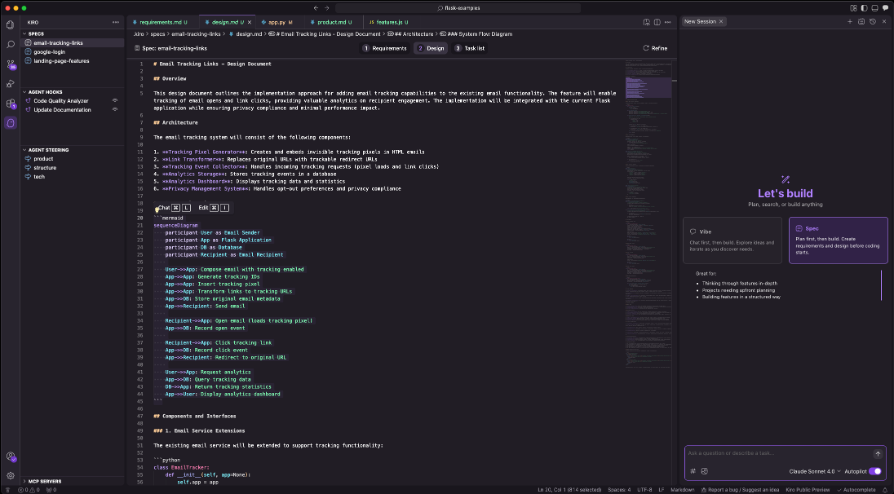
Figure 3. Kiro helps you do your best work by bringing structure to AI coding with spec-driven development.
Together, these tools remove modernization bottlenecks by automating code analysis, transformation, and deployment – letting you adopt cloud-native services without extensive manual refactoring. For applications with source code access, tools like AWS Transform and Kiro accelerate refactoring. But what about applications where source code isn’t available?
For vendor-locked applications where refactoring isn’t feasible, working with our partner Cloudhouse, we can help migrate applications where source code is unavailable, minimizing risk and avoiding invasive changes. This provides a practical path for applications once considered “too hard” or “too risky” to move to the cloud.
Cloudhouse
Cloudhouse is a long-term AWS partner providing solutions to unblock stalled migrations, accelerate modernization, and provide configuration monitoring of an IT estate to reduce risk by validating and auditing change occurring for compliance and ensuring security postures are achieved and maintained.
Cloudhouse offers a portfolio of three products that address different aspects of IT estate management and modernization:
- Guardian – Configuration drift, change validation & compliance – Continuously monitors servers, containers, and endpoints to detect configuration drift, capture compliance evidence (FCA, SOX, DORA), and reconcile against a known-good baseline before misconfigurations cause outages.
- Foundry – Application packaging & modernization at scale – Automates application packaging through Studio (converts legacy VMs to cloud-ready containers) and Flow (streamlines packaging for non-persistent virtual desktops, including Amazon WorkSpaces).
- Alchemy – Legacy OS modernization & app compatibility – Encapsulates legacy Windows applications so they run untouched on modern Windows, AWS, or virtual desktops without any source code changes.
Since our focus is application migration and modernization, we’ll dive deeper into Foundry, the product most directly applicable to modernizing and migrating workloads onto AWS.
A closer look: Foundry Flow
Cloudhouse’s Foundry Flow (Figure 4) has been designed to accelerate modernization projects by packaging applications from their installers and enabling them to be deployed into the latest AWS environments without any need to modify the application code.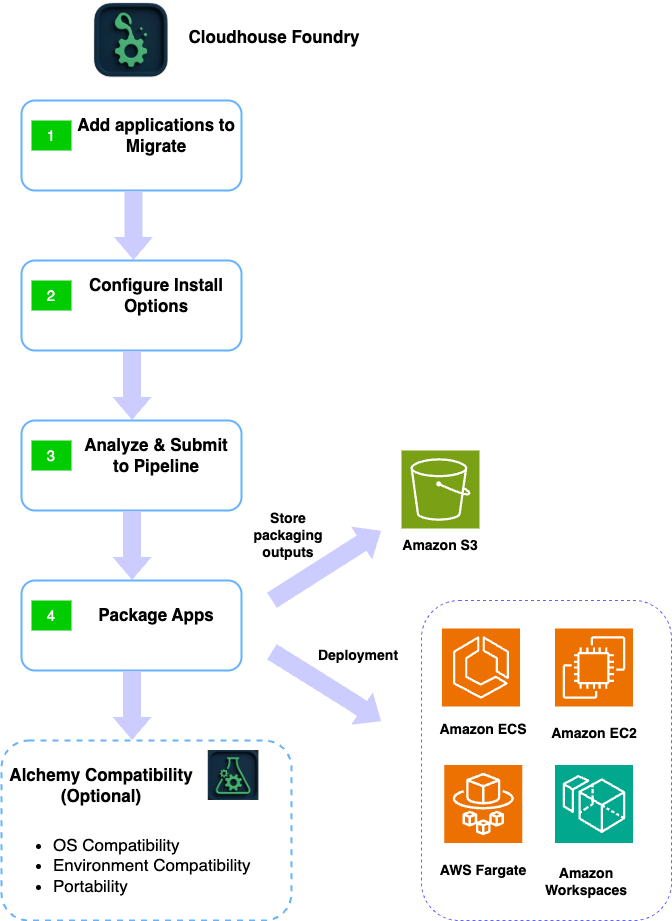
Figure 4. How Foundry’s automated pipeline extracts the artifacts from a monolithic application
Foundry Flow’s automated pipeline follows four stages. First, you add the applications to migrate, sourced from a pre-built catalogue or an uploaded custom installer. Second, Foundry Flow configures install options automatically, discovering silent switches and other install parameters without manual scripting or vendor documentation lookups. Third, it analyzes the package and submits it to the pipeline. Fourth, Foundry Flow packages the application, storing the output in your Amazon Simple Storage Service (Amazon S3) bucket, ready for deployment to Amazon Elastic Container Service (Amazon ECS), Amazon Elastic Compute Cloud (Amazon EC2), AWS Fargate, or Amazon WorkSpaces.
Optionally, customers can complement Foundry Flow with Alchemy Compatibility, checking applications for OS and environment compatibility and making them truly portable, ensuring they continue to deliver business value through future infrastructure modernization.
Figure 5 shows a live packaging run, with each stage, from uploading the installer to shelling down the forge, tracked in real time. In addition, Foundry Flow can create and register the package as an Amazon WorkSpaces application and assign it to an Elastic Fleet ready to be launched.
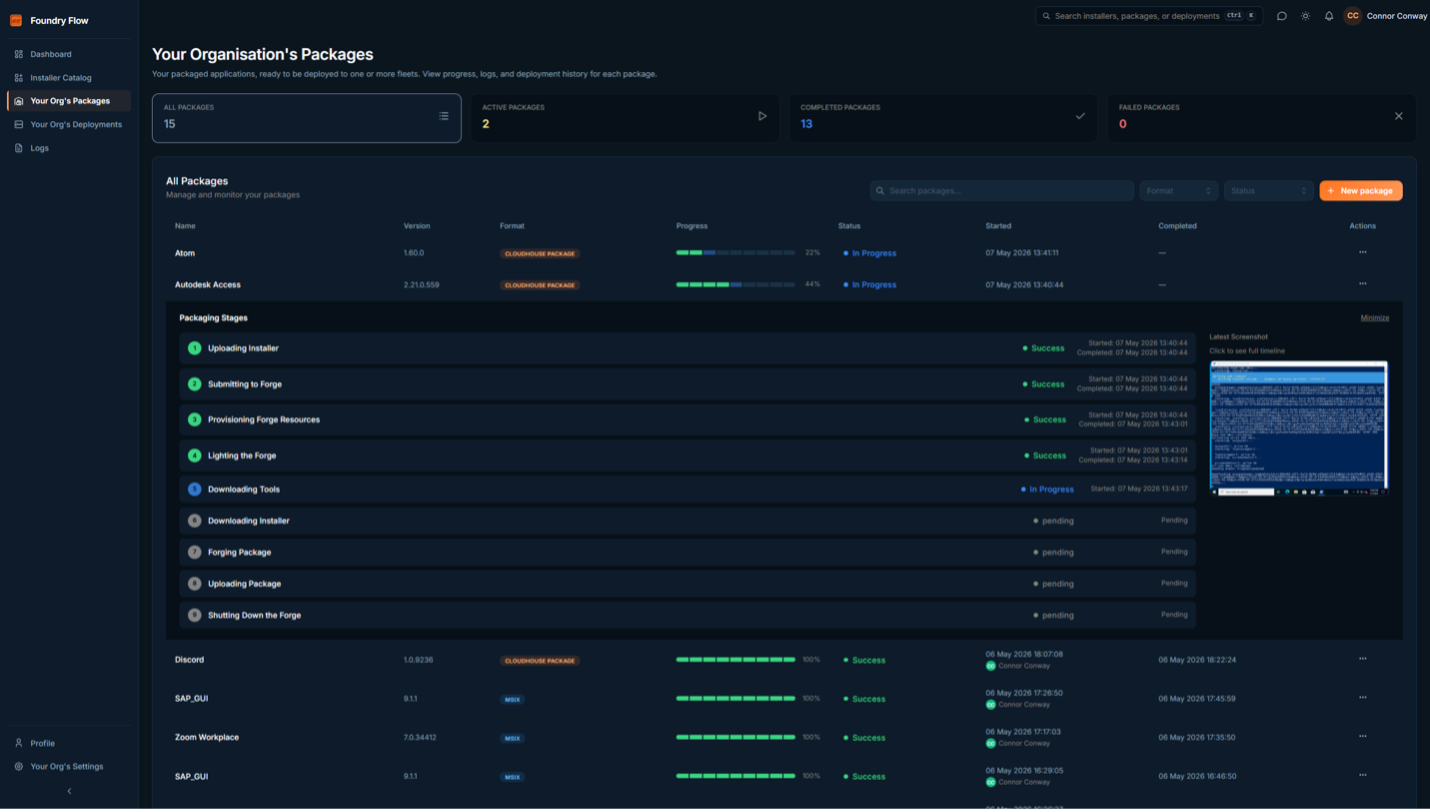
Figure 5: Foundry Flow, Self-service Packages dashboard
This fully automated process ensures deployment has no impact on operations. It eliminates manual packaging workflows and delivers consistent, reliable deployments quickly and effectively.
Cloudhouse Foundry Studio
Cloudhouse Foundry Studio is a self-service modernization platform for customers who are more interested in modernization with minimum efforts. Foundry Studio simplifies the transformation of VM-based workloads into container images ready for deployment, without requiring specialist skill sets. It offers a low-risk path for migrating suitable VMware workloads directly into containers. Customers can deploy transformed applications to Amazon ECS by uploading images to Amazon Elastic Container Registry (Amazon ECR), eliminating the need for application recoding and complex transformation programs, avoiding team upskilling and manual packaging effort, and delivering significant cost savings over lift-and-shift virtualized migrations. As shown in Figure 6, Foundry Studio lists down the processes running in the VM. We can just pick and choose which application/process to package it as a docker image.
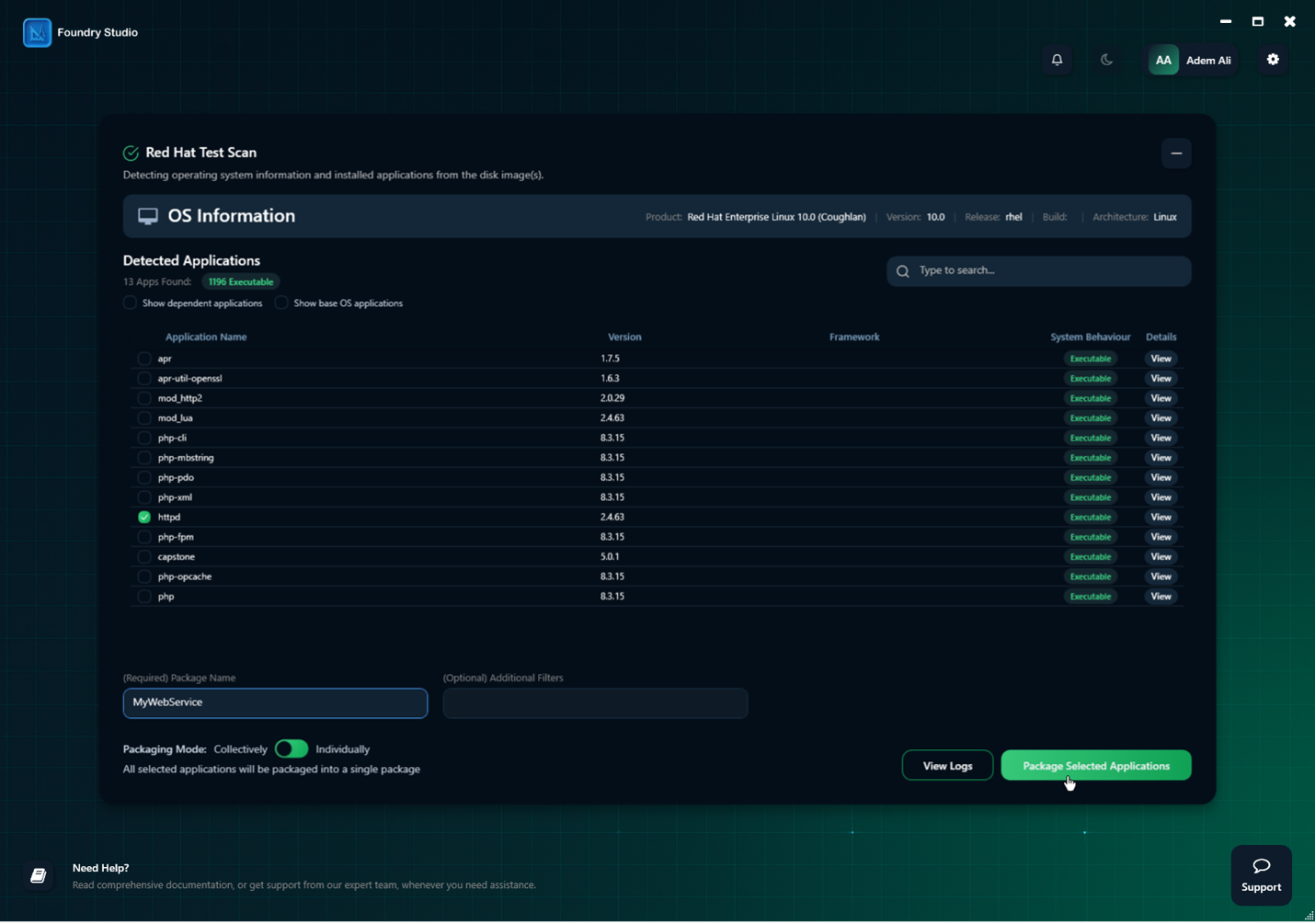
Figure 6: Foundry Studio – self-service containerization dashboard
For applications running on Windows, modernizing with Foundry Studio gives you better density and fewer OS instances to patch, while enabling more effective security and scaling through cloud-native services.
Modernize on AWS without touching source code
A UK-based gaming studio behind a globally recognized multiplayer franchise had been supporting the older games on legacy infrastructure that has stability challenges and was very hard to support. They had run their applications on legacy VMs and supported older games and services as a goodwill gesture to their users and did not have the capacity to rewrite the application with ongoing game development priorities. To better support their players, they needed to modernize onto AWS-native infrastructure without impacting their live multiplayer environment. To address the challenges, the customer leveraged Foundry Studio, analyzed the VM image,identified 3 tightly coupled services: the Web Service, IRCD Service and MariaDB components. They packaged the web and IRCD services as containers and deployed them on Amazon ECS, and AWS Fargate, and migrated backend DB to Amazon Relational Database Service (Amazon RDS) achieving a fully AWS-native architecture with zero downtime and zero source code access required.
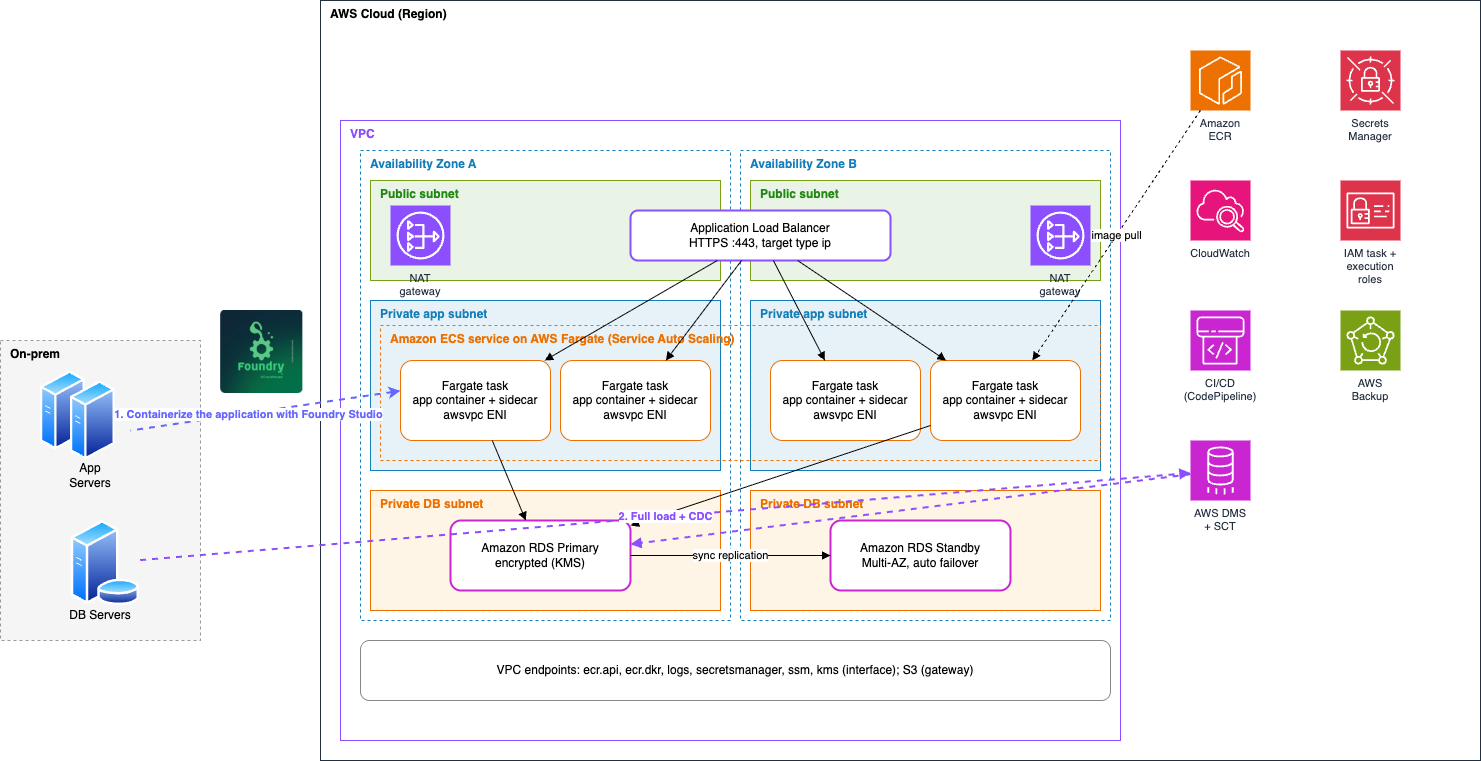
Figure 7: Migrating legacy game services from on-premises to Amazon ECS on AWS Fargate and Amazon RDS
Traditionally, modernizing a workload like this would demand source code, a lengthy rewrite, and a disruptive cutover. Foundry Studio erased all three: 3 services containerized, 0 lines of code touched, and 0 downtime for the live player community. Based on initial calculations, the customer is expecting to see savings of around $20k per annum for this small estate together with hugely increased resilience and scalability. Since the customer is providing this capability as a goodwill gesture to their users, minimizing costs, simplifying maintenance, and mitigating the risks of outages further enhances their reputation with their userbase while reducing the overheads of services that are not directly generating revenue. In addition, we helped the customer to containerize 3 services in less than 3 weeks.
Conclusion
Cloudhouse fills the gap of migrating end-of-support applications to the cloud without requiring access to source code, invasive rewrites, or disruptive downtime.
- Foundry Flow accelerates modernization by releasing applications from their existing infrastructure, automatically packaging them, and deploying them into the latest AWS environments, eliminating manual packaging workflows and delivering consistent, reliable deployments to end users quickly.
- Foundry Studio transforms VM-based workloads into container images ready to run on AWS without specialist skills or recoding.
The result is a practical, low-risk modernization path for the very applications that would otherwise be considered “too hard” or “too risky” to move to the cloud, cutting migration time and cost, removing the bottlenecks of manual refactoring, and accelerating time to value.
Getting started
- Visit the Foundry Studio listing on AWS Marketplace to explore pricing and deployment options.
- Identify your end-of-support Windows applications that lack source code access.
- Work with your AWS account team to plan a modernization assessment using Foundry Studio.