AWS Public Sector Blog
Validating infrastructure as code against FedRAMP 20x: Shift-left compliance
Catching a compliance violation in production is expensive. Catching it in a pull request is nearly free. In this post, we demonstrate how to build a multi-tool infrastructure as code (IaC) validation pipeline that checks AWS CloudFormation templates and Terraform configurations against Federal Risk and Authorization Management Program (FedRAMP) 20x Key Security Indicators (KSIs) before deployment. Combined with the preventive controls from Preventive controls for FedRAMP 20x: Using SCPs and guardrails to enforce KSIs and the methods to be described in future blog posts, this creates a full-lifecycle compliance architecture.
The case for shift-left compliance
FedRAMP 20x requires that 70% or more of KSIs have automated validation. Most organizations focus that automation on runtime detection, using AWS Config rules and AWS Security Hub checks to find non-compliant resources after deployment. Shift-left compliance adds a layer before deployment: scanning IaC templates in your continuous integration and continuous deployment (CI/CD) pipeline to catch violations before resources are created.
This approach has three benefits for FedRAMP 20x:
- Faster feedback. Developers learn about compliance issues in minutes, not days.
- Reduced remediation cost. Fixing a Terraform variable is simpler than remediating a deployed resource.
- Stronger evidence. Pipeline scan results become machine-readable evidence that your deployment process enforces KSI compliance.
Multi-tool validation strategy
No single tool covers every KSI across every IaC format. We use three complementary tools, each with strengths in different areas:
| Tool | Best for | Format | KSI coverage |
| Open Policy Agent (OPA)/Rego | Custom policy logic, Terraform plan JSON | Terraform | 64 policies across all KSI themes |
| cfn-guard | CloudFormation rule evaluation | CloudFormation | 15 rules covering SVC, CNA, and IAM themes |
| Checkov | Broad static analysis, both formats | Terraform and CloudFormation | 59 policies per format |
The following figure shows how these tools fit into a full-lifecycle FedRAMP 20x compliance CI/CD pipeline alongside the preventive and detective controls from earlier posts, including:
- Pre-deployment: IaC validation
- Deployment: Service control policy (SCP) enforcement
- Runtime: AWS Config rules
- Real time: Threat detection
- Throughout: Evidence at each stage feeding into the evidence lake
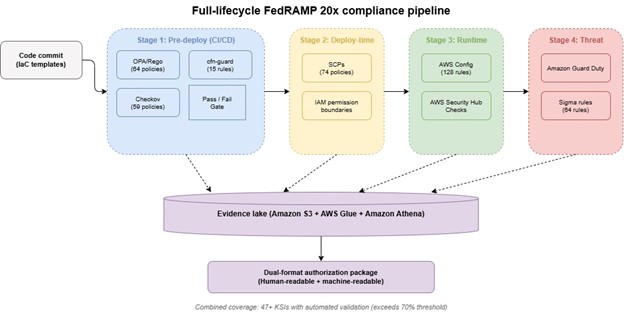
Figure 1: Full-lifecycle FedRAMP 20x compliance pipeline
End-to-end example: Validating a template against multiple KSIs
Consider a CloudFormation template that creates an Amazon Elastic Compute Cloud (Amazon EC2) instance with an Amazon Elastic Block Store (Amazon EBS) volume and a security group. This single template touches at least three KSIs:
- KSI-SVC-VRI: The EBS volume must be encrypted
- KSI-CNA-RNT: The security group must restrict inbound traffic
- KSI-IAM-ELP: The instance profile must follow least privilege
OPA/Rego policy for encryption (KSI-SVC-VRI)
This policy evaluates a Terraform plan JSON file and flags any EBS volume that lacks encryption. The output is a structured denial message that maps directly to the KSI identifier.
package fedramp20x.svc_vri

import rego.v1

deny contains msg if {
resource := input.resource_changes[_]
resource.type == "aws_ebs_volume"
not resource.change.after.encrypted
msg := sprintf("KSI-SVC-VRI: EBS volume '%s' must be encrypted",
[resource.address])
}
cfn-guard rule for security groups (KSI-CNA-RNT)
This cfn-guard rule evaluates CloudFormation templates and denies any security group with unrestricted inbound access from the internet.
rule deny_unrestricted_ingress when %security_groups !empty {
%security_groups.Properties.SecurityGroupIngress[*] {
CidrIp != "0.0.0.0/0"
CidrIpv6 != "::/0"
}
}

let security_groups = Resources.*[
Type == "AWS::EC2::SecurityGroup"
]
Checkov scan for least privilege (KSI-IAM-ELP)
Checkov includes built-in checks for overly permissive AWS Identity and Access Management (IAM) policies. Runningcheckov -d . --check CKV_AWS_63,CKV_AWS_61 validates that IAM policies do not use wildcard actions or resources.
CI/CD integration
You can integrate the three validation tools into your existing CI/CD pipeline using AWS CodePipeline or GitHub Actions. The following sections show how to configure each so that a KSI violation fails the build before deployment.
AWS CodePipeline integration
In AWS CodePipeline, add a validation stage between your source and deploy stages. Use AWS CodeBuild to run the scanning tools.
phases:
  install:
    commands:
      - pip install checkov
      - curl -L -o opa https://openpolicyagent.org/downloads/latest/opa_linux_amd64_static
      - chmod +x opa
      - curl -L -o cfn-guard https://github.com/aws-cloudformation/cloudformation-guard/releases/latest/download/cfn-guard-v3-ubuntu-latest.tar.gz
  build:
    commands:
      - terraform plan -out=tfplan && terraform show -json tfplan > plan.json
      - ./opa eval -d policies/ -i plan.json "data.fedramp20x" --format json > opa-results.json
      - cfn-guard validate -d templates/ -r rules/ --output-format json > guard-results.json
      - checkov -d . --output json > checkov-results.json
  post_build:
    commands:
      - python3 aggregate-results.py --output s3://evidence-bucket/iac-scans/
GitHub Actions integration
For teams using GitHub Actions, add the following step to your workflow. It runs the same three tools and fails the job if any tool detects a
violation.
- name: FedRAMP 20x IaC Validation
  run: |
    opa eval -d policies/ -i plan.json "data.fedramp20x" --fail-defined
    cfn-guard validate -d templates/ -r rules/ --show-summary fail
    checkov -d . --compact --hard-fail-on HIGH
Both integrations fail the pipeline if any KSI violation is detected, preventing non-compliant infrastructure from reaching deployment.
Validating Terraform and CloudFormation side by side
Many organizations use both Terraform and CloudFormation, sometimes within the same environment. Terraform might manage application infrastructure while CloudFormation manages the multi-account AWS environment baseline. Your validation pipeline must cover both.
The multi-tool strategy handles this naturally:
- OPA/Rego evaluates Terraform plan JSON, which captures the full resource graph including computed values and provider defaults. This makes OPA particularly effective for validating Terraform configurations.
- cfn-guard evaluates CloudFormation templates natively, understanding intrinsic functions like
!Ref and !GetAtt. This makes it the right tool for CloudFormation-specific validation. - Checkov supports both formats with a shared rule set, providing consistent baseline coverage regardless of which IaC tool produced
the template.
For organizations standardizing on a single IaC tool, the recommendation is to use all three tools anyway. Each tool detects different classes of issues, and the overlap provides defense in depth at the scanning layer.
AWS Config conformance packs as the runtime complement
IaC scanning catches violations before deployment. AWS Config conformance packs catch drift after deployment. This project includes two conformance packs (Low and Moderate) with 128 rules each, covering 44 to 47 KSIs.
The combination works as follows:
- Pre-deploy: OPA/Rego, cfn-guard, and Checkov scan templates in the CI/CD pipeline
- Deploy-time: SCPs block non-compliant API calls
- Runtime: Config conformance packs detect configuration drift
- Threat detection: Amazon GuardDuty and Sigma rules identify active issues
Each layer produces machine-readable evidence that feeds into the evidence lake, contributing to the dual-format authorization package required by FedRAMP 20x.
Mapping scan results to KSI evidence
Every scan result should include the KSI identifier it validates. This mapping enables automated aggregation into your authorization package. Structure your scan output to include:
{
  "ksi_id": "KSI-SVC-VRI",
  "tool": "opa",
  "result": "PASS",
  "resource": "aws_ebs_volume.data",
  "timestamp": "2026-05-15T14:30:00Z",
  "evidence_type": "pre-deploy-scan"
}
This structured output feeds directly into the evidence pipeline covered in future posts, where scan results are transformed into the machine-readable format required for the authorization package.
Building a policy library
The project repository includes a comprehensive policy library across all three tools:
- 64 OPA/Rego policies covering all 12 KSI themes, with each policy tagged with its KSI identifier and mapped to National Institute
of Standards and Technology (NIST) Special Publication (SP) 800-53 controls - 15 cfn-guard rules focused on Service Configuration (SVC), Cloud Native Architecture (CNA), and identity and access management
themes - 59 Checkov policies per format (Terraform and CloudFormation) covering encryption, network security, identity, and
logging
When building your own policies, follow these practices:
- Tag every policy with its KSI identifier. This enables automated mapping from scan results to KSI evidence.
- Include the NIST 800-53 control mapping. Organizations with existing NIST compliance programs can demonstrate dual coverage.
- Write clear denial messages. When a scan fails, the message should tell the developer exactly what to fix and why.
- Version your policies alongside your infrastructure code.
Policy changes should go through the same review process as infrastructure changes.
Handling scan failures in the pipeline
When a scan detects a KSI violation, the pipeline should fail the build and prevent deployment. However, not all violations are equal. Consider implementing a tiered response:
- Critical violations (encryption disabled, public access enabled, no multi-factor authentication (MFA)): Block deployment immediately. These map to KSIs where non-compliance creates direct risk.
- High violations (overly permissive identity and access management, missing logging): Block deployment with a clear remediation
path. - Medium violations (non-optimal configurations, missing tags): Warn but allow deployment with a tracking ticket. These might map to KSI recommendations rather than requirements.
This tiered approach prevents pipeline fatigue while maintaining a hard gate on critical KSI requirements. All scan results, including warnings, feed into the evidence lake as pre-deploy validation evidence.
What comes next
With preventive controls blocking non-compliant resources and IaC scanning catching misconfigurations before deployment, the next challenge is assembling all this evidence into a machine-readable authorization package. In next blog, we walk through the evidence pipeline from AWS Config evaluations through Security Hub aggregation to dual-format authorization package output.
Next steps and resources
- FedRAMP 20x overview – Program overview and phased delivery timeline
- AWS Config conformance packs – Grouping Config rules for compliance frameworks
- AWS CodePipeline – Continuous delivery service for automated release pipelines
- Open Policy Agent – Policy engine for cloud-native environments
- CloudFormation Guard – Policy-as-code evaluation for CloudFormation templates
- AWS Security Hub – Centralized security findings aggregation
- Blog post 3: Preventive Controls for FedRAMP 20x – SCP enforcement of KSIs