AWS Storage Blog
Amazon S3 audit logging, Part 2: Centralized logging and analysis of S3 data events in AWS CloudTrail for security and compliance
This is Part 2 of our three-part series on Amazon S3 audit logging, focusing on identity-driven security investigations. In Part 1, we covered S3 server access logs for HTTP-level performance analysis and cost attribution.
When a security incident occurs—an unauthorized download, a bulk deletion, or suspicious access from an unfamiliar location—the first question is always, “Who did this?” Access logs show that a request happened, but without knowing which user, which role, whether multi-factor authentication (MFA) was used, or whether the request came from inside or outside the organization, investigators are left with an incomplete picture that slows response and weakens compliance posture.
AWS CloudTrail data events address this by providing API-level tracking for Amazon S3 operations with full identity context. Data events capture not just what happened, but who initiated it—including AWS Identity and Access Management (IAM) users, assumed roles, federated identities, MFA status, and cross-account access details. Combined with Amazon Athena for serverless querying, this creates an investigation platform that can search millions of events in seconds without provisioning infrastructure.
In this post, you will learn how to configure an organization-wide AWS CloudTrail data event trail delivering logs from member accounts to a central bucket, create optimized Athena tables with partition projection to minimize query costs, and run common analysis patterns for user activity tracking, cross-account access monitoring, failed access detection, and delete operation auditing. Depending on your use case, you might also need server access logs for HTTP-level performance and cost attribution (discussed in Part 1) or S3 Metadata journal tables (discussed in Part 3)—see the decision framework in Part 1 to determine which mechanisms best fit your needs.
What S3 data events in CloudTrail contain
CloudTrail data events act as your identity-focused auditor, recording comprehensive API-level information about every S3 operation—with full context about who performed it. Refer to Logging data events for more information.
What is captured:
- User identity – Full IAM context—user, roles, federated identities, session details
- API operations –
GetObject,PutObject,DeleteObject, and all S3 API calls forObjectevents - Authentication context – MFA status, role assumption chains, session issuer details
- Request context – Source IP, user agent, request parameters
- Response details – Success/failure, error codes, response elements
- Cross-account access – Source and target account information
What is not captured:
- HTTP-level details – No status codes, response times, or bytes transferred (use access logs, as discussed in Part 1). However, API error codes (for example,
AccessDenied,NoSuchKey) are captured in the errorcode field for failed requests, and bytes transferred might be available inadditionalEventDatafor some operations likeGetObject. - Metadata or storage changes – No tracking of object property changes or lifecycle events (use S3 Metadata journal tables, as discussed in Part 3).
Delivery latency – Typically, within 5 minutes of API activity, though actual delivery times might vary. Format is JSON. Cost is $0.10 per 100,000 data events recorded. Unlike management events, there is no free tier for data events—all data events are charged. Refer to How CloudTrail works for more information.
Enable CloudTrail data events for S3
Before creating a new trail, verify no existing trails already log the events you plan to capture. While creating the trail for data events, enable the management event in it only if there are no other trails logging management events. CloudTrail charges for management event logging from the second copy onward per region—only the first copy is free. Refer to AWS CloudTrail pricing and AWS CloudTrail FAQs for more details.
To enable CloudTrail data events, complete the following steps:
- On the CloudTrail console, choose Trails in the navigation pane.
- Choose Create trail.
- For Trail name, enter a name (for example,
s3-data-events-trail). - For Storage location, select Create new S3 bucket or Use existing
S3 bucket. - For S3 bucket, enter a bucket name (for example,
centralized-s3-cloudtrail-logs). - For Log file prefix (optional), enter a prefix (for example,
s3-cloudtrail-logs/). If specified, then remember to add this prefix to S3 Location and ‘storage.location.template’ in Athena table creation query (described later in this post)
If you are planning to send CloudTrail logs to a centralized location, see Receiving CloudTrail log files from multiple accounts for more information.
If you plan to create CloudTrail logs for all accounts in an organization (not for few select accounts), log in to the organization account and while following these steps, select Enable for all accounts in my organization. Then you don’t need to create a trail in specific accounts and redirect logs to a centralized bucket. This option will create the trail for all accounts within the organization and start sending the log data to a centralized S3 bucket in the organization’s account. Also, remember to adjust the location by adding organization_id after AWSLogs/ while creating the Athena table. For more details, refer to Creating a trail for your organization in the console.
- For Log file SSE-KMS encryption, select Enabled (recommended for security)
then select New KMS key or Existing KMS key. - For Log file validation, select Enabled (recommended for integrity
verification). - For CloudWatch Logs (optional), select Enabled for real-time monitoring.
- Select or create your log group.
- Choose Next.
- Choose Log events.
- Deselect Management events (we only want data events).
You can keep this enabled if you want both management and data events, but make sure no other trail is logging management events. The first copy of management events per AWS Region is free. If another trail in the same Region already logs management events, enabling them here will incur charges at $2.00 per 100,000 events. Data events don’t have any free copies.
- Select Data events.
Make sure you are in Advanced event selectors. For more details, refer to Filtering data events by using advanced event selectors. Advanced event selectors (the default) provide more granular control. For most enterprise use cases, keep advanced event selectors enabled—they allow filtering by prefix and excluding high-volume low-value events like HeadObject, which can significantly reduce costs.
- For Resource type, choose S3.
- For Log selector template, choose your event type.
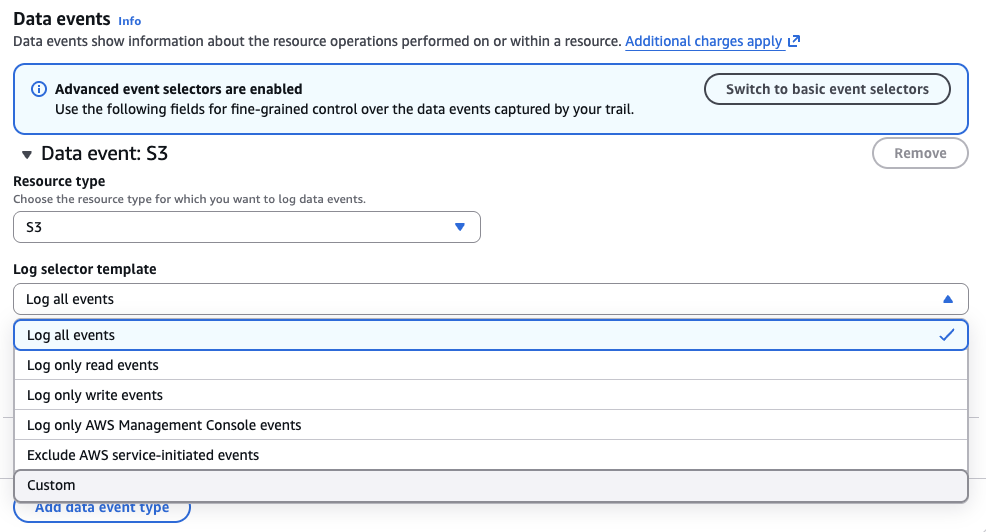
- Choose Selector name (optional).
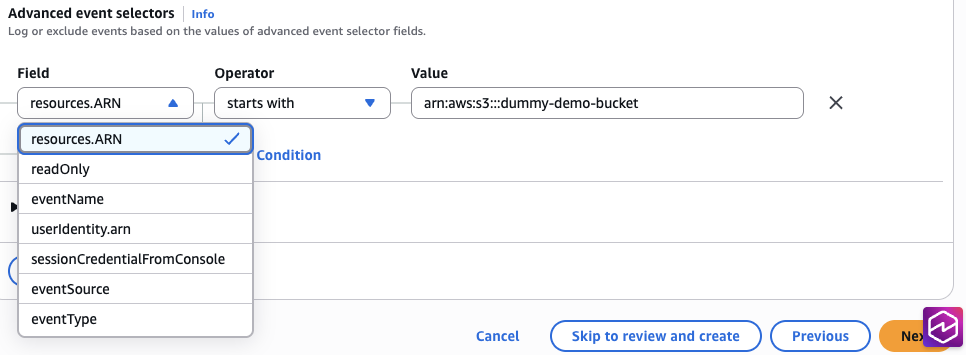
- If you chose Custom for Log selector template, you must choose options for
Field and Operator, and provide the appropriate value to match the event.
This offers more precise logging. - Choose Next.
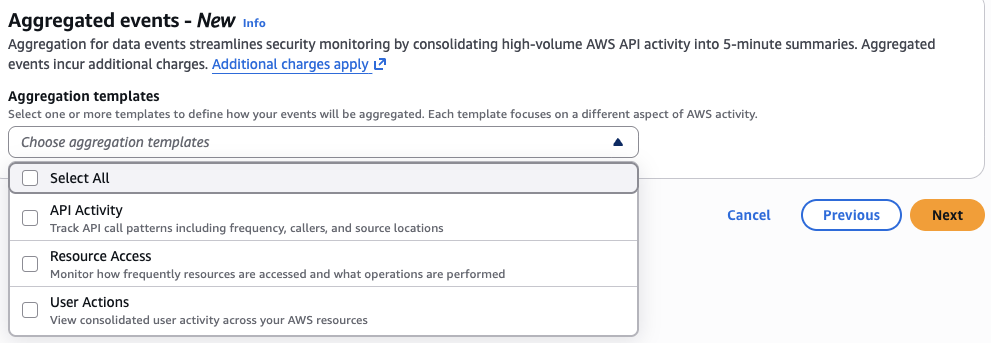
- Optionally, you can configure event aggregation. Event aggregation incurs additional charges. For the Athena based analysis approach described in this post, aggregation is not required—skip this step unless you specifically need CloudTrail Lake aggregated event summaries.
- Choose Next.
- Review all settings.
- Optionally, add tags for the organization.
- Choose Create trail.
The trail will start logging immediately.
(Optional) Set up S3 Lifecycle policy for CloudTrail logs
It is recommended to set up an S3 Lifecycle policy for your CloudTrail logs. The following lifecycle settings are general recommendations; you can adjust them based on your organization’s requirements.
- On the S3 console, go to your CloudTrail logs bucket (
centralized-s3-cloudtrail-logs). - On the Management tab, under Lifecycle configuration, choose Create
lifecycle rule. - For Lifecycle rule name, enter a name (for example,
CloudTrailLogsLifecycle). - Select Limit the scope of this rule using one or more filters.
- For Prefix, enter a prefix (for example,
s3-cloudtrail-logs/). - For Lifecycle rule actions:
- Select Transition current versions of objects between storage classes.
- Select Expire current versions of objects (optional, for automatic deletion).
- For Transitions for current versions, adjust transition days as appropriate to your use
cases:- Choose Add transition.
- Transition to Standard-IA after 90 days.
- Choose Add transition again.
- Transition to Glacier Flexible Retrieval after 180 days.
- Choose Add transition again.
- Transition to Glacier Deep Archive after 365 days.
- For Expiration, optionally expire current versions of objects in 2,555 days (7 years).
- Choose Create rule.
Note: Assumption with this lifecycle policy is, you don’t need to query CloudTrail events beyond six months as otherwise, data from Glacier storage classes need to be restored first.
Understanding CloudTrail log structure
CloudTrail organizes logs in a predictable path structure that enables partition projection:
s3://centralized-s3-cloudtrail-logs/
└──[Optional prefix] -> Optional only
   └── AWSLogs/
       └── {organization-id}/ -> Only when organization trail
           └── {account-id}/
               └── CloudTrail/
                   └── {region}/
                       └── {year}/
                           └── {month}/
                               └── {day}/
                                   └── {account-id}_CloudTrail_{region}_{timestamp}_{unique-id}.json.gz
The following is an example path:
s3://centralized-s3-cloudtrail-logs/AWSLogs/123456789012/CloudTrail/us-east-1/2024/03/15/123456789012_CloudTrail_us-east-1_20240315T1030Z_abc123.json.gzCreate Athena table with partition projection
To create an Athena table with partition projection, complete the following steps:
- On the Athena console, choose Query editor in the navigation pane.
- For Data source, choose
AWSDataCatalog. - For Catalog, choose None.
- For Database, choose
default. - Enter the following SQL query:
CREATE EXTERNAL TABLE cloudtrail_s3_events (
eventversion STRING,
useridentity STRUCT<
type: STRING,
principalid: STRING,
arn: STRING,
accountid: STRING,
invokedby: STRING,
accesskeyid: STRING,
username: STRING,
onbehalfof: STRUCT<
userid: STRING,
identitystorearn: STRING
>,
sessioncontext: STRUCT<
attributes: STRUCT<
mfaauthenticated: STRING,
creationdate: STRING
>,
sessionissuer: STRUCT<
type: STRING,
principalid: STRING,
arn: STRING,
accountid: STRING,
username: STRING
>,
ec2roledelivery: STRING,
webidfederationdata: STRUCT<
federatedprovider: STRING,
attributes: map<STRING,STRING>
>
>
>,
eventtime STRING,
eventsource STRING,
eventname STRING,
awsregion STRING,
sourceipaddress STRING,
useragent STRING,
errorcode STRING,
errormessage STRING,
requestparameters STRING,
responseelements STRING,
additionaleventdata STRING,
requestid STRING,
eventid STRING,
readonly STRING,
resources ARRAY<STRUCT<
arn: STRING,
accountid: STRING,
type: STRING>
>,
eventtype STRING,
apiversion STRING,
recipientaccountid STRING,
serviceeventdetails STRING,
sharedeventid STRING,
vpcendpointid STRING,
vpcendpointaccountid STRING,
eventcategory STRING,
addendum STRUCT<
reason: STRING,
updatedfields: STRING,
originalrequestid: STRING,
originaleventid: STRING
>,
sessioncredentialfromconsole STRING,
edgedevicedetails STRING,
tlsdetails STRUCT<
tlsversion: STRING,
ciphersuite: STRING,
clientprovidedhostheader: STRING
>
)
PARTITIONED BY (
account STRING,
region STRING,
`timestamp` STRING
)
ROW FORMAT SERDE 'org.apache.hive.hcatalog.data.JsonSerDe'
STORED AS INPUTFORMAT 'com.amazon.emr.cloudtrail.CloudTrailInputFormat'
OUTPUTFORMAT 'org.apache.hadoop.hive.ql.io.HiveIgnoreKeyTextOutputFormat'
LOCATION 's3://centralized-s3-cloudtrail-logs/AWSLogs/'
TBLPROPERTIES (
'projection.enabled' = 'true',
'projection.account.type' = 'injected',
'projection.region.type' = 'injected',
'projection.timestamp.type' = 'date',
'projection.timestamp.format' = 'yyyy/MM/dd',
'projection.timestamp.range' = '2024/01/01,NOW',
'projection.timestamp.interval' = '1',
'projection.timestamp.interval.unit' = 'DAYS',
'storage.location.template' = 's3://centralized-s3-cloudtrail-logs/AWSLogs/${account}/CloudTrail/${region}/${timestamp}/'
);
Above query would work for single/multiple account CloudTrail data events. For organization wide trail, everything
would remain same except following:
…
PARTITIONED BY (
organization_id STRING,
account STRING,
region STRING,
`timestamp` STRING
)
…
TBLPROPERTIES (
'projection.enabled' = 'true',
'projection.organization_id.type' = 'injected',
'projection.account.type' = 'injected',
'projection.region.type' = 'injected',
'projection.timestamp.type' = 'date',
'projection.timestamp.format' = 'yyyy/MM/dd',
'projection.timestamp.range' = '2024/01/01,NOW',
'projection.timestamp.interval' = '1',
'projection.timestamp.interval.unit' = 'DAYS',
'storage.location.template' = 's3://centralized-s3-cloudtrail-logs/AWSLogs/${organization_id}/${account}/CloudTrail/${region}/${timestamp}/'
);- Choose Run.
- Verify table creation: you should see a Query successful message.
Note that requestparameters, responseelements, and additionaleventdata are JSON strings; use JSON_EXTRACT_SCALAR() for scalar values and JSON_EXTRACT() for nested or array values.
Analyze CloudTrail S3 data events
In this section, we present common CloudTrail S3 data event analysis patterns. With injected partition projection, you must specify account and region in every query’s WHERE clause.
All the dates and date ranges used in the following query patterns are examples and use placeholders; these need to be adjusted based on your requirements.
To run each query, complete the following steps:
- On the Athena console, open the query editor.
- For Data source, choose
AWSDataCatalog. - For Catalog, choose None.
- For Database, choose
default. - Enter your desired query.
- Choose Run or press Ctrl+Enter.
- View results in the Results pane.
Performance & reliability tips for CloudTrail queries:
- Always filter on timestamp (partition column) first — Athena uses it to enable partition pruning, skipping entire S3 paths and reducing data scanned and query cost. Use
eventtimeonly when you need sub-day precision (hours/minutes/seconds), and always pair it with atimestampfilter to preserve partition pruning benefits. - Be aware of delivery delays — CloudTrail logs are delivered on a best-effort basis with up to ~5 minute delay, so an event occurring at time T may land in a partition for a different day than expected, especially near midnight UTC boundaries. Check both adjacent partitions (
WHERE timestamp BETWEEN '2025/09/15' AND '2025/09/16') when investigating events near day boundaries to avoid missing logs.
Query pattern 1: User activity investigation
The following query traces a specific IAM user’s S3 data-plane activities (Get, Put, Delete) from CloudTrail logs to support security investigations or audit reviews of individual user behavior:
-- Investigate specific user's S3 activities
SELECT
eventtime,
useridentity.type as identity_type,
useridentity.arn as user_arn,
useridentity.username as user_name,
eventname,
sourceipaddress,
JSON_EXTRACT_SCALAR(requestparameters, '$.bucketName') as bucket,
JSON_EXTRACT_SCALAR(requestparameters, '$.key') as object_key,
errorcode,
errormessage
FROM cloudtrail_s3_events
WHERE account = '123456789012' -- REQUIRED: Your AWS account ID
AND region = 'us-east-1' -- REQUIRED: AWS region
AND timestamp = '2026/05/15'
AND useridentity.username = 'specific-user' -- For IAM users
-- For assumed roles, use ARN instead:
-- AND useridentity.arn LIKE '%specific-user%'
-- Or combine both:
-- AND (useridentity.username = 'specific-user'
-- OR useridentity.arn LIKE '%:assumed-role/%/specific-user%')
AND eventname IN ('GetObject', 'PutObject', 'DeleteObject')
ORDER BY eventtime DESC;
Query pattern 2: Cross-account access monitoring
The following query identifies S3 operations originating from external AWS accounts by comparing source and target account IDs in CloudTrail logs, and helps detect unauthorized cross-account access or verify expected sharing configurations:
-- Monitor cross-account S3 access
SELECT
eventtime,
useridentity.accountid as source_account,
recipientaccountid as target_account,
useridentity.arn as user_arn,
eventname,
sourceipaddress,
JSON_EXTRACT_SCALAR(requestparameters, '$.bucketName') as bucket,
JSON_EXTRACT_SCALAR(requestparameters, '$.key') as object_key,
readonly
FROM cloudtrail_s3_events
WHERE account = '123456789012' -- REQUIRED
AND region = 'us-east-1'       -- REQUIRED
AND timestamp = '2026/05/15'
AND useridentity.accountid != recipientaccountid -- Cross-account access
AND eventname IN ('GetObject', 'PutObject', 'DeleteObject')
ORDER BY eventtime DESC;
Query pattern 3: Failed access attempts
The following query surfaces failed S3 operations from CloudTrail logs to help identify permission misconfigurations, unauthorized access attempts, or potential brute-force activity against S3 resources:
-- Identify failed S3 access attempts for security analysis
SELECT
eventtime,
useridentity.arn as user_arn,
useridentity.username as user_name,
eventname,
sourceipaddress,
JSON_EXTRACT_SCALAR(requestparameters, '$.bucketName') as bucket,
JSON_EXTRACT_SCALAR(requestparameters, '$.key') as object_key,
errorcode,
errormessage,
useragent
FROM cloudtrail_s3_events
WHERE account = '123456789012' -- REQUIRED
AND region = 'us-east-1'       -- REQUIRED
AND timestamp = '2026/05/15'
AND errorcode IS NOT NULL
AND eventname IN ('GetObject', 'PutObject', 'DeleteObject') -- Expand to include other object events as needed for comprehensive security analysis
ORDER BY eventtime DESC
LIMIT 100;
Query pattern 4: Specific bucket activity
The following query retrieves CloudTrail logged S3 operations against a specific bucket, and provides a comprehensive audit trail for sensitive bucket monitoring and compliance reviews:
-- Analyze all activities on a specific bucket
SELECT
eventtime,
useridentity.type as identity_type,
useridentity.arn as user_arn,
eventname,
sourceipaddress,
JSON_EXTRACT_SCALAR(requestparameters, '$.key') as object_key,
CASE
WHEN readonly = 'true' THEN 'Read'
WHEN readonly = 'false' THEN 'Write'
ELSE 'Unknown'
END as operation_type
FROM cloudtrail_s3_events
WHERE account = '123456789012' -- REQUIRED
AND region = 'us-east-1'       -- REQUIRED
AND timestamp = '2026/05/15'
AND JSON_EXTRACT_SCALAR(requestparameters, '$.bucketName') = 'my-sensitive-bucket'
ORDER BY eventtime DESC;
Query pattern 5: Delete operations audit
The following query tracks S3 delete operations (single and bulk) from CloudTrail logs over a date range, returning caller identity, assumed role, other details to support compliance auditing and data deletion accountability:
-- Track all delete operations for compliance
SELECT
eventtime,
useridentity.arn as user_arn,
useridentity.username as user_name,
useridentity.sessioncontext.sessionissuer.username as assumed_role,
sourceipaddress,
JSON_EXTRACT_SCALAR(requestparameters, '$.bucketName') as bucket,
JSON_EXTRACT_SCALAR(requestparameters, '$.key') as deleted_object, -- Note: Returns NULL for DeleteObjects (bulk). Use JSON_EXTRACT + UNNEST for bulk delete key auditing
useridentity.sessioncontext.attributes.mfaauthenticated as mfa_used
FROM cloudtrail_s3_events
WHERE account = '123456789012' -- REQUIRED
AND region = 'us-east-1'       -- REQUIRED
AND timestamp BETWEEN '2026/05/15' AND '2026/05/17'
AND eventname IN ('DeleteObject', 'DeleteObjects')
ORDER BY eventtime DESC;
Query pattern 6: Assumed role activity
The following query isolates S3 object operations performed via assumed roles from CloudTrail logs, returning session
details, role name or Amazon Resource Name (ARN), and so on, to verify assumed role permissions align with intended
use:
-- Track activities performed via assumed roles
SELECT
eventtime,
useridentity.type as identity_type,
useridentity.principalid as principal_id,
useridentity.arn as user_arn,
useridentity.sessioncontext.sessionissuer.arn as role_arn,
useridentity.sessioncontext.sessionissuer.username as role_name,
eventname,
sourceipaddress,
JSON_EXTRACT_SCALAR(requestparameters, '$.bucketName') as bucket,
JSON_EXTRACT_SCALAR(requestparameters, '$.key') as object_key
FROM cloudtrail_s3_events
WHERE account = '123456789012' -- REQUIRED
AND region = 'us-east-1'       -- REQUIRED
AND timestamp = '2026/05/15'
AND useridentity.type = 'AssumedRole' -- Add other types as needed AssumedRole doesn’t cover FederatedUser/WebIdentityUser
AND eventname IN ('GetObject', 'PutObject', 'DeleteObject')
ORDER BY eventtime DESC;
Query pattern 7: Data transfer volume by user
The following query calculates per-user S3 data transfer metrics from CloudTrail logs, summarizing download/upload
volumes (in GB), operation counts and so on:
-- Calculate data transfer volume by user. Remember for uploads, 'bytesTransferredIn' value comes as 0
SELECT
useridentity.arn as user_arn,
useridentity.username as user_name,
useridentity.type as identity_type,
JSON_EXTRACT_SCALAR(requestparameters, '$.bucketName') as bucket_name,
COUNT(*) as operation_count,
-- Data transfer metrics
COALESCE(
SUM(TRY_CAST(JSON_EXTRACT_SCALAR(additionaleventdata, '$.bytesTransferredOut') AS BIGINT)),
0
) / 1024.0 / 1024.0 / 1024.0 as total_gb_downloaded,
COALESCE(
SUM(TRY_CAST(JSON_EXTRACT_SCALAR(additionaleventdata, '$.bytesTransferredIn') AS BIGINT)),
0
) / 1024.0 / 1024.0 / 1024.0 as total_gb_uploaded,
-- Time range
MIN(from_iso8601_timestamp(eventtime)) as first_activity,
MAX(from_iso8601_timestamp(eventtime)) as last_activity,
-- Error tracking
COUNT(CASE WHEN errorcode IS NOT NULL THEN 1 END) as error_count
FROM cloudtrail_s3_events
WHERE account = '123456789012' -- REQUIRED
AND region = 'us-east-1'       -- REQUIRED
AND timestamp = '2026/05/15'
AND eventname IN ('GetObject', 'PutObject')
--AND useridentity.type != 'AWSService' -- Exclude AWS service calls
GROUP BY useridentity.arn, useridentity.username, useridentity.type, JSON_EXTRACT_SCALAR(requestparameters, '$.bucketName')
ORDER BY total_gb_downloaded DESC;
Query pattern 8: source IP analysis
The following sample query profiles high-activity source IP addresses from CloudTrail S3 logs to help identify
suspicious endpoints or unusual access concentrations:
-- Analyze access patterns by source IP
SELECT
sourceipaddress,
COUNT(*) as request_count,
COUNT(DISTINCT useridentity.arn) as unique_users,
COUNT(DISTINCT JSON_EXTRACT_SCALAR(requestparameters, '$.bucketName')) as unique_buckets,
COUNT(DISTINCT eventname) as unique_operations,
MIN(from_iso8601_timestamp(eventtime)) as first_seen,
MAX(from_iso8601_timestamp(eventtime)) as last_seen
FROM cloudtrail_s3_events
WHERE account = '123456789012' -- REQUIRED
AND region = 'us-east-1'       -- REQUIRED
AND timestamp = '2026/05/15'
AND sourceipaddress NOT LIKE '%.amazonaws.com'
GROUP BY sourceipaddress
HAVING COUNT(*) > 100
ORDER BY request_count DESC
LIMIT 50;
Advanced analysis techniques
In this section, we discuss two advanced analysis techniques. For frequently used queries, consider saving them in
Athena and views can also be created for recurring queries.
Create saved queries in Athena
To create saved queries in Athena, complete the following steps:
- On the Athena console, open the query editor.
- Enter your query, then choose the options menu (three dots) and choose Save.
- For Query name, enter a descriptive name (for example, CloudTrail – Failed Access Attempts).
- For Description, enter details about what the query does.
- Choose Save.
- Choose the Saved queries tab to access your list of saved queries.
Create views for common analyses
The following example query creates security alert views:
-- Create view for security-relevant events
CREATE OR REPLACE VIEW security_alerts AS
SELECT
account,
region,
SUBSTR(timestamp, 1, 4) AS year,
SUBSTR(timestamp, 6, 2) AS month,
SUBSTR(timestamp, 9, 2) AS day,
eventtime,
useridentity.arn as user_arn,
useridentity.username as user_name1,
useridentity.sessioncontext.sessionissuer.username as user_name2,
eventname,
sourceipaddress,
JSON_EXTRACT_SCALAR(requestparameters, '$.bucketName') as bucket,
JSON_EXTRACT_SCALAR(requestparameters, '$.key') as object_key,
errorcode,
CASE
WHEN errorcode IS NOT NULL THEN 'Failed Access Attempt'
WHEN eventname IN ('DeleteObject', 'DeleteObjects') THEN 'Delete Operation'
WHEN useridentity.sessioncontext.attributes.mfaauthenticated = 'false' THEN 'No MFA'
WHEN useridentity.accountid != recipientaccountid THEN 'Cross-Account Access'
ELSE 'Normal Activity'
END as alert_type
FROM cloudtrail_s3_events
WHERE
errorcode IS NOT NULL
OR eventname IN ('DeleteObject', 'DeleteObjects')
--OR useridentity.sessioncontext.attributes.mfaauthenticated = 'false' -- Optional, uncomment if you have MFA enforcement to find out exceptions
OR useridentity.accountid != recipientaccountid;
-- Query security alerts
SELECT *
FROM security_alerts
WHERE account = '123456789012'
AND region = 'us-east-1'
AND year = '2026'
AND month = '05'
AND day = '15'
AND alert_type = 'Failed Access Attempt' -- Include/exclude alert_type as required
ORDER BY eventtime DESC;
Cost optimization best practices
For cost optimization, we recommend using partition pruning. Include all partition columns in every query. Athena charges $5 per TB of data scanned. The following partition pruning techniques directly reduce your Athena costs by minimizing data scanned per query. Refer to Amazon Athena pricing for more details.
The following is an example of an efficient query:
SELECT * FROM cloudtrail_s3_events
WHERE account = '123456789012' -- Partition pruning
AND region = 'us-east-1' -- Partition pruning
AND timestamp = '2026/05/15' -- Partition pruning
AND eventname = 'DeleteObject';
Expensive query: Avoid full table scan
-- Missing required partition columns!
SELECT * FROM cloudtrail_s3_events
WHERE eventname = 'DeleteObject';
The following query uses specific date ranges:
-- Efficient: Query specific days
SELECT * FROM cloudtrail_s3_events
WHERE account = '123456789012'
AND region = 'us-east-1'
AND timestamp BETWEEN '2026/05/15' AND '2026/05/17'
LIMIT 1000;
The following demonstrates how to filter early in your query:
-- Efficient: Filter on partitions first, then other conditions
SELECT
useridentity.username,
eventname,
eventtime
FROM cloudtrail_s3_events
WHERE account = '123456789012' -- Partition filter first
AND region = 'us-east-1' -- Partition filter
AND timestamp = '2026/05/15' -- Partition filter
AND eventname = 'DeleteObject' -- Then data filter
AND useridentity.username IS NOT NULL
LIMIT 100;
Another best practice for cost optimization is to use LIMIT for one-time exploratory queries.
Configuration and security best practices
Consider the following configuration best practices:
- Enable log file validation for integrity verification.
- Use AWS Key Management Service (AWS KMS) encryption for CloudTrail logs at rest.
- Enable multi-Region trails for comprehensive coverage.
- Configure lifecycle policies to reduce storage costs. Note that Glacier Flexible Retrieval has a minimum storage duration of 90 days and and Glacier Deep Archive has a minimum storage duration of 180 days. Factor this into your cost calculations if you plan to expire objects before minimum storage duration.
- Enable management events only if there is no other trail logging management event already.
- In Management events, consider selecting Exclude AWS KMS events and Exclude Amazon RDS Data API events unless specifically required.
Consider the following security best practices:
- Restrict S3 bucket access for CloudTrail logs.
- Consider S3 Object Lock (Compliance mode) for tamper-proof log retention—it is more operationally manageable than MFA Delete and provides stronger compliance guarantees. MFA Delete is an alternative for buckets where Object Lock cannot be enabled.
- Use a separate AWS account for log storage (optional).
- Set up CloudWatch alarms for trail modifications.
- Conduct regular audits of trail configurations.
Troubleshooting common issues
The following are common issues and troubleshooting tips:
- Query returns no results – CloudTrail logs typically take 5 minutes for delivery. Verify logs exist at the expected S3 path and confirm data events are enabled for the target bucket. Verify log files exist in S3 at the expected path and confirm partition values in your WHERE clause match the actual S3 structure. For more details, see Logging data events.
- “HIVE_PARTITION_SCHEMA_MISMATCH” error – The
storage.location.templatein your table properties doesn’t match the actual S3 path structure. Ensure partition column types match. - Partition pruning – Use partition pruning effectively and include all partition columns:
-- Required partition columns for cost optimization
WHERE account = 'xxx' -- REQUIRED
AND region = 'xxx' -- REQUIRED
AND timestamp = 'xxxx' -- REQUIRED - Missing user identity information – Some events are service-to-service calls. Filter with
useridentity.type != 'AWSService':
SELECT * FROM cloudtrail_s3_events
WHERE account = '123456789012'
AND region = 'us-east-1'
AND timestamp = '2026/05/15'
AND useridentity.type != 'AWSService' -- Exclude service calls
AND useridentity.principalid IS NOT NULL
ORDER BY eventtime DESC;- CloudTrail not logging S3 events – Verify trail status shows Logging and the Data events tab includes your target buckets. For more details, see Troubleshooting issues with an organization trail.
Conclusion
In this post, we reviewed how to implement CloudTrail data events for S3 with partition projection in Athena to efficiently investigate user activity, security incidents, and compliance requirements. You now have query patterns for user activity tracking, cross-account access monitoring, failed access detection, delete operation auditing, MFA verification, assumed role analysis, and data transfer attribution—all with full IAM identity context.
CloudTrail data events tell you who accessed your data, but not the HTTP-level performance details or what changed about your objects over time. In Part 3, we cover S3 Metadata journal tables for tracking object lifecycle changes, storage class transitions, and encryption compliance—completing the three-part audit picture.