AWS Storage Blog
Building automated AWS Regional availability checks with Amazon S3
Every day, organizations expand into new markets, migrate critical workloads across geographies, and build systems that need to operate reliably in multiple locations. At the root of these efforts is a simple question: “What can I deploy, and where?” The answer shapes important architecture decisions, from which AWS Regions to expand into, to how you design for resilience. For data storage professionals, this question becomes even more critical. Data regulations and data residency requirements continue to change and grow more complex across geographies. As organizations expand, every team involved needs fast, reliable answers.
At AWS, we publish comprehensive regional availability data covering services, features, APIs, and infrastructure resource types across all AWS Regions to help answer availability questions. You can explore this data interactively on the AWS Capabilities by Region page, or query it using the AWS Knowledge MCP Server. These tools work well for exploration and planning. However, teams need this data in their own environments, accessible on their terms, shaped for specific use cases with the capability to integrate into the tools and workflows they already run. That means direct access to the underlying data, delivered through a storage solution they already use, like Amazon S3.
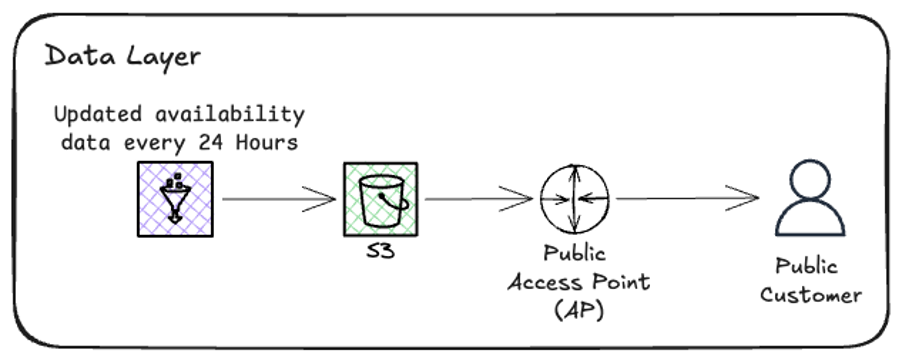
In this post, we introduce a new data access option for AWS Regional availability hosted on S3 to help you copy the data directly into your account using AWS API or AWS CLI. This data is published through an S3 Access Point and available to all authenticated AWS Principals. You can use the same AWS Identity and Access Management (IAM) policies, SDK integrations, and access patterns as you do for your own S3 data, and no onboarding is required. Because the data lives in S3, you can also land it directly in a data lake or sync it to your own bucket and query it with Amazon Athena. We walk through how to configure IAM policy for principals, download structured datasets in JSON, CSV, and Apache Parquet formats, and integrate them into real workflows like pre-deployment template validation and regional expansion gap analysis. Whether you’re designing resilience across regions, navigating data residency requirements, or validating your infrastructure before deployment, this data is now available to download, store, and integrate using the S3 workflows you already run.
Available data
The data covers three main categories, each mapping to a different stage of your planning and deployment workflow. Use these to verify regional support before you commit to an architecture, write application code, or deploy infrastructure.
| Entity type | Description | Use case |
| Services & features (products) | Service availability and feature support by region | Verify S3 features before architecting storage |
| APIs (apis) | API operation availability by region | Check DynamoDB API support before writing application code |
| CloudFormation resources (cfn_resources) | Resource type support by region | Validate templates before deployment |
Data formats
You can consume the data in whichever format best fits your workflow. Data is refreshed daily and published to the S3 Access Point. Each dataset includes a manifest.json with metadata, including the last updated timestamp, so you always know how fresh the data is. The Parquet format is particularly useful if you’re landing this data into a data lake or querying it with Athena, Amazon Redshift Spectrum, or similar analytics tools.
| Format | Status | Use case |
| JSON | Available | Programmatic access, scripting, application integration |
| CSV | Available | Spreadsheet analysis, reporting, data import |
| Parquet | Available | Big data analytics, data lake integration |
| JSON-LD | Coming soon | Linked data applications, AI agent ingestion, structured context for large language models (LLMs) |
Additional use cases
The examples covered in this post cover pre-deployment validation and regional expansion planning, but the data supports a wide range of use cases. Compliance teams can generate audit-ready reports on service availability across their operating Regions. Migration teams can identify alternative services when preferred options aren’t available in a target Region. Furthermore, because the data is structured and refreshed daily, you can build dashboards that track regional parity over time, turning a one-time analysis into continuous visibility.
| Use case | Description |
| Pre-deployment validation | Integrate availability checks into CI/CD pipelines to catch compatibility issues before deployment |
| Regional expansion planning | Analyze capability gaps between regions before migrating workloads |
| Compliance and audit | Generate reports on service availability for compliance documentation |
| Migration planning | Identify alternative services when preferred options aren’t available in the target Region |
Solution overview
This solution provides programmatic access to AWS Regional availability data through a public S3 Access Point, requiring only standard AWS authentication and three straightforward steps.
Prerequisites
To follow along, you need:
- An AWS account with IAM permissions to call S3
GetObject - AWS CLI installed and configured
- Python 3.10+ and PyYAML (`pip install pyyaml`) for the integration examples
- An AWS CloudFormation template (YAML) if you want to run Example 1 against your own infrastructure
Step 1: Configure IAM permissions
Add the following policy to your IAM role or user to allow access to the data:
{
   "Version": "2012-10-17",
   "Statement": [{
     "Effect": "Allow",
     "Action": ["s3:GetObject"],
     "Resource": [
       "arn:aws:s3:us-east-1:686591367145:accesspoint/aws-capabilities-public/object/*"
     ]
   }]
 }
Note: This step is optional if your IAM role or user already has s3:GetObject permissions on all S3 resources.
Step 2: Access the data
Start by downloading the index to see all available versions and the latest version, then download the manifest to discover available files, check the latest updated timestamp, and understand the folder structure.
# Download index
aws s3 cp s3://aws-capabilities-pub-ybkxdwgxrkfhwmq8b1neoq8ny6ua4use1b-s3alias/public/index.json -

# Download manifest
aws s3 cp s3://aws-capabilities-pub-ybkxdwgxrkfhwmq8b1neoq8ny6ua4use1b-s3alias/public/v1/manifest.json -
Note: Ensure your CLI is configured with credentials that have the permissions described in Step 1 (or equivalent to S3 read access).
Next, download the data files you need.
# Download service availability data
aws s3 cp s3://aws-capabilities-pub-ybkxdwgxrkfhwmq8b1neoq8ny6ua4use1b-s3alias/public/v1/json/products.json -
# Download CloudFormation Resources availability data
aws s3 cp s3://aws-capabilities-pub-ybkxdwgxrkfhwmq8b1neoq8ny6ua4use1b-s3alias/public/v1/json/cfn_resources.json -
# Download API availability data
aws s3 cp s3://aws-capabilities-pub-ybkxdwgxrkfhwmq8b1neoq8ny6ua4use1b-s3alias/public/v1/json/apis.json -
# Download as CSV for spreadsheet analysis
aws s3 cp s3://aws-capabilities-pub-ybkxdwgxrkfhwmq8b1neoq8ny6ua4use1b-s3alias/public/v1/csv/products.csv -
Step 3: Integrate with your workflows
With the data downloaded, you can integrate it into existing tools and processes. The following examples show two common use cases.
Integration examples
First, download the data files using the following CLI commands.
aws s3 cp s3://aws-capabilities-pub-ybkxdwgxrkfhwmq8b1neoq8ny6ua4use1b-s3alias/public/v1/json/cfn_resources.json -

aws s3 cp s3://aws-capabilities-pub-ybkxdwgxrkfhwmq8b1neoq8ny6ua4use1b-s3alias/public/v1/json/products.json -
Example 1: Validate CloudFormation template before deployment
import json
import yaml

# Load availability data and CloudFormation template
 with open('cfn_resources.json') as f:
     cfn_availability = json.load(f)

 with open('my-infrastructure.yaml') as f:
     template = yaml.safe_load(f)

target_region = 'eu-west-1'

# Build set of available resource types for target Region
available_types = set()
for service in cfn_availability:
    for rt in service.get('resourceTypes', []):
        if rt.get('regionalAvailability', {}).get(target_region) == 'Available':
            available_types.add(f"AWS::{service['serviceName']}::{rt['resourceTypeName']}")

# Check each resource in template
 print(f"Validating template for {target_region}:\n")
 for resource_name, resource_def in template.get('Resources', {}).items():
     resource_type = resource_def.get('Type')
     if resource_type in available_types:
         print(f" ✅ {resource_name}: {resource_type}")
     else:
         print(f" ❌ {resource_name}: {resource_type} - NOT AVAILABLE")
This represents a typical example of the validation results generated by the automated system.
The following is the validating template for eu-west-1:
  ✅ MyLambdaFunction: AWS::Lambda::Function
  ✅ MyDynamoDBTable: AWS::DynamoDB::Table
  ❌ MySDCDeployment: AWS::SDC::Deployment - NOT AVAILABLE
Example 2: Regional expansion gap analysis
Compare your source Region against a target Region to identify capability gaps before migration.
import json

with open('products.json') as f:
     products = json.load(f)

source_region = 'us-east-1'
 target_region = 'ap-southeast-1'

# Get available services in each Region
 def get_available_services(region):
     return {
         p['productName'] for p in products
         if p.get('regionalAvailability', {}).get(region) == 'Available'
     }

source_services = get_available_services(source_region)
 target_services = get_available_services(target_region)

# Identify gaps
 gaps = source_services - target_services
 common = source_services & target_services

print(f"Source Region ({source_region}): {len(source_services)} services")
 print(f"Target Region ({target_region}): {len(target_services)} services")
 print(f"Common services: {len(common)}")
 print(f"\nServices NOT available in target Region:")
 for service in sorted(gaps):
     print(f"  - {service}")
Considerations
Before implementing this solution, keep the following operational details in mind:
- Pricing: There is no additional charge for accessing the availability data. Standard AWS authentication is required, but no data transfer or request fees apply to the consumer.
- Data freshness: Availability data is refreshed daily. Check
manifest.jsonfor thelast_updatedtimestamp. - Security: Access is restricted to authenticated AWS principals only.
- Feedback: For data accuracy issues or feature requests, contact your account team or file a support case.
Conclusion
In this post, we showed you how to access AWS Regional availability data programmatically through Amazon S3, configure IAM permissions for S3 Access Points, and integrate this data into CloudFormation validation and Regional expansion workflows. No cleanup is required, as this solution only reads publicly available data and does not create any resources in your account. We built this because we believe availability data should be as easy to consume programmatically as it is to browse interactively. Whether you’re validating templates in CI/CD, planning a multi-Region migration, or building governance tooling, the data is there for you—structured, fresh, and ready to integrate.
To get started, configure your IAM permissions and download the manifest (see Step 2). We look forward to seeing what you build.