AWS Storage Blog
How Comcast scaled analytics 80x while cutting costs 38% with GraphQL and Amazon S3 Tables
Customer Story | Amazon S3 Tables – Learn how Comcast redesigned their analytics layer with GraphQL and Amazon S3 Tables, scaling to 80x higher concurrent request volumes while cutting costs by 38% and reducing query latency by 28%.
Comcast is building America’s largest and most intelligent broadband network with a simple purpose: connect everyone, everywhere to what they need and love. Within Comcast, the Reliability organization focuses on making Comcast the most reliable internet provider. The team analyzes cable-modem telemetry at scale to understand real customer experience across devices and interactions, then turns those insights into actionable data products for teams across the company. Delivering on this mission required evolving how teams access reliability data.
The Comcast Reliability Analytics and Data Science (RADS) team initially served datasets through Spark and SQL interfaces for batch analytics. When the first external consumer needed real-time access, the team built a simple REST endpoint to serve the customer. This worked for a single use case but didn’t scale. As adoption grew to over 10 internal clients consuming 350 TiB of data for UI experiences, real-time analytics, and AI workflows, the REST approach created bottlenecks like slow iteration cycles (2 weeks to add a field), performance degradation under load, over-fetching that wasted resources, and mounting operational costs.
This post shows how the team redesigned their analytics layer using GraphQL and Amazon S3 Tables. The new architecture handles 80 times higher concurrent request volumes while reducing costs by 38 percent and cutting query latency by 28 percent. The team now serves multiple data products through a single GraphQL endpoint with a unified schema, and a simplified extract, transform, and load (ETL) data processing pipeline, freeing up engineering time to focus on new feature development instead of infrastructure maintenance.
Challenges
Comcast’s RADS team began with a single REST endpoint serving one consumer. Within two years, tenfold customer demand drove traffic growth, exposing scalability challenges of the original architecture. It also lacked the speed and flexibility product teams require for creating new interactive experiences. The team faced the following challenges:
- Over-fetching – Each REST endpoint returned a fixed set of 15 fields regardless of client needs. Most clients used only 5–7 fields, wasting compute resources and increasing payload sizes by 2–3 times. This increased both network data transfer costs and client-side processing time.
- Performance degradation – Growing client count, query variety, and traffic degraded latency and responsiveness, particularly for scan-heavy requests. Peak concurrency reached 32,000 requests per 5-minute window. The team needed to maintain p95 latency below 800 milliseconds and p99 below 1 second for device-centric queries, but the existing architecture struggled under load.
- Scalability limits – Growing dataset sizes and increasingly sophisticated client queries stressed the existing infrastructure. The team spent significant time on frequent scaling and tuning operations rather than building new features.
- Operational overhead – The team maintained separate Amazon Relational Database Service (Amazon RDS) copies for each dataset and created new REST variants for each use case. This multiplied the systems requiring tuning and support, pulling engineers away from feature development.
- Slow iteration – Evolving endpoints to support new fields or reporting requirements slowed delivery. Adding a single new field took 2 weeks because it required creating new REST variants, updating multiple database copies, and coordinating deployments across systems.
Solution overview
The team built a new architecture (Figure 1) using Amazon API Gateway with GraphQL, AWS Lambda, Amazon S3 Tables, and Apache Airflow. This combination decouples the API layer from storage, giving clients flexibility to request exactly what they need while pushing filtering, projection, and optimization into the storage layer.
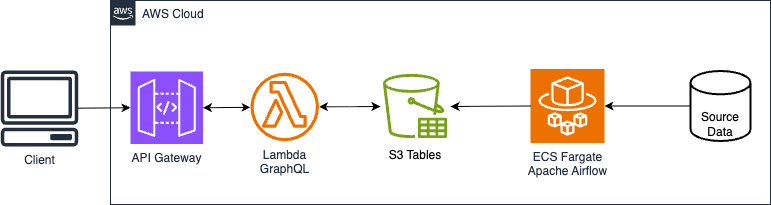
Figure 1: Architecture diagram
The architecture includes the following key components:
- Amazon API Gateway with GraphQL – GraphQL allows clients to request exactly the data they need, providing a more flexible and efficient alternative to REST in many scenarios. The team exposed a unified GraphQL endpoint so clients can specify exactly which fields they need for each use case. This removed the proliferation of bespoke REST endpoints and reduced average field counts per query from 15 to 5, cutting data transfer and simplifying both client code and client-side processing.
- AWS Lambda – Stateless GraphQL resolvers scale automatically with traffic, keeping per-request compute costs aligned with usage. A Lambda function was optimized to cache connections by moving the S3 Tables catalog initialization code outside of the handler function, reducing both latency and cost per request.
- Amazon S3 Tables – The team adopted Apache Iceberg for its ACID properties, native schema evolution, and partitioning capabilities. However, they also wanted to alleviate the operational burden of maintaining compaction scripts and snapshot management. S3 Tables provides built-in Iceberg support with automated table optimization that continuously scans and rewrites data in the background for optimal query performance. The team started with basic time-based partitioning, then iterated to a device-identifier-plus-time partition strategy. They sorted data to optimize eight device-centric representative queries. This improved predicate pushdown and file skipping for device lookups, cutting scanned data and read I/O operations by 35–40 percent and stabilizing tail latency (p95/p99) under load. Automatic compaction and snapshot cleanup kept small-file counts in check without custom jobs. The same tables powering the GraphQL API were seamlessly exposed through the S3 Tables Iceberg REST endpoint, helping data scientists query datasets through Amazon Athena, Amazon EMR, and Iceberg-compatible tools like PyIceberg. This unified approach avoided redundant data copies while extending analytics capabilities beyond the original API.
- Apache Airflow – The team deployed Apache Airflow on AWS Fargate on Amazon Elastic Container Service (Amazon ECS) to orchestrate incremental data loads, keeping datasets fresh without expensive full reloads or reindexing operations.
This architecture pushes heavy lifting like predicate filtering, column projection, and automatic maintenance into the storage layer while giving clients the flexibility to request only what they need.
Results
The new architecture handles 80 times higher concurrent request volumes while reducing costs by 38 percent and cutting query latency by 28 percent. This transformation came from eliminating multiple pipelines to keep datasets current and REST endpoint-based architecture to S3 Tables and GraphQL. The team saw the following results:
- Scalability – The serverless architecture using Lambda, GraphQL, and S3 Tables now sustains 32,000 requests per 5-minute window, 80 times higher than the previous system. Peak sustained throughput reached 107 queries per second, with headroom to grow further.
- Latency – As shown in the Figure 2, response time for common device-centric queries improved from 820 milliseconds to 590 milliseconds (28 percent faster) at the median. Under peak load, p95 latency measured 720 milliseconds and p99 reached 940 milliseconds. GraphQL queries return results faster because S3 Tables columnar format reduces I/O operations.
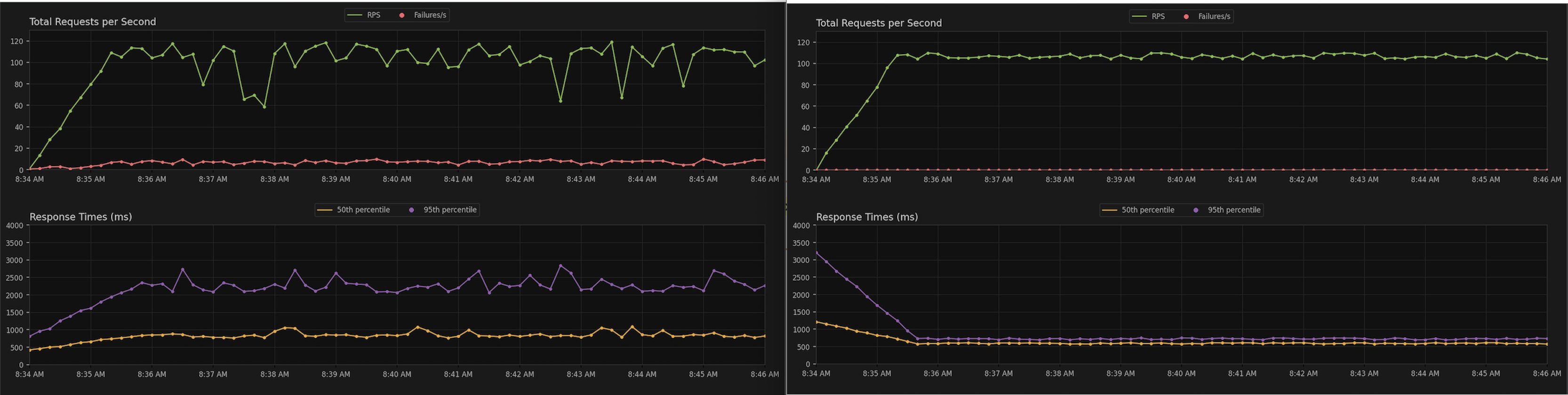
Figure 2: Latency for requests
- Cost optimization – The new infrastructure costs are 38 percent less. The bulk of the savings comes from avoiding duplicate copies of data. Additionally, the efficient storage layout of S3 Tables scans less data per query and returns smaller payloads, reducing both compute and data transfer costs.
- Development agility – Adding new fields now takes 2 days instead of 2 weeks. Engineers update the GraphQL schema directly rather than creating new REST API variants, avoiding separate deployment cycles.
- Analytics integration – Data scientists and API consumers query the same S3 Tables through Athena, Amazon EMR, or PyIceberg. This avoids data duplication and provides consistency across batch analytics and real-time APIs.
- Security – The system authorizes requests through OAuth2 with resource-level permissions and least-privilege access controls.
- Operational efficiency – The team removed Amazon RDS database clones that maintained separate copies for each dataset. S3 Tables also handle automatic compaction and optimization, removing the manual scripts and tuning jobs that engineers previously maintained. This freed the team to focus on feature development instead of infrastructure maintenance.
Conclusion
By decoupling the API layer with GraphQL and pushing filtering and optimization into S3 Tables, the RADS team freed engineers to build features instead of maintaining infrastructure. Adding new fields now takes 2 days instead of 2 weeks, and the team serves new consumers without creating additional endpoints or data copies. Three design decisions drove this outcome. First, GraphQL avoided over-fetching by letting clients request exactly the fields they need, reducing average field counts from 15 to 5. Second, automated optimization in S3 Tables handles compaction and snapshot management, removing manual maintenance jobs. Third, device-identifier partitioning with sorted data cuts scanned data by 35–40 percent, improving both performance and cost. This architecture also positions the team for future growth. The same S3 Tables serve both real-time GraphQL queries and batch analytics through Athena and Amazon EMR, avoiding data duplication. The Iceberg REST Catalog makes datasets accessible to new tools and use cases without additional ETL. As Comcast continues analyzing cable-modem telemetry at scale to improve network reliability, the infrastructure scales with demand rather than constraining it.
To get started with S3 Tables, see the tutorial Getting started with S3 Tables and Working with Amazon S3 Tables and table buckets.