AWS Storage Blog
Streamline ransomware protection while reducing cost with AWS Backup logically air-gapped vault primary backup
Organizations today face increasing pressure to protect their backup data against ransomware events and accidental deletions. Although air-gapped storage provides strong protection for backups, implementing it traditionally requires maintaining multiple copies of data which increases costs and adds complexity. This can force organizations to compromise between meeting strict security requirements and managing storage costs, either sacrificing the level of protection or accepting higher operational expenses.
AWS Backup logically air-gapped vaults provide isolated, immutable backup storage in separate service-owned accounts. With the introduction of logically air-gapped vault primary backups, organizations can store their backups directly in logically air-gapped vaults without needing additional copies. This enhancement helps organizations reduce costs while maintaining robust protection against ransomware and accidental deletions. Customers should use this feature to optimize their backup costs while ensuring their data remains secure.
In this post, we walk through how to back up directly to a logically air-gapped vault. You will learn how to configure the feature across different resource types, along with best practices for monitoring and managing your protected data. If you’re looking to strengthen your ransomware recovery posture, meet compliance requirements, or simplify your backup security architecture, this approach can help you achieve those goals without sacrificing cost.
Background: Evolution of logically air-gapped vault
In August 2024, AWS Backup introduced logically air-gapped vaults, providing customers with an isolated backup storage solution that stores immutable backup copies in service-owned accounts. These vaults are encrypted using either service-owned or customer-managed AWS KMS keys, offering an added layer of protection by separating backup copies from workload accounts. Customers can use AWS Resource Access Manager (AWS RAM) to share the vault data across specific accounts and AWS Organizations, providing direct access to recovery points and leading to faster restores. Furthermore, customers can use Multi-party approval to recover their backup data even in cases where their primary account or entire Organizations structure is compromised. Although this approach aligned with the 3-2-1 industry backup standard, the requirement to maintain multiple backup copies prevented some customers from adopting logically air-gapped vaults and benefiting from their enhanced security features.
How logically air-gapped vault primary backup works
AWS Backup now supports designating a logically air-gapped vault as a primary backup target in backup plans, Organization-wide policies, or on-demand backups. By enabling direct backup to logically air-gapped vaults, AWS Backup has eliminated the previous requirement to first store backups in a standard vault before copying. This reduces storage costs while maintaining comprehensive security and recoverability protection. For customers, implementing logically air-gapped vault primary backup is straightforward and can be completed quickly. AWS resources vary in whether they allow AWS Backup to directly control backup storage or require the service to orchestrate native snapshot capabilities. When you specify both a backup vault and a logically air-gapped vault as targets for your backup jobs, AWS Backup determines the appropriate workflow based on the resource type and encryption configuration:
- Fully managed resources (like Amazon S3, Amazon DynamoDB, and Amazon EFS): Backups are written directly to the logically air-gapped vault without intermediate copies. You can specify a logically air-gapped vault as your target in the same way for all resource types. For fully managed resources, AWS Backup stores your backups directly in the logically air-gapped vault.
- Non-fully managed resources (like Amazon EBS, Amazon Aurora, and Amazon FSx): AWS Backup intelligently coordinates with the underlying service. The process creates a temporary snapshot in your account before transferring it to the specified logically air-gapped vault. AWS Backup automatically manages this orchestration, including cleanup of temporary snapshots, providing a cost-effective solution that requires no manual intervention.
- Unsupported resources: These continue to be stored as backups in the standard vault designated in your backup plan.
Fully managed resources: Direct backup path
You can back up resources fully managed by AWS Backup directly to a logically air-gapped vault with no intermediary steps. Logically air-gapped vault primary backup maintains PITR capabilities where supported, such as with Amazon S3 continuous backups. These resources are already integrated with AWS Backup, so they can be directly encrypted with either the logically air-gapped vault service-owned keys or customer managed keys (CMKs). Any further copy actions use the logically air-gapped vault recovery point as the source to copy to other vaults.
Non-fully managed resources: Intelligent orchestration
You can back up resources that are supported by logically air-gapped vault but not fully managed by AWS Backup using an intelligent orchestration process automatically managed by the service. This process creates a temporary snapshot in the standard vault, before copying the backup to the logically air-gapped vault. These services manage their own backup storage, while AWS Backup orchestrates the backup, copy, and restore operations.
- After you start the logically air-gapped vault primary backup, AWS Backup creates a temporary snapshot in your target backup vault.
- When the backup in the target vault is complete, AWS Backup automatically initiates a copy operation to transfer the backup to your logically air-gapped vault.
- Upon successful copy completion, the temporary snapshot is automatically removed.
- If the copy operation fails, then the temporary snapshot is retained according to your specified lifecycle policy to ensure at least one usable backup is retained.
For a complete list of AWS services and their integration type (fully managed or non-fully managed), go to the AWS Backup feature compatibility matrix in the documentation. The following architecture diagram shows the backup workflow from AWS resources to vault storage.
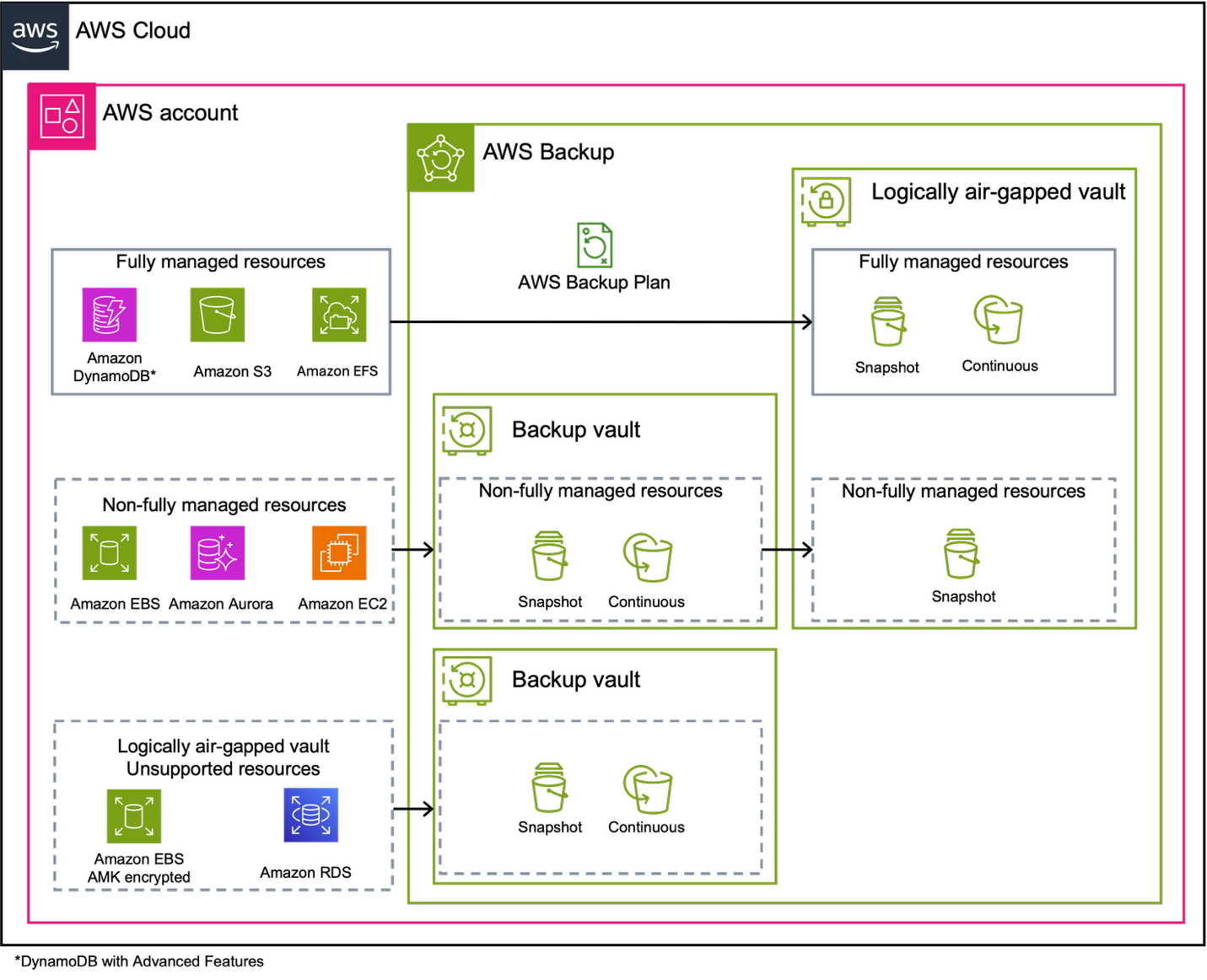
Figure 1: Logically air-gapped vault architecture showing backup paths depending on resource type
Prerequisites
Before implementing logically air-gapped vault primary backup, make sure that you have the following:
- A logically air-gapped vault created in the same AWS account and AWS Region as your resources.
- AWS Identity and Access Management (IAM) permissions configured, including the
AWSServiceRoleForBackupservice linked role. - Verify resource encryption status—review the Considerations and limitations section in the logically air-gapped vaults documentation.
- Organizations enabled (if using organization-wide backup policies).
- Multi-party approval teams configured through IAM Identity Center if you want to use this option.
With these prerequisites in place, AWS Backup offers three implementation approaches for logically air-gapped vault primary backup. You can create on-demand backups for immediate protection of specific resources, configure backup plans for scheduled and automated protection across multiple resources, or implement organization-wide policies for enterprise scale governance and compliance. Each approach provides the same core functionality while serving different operational models and use cases. When configuring any of these approaches, remember that you must always designate a standard backup vault alongside your logically air-gapped vault. This requirement establishes support for all resource types, because some resources store their backups in the standard backup vault when they can’t be stored in the logically air-gapped vault.
Walkthrough
The following steps walk you through implementing logically air-gapped vault primary backup.
Via on-demand backup
When you create a logically air-gapped vault, you can create on-demand backups directly to the logically air-gapped vault, as shown in the following Figure 2.
To create an on-demand backup to a logically air-gapped vault:
- Open the AWS Backup console.
- In the navigation pane, choose Protected resources.
- Choose Create on-demand backup.
- For Resource type, select the resource you want to back up.
- Configure the appropriate backup settings for your resource.
- Under Backup vault, select a standard backup vault.
- For Logically air-gapped vault (Optional), select the logically air-gapped vault that you created.
- Choose Create on-demand backup.
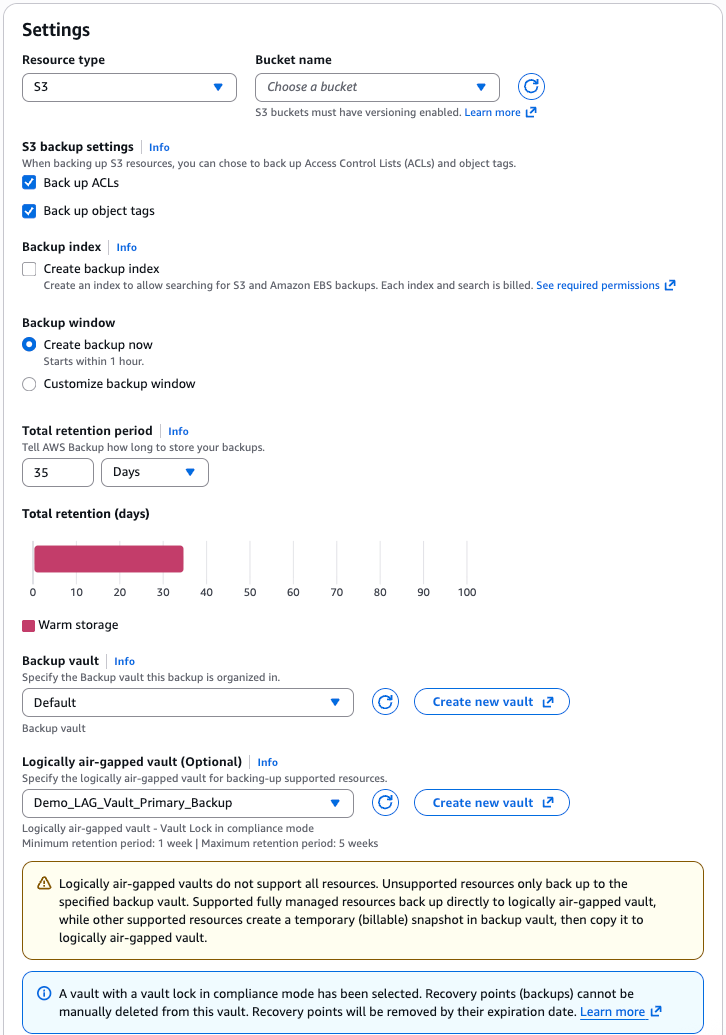
Figure 2: Creating an on-demand backup with a logically air-gapped vault target
When the on-demand backup is created, you can view the details and status under the Jobs menu, as shown in the following Figure 3. For fully managed resources, backups are written directly to the logically air-gapped vault. For non-fully managed resources, AWS Backup manages the process by creating a temporary snapshot before transferring it to the logically air-gapped vault.
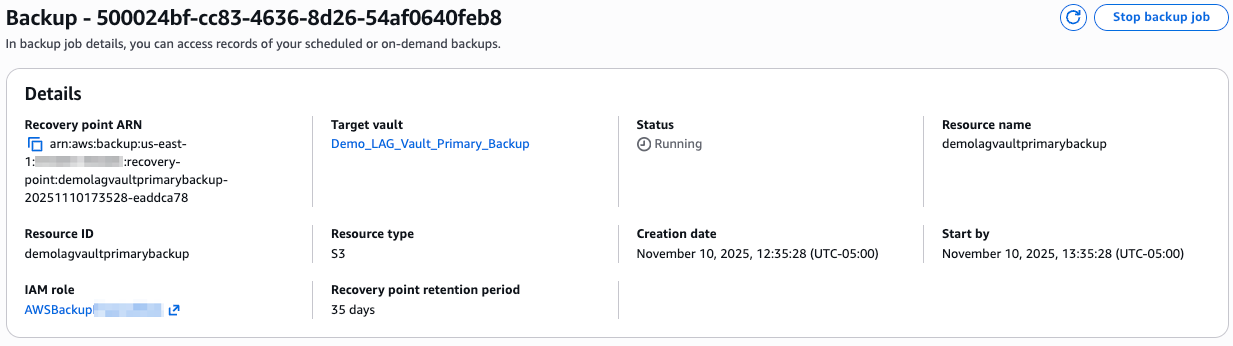
Figure 3: Logically air-gapped vault primary backup details
Via a logically air-gapped vault primary backup in a backup plan
You can also create backup rules within a backup plan that target backups directly to a logically air-gapped vault, as shown in the following Figures 4 and 5. To configure backup rules in your backup plan:
- Open the AWS Backup console.
- In the navigation pane, choose Backup plans.
- Create a plan by starting with a template, building a new one, or defining one using JSON.
- Create or edit a backup rule in your backup plan.
- Specify a backup vault as the primary target.
- Select the logically air-gapped vault that you want to use as your target.
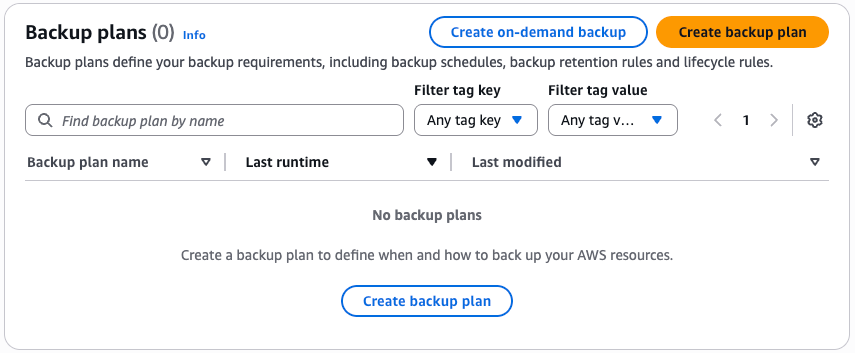
Figure 4: Backup plan menu
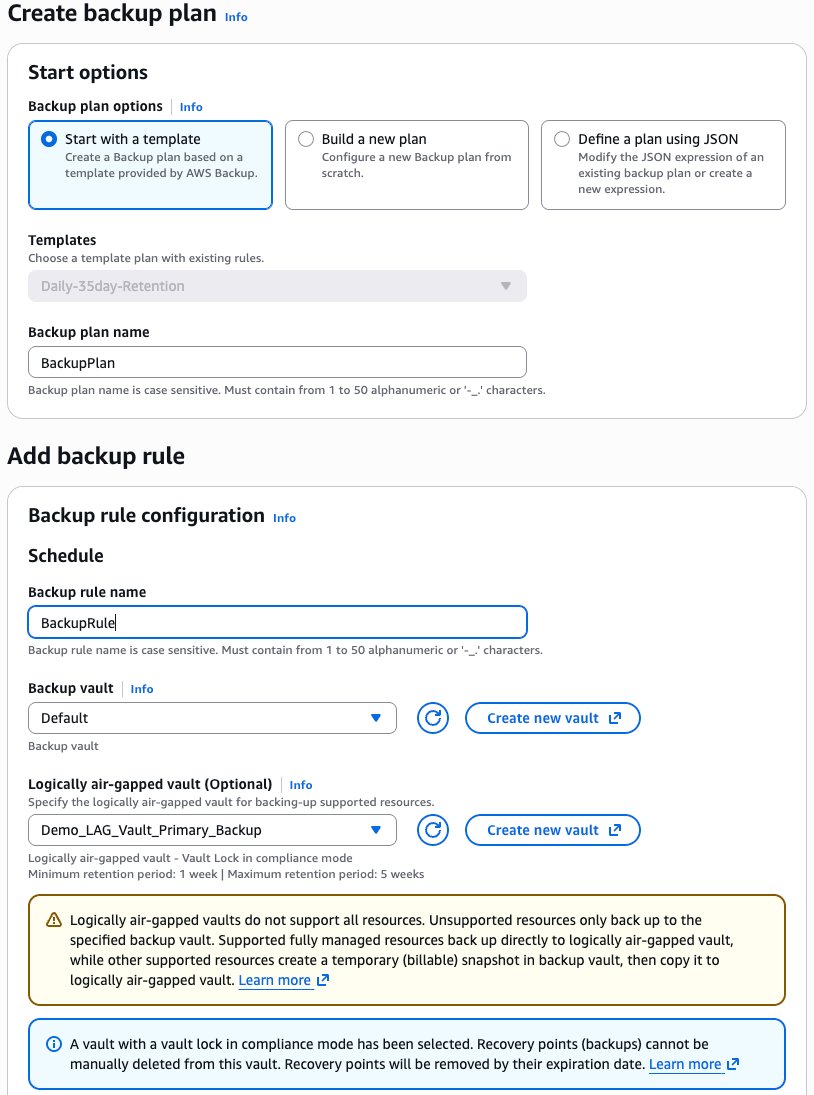
Figure 5: Backup plan options with logically air-gapped vault primary backups
When modifying an existing backup rule to include a logically air-gapped vault, only new backups are affected. Existing backups remain in their original vault with their current retention policies.
Best practices
When implementing logically air-gapped vault primary backups, configure your backup plans with consideration for resource type and encryption:
- Review your resource encryption: Non fully-managed resources must still be copied into logically air-gapped vault. This copy is only possible if the resource is encrypted with a CMK or unencrypted. Resources encrypted with AWS managed keys can’t be shared across accounts and thus can’t be copied to the logically air-gapped vault.
- Plan backup frequency: For non-fully managed resources, each backup requires time to create a temporary snapshot and copy it to the logically air-gapped vault, making backup frequency a key factor in optimizing both operational efficiency and cost benefits. To achieve maximum cost optimization with logically air-gapped vault primary backup, consider backup frequencies of 24 hours or greater. This allows the solution to deliver its full cost advantages by minimizing overlapping storage periods between temporary snapshots and logically air-gapped vault copies. Although backup frequencies under 24 hours still provide the security, compliance, and operational benefits of logically air-gapped protection, the cost optimization benefits become progressively smaller as frequency increases, with hourly backups requiring careful evaluation of whether the operational benefits justify the higher storage costs due to frequent temporary snapshots and copy operations. Schedule backups with sufficient intervals to prevent copy operations from queuing and carefully evaluate whether your frequency requirements align with your cost optimization objectives.
- Consider your retention requirements: Logically air-gapped vaults have a mandatory minimum retention period of seven days. Verify that your lifecycle policies align with this requirement and any other retention settings that you configure for the vault. Effective retention planning requires a comprehensive strategy that balances compliance obligations, recovery requirements, and cost optimization through intelligent lifecycle management. Design differentiated retention policies based on data criticality and business requirements.
Architecture considerations
Implementing logically air-gapped vaults in your workload accounts is required for logically air-gapped vault primary backup and streamlines management by keeping resources and backups within the same account boundary. Logically air-gapped vaults are inherently isolated in separate service-owned accounts, providing strong protection without requiring you to maintain copies in a separate data bunker account. Enabling Multi-party approval provides an added layer of security so that backup recovery remains possible even if your workload account is compromised.
If you have disaster recovery requirements, then consider your regional strategy carefully. Logically air-gapped vaults for primary backups must be deployed in the same AWS account and Region as your resources to enable faster recovery without requiring a copy operation. If you require a copy of your data in a second Region for disaster recovery, then AWS recommends either cross-Region replication of your primary resources for quick failover, or cross-Region recovery point copies to a locked backup vault. This approach optimizes both recovery speed and cost while maintaining appropriate protection levels. For organizations requiring centralized backup access patterns, AWS RAM sharing provides the optimal approach for cross account vault access without the operational complexity of separate central bunker accounts. AWS RAM sharing enables centralized visibility and management while avoiding the critical quota limitations that constrain traditional bunker architectures, particularly the non-adjustable 30 cross-Region copy jobs per vault limit that creates bottlenecks when receiving copies from multiple source accounts. Organizations with specific compliance requirements mandating physical account separation should carefully evaluate these quota constraints and implement mitigation strategies such as backup plan partitioning across multiple schedules, distributing copies across multiple account/Region combinations, or maintaining copies within a single account to avoid cross account transfer costs and quota limitations entirely. The single account approach with AWS RAM sharing for cross account access typically provides the optimal balance of centralization benefits, operational clarity, cost efficiency, and scalability.
Cleaning up
If you’ve been following this post and want to remove the resources that you’ve created, then follow these steps. Logically air-gapped vaults include built-in protection mechanisms that may affect your ability to delete certain resources based on your configuration. Logically air-gapped vaults can’t be deleted if they contain recovery points. Consider this when configuring retention settings.
- Remove backup plan rules or delete backup plans that reference your logically air-gapped vault.
- Wait for recovery points in your logically air-gapped vault to expire based on your configured policies.
- Delete your logically air-gapped vault when it’s empty.
Conclusion
In this post, we introduced you to logically air-gapped vault primary backup, which provides an enhancement to the AWS Backup ransomware protection capabilities. This feature removes the need for duplicate storage while maintaining the security benefits of logically air-gapped vaults. In turn, it makes advanced backup protection more accessible to organizations of all sizes. Logically air-gapped vault primary backup reduces operational and storage costs for customers.
To learn more about AWS Backup and logically air-gapped vaults, visit the AWS Backup documentation or the AWS Backup website.