AWS Big Data Blog
Category: AWS Glue
Multi-cloud lakehouse architecture on AWS for Agentic AI, Part 1: Architecture and best practices
This post focuses on explaining the architecture approach to build the open lakehouse architecture on AWS, unifying the metadata catalog across providers for the AI agents to access. In addition, it highlights the architecture trade-offs and best practices.
Introducing Apache Spark Connect support in AWS Glue interactive sessions
Apache Spark Connect bridges the gap between these two worlds: you develop in local Python, but execute on AWS Glue against actual data. Today, AWS Glue interactive sessions support Spark Connect natively. You can connect from any environment that supports the PySpark remote() API, including VS Code, PyCharm, Amazon SageMaker Unified Studio notebooks, and standalone Python applications. You don’t need to install specialized kernels or manage cluster infrastructure.
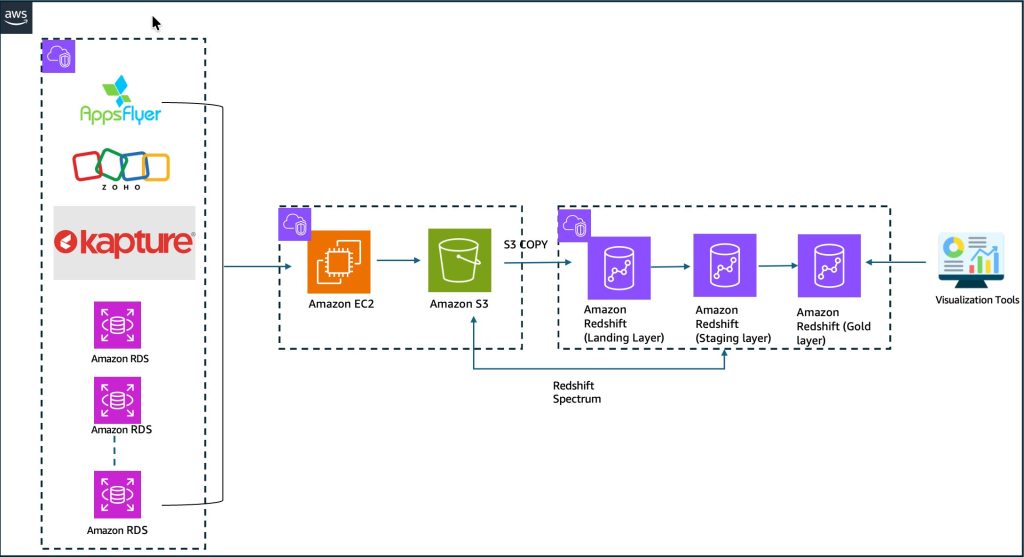
How BigBasket uses the Iceberg based lakehouse architecture on AWS to power lightning-fast grocery delivery across India
In this post, we demonstrate how BigBasket implemented the lakehouse architecture on AWS, including their architecture decisions, implementation approach, and the measurable business results you can expect from a similar modernization. Whether you’re facing scalability challenges or planning your own lakehouse implementation, this blueprint provides actionable insights you can adapt for your organization.
Accelerating log analytics at scale with AWS Glue and Apache Iceberg materialized views
In this post, you learn how to build an application log pipeline for production use with Amazon CloudWatch Logs, AWS Lambda, Amazon Data Firehose, AWS Glue, and Apache Iceberg materialized tables. You then use materialized views to accelerate query performance. This solution helps you achieve faster query response times on large-scale log data without requiring you to manage continuous data lake refresh.
Deploy modern data platforms in minutes with MDAA
In this post, we explore how MDAA transforms data architecture development from months of manual coding to production-ready deployment through configuration-driven infrastructure and embedded governance, examine a real customer transformation, and provide a clear implementation pathway for your own data modernization journey.
Autonomous troubleshooting for Medallion Architecture with AWS DevOps Agent and Apache Spark Troubleshooting Agent
In this post, we show you how to diagnose multi-layer Medallion Architecture pipeline failures in minutes using AWS DevOps Agent with Apache Spark Troubleshooting Agent integrated as an MCP server.
Beyond JSON blobs: Implementing the VARIANT data type in Apache Iceberg V3
This post is part 1 of a two-part series. We walk through the basics: creating an Iceberg V3 table with a VARIANT column, inserting semi-structured data, and querying it with variant_get(). In Part 2, we scale to millions of rows and benchmark VARIANT against traditional string storage. We measure the difference in query performance and storage footprint.
Automate data discovery and centralized management with AWS Glue Data Catalog
In this post, we show you how to tackle data discovery, classification, and governance across your databases, data warehouses, and object storage to regain visibility and control over your data landscape.
Securing client confidentiality at scale: Automated data discovery and governed analytics for legal workloads
In this post, we show you a reference architecture that automates sensitive data discovery across legal document repositories on Amazon Web Services (AWS), demonstrate how to capture structured findings as a compliance dataset, and guide you through building a governed analytics workspace that maintains your security boundaries. You walk away with a practical model for building security and analytics into the same lifecycle, without moving documents outside their system of record.
How to use streamlined permissions for Amazon S3 Tables and Iceberg materialized views
In this post, we walk through how to set up and manage S3 Tables in the AWS Glue Data Catalog, create and query Iceberg materialized views, and configure access controls that work across your analytics stack with IAM-based authorization.