AWS Big Data Blog
Category: AWS Big Data

Amazon EMR introduces EMR runtime for Presto, providing a 2.6 times speedup
Presto is an open-source distributed SQL query engine for running interactive analytic queries against data sources of all sizes ranging from gigabytes to petabytes. Presto was designed and written from the ground up for interactive analytics, and approaches the speed of commercial data warehouses while scaling to the size of organizations like Facebook. Running Presto […]

Estimate Amazon EC2 Spot Instance cost savings with AWS Glue DataBrew, AWS Glue, and Amazon QuickSight
AWS provides many ways to optimize your workloads and save on costs. For example, services like AWS Cost Explorer and AWS Trusted Advisor provide cost savings recommendations to help you optimize your AWS environments. However, you may also want to estimate cost savings when comparing Amazon Elastic Compute Cloud (Amazon EC2) Spot to On-Demand Instances. […]

Extract multidimensional data from Microsoft SQL Server Analysis Services using AWS Glue
AWS Glue is fully managed service that makes it easier for you to extract, transform, and load (ETL) data for analytics. You can easily create ETL jobs to connect to backend data sources. There are several natively supported data sources, but what if you need to extract data from an unsupported data source? What if […]

Migrate terabytes of data quickly from Google Cloud to Amazon S3 with AWS Glue Connector for Google BigQuery
This blog post was last updated July, 2022 to update the new version of the connector and details on how to push down queries to Google BigQuery. The cloud is often seen as advantageous for data lakes because of better security, faster time to deployment, better availability, more frequent feature and functionality updates, more elasticity, […]

Doing data preparation using on-premises PostgreSQL databases with AWS Glue DataBrew
Today, with AWS Glue DataBrew, data analysts and data scientists can easily access and visually explore any amount of data across their organization directly from their Amazon Simple Storage Service (Amazon S3) data lake, Amazon Redshift data warehouse, and Amazon Aurora and Amazon Relational Database Service (Amazon RDS) databases. Customers can choose from over 250 […]

Amazon EMR 6.2.0 adds persistent HFile tracking to improve performance with HBase on Amazon S3
Apache HBase is an open-source, NoSQL database that you can use to achieve low latency random access to billions of rows. Starting with Amazon EMR 5.2.0, you can enable HBase on Amazon Simple Storage Service (Amazon S3). With HBase on Amazon S3, the HBase data files (HFiles) are written to Amazon S3, enabling data lake […]

Automate dynamic mapping and renaming of column names in data files using AWS Glue: Part 1
A common challenge ETL and big data developers face is working with data files that don’t have proper name header records. They’re tasked with renaming the columns of the data files appropriately so that downstream application and mappings for data load can work seamlessly. One example use case is while working with ORC files and […]

Automate dynamic mapping and renaming of column names in data files using AWS Glue: Part 2
In Part 1 of this two-part post, we looked at how we can create an AWS Glue ETL job that is agnostic enough to rename columns of a data file by mapping to column names of another file. The solution focused on using a single file that was populated in the AWS Glue Data Catalog […]

How 1Strategy simplified their spreadsheet ETL process using AWS Glue DataBrew
This is a guest blog post by Pat Reilly and Gary Houk at 1Strategy. In their own words, “1Strategy is an APN Premier Consulting Partner focusing exclusively on AWS solutions. 1Strategy consultants help businesses architect, migrate, and optimize their workloads on AWS, creating scalable, cost-effective, secure, and reliable solutions. 1Strategy holds the AWS DevOps, Migration, […]
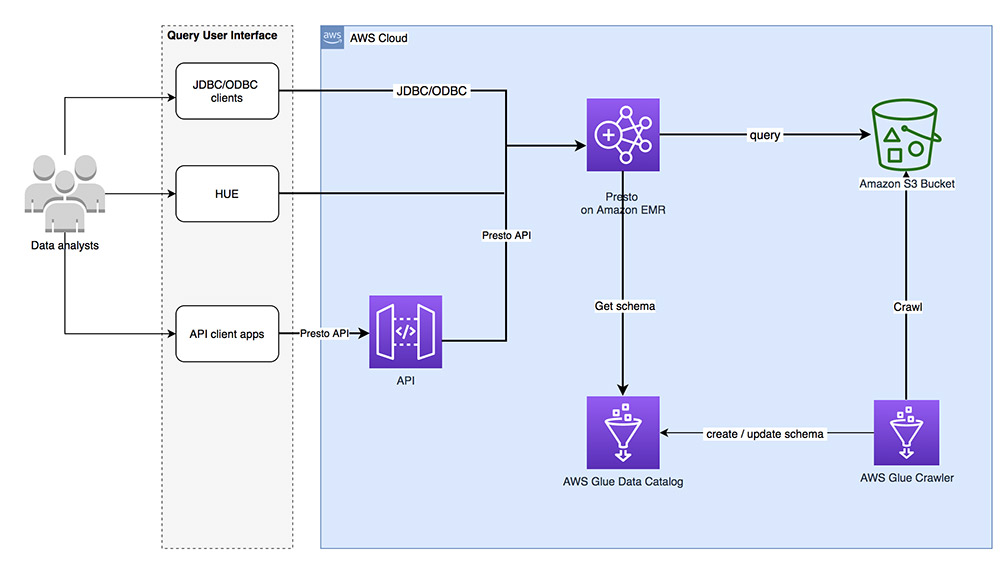
Top 9 performance tuning tips for PrestoDB on Amazon EMR
Presto is a popular distributed SQL query engine for interactive data analytics. With its massively parallel processing (MPP) architecture, it’s capable of directly querying large datasets without the need of time-consuming and costly ETL processes. With a properly tuned Presto cluster you can run fast queries against big data with response times ranging from subsecond […]