AWS Big Data Blog
Create a customizable cross-company log lake, Part II: Build and add Amazon Bedrock
In Part I, we introduced the business background behind Log Lake. In this post, we describe how to build it, and how to add model invocation logs from Amazon Bedrock.
The original use case of Log Lake was to join AWS CloudTrail logs (with StartSession API calls) with Amazon CloudWatch logs (with session keystrokes from within Session Manager, a capability of AWS Systems Manager), to help a manager review an employee’s use of elevated permissions to determine if the use was appropriate. Because there might be only one event of elevated privileges in millions or billions of rows of log data, finding the right row to review was like looking for a needle in a haystack.
Log Lake is not just for Session Manager, but also general purpose CloudTrail and CloudWatch logs. After adding CloudWatch and CloudTrail logs to raw tables at scale, you can set up AWS Glue jobs to process the many tiny JSON files of raw tables into bigger binary files for “readready” tables. Then, these readready tables could be queried with different filters to answer questions for many use cases, such as legal or regulatory reviews for compliance, deep forensic investigations for security, or auditing. Log Lake is an answer to the question “Are there logs, and if so, how do I get them?”
Solution overview
Log Lake is a data lake for compliance-related use cases, uses CloudTrail and CloudWatch as data sources, has separate tables for writing (original in raw JSON file format) and reading (read-optimized readready in transformed Apache ORC file format), and gives you control over the components so you can customize it for yourself.
The following diagram shows the system architecture.
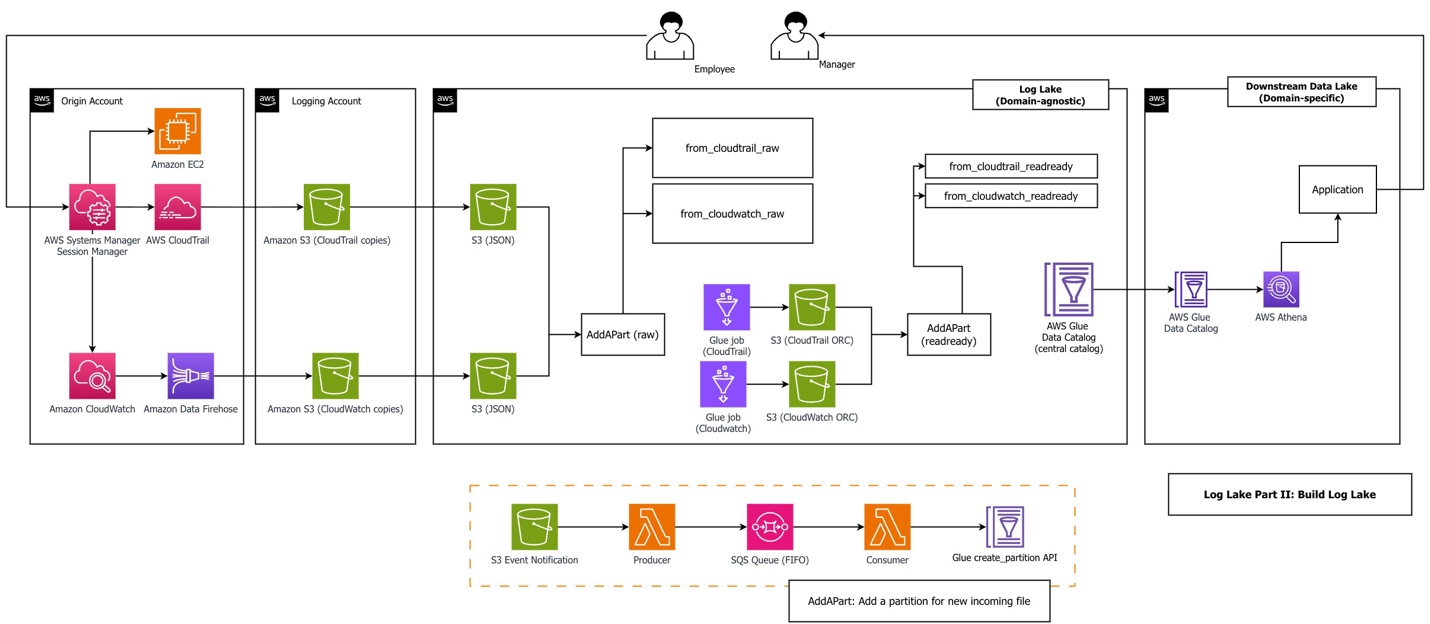
The workflow consists of the following steps:
- An employee uses Session Manager to access Amazon Elastic Compute Cloud (Amazon EC2). Sessions might include sessionContext.sourceIdentity if a principal provided it while assuming a role (requires
sts:SetSourceIdentityin the role trust policy). Our AWS Glue jobs filtered on this field to reduce cost and improve performance. - Logging in to an EC2 instance using Session Manager and performing actions during a session triggers two kinds of logs: CloudTrail records API activity (
StartSession) and CloudWatch records session data from within the service (sessionData). Sample CloudTrail and CloudWatch log files are in the GitHub repository, generated from a real Systems Manager session. We recommend you upload these files in your first deployment, but alternatively, you can generate your own data files. - An Amazon Data Firehose subscription copies logs to Amazon Simple Storage Service (Amazon S3) using a CloudWatch subscription filter. CloudWatch combines multiple log events into one Firehose record when it is sent using subscription filters. This is why Log Lake uses regex serde to process CloudWatch rather than JSON serde. When using Firehose subscription filters, Firehose compresses data with GZIP level 6 compression.
- Optionally, replication rules copy files to consolidated S3 buckets.
- The AddAPart AWS Lambda function associates many tiny JSON files with raw Hive tables in the Data Catalog using the AWS Glue API, triggered by S3 event notifications.
- The AWS Glue job reads raw tables and writes to bigger binary ORC files, a columnar file format suitable for analytics. Amazon Athena needs JSON documents on separate lines for processing. In our benchmarking using CloudWatch and CloudTrail workloads, ORC ZLIB had the fastest (lowest) query duration, and was half the file size of Parquet Snappy (1246 MB ORC ZLIB vs 2.4GB Parquet Snappy). Also, ORC is used by AWS CloudTrail Lake. To test file formats, logs from CloudTrail Systems Manager (
eventsource='ssm.amazonaws.com') were copied to generate a total population of JSON files over 500 GB. First, a JSON table was created. Then two additional tables were created using Athena CTAS: one for ORC ZLIB, and one for Parquet Snappy. Tests compared three subsequent query durations for three different workloads across ORC vs. Parquet. - The AddAPart Lambda function associates ORC files with Hive readready tables. AddAPart for readready is created using the same stack as for raw, but different parameters (bucket, table, and so on). Hive table format was used for raw because incoming files were JSON, and readready used Hive (not Iceberg) for consistency and append only operations.
- Users can query readready tables using the Athena API.
Log Lake uses multiple services together:
- CloudTrail logs for StartSession API activity (required for auditing, compliance, legal purposes)
- CloudWatch logs to extend and add keystrokes from Session Manager, so what happened within a session can be reviewed for appropriate use
- Lambda and Amazon Simple Queue Service (Amazon SQS) for asynchronous invocation of S3 event notifications, for serverless event-driven processing to associate data files with metadata tables
- The Data Catalog as a metastore to register table metadata, either standalone or as part of a data mesh architecture
- AWS Glue Spark jobs to transform data from original raw format to read-optimized tables
- Athena for one-time queries
The architecture of Log Lake includes the following design choices:
- Separate tables for writing (raw) and reading (readready).
- Asynchronous invocation using Lambda and Amazon SQS to add partitions for files (AddAPart).
- AWS Glue jobs with Spark SQL and views (“many view”).
- AWS services designed to do one thing well, such as Amazon S3 for storage and Amazon SQS for message queueing. This gives data engineers control over components for cost or customization.
Separate tables for reading (readready) and writing (raw)
The concept of raw and readready tables represents two distinct approaches to data storage and processing, each serving different purposes in a data architecture:
- Raw tables – Source-aligned and write-optimized. They are backed by many tiny files (KB in size) in original format. For CloudWatch and CloudTrail, this means JSON file format.
- ReadReady tables – Source-aligned and read-optimized. They are backed by bigger binary files, usually larger than 10 MB, in columnar file format.
Part I contains our comparison of performance, cost, and convenience of both table layers.
Add partition Lambda functions (AddAPart)
Log Lake uses an event-based, asynchronous invocation approach to add partitions to raw tables. We call this approach “AddAPart with LoLLs” (Lots of Little Lambdas). It is optimized for adding new incoming files in text format to existing Hive tables as fast as possible, with the following assumptions:
- Incoming raw files are in JSON or CSV and must be stored and queried in original format (can’t be changed to Iceberg-compatible formats such as Parquet or ORC). Append only, not merge or update.
- Partition management must be automatic.
- File-based, no dependency on a job (files can be landed by different pipelines in different ways, and handled consistently by the same AddAPart function).
- No dependency on Athena partition projection (Data Catalog only).
The AddAPart function consists of five steps:
- An S3 event notification triggers the AddAPart producer Lambda function.
- The AddAPart producer sends messages to a first-in-first-out (FIFO) SQS queue.
- Amazon SQS helps prevent duplicate messages using MessageDeduplicationId.
- The AddAPart consumer processes a message and translates it to a partition placer profile.
- The AddAPart consumer uses the AWS Glue API to create a partition if none exists.
The following are some ways we have used AddAPart:
- Minimizing the time it takes to associate new data (JSON files) with new partitions (table in Hive).
- Reducing the cost of partition adding (duplicate S3 prefixes are ignored).
- Altering file names (Data Firehose postprocessing Lambda functions are an alternative).
- Customization, such as ignoring files with certain regex patterns in the S3 prefix or file name. If you want to exclude a data source or do an emergency power off, you can do it from within AddAPart without modifying other resources.
“Many view” AWS Glue jobs
Both Log Lake jobs are what we call “many view” AWS Glue jobs, which use createOrReplaceTempView from Spark, using code like the following:
We have used this approach to address the following antipatterns:
- Trying to do everything in one step – Trying to do all operations and relational algebra in a single Spark SQL statement can become too complex to troubleshoot, understand, or maintain. For us, when we see a single statement with at least 200 lines and 2 subqueries, we prefer to break it down into smaller statements.
- Code that is not standardized (inconsistent APIs and approaches) that is harder to maintain, support, and enhance – We have seen the freedom of Spark to mix API approaches (Spark SQL API, RDD API, DataFrame API) result in inconsistency and complexity in large code bases with many contributors.
- Mixing business logic with Spark environment (such as session settings) – Business logic should be separate and portable.
AWS Glue jobs with custom bounded execution and tables that support workload partitioning
You can tell AWS Glue jobs to look at a maximum of n days or n rows with custom bounds, which we implement using Spark Data Frames as follows:
Also, jobs can prune data using table partitions (and use partition indexes). This helps you prepare routine mechanisms up front that are ready to run and recover from missing data by running relative backfill jobs until data is up to date.
Prerequisites
Complete the following prerequisite steps to implement this solution:
- Download the repository:
- Create or identify an S3 bucket to use during the walkthrough. This will be used for storing the AWS Glue job scripts, Lambda Python files, and AWS CloudFormation stacks.
- Copy all files under
log_laketo the S3 bucket. - If the S3 bucket is encrypted using an AWS Key Management Service (AWS KMS) key, note the Amazon Resource Name (ARN) of the key.
Build Log Lake
To build Log Lake, follow the deployment steps in the how_to_deploy.md file in the repo.
After deployment is complete, you can upload demo data files and run the AWS Glue jobs to demo how to answer the question, “Who did what in session manager?” For this, switch over to the how_to_demo.md file and follow the steps.
When you are done, you should see the following tables in the Data Catalog:
- from_cloudtrail_readready – Contains processed CloudTrail session data
- from_cloudwatch_readready – Contains processed CloudWatch session logs
You can view them on the AWS Glue console or query them directly in Athena. The following is a sample query from the repository that shows how to join both tables to get API activity from CloudTrail and join it to session data (keystrokes) from CloudWatch:
Add Amazon Bedrock model invocation logs
Adding Bedrock model invocation logs to Log Lake is important to enable human review of agent actions with elevated permissions. Some examples of the need for human oversight are tool use, computer use, agentic misalignment, and high impact AI in federal agencies. If you have not considered this use case and are using LLMs, we urge you to review Amazon Bedrock logs and consider either a managed product or a self-built data lake like Log Lake.
In this post, we use “agentic” and “agent” to refer to a large language model (LLM) using tools with some autonomy to iterate toward a goal.
To generate model invocation logs for this post, we created a custom Lambda function to ask Anthropic’s Claude 4.5 to list files in a bucket using a tool. We used this as a plausible future scenario where a human might need to review an agent’s actions and logs to decide if an agent’s tool use was appropriate.
The following diagram shows the components involved.
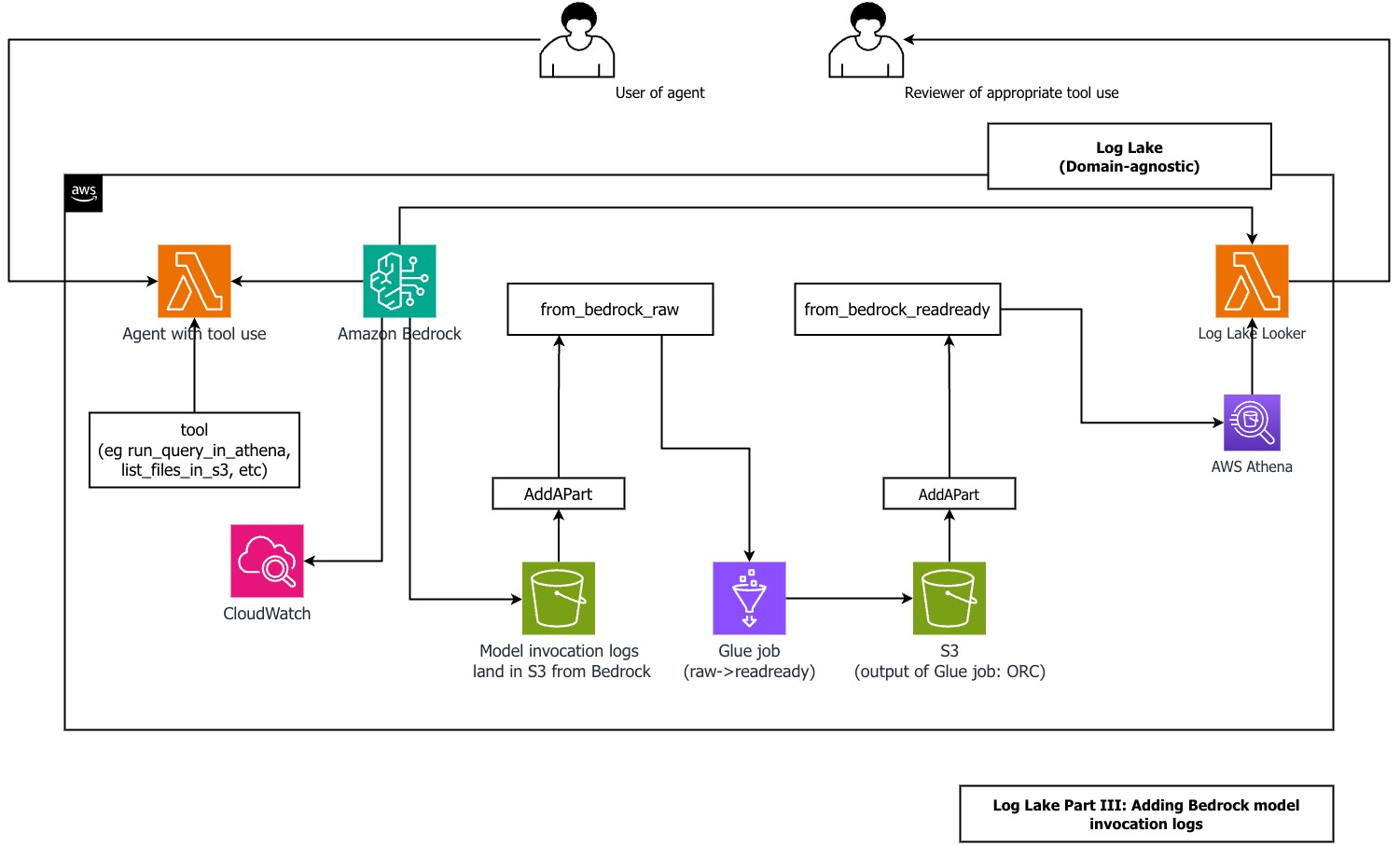
For logging inputs and outputs of LLMs running on Bedrock, refer to Monitor model invocation using CloudWatch Logs and Amazon S3. For simplicity, we avoided CloudWatch logs and set up logging directly to Amazon S3.
For logging API activity for Amazon Bedrock, refer to Monitor Amazon Bedrock API calls using CloudTrail.
We have included examples of the CloudTrail and CloudWatch files from Amazon Bedrock model invocation logs in the repository.
Before you create the model invocation logs, make sure you have created the from_cloudtrail_readready table from the previous steps.
Follow the steps in the GItHub repo to add Amazon Bedrock model invocation logs to Log Lake. When done, you should have the tablereplace_me_with_your_database.from_bedrock_readready.
You can query this table using Athena and join it to from_cloudtrail_readready, using SQL like the following example from the repo:
Use an agent to review an agent
The predefined query we used in our demo is what we used when we knew the needle in the haystack (tool_use in input messages), but this approach wouldn’t work for new, unknown patterns that require running SQL queries in multiple steps to understand complex data.
Our solution includes a method for an agent in Amazon Bedrock to review an agent in Amazon Bedrock. In this post’s repository, we include a Log Lake Looker Lambda function, which uses an LLM (Anthropic’s Claude) to talk to a database (the Log Lake AWS Glue database).
This pattern is not new. It has been described in 2024 in the paper DB-GPT: Empowering Database Interactions with Private Large Language Models as “a paradigm shift in database interactions, offering a more natural, efficient, and secure way to engage with data repositories.” This is an extension of an older idea from 1998: an interface to data was described in the Distributed Computing Manifesto as “the client is no longer dependent on the underlying data structure or even where the data is located.”
Using an agent to query Log Lake has multiple benefits:
- An engineered agent can deliver consistent, reliable, high-quality answers during stressful situations, such as a time-sensitive incident response or high-visibility investigation
- Users don’t have to write their own queries and can reduce their cognitive load (“What was that long column name?”)
- It can reduce onboarding and training time (the agent implements the training and specialized knowledge of the data structures)
You can ask Log Lake Looker an open-ended question and get an answer without writing a query. Log Lake Looker performs the following actions for you:
- Create a valid SQL query from a natural language user prompt. Log Lake Looker is optimized for the
from_bedrock_readreadytable using a system prompt, like the Anthropic SQL sorcerer example. - Run the query in Athena using a custom tool.
- Review tool results (rows) and replies with a simple summary.
When using input and output that can be verbose, like query results, you might need to manage tokens in your context window. For example, if the sum of input and output tokens exceeds the model’s context window, newer Claude models return a validation error, such as the following error we saw during testing: - Compact context by removing tool results. This improves time to answer performance, quality of answer, and reduces proliferation of potentially sensitive data to model invocation logs.
- Either run a follow-up query or suggest next steps for the human user.
Log Lake Looker looks at small samples from from_bedrock_readready using more than one try. This means the model reflects on its output and can create a follow-up query based on query results. To learn more about this, we recommend reading about reflection and iterative refinement. We have seen useful responses from agents using iterative approaches, especially when context is managed (for example, a specific system prompt using one table only or a limit on conversational turns) and tool results are compacted.
We’ve seen the agent answer simple questions like “can you query my table and tell me what you find?” in less than 60 seconds more than 50% of the time, without optimizing for any specific question. The following are snippets of CloudWatch logs to show you what’s possible, using Anthropic’s Claude Sonnet 4.5:
Security
Log Lake Looker should be reviewed by a human for appropriate tool use, because it has the same risks as the other agents using tools or a human with elevated privileges. Looker can review its own tool use, but human review is still needed.
There are security implications of allowing an agent to review model invocation logs: these logs can contain system prompts, sensitive data in responses, and user input in requests. Also, allowing an agent to generate SQL statements based on user input has additional risks specific to access to structured data, such as prompt injection, improper content, and proliferation of sensitive data.
We recommend a defense in depth (more than one layer) approach for tool use by a model. Log Lake Looker uses multiple layers of defensive measures:
- The application code requires the SQL statement to begin with
selectprior to sending to Athena. Because the query is from an assistant response to a user input (request), this relates to sanitizing and validating user inputs and model responses. - The AWS Identity and Access Management (IAM) role used by the function has
glue:Get*actions only (no mutation, such as create, update, delete tables, partitions, or databases), for least-privilege permissions. - It’s only used interactively as part of ad-hoc human-in-the-loop review (not in bulk or systemic).
- System prompting to steer behavior, like this example from the repo:
- The bucket storing model invocation logs is secure and follows least privilege practices. Logs can contain proliferation of sensitive data, such as tool results, user inputs, model outputs, and system prompts. If a system prompt contains sensitive information (such as metadata or query information not otherwise available) and is saved to logs in an unsecure bucket, this can result in a system prompt leak.
- Stripping tool results to reduce proliferation, using code to truncate content:
- You can use Amazon Bedrock Guardrails (without invoking the model in application code) using the ApplyGuardrail API.
Clean up
To avoid incurring future charges, delete the stacks. The repository has shell scripts you can use to delete files in buckets, which is required before deleting buckets.
Conclusion
In this post, we showed you how to deploy Log Lake in a new AWS account to create two tables, from_cloudtrail_readready and from_cloudwatch_readready. These tables can answer the question “What did an employee do in Session Manager?” across large data volumes in seconds using Athena.
Additionally, we showed how to add a data source to an existing Log Lake: Amazon Bedrock model invocation logs in the form of from_bedrock_readready. This shows how Log Lake can be extended to answer questions such as “What tools did an agent use?” and “Was there inappropriate use, and why?”
Finally, we showed how to create and use Log Lake Looker, an agent using Lambda and Amazon Bedrock. Looker can query Log Lake for new unknown patterns as part of human-in-the-loop review, without writing SQL or remembering column names. You can make Log Lake your way. We encourage you to look through the repository and use it as inspiration for your own Log Lake. If you have questions or comments, please let us know!