Containers
Break-glass access for Amazon EKS when federated identity fails
A federated identity provider outage locks you out of the clusters you need to reach to fix it. Implementing break-glass access for Amazon Elastic Kubernetes Service (Amazon EKS) clusters removes that circular dependency by creating an emergency path that depends on no external identity system. A leading worldwide provider of payment technology and software solutions, headquartered in the United States and referred to here as the customer, tested and verified this pattern across a fleet of more than 50 AWS accounts before moving its Amazon EKS estate between organizations in AWS Organizations. The migration completed without any cluster lockouts or production disruptions because the emergency path had been proven in every target account before the work began.
AWS already documents a good deal of this territory, and it’s worth being precise about what’s covered. The Amazon EKS best practices guidance recommends removing standing cluster-admin permissions from the cluster creator identity, and notes that the permission can be added back for break-glass use cases. The access entries documentation lists misconfiguration recovery as a feature, meaning cluster access can be restored through the Amazon EKS API without reaching the Kubernetes API first. At the account level, AWS Identity and Access Management (IAM) documents an emergency user, while AWS IAM Identity Center documents a full emergency access procedure.
What the guidance stops short of is a worked pattern for the Kubernetes authorization layer. The existing recommendation is to secure the cluster creator role and reuse it during an incident. That role sits in the same account as the cluster and carries no enforced multi-factor authentication (MFA). It’s also the identity most likely to have been broken by the restructuring itself: the cluster creator is typically a federated engineer role or a provisioning-pipeline role, and an organization migration can delete that role, recreate it under a different name or path, or invalidate the trust policy it depends on. The access entry recorded at cluster creation then points at a principal that no longer exists or that nobody can assume. This post covers the remaining distance. It supplies a dedicated cross-account role, MFA conditions that include recency, and infrastructure-as-code templates. It also adds a validation method with a negative test and a positive one, and a post-incident procedure that checks workload identity rather than only user access. That procedure includes a comparison of how IAM roles for service accounts (IRSA) and Amazon EKS Pod Identity each behave when an identity provider fails.
The circular dependency
Most production Amazon EKS clusters authenticate users through a federated identity provider. A user signs in to the identity provider, receives a federated AWS IAM role, and that role maps to Kubernetes permissions. The user experience is good, and identity management stays centralized.
The weakness appears when the identity provider fails. Four failure modes produce the same outcome:
- The identity provider suffers an outage, so no user can obtain credentials.
- An OpenID Connect (OIDC) endpoint certificate expires, and token validation fails.
- A federated role Amazon Resource Name (ARN) changes during an account migration, so existing Kubernetes mappings no longer match any principal.
- Someone deletes or misconfigures the AWS IAM identity provider entry.
In each case, the remedy requires cluster access, and cluster access requires the component that has failed. Administrators cannot reach the cluster to diagnose the problem and cannot fix the problem without reaching the cluster. Without a pre-provisioned alternative, the options narrow to a support case or cluster recreation.
Solution overview
The pattern rests on one principle: the emergency path must share no dependency with the primary path. Four properties follow that principle.
Authentication through AWS Identity and Access Management (IAM) and AWS Security Token Service (AWS STS) only. A dedicated role lives in a separate operations account, with a cross-account trust policy that requires MFA. You call sts:AssumeRole directly. No federation, no OIDC, no external directory.
Authorization through the Amazon EKS Cluster Access Management (CAM) API. Access entries and access policies are managed through the AWS API rather than through Kubernetes objects. This matters more than it first appears. When kubectl cannot authenticate, the aws-auth ConfigMap can’t be edited, because editing it requires the cluster access that has failed. CAM moves authorization out of the cluster and into the AWS control plane, where AWS IAM credentials are sufficient.
Pre-provisioning rather than incident-time creation. The role, the access entry, and the policy association are all created in advance and left dormant. An operator performs one action during an incident: assume the role. Creating the access path during the incident adds a step that can fail when it is least convenient.
Short-lived credentials with a complete audit trail. AWS STS issues temporary credentials that expire on a configured schedule. AWS CloudTrail records the AssumeRole call and Amazon CloudWatch records the Kubernetes API operations that follow.
The resulting authentication chain runs from AWS IAM to AWS STS to the Amazon EKS authentication webhook to the access entries cached on the cluster control plane. No link in that chain touches an external identity provider, which is precisely why it holds when the primary path does not.
That chain is worth a closer look, because the token exchange is where independence comes from. After the role assumption returns temporary credentials, aws eks get-token uses them to sign a request to the AWS STS GetCallerIdentity operation, then encodes that presigned URL as the Kubernetes bearer token. The aws eks update-kubeconfig command wires that call into the kubeconfig, so kubectl obtains a short-lived token, valid for about 15 minutes, and reuses it until it expires, then requests a new one. The Amazon EKS control plane receives the token, calls the presigned URL itself, and AWS STS answers with the AWS IAM principal that signed it. The control plane then matches that principal against its locally cached access entries, and the associated access policy determines the Kubernetes permissions.
Nothing in that exchange consults an external directory. The token is a signed AWS STS request. The validation is an AWS STS response, and the authorization decision happens inside the Amazon EKS control plane, which evaluates the caller against access entries cached on the control plane instances themselves. That is the whole reason the path survives an identity provider failure.
The following diagram shows both paths. The primary path fails at the identity provider, while the break-glass path reaches the Kubernetes API server through AWS services only.
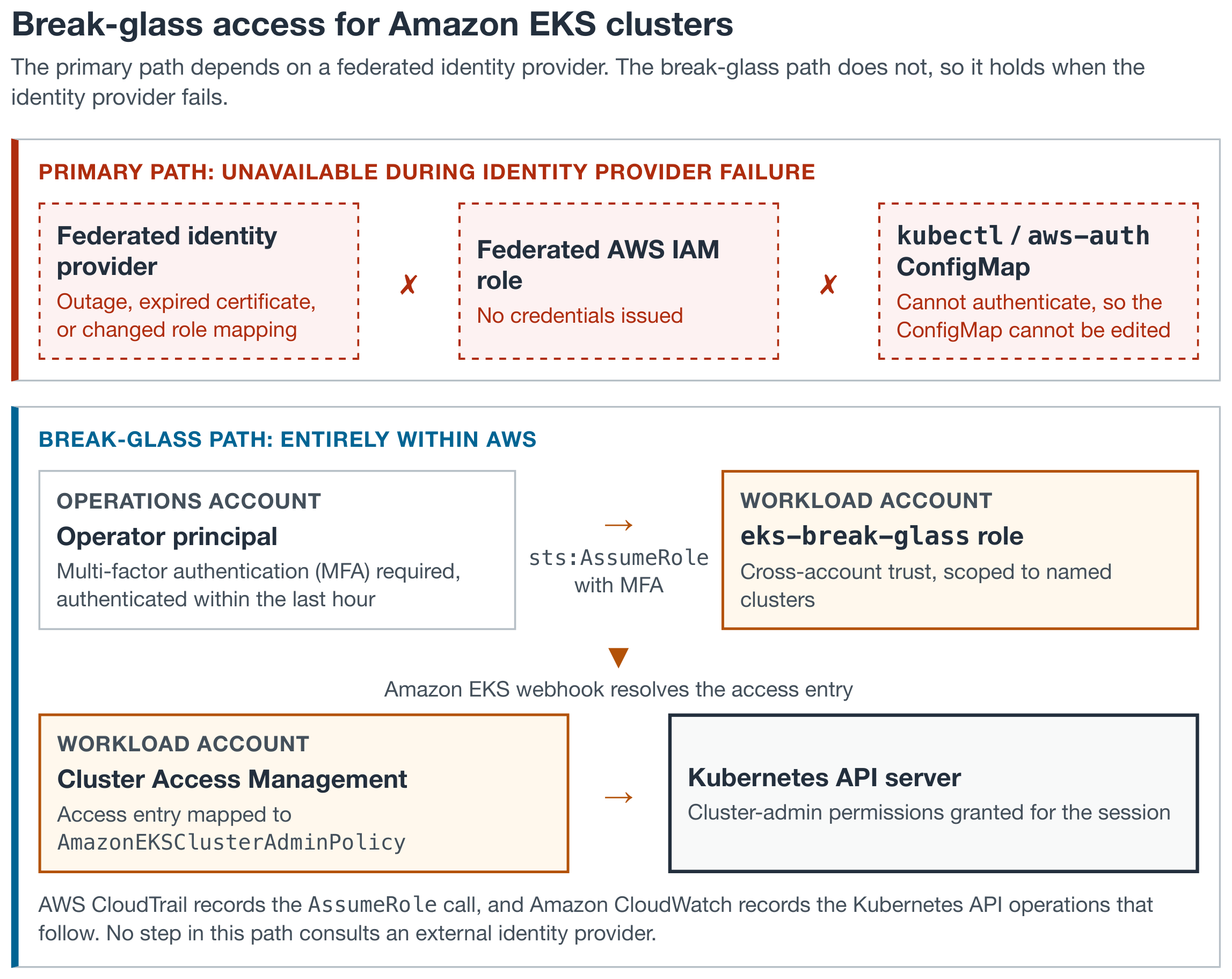
Figure 1: The primary federated path and the AWS-only break-glass path to an Amazon EKS cluster
Prerequisites
Three conditions apply before the pattern can be deployed.
The cluster authentication mode must be API or API_AND_CONFIG_MAP. Clusters running in CONFIG_MAP mode cannot use access entries, and the mode must be changed first. The change is one way: a cluster can move from CONFIG_MAP toward API, but cannot move back. The following command reports the current mode:
An operations account separate from the workload accounts must exist, holding the IAM principals for the operators who will carry break-glass permissions. Those principals need MFA devices registered.
Important: Network reachability must be solved separately, and this is the prerequisite most often missed. The pattern restores authentication and authorization, not connectivity. On a cluster with a private-only API endpoint, an operator outside the Amazon Virtual Private Cloud (Amazon VPC) still can’t reach the API server even holding valid cluster-admin permissions. Confirm the operator has a network path, whether through a bastion host, AWS Systems Manager Session Manager, a virtual private network (VPN), or AWS Direct Connect. Validate that path at the same time as the role itself.
Technical implementation
Implementation proceeds in three stages: the IAM role, the Amazon EKS access entry, and validation.
Stage 1: The cross-account AWS IAM role
You create the role in the workload account and configure it to trust the operations account. The following AWS CloudFormation template does both.
Design decisions in the CloudFormation template
Multi-factor authentication is unconditional. Earlier versions of this pattern exposed it as a parameter, which introduced a trap: setting the parameter to false produces "aws:MultiFactorAuthPresent": "false". That condition requires the absence of MFA rather than making it optional. A break-glass role reaching production clusters shouldn’t offer that option at all.
The aws:MultiFactorAuthAge condition rejects sessions where authentication occurred more than an hour previously. The possession of a valid session isn’t sufficient. The operator must have authenticated it recently.
Source identity is mandatory. The Null condition on sts:SourceIdentity requires the operator to stamp an ID onto the session, and sts:SetSourceIdentity in the action list is what permits them to set it. Omitting that action causes the assumption to fail. The value persists for the whole session, cannot be changed once set, and appears in every subsequent AWS CloudTrail event as aws:SourceIdentity. This closes the audit gap that role assumption otherwise leaves, where a shared role name obscures which human acted.
One tradeoff comes with it, and it is worth stating plainly. A role that requires source identity can’t be assumed through role switching in the AWS Management Console. Break-glass access becomes a command line operation only. For a path that is rehearsed quarterly and executed by platform engineers, that is an acceptable price for attributable audit records. For a team that expects to reach the console under pressure, drop the Null condition and accept weaker attribution.
Cluster ARNs are explicit rather than wildcarded. eks:ListClusters doesn’t accept a resource restriction, so it remains at *, but the permissions that reach a cluster are scoped to named clusters.
The session duration floor is one hour. AWS IAM accepts a MaxSessionDuration between one and twelve hours, so 3600 seconds is the lowest valid setting. An operator who wants a shorter emergency session requests it with --duration-seconds at assumption time, which accepts values from fifteen minutes upward.
No Kubernetes permissions appear anywhere in the IAM policy. eks:AccessKubernetesApi permits the principal to reach the Kubernetes API. What the principal may then do inside the cluster is determined entirely by the access entry created in stage 2.
The Terraform equivalent follows, written against version 5 of the AWS provider where aws_iam_role_policy replaces the deprecated inline policy block. It also pins max_session_duration to the one-hour floor. Raise that argument if you need the twelve-hour ceiling the AWS CloudFormation parameter exposes.
The trust policy is one half of a cross-account relationship. Naming the operations account as the principal delegates the decision to that account, so an administrator there must also grant the operator permission to assume the role. Without that grant, the assumption fails with AccessDenied, even though the trust policy is correct.
IAM documents the same requirement for source identity across an account boundary. The permission must appear in the permissions policy of the principal in the originating account, and in the trust policy of the role in the target account.
Attach the following policy to the operators in the operations account, or to a group that contains them:
The condition on the second statement is the part worth copying. Pinning sts:SourceIdentity to ${aws:username} stops an operator from stamping another person’s ID onto the session. Without it the source identity is self-declared, and an audit trail that any operator can forge isn’t an audit trail. The aws:username variable resolves only for IAM users. Operators arriving through IAM Identity Center can’t assume this role at all: their federated sessions never carry aws:MultiFactorAuthPresent, so the trust policy rejects them by design. Break-glass operators must be IAM users.
One consequence reaches the validation stage. After this condition is in place, the value passed with --source-identity must match the operator’s username, so the placeholder in the positive test stands for that name rather than an arbitrary label.
Stage 2: The Amazon EKS access entry
Two API calls associate the role with cluster-admin permissions. Both run against the AWS API rather than the Kubernetes API, which is what makes them available when kubectl cannot authenticate.
The STANDARD type is the default, and Amazon EKS applies it when no type is specified, so the preceding flag records intent rather than changing behavior. The remaining types are reserved for principals that join nodes to a cluster, and those types accept neither a username nor an access policy association. A break-glass role needs both.
AmazonEKSClusterAdminPolicy grants full administrative permissions across the cluster. Narrower policies exist, and AmazonEKSAdminPolicy combined with a namespace-scoped access scope suits teams that want emergency access confined to specific namespaces. For a break-glass path intended to recover a broken cluster, cluster-wide administrative permissions are usually the correct choice, because the fault may sit anywhere.
Run both calls at deployment time, not during an incident.
One caution follows from combining this pattern with the best practice of disabling cluster creator admin permissions. If bootstrapClusterCreatorAdminPermissions is set to false and the break-glass role becomes the only remaining administrative access entry, then that single role is now a single point of failure for the cluster. Keep a second independent administrative access entry, held by a separate principal such as an automation role owned by the cluster provisioning pipeline.
Stage 3: Validation
Validation requires both a positive and a negative test. The positive test confirms that the path works. The negative test confirms the guardrail holds, and skipping it is how teams discover months later that MFA was never actually required.
The customer treated this as a migration gate rather than a closing task. Its platform team ran both tests in every target account and signed the result off before any account moved. A break-glass path that has never been exercised is an assumption, and a migration is a poor moment to test an assumption.
The positive test assumes the role with a valid MFA code and reaches the cluster:
A response of yes confirms cluster-admin permissions are active.
Two details in that command matter. The session name carries the incident reference, so AWS CloudTrail events and Kubernetes audit entries can both be filtered to one incident without cross-referencing timestamps. The source identity carries the operator alias, which survives into every downstream event. Adopt a convention for both before an incident, because nobody invents a naming standard at three in the morning.
The negative test attempts the same assumption without an MFA code, and must fail. The request still supplies a source identity, so the missing MFA code is the only condition under test:
The expected result is AccessDenied. A successful assumption means the trust policy condition isn’t being applied, and the role should be treated as having inadvertent access until corrected.
Run a second negative test against the recency condition, because a present-but-stale MFA session is the case teams usually miss. Authenticate, wait until the session passes the aws:MultiFactorAuthAge threshold, then attempt the assumption again with the same credentials. It must also return AccessDenied. A condition that accepts any prior authentication provides far less than it appears to.
Confirm that both attempts reached AWS CloudTrail. The following query returns the recent record:
Turn on the cluster authenticator and audit logs, so Kubernetes API operations performed through the break-glass path are recorded alongside the AWS IAM events:
Assumption of this role outside a recorded incident is either an unlogged incident or an intrusion, and both warrant investigation. The following Amazon EventBridge rule pattern turns every assumption into a notification:
Create the rule in the AWS Region where AWS CloudTrail records the event. AWS CLI v2 uses the Regional AWS STS endpoint by default, so the AssumeRole event is recorded in the operator’s configured Region, while a call to the global endpoint lands in us-east-1. A rule created in the wrong Region never matches, so cover each Region your operators use. Target an Amazon Simple Notification Service (Amazon SNS) topic that reaches the on-call rotation rather than a ticket queue. A break-glass assumption is either already known to the responder or needs to become known within minutes.
Rolling out across an account fleet
A single template proves the pattern. Deploying it across an estate is a different problem, and a Terraform constraint shapes the answer.
Terraform can’t create provider configurations dynamically. A for_each over a map of accounts doesn’t produce one provider per account, so a single root module cannot fan out across an estate by itself. The division that works is to let the pipeline iterate account-and-Region pairs and let for_each iterate the clusters inside each pair.
The cluster map is a module input, and the account map lives in version control where it drives the pipeline matrix:
The pipeline holds a role in a shared automation account that can assume a deployment role in each target account. For every entry in the account map it assumes that account’s role, selects the matching Terraform state, and applies the module. State stays separate per account, so a failure in one account does not block the remainder.
Three practices matter more at fleet scale than they do for a single cluster:
- Run the negative test as a pipeline stage rather than a manual step and fail the deployment if the assumption without MFA succeeds.
- Detect drift on a schedule. An access entry deleted by hand in one account stays invisible until an incident, and a scheduled
terraform plansurfaces it. - Treat the account map as the single source of truth for which accounts carry the pattern. Decommissioning then becomes a map of entry removal rather than an archaeology exercise.
Post-incident recovery
Regaining access is the first half of the work. Restoring the primary path and confirming that nothing else broke while attention was elsewhere is the second half. Run the commands in this section under the restored primary path or a separate administrative role. They call IAM and Amazon EKS control-plane APIs that the break-glass role deliberately lacks.
A distinction governs this stage. User authentication and workload identity are separate systems that both involve OpenID Connect (OIDC), and conflating them causes teams to chase problems that do not exist. The federated identity provider that failed handles user authentication. Workload identity, meaning the mechanism by which pods obtain AWS credentials, runs through either IRSA or EKS Pod Identity. A federated identity provider outage doesn’t affect either of them.
The two workload identity mechanisms differ in what does affect them, and the difference matters during recovery.
| Property | IRSA | EKS Pod Identity |
| Trust anchor | Account-level AWS IAM OIDC provider for the cluster issuer | pods.eks.amazonaws.com service principal |
| Affected by federated user identity provider failure | No | No |
| Affected by deleting the cluster AWS IAM OIDC provider | Yes, all role assumptions fail | No |
| Survives cluster recreation | No, the issuer ID changes and every trust policy needs updating | Yes, associations are re-created but trust policies are unchanged |
| Recovery verification needed | Yes | Confirm the add-on is running |
Restoring user authentication
Work through the primary path in dependency order. Confirm that the federated identity provider is serving tokens again. Confirm the IAM identity provider entry or IAM Identity Center configuration is intact, because an account migration might have altered it. Confirm the federated role ARNs still match the access entries or aws-auth mappings that reference them, because a role recreated during migration carries a new unique ID even when the ARN string is unchanged.
Then verify a real user, not the break-glass role, can reach the cluster:
Verifying workload identity
If the incident involved the cluster IAM OIDC provider rather than the user-facing identity provider, IRSA requires explicit verification. Confirm the provider still exists and matches the cluster issuer:
An empty result means the provider is gone, and every IRSA role assumption in the cluster is failing. Recreate it with eksctl utils associate-iam-oidc-provider, or through the equivalent AWS IAM API call.
Then confirm a workload receives credentials, rather than assuming the configuration implies it does:
The returned ARN should show the assumed role for that service account. For clusters using EKS Pod Identity, confirm the agent is running and the associations survived:
Closing the incident
Record the following before the incident is closed, because the audit value of a break-glass event decays quickly after the details are no longer fresh:
- The trigger, meaning which component failed and how the failure was detected.
- Who assumed the role, at what time, and under whose authorization.
- The AWS CloudTrail event ID for the
AssumeRolecall. - Every action taken inside the cluster, cross-referenced against the Kubernetes audit log.
- The time at which normal authentication was restored, and the evidence for it.
- Whether the session was allowed to expire or was explicitly ended.
Then review whether the break-glass path itself behaved correctly. A real incident exposes friction that a quarterly test does not. Record what proved awkward while the memory is fresh: a condition that fired unexpectedly, a network path that needed improvising, or a runbook step that turned out to be wrong.
Operational lifecycle
Treat the role as a control that needs maintenance, not a fixture that needs installation.
Test quarterly against a non-production cluster, running the positive test, the negative test, and the AWS CloudTrail verification. The customer placed this on the same review cycle as its existing privileged access audit, rather than creating a separate process that would compete for attention. Review the operations account principals who hold assumption permissions at the same interval and remove operators who have changed teams. Rerun the negative test after any change to the trust policy or to the surrounding service control policies. A service control policy applied at the organizational unit level can alter behavior without touching the role.
Decommission the role when a cluster is retired. A break-glass role for a cluster that no longer exists is a standing permission with no purpose, and it will be found during an audit.
Removal runs in the reverse order of creation. Delete the access entry first, so cluster authorization is withdrawn before the IAM role disappears:
IAM refuses to delete a role that still carries an inline policy, which is why the policy deletion comes first. Where the role was deployed through AWS CloudFormation or Terraform, delete the stack or remove the cluster from the account map instead, so the templates and the deployed state stay aligned.
When this pattern is the wrong answer
The pattern earns its complexity in a narrow set of circumstances. Four cases call for something else.
Routine operations. Break-glass isn’t a convenience path. Daily kubectl work, deployments, and non-urgent troubleshooting belong on the federated path. Every assumption of the break-glass role should prompt a question, and a role assumed weekly stops being a signal and becomes background noise.
Workload and automation access. Pods that need AWS credentials should use EKS Pod Identity, and pipelines should hold their own dedicated roles. A break-glass role issued to automation is a standing administrative credential with a misleading name.
Shared use. One operator per session, one source identity per session. Sharing the credentials, or automating the assumption, destroys the attribution that justifies the pattern in the first place.
Non-production clusters. Development and sandbox clusters rarely justify quarterly testing and access review. Recreating a broken development cluster is usually faster than maintaining an emergency path into it.
A fifth case is worth naming separately. If your operators expect to reach for the AWS Management Console during an incident, the source identity requirement blocks them, and the pattern needs the weaker attribution described in stage 1.
Conclusion
The Amazon EKS Best Practices Guide is right that standing cluster-admin permissions should be removed, and right that a break-glass mechanism should replace them. The pattern in this post supplies implementation. A cross-account AWS IAM role requires recent MFA, and access entries managed through the CAM API handle authorization. AWS CloudFormation or Terraform provisions both in advance, and validation covers a negative test and a positive one.
The property that makes it work is narrow and worth restating. Every link in the chain, from IAM through AWS STS to the Amazon EKS authentication webhook and the access entries cached on the cluster control plane, sits inside AWS. None of it depends on the federated identity provider whose failure created the problem.
An earlier post covered a narrower version of this pattern, scoped to landing zone migrations, in Maintaining Amazon EKS cluster access during AWS Landing Zone migrations. This post generalizes it beyond migrations, and adds the infrastructure-as-code templates, the negative test, and the post-incident workload identity procedure.
To put this into practice, deploy the AWS CloudFormation template from stage 1 into a non-production account, create the access entry, and run both validation tests before you need them. For further reading, review the Amazon EKS cluster access management best practices, the Amazon EKS access entries documentation, the AWS IAM Identity Center emergency access procedure, and the EKS Pod Identity documentation.