AWS Database Blog
Real-time personalized recommendations with Amazon SageMaker and Valkey
Amazon receives millions of visits every day, and earning each customer’s trust visit after visit is the foundation that the store is built on. A meaningful part of that trust comes down to whether the recommendations we surface feel relevant and whether they reflect what the customer actually cares about in the moment. Delivering that level of relevance and personalization at scale in real time across many product discovery surfaces is a non-trivial engineering challenge. Capturing intent as it’s forming, rather than from a schedule, is what makes a recommendation feel personal.
In this post, we describe an architecture that makes it achievable. Amazon SageMaker hosts a sentence transformer model on a managed endpoint and turns customer query text into dense semantic vectors. These representations capture meaning rather than just keywords. Valkey is an open source, in-memory data store with built-in vector search. It’s available on AWS through Amazon ElastiCache and Amazon MemoryDB. In our architecture, we use Amazon-managed Valkey to store the product catalog as a vector index. Valkey performs sub-10-millisecond similarity search at thousands of transactions per second against the query vector, with rich filtering composed into the same query. Additional signals such as long-term customer preferences, trending items, deals and promotions, or other features can be layered on top from sources such as Amazon DynamoDB. Together, they transform a customer search query into a ranked, personalized set of products in real time.
In the sections that follow, we examine why real-time recommendation is harder than it looks, walk through each core component in detail, and discuss the design considerations that shape a production deployment.
The challenge: From batch to real-time
Offline batch processing is a great fit for capturing long-term preferences. You analyze historical data on a schedule and serve the results from a cache. It has well-known tradeoffs though:
- Staleness: Periodic refreshes miss real-time shopping intent.
- Context blindness: It’s hard to incorporate live session behavior.
- Missed opportunities: Spontaneous shopping missions don’t get a relevant response.
Real-time recommendation systems address these gaps by processing customer signals as they arrive. Doing that at scale is where the interesting constraints show up:
- Latency – Recommendations must be generated in a sub-hundred-millisecond budget. They must feel instant when serving thousands of customers per second and selecting high-quality items from a catalog of 100,000 or more products.
- Throughput – Traffic patterns are bursty, and the system must hold up at peak. Peak requests can run 8–10 times higher than baseline.
- Semantic understanding – Natural language queries must map to meaningful vector representations.
- Personalization – Real-time intent must combine cleanly with historical preferences.
The rest of this post walks through one way to build a system that handles all four.
Solution overview
At a high level, the architecture has three core stages:
- Embedding generation: convert the query text into a dense vector using a SageMaker endpoint.
- Vector search: find the most similar products in an index using approximate nearest neighbor search.
- Optional enrichment: layer on additional signals from sources like DynamoDB to personalize or rerank.
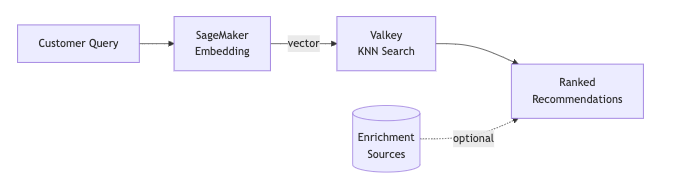
Fan out independent work in parallel where you can. That’s the key technique for keeping end-to-end latency within a tight budget.
Core component 1: Real-time embedding generation with SageMaker
The first step is turning a query string like "moisturizer for dry skin" into a dense vector. A dense vector is an array of floating-point numbers that captures the meaning of the text in a form that a computer can compare mathematically. This process is called embedding, and it’s the foundation of semantic search. Two queries with similar meaning (“small dog breeds” and “chihuahua puppies”, or “cat food hairball control” and “feline diet reduce shedding”) will produce vectors that are close to each other in vector space, even though they share almost no words in common. That’s the key property that lets us match customer intent to products without relying on exact keyword matches.
To generate these embeddings, we use a sentence transformer, or a neural network model specifically trained to encode variable-length text into fixed-size vectors. Popular open source sentence-transformer models are widely used for this task. They’re compact enough to run efficiently in production and strong enough to capture nuanced semantic relationships across a wide range of domains. Note that the architecture is model-agnostic, so you can swap in any embedding model that best suits your use case.
For serving these models at scale, SageMaker is a natural fit. With SageMaker, you can deploy a model as a fully managed real-time inference endpoint. You register a model artifact, define an endpoint configuration (instance type, initial instance count, auto scaling policy), and create the endpoint. SageMaker handles the provisioning, networking, monitoring, and scaling behind it. You don’t manage servers or model servers. Instead, you make an InvokeEndpoint API call and receive an embedding. For a sentence transformer on the critical path of a recommendation system, this combination of managed infrastructure and low-latency inference gives a strong balance of speed, quality, and operational simplicity.
What to look for in a model
- Serving cost – Inference time has to fit inside your end-to-end latency budget. Smaller models are faster but capture less nuance. Larger models are more expressive but slower and more expensive to serve. Benchmark candidates on your target instance type before committing.
- Dimensionality – The size of the output vector. Smaller dimensions (for example, 384) mean less memory, faster search, and cheaper storage. Larger dimensions (768, 1024, and up) can capture more semantic nuance at the cost of storage and search overhead.
- Quality – How well the model understands the kinds of queries your customers actually write. Out-of-the-box models are trained on general-purpose text corpora and work well for most shopping queries. Domain-specific fine-tuning on product titles, descriptions, and historical search behavior can materially improve relevance if you’re willing to invest in it.
How it works

The client sends a simple JSON content to the SageMaker runtime endpoint and parses the response into a list of floats. The {"inputs": "..."} format is the standard Hugging Face sentence-transformers contract, so the same client code works across model versions:
Design considerations
- Decide where the embedding endpoint sits in your failure model. Embedding generation is on the critical path. No vector means no search. Some choose to fail fast and let the upstream caller handle the empty response. Others add a fallback such as cached results from a prior session, a batch-generated recommendation set, or a default widget. Pick the option that fits your latency budget and product expectations.
- Consider built-in inference containers. If your model fits one of the SageMaker built-in inference containers, such as the sentence-transformers container, you can skip the custom
entry_pointandsource_dirand just register the model artifact. - Pick instance hardware that fits your model and traffic. SageMaker offers a range of CPU, GPU, and purpose-built inference instances, each with different tradeoffs in cost, memory, and throughput. GPU instances are a common choice for transformer inference. Benchmark a couple of candidates with production-shaped traffic, including your batch sizes, query distribution, and peak transactions per second. Compare cost per inference alongside latency before you commit.
- Plan for bursty traffic with auto scaling. SageMaker supports target-tracking auto scaling on metrics like InvocationsPerInstance, which lets you hold each instance at a healthy utilization level.
Core component 2: Vector search with Valkey
With a query embedding in hand, the next step is finding the most similar products in the catalog. Each product in the catalog has already been converted to a vector of the same dimensionality using the same embedding model, and those vectors live in a specialized data store called a vector database. The task at query time is to find the product vectors whose values are closest to the query vector, where “closest” is typically measured by cosine similarity or Euclidean distance. The smaller the distance, the more semantically related the product is to what the customer is looking for.
A brute-force solution would compare the query vector against every product vector in the catalog. For a catalog of a few million products at 768 dimensions each, that’s billions of floating-point operations per query. That’s far too slow for a real-time path. Instead, vector databases use approximate nearest neighbor (ANN) algorithms that trade a tiny amount of accuracy for orders-of-magnitude speedup. The most widely used algorithm today is Hierarchical Navigable Small World (HNSW), which builds a multilayer graph structure over the vectors and searches it greedily. A well-tuned HNSW index can return the top-k nearest neighbors in milliseconds even at multi-million-vector scale, with recall typically above 95 percent.
AWS offers several vector database options. Amazon OpenSearch Service supports vector search through the k-NN plugin. Amazon Aurora PostgreSQL supports vector search through the pgvector extension. Valkey brings vector search to the in-memory tier on AWS through Amazon ElastiCache and Amazon MemoryDB. Vector search is built into Valkey, so the same client code and the same commands work against either AWS service.
For a recommendation system that needs predictable response times on every request, Valkey stands out because it offers completely in-memory storage of data and index with built-in HNSW support. Because the entire index lives in memory, applications can search terabytes of data with latency as low as microseconds and throughput up to millions of search operations per second. We chose Valkey on MemoryDB for the additional durability benefits at the time of writing.
Why Valkey is a good fit
- Performance – In-memory storage delivers single-digit to low double-digit millisecond K-nearest neighbor (KNN) search, even over millions of vectors.
- Rich filtering – Vector similarity composes cleanly with tag, numeric, and text filters in the same query. You can ask “find products similar to this query vector, but only in category X and region Y” in a single round trip.
- Scalability – ElastiCache scales horizontally across shards, in addition to vertical scaling and read replicas. That makes it the right choice for larger datasets at TB-scale. MemoryDB for Valkey vector search currently operates on a single shard, so it scales vertically with larger instance types and read replicas.
- Multiple indexes per cluster – A single Valkey cluster can host multiple vector indexes, each with its own dimensionality and schema. That means different recommendation pools or even different embedding models can coexist in the same cluster, which makes experimentation and incremental model upgrades straightforward.
Populating and maintaining the index
The index has to be created before you can query it. An FT.CREATE call defines the schema. The schema includes a unique item identifier, the embedding vector, and any tag or numeric fields you want to filter by, such as category, AWS Region, or price, along with the distance metric and HNSW parameters. We provision indexes using AWS Cloud Development Kit (AWS CDK) alongside the cluster itself, so the schema lives in version control with the rest of the infrastructure. In practice, a small Python AWS Lambda function invoked as an AWS CloudFormation custom resource does the actual FT.CREATE call at stack deploy time:
Populating the index is an offline workflow. For initial loads and periodic full refreshes, we generate embeddings in bulk (for example, with SageMaker Batch Transform) and stream them into the database as Valkey hashes using pipelined HSET commands. An Amazon Managed Workflows for Apache Airflow (Amazon MWAA) job orchestrates this. The inner loop looks like:
If we need to upgrade embedding models, we build a new index (with a new name and possibly new dimensionality) in the same cluster, validate it offline, and cut traffic over with a configuration change.
How it works

A KNN query combines an optional tag filter clause with a vector clause. The embedding is serialized as little-endian FLOAT32 bytes, the format Valkey expects, and Dialect 2 is used for the KNN syntax:
The client side is straightforward. Serialize the embedding, build the query string, and invoke the client:
Design considerations
- Distribute reads across read replicas. If you’re running vector search at scale, consider enabling replica reads so search queries can be served by primaries and multiple replicas alike. That effectively multiplies your read capacity without bigger instances.
- Plan capacity around in-memory storage. Valkey vector search is in-memory, so capacity planning is about node size and replica count. If you need horizontal scaling or are working with very large datasets, choose ElastiCache for Valkey, which supports sharding across nodes.
Optional enrichment
Real-time vector search captures immediate intent well, but additional signals often make results more relevant and personalized. For example, customer preferences, trending items, deals and promotions, and category affinities can be fetched from DynamoDB tables or other sources. You can use these signals to enhance results by enriching the search query before embedding or by reranking the output after retrieval. Either way, the final recommendations reflect not just what the customer intends to buy right now, but a richer picture of who they are and what’s relevant to them.
If those signals aren’t strictly required, running the lookups in parallel with embedding generation keeps them off the critical path. Treating them as best-effort means a transient failure in the enrichment source doesn’t break the recommendation response. You serve vector results without the extra signal. Whether that’s the right tradeoff depends on how central personalization is to your experience. It’s a design choice worth making deliberately.
Putting it all together
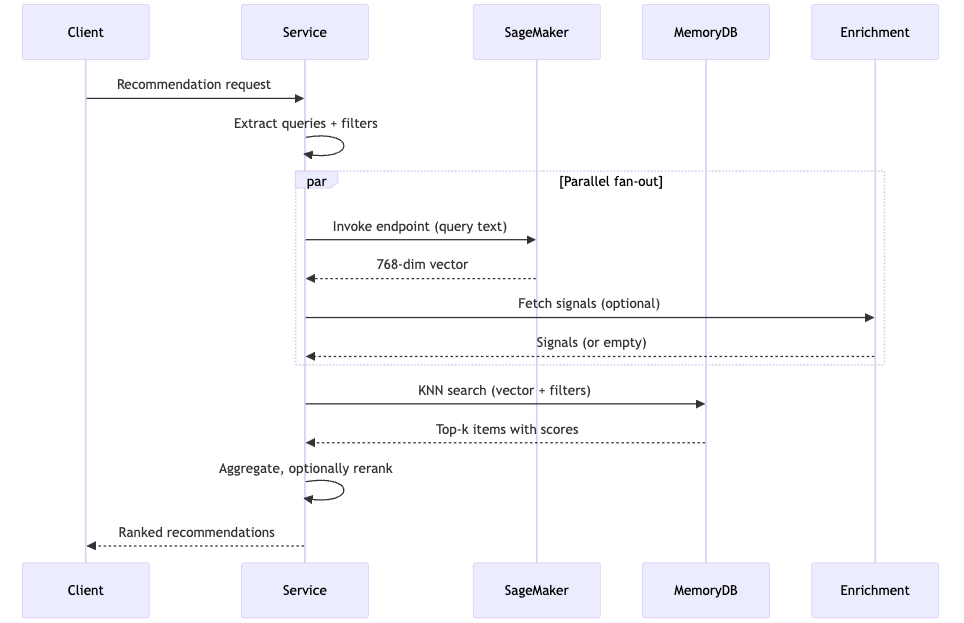
Making the pipeline configurable pays off quickly. If the embedding endpoint, index name, filters, result count, and reranker are all externalized, you can experiment with different surfaces and traffic slices without shipping code.
Takeaways
A few ideas worth emphasizing if you’re designing something similar:
- Separate the stages cleanly. Embedding, retrieval, and enrichment have different failure modes and scaling characteristics. Keeping them as distinct stages with clear contracts makes it practical to evolve each one independently without rewriting the pipeline. You can swap in a new model, change the vector database, or add a new enrichment source.
- Make the pipeline configurable. Endpoints, indexes, filters, rankers, enrichment sources, or anything that might vary per surface or experiment is worth externalizing. Configuration iterations are much faster than deployment iterations. Configurability is what lets a single architecture power many experiences.
- SageMaker is powerful, treat it as a clean boundary. SageMaker handles model serving, auto scaling, and container lifecycle so the rest of the pipeline sees a simple “text in, vector out” interface. Experiment with auto scaling policies, instance types, and instance counts, and benchmark with production-shaped traffic. Stepping up to larger models for richer embeddings is straightforward.
- Valkey vector search is fast. In-memory HNSW indexing gives consistent and quick response times, exactly what a real-time recommendation system needs.
Conclusion
Real-time personalized recommendations come down to orchestrating a few AWS services that each do one thing well. SageMaker handles fast embedding generation. Valkey handles low-latency vector similarity search with rich filtering. Managed AWS services like ElastiCache and MemoryDB take care of provisioning, scaling, and high availability. Optional enrichment from sources like DynamoDB layers personalization on top. Put them together and you can serve sub-hundred-millisecond recommendations at production scale.
The patterns of semantic embeddings, vector similarity search, optional enrichment, parallel fan-out, and configurable pipelines generalize well beyond product recommendations. Semantic search, content discovery, product ranking, anything that starts with “given this text, find the closest things” can be built on the same foundation.
The reason we invest in this kind of architecture comes back to something simple: our customers. Every shopping experience is a chance to help someone find what they need a little faster, with a little more delight. Customer obsession is at the core of how we build at Amazon, and real-time personalized recommendations are one of the ways we put that principle into practice. If you’re building something similar for your own customers, we hope the ideas here are a useful starting point for creating experiences your customers will love.
Thanks to the senior engineers on the Everyday Essentials Personalization team whose foundational work made this possible: Shraddha Naik, for conceiving the idea of real-time semantic similarity search, providing guidance through reviews, and mentoring through development; Sergii Oborskyi, for the recommendation serving architecture and scaling design; and Shawn Liu, for his contributions to SageMaker online inference and latency optimization.
Special thanks to Murilo Cerone Nascimento, Madelyn Olson, and Rong Zhang for their contributions to this blog post through review and publication. We are also grateful for the support and guidance from Sam Heyworth, Nirav Desai, and Ankur Datta, and the broader Everyday Essentials leadership team.