AWS DevOps & Developer Productivity Blog
Building Self-Extending CLI Tools with Strands Agent
I. Introduction
Engineering teams build internal command-line interface (CLI) tools because repetitive operational tasks such as generating reports, auditing infrastructure, and checking service health are faster and more reliable when automated behind a consistent interface. A well-built CLI replaces ad-hoc scripts with structured commands, standardized error handling, and composable workflows that any team member can run. However, building these tools follows a predictable development lifecycle. The developer sets up a package, writes commands, handles errors, and ships it, then spends the next six months as its sole maintainer. Meanwhile, requests for new commands, custom report formats, and one-off integrations pile up as other teams across the organization discover the tool is useful for their workflows too. Frameworks like Click and Typer reduce the friction, but every new command still needs to be written, tested, and deployed manually.
Tools that generate their own capabilities on demand offer a different approach. Instead of writing each command manually, users can describe what is needed in natural language, and the tool writes the code, loads it, and makes it available at runtime without requiring a restart or redeployment. This is called meta-tooling, a repeatable pattern for giving applications the ability to create their own tools dynamically. For teams that maintain growing collections of internal utilities, this eliminates the bottleneck of having a single developer write every new feature.
In this post, we will walk through one implementation of this pattern, a CLI generator called CLI Creator. CLI Creator combines three technologies into a mechanism that organizations can adapt for their own use cases:
- Amazon Bedrock, a fully managed service for building generative AI applications with foundation models, with Anthropic’s Claude Opus 4.6 for AI-powered code generation.
- Strands Agents SDK, an open-source Python framework for building AI agents with tool use, for dynamic tool creation, loading, and execution at runtime.
- Model Context Protocol (MCP), an open standard for connecting AI applications to external data sources and tools, for automatically discovering API servers that give generated tools additional knowledge.
The result is a development workflow where new CLI capabilities go from request to working command in minutes instead of days, without manual coding. By the end of this post, a single natural language prompt will have produced a complete, installable CLI. That CLI can extend itself with new tools, refine them iteratively, and discover relevant MCP servers through an interactive selection workflow.
II. Solution Overview
The Challenge
As an example, consider a platform engineering team that produces weekly operations reports for leadership. Every Monday morning, stakeholders expect a summary of their AWS footprint, including which Amazon DynamoDB tables are running hot, which Amazon Simple Storage Service (Amazon S3) buckets are growing fastest, and who made significant infrastructure changes last week. The AWS CLI can list tables and buckets, but it cannot produce these reports.
Each report is a multi-step workflow that involves calling several APIs, joining the data, computing derived metrics like estimated monthly cost or growth rate, and formatting the output for a specific audience. The team ends up writing Python scripts for each report, and every new report request means another script by a developer.These are each their own small project, often requiring a hundred lines of Python to pull multiple APIs, compute derived metrics, and format output before you even think about error handling. Requirements shift weekly, so each change means modifying source code, testing, and redeploying. The tooling never converges; the team ends up with a folder of disconnected scripts, each with its own argument parsing, error handling, and output formatting. Any team that builds small, purpose-built utilities faces the same friction, and operations reporting is the example we use to illustrate the meta-tooling pattern.
The Solution
Prerequisites
To follow along with this post, you will need:
- Python 3.12 or later
- An AWS account with Amazon Bedrock access enabled for Anthropic Claude models in us-west-2
- AWS credentials configured locally (via `aws configure` or environment variables)
- Git installed (for tool version tracking)
The source code is available on GitHub. Installation instructions are in the repository README.
Walkthrough
Instead of writing report scripts manually, organizations describe what they need in natural language.![Terminal screenshot of a CLI Creator tool generating an AWS operations reporting CLI called "aws-ops-reporter." The tool analyzes requirements, detects API keywords (DynamoDB, S3, CloudTrail), and displays 18 available MCP servers. The user selects servers 1, 9, and 18 (AWS DynamoDB, AWS S3, AWS CloudTrail). A planned CLI structure shows four commands: dynamo-capacity, unused-s3, audit-cloudtrail, and cost-summary. A confirmation prompt reads "Proceed with generation? [Y/n].](https://d2908q01vomqb2.cloudfront.net/7719a1c782a1ba91c031a682a0a2f8658209adbf/2026/05/11/image-1.jpeg)
The system then does the following:
- Claude Opus 4.6 on Amazon Bedrock analyzes the description and extracts a structured list of commands, arguments, and options.
- MCP servers are discovered automatically, wherein the system detects keywords like “DynamoDB”, “S3”, and “CloudTrail” in the description, searches the MCP registry for relevant API servers, and presents an interactive selection prompt for choosing which servers to include.
- Once the user confirms, the system generates complete Python code for each command. These are not stubs or placeholders that users may typically see within generated code, but working implementations with validated AWS SDK for Python (Boto3) calls, error handling, and type hints.
- Finally, the output is packaged as an installable Python project with a
pyproject.tomlfile and entry points configured.
Most importantly, the generated CLI includes a tool command group that enables self-extension at runtime. After installation, users can ask the CLI to create entirely new reporting tools and iteratively refine them without touching source code. This is the repeatable part of the pattern because any generated tool inherits the ability to extend itself. This mechanism is built into every generated CLI, so each one is immediately capable of growing beyond its original scope.
III. Technical Implementation
Strands Agents SDK Integration
The Strands Agents SDK is the backbone of the meta-tooling pattern. It provides three features that make self-extending tools possible, and these features are not specific to CLI generation. Any Python application can use them to dynamically create and manage capabilities at runtime.
The @tool Decorator
When a user asks a generated CLI to create a new tool, Claude Opus 4.6 on Amazon Bedrock produces Python code that uses the Strands @tool decorator. This decorator registers the function with Strands’ tool system, making it immediately discoverable and executable:
The @tool decorator registers the function’s signature, type hints, and docstring as a tool specification that the Strands Agent can reason about and invoke.
Runtime Tool Loading
The Strands Agents SDK includes a tool loading system that can discover and import @tool-decorated functions from Python files at runtime. Tools do not need to be registered at application startup. They can be created, saved to a directory, and made available to the agent dynamically.In our implementation, generated tools are saved as standalone Python files in a directory called `tools/`. Each time a CLI command runs, the application scans this directory, loads any @tool-decorated functions it finds, and adds them to the agent’s tool collection without requiring a restart.The self-extending pattern works because of this scan-on-invocation approach. A user can create a tool, execute it, decide it needs changes, update it, and execute again without any rebuild or reinstall step since each CLI invocation discovers and loads whatever tools exist on disk.
Agent Orchestration with BedrockModel
The Strands Agent class ties everything together. It connects to Amazon Bedrock via BedrockModel and manages a collection of tools:
When the agent receives a tool creation request, it calls Amazon Bedrock to generate the implementation and saves it as a Python file in the tools/ directory. The next CLI command automatically discovers and loads the new tool.
Amazon Bedrock Integration
CLI Creator connects to Anthropic’s Claude through Amazon Bedrock’s cross-region inference profile. Amazon Bedrock serves two distinct roles in the system.
Role 1: CLI Requirements Analysis with Structured Output
When you run cli-creator create, the first step is analyzing the natural language description and extracting a structured specification. Instead of parsing raw text from the model, we use the Strands Agents SDK’s structured output feature with Pydantic models to guarantee the response conforms to our schema:
By passing the structured_output_model, the Strands Agent constrains the model’s response to match the Pydantic schema. The result is a validated Python object where if the model’s first attempt does not conform to the schema, Strands automatically sends the validation errors back to the model and retries, producing a correct response without manual intervention. This approach eliminates malformed JSON, missing fields, wrong types, and hallucinated structure.
Role 2: Complete Command Generation with AI Functions
The second Amazon Bedrock role is generating complete command implementations. Direct integration of AI agents in code generation workflows is often avoided because of the model’s non-deterministic nature. There is no guarantee that generated code will compile, follow the expected structure, or avoid common pitfalls like empty error handlers. Strands AI Functions addresses this through runtime post-condition checking. AI Functions is a Python library for building reliable AI-powered applications through a new abstraction of functions that behave like standard Python functions but are evaluated by reasoning AI Agents. You decorate a function with @ai_function, write its prompt as a docstring with curly-brace placeholders, and attach post-conditions that the output must satisfy. If any post-condition fails, AI Functions automatically initiates a self-correcting loop, sending the specific error back to the model and retrying until all conditions pass or the maximum attempts are reached.
We use AI Functions to build a self-correcting code generation pipeline. Each generated command must pass three post-conditions before it is accepted:
The @ai_function decorator turns the function’s docstring into a prompt template. Curly-brace placeholders like {command_name} are filled from the function arguments at call time. Each post-condition receives the model’s response and returns a PostConditionResult. When a condition fails, AI Functions sends the error message back to the model and retries automatically, up to max_attempts. The model sees the specific failure (“syntax error on line 42”, “missing @cli.command decorator”, “empty try/except block detected”) and corrects it on the next attempt.
The prompt embedded in the docstring still enforces coding conventions (use import click rather than from click import, use from X import Y for all other imports) to prevent import conflicts. Post-conditions catch what the prompt misses, making the pipeline significantly more reliable than prompt engineering alone.
MCP Server Discovery and Integration
The Model Context Protocol adds automatic discovery of external API knowledge to the pattern. When your tool description mentions AWS services, the system searches for MCP servers that can provide domain-specific tooling. Generated tools can tap into live, structured API knowledge beyond what Amazon Bedrock knows at generation time.
How Discovery Works
The system uses Amazon Bedrock to extract API keywords dynamically. The api_keywords field is part of the same CLIRequirements Pydantic model used for structured output, so keyword detection happens in the same call that extracts commands and dependencies at zero additional cost:
When the model returns keywords like ["dynamodb", "s3", "cloudtrail"], the system uses a Strands Agent with the http_request tool from Strands Agents Tools to search the MCP registry for each keyword. Results are merged and deduplicated.
Interactive MCP Selection
After discovering relevant MCPs, the system presents them to the user for selection:
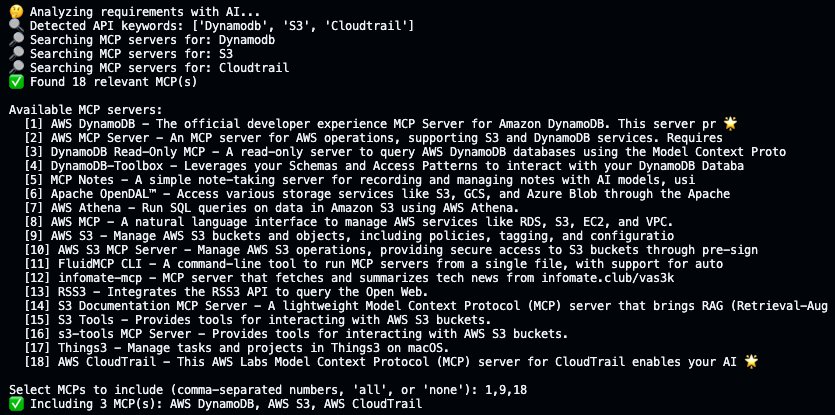
Selected MCPs are configured in the generated CLI’s .mcp.json file, and a bridge module is copied to the output project. This bridge connects to MCP servers at runtime, extracts their tool metadata, and converts them into Strands @tool functions that the Agent can invoke.
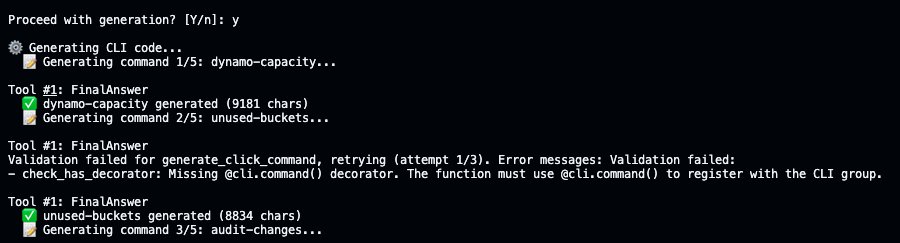
After MCP selection, CLI Creator generates each command sequentially using AI Functions. Here, the unused-buckets command initially fails the check_has_decorator post-condition for missing the @cli.command decorator, and AI Functions automatically retries generation with the error fed back to the model, producing valid code on the second attempt. All commands go through this process before having an installable CLI.
The Meta-Tooling Workflow: Create, Update, Revert
The most distinctive feature of the pattern is the iterative tool refinement workflow. This is where meta-tooling becomes practical, and it is the part most easily adapted to domains beyond CLI generation.
Step 1: Install and verify the generated CLI
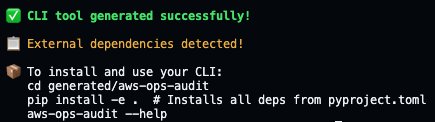
After generation completes, install the CLI and verify it works:
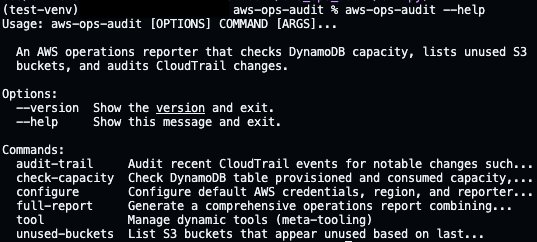
Each command is fully implemented. Here is unused-buckets pulling live S3 data:
![Terminal screenshot showing the output of the "aws-ops-audit unused-buckets" command run in a Python virtual environment. An "Unused S3 Buckets Report" lists four S3 buckets with metadata including name, region, object count, size, last modified date, creation date, and reason for being flagged — either "no activity since [date]" or "empty bucket."](https://d2908q01vomqb2.cloudfront.net/7719a1c782a1ba91c031a682a0a2f8658209adbf/2026/05/11/image-6.jpeg)
After installation, the CLI is ready to use. Each subcommand supports --help for detailed parameter information.
Step 2: Create a new reporting tool at runtime
Consider a scenario where leadership requests a new report that was not part of the original CLI, such as a summary of all Amazon S3 buckets with their sizes, sorted by cost impact. Instead of modifying source code, use the built-in tool create command:
![Terminal screenshot showing the output of the "aws-ops-audit unused-buckets" command run in a Python virtual environment. An "Unused S3 Buckets Report" lists four S3 buckets with metadata including name, region, object count, size, last modified date, creation date, and reason for being flagged — either "no activity since [date]" or "empty bucket."](https://d2908q01vomqb2.cloudfront.net/7719a1c782a1ba91c031a682a0a2f8658209adbf/2026/05/11/image-7-2.jpeg)
Amazon Bedrock generates a complete Strands tool, saves it to `tools/`, and commits it to git. The next CLI command automatically discovers and loads the new tool from disk, so you can execute it right away:
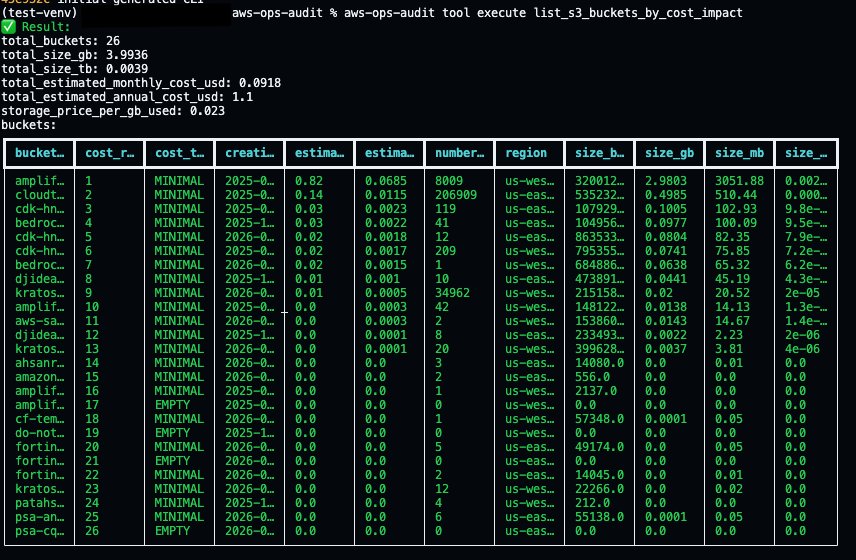
Output is automatically formatted based on data type, so lists of dictionaries render as tables, single dictionaries display as key-value pairs, and everything else falls back to JSON.
Step 3: Update and review changes
Suppose the initial output needs adjustment. Leadership wants the report to exclude buckets with an object count of zero. The user describes this change in natural language using the tool update command.
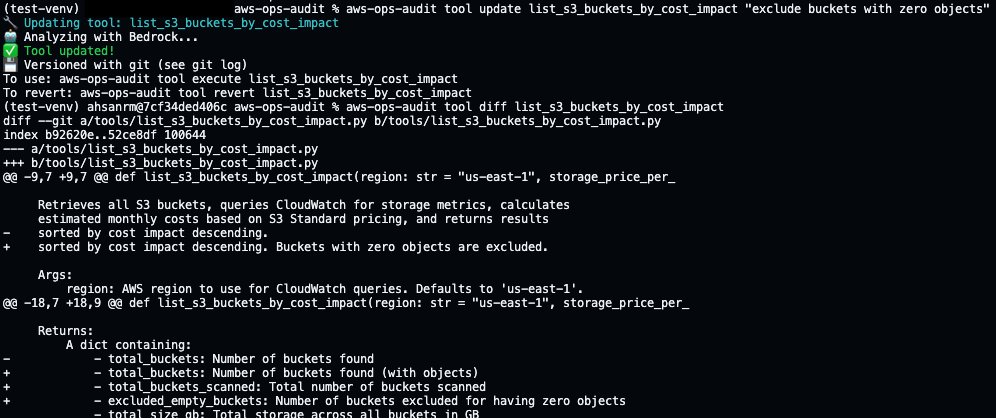
CLI Creator commits the current version to git before overwriting, then generates a new version. The tool diff command shows exactly what changed. Now execute the updated tool to see the improvements:
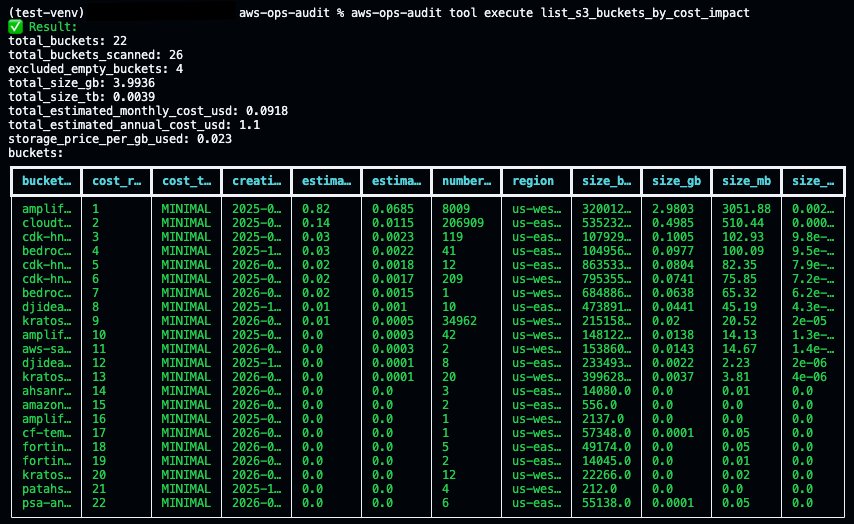
The same update workflow applies regardless of what the tool does, whether it is an Amazon S3 cost report, an Amazon DynamoDB capacity analyzer, or a Salesforce data exporter.
Step 4: Revert if needed
If the update didn’t work as expected, tool revert restores the previous version from git:
![Terminal screenshot showing the revert of the "list_s3_buckets_by_cost_impact" tool using the aws-ops-audit CLI. A confirmation prompt asks "Revert 'list_s3_buckets_by_cost_impact' to previous backup? [Y/n]:" and the user enters "y." A green checkmark confirms "Tool reverted!" followed by a note: "Restored from git history."](https://d2908q01vomqb2.cloudfront.net/7719a1c782a1ba91c031a682a0a2f8658209adbf/2026/05/11/image-11.jpeg)
The git log shows the full history of create, update, and revert operations, all tracked automatically.

Under the hood, tool create, tool update, and tool revert are convenience wrappers around git. Each operation commits to the repository, so the version history is standard git and works with any existing workflow. The tool diff and tool revert commands exist so that someone iterating conversationally can see changes and undo them without switching context to git commands, but git log, git diff, and git revert work just as well. Git-based versioning and one-command reverts make it safe to experiment.
Step 5: Output formats
Reports often need to be consumed in different ways. The --format flag lets you control how output is rendered:
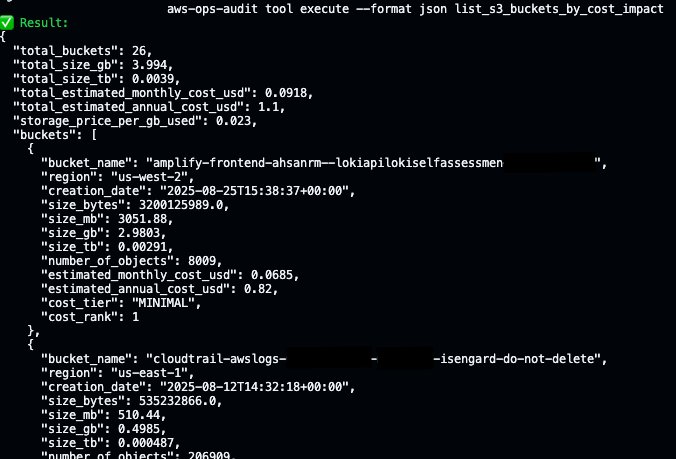
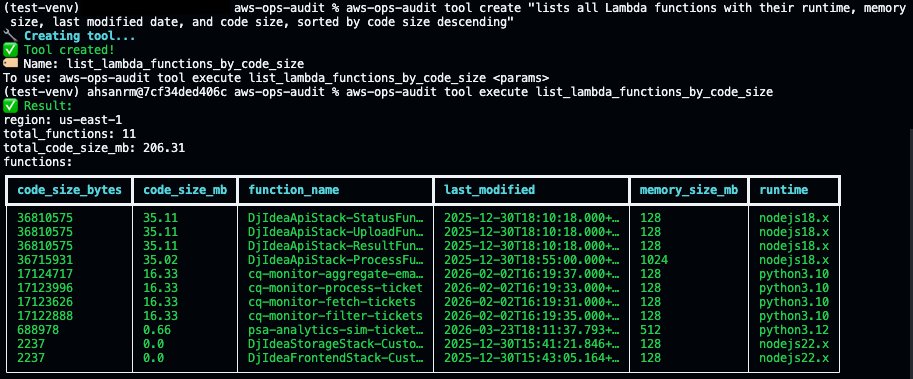
The formatter attempts to use the Rich library for colored tables when available and falls back to an ASCII table implementation when it is not installed. Here is a new AWS Lambda tool stored in `tools/`, rendering as a table by default:
IV. Conclusion
The meta-tooling pattern demonstrated here combines Amazon Bedrock for code generation, the Strands Agents SDK for runtime tool management, and Model Context Protocol for external API discovery into a system where CLIs extend themselves through natural language. The implementation has clear limitations today. Generated code still requires human review before production use; post-conditions catch structural errors but cannot verify business logic correctness, and the MCP ecosystem is young enough that server coverage is uneven across domains.
V. Next Steps
CLI tools are a natural starting point because they have a well-defined structure and fast feedback loops, but the same mechanism applies to any software that could benefit from generating and refining small, composable units of functionality at runtime. Infrastructure-as-code modules, data pipeline transformations, API integration adapters, and compliance policy checks are all domains where the creation pattern is repetitive, and the validation criteria are expressible as post-conditions. To explore the pattern:
– Start with Amazon Bedrock for foundation model access.
– Use the Strands Agents SDK for tool orchestration.
– Browse the MCP ecosystem at mcpservers.org.
– Fork the CLI Creator source code on GitHub.