AWS for Industries
DR Strategies for Connected Mobility Workloads, Part 1: Backup and Restore
Introduction
Connected Mobility (CM) integrates vehicles, infrastructure, and data analytics to enhance user experience, safety, and reduce emissions. System resilience is critical as disruptions can cause: 1/direct customer impact on vehicle remote functions 2/brand reputation damage through negative publicity 3/manufacturing disruptions 4/revenue loss and legal consequences. Disaster Recovery (DR) is essential to prepare for natural disasters, technical failures, and human errors. This blog is the first in a series examining connected mobility architecture and “backup & restore DR strategies” for CM workloads..
Connected Mobility Reference Architecture
AWS Connected Mobility Lens implements six key scenarios: 1/vehicle and user provisioning, 2/vehicle connectivity management, 3/vehicle data management and insights, 4/connected mobility core services, 5/connected mobility supported downstream system, and 6/customer experience management. Given below is the AWS Connected Mobility Reference Architecture; modules from this architecture will be used throughout the blog to explain the DR strategies. This blog focuses on backup & restore DR strategies for vehicle connectivity, data ingestion, and visualization components (highlighted in grey).
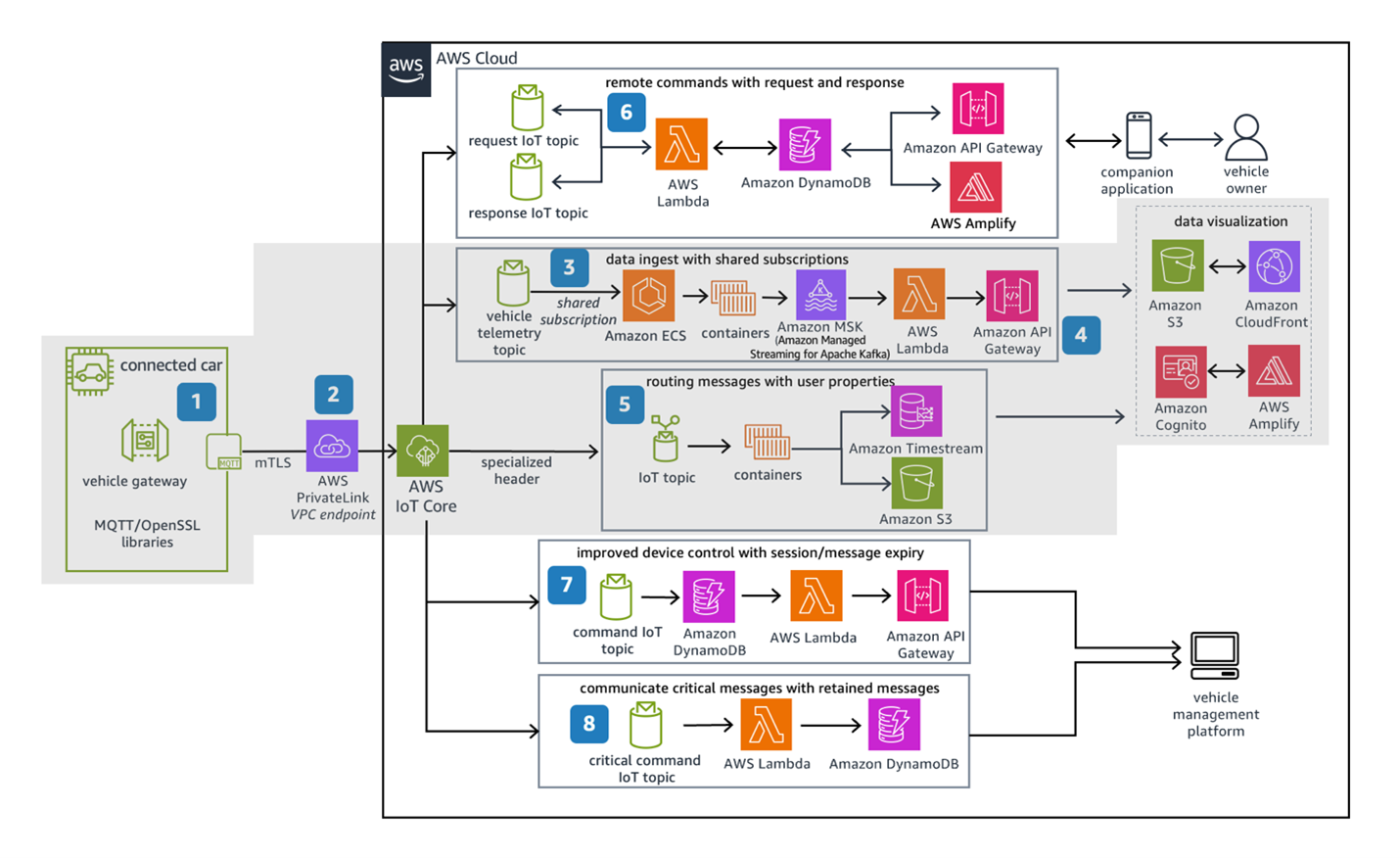
Figure 1: AWS Connected Vehicle Reference Architecture
Connected Mobility DR Options
Connected Mobility is a mixed-criticality workload with different Recovery Point Objective (RPO) / Recovery Time Objective (RTO) requirements like emergency or safety impacting systems requiring RPO/RTO in seconds and use cases involving sending diagnostic emails having RPO/RTO of hours. The RTO and RPO requirements help in selecting the right DR strategy for the workload. A list of potential DR options are backup & restore, pilot light, warm standby, and multi-site active/active.
Backup and Restore DR Option
Backup & restore is the simplest and most affordable strategy, suitable for less critical components of CM applications with recovery time measured in hours. It protects against regional disasters by copying data to another AWS Region and works for on-premises systems as well using AWS as a backup site. Some CM workloads may require this approach for compliance reasons.
Key considerations for a DR implementation include:
- To create a DR plan, first review the CM architecture, and outline DR objectives and requirements. The DR objectives include minimizing data loss (RPO) and minimizing downtime (RTO). Develop a comprehensive inventory of critical assets requiring protection within your disaster recovery strategy. As a best practice, the entire application should be backed up in another region at regular intervals. In addition to the application code, you also need to backup application configuration and Infrastructure as Code (IaC) templates to the recovery region.
- Ensure AWS Service Quotas are in sync between regions. Since quotas are region-specific, any increases made in your primary region must also be applied to your disaster recovery region to prevent capacity issues during failover.
- Define the frequency of backup. The frequency of the backup is defined by the RPO of the application. So, if your RPO is one hour, which means you can afford to lose an hour worth of data, your frequency of backup should be less than an hour
- Implement strategic backup and recovery solutions tailored to your architecture. Leverage AWS Backup for centralized policy management across applications, while utilizing native multi-region replication for services like Amazon Elastic Container Registry (Amazon ECR). Enhance CI/CD pipelines to automatically deploy changes to both primary and secondary regions, ensuring configuration consistency. For specialized services such as AWS IoT Core, evaluate whether Just-in-Time Provisioning or event-driven synchronization workflows better meet your recovery requirements. Each approach offers distinct advantages depending on your specific workload characteristics.
- Implement automated systems to detect regional failures and trigger recovery processes. Configure health checks that initiate failover workflows—either automatically or with approval steps. Include automated communications that keep stakeholders informed about incident status and expected recovery times.
- For quick and reliable infrastructure deployment in the failover region, use Infrastructure as Code (IaC) with services like AWS CloudFormation, AWS Cloud Development Kit (CDK), or Terraform.
- Establish a comprehensive failback strategy for returning operations to the primary region. Following primary region recovery, execute a structured data synchronization protocol and implement a controlled transition process to restore normal operations while minimizing disruption to business services.
- Define the data retention policy for the backups as it is an important criterion for cost optimization. Define the policy for primary and secondary regions.
- Implement security controls, such as data encryption, data integrity checks, access controls, and incident response plans, to protect data and systems while implementing a DR solution. The solution should also comply with regulations like GDPR and SOC2.
- Establish a regular DR testing schedule to validate recovery capabilities. Conduct periodic drills to identify configuration drift and ensure recovery procedures remain effective as systems evolve, confirming readiness for actual disaster events.
Solution Overview
In this section, we will dive deep into the backup & restore DR architecture for the vehicle connectivity, data ingestion, and visualization modules of the Connected Mobility reference architecture. Figure 2a and 2b provide a high-level architecture and backup & restore flows in the secondary region for those modules.
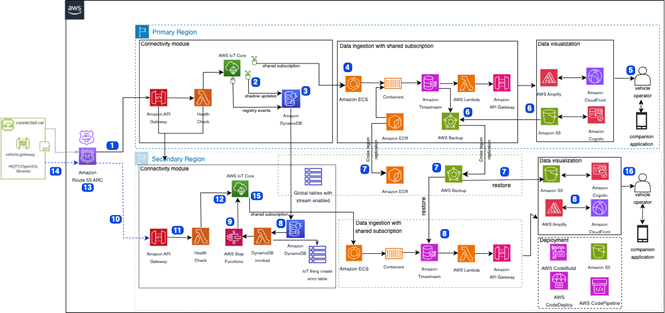
Figure 2a. Backup and Restore DR Strategy for CM workload
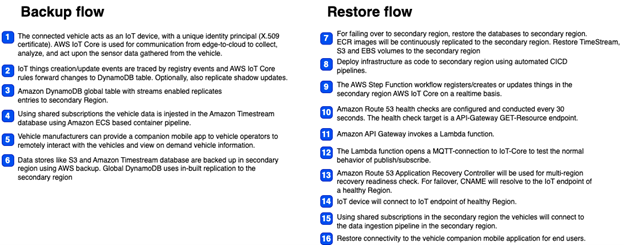 Figure 2b. Backup & Restore workflows for DR Strategy for CM workload
Backup Solution
To build a successful and cost-effective backup & restore DR solution, we start identifying components that should be included in the backup plan. As shown in Figure 2a, the following components require backup
- Application: Codebase, CICD Pipeline, build specifications, deployment scripts, Infrastructure as Code (IaC) templates and service quotas
- Data: Amazon Simple Storage Service (S3) buckets, Amazon DynamoDB (DynamoDB) tables, Amazon Timestream (Amazon Timestream for InfluxDB) database, and Amazon Elastic Block Store (EBS) volumes, Amazon MSK (Amazon Managed Streaming for Apache Kafka)
- Compute: Amazon Machine Image (AMI), Container images in Amazon ECR
- IoT: AWS IoT device registry, device certificates and policies, IoT Core configurations, rules, destinations, role aliases, custom authorizers
The next step is to choose the right strategy for backup
1. For Timestream, S3, and EBS volumes in the data tier, use AWS Backup—a managed service that compresses data for cost efficiency. While S3 offers cross-region replication, AWS Backup is typically more economical due to compression of data at rest. This solution uses DynamoDB Global Tables to replicate IoT Core events to the secondary region continuously.
2. For the compute tier Elastic Container Service (ECS) component it is recommended to use AWS Backup for EC2 backup and restore for easy setup and central control. Using AWS Backup, you can copy backups to secondary Regions automatically as part of a scheduled backup plan. The Amazon Elastic Compute Cloud (EC2) AMI are also replicated in the secondary region and available for restore. For Container images the solution leverages Amazon ECR’s native cross region replication setup.
3. If your workload requires backup & restore of Amazon MSK topics, follow the guidelines from the blog: Backup and restore Kafka topic data using Amazon MSK Connect
4. AWS IoT Core does not have native backup & restore capability. Given below are the backup solutions for the IoT Core services:
a. Device related resources such as the device registry, device policies or device certificates are replicated to the secondary region continuously. In the solution IoT Core rules stores device related operations in the Global DynamoDB table. AWS Lambda (Lambda) and AWS Step Functions (Step Functions) replicates the operations in IoT Core of the secondary region. After the replication, the record in the DynamoDB Global table will be marked for deletion. Customer can also use just-in-time provisioning/registration for IoT device certificates instead of real-time replication, but this approach will increase response time when vehicles connect to the IoT Core for the first time. In this approach you prepare both regions for the just-in-time setup and when your vehicle connects for the first time, they are automatically registered by AWS IoT Core. The blog JIT Registration IoT Device Certificates provides additional details on how to accomplish this to avoid the need to maintain a backup for IoT Device certificates.
b. AWS IoT Core resources like IoT rules, destinations, role aliases or custom authorizers. These should be created in the secondary region using IaC at the same time they are deployed in the primary region. This reduces the chances of configuration drift. The Lambda functions in both regions should have loopback protection so that changes made on the DR system are not replicated back to the source system, and vice versa.
Restore Solution
In this solution, we have chosen Amazon Application Recovery Controller (ARC)
to detect regional failures and direct traffic to the secondary region. ARC can check if resources are ready for recovery and perform failovers without any dependency on the control plane. Using readiness checks, ARC monitors resource quotas, capacity, and configuration for your multi-region applications and reviews changes that might affect your ability to fail over to the secondary region. ARC also helps you manage and automate recovery for your applications across AZs. These capabilities simplify application recovery and make it more reliable by reducing the manual steps that traditional tools and processes require.
When a regional failure is detected, the system initiates an AWS Systems Manager (SSM) runbook to restore the CM application in the secondary region. The following steps should be added to the runbook:
- Data Recovery Restore Amazon Timestream and Amazon S3 data in the secondary region using AWS Backup’s point-in-time recovery.
- Compute Recovery Restore Amazon Elastic Block Store (EBS) volumes to launch new Amazon Elastic Compute Cloud (EC2) instances using AMI already replicated to the secondary region. Elastic Container Registry (ECR) images maintain continuous replication to the secondary region and are available.
- The IoT Core Registry in the secondary region receives continuous updates of connected vehicle metadata. Amazon Route 53 Application Recovery Controller (ARC) monitors multi-region recovery health and manages routing control. Route 53 performs health checks every 30 seconds, targeting an Amazon API Gateway GET endpoint that triggers an AWS Lambda function. This function establishes an MQTT connection to IoT Core to verify publish/subscribe functionality
- Application Deployment Deploy applications and AWS services in the secondary region using automated CI/CD pipeline
Once ARC confirms that data is restored and application components are up and running, it can perform traffic routing to update CNAME records to resolve the IoT endpoint in the healthy region. At this stage, we can restore connectivity to vehicle companion mobile applications and notify users about service availability through preferred communication channels. This approach ensures minimal disruption during failover while maintaining data consistency and service availability.
AWS Cost Estimate for Backup and Restore DR Option
In this section, we provide a sample cost estimate for 1 million connected vehicles to add backup & restore DR to the vehicle connectivity, data ingestion, and visualization modules of the Connected Mobility reference architecture. We are assuming US East (N. Virginia) as primary, and US East (Ohio) is the secondary region. The connected vehicle data volume assumptions are also listed under ‘Dimensions’ for this estimate.
The cost estimation above was done in June 2025 for this example scenario. Pricing for AWS services change over time and varies slightly between AWS regions. You may get a different value when doing this estimate for your account.
| AWS service | Dimensions | Monthly Cost Primary | Monthly Cost Secondary |
| IoT Core (MQTT) | Number of messages transmitted between a vehicle and AWS IoT Core in a month 28000; average size of each message 5 KB.
Number of Shadow operations for a device in a month 2800(10%); average size of each shadow message 2KB. Number of Registry requests per vehicle in a month 3; Average size of each record 1KB. Number of rules triggered per month by a device 30; Average number of actions executed per rule 2; Average size of each message 1KB. |
$30,821.25 | – |
| S3 Standard with AWS Backup replication in secondary region, data transfer charges in separate line item | S3 Standard storage (10 TB per month), PUT, COPY, POST, LIST requests to S3 Standard (920000000), GET, SELECT, and all other requests from S3 Standard (920000000), Data returned by S3 Select (5 TB per month), Data scanned by S3 Select (8 TB per month)
AWS Backup for S3 data with continuous/hourly backup retained in warm storage for 1 day, and daily backup retained in warm storage for 7 days |
$5,223.49 | $514.56 |
| DynamoDB on-demand capacity | Table class (Standard), Average item size (all attributes) (2 KB), Data storage size (150 GB).
On demand write 90M per month; 90 standard, 10 transactional. On demand read 450M per month; 90 eventual, 10 strong. |
$192.19 | $192.19 |
| TimeStream with AWS Backup replication in secondary region, data transfer charges in separate line item | Record size 1KB, Number of records 100M per month, Magnetic Number of records (20 per second), Number of Real-Time queries (1000 per day), Number of Analytical queries (100 per week), Memory store retention (12 hours), Magnetic store retention (1 months)
AWS Backup retaining hourly/daily backups for 1 day in warm retention and 7 days in cold storage. |
$1,728.60 | $124.25 |
| Amazon Elastic Container Registry replicated to secondary region | Amount of data stored (1 TB per month)
Data transfer charges |
$112.64 | $102.40 |
| Step Functions – Standard Workflows: Secondary Region state change workflow | Workflow requests (3000000 per month), State transitions per workflow (1) | – | $74.90 |
| Step Functions – Standard Workflows: Secondary Region state change workflow | 300 http & 300 rest API per vehicle with 34KB message per request | $1,350 | – |
| EBS volume with AWS Backup replication in secondary region, data transfer charges in separate line item | EBS Data 5TB (50 gp3 volumes, 100 GB each)
AWS Backup retaining hourly backup for 1 day, daily backup for 7 days and weekly backup for a week in warm retention and monthly backup for 1 month in cold storage. |
$874.36 | $456.45 |
| AWS Backup Data Transfer | S3: 10TB; EBS: 5TB; TimeStream: 1 TB | – | $163.84 |
| Application Recovery Controller | 1 cluster end point and 10 readiness checks. ARC pricing is based on two dimensions: readiness checks and cluster endpoints(redundant regional endpoints), see Amazon ARC Pricing for details. | – | $2,124 |
| Route 53 | 1 hosted zone with 300M standard queries | $120.50 | – |
| Total | Estimated cost of selected modules in the reference architecture | $40,423.03 | $3,752.59 |
Conclusion
Backup & restore is a cost-effective approach to implement Disaster Recovery (DR) as compared to other DR strategies like pilot light and active/active. When you set up automated processes, this solution delivers Recovery Time Objectives and Recovery Point Objectives (RTO/RPO) within 2-4 hours, meeting the DR requirements for most Connected Mobility (CM) workloads.
For CM systems requiring faster recovery (sub-hour RTO/RPO), consider implementing either warm standby or multi-site active/active architectures using general guidance available at DR options. We will provide DR guidance, specific to Connected Mobility, on these approaches in the upcoming blog posts.