Artificial Intelligence
Build generative AI applications with Amazon Bedrock and AWS CDK
November 2026: This post was reviewed and updated for accuracy.
Generative AI applications usually combine two pieces: retrieval over your own documents, and an agent that decides when to look something up and how to answer. Building both by hand means wiring storage, parsing, embeddings, a vector store, an agent loop and the permissions between them.
In this post, you learn how to define both pieces as code with the AWS Cloud Development Kit (AWS CDK) and deploy them as one stack. The tutorial has two parts. In Part 1, you build a retrieval augmented generation (RAG) application on an Amazon Bedrock Managed Knowledge Base. In Part 2, you add an agent on Amazon Bedrock AgentCore that uses that knowledge base as a tool. The example answers questions about Pride and Prejudice from Project Gutenberg, and you can swap in your own documents.
Solution overview
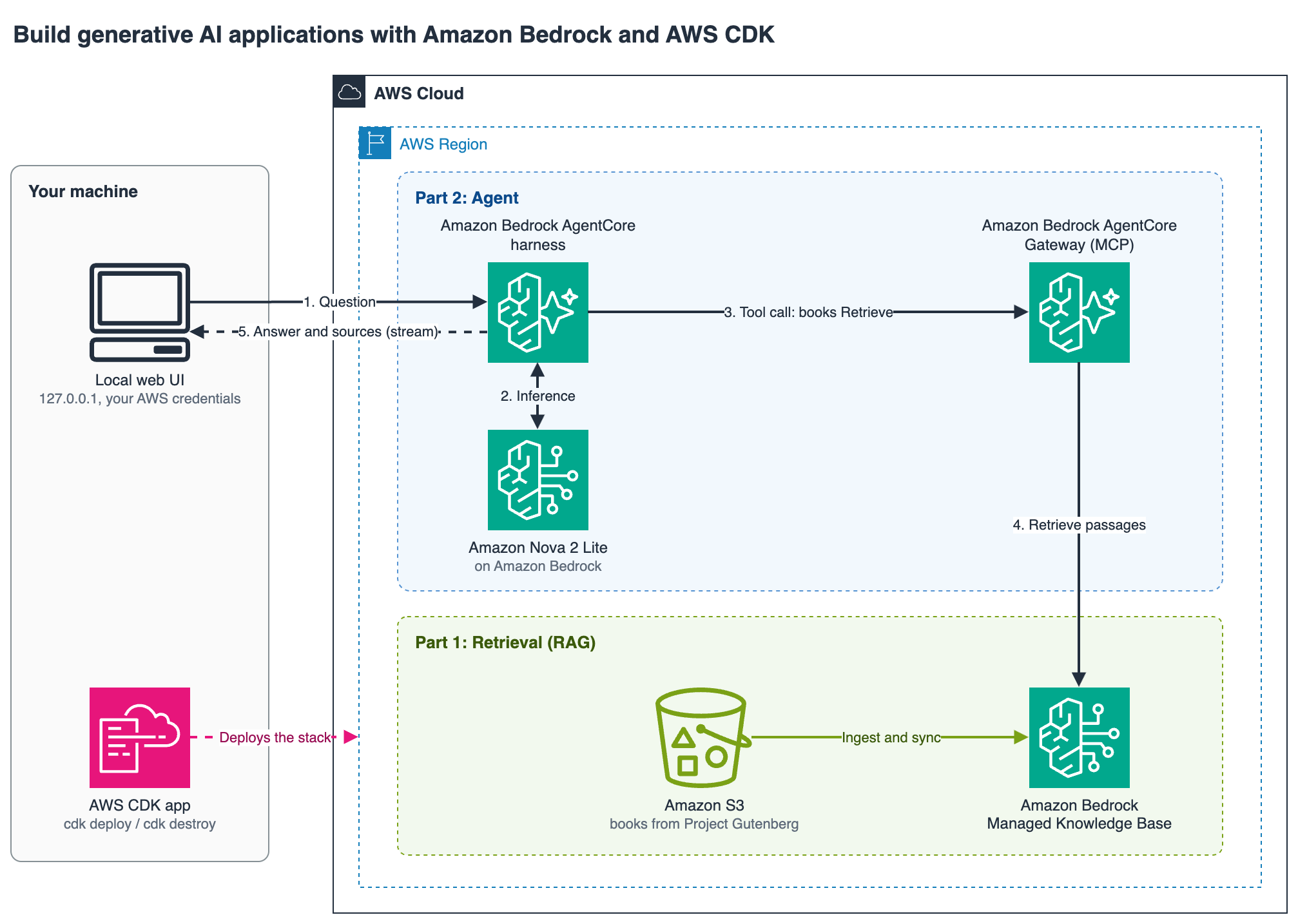
Figure 1: How a question flows from the agent through the gateway to the knowledge base and back
The numbered steps follow one question through the system:
- The question goes to the agent.
- The agent calls the model.
- The model calls the books tool through the gateway.
- The gateway retrieves passages from the knowledge base.
- The answer and its sources stream back.
The stack has two parts.
Part 1, retrieval. The book is uploaded to an Amazon Simple Storage Service (Amazon S3) bucket. A managed knowledge base connects to the bucket through an S3 data source. Amazon Bedrock parses, chunks, embeds and indexes the documents and stores the vectors for you, so the stack contains no vector database and no embedding or chunking settings. A small custom resource starts the first sync during deployment.
Part 2, the agent. An Amazon Bedrock AgentCore Gateway exposes the knowledge base as a tool over the Model Context Protocol (MCP), using the built-in knowledge base connector. An AgentCore harness runs the agent. You declare the model, the instructions and the tools, and the harness runs the loop of calling the model, calling tools and returning an answer. Each session runs in its own isolated environment.
The agent model is a CDK context value. The sample uses Amazon Nova 2 Lite through the US cross-Region inference profile us.amazon.nova-2-lite-v1:0, and you can change it at deploy time without editing code. Outside the US, use the global profile global.amazon.nova-2-lite-v1:0, or a geographic profile such as eu.amazon.nova-2-lite-v1:0 or jp.amazon.nova-2-lite-v1:0 if you have data residency requirements.
Everything in the stack uses constructs from aws-cdk-lib, so there are no extra construct libraries to install. The sample pins aws-cdk-lib 2.275.0, which includes the managed knowledge base and AgentCore harness types.
The complete code for this post is available in the sample-agentcore-with-managed-kb GitHub repository.
Prerequisites
- An AWS account and an AWS Identity and Access Management (IAM) principal that can create the resources in the stack.
Node.js20 or later and the AWS CDK CLI. See Getting started with the AWS CDK. Runnpx cdk bootstraponce for your account and Region.- Python 3 with a recent version of
boto3, for the test script. The sample was tested withboto31.43. - Access to the model you plan to use. See Request access to models.
- A Region where managed knowledge bases are available: US East (N. Virginia), US West (Oregon), Europe (Ireland), Europe (London), Europe (Frankfurt), Asia Pacific (Tokyo), Asia Pacific (Singapore) or Asia Pacific (Sydney). Check that AgentCore and your model are also available there. See Supported AWS Regions for managed knowledge bases, Supported AWS Regions for AgentCore and Regional availability by models. AWS GovCloud (US-West) isn’t supported for this sample, because it doesn’t offer the managed embedding model or the AgentCore Gateway target for managed knowledge bases.
Running the sample incurs charges for the knowledge base, model calls and the AgentCore capabilities the agent uses. There is no separate charge for the harness itself. Delete the stack when you’re done. See Amazon Bedrock pricing and AgentCore pricing.
Clone the sample and install dependencies:
The commands in this post use npx so that the CDK CLI version pinned in the project is used.
The stack is in lib/genai-app-stack.ts. The following sections walk through it from top to bottom.
Part 1: a RAG application on a managed knowledge base
The stack first creates a bucket and uploads the contents of the data/ folder. The bucket is removed with the stack, including its objects.
The knowledge base needs a role it can assume to read the documents. The trust policy is scoped to knowledge bases in your account. The permissions let the role list the bucket, read only objects under the books/ prefix, and publish knowledge base metrics to Amazon CloudWatch (cloudwatch:PutMetricData, limited to the AWS/Bedrock/KnowledgeBases namespace). The bucket statements are:
Next comes the knowledge base itself. Setting the type to MANAGED and the embedding model type to MANAGED lets Amazon Bedrock choose and run the embedding model and the vector store:
The data source points the knowledge base at the books/ prefix in the bucket. The connectorParameters block is passed to the service as is, which is why its keys are camelCase while the rest of the construct uses CDK property names. SMART_PARSING lets the service pick a parsing approach for each document type.
A data source does not index anything until it syncs. To make the knowledge base usable as soon as the deployment finishes, an AwsCustomResource calls StartIngestionJob once, after the upload completes:
When you add or change documents later, sync again from the console or with StartIngestionJob. See Sync your data with your Amazon Bedrock knowledge base. You can also set a daily, weekly or monthly sync schedule on the data source.
With a managed knowledge base, you can still choose a custom embedding model and a chunking strategy (default, fixed-size or none). See Customize ingestion for a managed knowledge base. To bring your own vector store, use a customer-managed knowledge base.
Deploy and test Part 1
Deploy the stack and save the outputs:
The CLI lists the IAM changes the stack makes and asks you to confirm. Review them and enter y.
The deployment takes a few minutes. The first sync of the sample book takes about two more. You can watch it under Knowledge Bases in the Amazon Bedrock console.
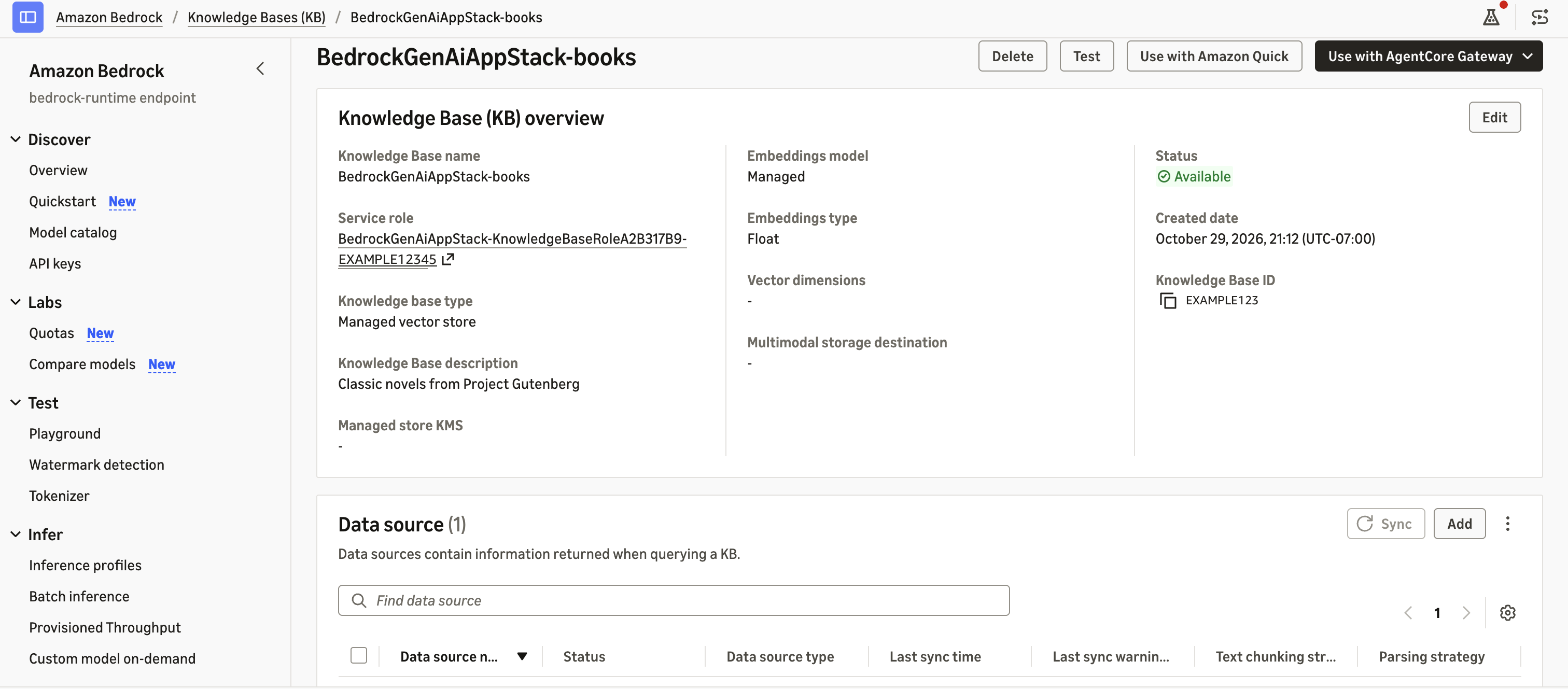
Figure 2: The knowledge base in the Amazon Bedrock console after deployment
The knowledge base type shows Managed vector store and the embeddings model shows Managed. Nothing in the stack defines either one.
Query the knowledge base directly, with no model involved, to see the passages it returns:
Among the top results is the passage where Mrs. Bennet says, “If I can but see one of my daughters happily settled at Netherfield… I shall have nothing to wish for.” That is the RAG half of the application: relevant passages and their source locations, ready to pass to a model.
Part 2: an agent that uses the knowledge base
Part 2 adds three resources to the same stack: a gateway, a gateway target that connects the gateway to the knowledge base, and the agent. The gateway and the agent each have their own IAM role, and the gateway target uses the gateway’s role. It helps to keep track of who calls whom:
- The gateway role lets the gateway read from the knowledge base.
- The agent role lets the agent call the model and call the gateway.
- Your own credentials call the agent.
The gateway uses MCP, and callers authenticate with IAM:
The gateway target uses the built-in bedrock-knowledge-bases connector. It exposes the knowledge base as a Retrieve tool and binds the knowledge base ID, so the agent never handles it. A novel is long, so the target returns 10 passages per search instead of the default.
The gateway role needs bedrock:GetKnowledgeBase and bedrock:Retrieve on the knowledge base ARN. After deployment, open Gateways in the Amazon Bedrock AgentCore console. The gateway lists the target as a knowledge base tool with status Ready.
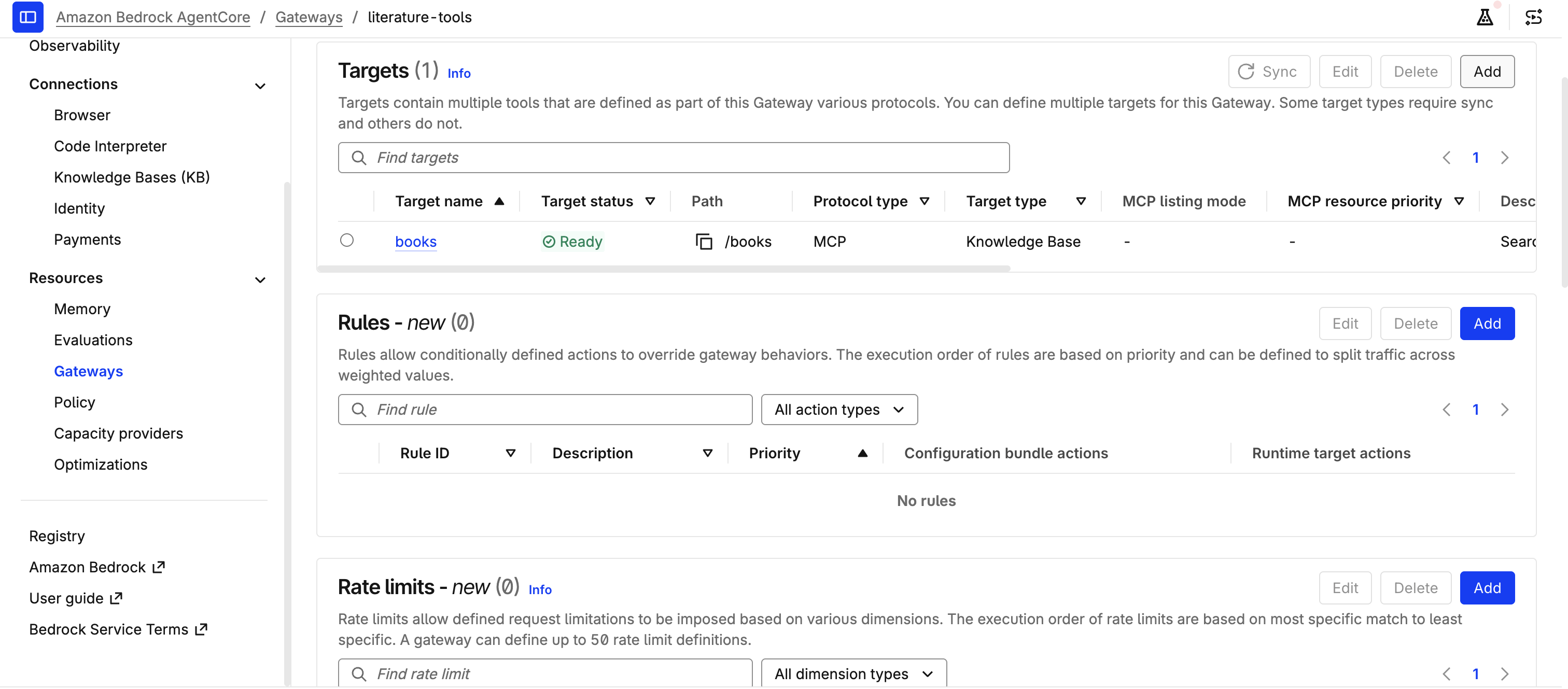
Figure 3: The gateway target listed as a knowledge base tool with status Ready
For the full set of options, including the agentic retrieval tool, see Amazon Bedrock Managed Knowledge Bases as Connector Target.
Finally, the agent. The harness declares the model, the system prompt and the tools:
Three settings in this block came out of testing the sample, and they apply to most agents you build this way.
Limit the tools. Every harness session includes built-in shell and file_operations tools unless you restrict them. In testing, the agent called the file tool on questions it could answer from the books tool alone. allowedTools: ['@books'] limits it to the gateway’s tools, and it also saves the input tokens those tool definitions add to every model call.
Keep answers grounded. Pride and Prejudice is famous, and the model already knows the plot. With a loose prompt, the agent sometimes answered from memory and said the passages did not support the answer. The system prompt above requires answers drawn only from the returned passages, with a supporting quote for each claim. Expect the same behavior with any well-known source, such as public product documentation.
Keep the sample stateless. memory: { disabled: {} } turns off conversation memory, so each session starts fresh and no conversation history is stored. If you leave out the memory setting, the harness provisions managed memory, which has its own charges. Turn memory on when you want multi-turn conversations. See Harness memory.
The agent role follows the sample execution role policy in Security and access controls, plus bedrock-agentcore:InvokeGateway on the gateway ARN. Model access is limited to the model you deploy with: the role can invoke only the inference profile in modelId and its base model, so changing the model is still a deploy flag and the permissions follow it.
Test Part 2
The repository includes scripts/ask_agent.py, which invokes the harness, streams the answer and lists the tools the agent called:
The agent searches the books tool and answers with quoted passages, for example that she hopes “to see one of my daughters happily settled at Netherfield.” Try a few more:
- Who does Elizabeth Bennet eventually marry?
- What does Mr. Darcy say about Elizabeth at the first ball?
- What does Sherlock Holmes say about Mr. Darcy?
The last question is not answerable from the book, and the agent says it could not find it in the documents.
If you want to see the agent’s traces, turn on CloudWatch Transaction Search once for your account. See Enabling AgentCore Observability. Until you do, the agent’s log group shows span export errors such as “Failed to export span batch code: 400”. They don’t affect the answers.
Try it in a web page
The repository also includes a small web page in ui/ that shows the same agent with its sources side by side. It runs on your machine and calls the agent in your account with your AWS credentials, so there is nothing extra to deploy. The page listens on 127.0.0.1 only and never receives your credentials.
Open http://127.0.0.1:8790 and choose one of the sample questions. The answer streams into the conversation, and the Sources panel lists the passages the knowledge base returned, with their relevance scores. Passages the answer quotes are marked Quoted and listed first, so you can check each claim against the book.
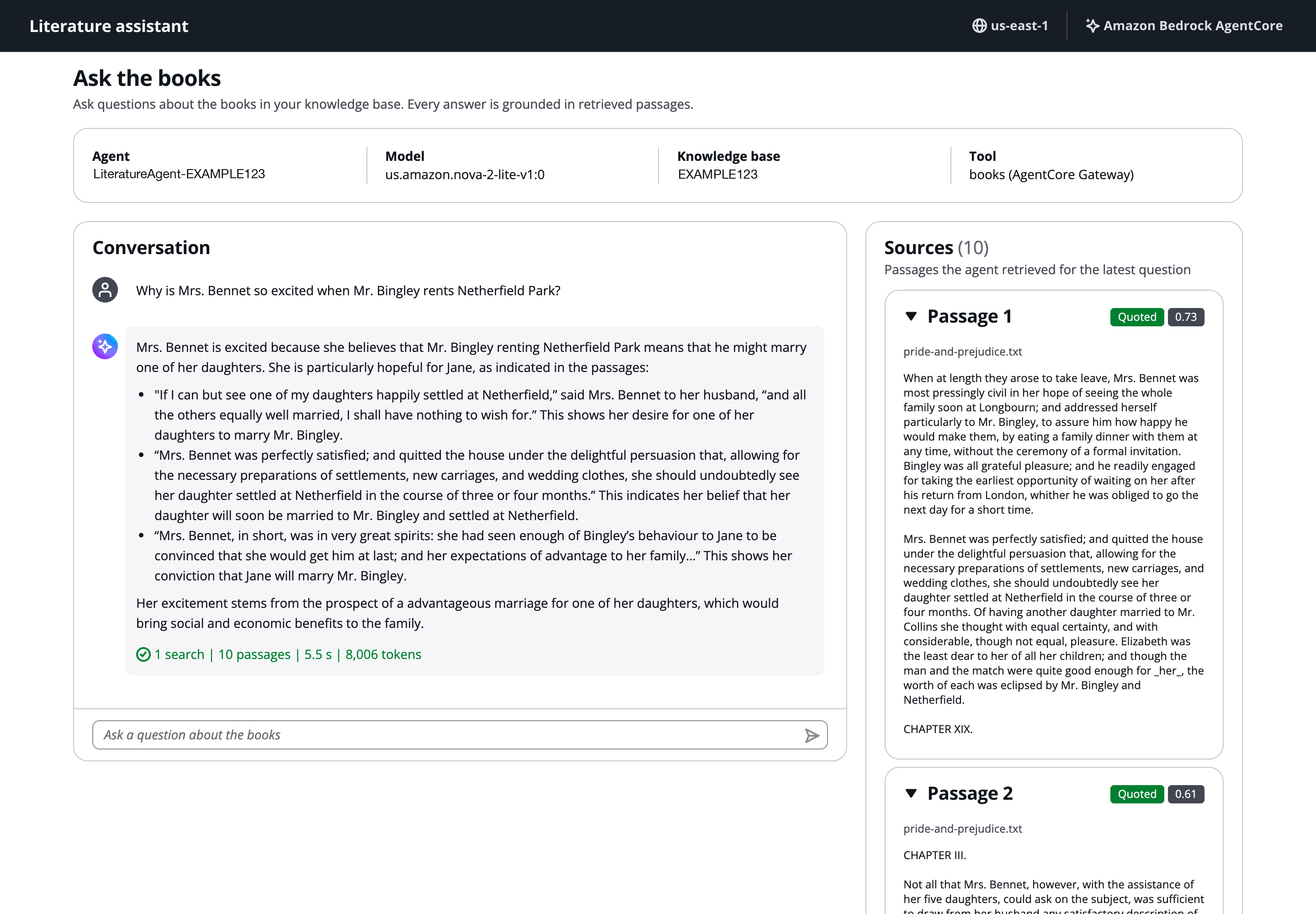
Figure 4: The sample web page answering a question alongside its supporting passages
Ask the Sherlock Holmes question and the agent replies that it could not find the answer, because the retrieved passages do not contain it.
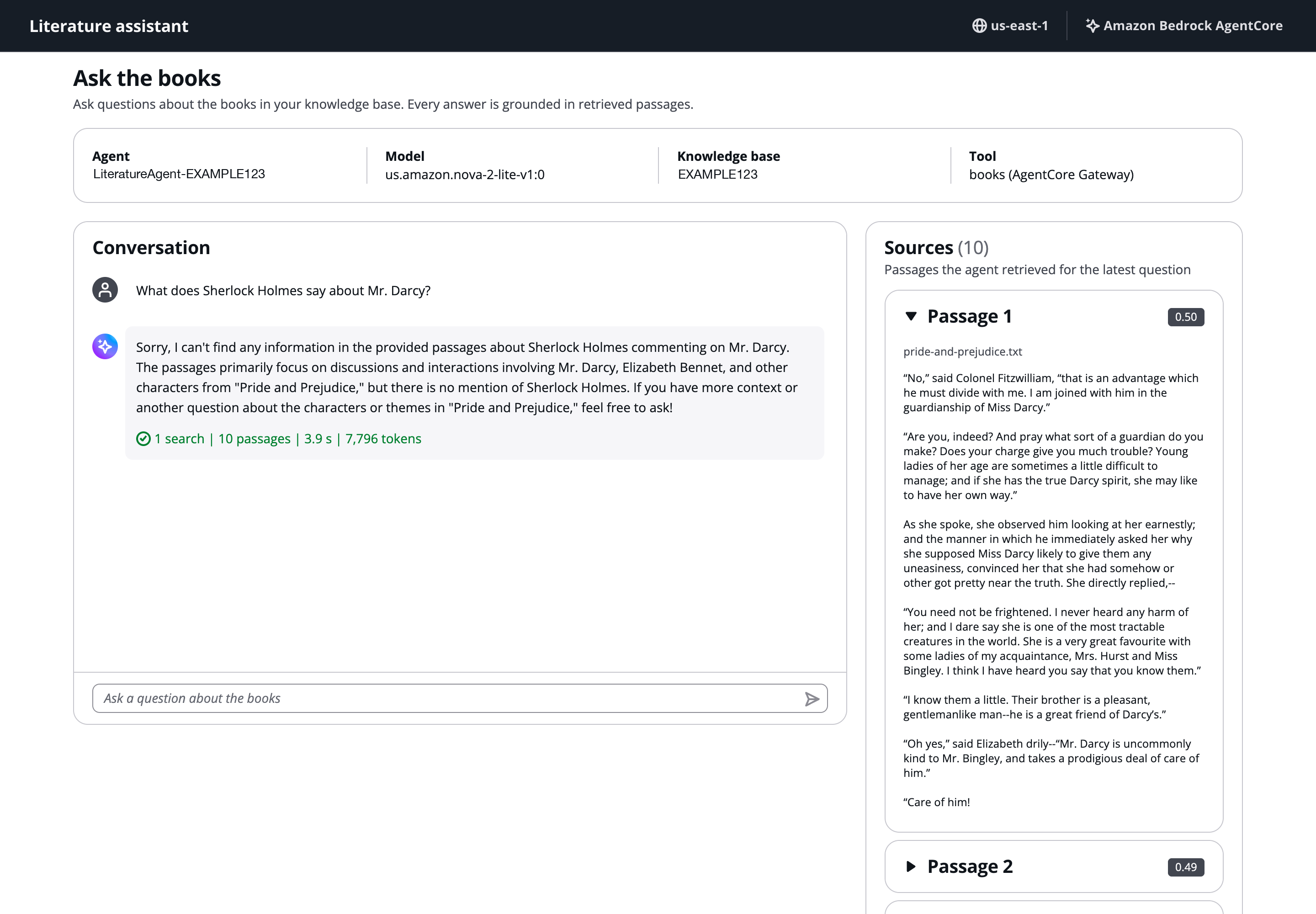
Figure 5: The agent reporting that the documents do not contain the answer
The page is built with the Cloudscape Design System. To share it with other people, host it behind sign-in and put an API in front of the agent rather than exposing the local server.
Use your own documents and model
To use your own documents, replace the contents of data/ and deploy again. Then run a sync, because the custom resource only starts the first one.
Use the KnowledgeBaseId and DataSourceId values from outputs.json. To check progress, run aws bedrock-agent get-ingestion-job with the same IDs and the ingestion job ID from the response, and wait for the status COMPLETE. Also update the book-specific text to match your documents: the system prompt and the knowledge base and tool descriptions in lib/genai-app-stack.ts, and the sample questions in ui/src/App.tsx.
To change the model, pass a different model or inference profile ID:
Anthropic models need a one-time first-time use form before you can call them, and the us. prefix works only in US Regions. See Access Amazon Bedrock foundation models.
Two directions for going further:
- The connector also offers an agentic retrieval tool, which breaks a multi-part question into steps and retrieves iteratively. See Connect to your knowledge base through AgentCore Gateway. To use it, add an
AgenticRetrieveStreamentry to the target’sconfigurationswithretrieversandagenticRetrieveConfiguration, and grant the gateway rolebedrock:AgenticRetrieveStream. - When configuration is not enough and you need to own the agent loop, you can export the harness to code and run it on AgentCore Runtime. Export doesn’t carry over Gateway tools. It lists them in
EXPORT_NOTES.md, and you wire the books tool into the generated agent yourself.
Security considerations
This sample is for learning and experimentation and isn’t production-ready. Before you adapt it, review the following:
- The agent runs on the public network. To reach private resources, run the harness in your virtual private cloud (VPC).
- The bucket uses Amazon S3 managed keys (SSE-S3) and has no server access logging or versioning. Consider a customer managed key and access logging for production data.
- The log groups have no retention period. Set one that fits your requirements.
- Any principal with
bedrock-agentcore:InvokeHarnessandbedrock-agentcore:InvokeAgentRuntimeon the harness ARN can call the agent, and a caller can override settings such as the model and skills on each call. Grant these actions only to principals you trust, and validate input in your application if you put the agent behind an API. See Security and access controls. - The local web page is for your own machine. It accepts requests only from the page itself, but stop it when you’re done and don’t expose it to other users.
- Copies of your documents remain in the CDK bootstrap bucket after you delete the stack. See Clean up.
Clean up
Delete the stack to avoid ongoing charges:
Deletion can take 10 to 15 minutes, most of it spent deleting the data source and the harness. Leave the command running.
The stack’s helper functions and the agent write logs to Amazon CloudWatch, and those log groups remain after deletion. Remove them with:
npx cdk deploy also uploads a copy of the data/ folder to your CDK bootstrap bucket (cdk-hnb659fds-assets-<account>-<region>) and keeps one in the local cdk.out/ folder. npx cdk destroy doesn’t remove either. Delete the local folder, and delete the asset from the bootstrap bucket if you don’t want to keep it. The cdk gc command can remove unused assets, but it covers every CDK app in that account and Region.
Conclusion
In this post, you defined a RAG application and an agent in one CDK stack. The managed knowledge base handled parsing, embedding and storage. The AgentCore Gateway turned the knowledge base into a tool, and the AgentCore harness ran the agent loop from a short declaration. Because the model is a parameter, changing it is a deploy flag rather than a code change.
To learn more, see Amazon Bedrock Knowledge Bases, the AgentCore harness documentation, Amazon Bedrock pricing and AgentCore pricing.
To go further with agentic retrieval across several knowledge bases, with observability and evaluation, see Build observable enterprise agentic retrieval using Managed Amazon Bedrock Knowledge Base with AWS CloudFormation.
To build enterprise search for agents, see Build enterprise search for agents with Amazon Bedrock Managed Knowledge Base.
To get started, clone the sample, try it with your own documents and a different model, and share what you build in the comments.