Artificial Intelligence
Customize Amazon Nova models with Amazon Bedrock fine-tuning
Today, we’re sharing how Amazon Bedrock makes it straightforward to customize Amazon Nova models for your specific business needs. As customers scale their AI deployments, they need models that reflect proprietary knowledge and workflows — whether that means maintaining a consistent brand voice in customer communications, handling complex industry-specific workflows or accurately classifying intents in a high-volume airline reservation system. Techniques like prompt engineering and Retrieval-Augmented Generation (RAG) provide the model with additional context to improve task performance, but these techniques do not instill native understanding into the model.
Amazon Bedrock supports three customization approaches for Nova models: supervised fine-tuning (SFT), which trains the model on labeled input-output examples; reinforcement fine-tuning (RFT), which uses a reward function to guide learning toward target behaviors; and model distillation, which transfers knowledge from a larger teacher model into a smaller, faster student model. Each technique embeds new knowledge directly into the model weights, rather than supplying it at inference time through prompts or retrieved context. With these approaches, you get faster inference, lower token costs, and higher accuracy on the tasks that matter most to your business. Amazon Bedrock manages the training process automatically, requiring only that you upload your data to Amazon Simple Storage Service (Amazon S3) and initiate the job through the AWS Management Console, CLI, or API. Deep machine learning expertise is not required. Nova models support on-demand invocation of customized models in Amazon Bedrock. This means you pay only per-call at the standard rate for the model, instead of needing to purchase more expensive allocated capacity (Provisioned Throughput).
In this post, we’ll walk you through a complete implementation of model fine-tuning in Amazon Bedrock using Amazon Nova models, demonstrating each step through an intent classifier example that achieves superior performance on a domain specific task. Throughout this guide, you’ll learn to prepare high-quality training data that drives meaningful model improvements, configure hyperparameters to optimize learning without overfitting, and deploy your fine-tuned model for improved accuracy and reduced latency. We’ll show you how to evaluate your results using training metrics and loss curves.
Understanding fine-tuning and when to use it
Context-engineering techniques such as prompt engineering or Retrieval-Augmented Generation (RAG) place information into the model’s prompt. These approaches offer significant advantages: they take effect immediately with no training required, allow for dynamic information updates, and work with multiple foundation models without modification. However, these techniques consume context window tokens on every invocation, which can increase cumulative costs and latency over time. More importantly, they do not generalize well. The model is simply reading instructions each time rather than having internalized the knowledge, so it can struggle with novel phrasings, edge cases, or tasks that require reasoning beyond what was explicitly provided in the prompt. Customization techniques, by comparison, incorporate the new knowledge directly into the model by adding an adapter matrix of additional weights and customizing those (“parameter-efficient fine-tuning”, aka “PEFT”). The resulting customized model has acquired new domain-specific skills. Customization allows faster and more efficient small models to reach performance comparable to larger models in the specific training domain.
When to fine-tune: Consider fine-tuning when you have a high-volume, well-defined task where you can assemble quality labeled examples or a reward function. Use cases include training a model to correctly render your company’s logo, embedding brand tone and company policies into the model, or replacing a traditional ML classifier with a small LLM. For example, Amazon Customer Service customized Nova Micro for specialized customer support to improve accuracy and reduce latency, improving accuracy by 5.4% on domain-specific issues and 7.3% on general issues.
Fine-tuned small LLMs like Nova Micro are increasingly replacing traditional ML classifiers for tasks such as intent detection. They deliver the flexibility and world knowledge of an LLM at the speed and cost of a lightweight model. Unlike classifiers, LLMs handle natural variation in phrasing, slang, and context without retraining, and fine-tuning sharpens their accuracy further for the specific task. We demonstrate this with an intent classifier example later in this blog.
When NOT to fine-tune: Fine-tuning requires assembling quality labeled data or a reward function and executing a training job, which involves upfront time and cost. However, this initial investment can reduce per-request inference costs and latency for high-volume applications.
Customization approaches
Amazon Bedrock offers three customization approaches for Nova models:
- Supervised fine-tuning (SFT) customizes the model to learn patterns from labeled data that you supply. This post demonstrates this technique in action.
- Reinforcement fine-tuning (RFT) takes a different approach, using training data combined with a reward function, either custom code or an LLM acting as a judge, to guide the learning process.
- Model distillation, for scenarios requiring knowledge transfer, lets you compress insights from large teacher models into smaller, more efficient student models suitable for resource-constrained devices.
Amazon Bedrock automatically uses parameter efficient fine-tuning (PEFT) techniques appropriate to the model for customizing Nova models. This reduces memory requirements and accelerates training compared to full fine-tuning, while maintaining model quality. Having established when and why to use fine-tuning, let’s explore how Amazon Bedrock simplifies the implementation process, and which Nova models support this customization approach.
Understanding Amazon Nova models on Amazon Bedrock
Amazon Bedrock fully automates infrastructure provisioning, compute management, and training orchestration. You upload data to S3 and start training with a single API call, without managing clusters and GPUs or configuring distributed training pipelines. It provides clear documentation for data preparation (including format specifications and schema requirements), sensible hyperparameter defaults (such as epochCount, learningRateMultiplier), and training visibility through loss curves that help you monitor convergence in real-time.
Nova Models: Several of the Nova models allow fine-tuning (see documentation). After training is completed, you have the option to host the customized Nova models on Amazon Bedrock using cost-effective On Demand inference, at the same low inference price as the non-customized model.
Nova 2 Lite, for example, is a fast, cost-effective reasoning model. As a multimodal foundation model, it processes text, images, and video within a 1-million token context window. This context window supports analysis of documents longer than 400 pages or 90-minute videos in a single prompt. It excels at document processing, video understanding, code generation, and agentic workflows. Nova 2 Lite supports both SFT and RFT.
The smallest Nova model, Nova Micro, is also particularly useful because it offers fast, low-cost inference with LLM intelligence. Nova Micro is ideal for pipeline processing tasks done as part of a larger system, such as fixing addresses or extracting data fields from text. In this post, we show an example of customizing Nova Micro for a segmentation task instead of building a custom data science model.This table shows both Nova 1 and Nova 2 reasoning models and their current availability as of publication time, with which models currently allow RFT or SFT. These capabilities are subject to change; see the online documentation for the most current model availability and customization, and the Nova Users Guide for more detail on the models.
| Model | Capabilities | Input | Output | Status | Bedrock fine-tuning |
| Nova Premier | Most capable model for complex tasks and teacher for model distillation | Text, images, video (excluding audio) | Text | Generally available | Can be used as a teacher for model distillation |
| Nova Pro | Multimodal model with best combination of accuracy, speed, and cost for a wide range of tasks | Text, images, video | Text | Generally available | SFT |
| Nova 2 Lite | Low cost multimodal model with fast processing | Text, images, video | Text | Generally available | RFT, SFT |
| Nova Lite | Low cost multimodal model with fast processing | Text, images, video | Text | Generally available | SFT |
| Nova Micro | Lowest latency responses at low cost. | Text | Text | Generally available | SFT |
Now that you understand how Nova models support fine-tuning through the Amazon Bedrock managed infrastructure, let’s examine a real-world scenario that demonstrates these capabilities in action.
Use case example – intent detection (replacing traditional ML models)
Intent detection determines the category of the user’s intended interaction from the input case. For example, in the case of an airline travel assistance system, the user might be attempting to get information about a previously booked flight or asking a question about airline services, such as how to transport a pet. Often systems will want to route the inquiry to specific agents based on intent. Intent detection systems must operate quickly and economically at high volume.
The traditional solution for such a system has been to train a machine-learning model. While this is effective, developers are more often turning to small LLMs for these tasks. LLMs offer more flexibility, can quickly be modified through prompt changes, and come with extensive world knowledge built in. Their understanding of shorthand, texting slang, equivalent words, and context can provide a better user experience, and the LLM development experience is familiar for AI engineers.
For our example, we will customize Nova Micro model on the open-source Airline Travel Information System (ATIS) data set, an industry standard benchmark for intent-based systems. Nova Micro achieves 41.4% on ATIS with no customization, but we can customize it for the specific task, improving its accuracy to 97% with a simple training job.
Technical implementation: Fine-tuning process
The two critical factors that drive model fine-tuning success are data quality and hyperparameter selection. Getting these right determines whether your model converges efficiently or requires costly retraining. Let’s walk through each component of the implementation process, starting with how to prepare your training data.
Data preparation
Amazon Bedrock requires JSONL (JavaScript Object Notation Lines) format because it supports efficient streaming of large datasets during training, so that you can process your data incrementally without memory constraints. This format also simplifies validation. Each line can be checked independently for errors. Verify that each row in the JSONL file is valid JSON. If the file format is invalid, the Amazon Bedrock model creation job will fail with an error. For more detail, see the documentation on Nova model fine-tuning. We used a script to format the ATIS dataset as JSONL. Nova Micro accepts a separate validation set so we then off split 10% of the data into a validation set (Nova 2 models do this automatically in customization). We also reserved a test set of records, which the model was not trained on, to facilitate clean testing results.
For our intent classifier example, our input data is text only. However, when fine-tuning multimedia models, also make sure you are using only supported image formats (PNG, JPEG, and GIF). Make sure your training examples span the important cases. Validate your dataset with your team and remove ambiguous or contradictory answers before fine-tuning.
{"schemaVersion": "bedrock-conversation-2024", "system": [{"text": "Classify the intent of airline queries. Choose one intent from this list: abbreviation, aircraft, aircraft+flight+flight_no, airfare, airfare+flight_time, airline, airline+flight_no, airport, capacity, cheapest, city, distance, flight, flight+airfare, flight_no, flight_time, ground_fare, ground_service, ground_service+ground_fare, meal, quantity, restriction\n\nRespond with only the intent name, nothing else."}], "messages": [{"role": "user", "content": [{"text": "show me the morning flights from boston to philadelphia"}]}, {"role": "assistant", "content": [{"text": "flight"}]}]}
Prepared row in a training data sample (note that although it appears wrapped, JSONL format is really a single row per example)
Important: Note that the system prompt appears in the training data. It is important that the system prompt used for training match the system prompt used for inference, because the model learns the system prompt as context that triggers its fine-tuned behavior.
Data privacy considerations:
When fine-tuning with sensitive data:
- Anonymize or mask PII (names, email addresses, phone numbers, payment details) before uploading to Amazon S3.
- Consider data residency requirements for regulatory compliance.
- Amazon Bedrock does not use your training data to improve base models.
- For enhanced security, consider using Amazon Virtual Private Cloud (VPC) endpoints for private connectivity between S3 and Amazon Bedrock, eliminating exposure to the public internet.
Key hyperparameters
Hyperparameters control the training job. Amazon Bedrock sets reasonable defaults, and you can often use them with no adjustment, but you might need to adjust them for your fine-tuning job to achieve your target accuracy. Here are the hyperparameters for the Nova understanding models – consult the documentation for other models:
Three hyperparameters control your training job’s behavior, and while Amazon Bedrock sets reasonable defaults, understanding them helps you optimize results. Getting these settings right can save you hours of training time and minimize compute costs.
The first hyperparameter, epochCount, specifies how many complete passes the model makes through your dataset. Think of it like reading a book multiple times to improve comprehension. After the first read you might retain 60% of the material; a second pass raises comprehension to 80%. However, after you understand 100% of the material, additional readings waste training time without producing gains. Amazon Nova models support 1 to 5 epochs with a default of 2. Larger datasets typically converge with fewer epochs, while smaller datasets benefit from more iterations. For our ATIS intent classifier example with ~5000 combined samples, we set epochCount to 3.
The learningRateMultiplier controls how aggressively the model learns from errors. It is essentially the step size for corrections. If the learning rate is too high, you might miss details and jump to wrong conclusions. If the rate is too low, you form conclusions slowly. We use 1e-5 (0.00001) for the ATIS example, which provides stable, gradual learning. The learningRateWarmupSteps parameter gradually increases the learning rate to the specified value over a set number of iterations, alleviating unstable training at the start. We use the default value of 10 for our example.
Why this matters to you: Setting the right epoch count avoids wasted training time and costs. Each epoch represents another pass through the complete training data, which will increase the number of tokens processed (the main cost in model training—see “Cost and training time” later in this post). Too few epochs mean your model might not learn the training data effectively enough. Finding this balance early saves both time and budget. The learning rate directly impacts your model’s accuracy and training efficiency, potentially meaning the difference between a model that converges in hours versus one that never reaches acceptable performance.
Starting a fine-tuning job
The prerequisite of fine-tuning is creating an S3 bucket with training data.
S3 bucket setup
Create an S3 bucket in the same region as your Amazon Bedrock job with the following security configurations:
- Enable server-side encryption (SSE-S3 or SSE-KMS) to protect training data at rest.
- Block public access on the bucket to prevent unauthorized exposure.
- Enable S3 versioning to protect training data from accidental overwrites and track changes across training iteration.
Apply the same encryption and access controls to your output S3 bucket. Upload your JSONL file in the new S3 bucket and then organize it with the /training-data prefix. S3 versioning helps protect your training data from accidental overwrites and allows you to track changes across training iterations. This is essential when you’re experimenting with different dataset versions to optimize results.
To create a supervised fine-tuning job
- In the AWS Management Console, choose Amazon Bedrock.
- Choose Test, Chat/Text playground and confirm that Nova Micro appears in the model selector drop-down list.
- Under Custom model, choose Create, and then select Supervised fine-tuning job.
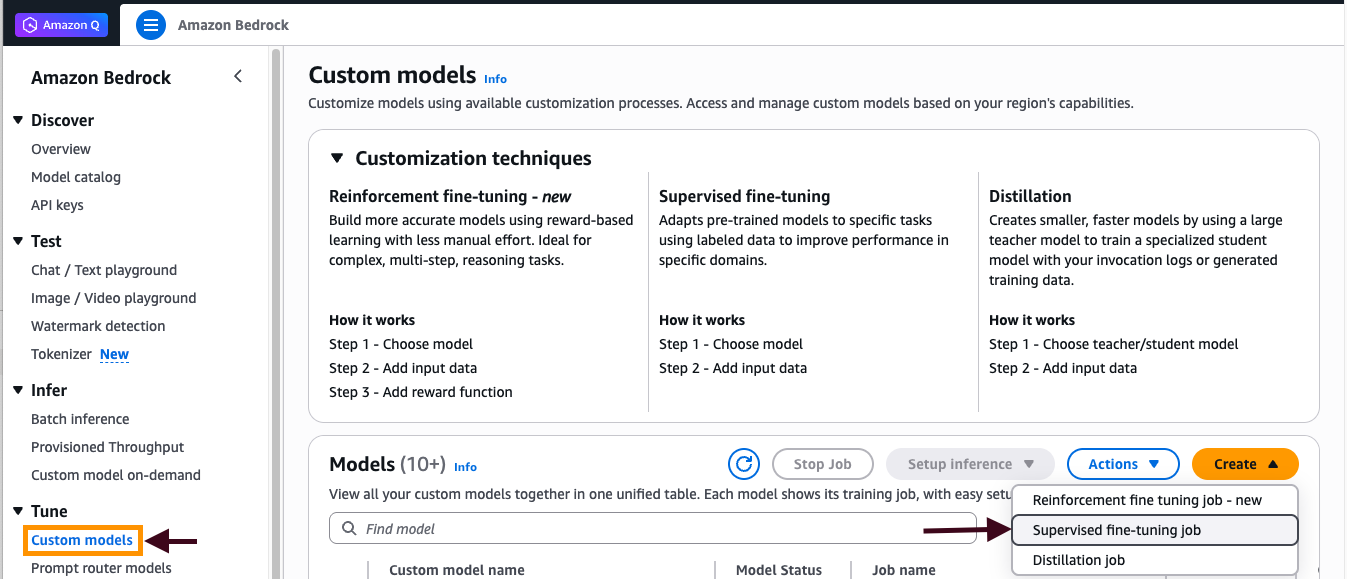
Figure 1: Creating supervised fine-tuning job
- Specify “Nova Micro” model as the source model.
- In the Training data section, enter the S3 URI path to your JSONL training file (for example,
s3://amzn-s3-demo-bucket/training-data/focused-training-data-v2.jsonl). - In the Output data section, specify the S3 URI path where training outputs will be stored (for example,
s3://amzn-s3-demo-bucket/output-data/). - Expand the Hyperparameters section and configure the following values:
epochCount: 3,learningRateMultiplier: 1e-5,learningRateWarmupSteps: 10 - Select the IAM role with least-privilege S3 access permissions or you can create one. The role should have:
- Scoped permissions limited to specific actions (
s3:GetObjectands3:PutObject) on specific bucket paths (for example,arn:aws:s3:::your-bucket-name/training-data/*andarn:aws:s3:::your-bucket-name/output-data/*) - Avoid over-provisioning and include IAM condition keys.
- For detailed guidance on S3 permission best practices and security configurations, refer to the AWS IAM Best Practices documentation.
- Scoped permissions limited to specific actions (
- Choose Create job.
Monitoring job status
To monitor the training job’s status and convergence:
- Monitor the job status in the Custom models dashboard.
- Wait for the Data validation phase to complete, followed by the Training phase (completion time ranges from minutes to hours depending on dataset size and modality).
- After training completes, choose your job name to view the Training metrics tab and verify the loss curve shows proper convergence.
- After training is completed, if the job is successful, a custom model is created and ready for inference. You can deploy the customized Nova model for on-demand inference.
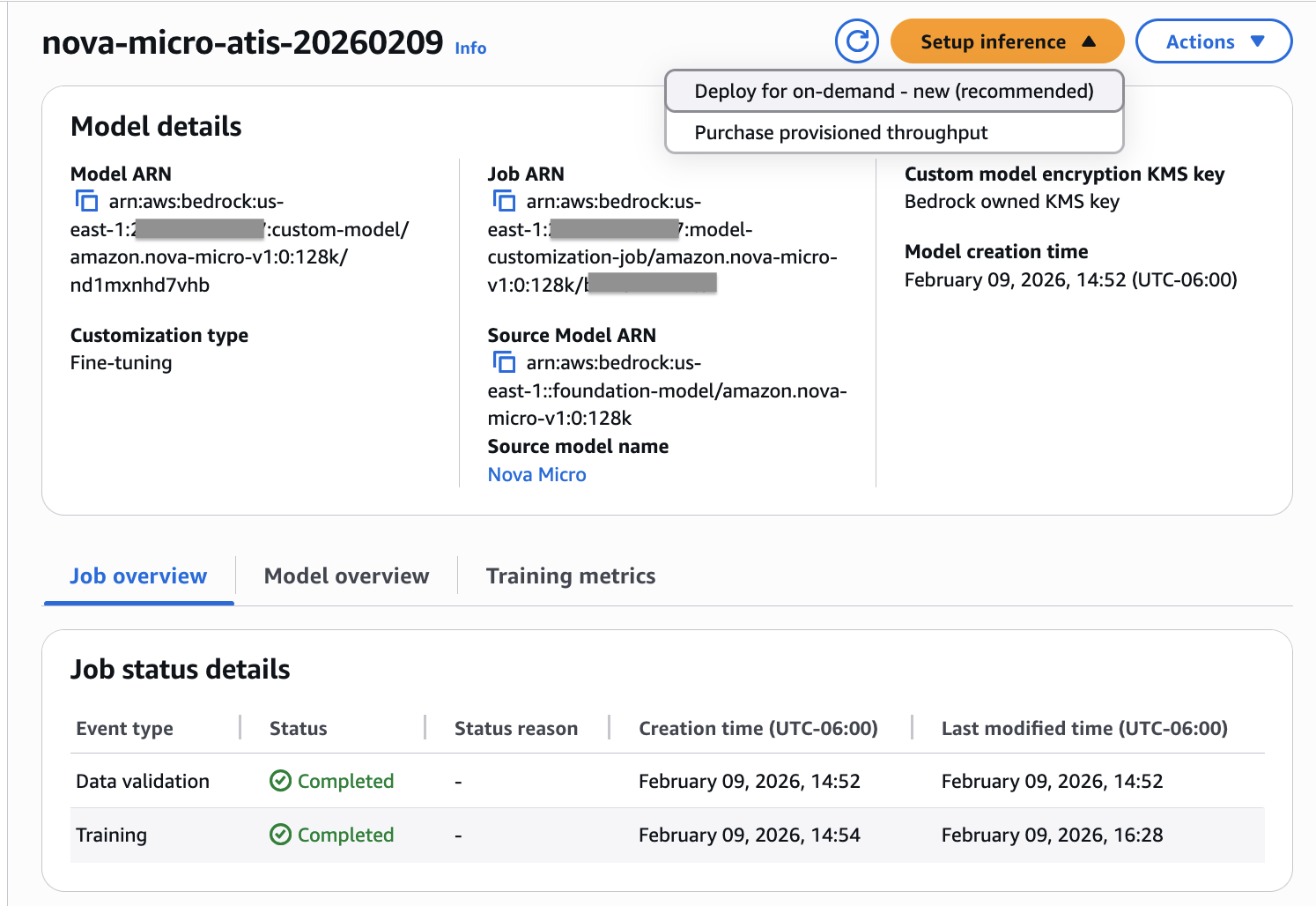
Figure 2: Verifying job status
Evaluating training success
With Amazon Bedrock, you can evaluate your fine-tuning job’s effectiveness through training metrics and loss curves. By analyzing the training loss progression across steps and epochs, you can assess whether your model is learning effectively and determine if hyperparameter adjustments are needed for optimal performance. Amazon Bedrock customization automatically stores training artifacts, including validation results, metrics, logs, and training data in your designated S3 bucket, giving you complete visibility into the training process. Training metrics data lets you track how your model performs with specific hyperparameters and make informed tuning decisions.
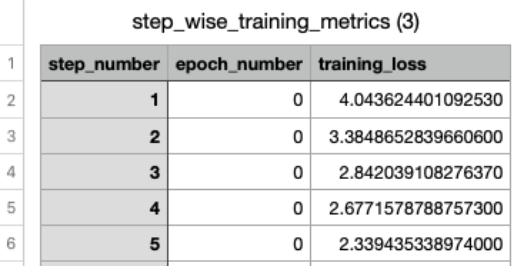
Figure 3: Example training metrics in CSV format
You can visualize your model’s training progress directly from the Amazon Bedrock Custom Models console. Select your customized model to access detailed metrics, including an interactive training loss curve that shows how effectively your model learned from the training data over time. The loss curve gives insight into how training progressed, and whether hyperparameters need modification for effective training. From the Amazon Bedrock Custom Models tab, select the customized model to see its details, including the training loss curve. (Figure 4).
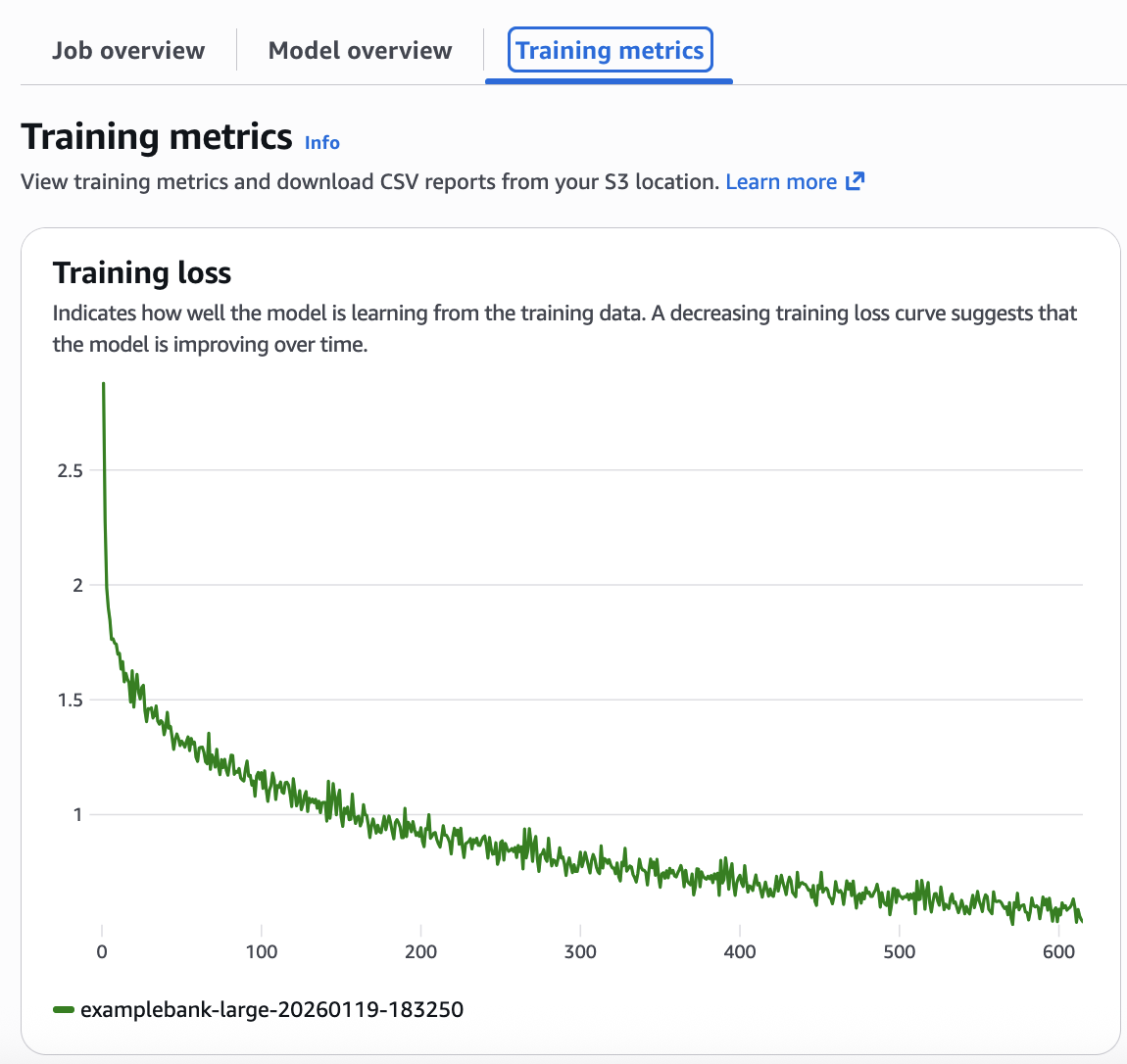
Figure 4: Analyzing the loss curve from the training metrics
This loss curve shows that the model is performing well. The decreasing loss curve shown in your metrics confirms the model successfully learned from your training data. Ideally while the model is learning, the training loss and validation loss curves should track similarly .A well-configured model shows steady convergence—the loss decreases smoothly without dramatic fluctuations. If you see oscillating patterns in your loss curve (wild swings up and down), reduce your learningRateMultiplier by 50% and restart training. If your loss decreases too slowly (flat or barely declining curve), increase your learningRateMultiplier by 2x. If your loss plateaus early (flattens before reaching good accuracy), increase your epochCount by 1-2 epochs.
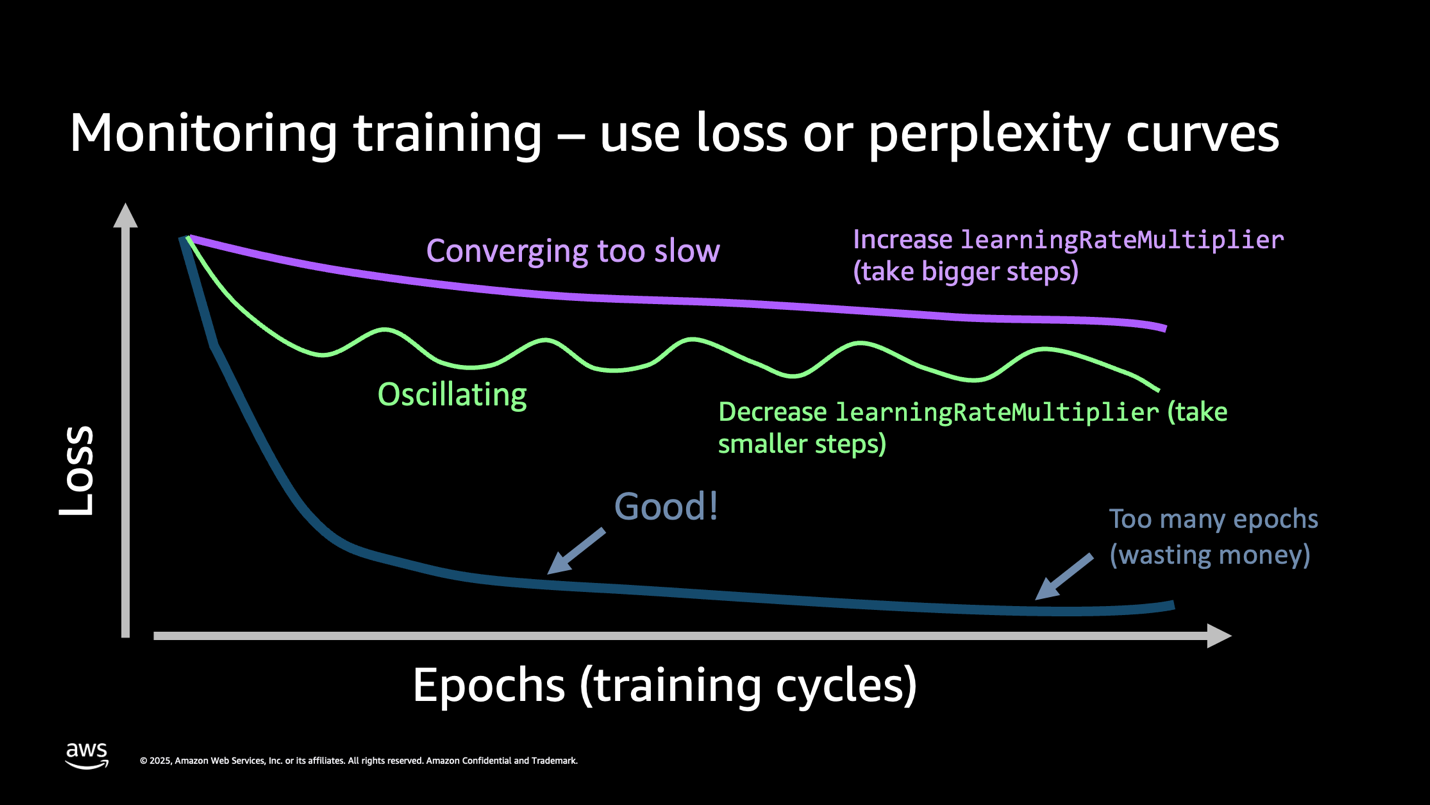
Figure 5: Understanding the loss curve
Key takeaway: Your loss curve tells the complete story. A smooth downward trend means success. Wild oscillations mean that your learning rate is too high. Flat lines mean you need more epochs or better data. Monitor this one metric to avoid costly retraining.
Customization best practices
Maximizing your fine-tuning success starts with data quality. Small, high-quality datasets consistently outperform large, noisy ones. Focus on curating labeled examples that accurately represent your target domain rather than collecting massive volumes of mediocre data. Each training sample should be properly formatted and validated before use, as clean data directly translates to better model performance. Remember to specify an appropriate system prompt.
Common pitfalls to avoid include over-training (running too many epochs after convergence), suboptimal data formatting (inconsistent JSON/JSONL structures), and hyperparameter settings that need adjustment. We recommend validating your training data format before starting and monitoring loss curves actively during training. Watch for signs that your model has converged. Continuing training beyond this point wastes resources without improving results.
Cost and training time
Training the customized Nova Micro model for our ATIS example with 4,978 combined examples and 3 training epochs (~1.75M total tokens) completed in about 1.5 hours and cost only $2.18, plus a $1.75 monthly recurring storage fee for the model. On-Demand inference using customized Amazon Nova models is charged at the same rate as the non-customized models. See the Bedrock pricing page for reference. The managed fine-tuning provided by Amazon Bedrock and the Amazon Nova models bring fine-tuning well within cost thresholds for most organizations. The ease of use and cost effectiveness opens new possibilities for customizing models to produce better and faster results without maintaining long prompts or knowledge bases of information specific to your organization.
Deploying and testing the fine-tuned model
Consider on-demand inference for unpredictable or low-volume workloads. Use the more expensive provisioned throughput when needed for consistent, high-volume production workloads requiring guaranteed performance and lower per-token costs.
Model security considerations:
- Restrict model invocation using IAM resource policies to control which users and applications can invoke your custom model.
- Implement authentication/authorization for API callers accessing the on-demand inference endpoint through IAM roles and policies.
Network security:
- Configure VPC endpoints for Amazon Bedrock to keep traffic within your AWS network.
- Restrict network access to training and inference pipelines using security groups and network ACLs.
- Consider deploying resources within a VPC for additional network-level controls.
The deployment name should be unique, and the description should explain in detail what the custom model is used for.
To deploy the model, enter deployment name, description and choose Create (Figure 6).
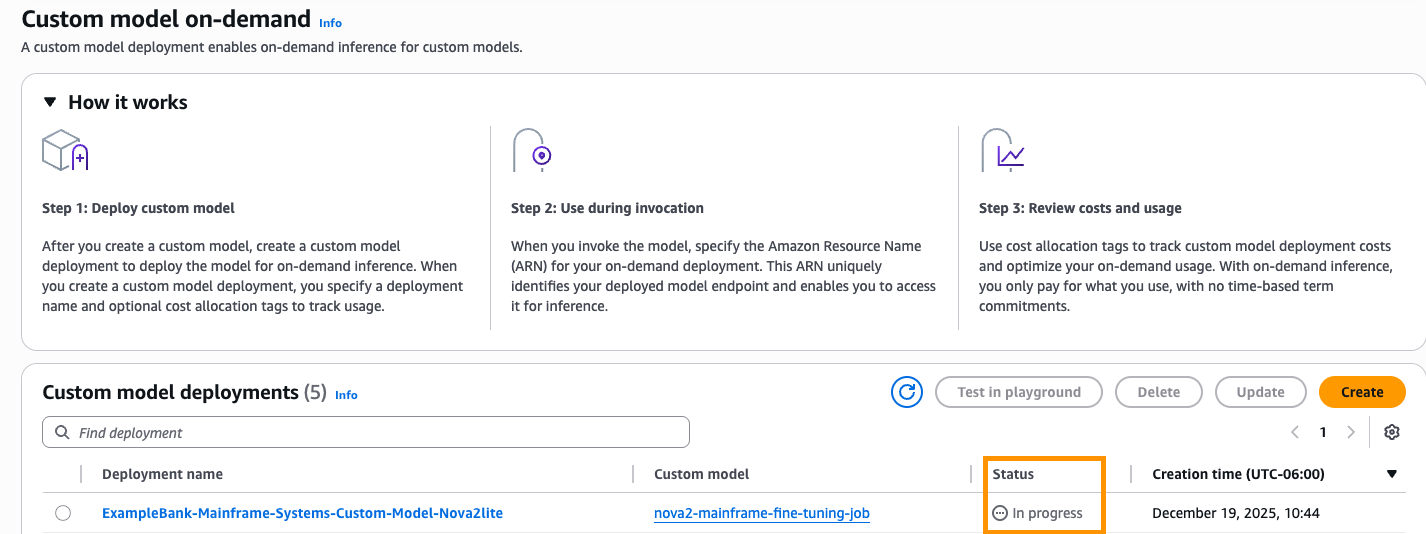
Figure 6:
Deploying a custom model with on-demand inference
After the status changes to “Active” the model is ready to use by your application and can be tested via the Amazon Bedrock playground. Choose Test in playground (Figure 7).
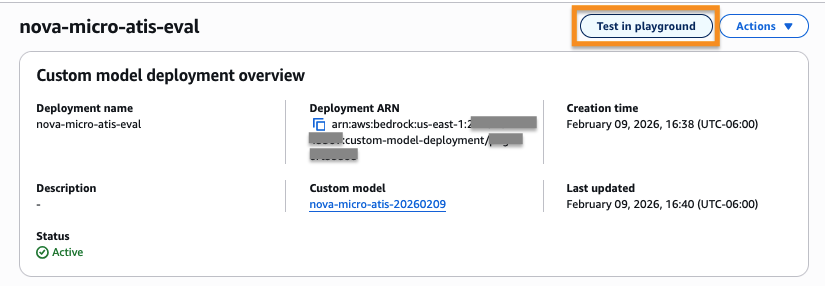
Figure 7: Testing the model from the deployed inference endpoint
Logging and monitoring:
Enable the following for security auditing and incident response:
- AWS CloudTrail for Amazon Bedrock API call logging
- Amazon CloudWatch for model invocation metrics and performance monitoring
- S3 access logs for tracking data access patterns.
Testing the model in the playground:
To test inference with the custom model, we use the Amazon Bedrock playground, giving the following example prompt:system:
Classify the intent of airline queries. Choose one intent from this list: abbreviation, aircraft, aircraft+flight+flight_no, airfare, airfare+flight_time, airline, airline+flight_no, airport, capacity, cheapest, city, distance, flight, flight+airfare, flight_no, flight_time, ground_fare, ground_service, ground_service+ground_fare, meal, quantity, restriction\n\nRespond with only the intent name, nothing else. I would like to find a flight from charlotte to las vegas that makes a stop in st. louisIf called on the base model, the same prompt will return a less accurate answer.
Important: Note that the system prompt provided with the training data for fine-tuning must be included with your prompt during invocation for best results. Because the playground does not provide a separate place to put the system prompt for our custom model, we include it in the preceding prompt string.
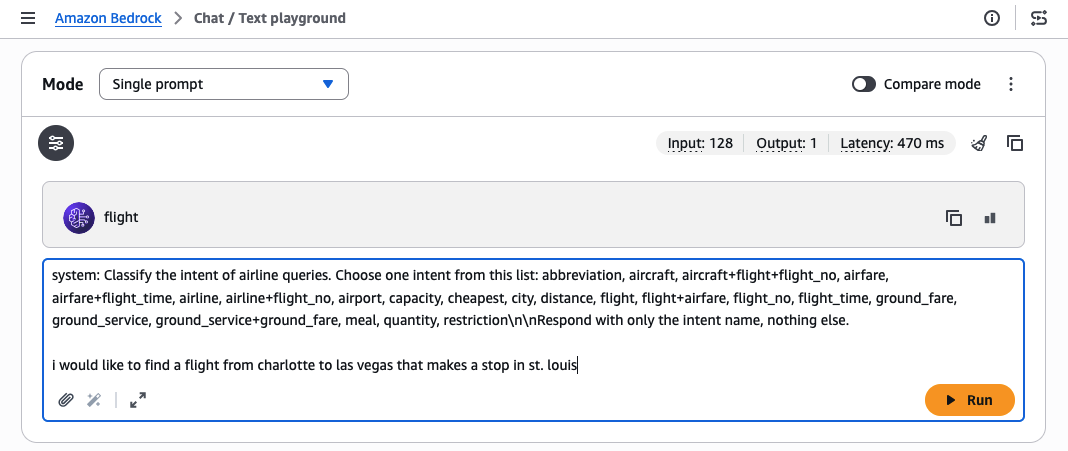
Figure 8: Manually evaluating a customized model in the test playground
Evaluating your customized model
After you have trained your model, you must evaluate its real-world performance. A common evaluation is “LLM as a judge,” where a larger, more intelligent model with access to a full RAG database scores the trained model’s responses against the expected responses. Amazon Bedrock provides the Amazon Bedrock Evaluations service for this purpose (or you can use your own framework). For guidance, refer to the blog post LLM-as-a-judge on Amazon Bedrock Model Evaluation.
Your evaluation should use a test set of questions and answers, prepared using the same method as your training data, but kept separate so the model has not seen the exact questions. Figure 9 shows the fine-tuned model achieves accuracy of 97% on the test data set, a 55% improvement vs. the base Nova Micro model.
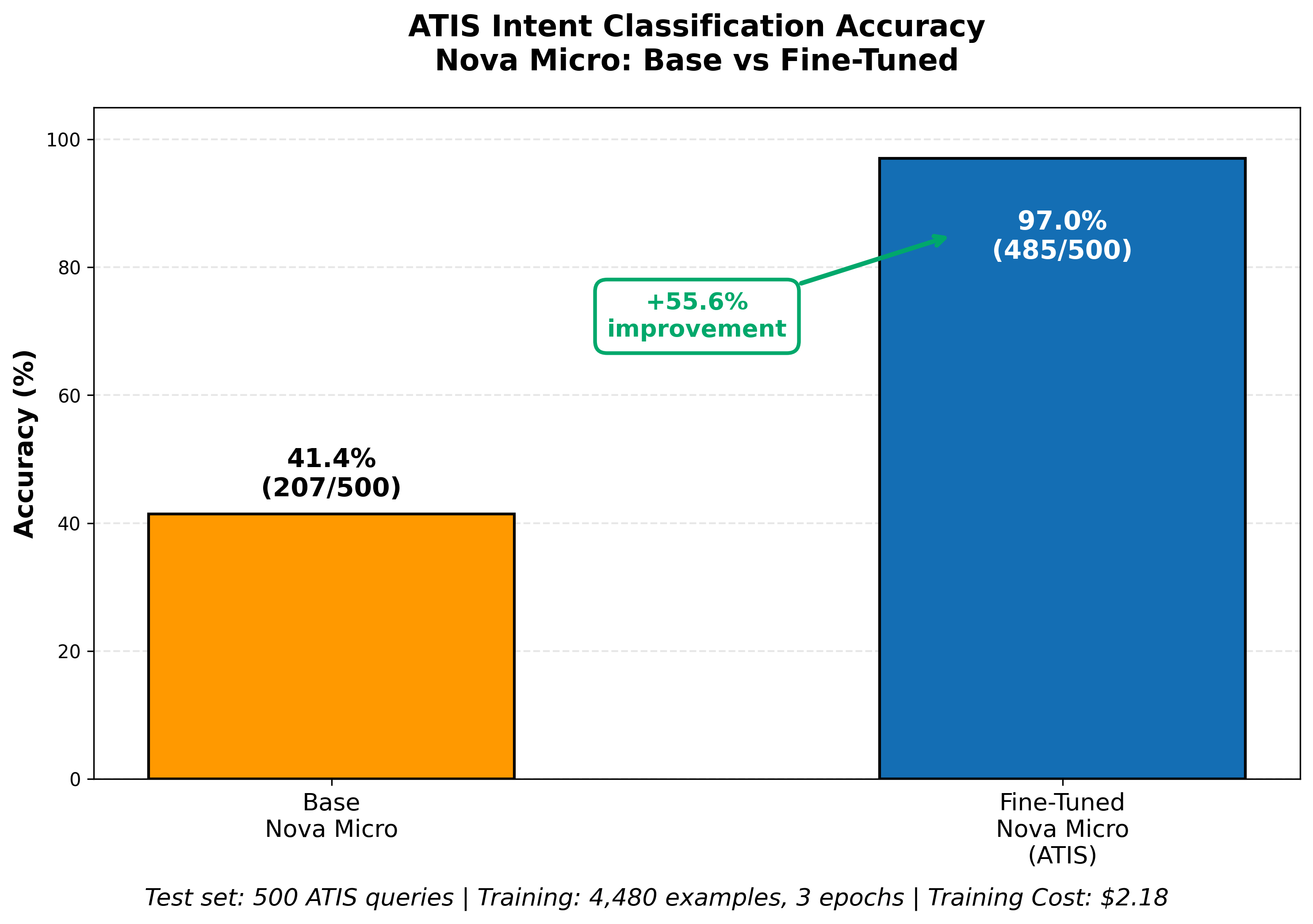
Figure 9: Evaluation of fine-tuning results vs. base model
Beyond Amazon Bedrock customization
Amazon Bedrock’s simplified customization experience will meet many customer needs. Should you need more extensive control over customization, Amazon SageMaker AI provides a broader range of customization types and more detailed control over hyperparameters – see the blog Announcing Amazon Nova customization in Amazon SageMaker AI for more detail.
For cases where even more extensive customization is needed, Amazon Nova Forge provides a strategic alternative to building foundation models from scratch. While fine-tuning teaches specific task behaviors through labeled examples, Nova Forge uses continued pre-training to build comprehensive domain knowledge by immersing the model in millions to billions of tokens of unlabeled, proprietary data. This approach is ideal for organizations with massive proprietary datasets, highly specialized domains requiring deep expertise, or those building long-term strategic foundational models that will serve as organizational assets.
Nova Forge goes beyond standard fine-tuning by offering advanced capabilities including data mixing to mitigate catastrophic forgetting during full-rank supervised fine-tuning, checkpoint selection for optimal model performance, and bring-your-own-optimizer (BYOO) for multi-turn reinforcement fine-tuning. While requiring greater investment through an annual subscription and longer training cycles, Forge can deliver a significantly more cost-effective path than training foundation models from scratch. This approach is ideal for building strategic AI assets that serve as long-term competitive advantages. For Nova Forge customization examples, see the Amazon Nova Customization Hub on GitHub.
Conclusion
As we have demonstrated through our intent classifier example, the Amazon Bedrock managed fine-tuning capabilities, together with the Nova and Nova 2 models, make AI customization accessible at low cost and with low effort. This simplified approach requires minimal data preparation and hyperparameter management, minimizing the need for dedicated data science skills. You can customize models to improve latency and reduce inference cost by reducing the tokens of contextual information that the model must process. Fine-tuning Nova models on Amazon Bedrock transforms generic foundation models into powerful, domain-specific tools that deliver higher accuracy and reduced latency, at low training cost. The ability of Amazon Bedrock to host the Nova models using On-Demand inference allows you to run the model at the same per-token pricing as the base Nova model. See the Bedrock pricing page for current rates.
To get started with your own fine-tuning project using Amazon Bedrock, explore the Amazon Bedrock fine-tuning documentation and review sample notebooks in the AWS Samples GitHub repository.