Artificial Intelligence
Customizing your knowledge base on Amazon Bedrock for large and complex documents using Amazon Textract
For customer service teams handling thousands of utility bills each month, accurately parsing and analyzing complex, multi-page documents is a persistent challenge. Inconsistent formats, dense tables, and varied layouts make it difficult to extract the right information quickly. This leads to delayed responses, billing errors, and frustrated customers. As document volumes grow, these inefficiencies compound, leaving organizations unable to act on the data already in their hands.
Amazon Bedrock, integrated with Amazon Textract, provides the retrieval and generation capabilities to solve this. By combining the high-accuracy extraction of structured and unstructured content from Amazon Textract with the generative AI capabilities of Amazon Bedrock, organizations can move from manually searching through documents to programmatically querying them. This unlocks actionable insights from utility bills at scale and delivers faster, more accurate customer interactions.
In this post, we demonstrate how to chat with utility bills in complex PDF and image formats, parse them, analyze the content, and tag the relevant tables to help large language models (LLMs) extract the most useful information. You can find the code for this post on GitHub.
Use cases overview
A customer service support team receives a multitude of queries regarding utility bills, spanning across various domains such as billing, usage, payment, and customer service. The team struggles to efficiently parse and analyze these queries, which come in various formats including PDF, DOCX, TXT, HTML, and XLSX. The manual process of extracting relevant information from these documents is time-consuming and prone to errors, leading to delays in response times and customer dissatisfaction.
To solve the problem statement, the customer initially attempted to implement a Retrieval Augmented Generation (RAG) solution using the utility bills directly. However, they quickly encountered significant issues. The large language model (LLM) used to extract information from these documents was missing key details and, in some cases, hallucinating and providing incorrect or irrelevant information. This led the customer to realize that simply loading the documents and utility bills in their raw form would not produce reliable, accurate responses.
The customer service support team needed a robust solution to accurately extract and analyze information from various utility bills, which come in multiple formats: PDF, DOCX, TXT, HTML, PNG, and XLSX. The team aimed to build a RAG-based solution that could reliably extract relevant information, such as account numbers, billing details, and payment instructions, to provide accurate and timely responses to customer queries.
The customer’s initial approach involved feeding the raw utility bills directly into the RAG model. This method had several drawbacks:
- Incomplete data extraction: The LLM struggled to extract all necessary information, often missing critical details such as due dates, payment amounts, and account numbers.
- Hallucinations: The model occasionally generated incorrect or irrelevant information, leading to confusion and errors in customer service responses.
- Format variability: The different formats of the utility bills (PDF, DOCX, TXT, HTML, XLSX) posed challenges for the LLM, resulting in inconsistent performance across different document types.
After observing these issues, the customer quickly realized that a more sophisticated approach was needed. Simply loading the raw documents into the RAG model was insufficient. The team needed a method to preprocess and enhance the utility bills so that the LLM could accurately extract and use the necessary information.
Supported types
The following file types are currently supported: PDF, DOCX, TXT, HTML, XLSX, and PNG.
- PDF (Portable Document Format).
- Amazon Textract can extract text from multi-page PDF documents, including those with complex layouts and embedded images.
- DOCX (Microsoft Word Document).
- Amazon Textract can parse and extract text from Word documents, including tables, images, and other embedded objects.
- TXT (Plain Text Files).
- Plain text files can be parsed to extract text content.
- HTML (HyperText Markup Language).
- Amazon Textract can extract text from HTML files, including structured data within tags.
- XLSX (Microsoft Excel Spreadsheet).
- While primarily a text extraction tool, Amazon Textract can extract text from Excel spreadsheets, including cell contents and table data.
- PNG (Portable Network Graphics).
- Amazon Textract can extract text from PNG files.
Solution overview
To address these challenges, the customer can choose to integrate Amazon Textract, a text extraction service, with Amazon Bedrock. This integration provides the following:
- Advanced text extraction: Amazon Textract preprocesses the utility bills, extracting text from various formats and capturing all relevant information.
- Data cleaning and enrichment: The extracted data is cleaned and enriched to remove noise and irrelevant information, so that only the most pertinent details are fed into the RAG model.
- Contextual understanding: Amazon Textract uses contextual understanding to accurately label and tag the extracted data, making it easier for the LLM to process and generate accurate responses.
By implementing this approach, the customer service team aims to build a more reliable RAG-based solution. This solution can accurately extract and use information from utility bills, improving response times and customer satisfaction.
Deploy the solution
To deploy the solution, a shell script has been created that creates the AWS CloudFormation stack and deploys dependency resources as needed for the solution.
To run the shell script, follow these steps:
- Clone the repository from GitHub.
- Navigate to the
custom-knowledge-basedirectory. - Open a terminal and run
bash custom_kb_deployment_setup.sh. This deploys the AWS CloudFormation stack for you.
The CloudFormation stack creates the following resources in your account:
- AWS Lambda Execution Role.
- Lambda layer used for Lambda function.
- Two Lambda functions.
- One Amazon Simple Storage Service (Amazon S3) bucket.
- One Amazon OpenSearch Serverless cluster.
- Amazon Bedrock Knowledge Bases.
- AWS Identity and Access Management (IAM) role for Amazon Bedrock knowledge base.
Post-deployment steps
After the stack finishes deploying, complete the following steps to configure the solution.
Configure Amazon S3
- Open the Amazon S3 console.
- Locate the created S3 bucket named
document-<stack-name>-<partial-stack-id>. - Create a folder named
raw_files. - Upload the provided utility bills from the repository to
raw_files.
Automated processing
- A file upload triggers the
document-parserLambda function. - Amazon Textract jobs process the raw files.
- Processed files are saved to the
parsed_filesfolder. - A second Lambda function processes the files into TXT format.
- The final output is saved to the
parsed_kb_documentsfolder.
Knowledge base setup
- Open the Amazon Bedrock console and navigate to Amazon Bedrock Knowledge Bases, the fully managed capability for building retrieval-augmented generation solutions.
- In the left navigation pane, choose Knowledge Bases.
- Select the newly created knowledge base.
- Choose Data source.
- Select the data source and choose Sync.
- Wait for the sync to complete.
Test the application
- Open the Amazon Bedrock console and select the knowledge base.
- Select Text Knowledge Base.
- Under configurations, select the Amazon Nova Micro model. For model availability by AWS Region, refer to Supported models by AWS Region in Amazon Bedrock.
- In the text box on the right, you can now ask questions related to the utility bills.
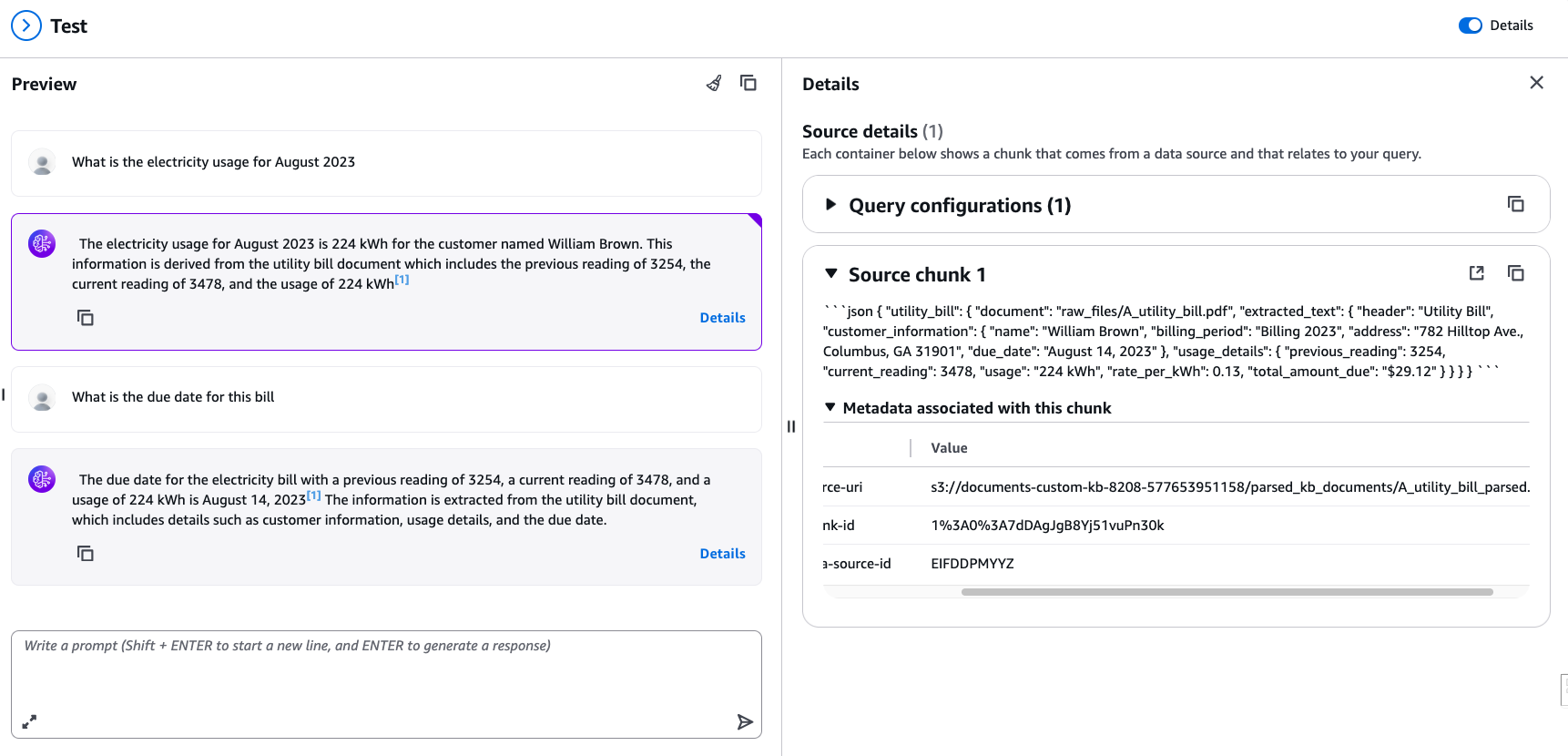
Figure 1: Output with the custom knowledge base solution
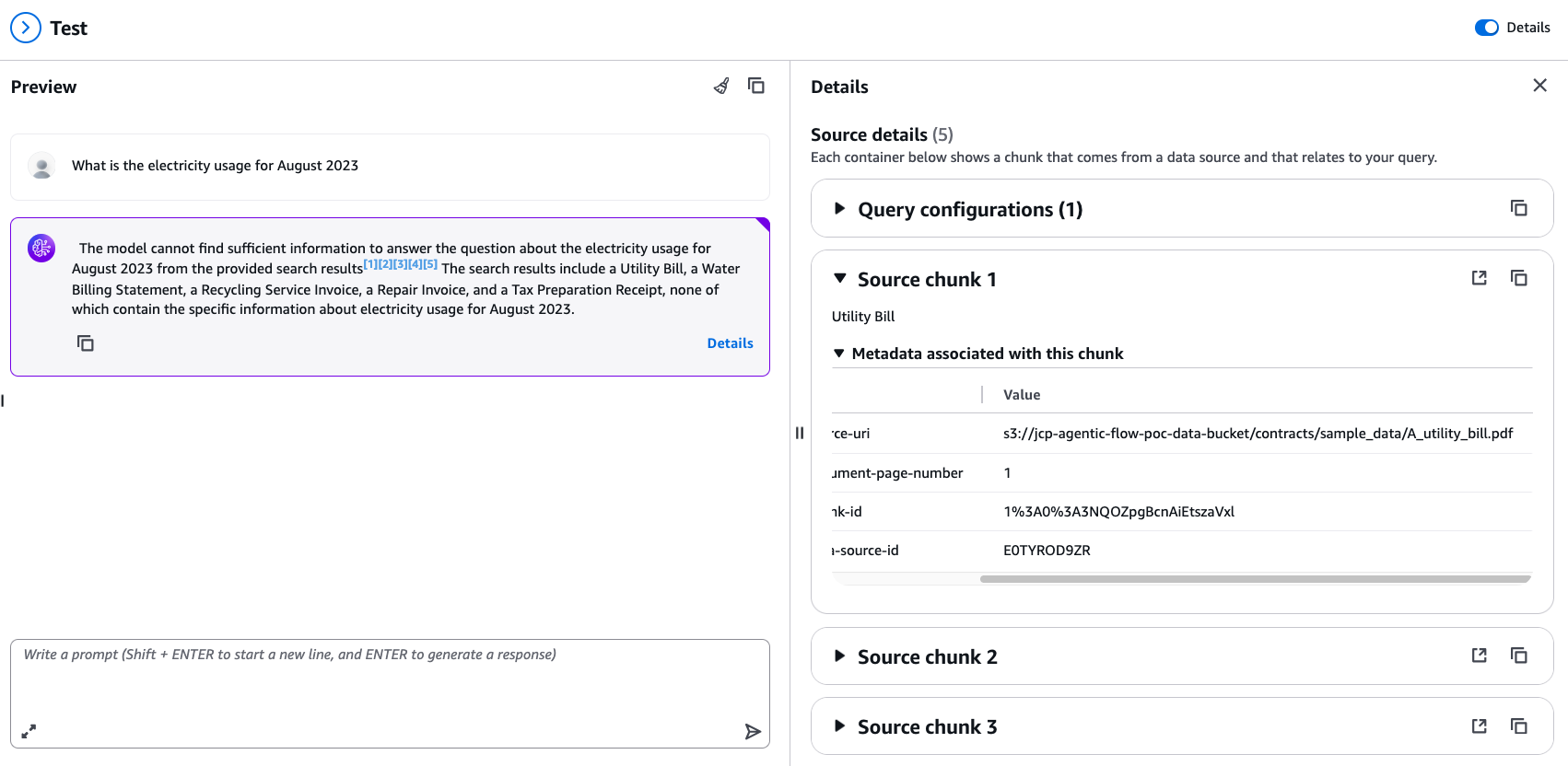
Figure 2: Output without the custom knowledge base solution
Summary
This guide outlines the deployment process for a custom knowledge base solution using AWS services. The solution uses AWS CloudFormation to automate the creation of essential resources, including Lambda functions, S3 buckets, an OpenSearch Serverless cluster, and an Amazon Bedrock knowledge base. The deployment process runs a shell script that initiates the CloudFormation stack creation required for deploying the solution.
The post-deployment steps include configuring the S3 bucket, uploading sample documents, and setting up the Amazon Bedrock knowledge base. The solution automatically processes uploaded documents, transforming them into a format suitable for the knowledge base.
Conclusion
This custom knowledge base solution demonstrates how to integrate multiple AWS services to create an intelligent document processing and querying system. By using CloudFormation for deployment, the solution creates consistent, repeatable infrastructure across different environments. The automated document processing pipeline, from raw file upload to knowledge base integration, shows the potential for scalable, efficient handling of large document sets.
Responsible AI considerations
When deploying RAG-based solutions in production, it is important to implement safeguards for reliable, trustworthy outputs. Amazon Bedrock Guardrails provides configurable controls to filter harmful content, block denied topics, and redact sensitive information from both inputs and outputs. Additionally, grounding validation helps detect and reduce hallucinations by evaluating whether model responses are supported by the retrieved source documents. For production deployments, we recommend turning on these controls to maintain accuracy, compliance, and user trust across your knowledge base interactions.
This solution can be particularly valuable for organizations dealing with large volumes of structured documents, such as utility bills in this example. It provides a streamlined way to extract, process, and query information from these documents, potentially improving operational efficiency and supporting more sophisticated data analysis. Future enhancements could include expanding the types of documents processed, integrating with additional AWS services for more complex analysis, or developing a user-friendly front-end interface for easier interaction with the knowledge base.
Overall, this solution serves as a solid starting point for organizations looking to build intelligent document processing and querying systems on AWS, with the flexibility to customize and expand based on specific business needs.