Artificial Intelligence
Preview web apps live as your coding agent builds them with Amazon Bedrock AgentCore runtime
Coding agents now build working web apps: a dashboard, a product page, a prototype that a product team wants to try. The fastest way to review that work is to open the app, use it, ask for a change, and check the result. That loop works well when the app keeps running where the agent edits it, so each change shows up in the browser within seconds. When the app must be copied out and deployed somewhere else first, every change waits for a deployment, and the review slows down to that pace.
Amazon Bedrock AgentCore is a platform to build, connect, and optimize agents at scale, with your choice of agent framework and foundation model (FM). AgentCore runtime, a capability of Amazon Bedrock AgentCore, runs each agent session in its own isolated microVM. With Session endpoints, you can open an app running in that session from your own browser. Session Endpoints give each session an authenticated URL that forwards each request’s HTTP method, path, query string, and body, and WebSocket connections, to the ports you allow. You can watch the page update as the agent saves each file.
In this post, you deploy a coding agent that keeps a Vite website running in its session, then open one local page with a chat on the left and the live website on the right. You ask the agent to switch the site to a dark color theme, follow its steps as they stream in, and watch the website change without a refresh. Finally, you look at what happens internally: a second port in the same session, and the requests the Session endpoint refuses.
The complete sample, including the notebook this post follows, is in the 14-remote-access folder of the agentcore-samples GitHub repo.
How Session endpoints work
Each session gets its own Session endpoint, and six details shape how you use it.
You choose which ports it reaches. You set allowedPorts when you call CreateAgentRuntime: 1–5 entries, each a single port or a range within 8000–12000, excluding the reserved platform ports. Allowing a port doesn’t start a server, so your application must listen on it, bound to 0.0.0.0.
The URL arrives with the session. The InvokeAgentRuntime response carries it in the X-Amzn-Bedrock-AgentCore-Runtime-Session-Endpoint-Url header, which SDKs that model it expose as sessionEndpointUrl.
Every request is authenticated. For a runtime that uses AWS Identity and Access Management (IAM), each HTTP request, HTTP/2 stream, and WebSocket handshake carries a Signature Version 4 (SigV4) signature. The caller also needs bedrock-agentcore:InvokeAgentRuntimeProxy on the runtime and its runtime endpoint. For a runtime with an inbound JSON Web Token (JWT) authorizer, each request carries a bearer token instead. Knowing the URL doesn’t grant access.
The host name selects the port. Your client connects on port 443 regardless of the target port, and a prefix on the host name chooses the port inside the session:
It carries the protocols your server speaks. HTTP/1.1 and HTTP/2 requests, including server-sent events and gRPC, and WebSocket connections all pass through. This walkthrough uses HTTP/1.1 and WebSocket.
It’s scoped to one session. The URL needs credentials on every request and lasts only as long as the session, so use it to build, test, and review what your agent produces. To serve an app to your users, deploy it to a hosting service such as AWS Amplify Hosting.
A browser can’t add a SigV4 signature or a bearer token to the requests a page makes on its own, so the Session endpoint client in the bedrock-agentcore SDK can open a local endpoint on your machine. Your browser opens http://localhost:8088, and the local endpoint adds your credentials to each request and WebSocket handshake before forwarding it.
A Session endpoint is different from a runtime endpoint, which AgentCore runtime already provides. Use a runtime endpoint, such as DEFAULT, to reach your agent, which controls which version of it callers will reach. InvokeAgentRuntime calls resolve through it, so you can keep development and production on different versions and promote or roll back without changing callers. Use a Session endpoint to see what your agent runs in its session, such as a web preview. It’s an authenticated URL that reaches only the ports you allow, works with whichever version the session runs, and stops working when the session ends. For complete documentation, refer to Connect to runtime sessions through a session endpoint.
Solution overview
The sample has four parts. A coding agent runs in the session on port 8080 and edits the website’s files with four tools: list, read, write, and edit. The agent starts a Vite development server on port 8090, which serves the website and pushes each saved change to the browser over its hot-reload WebSocket. On your machine, PreviewApp serves the preview page, sends your prompts to InvokeAgentRuntime, and opens a local endpoint for the website. As Figure 1 shows, the preview page loads the website from the Vite development server on port 8090 through the local endpoint and the Session endpoint, and sends your prompts through InvokeAgentRuntime to the agent on port 8080. The numbers show the order of the steps for one request.
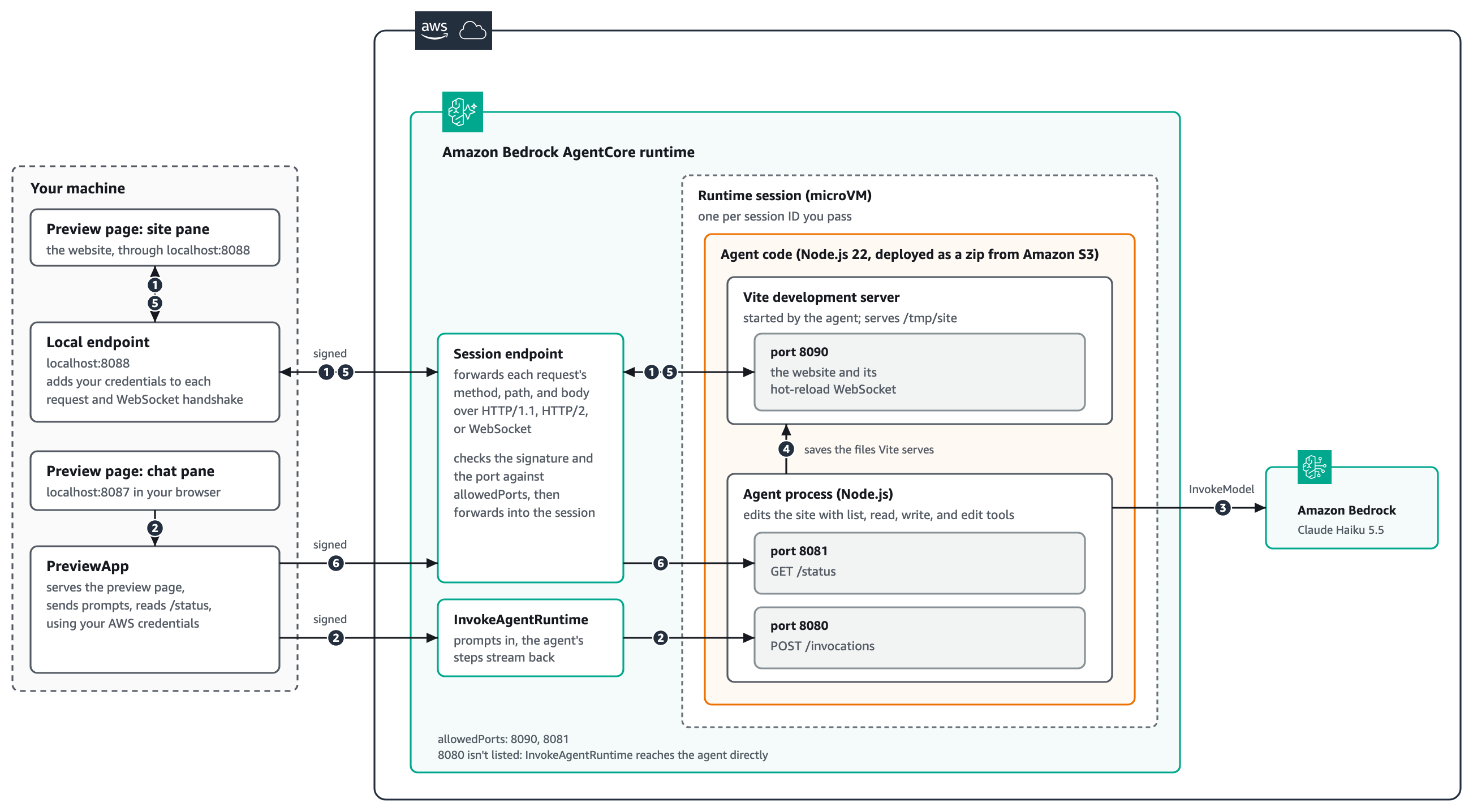
Figure 1: Solution architecture
Before step 1, PreviewApp has already called InvokeAgentRuntime once to start the session, which starts the agent and the Vite development server. PreviewApp read the Session endpoint URL from that response and opened a local endpoint for port 8090. The numbered steps in Figure 1 then follow one request for a change:
- The site pane of the preview page loads the website from the local endpoint on
localhost:8088. The local endpoint adds your credentials to each request and the WebSocket handshake, and forwards them to the Session endpoint. The Session endpoint checks the signature and the port againstallowedPorts, then forwards them to the Vite development server on port 8090. The page keeps the Vite hot-reload WebSocket open. - You send a prompt from the chat pane.
PreviewAppsends it toInvokeAgentRuntimeas a standard AWS API call signed with your AWS credentials, and the runtime delivers it to the agent on port 8080. The agent’s steps stream back to the chat pane as it works. - The agent calls Claude Haiku 5.5 in Amazon Bedrock to decide what to change.
- The agent reads the site’s files and saves the ones it changes. The Vite development server serves those files and watches them for changes.
- When a file is saved, Vite pushes the change over the WebSocket opened in step 1, back through the Session endpoint and the local endpoint, and the site pane updates without a refresh.
- From the notebook,
PreviewAppreads the agent’s/statusroute on port 8081 through the same Session endpoint. Only the port changes.
Port 8080 isn’t in allowedPorts, because InvokeAgentRuntime reaches the agent without going through the Session endpoint.
Prerequisites
To follow the walkthrough, you need:
- An AWS account in an AWS Region where AgentCore runtime Session endpoints are available, with credentials configured.
- Permissions to create an AWS Identity and Access Management (IAM) role, upload to Amazon Simple Storage Service (Amazon S3), and create a runtime, plus
bedrock-agentcore:InvokeAgentRuntimeandbedrock-agentcore:InvokeAgentRuntimeProxyon that runtime and itsDEFAULTruntime endpoint. For details, refer to IAM permissions for AgentCore runtime. - Python 3.10 or later, with
bedrock-agentcore1.25.2 or later andboto31.43.122 or later. - Git, to clone the sample repo, and a Jupyter environment, such as JupyterLab or Visual Studio Code with the Jupyter extension, to run the notebook.
- Access to Claude Haiku 5.5 in Amazon Bedrock. For model availability by Region, refer to Regional availability by models.
- Node.js 22 or later with
npm, which the deployment script uses to package the agent and the website.
The sample deploys the agent as a zip file in Amazon S3 with direct code deployment for Node.js, so you don’t need Docker or an Amazon Elastic Container Registry (Amazon ECR) repository. Session endpoints work with microVM runtimes, not with the Instances compute type, and Session endpoint URLs are reachable over public HTTPS. AWS PrivateLink isn’t supported for inbound connections.
Deploy the agent and its website
First, you deploy the runtime, and the configuration you choose here decides which ports the Session endpoint can reach. The deployment script bundles the agent into one file, adds the website and its dependencies for the runtime’s Linux on Arm64 system, uploads the zip to Amazon S3, and creates the runtime.
The following excerpt from deploy.py shows the two settings that matter for this post. protocolConfiguration says where the agent listens for InvokeAgentRuntime, and allowedPorts lists the ports the Session endpoint can reach: 8090 for the website and 8081 for the agent’s status route. Port 8080 isn’t in the list, because InvokeAgentRuntime reaches the agent without it. For the port and path settings, refer to Configure your agent’s serving port and invocation path.
The website’s Vite configuration makes the development server reachable from the Session endpoint. It listens on 0.0.0.0 at port 8090 and doesn’t restrict the Host header (server.allowedHosts is true), because requests arrive under a host name the runtime assigns rather than localhost. The Session endpoint authenticates every request before it reaches the server, so the server doesn’t need its own host check.
To deploy the runtime:
1. Clone the sample repo and change to the sample folder:
2. Open session_endpoints_preview.ipynb from the sample folder.
3. Run the install cell, which installs the Python dependencies.
4. Run the %run deploy.py cell. Deployment takes a few minutes, mostly waiting for the runtime to reach the READY status.
Open the preview
With the runtime ready, you start the preview. One call does three things: it starts a session (which starts the website), opens a local endpoint for port 8090, and serves the preview page on localhost:8087.
Inside start(), the calls that use Session endpoints are short. The first InvokeAgentRuntime call returns the URL in a response header, session_endpoint_url reads it, and the Session endpoint client opens a local endpoint for port 8090:
To open the preview:
- Run the cell that starts
PreviewApp. - Open the printed link,
http://localhost:8087, in your browser.
The page shows the website on the right, served from port 8090 in the session, and a short guide with suggested requests on the left.
Ask the agent for a change
Now you ask for a change and watch it arrive. Each prompt goes to the agent through InvokeAgentRuntime. The agent reads the files it needs, writes the ones it changes, and reports each step as it happens. When a file is saved, the Vite development server pushes the change over its WebSocket, through the Session endpoint and the local endpoint, and the website updates in place.
To ask for a change:
- On the preview page, choose Switch this website to a dark coffee-house color theme.
- Follow the agent’s steps in the chat pane as it reads and saves files.
- Watch the site pane. It changes when the agent saves the stylesheet, and a banner names the file the change came from.
The following video shows the preview page while the agent works through several requests. Choosing a suggested request sends it to the agent, the chat pane lists each file the agent reads and saves, and the site pane on the right updates without a refresh, from the dark theme to a green Order ahead button.
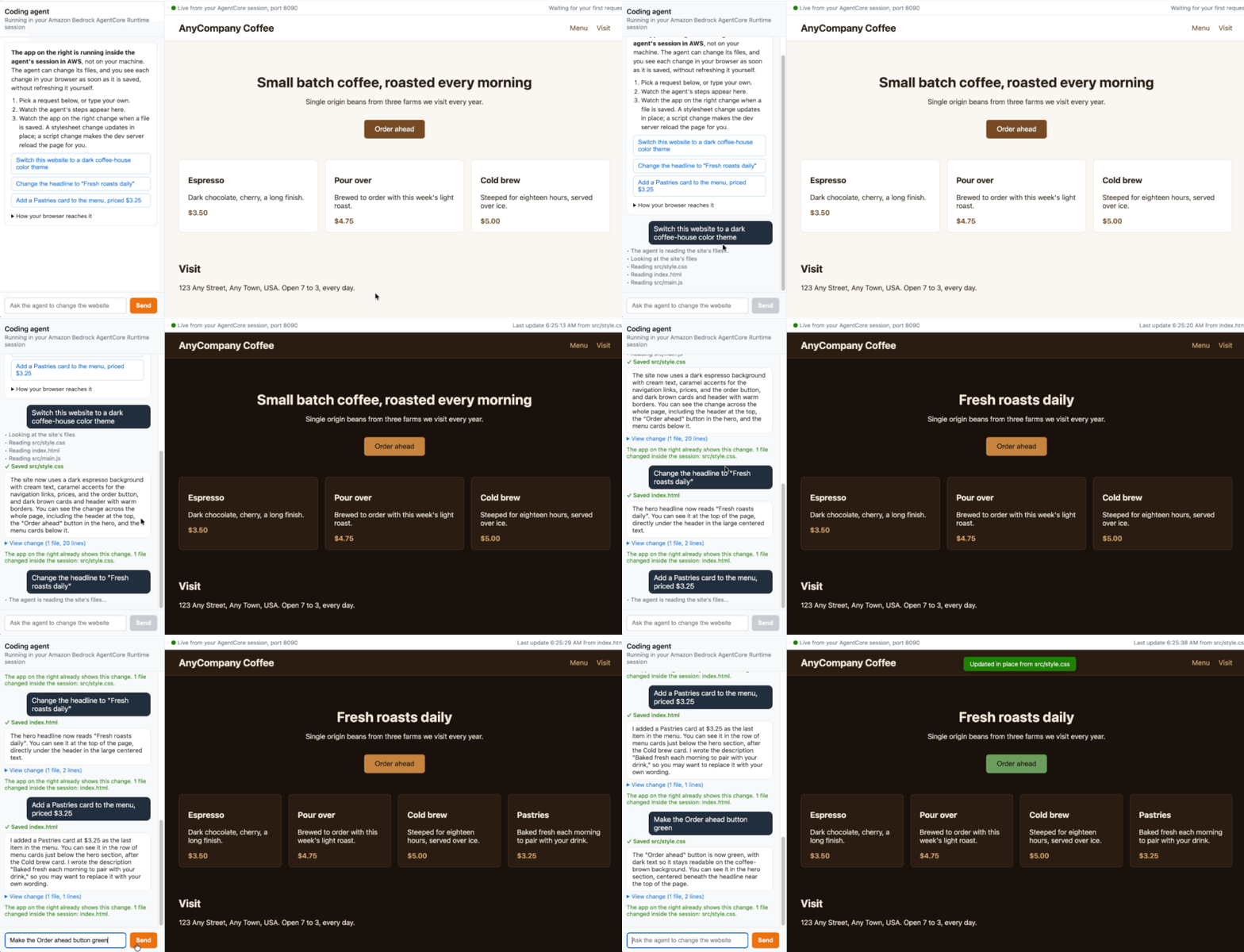
Figure 2: The preview page as the agent works
The steps stream because the agent answers with server-sent events when you ask it to. You can send the same prompts from Python with app.ask, which reads the stream with iter_events from the bedrock-agentcore SDK. The open page updates in the same way:
The output of this Python script should resemble the following:
Reach a second port in the same session
The website isn’t the only server you can reach. The agent serves /status on port 8081, which lists each prompt and the files it changed. The same Session endpoint reaches it, and the only difference is the port argument.
The output of this Python script should resemble the following:
What the Session endpoint refuses
When the runtime refuses a request, it answers with an HTTP status, an empty body, and an error code in a response header, so you can tell its refusals from errors your application returns. The notebook sends a request to a port outside allowedPorts and a request without credentials, and the runtime refuses both with 403 AccessDenied.
The following table lists the refusals you’re likely to meet while you build with Session endpoints.
| Request | Response from the runtime |
A port that isn’t in allowedPorts |
403 AccessDenied |
| A request without valid credentials | 403 AccessDenied or 401 AuthenticationRequired |
| An allowed port with nothing listening on it | 502 PortNotReachable |
| A URL whose session no longer exists | 404 SessionNotFound |
How access to your session is protected
The runtime removes its own authentication headers before it forwards a request, so the website doesn’t receive your signature. Requests are recorded in AWS CloudTrail as InvokeAgentRuntimeProxy events, with the event source bedrock-agentcore.amazonaws.com. The local endpoint acts with your credentials, so it limits who can use it. It listens on 127.0.0.1 only, answers only requests addressed to its own local address, and refuses WebSocket connections opened by pages from other origins. Run the local endpoint only while you use the preview. For more information, see Log session endpoint requests in CloudTrail.
The access controls don’t separate the website from the agent. Both run in the same session, so give the execution role only the permissions the agent needs. If the runtime replaces the session’s compute, open connections close, and the agent’s edits might not survive unless the session uses persistent storage. Refer to File system configurations for AgentCore runtime if you need the files to outlast the compute.
The agent’s file tools resolve every path inside the site folder and refuse paths outside it, so a prompt can’t make the agent change other files in the session. If other people can send prompts to your coding agent, consider Amazon Bedrock Guardrails to filter harmful prompts and responses, and review the agent’s changes before you publish them.
Clean up
To avoid ongoing charges, stop the preview and delete the resources the sample created. The website the agent edited lives in the session, so it goes with the session.
To clean up:
1. Run the stop cell, and press Enter when the notebook asks. This stops the preview page, the local endpoint, and the session.
2. Run the %run cleanup.py cell, which deletes the runtime, the uploaded code, and the IAM role.
Conclusion
Session endpoints give you authenticated access to the applications in an AgentCore runtime session from your own tools over HTTP/1.1, HTTP/2, and WebSocket, on the ports you allow. In this post, you deployed a coding agent with a Vite website in its session, opened the live website in your browser through a local endpoint, asked the agent for a dark theme, and watched the change arrive as the agent saved the file. You also reached a second port in the same session and confirmed what the Session endpoint refuses.
To go further, run the notebook with your own site in the site folder, or change the agent’s tools to match how your coding agent works. For the full set of options, including port ranges, OAuth, HTTP/2, and gRPC, refer to Connect to runtime sessions through a session endpoint.
To change the port or path that InvokeAgentRuntime uses in your own agent, refer to Configure your agent’s serving port and invocation path. If your agent also needs to run build or test commands in the same session, refer to Execute shell commands in AgentCore runtime sessions. To deploy your own Node.js agent from a zip file the way this sample does, refer to Direct code deployment for Node.js. For everything else the service offers, start with Host agent or tools with Amazon Bedrock AgentCore runtime, and find more examples in the agentcore-samples GitHub repo.