Artificial Intelligence
Use RAG for video generation using Amazon Bedrock and Amazon Nova Reel
Generating high-quality custom videos remains a significant challenge, because video generation models are limited to their pre-trained knowledge. This limitation affects industries such as advertising, media production, education, and gaming, where customization and control of video generation is essential.
To address this, we developed a Video Retrieval Augmented Generation (VRAG) multimodal pipeline that transforms structured text into bespoke videos using a library of images as reference. Using Amazon Bedrock, Amazon Nova Reel, the Amazon OpenSearch Service vector engine, and Amazon Simple Storage Service (Amazon S3), the solution seamlessly integrates image retrieval, prompt-based video generation, and batch processing into a single automated workflow. Users provide an object of interest, and the solution retrieves the most relevant image from an indexed dataset. They then define an action prompt (for example, “Camera rotates clockwise”), which is combined with the retrieved image to generate the video. Structured prompts from text files allow multiple videos to be generated in one execution, creating a scalable, reusable foundation for AI-assisted media generation.
In this post, we explore our approach to video generation through VRAG, transforming natural language text prompts and images into grounded, high-quality videos. Through this fully automated solution, you can generate realistic, AI-powered video sequences from structured text and image inputs, streamlining the video creation process.
Solution overview
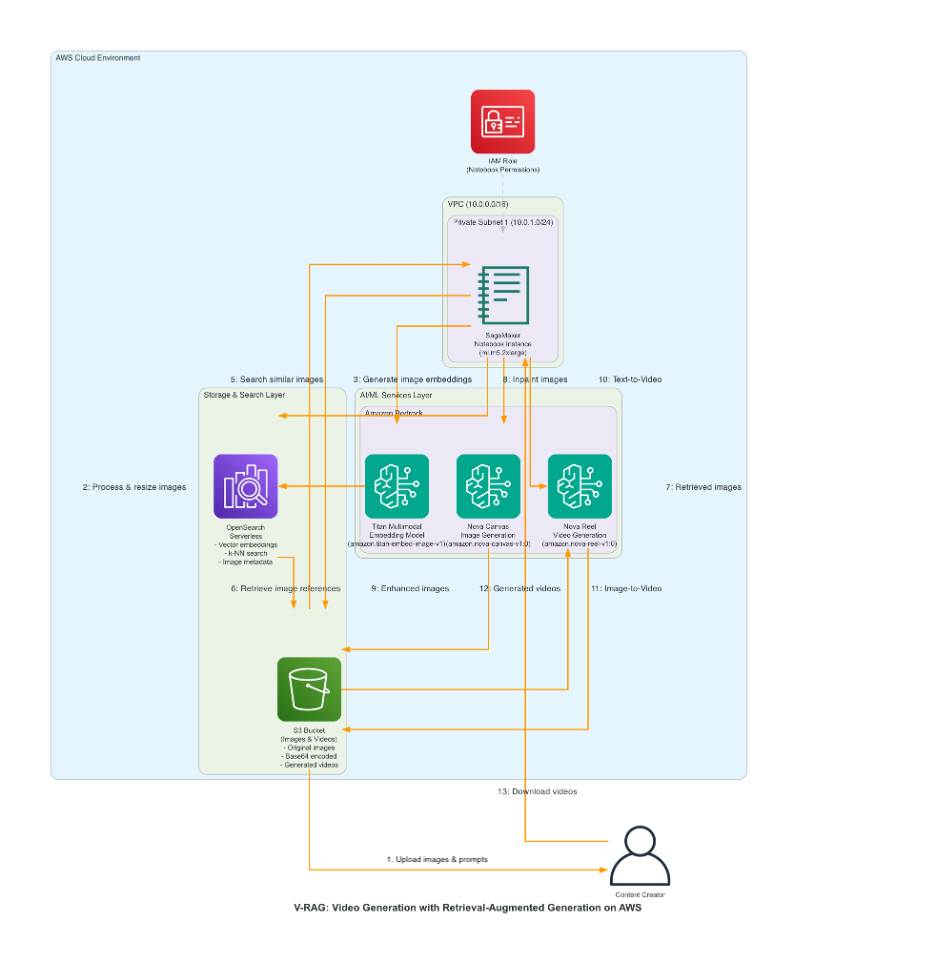
Our solution is designed to take a structured text prompt, retrieve the most relevant image, and use Amazon Nova Reel for video generation. This solution integrates multiple components into a seamless workflow:
- Image retrieval and processing – Users provide an object of interest (for example, “blue sky”) and the solution queries the OpenSearch vector engine to retrieve the most relevant image from an indexed dataset, which contains pre-indexed images and descriptions. The most relevant image is retrieved from an S3 bucket.
- Prompt-based video generation – Users define an action prompt (for example, “Camera pans down”), which is combined with the retrieved image to generate a video using Amazon Nova Reel.
- Batch processing for multiple prompts – The solution reads a list of text templates from
prompts.txt, which contain placeholders to enable batch processing of multiple video generation requests with structured variations:- <object_prompt> – Dynamically replaced with the queried object.
- <action_prompt> – Dynamically replaced with the camera movement or scene action.
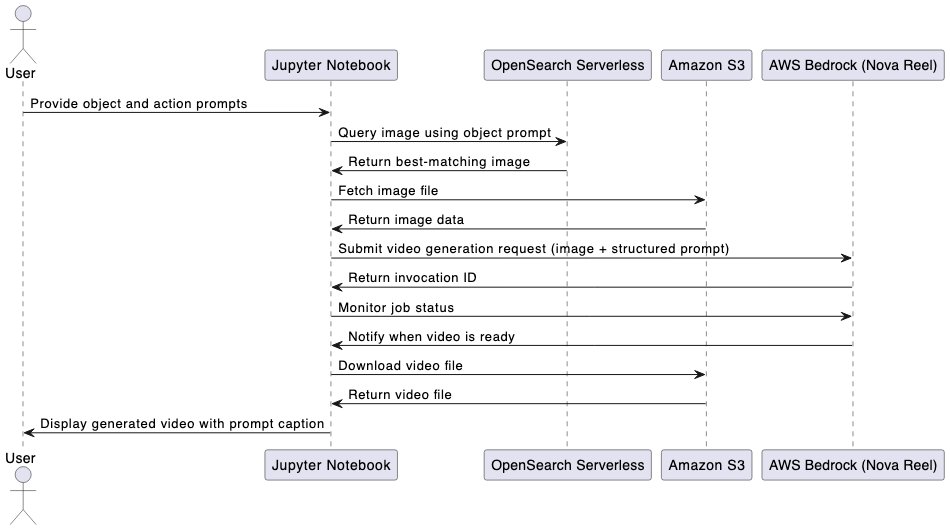
- Monitoring and storage – The video generation is asynchronous, so the solution monitors the job status. When it’s complete, the video is stored in an S3 bucket and automatically downloaded for preview. The generated videos are displayed in the notebook, with the corresponding prompt shown as a caption.
The following diagram illustrates the solution architecture.
The following diagram illustrates the end-to-end workflow using a Jupyter notebook.
This solution can serve the following use cases:
- Educational videos – Automatically creating instructional videos by pulling relevant images from a subject matter knowledge base
- Marketing videos – Creating targeted video ads by pulling images that align with specific demographics or product features
- Personalized content – Tailoring video content to individual users by retrieving images based on their specific interests
In the following sections, we break down each component, how it works, and how you can customize it for your own AI-driven video workflows.
Example input
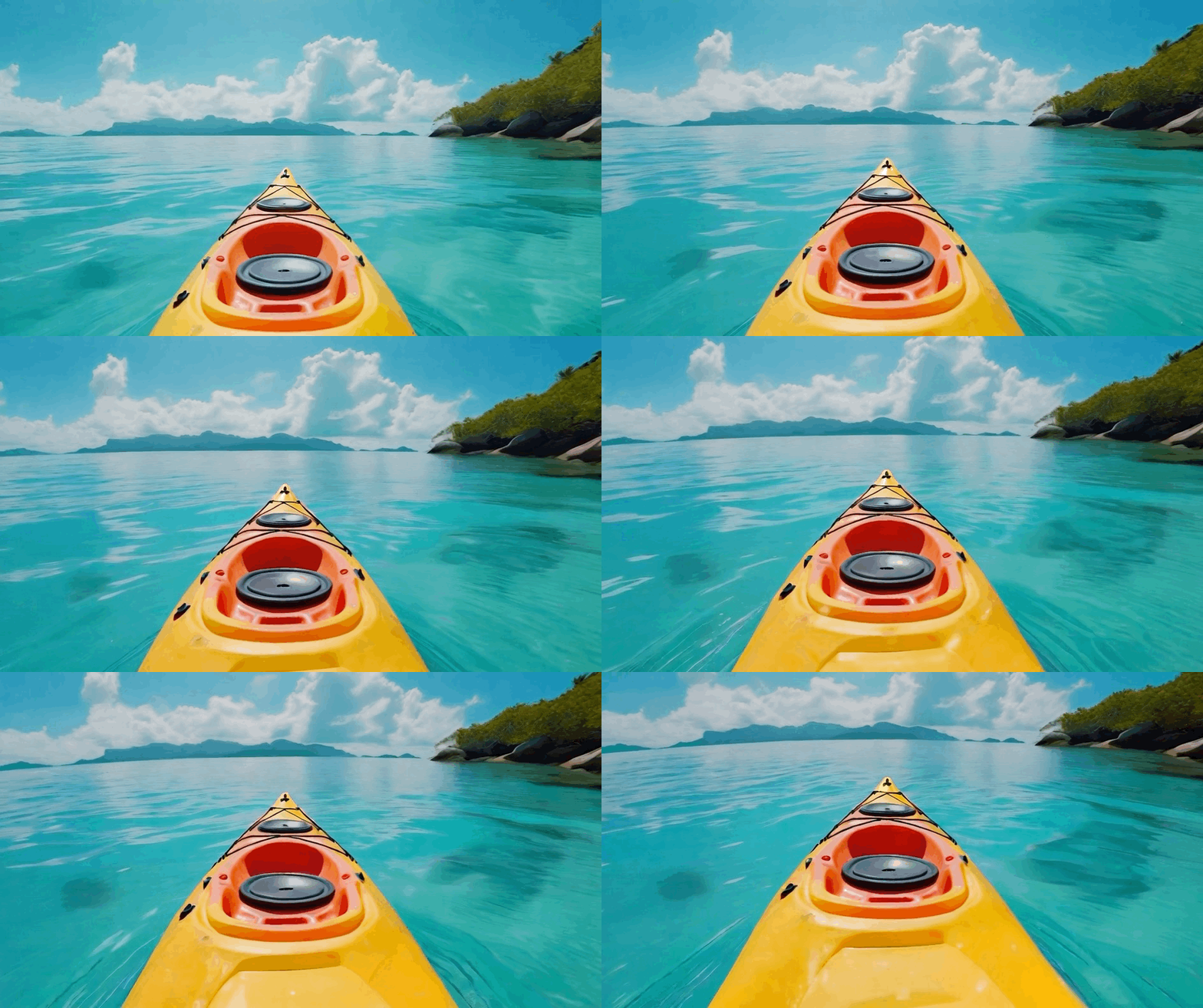
In this section, we demonstrate the video generation capabilities of Amazon Nova Reel through two distinct input methods: text-only and text and image inputs. These examples illustrate how video generation can be further customized by incorporating input images, in this scenario for advertising. For our example, a travel agency wants to create an advertisement featuring a beautiful beach scene from a specific location and panning to a kayak to entice potential vacation bookings. We compare the results of using a text-only input approach vs. VRAG with a static image to achieve this goal.
Text-only input
For the text-only example, we use the input “Very slow pan down from blue sky to a colorful kayak floating on turquoise water.” We get the following result.
Text and image input
Using the same text prompt, the travel agency can now use a specific shot they took at their location. For this example, we use the following image.

Travel agency can now add content into their existing shot using VRAG. They use the same prompt: “Very slow pan down from blue sky to a colorful kayak floating on turquoise water.” This generates the following video.

Prerequisites
Before you deploy this solution, make sure the following prerequisites are in place:
- Access to a valid AWS account
- Familiarity with Amazon SageMaker notebook instances
Deploy the solution
For this post, we use an AWS CloudFormation template to deploy the solution in the US East (N. Virginia) AWS Region. For a list of Regions that support Amazon Nova Reel, see Model support by AWS Region in Amazon Bedrock. Complete the following steps:
- Choose Launch Stack to deploy the stack:

- Enter a name for the stack, such as
vrag-blogpost, and follow the steps to deploy. - On the CloudFormation console, locate the
vrag-blogpoststack and confirm that its status is CREATE_COMPLETE. - On the SageMaker AI console, choose Notebooks in the navigation pane.
- On the Notebook instances tab, locate the notebook instance
vrag-blogpost-notebookprovisioned for this post and chose Open JupyterLab.
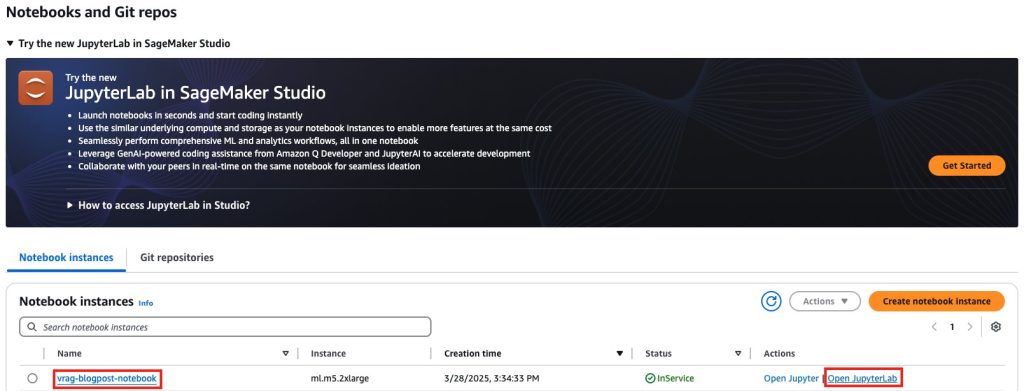
- Open the folder
sample-video-ragto view the notebooks needed for this post.
Run notebooks
We have provided seven sequential notebooks, numbered from _00 to _06, with step-by-step instructions and objectives to help you build your understanding of a VRAG solution. Your output might vary from the examples in this post.
Image processing (notebook _00)
In _00_image_processing, you use Amazon Bedrock, Amazon S3, and SageMaker AI to perform the following actions:
- Process and resize images
- Generate Base64 encodings
- Store data in Amazon S3
- Generate image descriptions using Amazon Nova
- Create a visualization of the results
This notebook illustrates the following capabilities:
- Automated processing pipeline:
- Bulk image processing
- Intelligent resizing and optimization
- Base64 encoding for API compatibility
- Amazon S3 storage of images
- AI-powered analysis:
- Advanced image description generation
- Content-based image understanding
- Multi-modal AI integration
- Robust data management:
- Efficient storage organization
- Metadata extraction and indexing
For this example, we use the following input image.

We receive the following generated image caption as output: “The image features a brown handbag with white floral patterns, a straw hat with a blue ribbon, and a bottle of perfume. The handbag is placed on a surface, and the straw hat is positioned next to it. The handbag has a strap and a chain attached to it, and the straw hat has a blue ribbon tied around it. The perfume bottle is placed next to the handbag.”
Image ingestion (notebook _01)
In _01_oss_ingestion.ipynb, you use Amazon Bedrock (with Amazon Titan Embeddings to generate embeddings), Amazon S3, OpenSearch Serverless (for vector storage and search), and SageMaker AI (for notebook hosting) to perform the following actions:
- Process and resize images
- Generate base64 encodings
- Store data in Amazon S3
- Generate image descriptions using Amazon Nova
- Create visualization of the results
This notebook illustrates the following capabilities:
- Vector database management:
- Index creation and configuration
- Bulk data ingestion
- Efficient vector storage
- Embedding generation:
- Multi-modal embedding creation
- Dimension optimization
- Batch processing support
- Semantic search capabilities:
- k-NN search implementation
- Query vector generation
- Result visualization
For our input, we use the query “Building” and receive the following image as a result.

The image has the associated caption as output: “The image depicts a modern architectural scene featuring several high-rise buildings with glass facades. The buildings are constructed with a combination of glass and steel, giving them a sleek and contemporary appearance. The glass panels reflect the surrounding environment, including the sky and other buildings, creating a dynamic interplay of light and reflections. The sky above is partly cloudy, with patches of blue visible, suggesting a clear day with some cloud cover. The buildings are tall and narrow, with vertical lines emphasized by the structure of the glass panels and steel framework. The reflections on the glass surfaces show the surrounding buildings and the sky, adding depth to the image. The overall impression is one of modernity, efficiency, and urban sophistication.”
Video generation from text only (notebook _02)
In _02_video_gen_text_only.ipynb, you use Amazon Bedrock (to access Amazon Nova Reel) and SageMaker AI (for notebook hosting) to perform the following actions:
- Construct the request payload for video generation with text as prompt
- Initiate an asynchronous job using Amazon Bedrock
- Track progress and wait until completion
- Retrieve the generated video from Amazon S3 and render it in the notebook
This notebook illustrates the following capabilities:
- Automated processing of video generation with text as input
- Video generation at scale with observability
We use the following input prompt: “Closeup of a large seashell in the sand, gentle waves flow around the shell. Camera zoom in.”We receive the following generated video as output.

Video generation from text and image prompts (notebook _03)
In _03_video_gen_text_image.ipynb, you use Amazon Bedrock (to access Amazon Nova Reel) and SageMaker AI (for notebook hosting) to perform the following actions:
- Construct the request payload for video generation with text and image as prompt
- Initiate an asynchronous job using Amazon Bedrock
- Track progress and wait until completion
- Retrieve the generated video from Amazon S3 and render it in the notebook
This notebook illustrates the following capabilities:
- Automated processing of video generation with text and image as input
- Video generation at scale with observability
We use the prompt “camera tilt up from the road to the sky” and the following image as input.

We receive the following generated video as output.

Video generation from multi-modal inputs (notebook _04)
In _04_video_gen_multi.ipynb, you use Amazon Bedrock (to access Amazon Nova Reel) and SageMaker AI (for notebook hosting) to perform the following actions:
- Generate embedding for input prompt and search the OpenSearch Serverless vector collection index
- Combine text and retrieved images to generate videos
This notebook illustrates the following capabilities:
- The VRAG process
- Video generation at scale with observability
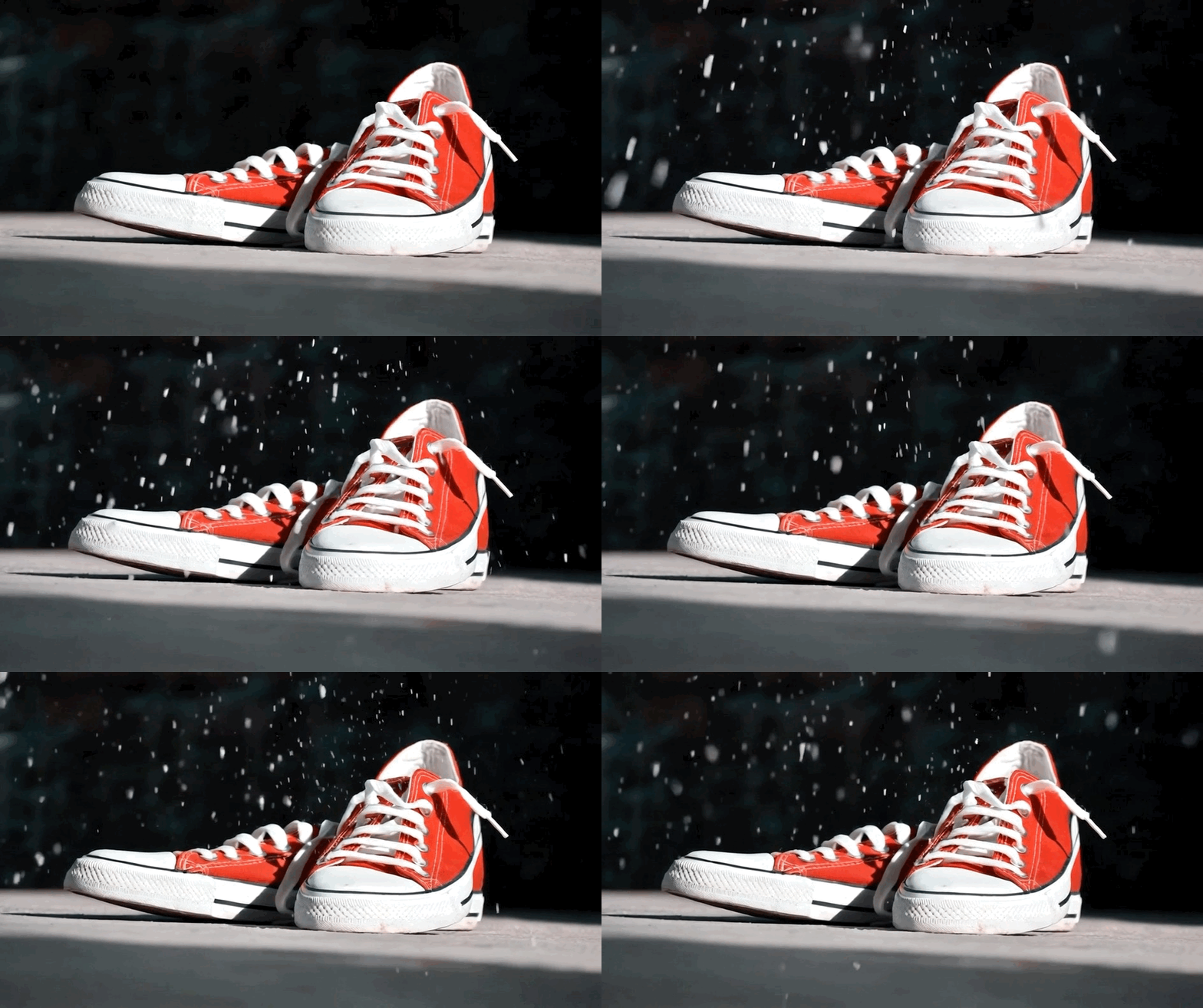
We use the following prompt as input: “A clean cinematic shot of red shoes placed under falling snow, while the environment stays silent and still.”We receive the following video as output.
Update images with in-painting (notebook _05)
In _05_inpainting.ipynb, you use Amazon Bedrock (to access Amazon Nova Reel) and SageMaker AI (for notebook hosting) to perform the following actions:
- Read base 64 image
- Generate images with in-painting
This notebook illustrates the following capabilities:
- Replace and select regions of an image based on surrounding context and prompts
- Remove unwanted objects and fix portions of images or creatively modify specific areas of an image
Generate videos with enhanced images (notebook _06)
In _06_video_gen_inpainting.ipynb, you use Amazon Bedrock (to access Amazon Nova Reel) and SageMaker AI (for notebook hosting) to perform the following actions:
- Search for relevant images in OpenSearch Service using natural language queries
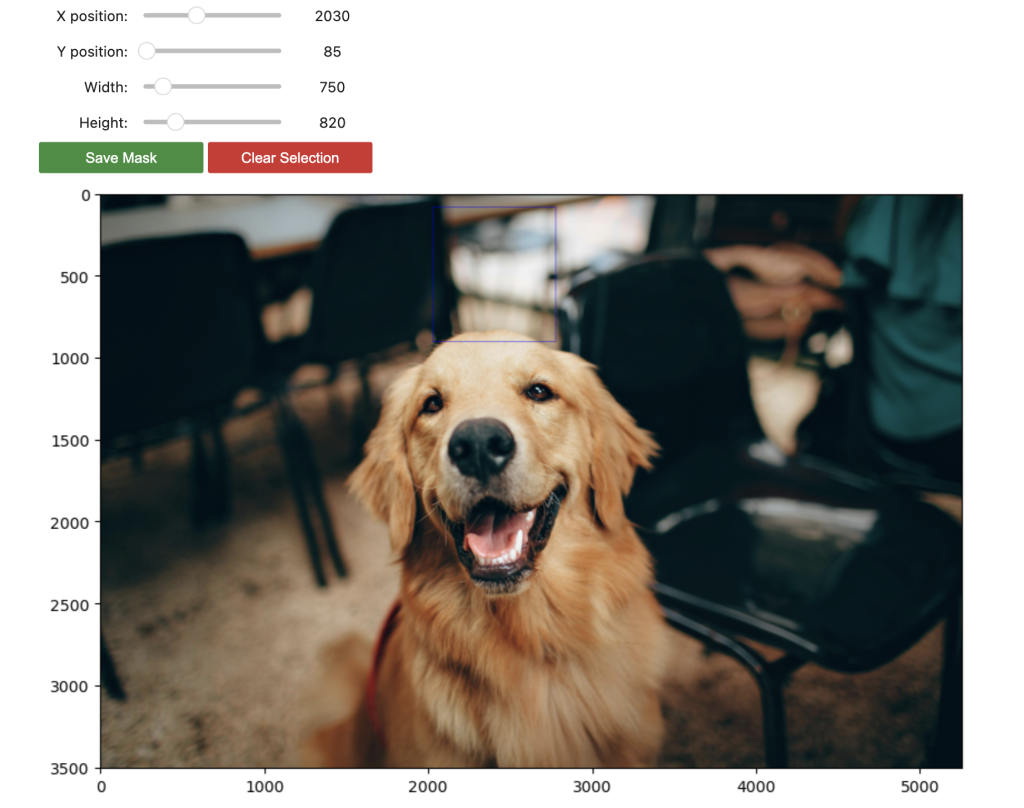
- Use explicit image masks to define areas for in-painting
- Generate videos using enhanced images
This notebook illustrates the following capabilities:
- Use in-painting to generate an image
- Generate a video using the enhanced image
The following screenshot shows the image and mask we use for in-painting.
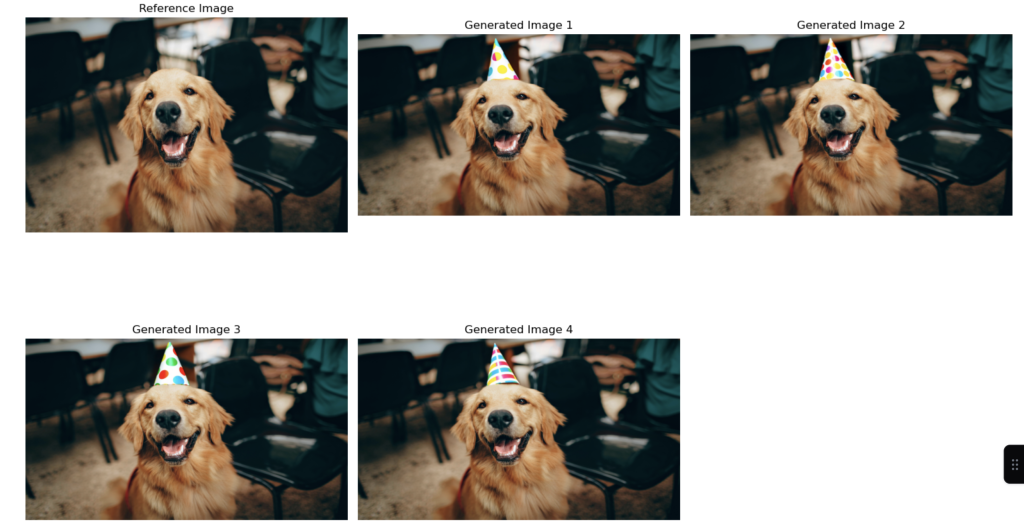
The following screenshot shows the generated images (few-shot) we receive as output.
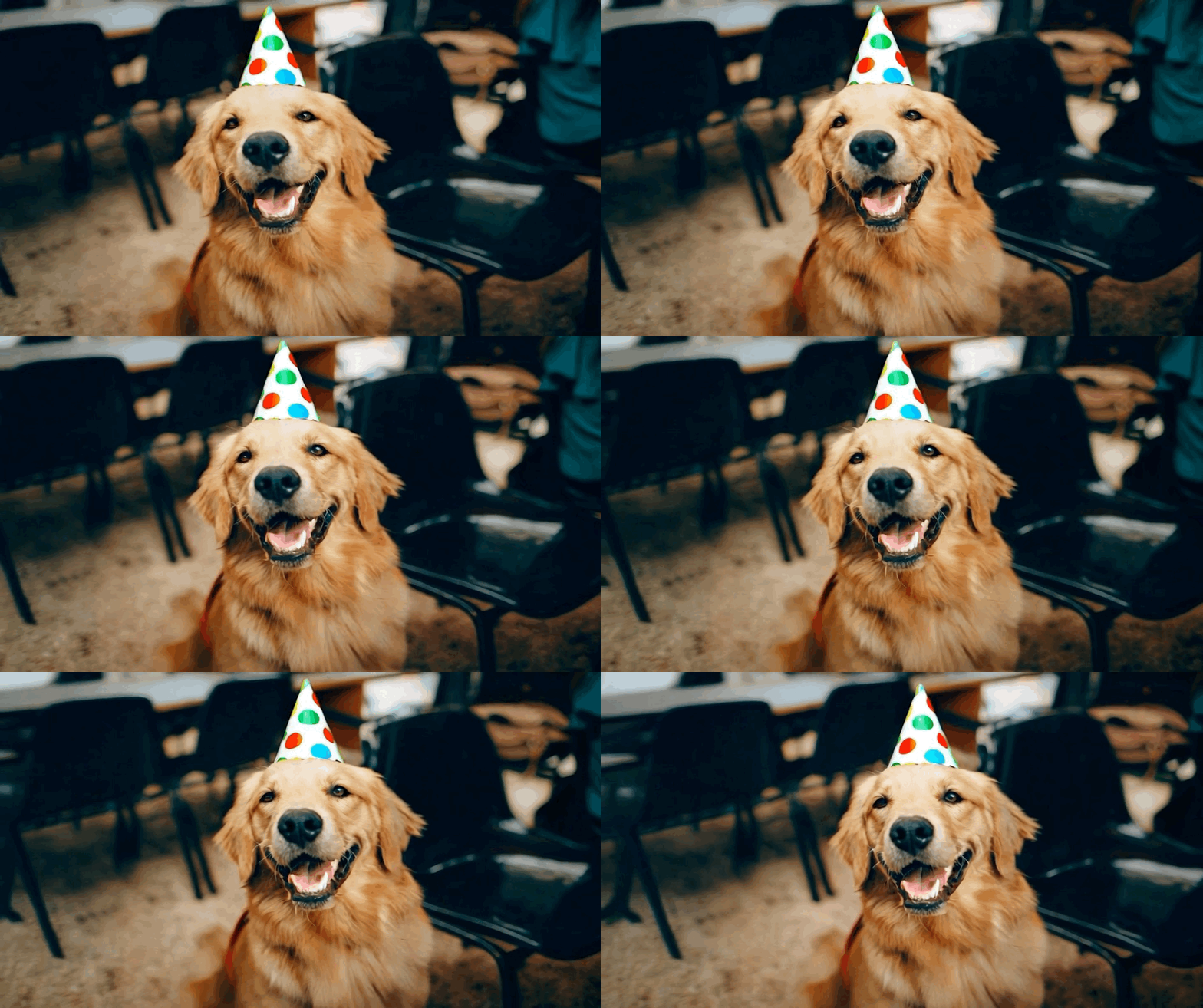
From the generated image, we receive the following video as output.
Best practices
An efficient AI video generation process requires seamless integration of data management, search optimization, and compliance measures. The process must handle high-quality input data while maintaining optimized OpenSearch queries and Amazon Bedrock integration for reliable processing. Proper Amazon S3 management and enhanced user experience features facilitate smooth operation, and strict adherence to EU AI Act guidelines maintains regulatory compliance.
For optimal implementation in production environments, consider these key factors:
- Data quality – The quality of the generated video is heavily dependent on the quality and relevance of the image database used in RAG
- Image captioning – For optimal results, consider incorporating image captions or metadata to provide additional context for the RAG solution
- Video editing – Although RAG can provide the core visual elements, additional video editing techniques might be required to create a polished final product
Clean up
To avoid incurring future charges, clean up the resources created in this post.
- Empty the S3 bucket created by the CloudFormation stack. On the Amazon S3 console, select the bucket, choose Empty, and confirm the deletion.
- On the AWS CloudFormation console, select the vrag-blogpost stack, choose Delete, and confirm. This removes all provisioned resources, including the SageMaker notebook instance, OpenSearch Serverless collection, and IAM roles.
Conclusion
VRAG represents a significant advancement in AI-powered video creation, seamlessly integrating existing image databases with user prompts to produce contextually relevant video content. This solution demonstrates powerful applications across education, marketing, entertainment, and beyond. As video generation technology continues to evolve, VRAG provides a robust foundation for creating engaging, context-aware video content at scale. By following these best practices and maintaining focus on data quality, organizations can use this technology to transform their video content creation processes while producing consistent, high-quality outputs. Try out VRAG for yourself with the notebooks provided in this post, and share your feedback in the comments section.
About the Authors
 Nick Biso is a Machine Learning Engineer at AWS Professional Services. He solves complex organizational and technical challenges using data science and engineering. In addition, he builds and deploys AI/ML models on the AWS Cloud. His passion extends to his proclivity for travel and diverse cultural experiences.
 Madhunika Mikkili is a Data and Machine Learning Engineer at AWS. She is passionate about helping customers achieve their goals using data analytics and machine learning.
 Shuai Cao is a Senior Applied Science Manager focused on generative AI at Amazon Web Services. He leads teams of data scientists, machine learning engineers, and application architects to deliver AI/ML solutions for customers. Outside of work, he enjoys composing and arranging music.
 Seif Elharaki is a Senior Cloud Application Architect who focuses on building AI/ML applications for the manufacturing vertical. He combines his expertise in cloud technologies with a deep understanding of industrial processes to create innovative solutions. Outside of work, Seif is an enthusiastic hobbyist game developer, enjoying coding fun games using tools like Unreal Engine and Unity.
 Vishwa Gupta is a Principal Consultant with AWS Professional Services. He helps customers implement generative AI, machine learning, and analytics solutions. Outside of work, he enjoys spending time with family, traveling, and trying new food.
 Raechel Frick is a Sr Product Marketing Manager for Amazon Nova. With over 20 years of experience in the tech industry, she brings a customer-first approach and growth mindset to building integrated marketing programs. Based in the greater Seattle area, Raechel balances her professional life with being a soccer mom and cheerleading coach.
 Maria Masood specializes in agentic AI, reinforcement fine-tuning, and multi-turn agent training. She has expertise in Machine Learning, spanning large language model customization, reward modeling, and building end-to-end training pipelines for AI agents. A sustainability enthusiast at heart, Maria enjoys gardening and making lattes.