AWS Messaging Blog
Automate toll-free number registrations at scale with AWS End User Messaging
When you manage SMS communications for dozens or hundreds of business units, registering each toll-free number (TFN) manually becomes a bottleneck. For independent software vendors (ISVs), software as a service (SaaS) providers, or large organizations with many teams, the repetitive console work, multi-day carrier reviews, and rejection handling add up fast.
With AWS End User Messaging SMS, you can send messages using TFNs, 10DLC numbers, or short codes in the US, each with its own registration process. For more information, see Toll-Free Number registration requirements. In a previous post, we showed how to programmatically register a single TFN using a Bash script, and how to register multiple TFNs in bulk with Python. Those scripts automate the seven API calls required for each registration.
This post goes further. We walk through a serverless architecture that handles the full TFN registration lifecycle: submission, carrier review, and resolution (including rejections). It uses AWS Step Functions for orchestration, Amazon EventBridge for async status callbacks, and a human-in-the-loop pattern for handling rejections. The same architecture applies to International Toll-Free Numbers (ITFNs) by adjusting the RegistrationType and IsoCountryCode.
Prerequisites
Before deploying this solution, you need:
- Technical prerequisites: AWS Command Line Interface (AWS CLI) v2, AWS Serverless Application Model (AWS SAM) CLI, Python 3.12+, and an AWS account with AWS End User Messaging SMS enabled. See the repository README for full setup instructions.
- An email address to receive SNS notifications for registration status updates.
- The registration data for each TFN you want to register:
- Company information.
- Contact information.
- Messaging use case and details.
- Opt-in workflow description.
- Opt-in workflow image (PNG, JPEG, or PDF, max 500 KB) showing how end users consent to receiving SMS messages. (You can retrieve the full list of required fields with DescribeRegistrationFieldDefinitions.)
- Message samples.
Note: For a complete step-by-step guide, see: How to register for a US toll-free number with AWS End User Messaging
The problem: Manual registration at scale
When you register a TFN through the AWS End User Messaging SMS console, you fill out a multi-step form for each number:
- Company Info – Company name, website, address, business type, tax ID.
- Contact Info – First name, last name, support email, support phone number.
- Messaging Use Case – Monthly volume, use case category, use case details, opt-in type, opt-in workflow description, opt-in image upload.
- Message Samples – 1–3 example SMS message bodies.
- Review and Submit.
For a single registration, this takes a few minutes. For 50, 100, or 500 registrations across tenants, it becomes a full-time job. After you submit a registration, each registration enters a carrier review period of 1–15 business days. If rejected, you need to identify the issue, fix the fields on the console, and resubmit. Tracking all of this across many registrations is where the real operational burden lives.
The following architecture automates submission by using an API and tracks the full lifecycle with event-driven callbacks.
Architecture overview
You deploy the solution as an AWS SAM template. It consists of the following components:
| Component | Purpose |
| Amazon API Gateway | RESTful endpoints for submission, file upload, and resume |
| AWS Lambda (six functions) | Business logic for intake, presigned URL generation, registration, event routing, notification, and human-in-the-loop resume |
| AWS Step Functions | Orchestrates the multi-day workflow with pause and resume capability |
| Amazon EventBridge | Captures async registration status change events from the carrier |
| Amazon DynamoDB | Tracks registration state across the full lifecycle |
| Amazon Simple Notification Service (SNS) | Sends operator notifications on status changes |
| Amazon Simple Storage Service (Amazon S3) | Stages opt-in workflow attachments with presigned upload URLs |
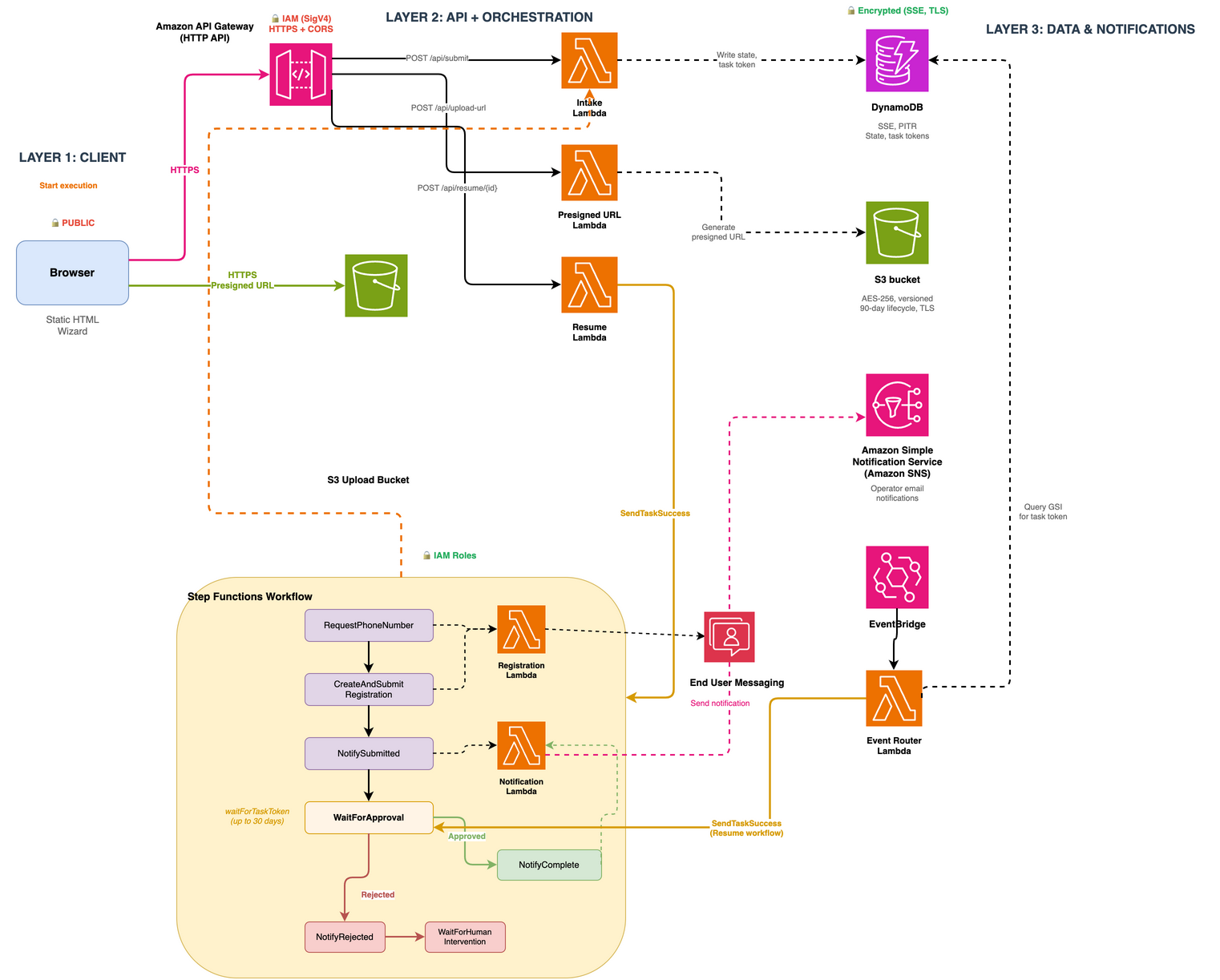
Figure 1: Architecture from submission through resolution, showing the synchronous submission flow, async Amazon EventBridge callbacks, and human-in-the-loop rejection handling
The flow
The workflow has three phases: submission, carrier review, and resolution.
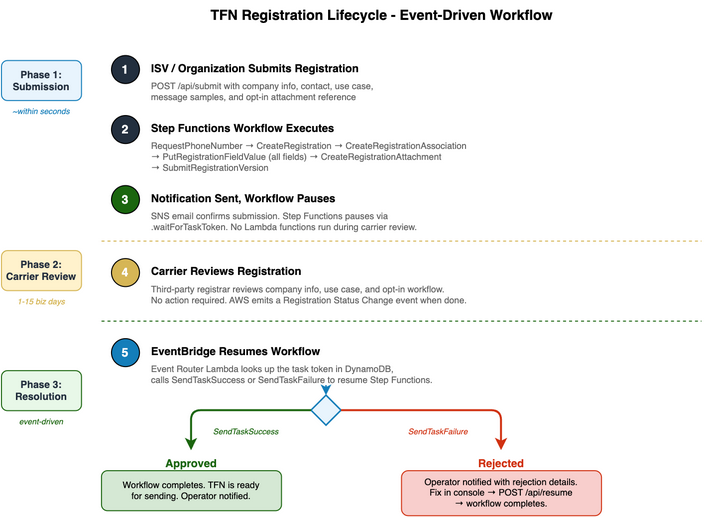
Figure 2: Registration lifecycle showing the three phases. No AWS Lambda functions run in Phase 2. The rejected path includes human-in-the-loop remediation before completion
Phase 1: Submission (within seconds)
- The application calls
POST /api/submitwith the registration data (company info, contact info, use case, message samples, and an Amazon S3 reference to the opt-in screenshot). - The Intake Lambda validates the payload, writes the full request to Amazon DynamoDB, and starts a Step Functions execution.
- Step Functions orchestrates the seven AWS End User Messaging SMS (EUM SMS) API calls in order:
- RequestPhoneNumber – Provisions a
TOLL_FREEnumber. - CreateRegistration – Creates a
US_TOLL_FREE_REGISTRATION. - CreateRegistrationAssociation – Associates the phone number with the registration (required before submission for TFNs).
- PutRegistrationFieldValue – Repeated for each field across all sections (
companyInfo,contactInfo,messagingUseCase,messageSamples). - CreateRegistrationAttachment – Uploads the opt-in screenshot from S3.
- DescribeRegistrationAttachments – Polls until the uploaded attachment reaches
UPLOAD_COMPLETEbefore the field value is assigned. - SubmitRegistrationVersion – Submits the registration for carrier review.
- RequestPhoneNumber – Provisions a
- An SNS notification confirms submission. The workflow then pauses using the Step Functions
.waitForTaskTokenintegration pattern.
Phase 2: Carrier review (1–15 business days)
During this phase, no Lambda functions run. Step Functions holds a task token in DynamoDB and waits. The toll-free number’s monthly fee still applies.
When the carrier completes its review, AWS End User Messaging emits a Registration Status Change event to Amazon EventBridge. An Amazon EventBridge rule routes this event to the Event Router Lambda. The Lambda queries a DynamoDB Global Secondary Index (GSI) to find the matching request by registrationId and retrieves the stored task token. It then calls SendTaskSuccess (if approved) or SendTaskFailure (if rejected) to resume the Step Functions execution.
Phase 3: Resolution
If approved: The workflow advances to the completion state, the operator is notified, and the TFN is ready for sending messages.
If rejected: The workflow enters a WaitForHumanIntervention state:
- The operator receives an SNS email with the specific rejection reasons (for example,
messagingUseCase.optInImage: MISSING_REQUIRED_FIELD). - The operator fixes the registration on the AWS End User Messaging SMS console.
- The operator calls
POST /api/resume/{requestId}to unblock the workflow. - The workflow completes successfully.
Scaling to many registrations
For organizations managing registrations across many customers or teams:
- Batch submission: Call
/api/submitfor each registration. Each spawns an independent Step Functions execution that tracks its own lifecycle. - State tracking: DynamoDB holds all registration state. Query by
requestId(internal ID) orregistrationId(EUM SMS ID, through the GSI) to build dashboards or status pages. - Rate limiting: The EUM SMS API has service quotas for
RequestPhoneNumberandPutRegistrationFieldValue. If submitting hundreds of registrations in a burst, add a Step FunctionsWaitstate or use Amazon Simple Queue Service (SQS) with a rate-limited consumer to stay within limits. - International Toll-Free Numbers (ITFNs): The same architecture extends to international toll-free numbers. Change the
RegistrationTypeandIsoCountryCode, and adjust the field mappings for the target country’s registration form. You can use DescribeRegistrationFieldDefinitions to retrieve the required fields for any registration type.
Production hardening: This solution ships as a sample. The AllowedOrigin parameter is required and rejects the wildcard CORS origin (’*’). Set it to your application’s domain when you deploy. The IAM policies in the template are scoped to resource ARNs in your account and Region, except SendTaskSuccess and SendTaskFailure, which don’t support resource-level permissions.
Deployment
The solution is available as an open source AWS SAM template:
Repository: sample-sms-tfn-registration-automation on GitHub
Deploy with:
Use the DryRun parameter to test the full workflow, from submission through resolution, without creating real registrations or incurring phone number charges. When set to true, the Registration Lambda returns synthetic IDs while DynamoDB writes, Step Functions execution, and SNS notifications all run for real.
Clean up
Because toll-free number lease fees begin the moment you request a number, tear down resources you no longer need. To remove the stack and stop incurring charges:
Cost considerations
Registrations spend most of their time waiting for carrier review. The architecture reflects that:
| Resource | Cost driver |
| Toll-free phone number | Monthly fee begins as soon as RequestPhoneNumber is called, regardless of registration status. See AWS End User Messaging Pricing. |
| Step Functions | Standard workflow charges per state transition. No charges while paused at .waitForTaskToken. |
| DynamoDB | On-demand billing. Each registration record is small (~2 KB). Negligible at hundreds of registrations. |
| Lambda | Only runs during submission (~seconds) and when Amazon EventBridge delivers a status change. No polling. |
| S3 | Storage for opt-in screenshots. 90-day lifecycle auto-deletion. |
| SNS | You pay per email sent. A few cents for a typical batch. |
The .waitForTaskToken pattern keeps the workflow idle during the 1–15 business day carrier review: no Lambda functions run and nothing polls. DynamoDB storage and the TFN monthly fee still apply.
Important: You begin incurring costs for TFNs as soon as you request the phone number, even if your registration has not yet been submitted or approved. Factor this into your batch strategy.
Monitoring and observability
To track registrations in flight:
- Step Functions console – Each registration has its own execution. View the current state (waiting for approval, rejected, complete) and full execution history.
- DynamoDB queries – Query the table by
requestId(hash key) to get the full record for a specific registration, including its currentstatus,registrationId, andphoneNumber. Use theregistration-id-indexGSI to look up a request by the EUM SMSregistrationId. Scan with a filter onstatusto find all registrations in a given state (for example,REGISTRATION_SUBMITTEDorREGISTRATION_REQUIRES_UPDATES). - Amazon CloudWatch Logs – Each Lambda function has its own log group. The Event Router logs structured fields like
regId,status, andtypefor every Amazon EventBridge event it receives. Use CloudWatch Logs Insights to query across log groups byregistrationIdto trace how an event was processed. - SNS notifications – Operators receive email for submissions, approvals, rejections (with specific field-level rejection reasons from the carrier), and timeouts. No polling or console checks required.
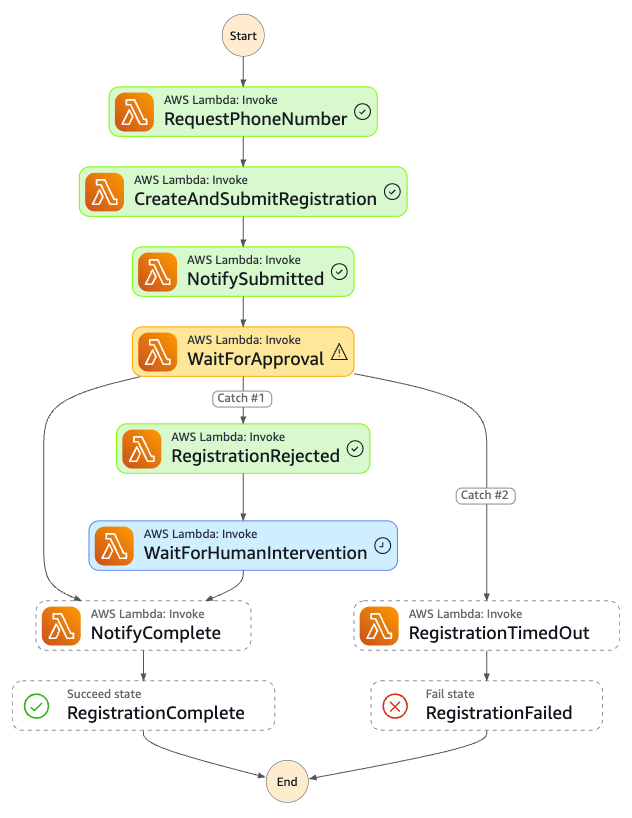
Figure 3: A single registration execution on the Step Functions console. Green states are the happy path. The rejection path (Catch #1) pauses for human intervention before completing
For organizations running hundreds of registrations, you can add a CloudWatch dashboard that tracks metrics like: registrations submitted per day, average approval time, rejection rate, and registrations currently awaiting review.
Conclusion
In this post, we showed how to automate the full TFN registration lifecycle using AWS Step Functions, Amazon EventBridge, and a human-in-the-loop rejection pattern. The architecture reduces each registration to a single API call and runs the seven EUM SMS API calls behind the scenes. It then waits for the carrier without running Lambda functions, and notifies you when something needs attention.
Related resources
- Automate AWS End User Messaging US Toll-Free Number Registrations – script-based approach for single or bulk TFN registration.
- US Toll-Free Number Registration Form (AWS Docs).
- Create a Registration Using the AWS CLI.
- How to register for a US toll-free number with AWS End User Messaging.
- Toll-Free Number Registration Rejection Reasons.