AWS Messaging Blog
Build an AI campaign orchestrator with Amazon Bedrock and AWS End User Messaging
Marketing teams running large-scale campaigns often send the same message across SMS, WhatsApp, and email regardless of how each customer engages or how many messages they’ve already received that week. This pattern wastes budget on channels customers ignore and pushes promotional content toward frustrated or message-fatigued customers. A MarketingSherpa study found that 45% of consumers who unsubscribe from email marketing cite messages being too frequent as the reason. Over-messaging therefore erodes the audience a brand has paid to acquire. This post shows how to build a campaign orchestrator on AWS End User Messaging and Amazon Bedrock. The orchestrator predicts the best channel for each customer, adapts content per channel, and holds back messages to fatigued or unhappy customers.
In this post, we describe the following capabilities for enterprise marketing teams:
- Channel prediction that selects SMS, WhatsApp, or email for each customer based on engagement history
- Content adaptation that takes a single campaign brief and produces channel-appropriate variants: a 160-character SMS, a longer WhatsApp template message, and an HTML email
- Sentiment-aware suppression that holds back promotional messages when a customer’s stored sentiment score is negative
- Frequency tracking across channels that lowers send rate when a customer shows disengagement signal
- Natural-language campaign launch that turns a typed instruction such as “Send the Andaman package to Mumbai customers who haven’t booked in six months” into a segmented, channel-routed send
Prerequisites
You need the following to deploy this solution-
- An AWS account
- Python 3.8 and the AWS Serverless Application Model (AWS SAM) CLI installed locally
- A WhatsApp Business account linked to AWS End User Messaging Social
- Amazon Bedrock model access granted for an Anthropic Claude model in your AWS Region
- (Optional) An Amazon SageMaker AI endpoint for channel prediction. The orchestrator calls the endpoint when it’s configured and falls back to the customer’s stored preferred channel otherwise.
Solution overview
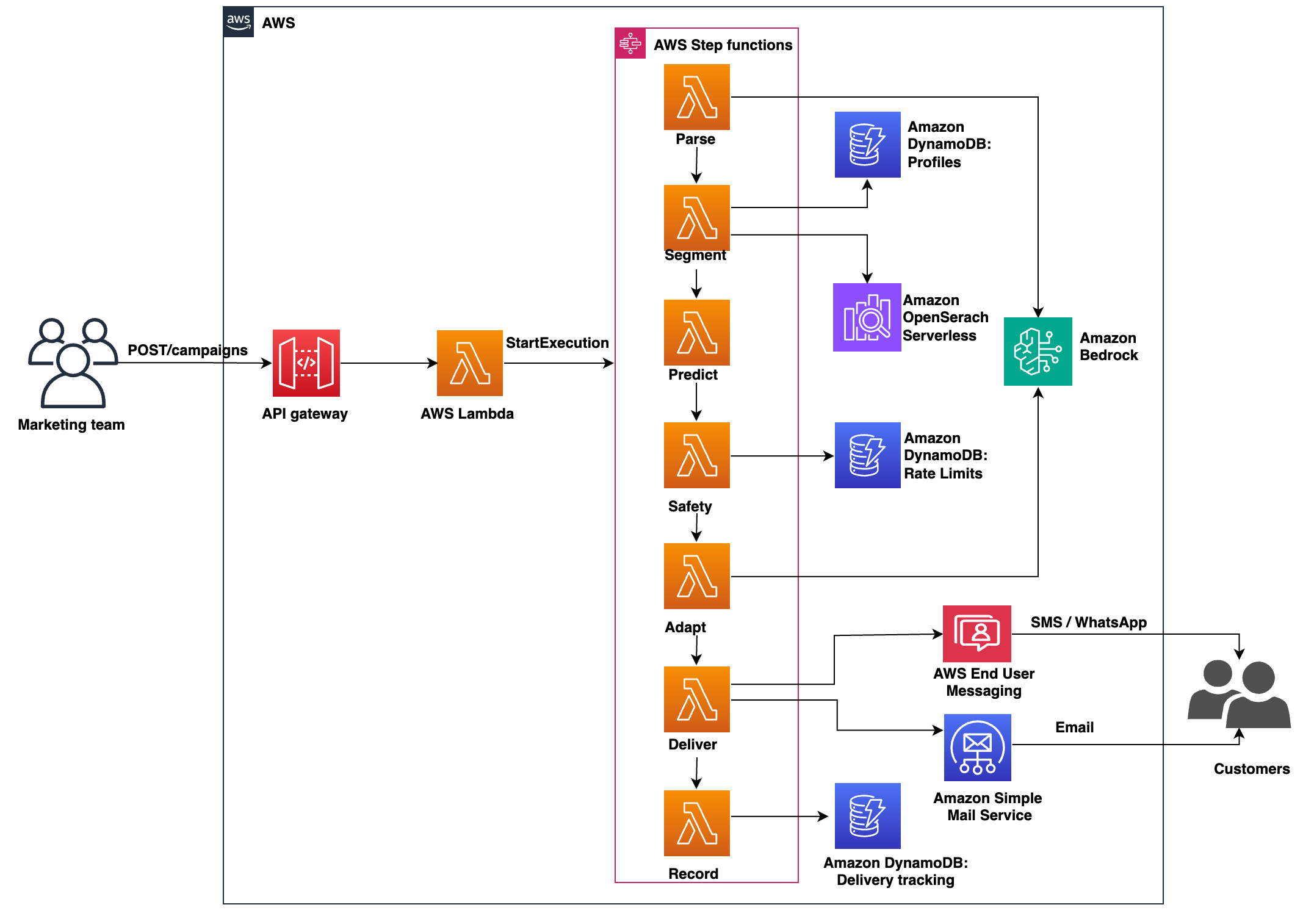
A marketer types a plain-language instruction into the campaign launcher. Amazon API Gateway forwards the instruction to an AWS Lambda function, which starts an AWS Step Functions state machine. The state machine walks the campaign through seven stages. Each stage moves the campaign closer to dispatching the right message on the right channel. The stages read and write customer state in Amazon DynamoDB and call Amazon Bedrock for language tasks. The final stage dispatches messages through AWS End User Messaging or Amazon Simple Email Service (Amazon SES).
When you turn on semantic segmentation, the state machine also queries an Amazon OpenSearch Serverless collection. The collection holds customer embeddings.
To deploy the sample in your account, refer to the GitHub repository.
Note: The API Gateway endpoint in the sample uses Cognito for authentication in the sample so you can test end-to-end quickly. Before running production traffic, put the API behind an authorizer such as Amazon Cognito, IAM auth on the HTTP API, or a Lambda authorizer. Also add rate limiting on the API stage and AWS WAF at the edge to protect against abuse.
Figure 1 shows the campaign orchestration system.
Message processing
When a marketer submits an instruction, the launcher Lambda function starts a Step Functions execution. The state machine then runs the stages in order. Each stage reads the output of the previous one, applies its own logic, and passes its result forward. The state machine retries transient failures within a stage, so a Bedrock throttle or a DynamoDB timeout doesn’t restart the whole campaign. A dedupe check ensures no recipient receives the same message twice. A choice state redirects the workflow straight to the recording stage when no customers pass the safety check, so empty campaigns skip the content adaptation step. This decoupled design gives operators three things:
- If one stage fails, the workflow retries that stage without rerunning earlier work
- You can add new stages — for example, a translation step — without changing the others
- The system scales with campaign volume
AI conversation engine
Amazon Bedrock does two distinct things in the orchestrator, and they happen at different stages. The parse stage runs first. It takes the marketer’s plain-language instruction and asks the model to return a small JSON object. The JSON has fields such as location, package, age range, and a short semantic query when the instruction implies a lifestyle or affinity. That JSON is what every downstream stage works against, so the parse output sets the shape of the campaign.
The parse stage sends the following prompt to Anthropic Claude on Bedrock through the InvokeModel API:
For the instruction “Send the Andaman package to budget-conscious families in Mumbai”, the model returns:
The adapt stage runs later, after segmentation and safety. It takes a single campaign brief and asks Amazon Bedrock to produce one variant per channel: a 160-character (GSM-7) SMS, a longer WhatsApp template message, and an HTML email. The model never sees customer-level data at this point; the brief and the channel are the only inputs. This means variants are personalized by channel and not by individual recipient; add a per-recipient personalization step if your use case demands it.
The orchestrator stores one prompt per channel. The SMS prompt enforces a hard character limit; the WhatsApp prompt allows a longer message; the email prompt asks for structured HTML:
Each prompt is formatted with the campaign brief and sent to Bedrock; the response becomes that channel’s variant for every approved customer in the segment.
The safety stage runs after the parse stage and before the adapt stage, and it is rule-based rather than model-based. It reads each customer’s stored sentiment score and rolling send count from DynamoDB, and drops customers below the sentiment threshold (default -0.3) or above the fatigue limit. The fatigue limit is a per-customer count of sends over a rolling window, for example five sends in the previous seven days. You set the fatigue window and the sentiment threshold as Step Functions input parameters. You populate the sentiment score upstream. For example, you can run a daily Amazon Comprehend Custom Classification job that scores recent support transcripts and writes the result back to the customer record.
The fatigue check reads the customer’s recent send timestamps from the rate-limits table and counts the entries inside the rolling window:
Each successful send writes its timestamp into the customer’s recent_sends list, so the next campaign sees an up-to-date fatigue count without a separate ETL step.
Orchestration
Each stage in the campaign workflow is a small AWS Lambda function. Each stage Lambda runs under its own IAM role, scoped to the minimum services it calls. The state machine invokes them in sequence: parse the instruction, segment customers, predict channels, check safety, adapt content, deliver messages, and record results. The predict stage reads each customer’s per-channel engagement history from DynamoDB and picks the channel with the highest historical engagement rate. When you wire an Amazon SageMaker AI endpoint into the stack, the stage calls that endpoint instead and uses its score as the channel ranking signal.
The state machine, not the functions, owns the control flow. New stages (for example, a translation step before adapt content) can be inserted without changing the existing handlers. The Step Functions definition lives in statemachine/campaign_orchestrator.asl.json. Refer to it in the GitHub repository for the exact state graph and retry policy.
Semantic search
Consider a marketer who types “Send the Andaman package to budget-conscious families interested in beach vacations.” A keyword filter against the customer table won’t match a profile tagged “economy package, kid-friendly, coastal”, because the words don’t overlap even though the meaning does. To bridge that gap, the seed script embeds each customer profile with Amazon Titan Text Embeddings v2 and writes the vector into an OpenSearch Serverless Vector search collection. The segment stage then embeds the marketer’s phrasing at query time and runs a k-nearest-neighbor search against the collection.
The orchestrator intersects those matches with the structured DynamoDB filter. The final segment respects both the hard constraints (location, age, recency) and the soft ones (lifestyle, affinity). OpenSearch Serverless scales the collection’s compute units to zero when idle, so this capability adds near-zero cost when no campaigns run.
Deployment
To deploy the sample in your AWS account, clone the GitHub repository and run the SAM-based deploy script:
The script prompts you for an AWS Region, a stack name, and the orchestrator parameters (your WhatsApp phone number ID and optional SES sender). It then runs sam build followed by sam deploy, and prints the API endpoint and stack outputs when the deployment finishes.
Test the solution
After the stack finishes deploying, seed the customer profiles table with one sample customer and run a campaign against it:
Then submit a campaign instruction to the API endpoint that the deploy script printed:
From here you can:
- Watch the campaign execution in the AWS Step Functions console.
- Query the delivery tracking table in Amazon DynamoDB to see which customers the safety stage approved or suppressed, and which channel the orchestrator picked for each.
- Check the recipient’s phone for the WhatsApp template message that the deliver stage sent.
Sample conversation
The recording in this section shows a marketer using the campaign launcher to send an Andaman travel promotion to a Mumbai segment. It opens with the marketer typing the natural-language instruction and the parse stage extracting structured filters. The segment stage then matches customers in DynamoDB. The safety stage suppresses a customer with a low sentiment score. The predict stage assigns a channel per remaining customer. The recording ends with the adapt stage producing one message variant per channel and the deliver stage dispatching them through AWS End User Messaging.
Clean up
To avoid incurring future charges, delete the resources you created. The sample includes a cleanup script in the GitHub repository. Run ./scripts/cleanup.sh to empty the deployment bucket and delete the stack. The stack deletion removes the AWS Step Functions state machine, AWS Lambda functions, Amazon DynamoDB tables, and (when configured) the Amazon OpenSearch Serverless collection.
Conclusion
You can combine AWS End User Messaging, Amazon Bedrock, and AWS Step Functions to build a campaign orchestrator. The orchestrator routes each message to the channel a customer is most likely to open. It also holds back sends to fatigued or unhappy customers.
The same pattern fits other business-initiated messaging workflows where per-recipient channel and content decisions matter. Examples include transactional banking notifications, appointment reminders, and logistics status updates. To deploy the sample in your account, refer to the GitHub repository. To learn more about AWS End User Messaging, refer to the service documentation.
If you’re applying this pattern, start with the safety check and frequency tracking. Those two stages reduce the risk of damaging customer relationships and produce the engagement data that channel prediction depends on. Once that data is in place, add the prediction and content adaptation stages. Use this implementation as a reference for production messaging on AWS.