Migration & Modernization
High-throughput enterprise-scale document migration on AWS
Migrating hundreds of millions of documents to the cloud is a defining enterprise challenge – data loss, downtime, or compliance gaps break traditional approaches. Here’s how we built a system on AWS that migrated 800 million documents with configurable parallelism, self-healing, and integrity validation.
When migrating at this scale, traditional approaches quickly break down. Manual processes don’t scale, scripting solutions lack the reliability and observability needed for enterprise workloads, and commercial off-the-shelf tools rarely accommodate the custom metadata schemas and validation rules that regulated industries require.
In this post, we share how we built a high-performance document migration system on AWS that processes 800 million documents with configurable parallelism, automated self-healing, and end-to-end integrity validation.
Challenges with large-scale document migration
Organizations across financial services, healthcare, government, and legal sectors maintain massive document repositories often accumulated over decades.
Migrating these documents to a modern platform involves far more than copying files:
- Preserving document integrity – Every file must arrive intact, validated by checksum comparison against the source.
- Migrating metadata faithfully – Each document carries structured metadata (identifiers, schemas, timestamps, version information, and custom attributes) that must transfer without loss or corruption.
- Handling versioning – Documents might have multiple versions, each requiring independent tracking and validation.
- Processing at scale – Hundreds of millions of documents means the system must sustain high throughput over days or weeks, not hours.
- Recovering gracefully – At this scale, transient failures are inevitable. The system must detect, isolate, and retry failures automatically without human intervention.
- Maintaining auditability – Regulated industries require a complete audit trail: which documents migrate, when, their validation status, and any failures encountered.
Traditional approaches – bulk file copy tools, custom scripts running on a single server, or even commercial migration platforms struggle with this combination of requirements. They either lack the parallelism needed for throughput, the granular tracking needed for compliance, or the self-healing capabilities needed for reliability at scale.
Solution overview
We built the Enterprise Document Migration, a Java SpringBoot-based migration system that runs on Amazon Elastic Container Service (Amazon ECS) with AWS Fargate. It uses an event-driven architecture where documents are organized into batches, validated, processed in parallel, and tracked through every stage of the lifecycle.
The pay-per-use pricing model of Fargate removes idle infrastructure costs. You pay only for the vCPU and memory your ECS tasks consume while running.
The following diagram illustrates the solution architecture.
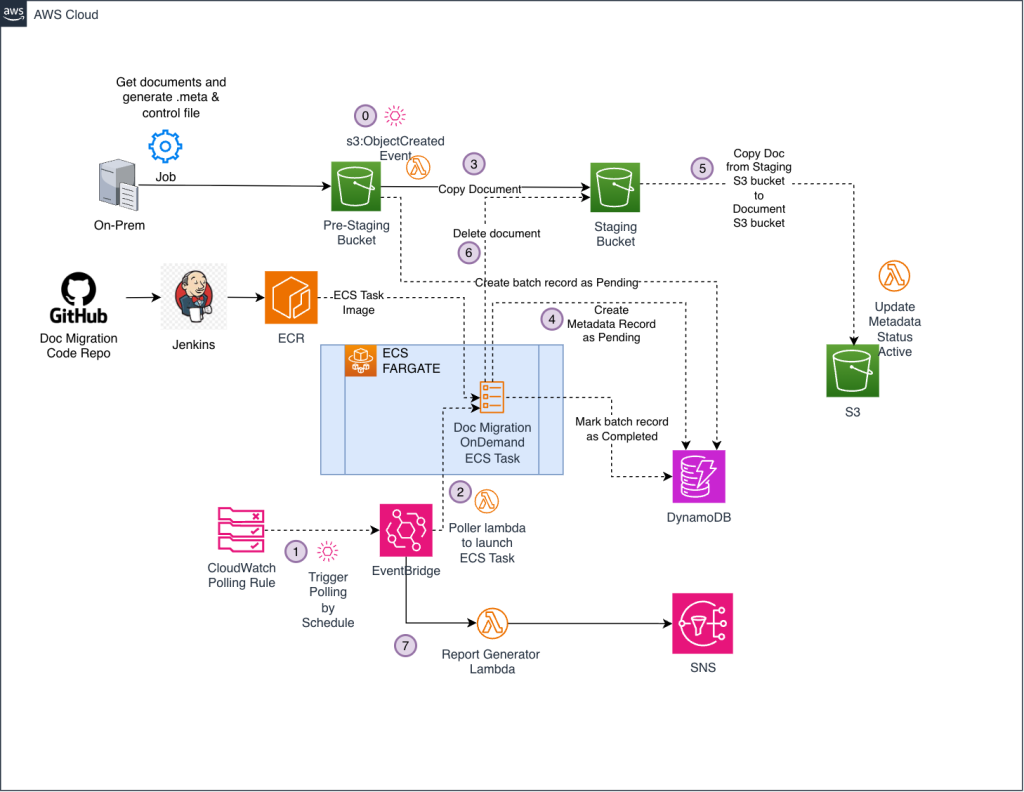
Figure 1 — Enterprise Document Migration high-level architecture
The architecture uses the following AWS services:
- Amazon ECS with AWS Fargate provides serverless compute for parallel document processing tasks.
- Amazon S3 handles document staging, storage, and control file management.
- Amazon DynamoDB with on-demand capacity manages batch tracking, document status, and migration state.
- AWS Lambda provides event-driven orchestration for batch ingestion, polling, and reporting.
- Amazon EventBridge triggers scheduled polling and report generation.
- Amazon API Gateway exposes REST APIs for document status queries and migration progress tracking.
- Amazon Simple Notification Service (Amazon SNS) sends email notifications for migration reports.
Prerequisites
Before deploying the Enterprise Document Migration system, make sure you have the following:
- An active AWS account with permissions to create Amazon ECS, AWS Fargate, Amazon S3, Amazon DynamoDB, AWS Lambda, Amazon EventBridge, Amazon API Gateway, and Amazon SNS resources.
- AWS CLI installed and configured with appropriate credentials.
- Terraform installed (version 1.0 or later) for infrastructure provisioning.
- Java Development Kit (JDK) 17 or later and Apache Maven for building the SpringBoot application.
- An Amazon S3 bucket designated for document pre-staging.
- Familiarity with Amazon ECS, AWS Fargate, and containerized application deployment.
How it works: the migration workflow
The migration follows a structured, event-driven workflow that moves documents through staging, validation, processing, and verification stages.
Step 1: Batch preparation and staging
You can transfer documents from on-premises systems into the Amazon S3 pre-staging bucket using AWS DataSync. Once you have organized documents in batches in S3, each consists of:
- Source documents – The actual files to migrate, placed in the
batches/[batchId]/prefix in the pre-staging S3 bucket. - Metadata files – A companion JSON file for each document containing structured metadata:
{
  "document-id": "b18794e8-5d0d-417c-b361-ba38e78411b4",
  "schema": "financial-records",
  "fileName": "quarterly-report-Q3.pdf",
  "created-ts": 1695820800000,
  "created-user": "jsmith",
  "updated-ts": 1698412800000,
  "updated-user": "mjones",
  "versions": "3",
  "attributes": {
    "department": "Finance",
    "classification": "Confidential",
    "retention-years": "7"
  }
}- Control Comma-Separated Values (CSV) file – A pipe-delimited manifest dropped into the
control/prefix that triggers the migration. Each row maps a document to its batch, version, filename, and SHA-256 checksum:
| Column | Description |
|---|---|
| REGION | Geographic region identifier |
| BATCHNAME | Batch identifier matching the S3 folder |
| ITEMID | Unique document identifier |
| VERSIONID | Document version number |
| FILENAME | Source document filename |
| CHECKSUM | SHA-256 hash for integrity validation |
Step 2: Automated batch ingestion
When the control CSV lands in S3, it triggers a Lambda function that parses the manifest and inserts a batch record into DynamoDB with a PENDING status. This event-driven trigger means there’s no manual step to “start” a migration, dropping the control file is the signal.
Step 3: Batch polling and task launch
An EventBridge schedule triggers a poller Lambda function every 5 minutes. The poller scans the DynamoDB batch table for records in PENDING status. For each pending batch, it asynchronously launches an ECS Fargate task, passing the batchId as an input parameter.
This decoupled polling pattern provides several advantages:
- Throttling – You control the maximum number of concurrent ECS tasks, preventing resource exhaustion.
- Backpressure – If all task slots are occupied, pending batches wait for the next polling cycle.
- Observability – The system records every state transition in DynamoDB, giving you a complete audit trail.
Step 4: Parallel document processing
Each ECS Fargate task runs the Java SpringBoot application, which processes its assigned batch using a configurable Java thread pool. Three parameters control the parallelism:
| Parameter | Purpose | Example |
|---|---|---|
app.processing.thread.pool.size |
Number of Java threads in the executor pool | 16 |
app.processing.batch.size |
Documents processed per sub-batch | 500 |
app.processing.max.concurrent |
Maximum concurrent sub-batches | 8 |
For a Fargate task configured with 4 vCPUs and 8 GB memory, running 16 Java threads with 8 concurrent sub-batches of 500 documents each can sustain thousands of documents per minute per task. The following benchmarks show throughput from a single ECS task:
| Documents | Java Thread Pool | Batch Size | Max Concurrency | Time |
|---|---|---|---|---|
| 1,000 | 50 | 30 | 40 | 13 seconds |
| 10,000 | 200 | 150 | 200 | ~2 minutes |
| 100,000 | 200 | 150 | 200 | ~26 minutes |
| 1,000,000 | 250 | 150 | 200 | ~4.5 hours |
A single ECS task with a Java thread pool of 250, batch size of 150, and max concurrency of 200 processes 1 million documents in approximately 4.5 hours. At this rate, the system can process 800 million documents in approximately 25 days, with the ability to scale further by increasing concurrent task count.
The following diagram illustrates the ECS task processing workflow.
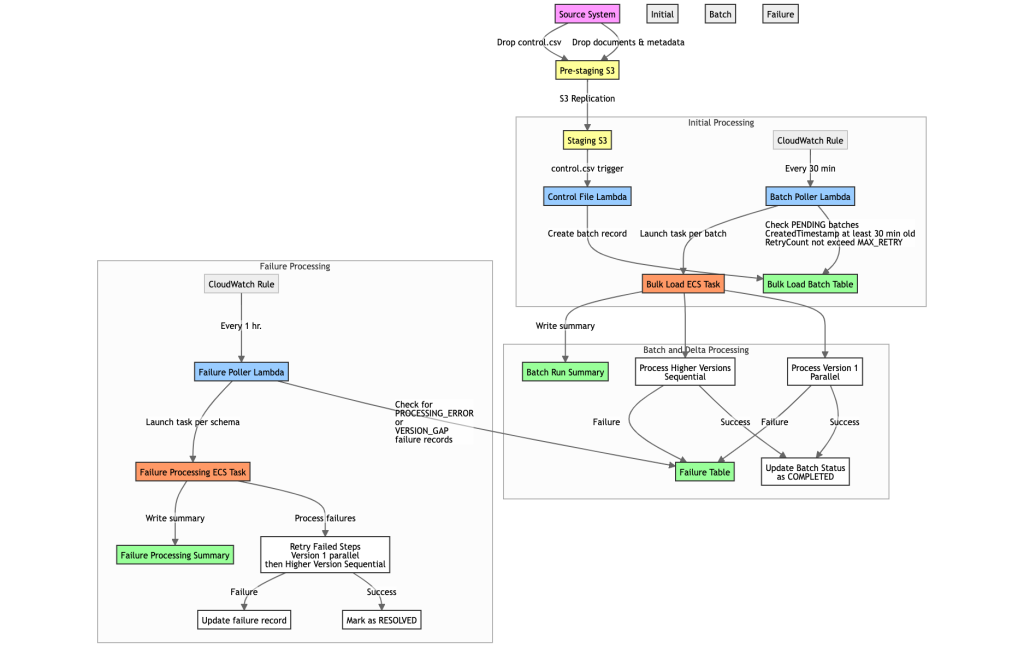
Figure 2 – Enterprise Document Migration ECS task processing workflow.
For each document, the task:
- Retrieves the source document and its metadata JSON from S3.
- Validates the file’s SHA-256 checksum against the value in the control CSV.
- Extracts and transforms metadata according to the target schema.
- Writes the document to the destination S3 bucket.
- Records the document’s status (success or failure) in DynamoDB with full metadata.
Step 5: Status APIs and progress tracking
Two REST APIs, exposed through a private Amazon API Gateway backed by Lambda functions, provide real-time visibility:
- Document Status API – Query the migration status of any individual document by ID.
- Migration Progress API – Get aggregate statistics: total documents, completed, failed, in-progress, and percentage complete.
These APIs enable integration with existing dashboards and monitoring tools, giving stakeholders real-time visibility without direct database access.
Self-healing and failure management
At the scale of millions of documents, failures aren’t exceptional, they’re expected. Network timeouts, S3 throttling, transient DynamoDB errors, and occasional malformed metadata files are expected at this scale. The Enterprise Document Migration handles these through multiple layers of resilience.
The Java application implements retry logic with exponential backoff for all AWS service calls. Transient failures (HTTP 5xx, throttling responses, network timeouts) are retried automatically without marking the document as failed.
If one document fails to process, it does not affect other documents in the same batch. The system catches exceptions at the individual document level, updates the document’s status to FAILED with full error context in DynamoDB, and continues processing the remaining documents. This status-driven approach means every failure is queryable and reportable – nothing is silently lost.
A separate ECS task definition – the Failure Processor runs on its own EventBridge schedule. It scans DynamoDB for documents in FAILED status, retrieves the error context, and retries the migration. This separation means failure reprocessing doesn’t compete with primary migration throughput.
| Component | Schedule | Purpose |
|---|---|---|
| Batch Poller | Every 5 minutes | Launches ECS tasks for pending batches |
| Failure Processor Poller | Every 10 minutes | Retries failed documents |
| Report Generator | Daily at 10 PM UTC | Generates migration progress reports |
Document integrity and compliance
For regulated industries, data integrity isn’t optional. The Enterprise Document Migration tool enforces integrity at multiple levels:
- SHA-256 checksum validation – The system validates every document against its source checksum before writing it to the destination and flags any mismatch that occurs.
- Version tracking – The system tracks each document version independently in DynamoDB, preserving the complete version history from the source system.
- Metadata fidelity – The structured JSON metadata schema captures creation timestamps, update timestamps, authorship, and extensible custom attributes – all persisted alongside the document.
- Complete audit trail – The system records every document’s journey: when it was ingested, when processing started, the checksum validation result, the final status, and any error details.
Results and outcomes
The Enterprise Document Migration delivered 1,000x throughput gains and near-zero operator intervention compared to traditional approaches, as shown in the following table.
| Key Performance Indicator | Traditional Approach | Enterprise Document Migration | Impact |
|---|---|---|---|
| Migration throughput | Thousands of docs/day | Millions of docs/day | 1,000x improvement |
| Failure recovery | Manual investigation and retry | Automated self-healing with status tracking | Near-zero operator intervention |
| Integrity validation | Post-migration spot checks | Per-document SHA-256 checksum validation | 100% coverage |
| Progress visibility | Periodic manual counts | Real-time APIs and Amazon OpenSearch dashboards | Continuous observability |
| Concurrent processing | Single-threaded or limited | Up to 50 parallel ECS tasks × 16 Java threads each | Configurable scale-out |
Best practices and lessons learned
Based on our experience migrating 800 million documents, the following practices made the biggest difference:
- Start with small batches – Validate your control CSV format, metadata schema, and checksum generation with batches of 100-1,000 documents before scaling up. Catching schema mismatches early saves days of reprocessing.
- Right-size your Fargate tasks – Monitor CPU and memory utilization during initial batches using Amazon CloudWatch Container Insights. Over-provisioning wastes money; under-provisioning causes out-of-memory failures that are expensive to retry.
- Tune parallelism incrementally – Start with conservative concurrency settings (2-5 concurrent tasks, 4-8 Java threads per task) and increase gradually while monitoring S3 and DynamoDB throttling metrics. The system’s configurable parameters make this straightforward to adjust without code changes.
- Monitor failure rates – Set up a CloudWatch alarm on the count of
FAILEDstatus documents in DynamoDB. A rising failure rate indicates a systemic issue (bad metadata format, permission errors) that won’t be resolved with retries alone. - Use the progress APIs – Integrate the Migration Progress API into your operational dashboards to track completion percentage and failure rate in real time.
- Clean your data first – Audit your document repository before migration. Eliminating obsolete versions and decommissioned records can dramatically reduce migration scope, time, and cost.
- Enable SNS notifications for reports – Configure the daily report generator with email notifications, so stakeholders receive automated progress updates without needing API access.
Getting started
To run your own large-scale document migration, follow these steps:
- Explore the architecture – Review the solution architecture diagrams and module structure to understand how the components work together.
- Deploy the infrastructure – Use the provided Terraform modules to provision all AWS resources in your account.
- Start small, scale fast – Begin with a pilot batch of 100-1,000 documents to validate your metadata format and control CSV structure, then scale concurrency incrementally.
- Monitor and tune – Use the built-in progress APIs and CloudWatch metrics to monitor throughput and failure rates, adjusting task sizing and concurrency as needed.
Cleaning up
To avoid ongoing charges after you finish evaluating or using the Enterprise Document Migration system, follow these steps:
1. Stop running Amazon ECS tasks – Before destroying infrastructure, stop all active Amazon ECS tasks to prevent orphaned processes:
aws ecs list-tasks --cluster <cluster-name> --desired-status RUNNING
aws ecs stop-task --cluster <cluster-name> --task <task-arn>
2. Empty Amazon S3 buckets – Terraform cannot delete non-empty Amazon S3 buckets. Empty the pre-staging and destination buckets:
aws s3 rm s3://<pre-staging-bucket> --recursive
aws s3 rm s3://<destination-bucket> --recursive
3. Destroy all resources with Terraform – From the project root directory, run terraform destroy. Review the planned destruction and confirm. This removes all provisioned resources including the Amazon ECS cluster, Amazon DynamoDB tables, AWS Lambda functions, Amazon EventBridge rules, Amazon API Gateway, and Amazon SNS topics.
4. Verify cleanup – Confirm that no resources remain by checking the AWS Management Console or running terraform show.
Conclusion
In this post, we showed how to build a high-performance document migration system using AWS services: Amazon ECS with AWS Fargate for serverless compute, Amazon DynamoDB for state management, Amazon S3 for storage, and AWS Lambda for orchestration. The system delivers high throughput, strong integrity guarantees, and cost-effective operation at scale.
To get started with the Enterprise Document Migration, explore the project repository and review the deployment guide. You can also manage your migration resources in the AWS Management Console. If you have feedback about this post, submit comments in the Comments section.
For more information about large-scale migration strategies on AWS, see:
- AWS Prescriptive Guidance: Large Migration Guide
- AWS Transform
- Amazon ECS on AWS Fargate
- Best practices for Amazon DynamoDB