AWS Cloud Operations Blog
From Monolith to Multi-Account: Pinterest’s AWS Organization Transformation Journey
Introduction
Pinterest launched in 2009 with a mission to bring everyone the inspiration to create a life they love. As one of the early cloud pioneers, Pinterest grew to hundreds of thousands of resources and exabytes of data within a single AWS account well before most cloud-native organizations operated at that scale or the best practices for managing it existed. As a result, Pinterest carried some technical debt such as:
- Resource limits that prevented them from scaling
- API limit breaches, for example throttling of services like Amazon Elastic Container Registry (Amazon ECR) or Amazon Elastic Compute Cloud (Amazon EC2)
- Inability to perform certain List API calls like DescribeInstances
- Enhanced security requirements due to a large, shared environment
- Reduced developer velocity due to the above security complexity
In this post, we cover Pinterest’s journey through the challenges of managing a flat AWS account and organization structure, and the strategy behind adopting a multi-account architecture. This transformation had three main components: migrating to a new management account with reduced security exposure, building automated tooling for account provisioning and network management, and adopting AWS managed services. Whether you’re operating at similar scale or planning your own migration, the lessons here provide a practical blueprint.
Designing for the cloud-native future
The above challenges made it clear that Pinterest needed a new AWS Organizations strategy. As new use cases adopted dedicated AWS accounts due to the constraints mentioned earlier, a clear vision became necessary. In early 2022, Pinterest kicked off a cross-functional team to craft a forward-looking strategy for their multi-account practice.
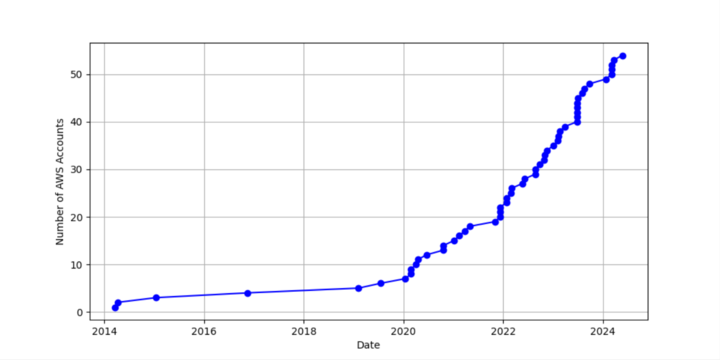
Figure 1: Growth of AWS Accounts over time
At that time, Pinterest’s AWS Organization was completely flat, as shown in Figure 2 — one management account with approximately 20 member accounts with no organization units (OUs) or classifications. Organizational policies, especially service control policies (SCPs), were applied per-account, leading to duplication that was hard to maintain. The management account also hosted Pinterest’s primary workloads, resulting in increased operational and security considerations due to its large footprint. (see Organizing Your AWS Environment Using Multiple Accounts).
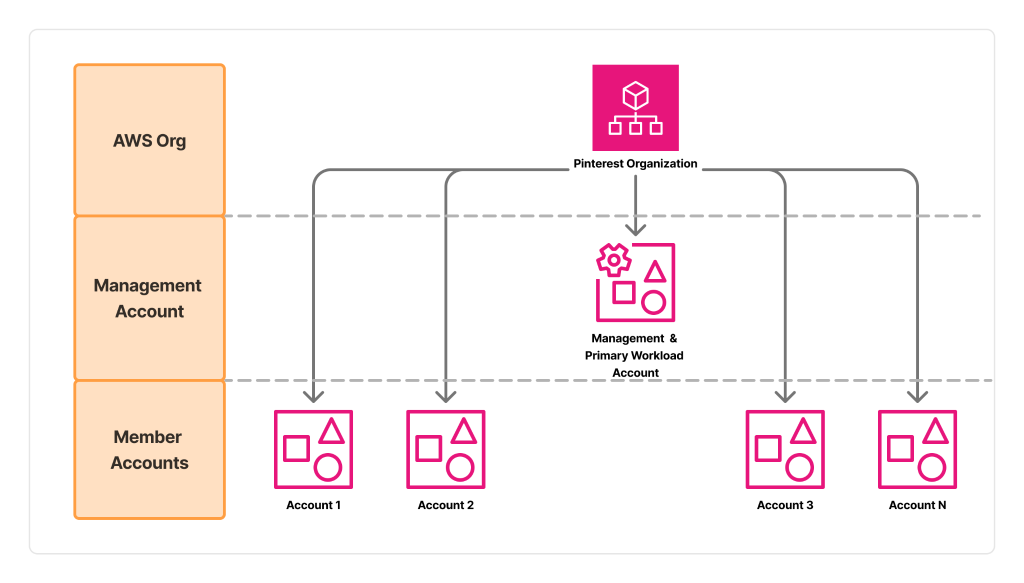
Figure 2: Flat Org Structure
Pinterest’s strategy revolved around five key initiatives.
- Creating account classifications and a meaningful OU structure
- Prototyping this strategy with business-critical use cases
- Switching to a new, much smaller management account
- Building tools for account provisioning and management
- Adopting modern, organization-first managed services from AWS
Pinterest’s account classification and OU structure was heavily influenced by the AWS Well-Architected Framework recommended OUs and accounts, and the Security Reference Architecture. The organization structure has two primary layers: group OUs based on classification and capabilities, and Software Development Life Cycle (SDLC) OUs representing account lifecycle patterns as shown in Figure 3. The organization structure also helps enforce Pinterest’s governance requirements.
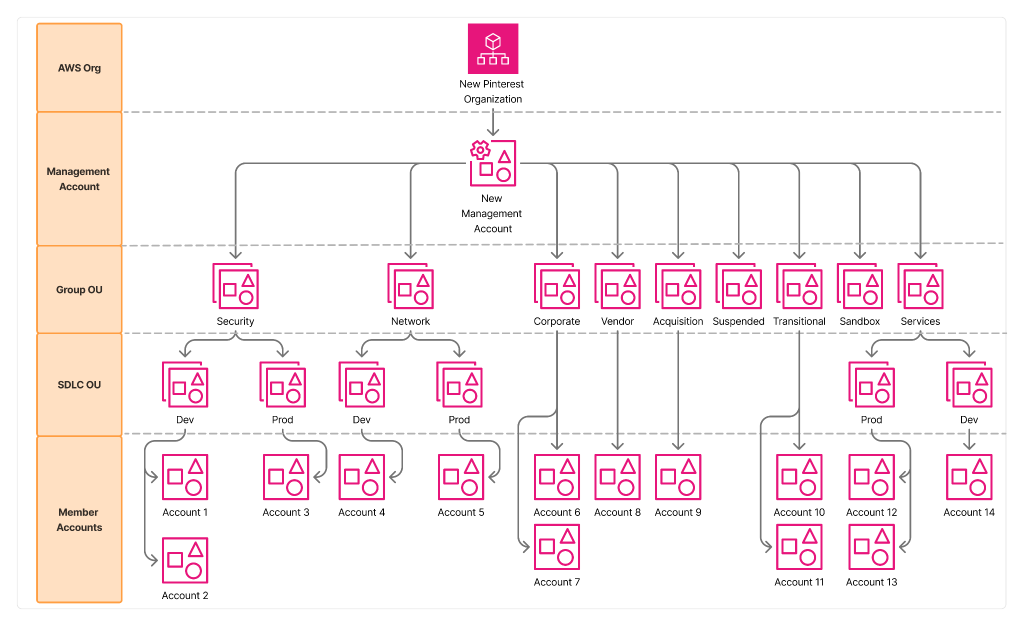
Figure 3: New Org Structure
- Security and Network OUs: Host shared infrastructure that’s centrally managed and separate sensitive infrastructure from more typical application accounts.
- Corporate OU: Houses business systems managed by the IT team, with different operating practices.
- Suspended, Transitional, and Acquisitions OUs: Manage accounts in state transition with security policies to reduce risk.
- Sandbox OU: Enables rapid experimentation with financial and security guardrails. You can use the Innovation Sandbox on AWS to accelerate this kind of development.
- Vendor OU: Houses third-party applications.
- Services OU: Holds all new AWS accounts for infrastructure and product teams building the core product, with separation between production and development accounts at the segment OU level.
This structure deviates from the Well-Architected Framework in three ways. First, Pinterest split their “exceptions” OU into known use cases, such as “Vendor” and “Corporate”, based on governance policies they wanted to apply to those groupings. Second, Pinterest created a dedicated Networking OU instead of a networking account in an Infrastructure OU for their specific networking strategy. Finally, Pinterest did not adopt some of the more advanced OUs in that framework (business continuity, deployments, and policy staging) primarily due to their single-account architecture at the time of migration.
Moving to this classification helped Pinterest understand the sprawl of their AWS accounts as they began to scale. It also allowed Pinterest to put key preflight checks in place before vending new accounts to teams to confirm each use case was well-defined and fit an existing pattern. This structure also allowed Pinterest to move from account-level SCPs to OU-level SCPs, freeing up space in those account-level SCPs for more tactical policy when needed. In short, having this structure in place enabled Pinterest to adhere to both scalability and security best practices in line with various AWS design frameworks.
Gathering Consensus and Shipping Prototypes
While Pinterest had started to see some one-off use cases for AWS accounts that were separate from their monolithic main account (for example HashiCorp Terraform testing, Disaster Recovery (DR) tooling, and corporate IT workloads), there was no strong business case to make a push toward a multi-account architecture for their core production workloads. However, in early 2022, Pinterest’s Batch Data Processing team began working on a next-generation Apache Spark system built on top of Amazon Elastic Kubernetes Service (Amazon EKS) known as Moka. In early testing, the Cloud Architecture team found several attributes of the Moka system that they suspected would impact Pinterest’s availability if it were built in the main monolithic account. These constraints were:
- Amazon Elastic Compute Cloud (Amazon EC2) API request rates for Elastic Network Interface (ENI) IP provisioning
- Network Address Usage (NAU)
- Private IPv4 exhaustion
With these findings, Pinterest needed to quantify the risk to gain consensus that they should invest in the engineering effort to pursue multi-account architecture. Pinterest occasionally experienced events related to AWS API service interruptions due to rate limiting. Pinterest extrapolated the number of AWS API calls the Moka system would make at full scale and compared it against the rates they experienced during events. They were able to conclusively prove that Moka would be throttled by the AWS APIs and impact Pinterest’s availability. Pinterest did a similar exercise comparing the maximum threshold of NAUs allowed by AWS against the predicted NAU level they would expect with Moka at scale and showed that they would exceed the threshold. Last, Pinterest looked at their available IPv4 space that was usable for Moka and determined that they needed to separate the network from the rest of production to make it manageable. You can learn more about how we designed the AWS architecture to support the Moka project here: part 1 and part 2.
The Platform Security team had been partnering with Cloud Architecture to shape a multi-account vision, so when the multi-account initiative was proposed, they lent their voice in support. In Platform Security’s view, multi-account presented a way to implement enhanced controls and to make effective use of cloud-native security tooling. The Moka team joined in partnership as the first production customer of multi-account, and Pinterest kicked off the initiative.
Big wins from Pinterest’s first workload
Using Moka as a first customer, the Cloud Architecture and Platform Security teams defined an architecture standard that outlined the networking, shared Pinterest infrastructure services, and security controls for production AWS Accounts. The teams generalized the standard for reuse by larger workloads that would need a separate account. Pinterest also defined policies describing when new accounts were needed and who should use them. This was Pinterest’s first major milestone and a durable, reusable artifact. Pinterest built their first Production account with a set of baseline security and network resources, with connectivity to their production networks. That first account was created manually, but Pinterest started to capture the implementation in Infrastructure as Code (IaC), which became the templated automation for provisioning additional accounts. The next milestone was making the account usable for Pinterest Production systems by extending shared infrastructure and security services (Puppet, CI/CD pipelines, observability, certificate authorities, and more) to support multi-account configurations. Pinterest required modifications to these shared systems to support N accounts, ensuring support for an expanding multi-account footprint in the future. For the final milestone, the Moka team launched their workload in the new account. This launch delivered new business capabilities and refined service-to-service communication, multi-account Terraform automation, and Amazon S3 ownership and permission patterns.
Management Account Separation
Pinterest spent their first decade operating primarily out of a single, monolithic AWS account, presenting many challenges outlined earlier. AWS best practices recommend using the Management Account only for billing and administration with minimal access. However, it is not possible to create a new Management Account within an existing organization. The Management Account serves as the ultimate owner with primary authority over security, infrastructure, and finance policies. Pinterest’s only option was to create a new AWS organization and move all their accounts one-by-one into that organization.
We recommend establishing a dedicated Management Account isolated from production workloads, aligning with the AWS Well-Architected Framework. The Management Account’s primary function is managing delegated administration, trusted access, AWS organizations governance features (OUs, organizational policies), and billing. It should be used only for tasks that can only be performed from the Management Account and should not host any workloads.
Key considerations when moving between AWS organizations: First, recreate organization-level services (AWS Security Hub, Amazon GuardDuty, organizational policies) in the destination organization to confirm continuity during the migration. Second, update policies referencing OU ID, organization ID, or AWS organization ARNs. Third, and most importantly, manage billing and savings plans derived from the organization. We provide resources for assessing organization dependencies and moving member accounts (Part 1, Part 2, Part 3). For assistance, contact your AWS account or support team.
If you’re in a similar position, we recommend creating a new AWS organization with an empty Management Account and migrating existing accounts. We provide documentation, best practices, and migration tools to help assess dependencies, validate networking, and verify billing continuity.
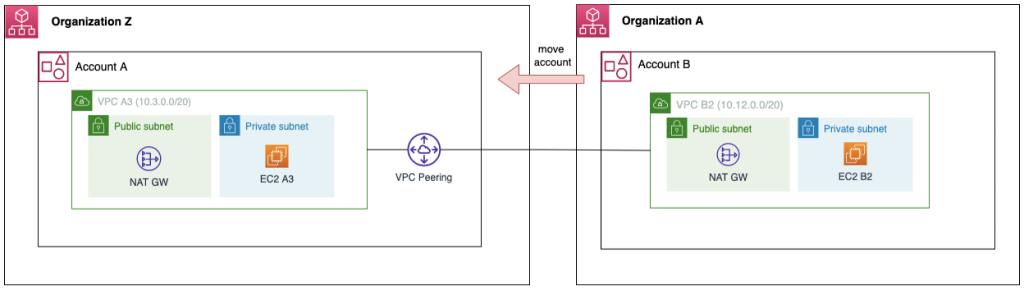
Figure 4 — Moving an AWS Account Between organizations
Pinterest had limited dependencies on organization-level services given their minimal adoption of AWS Organizations. Main use cases included Amazon GuardDuty, Amazon Macie, AWS Resource Access Manager, and Amazon S3 Storage Lens. The latter two were limited in scope and spun down prior to migration. For Macie and GuardDuty, Pinterest prepared a new Security Tooling account in their new organization and applied existing settings using IaC (Terraform).
Pinterest had few issues preparing for policy and networking migration. After running the account assessment tool, they identified no policies referencing AWS Organizations or OUs. The validation phase involved manually reviewing policies across the accounts in scope to confirm this finding and verify no edge cases were missed. Pinterest followed the Migrating accounts between AWS Organizations from a network perspective blog post using a separate instance of AWS Organizations and validated that no connectivity would be interrupted. When undergoing large changes, perform dry-runs and validations to confirm assumptions.
Pinterest focused most of their preparation effort on billing. There were two main considerations. First, Pinterest ran validations to confirm AWS Data Exports data continuity and compatibility with all their data pipelines that consume this data. Second, Pinterest confirmed that accounts with the largest spend and critical savings plans each moved within the same hour (XX:00 – XX:59). This timing was critical because reserved instances, savings plans, and preferred pricing agreements are all processed hourly. We recommend moving accounts based on impact, spend, and complexity. If you purchased Reserved Instances or Savings Plans in your current Management Account but consume them in linked accounts, migrate these accounts in the final phase to avoid losing the benefit. Solutions such as the Cloud Intelligence Dashboards and Cost Explorer can help you understand the financial dependencies between accounts. Pinterest used this aws-account-migration-example from our GitHub repo to quickly migrate batches of accounts given the time constraint.
We provide tooling (such as the Account Assessment for AWS Organizations) and best practices for assessing dependencies and validating cross-account networking. While the migration effort can be significant, it enables customers to fully use AWS’s organization-level governance and security services with reduced operational risk. Pinterest’s decision to move to a dedicated Management Account follows a broader trend among large-scale AWS customers.
Account Provisioning Tooling
Pinterest started by provisioning accounts in a mostly manual fashion. They wrote one-off Terraform configuration that was not deployed via a pipeline for the initial accounts. The first accounts took about a month to complete because Pinterest had to manually configure all standard networking, security, and shared infrastructure services from scratch. To scale a multi-account architecture at the pace Pinterest operates, they needed to reduce the time it takes to create accounts.
Pinterest evaluated services and solutions like AWS Control Tower and Account Factory for Terraform but their accounts and organizational structure were not compatible to use them. Control Tower required:
- Separation of the Management Account from the primary workload account
- Adoption of AWS Config
- Adoption of AWS IAM Identity Center
- Clearly defined baseline controls and infrastructure that applied across classes of accounts
Pinterest would eventually satisfy those requirements. However, due to the gap in capabilities, they decided to build their own solution. Pinterest identified three ways to accelerate their account vending lifecycle:
- A set of standardized baseline resources that would go in every account
- Terraform that represented these baseline resources and modules for each resource type
- A CI/CD pipeline and automation to generate Pull Requests to run through that pipeline
Some resources that every account needed couldn’t be deployed via Terraform. Additionally, some of Pinterest’s shared infrastructure services needed non-Terraform configuration changes to support additional accounts. As a result, Pinterest couldn’t automate everything with this first solution. However, automating this baseline set of resources and account creation drastically reduced the time to create a new account from one month to about two weeks. Today, Pinterest continues to add more pieces of their account baselines to this automation. These include CI/CD pipeline configurations to make accounts available for deployment, configuration management database integrations to track new accounts, and group management capabilities for their identity systems. Through this process, Pinterest learned a considerable amount about what it takes to vend repeatable accounts. Some of the learnings include submodules for different types of production accounts and what roles and permission sets are required.
Centralized Networking
Pinterest’s legacy networking configuration presented unique challenges. Choosing IP spaces, subnet sizing, and peering configurations could not be fully automated, making network creation highly manual and time-consuming. AWS best practice for multi-account connectivity is a combination of AWS Transit Gateway or AWS Cloud WAN, Amazon VPC Lattice, and Amazon VPC IP Address Manager (IPAM) (see Network connectivity for a multi-account architecture). Due to their legacy architecture, Pinterest used AWS Resource Access Manager (RAM) to share Amazon Virtual Private Cloud (Amazon VPC) resources from a centralized network account to participant accounts (VPC Sharing). RAM sharing VPC resources between AWS Organizations was not initially supported, and Pinterest had not yet separated their Management Account.
After Pinterest completed the management account separation, RAM sharing became available. Since then, Pinterest has designed a new network architecture that has become their default configuration for new AWS accounts. They manage a centralized network and share those resources into new accounts rather than provisioning new VPC resources per account. Pinterest also uses IPAM for automated IP address management. Some of the benefits of this approach are:
- Reduced management overhead to create new accounts accelerates their time to provision new accounts
- Efficient control of their network expansion
- Reduced dependency on VPC Peering
- More tractable Terraform deployment and state management for provisioning automation
Security Services
After setting up their new Management Account, Pinterest embraced more AWS managed security services that relied on AWS Organizations integrations. The main services they focused on were AWS CloudTrail, AWS Security Hub, AWS Config, and AWS IAM Identity Center.
At the time, most of these were straightforward integrations for Pinterest that they simply held off because they knew they wanted to create a new Management Account and did not want to add complexity to that migration. For example, in CloudTrail Pinterest was able to swap from per-account trails configured in a shared Terraform module to a single organization Trail enabled via a central audit account. AWS Security Hub and AWS Config were two services that Pinterest needed to roll out carefully primarily due to their scale. Pinterest knew these services could introduce potentially significant costs if implementation was not aligned with AWS’s best practices for the services, so they worked with AWS to estimate costs and understand the controls provided to tailor the deployment to exclude certain noisy resources. Once Pinterest had reliable estimates in place, they were able to enable these services with predictable costs.
Finally, AWS IAM Identity Center was a new paradigm for developer access. Pinterest’s primary way to access AWS for developers is through AdRoll’s Hologram, which works by simulating the Instance Metadata Service (IMDS) endpoint and assuming IAM roles via SSH authentication. As of this writing, Pinterest is still making progress on fully migrating away from Hologram to Identity Center, with three teams successfully transitioned to date and migrations planned for all remaining users in the coming months. Migrated teams have reported high satisfaction with the improved user experience (particularly for multi-account use cases) through centralized access management, and simplified credential rotation, eliminating the need to manage SSH keys across multiple environments.
Scaling for the Future
This post covered the steps Pinterest took to embed multi-account architecture into their culture and infrastructure: separating the management and workload accounts, building automation and tooling for vending and governance, maturing their cloud networking and security postures, and expanding beyond the first production account to many more accounts. Pinterest’s experience demonstrates that while multi-account migration requires significant planning and effort, it unlocks the ability to adopt AWS’s full suite of governance and security services with improved operational efficiency and reduced risk. Their journey from a flat, monolithic AWS organization to a mature multi-account architecture aligned with AWS best practices serves as a valuable blueprint for other organizations facing similar challenges. We want to thank everyone at Pinterest who made this possible.