AWS Cloud Operations Blog
Well-Architected Foundations Accelerator and ongoing assessment
Managing governance across tens or hundreds of AWS accounts is complex, and getting foundational capabilities right from the start matters. Whether you are a startup creating your first AWS account or an enterprise with thousands of users and accounts, every organization needs strong cloud foundations. AWS Well-Architected Cloud Foundations is guidance that helps you establish and maintain capabilities to govern your cloud environments. It organizes environment-wide best practices into seven capabilities: multi-account environment, identity and access management, central observability management, resource and inventory management, security and compliance, cloud financial management, and networking and connectivity. To learn how Well-Architected Cloud Foundations fits into the updated AWS Well-Architected Framework, see Announcing updates to the AWS Well-Architected Framework.
In this post, you learn how to find the gaps in your cloud foundations, close them with AWS services configured and running in your own accounts, and track your progress as your organization grows. We introduce two resources for this: the AWS Well-Architected Foundations Accelerator, a hands-on workshop with prescriptive steps to activate foundational AWS services according to best practices and Well-Architected principles in your environment, and the Well-Architected Foundations Assessment, an open-source tool that scans your organization in AWS Organizations and produces a maturity report with prioritized next steps.
Well-Architected Foundations Accelerator
The Accelerator is a hands-on workshop with modules that help you implement Well-Architected Cloud Foundations. You start with your landing zone: the multi-account environment, built on security and compliance best practices, that holds your organizational units, accounts, and users. You choose how to build it. You can follow step-by-step instructions to set up a landing zone in a new account or bring an existing organization into AWS Control Tower. This path works well if you want to understand each building block. Alternatively, you can use the landing zone agent in AWS Transform. The agent analyzes your organization and recommends an account structure and policies. After you approve the design, it deploys them, or it generates infrastructure as code that you review and deploy through your own pipeline.
Then you add any of six independent modules, in any order: Network Foundations, Resource and Inventory, Compliance, Security Monitoring, Central Observability, and AI Foundations. Each module takes 1 to 3 hours and walks you through enabling specific AWS services and configurations in your environment. Unlike traditional training that uses sandbox accounts, the Accelerator provides prescriptive steps designed for your production environment. You follow guided instructions to activate services such as AWS Organizations, AWS Control Tower, AWS IAM Identity Center, Amazon CloudWatch, AWS CloudTrail, Amazon GuardDuty, AWS Config, and AWS Security Hub CSPM, among others.
You leave each module with services configured and running, not just knowledge of what to do. Figure 1 shows the modules, how long each one takes, and the main services and topics that each module covers.
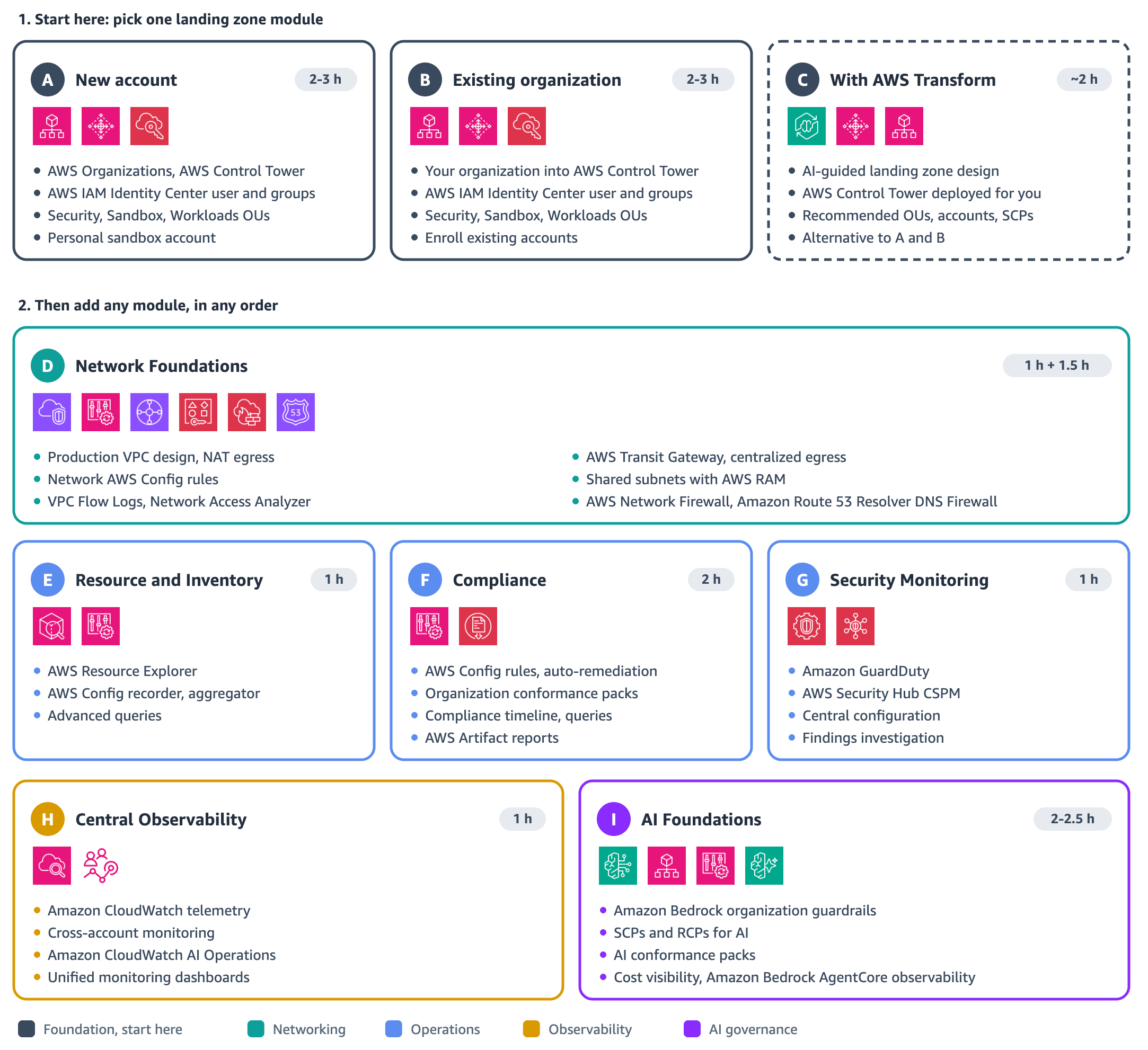
Figure 1: Well-Architected Foundations Accelerator modules
How the Accelerator works
The Accelerator is structured as a modular workshop. You can work through all modules or focus on the areas most relevant to your organization. Each module includes:
- Prescriptive implementation steps that guide you through service activation and configuration
- Best-practice configurations aligned with the Well-Architected Cloud Foundations guidance
- Validation checkpoints to confirm that each capability is correctly enabled
AWS specialists and AWS Partners use the Accelerator to help customers establish their cloud foundations. You work through it in your own environment in a 1:1 engagement, and your AWS account team can connect you with a specialist or a partner. They advise you on design decisions and help you configure the AWS services as you go.
Well-Architected Foundations Assessment
Before and after you implement foundational capabilities, you need a way to see where your environment stands as teams make changes and your organization scales. The Well-Architected Foundations Assessment addresses this need.
The Assessment is an open-source tool that evaluates the organization-level configuration of your AWS environment. Its checks use only read, list, and describe API calls. When you run it from your AWS Organizations management account, it performs 35 checks that cover your organization structure and policies, trusted access for AWS services, AWS Control Tower, IAM Identity Center, AWS CloudTrail, AWS Config, and other account resources. When you run it from a member account or a standalone account, it performs a limited set of checks.
The Assessment produces a self-contained HTML report that you can open offline, together with CSV and JSON exports. The report includes:
- A maturity level from 1 (Base) to 5 (Expert), with the criteria for each level and your progress toward the next one
- Coverage for each Well-Architected Cloud Foundations capability
- Check results that you can filter by status, each with a link to remediation guidance
- Prioritized next steps to reach the next maturity level
The following screenshots come from the sample report in the GitHub repository, which uses placeholder account data. You can open the sample report in your browser before you run the tool.
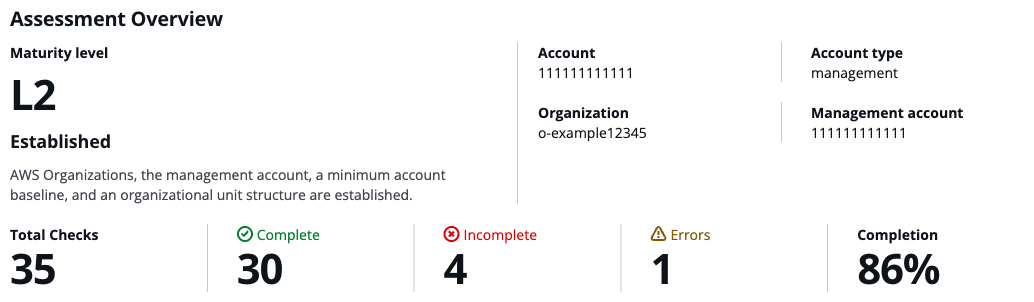
Figure 2: Assessment overview with the maturity level and a summary of check results
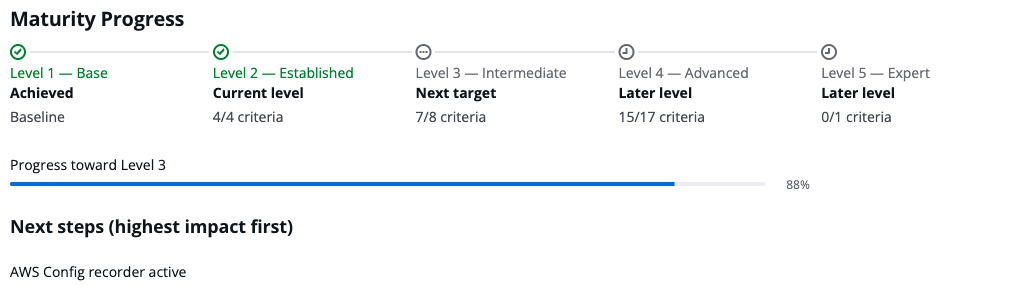
Figure 3: Maturity progress and next steps toward the next level
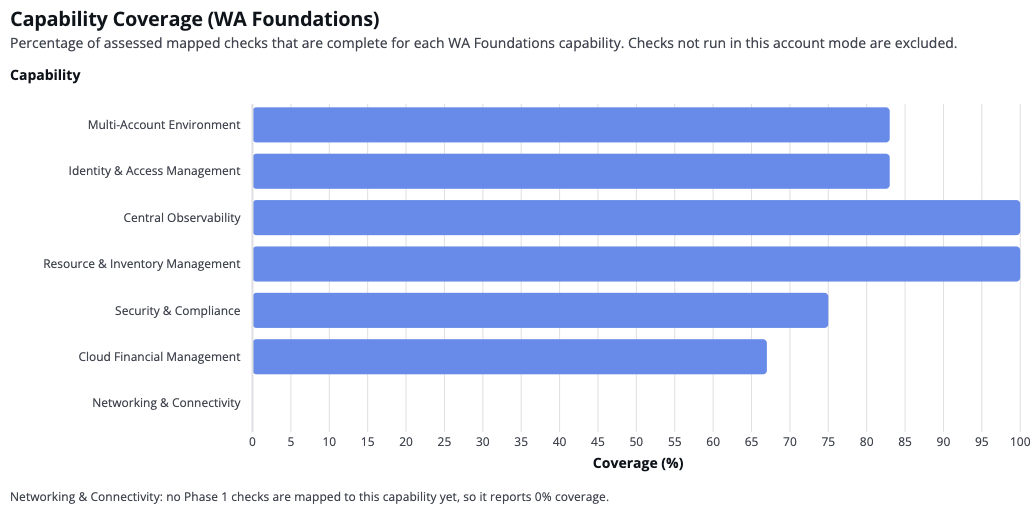
Figure 4: Coverage for each Well-Architected Cloud Foundations capability
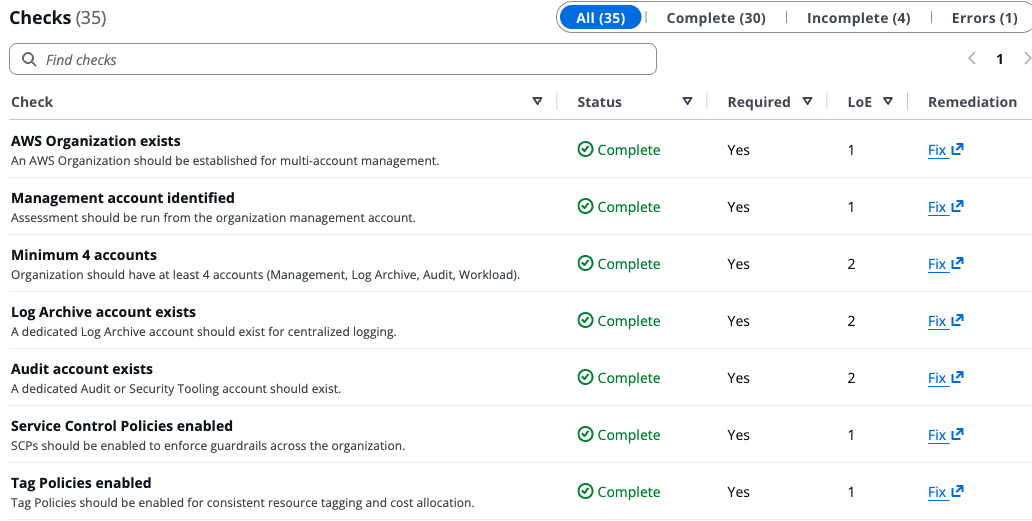
Figure 5: Check results with status, level of effort, and remediation links
The maturity level is an assessment aid, not an official AWS Well-Architected Tool score. Completing the Accelerator modules moves your environment toward the higher levels. Level 5 (Expert) requires every check to pass, including configurations that the Accelerator treats as optional. The checks evolve as the tool develops, so run the Assessment to see your current level. The current version doesn’t include checks for networking and connectivity, so that capability shows no coverage in the report.
Using the Accelerator and Assessment together
The Accelerator and Assessment complement each other:
- Assess: run the Assessment to establish a baseline and see which capabilities need attention first.
- Implement: use the Accelerator modules to activate and configure AWS services for those capabilities.
- Reassess: run the Assessment again after each batch of changes to confirm that checks move to Complete, and use the CSV export to track the remaining gaps.
Each run gives you a point-in-time view of your environment; the Assessment doesn’t monitor your environment continuously. During active remediation, run it after each batch of changes or at least monthly. For a stable environment, a quarterly review is a reasonable starting point. Also run it after major changes to your organization, landing zone, or identity configuration.
Where to start
How you use the guidance, the Accelerator, and the Assessment depends on where you are in your cloud journey:
- Starting your journey: If you are new to AWS or building a new environment, begin by reviewing the Well-Architected Cloud Foundations guidance. Then follow the landing zone module of the Accelerator, and add the modules for your priority capabilities. Run the Assessment afterward to see how you did and what to tackle next.
- Extending an existing environment: If you already operate an established AWS environment, begin by running the Assessment to see where you stand. Then follow the Accelerator module for the capability you want to add, such as AI Foundations or Security Monitoring. Run the Assessment again afterward to confirm the change.
Whichever path you take, you can also ask your account team about the AWS Security Health Improvement Program (SHIP), which helps you assess and improve the security posture of your environment.
Who should use the Accelerator and Assessment
The Accelerator and Assessment are designed for:
- Foundation and platform engineering teams establishing governance for new or existing AWS environments
- Organizations preparing for migration that need standardized account structures, security controls, and observability before moving workloads
- Teams adopting new technologies like AI that require governance with data access controls and cost tracking from the start
Whether you manage tens or thousands of AWS accounts, the Accelerator and Assessment help you implement and maintain consistent controls across your environment.
Walkthrough
How you start depends on whether you already have an organization in AWS Organizations. If you are building a new environment and don’t have an AWS account or organization yet, contact your AWS account team to schedule a Well-Architected Foundations Accelerator engagement. Start with the landing zone module for a new account, then run the Assessment to see where you stand. If you already have an organization, the following walkthrough shows an example of how to run the Assessment, close gaps with the Accelerator, and track your progress.
Prerequisites for running the Assessment
- AWS Organizations enabled, with access to the management account
- IAM permissions to deploy the Assessment resources, such as an AWS CloudFormation stack, IAM roles, Amazon S3 buckets, an AWS CodeBuild project, and an AWS Lambda function (see Deployment Permissions in the repository)
- Latest version of the AWS CLI and zip installed
To implement Well-Architected Cloud Foundations in an existing organization
- Review the AWS Well-Architected Cloud Foundations documentation to understand the seven capabilities.
- Clone the Assessment repository:
git clone https://github.com/aws-samples/sample-wa-foundations-assessment.git cd sample-wa-foundations-assessment - Deploy and run the Assessment with credentials for your management account:
./deploy.sh --profile <your-aws-profile> --region us-east-1The script deploys a CloudFormation stack, starts a CodeBuild build that runs the assessment, and shows where the report is stored. If you prefer not to deploy resources, you can run the Assessment locally or in AWS CloudShell, as described in the Quick Start.
- Download the HTML report from the Amazon S3 results bucket that the script shows, open it in a browser, review your maturity level and capability coverage, and identify the capabilities that align with your organization’s immediate priorities.
- Contact your AWS account team to schedule a Well-Architected Foundations Accelerator engagement with an AWS specialist or AWS Partner. Start with a landing zone module, then complete the modules for your priority capabilities.
- Run the Assessment again after each batch of changes to track your progress:
aws codebuild start-build \
  --project-name wa-foundations-assessment \
  --profile <your-aws-profile> \
  --region us-east-1
Clean up
The deployment creates resources in your management account. When you no longer need them, follow the Tear Down steps in the repository to delete the reports, the CloudFormation stack, and the source bucket. The results bucket has versioning turned on, so you need to delete all object versions before you delete the stack.
Getting started
Together, the Well-Architected Foundations Accelerator and Assessment help you implement governance across your AWS environment and track your progress as you scale.
- If you are building a new AWS environment: Ask your AWS account team for an Accelerator engagement, starting with the landing zone module.
- If you already run workloads on AWS: Run the Assessment to see where you stand, then use the Accelerator modules that close your gaps.
Because the Assessment gives you a point-in-time view, consider deploying AWS Config conformance packs after the Accelerator, starting from the sample templates. Their rules evaluate your resources whenever their configuration changes, so you can catch gaps between Assessment runs. To learn more, see the AWS Well-Architected documentation.