Networking & Content Delivery
Automating CIDR expansion: Reducing IP exhaustion downtime
Applications running in cloud virtual networks depend on available IP addresses for launching compute instances, creating network interfaces, and scaling container workloads. When a virtual network runs out of IP addresses during a traffic spike, new resources cannot launch and applications experience reduced capacity. Recovering from IP exhaustion typically requires you to manually identify available Classless Inter-Domain Routing (CIDR) ranges, associate them with the network, create subnets, and update routing. This process takes hours while applications operate at reduced capacity.
Amazon Virtual Private Cloud (Amazon VPC) supports adding secondary CIDR blocks to expand address space. With Amazon VPC IP Address Manager (IPAM), you can centrally manage IP addresses with automated, non-overlapping CIDR allocation. To address the challenge of manual CIDR expansion during traffic spikes, combine IPAM with Amazon CloudWatch for monitoring, AWS Step Functions for orchestration, AWS Lambda for compute, and Amazon DynamoDB for distributed locking. By combining these services, you build an automated expansion pipeline that responds in minutes instead of hours.
In this post, we walk through a serverless automation that monitors VPC IP utilization, detects utilization approaching capacity, and expands VPC capacity within minutes. You deploy the solution with the AWS Serverless Application Model (AWS SAM) and configure it per VPC through VPC tags. The solution supports three operating modes to fit different environments: full IPAM management for VPCs created from IPAM pools, IPAM for subnets only when you manage VPC CIDRs externally, and a no-IPAM mode that calculates free address space directly. The automation discovers your existing subnet naming conventions, route tables, and network ACLs, and applies them to new subnets without additional configuration.
Solution overview
The solution operates in two phases: monitor and expand.
Why Lambda polling over CloudWatch alarms
You can detect IP exhaustion in two ways. The first uses the built-in SubnetUtilization CloudWatch metrics in the IPAM Advanced tier with alarms and Amazon EventBridge rules to trigger expansion in an event-driven manner. The second uses a Lambda function that polls VPC utilization on a schedule and triggers expansion directly.
This solution uses the Lambda polling approach for three reasons. First, it works regardless of IPAM tier, including without IPAM. Second, EventBridge only fires on alarm state changes (OK to ALARM). If an expansion fails or partially completes, the alarm stays in ALARM state and doesn’t retrigger, which prevents the VPC from retrying expansion automatically. Third, the Lambda approach discovers VPC configuration from tags, removing the need for per-VPC alarm creation.
If you’re on IPAM Advanced tier, you can still use the native SubnetUtilization metrics on CloudWatch dashboards for visibility, while the Lambda function handles the actual trigger and retry logic.
| Criteria | CloudWatch alarm approach | Lambda polling approach |
|---|---|---|
| Trigger mechanism | Event-driven (alarm state change) | Schedule-based (every 5 minutes) |
| IPAM tier required | Advanced (paid) | Free, Advanced, or no IPAM |
| Self-healing on failure | No (alarm stays in ALARM state) | Yes (retries on next cycle) |
| Per-VPC alarm setup | Required | Not required |
| Compute cost | No Lambda cost for monitoring | Minimal (Lambda runs every 5 min) |
| Coverage | Only IPAM-managed subnets | Tagged VPCs regardless of IPAM setup |
In this solution, the Lambda function doesn’t use the custom CloudWatch metrics or IPAM native metrics to trigger expansion. It evaluates utilization internally and starts the workflow directly. The published CloudWatch metrics serve only as a visibility tool for dashboards and operational awareness.
Why Step Functions
The expansion workflow involves multiple sequential steps with dependencies, wait times, and conditional branching. It must acquire a lock, check VPC state, allocate a CIDR, wait for association (10 to 30 seconds), retry subnet creation with 30-second backoffs, record the result, release the lock, and send a notification. A single Lambda invocation can’t handle these wait times within its timeout. Step Functions handles state management, retry logic, error handling with lock release on failure, and execution history for auditing.
In the monitor phase, a Lambda function runs every five minutes on an Amazon EventBridge schedule. It discovers all VPCs tagged with MonitorCIDR=true, calculates IP utilization across the subnets in each VPC, and publishes three custom CloudWatch metrics per VPC: UtilizationPercentage, AvailableIPs, and TotalCapacity under the VPC/IPManagement namespace. These metrics support monitoring and dashboards only and don’t trigger any action.
When utilization exceeds the configured threshold (default 85%), the Lambda function starts a Step Functions workflow directly.
In the expand phase, Step Functions orchestrates the full expansion:
- Acquires a DynamoDB lock to prevent concurrent expansions.
- Reads the VPC configuration and operating mode from DynamoDB.
- Identifies whether the VPC needs additional address space. It examines existing subnets grouped by route table, counts the Availability Zones (AZs) in each group, and multiplies by the subnet size to calculate total IPs needed. If the VPC doesn’t have enough unallocated space, it adds a secondary CIDR.
- Allocates address space through IPAM for full_ipam mode, or uses the secondary CIDR specified in the VPC tags for other modes. It waits for the CIDR association to complete before proceeding.
- Creates subnets across AZs with dynamic naming that follows your existing convention. It detects the route table and network ACL from an existing reference subnet in the same tier and associates them with the new subnets automatically.
- Records the expansion in DynamoDB for auditing and sends an Amazon Simple Notification Service (Amazon SNS) email notification with the expansion details including VPC ID, new CIDR, and the list of subnets created.
If any step fails, the workflow releases the lock and sends a failure notification. Find the source code in the aws-samples GitHub repository.
The following diagram shows how the Lambda functions, Step Functions workflow, and DynamoDB tables interact during the expansion process.
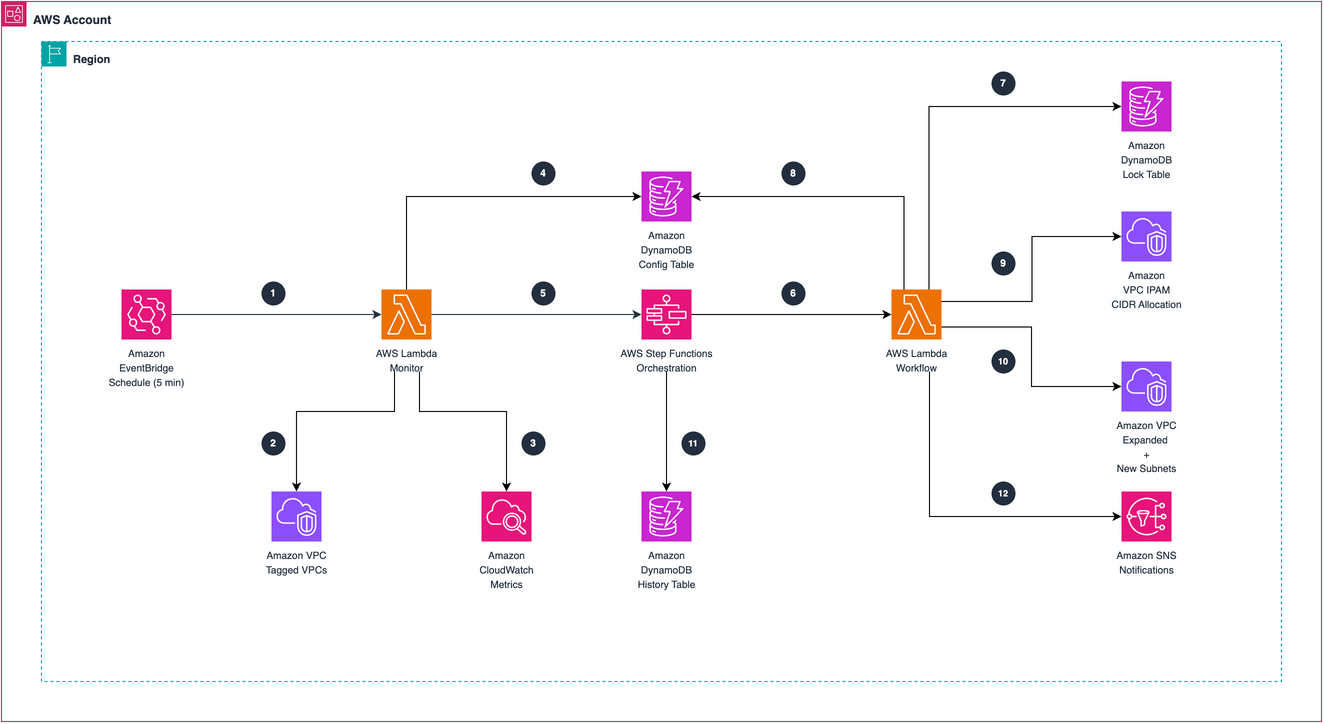
Figure 1: Automated VPC CIDR expansion architecture
Three operating modes
The solution supports three configurations, one per VPC through VPC tags. Choose the mode based on your IPAM setup: full_ipam if you use IPAM Advanced tier with VPC pools, ipam_subnets_only if you use IPAM for subnet allocation but manage VPC CIDRs separately, and no_ipam if you’re on IPAM Free tier or don’t use IPAM.
- full_ipam mode — IPAM allocates both VPC CIDRs and subnets. This mode requires two IPAM pools: a VPC CIDR pool with provisioned address space (for example,
10.200.0.0/16), and a child subnet pool with the VPC as its source resource. A single pool can’t serve both VPC CIDR allocation and subnet allocation. When the automation adds a secondary CIDR to the VPC, it provisions that CIDR into the subnet pool automatically. - ipam_subnets_only mode — IPAM allocates subnets, but you didn’t allocate the VPC CIDR from an IPAM pool. You provisioned the VPC CIDR separately through AWS Control Tower, AWS Landing Zone Accelerator, Terraform, or AWS CloudFormation. You specify the secondary CIDR block as a tag on the VPC (
CIDRExpansion:SecondaryCIDR) during setup, and the automation associates it with the VPC when address space runs out. An IPAM subnet pool configured with the VPC as its source resource handles the subnet allocation. - no_ipam mode — Doesn’t require IPAM pools. The workflow adds a secondary CIDR from the VPC tags and calculates free subnet CIDRs from the VPC’s existing address space.
Dynamic subnet naming
The workflow discovers existing subnet names, extracts the numeric portion, and increments it. If your subnets are named app-prod-priv-sub-01, app-prod-priv-sub-02, and app-prod-priv-sub-03, it creates app-prod-priv-sub-04, app-prod-priv-sub-05, and app-prod-priv-sub-06 with zero padding preserved. If existing subnets have no numeric sequence in their names, it appends a suffix starting from -1. For example, a subnet named private-subnet produces private-subnet-1, private-subnet-2, and private-subnet-3.
Configurable expansion size
The workflow calculates the expansion size based on the number of configured subnet tiers, AZs per tier, and the subnet netmask. For example, if you have one tier with three AZs using /28 subnets, the workflow needs 3 × 16 = 48 IPs and selects a /26 (64 IPs). You can override this per VPC through the expansion_netmask field in the DynamoDB config table for advanced use cases where you want to allocate more space than the minimum.
Scenario
Consider a production VPC with a /26 CIDR block (10.200.0.64/26) and three /28 subnets across three AZs, providing 33 usable IP addresses. During a load spike, workloads consume 29 addresses, pushing utilization to 88%.
The Monitor detects utilization above the 85% threshold and starts the Step Functions workflow. It checks the existing /26 address space, calculates that three new /28 subnets require 48 IPs (a /26 minimum), finds insufficient room, and adds a secondary /26 CIDR from the IPAM VPC pool. It discovers the existing subnets PrivateSubnet1, PrivateSubnet2, and PrivateSubnet3, then creates PrivateSubnet4, PrivateSubnet5, and PrivateSubnet6 in the new address space and associates them with the same route table and network ACL as the existing subnets. You receive an SNS notification with the expansion details.
After the expansion, utilization drops below the threshold and subsequent Monitor runs don’t trigger further expansion.
How the expansion workflow operates
When the Monitor detects utilization above the threshold, it starts the Step Functions workflow with the VPC ID. The execution progresses through the following states:
- CheckExpansionLock reads the DynamoDB lock table to determine whether an expansion is already running for this VPC. If a lock exists, the workflow exits quietly.
- AcquireLock writes a conditional lock entry with a 15-minute TTL. The conditional write prevents race conditions when the Monitor triggers multiple times before the first expansion is complete. If the Lambda function stops unexpectedly, the TTL releases the lock automatically.
- GetCurrentVPCState describes the CIDR blocks, subnets, utilization, and unallocated address space for the VPC. It reads the VPC configuration and operating mode from DynamoDB.
- CalculateCIDRSize verifies that utilization is above the warning threshold, then calculates the minimum secondary CIDR size needed to fit all configured subnets. If the VPC has enough free space, the workflow skips CIDR allocation.
- AllocateCIDR adds a secondary CIDR to the VPC when needed. For
full_ipam, it callsAssociateVpcCidrBlockwith the IPAM pool ID. Forno_ipam, it uses the secondary CIDR from the VPC tags. If the VPC already has enough space, the workflow skips this step. - WaitForAssociation polls the VPC until the CIDR association is complete (typically 10 to 30 seconds). After association, the function provisions the new CIDR into the subnet IPAM pool.
- CreateSubnets creates one subnet per AZ for each tier defined in the configuration. It discovers existing subnet names, generates the next sequential names, and creates the subnets through the IPAM subnet pool or finds available CIDRs from the VPC address space in
no_ipammode. The function copies route table and network ACL associations from the reference subnet and tags each new subnet withAutoExpanded=truefor identification. If IPAM allocation fails because of timing, the function retries up to three times with a 30-second backoff. - RecordExpansion writes the expansion details to the DynamoDB history table, including the VPC ID, timestamp, new CIDR block, and the subnets created.
- ReleaseLock clears the DynamoDB lock after the expansion is complete, so the VPC is available for future expansion cycles.
- NotifySuccess publishes a message to the SNS topic with the expansion summary. If any preceding step fails, the workflow transitions to ReleaseLockAndFail, which releases the lock and sends a failure notification.
Prerequisites
To deploy this solution, you need the following:
- An AWS account with permissions to create Lambda functions, Step Functions state machines, DynamoDB tables, EventBridge rules, SNS topics, AWS Key Management Service (AWS KMS) keys, and AWS Identity and Access Management (IAM) roles.
- AWS SAM CLI installed.
- A VPC tagged with
MonitorCIDR=true. - For
full_ipammode: An IPAM with a VPC CIDR pool and a child subnet pool with the VPC as its source resource. - For
ipam_subnets_onlymode: An IPAM subnet pool with the VPC as its source resource. - For
no_ipammode: A secondary CIDR range that doesn’t overlap with existing VPC or peered VPC address space.
Implementing the solution
The following steps deploy the SAM stack and configure the automation for your VPC.
Step 1. Clone the repository and deploy
You deploy the solution as an AWS SAM application. Clone the solution from the aws-samples GitHub repository and deploy with SAM:
The sam build command packages the Lambda functions, and sam deploy --guided walks you through the deployment parameters. SAM prompts for:
- VpcIpamPoolId — IPAM pool ID for VPC CIDR allocation (required for
full_ipammode). - SubnetIpamPoolId — IPAM pool ID for subnet allocation (required for
full_ipammode). Foripam_subnets_onlymode, each VPC uses a per-VPC pool specified through theCIDRExpansion:SubnetPoolIdtag. - UtilizationThreshold — Utilization percentage that triggers expansion (default: 85).
- NotificationEmail — Email address for SNS notifications. You must confirm the subscription from your inbox.
A single sam deploy creates a complete, ready-to-use automation with 16 resources: two Lambda functions, a Step Functions state machine, three DynamoDB tables (locks, history, configuration), an SNS topic, an Amazon Simple Queue Service (Amazon SQS) dead letter queue, a CloudWatch Logs log group, an AWS KMS key, an AWS KMS alias, an EventBridge schedule, and associated IAM roles. The DynamoDB tables and the SNS topic are encrypted with a customer managed key for data protection.
Step 2. Tag your VPC
Tag each VPC with the required configuration tags. The Monitor Lambda discovers subnet tiers from existing subnets and generates the DynamoDB configuration automatically — no manual DynamoDB entry needed.
Tag your VPC with the following:
- MonitorCIDR (always required) — set to
trueto activate monitoring - CIDRExpansion:Mode (always required) — operating mode:
full_ipam,ipam_subnets_only, orno_ipam - CIDRExpansion:SecondaryCIDR (for
ipam_subnets_onlyandno_ipam) — CIDR to add when space runs out - CIDRExpansion:SubnetPoolId (for
ipam_subnets_only) — IPAM pool for subnet allocation
For no_ipam mode:
For full_ipam mode:
The Monitor automatically discovers tier name (private or public based on route table), subnet netmask, naming pattern, AZs, route tables, and network ACLs from existing subnets. This covers most deployments without additional configuration.
Step 3. Verify monitoring
Invoke the Monitor function manually to confirm it discovers your VPC and automatically generates the configuration:
The response shows the VPC ID, total capacity, allocated IPs, and utilization percentage:
The function publishes metrics automatically every five minutes.
Step 4. Test the expansion workflow
Before relying on the automated trigger, validate the expansion logic by starting the Step Functions workflow manually. It enforces the utilization threshold, so your VPC must have utilization above the configured threshold (default 85%) for the expansion to proceed. You can simulate IP exhaustion by creating network interfaces in the subnets.
A successful run creates new subnets with the correct naming convention, records the expansion in the vpc-cidr-expansion-history DynamoDB table, and sends an email notification:
Verify the new subnets:
Considerations
The Monitor Lambda discovers VPCs based on the MonitorCIDR=true tag. Tag additional VPCs to monitor them without redeploying the stack.
IPAM resource discovery takes two to five minutes after VPC creation. Create the subnet IPAM pool only after IPAM discovers and monitors the VPC. In ipam_subnets_only mode, the automation adds the secondary_cidr from the VPC tags when the VPC runs out of space. The per-VPC IPAM subnet pool must have the VPC as its source resource.
The DynamoDB lock uses a 15-minute time to live (TTL). If a Lambda function stops unexpectedly, the lock expires automatically. A VPC supports a maximum of five CIDR blocks. The workflow checks this quota before adding a secondary CIDR. For the current quota, see VPC quotas in the Amazon VPC User Guide.
The automation logs each expansion in the vpc-cidr-expansion-history DynamoDB table with the VPC ID, timestamp, new CIDR, and subnets created. It tags new subnets with AutoExpanded=true and ManagedBy=vpc-cidr-automation so you can easily identify and audit auto-created resources.
This solution addresses IPv4 CIDR exhaustion. Amazon VPC allocates IPv6 address space from Amazon’s pool, and the allocation is large enough (/56 per VPC) that exhaustion isn’t a practical concern.
This solution works well alongside other approaches to IPv4 address exhaustion, such as private NAT gateways that conserve IP addresses by sharing them across Amazon Elastic Kubernetes Service (Amazon EKS) pods, and AWS Cloud WAN service insertion that centralizes shared resources to reduce address space consumption. For large-scale networks, IPv6 adoption remains the recommended long-term approach.
Cleaning up
To remove all resources created by this solution, first disable deletion protection on the DynamoDB tables:
Then delete the stack:
This deletes all Lambda functions, the Step Functions state machine, DynamoDB tables, the KMS key, and the SNS topic. Subnets and secondary CIDRs created by the automation remain in the VPC because they might be serving active workloads. To remove them, first verify that no resources are running in the automatically expanded subnets, then delete the subnets and disassociate the secondary CIDRs through the Amazon VPC console. Identify automation-created subnets by filtering on the AutoExpanded=true tag.
Conclusion
VPC IP address exhaustion during peak load causes application downtime and requires manual intervention. In this post, we walked through a serverless automation that detects this risk and expands VPC capacity within minutes.
The solution combines CloudWatch monitoring, Step Functions orchestration, IPAM address allocation, and DynamoDB locking into a single SAM application. Three operating modes make it adaptable: full_ipam for IPAM-managed address space, ipam_subnets_only for environments where you manage VPC CIDRs separately, and no_ipam for environments without IPAM. Subnet naming follows your existing conventions, the automation detects route tables and network ACLs automatically, and it records every expansion for auditing.
Use this automation to reduce the operational overhead of managing VPC IP capacity. If you have questions, post them in the comments section, or visit the sample-automated-vpc-cidr-expansion GitHub repository.
Further reading
- IPAM: How it works in the Amazon VPC IP Address Manager (IPAM) User Guide
- VPC CIDR blocks in the Amazon VPC User Guide
- Standard and Express workflows in the AWS Step Functions Developer Guide
- Publishing custom metrics in the Amazon CloudWatch User Guide
- AWS SAM template anatomy in the AWS SAM Developer Guide
- Addressing IPv4 address exhaustion in Amazon EKS clusters using private NAT gateways on the AWS Containers Blog
- Addressing private IPv4 exhaustion with AWS Cloud WAN service insertion on the AWS Networking & Content Delivery Blog
- IPv6 on AWS in the AWS Whitepapers library
About the authors

Aravindan A
Aravindan is a Delivery Consultant at AWS, where he architects and implements scalable cloud solutions across storage, security, DevOps, infrastructure, and AI. He specializes in helping enterprise customers automate security governance and build serverless workflows that reduce operational overhead. He enjoys simplifying complex problems and sharing practical insights with the cloud community.

Khalid Ahmed
Khalid Ahmed is a Delivery Consultant at AWS, where he specializes in automating infrastructure delivery to help enterprise customers move large-scale workloads to the cloud. He brings strong DevOps and platform engineering expertise, applying AI to accelerate migrations and reduce operational overhead. He is drawn to complex challenges and building solutions that last.