AWS Public Sector Blog
Build a self-service student assistant with Amazon Bedrock Knowledge Bases
With a self-service student assistant that’s built on Amazon Bedrock Knowledge Bases, universities can solve one of their most persistent challenges: getting students the right information at the moment they need it. In our work with institutions and EdTech companies, the same scenarios keep surfacing. Career-focused universities need AI assistants that are scoped to specific courses and grounded in instructor materials. At a historically black college or university (HBCU), the goal might be an on-demand learning companion that reflects the institution’s unique pedagogical voice.
Each institution already maintains syllabi, policy PDFs, course catalogs, lecture transcripts, and textbook content that contain the required information. What’s missing is the ability to make the documents instantly searchable in natural language.
With Amazon Bedrock Knowledge Bases, you build an assistant that grounds answers in your trusted documents through Retrieval Augmented Generation (RAG).
Answers exist, but students can’t find them
Higher education institutions typically maintain student-facing information across dozens of sources, such as the following:
- Course catalogs (often 200-page or more PDFs updated annually)
- Admissions policies (application requirements, transfer credit rules, deadlines)
- Financial aid policies (federal, state, and institutional, each with its own documents)
- Academic calendars and deadlines (semester and program)
- Department-specific FAQs (advising, registrar, bursar, housing, IT)
- Student handbooks (conduct policies, grievance procedures, accommodations)
Students don’t know which system holds the answer that they need. They search one portal, then another, then submit a ticket for help. Staff manually triage incoming tickets, often copying and pasting the same answer they sent last week. The information isn’t missing. It’s fragmented, unstructured, and hard to search for.
This pattern doesn’t scale, especially during peak periods such as enrollment, orientation, and financial aid deadlines.
RAG-powered self-service with Amazon Bedrock Knowledge Bases
RAG combines the natural language understanding of a large language model (LLM) with accurate retrieval from your institution’s documents. Training a model on your data can be expensive and time-consuming. Instead, RAG retrieves relevant passages when you ask a question and uses them to generate cited answers. When a policy changes, you update the document, not the entire model.
With Amazon Bedrock Knowledge Bases, you can use a fully managed RAG pipeline that consists of the following elements:
- Document ingestion to connect source documents from Amazon Simple Storage Service (Amazon S3) and other supported sources.
- Chunking that automatically splits documents into semantically meaningful pieces.
- Embedding that converts text chunks into vector representations for similarity search.
- Vector storage that stores embeddings in a managed vector index.
- Retrieval and generation that finds the relevant chunks and generates a cited, natural-language answer.
You don’t have to build the chunking logic, manage a vector database, or orchestrate retrieval yourself. You upload your documents to Amazon S3, sync, and ask a question.
- Indexing runs one time initially and again whenever content changes. The embeddings are stored in your chosen vector store, which defaults to Amazon S3 Vectors for cost efficiency.
- Retrieval and generation run on every student question. You can use Amazon Bedrock Guardrails to screen both the incoming prompts and the outgoing response so that answers are relevant and appropriate.
The following diagram shows how these two phases fit together end to end, from document indexing to retrieval and generation.
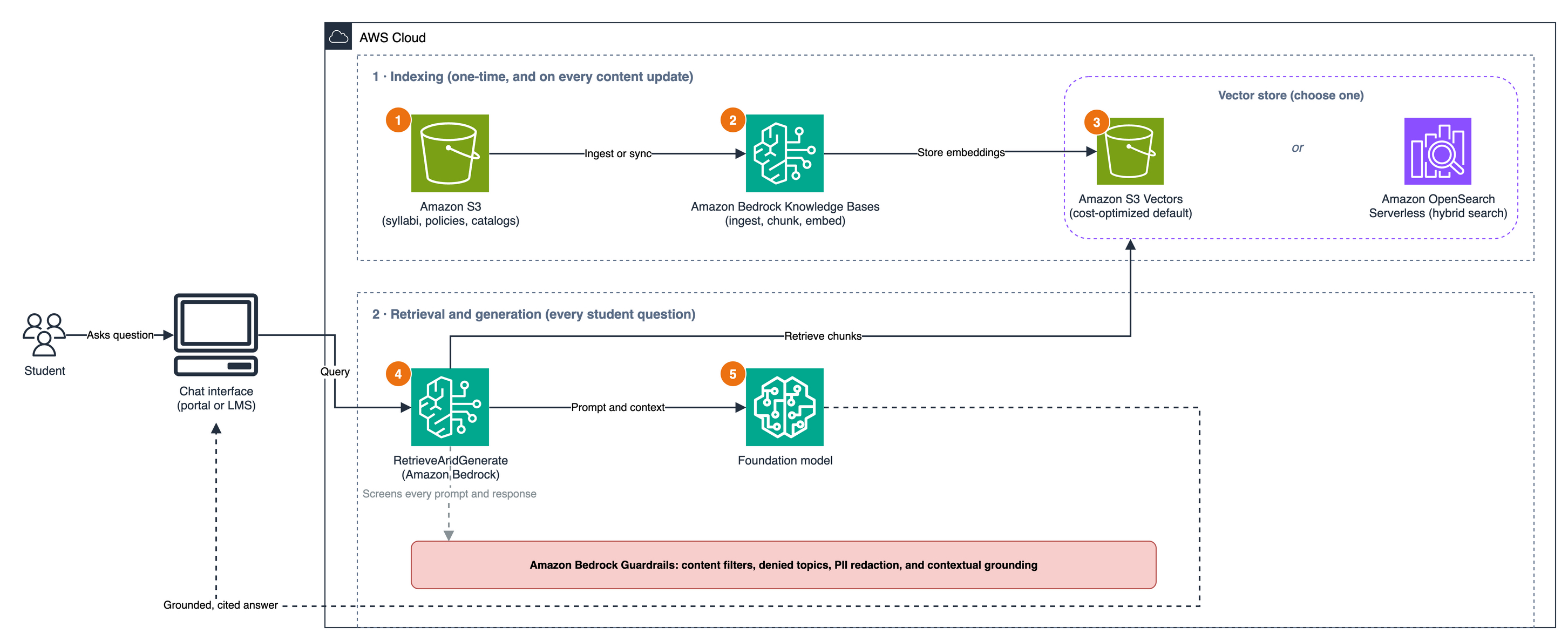
Figure 1: End-to-end RAG flow with Amazon Bedrock Knowledge Bases
Choose your knowledge base type
The self-service student assistant in this post uses a self-managed knowledge base with an unstructured data vector store, which gives you full control over indexing, ranking, and cost. However, Amazon Bedrock Knowledge Bases offers other options depending on your requirements. The following table outlines these options.
| Knowledge base type | Best fit | Key trade-off |
|---|---|---|
| Self-managed, unstructured data (used in this post) | Policy PDFs, catalogs, syllabi, and other unstructured documents | Full control over chunking, vector store, and cost |
| Amazon Bedrock managed | Quick setup with software as a service (SaaS) connectors and minimal operational overhead | You trade control for speed; Amazon Web Services (AWS) manages the vector store and models |
| Self-managed, structured data | Tabular or relational data in Amazon Redshift (enrollment, registration, financial systems) | Natural-language queries over structured data without a text-to-SQL layer |
Visit the Amazon Bedrock User Guide for a full comparison of Amazon Bedrock managed and customer managed knowledge bases.
Choose your vector store
For most self-service student assistants, the options are S3 Vectors and Amazon OpenSearch Serverless. The following table outlines the options.
| Vector store | Best fit | Cost model |
|---|---|---|
| S3 Vectors (used in this post) | Pure semantic search (FAQ bots, policy lookup, catalog retrieval) with intermittent traffic | No idle cost; cost-optimized for infrequent workloads |
| OpenSearch Serverless | Hybrid search (keyword plus vector), full-text matching, faceted filtering, or high-throughput production workloads | Higher cost for always-on; next generation supports scale-to-zero to reduce idle cost |
Start with S3 Vectors for a scoped pilot. Move to OpenSearch Serverless only if you later need hybrid or full-text search. For more information, refer to The next generation of Amazon OpenSearch Serverless: Built from the ground up for agents.
How to build a self-service student assistant
This section walks through building a self-service student assistant from end to end. To build the assistant, complete the following high-level steps:
- Upload your institutional documents to Amazon S3.
- Create an Amazon Bedrock knowledge base that references your Amazon S3 data source.
- Sync the knowledge base and test it with natural language questions.
- (Optional) Configure an Amazon Bedrock guardrail to help you maintain safe, institution-relevant responses.
- Put the assistant in front of students through your portal, learning management system (LMS), or a frontend chat.
Prerequisites
Before you begin, make sure that you have the following:
- An AWS account with access to Amazon Bedrock.
- An S3 bucket to store your source documents.
- AWS Identity and Access Management (IAM) permissions to create a knowledge base and read from your S3 bucket. If you create the knowledge base through the AWS Management Console, then Amazon Bedrock can create a service role with the required permissions.
- Access to a foundation model (FM) to use for answers and an embeddings model to use for vectors. In most AWS Regions, model access is activated by default. For some accounts or in AWS GovCloud (US), you might need to request model access.
- A vector store. Regardless of the vector store that you use, it’s a best practice to activate encryption at rest to help protect your embedded institutional content.
To get started, open the Amazon Bedrock console and confirm that you’re in the Region where you want to build. Then complete the steps in the following sections.
Prepare and upload your data
Gather the documents that your assistant can build answers from, such as course catalogs, syllabi, handbooks, financial aid guides, and advising resources. Amazon Bedrock Knowledge Bases supports common document formats including .txt, .md, .html, .doc or .docx, .csv, .xls or.xlsx, .pdf, and Markdown.
Upload the documents to your S3 bucket and organize by prefix based on how you want to control access. For finer control, add a filename.metadata.json file for each document with attributes such as course_id or department to filter results at query time. Don’t upload stale or duplicate documents. RAG answers reflect the accuracy and completeness of the documents that they’re built from. The following screenshot shows an example S3 bucket for the assistant, with source documents organized by department prefix.
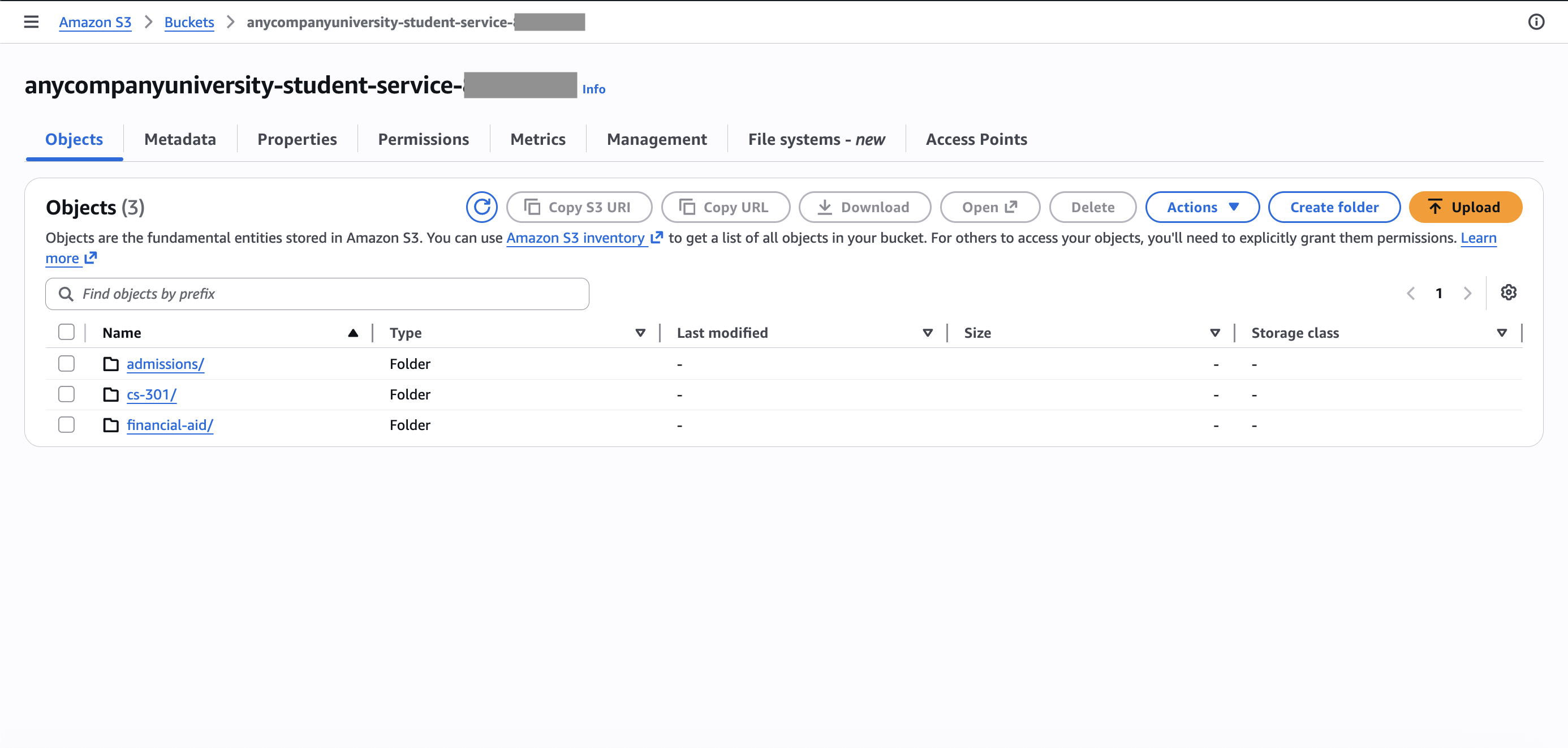
Figure 2: S3 bucket for the student-services assistant, with source documents organized into department prefixes such as admissions/, cs-301/, and financial-aid/
Create the knowledge base
To create the knowledge base, complete the following steps:
- Open the Amazon Bedrock console.
- In the navigation pane, choose Knowledge Bases (KB).
- On the Create Managed KB dropdown list, choose Unstructured Vector Store KB.
- Under Knowledge Bases, configure a name, a new service role, and your S3 bucket or prefix as the data source.
- Under Embedding model, configure your embeddings model.
- Under Vector database, choose Quick create a new vector store, and then Amazon S3 vectors.
- Choose a chunking strategy. Chunking has one of the biggest impacts on retrieval quality. For example:
- Fixed-size chunking (equal segments with overlap) is better for uniform documents such as FAQs.
- Semantic chunking (groups sentences by meaning) is better for narrative content like advising guides.
- Hierarchical chunking (focused child chunk with broader parent context) is good for nested policy handbooks.
- For tables, images, or scanned PDFs, use Amazon Bedrock Data Automation or a foundation model as a parser.
The following screenshots show the Knowledge Bases page and the guided creation flow.
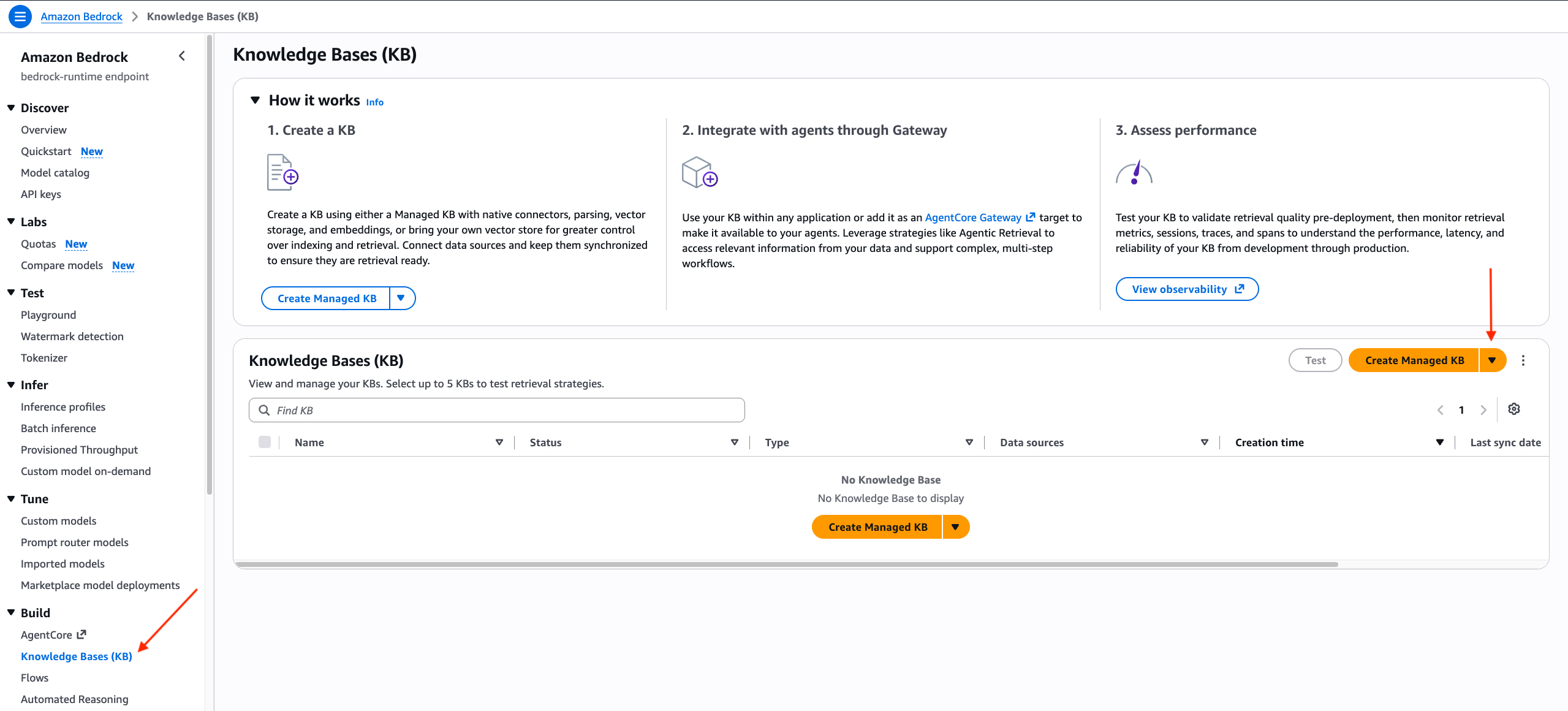
Figure 3: The Knowledge Bases (KB) page, showing the Create Managed KB button and the knowledge bases resource list
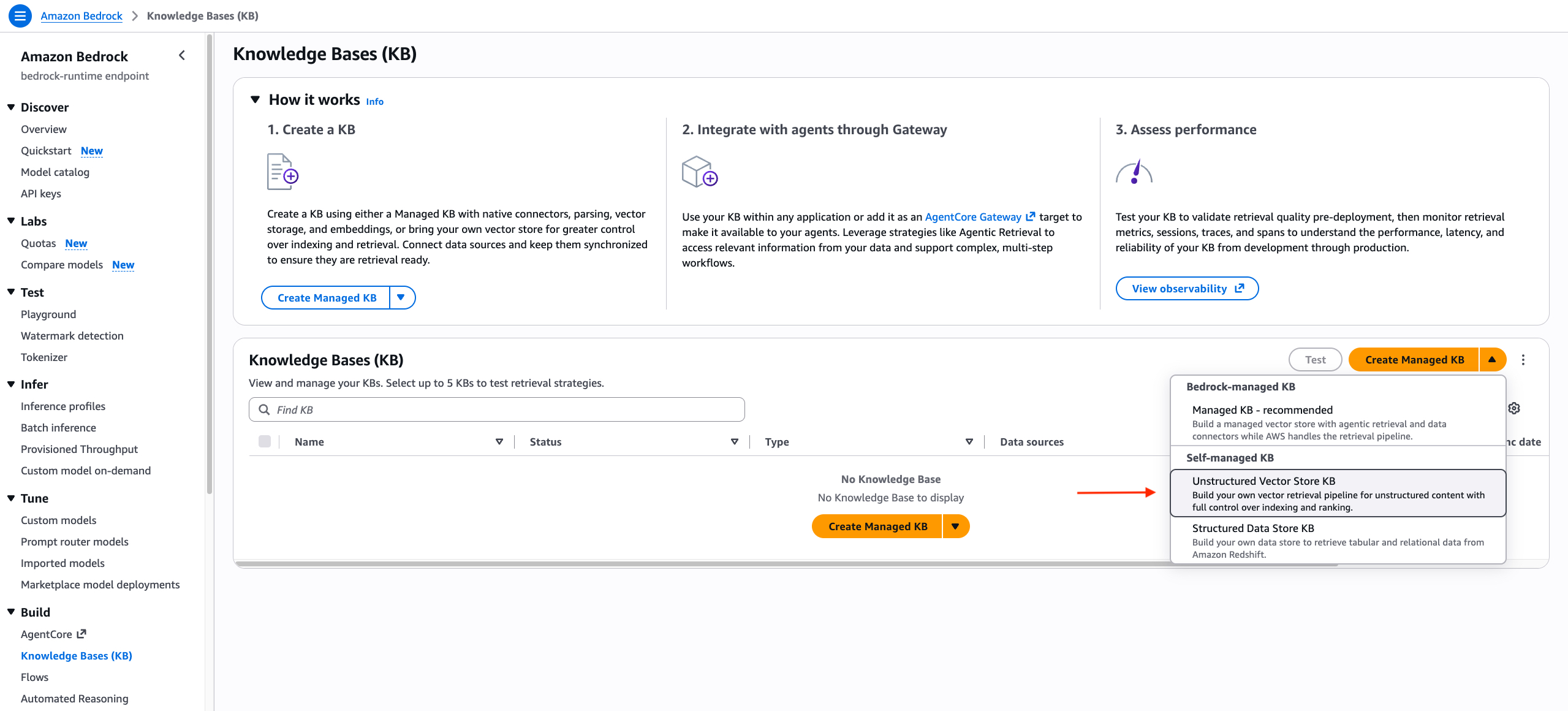
Figure 4: The Create Managed KB dropdown list, with Unstructured Vector Store KB under Self-managed KB
Sync and test
Open your knowledge base and choose Sync to ingest, chunk, embed, and index your documents. Resync whenever sources change. To automate this process, use Amazon S3 event notifications.

Figure 5: The Sync button on the Data source page, with Status showing as Available
Select a foundation model to generate responses, then ask questions in natural language, such as:
- “What are the prerequisites for Computer Science 301?”
- “When is the deadline to drop a course without penalty?”
- “How do I apply for work-study financial aid?”
The following screenshot shows the UI for this step in Amazon Nova 2 Lite.
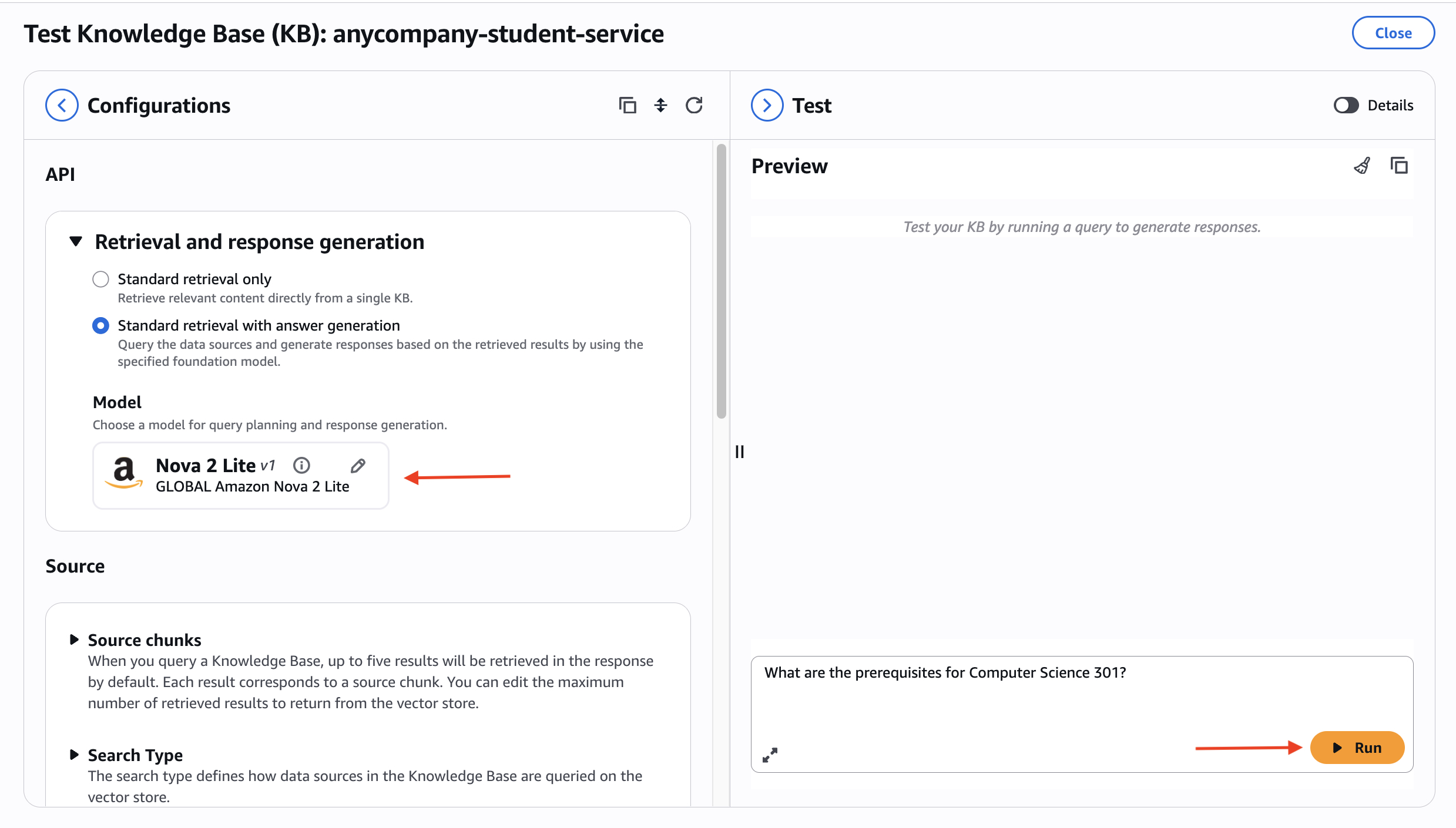
Figure 6: Testing the knowledge base with Amazon Nova 2 Lite and the question “What are the prerequisites for Computer Science 301?”
To review the retrieved source chunks, choose Details. If answers aren’t accurate, modify your chunking strategy, add metadata filters, or clean up your source documents. The following screenshot shows the answer to the question about course prerequisites source chunk details.
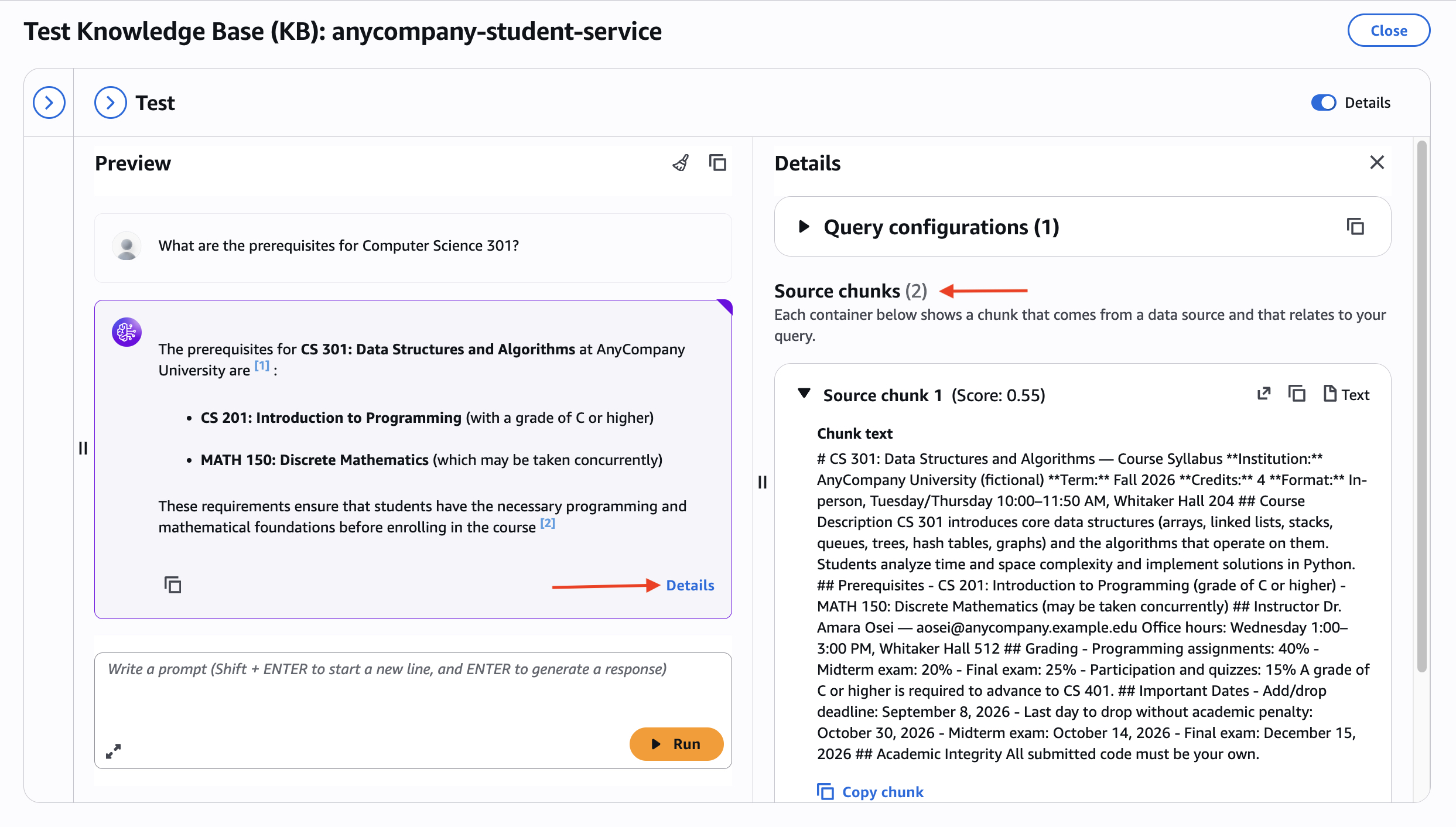
Figure 7: Inspecting the source citations for a response in the knowledge base test pane, showing the source document that each retrieved chunk came from
For student-facing tools, build an evaluation set of question and expected-answer pairs. Use RAG evaluation job reports and metrics to score the accuracy.
Configure a guardrail
Before you put the assistant in front of students, create an Amazon Bedrock guardrail to help keep responses safe, on-topic, and grounded on your institution’s content. A guardrail filters both incoming and outgoing responses.
The following are example guardrails for higher education institutions:
- Denied topics that block subjects such as medical, legal, or mental-health advice and redirect students to the right campus office.
- Content filters that set strength levels for hate, insults, sexual content, violence, misconduct, and prompt injections.
- Sensitive information filters that detect and redact personally identifiable information (PII) such as student IDs or Social Security numbers.
- Contextual grounding checks that require responses to be based on retrieved sources. This setting helps reduce hallucinations.
- Blocked messaging that returns a student-friendly fallback, such as “I couldn’t find that in our official materials. Please contact the registrar’s office.”
Test your guardrail against the same evaluation questions from Sync and test and against deliberately off-topic or adversarial prompts.
Put the assistant in front of students
You can embed a chat widget into your existing student portal or LMS, create a lightweight web app, or connect the assistant to Slack, Teams, or SMS. Whichever frontend you choose, it interacts with the same two Amazon Bedrock Knowledge Bases APIs. RetrieveAndGenerate returns a grounded, cited answer. Retrieve returns the source chunks so that you can pass them to your own prompt. Attach your guardrail to keep safety logic within the same managed service.
Clean up
To avoid ongoing charges, remove the resources that you no longer need:
- Delete knowledge bases. If Amazon Bedrock created and managed the vector store for you, then this step also removes the vector store.
- Delete guardrails.
- If you brought your own vector store, then delete the collection or cluster.
- Empty and delete the S3 bucket.
Best practices for student-facing deployments
Student records are often subject to regulations such as the Family Educational Rights and Privacy Act (FERPA). To protect student data and privacy, scope knowledge bases to nonsensitive institutional content, keep source data in your own S3 buckets, and apply the principle of least privilege for IAM access.
To keep responses on-topic and appropriate, pair the knowledge base with Amazon Bedrock guardrails to filter harmful content, block off-topic prompts, and reduce hallucinations.
Use an evaluation set and Amazon Bedrock Knowledge Bases evaluation to establish an accuracy baseline before launch. Rerun tests whenever you change chunking, sources, or models.
To meet accessibility requirements, know your institution’s standards and design your chat interface to align with them.
Plan for cost and scale. S3 Vectors keeps costs low with no idle cost. Amazon OpenSearch Serverless adds hybrid search with a scale-to-zero option. Review Amazon Bedrock pricing and start with a scoped pilot before expanding institution wide.
Conclusion
Generative AI that’s grounded on institutional content through RAG helps you deliver on the goal of self-service student support. With Amazon Bedrock Knowledge Bases, you can build an assistant from the documents that you already maintain. Use Amazon Bedrock guardrails to help keep responses on-topic and institution-appropriate.
The examples in this post come from higher education, but this solution is relevant to organizations that manage fragmented knowledge and repetitive questions. The documents already exist. The questions are already being asked. With Amazon Bedrock Knowledge Bases, you can seamlessly connect the two.
Learn more about knowledge bases at Retrieve data and generate AI responses with Amazon Bedrock Knowledge Bases. To go deeper, refer to How Amazon Bedrock knowledge bases work and Review RAG evaluation job reports and metrics. Start a scoped pilot with one department’s documents. Measure accuracy with an evaluation set and then expand.