AWS Storage Blog
Accelerate Amazon S3 Replication with automated S3 Batch Operations parallelization
As data volumes grow, organizations must move large datasets between storage locations to meet compliance requirements, optimize performance, and help meet data sovereignty requirements. However, migrating petabytes of data presents significant challenges: lengthy transfer times, complex coordination of parallel operations, data integrity verification, and substantial engineering overhead. Automation reduces resource consumption and operational complexity during migrations.
AWS addresses these challenges through Amazon S3 Batch Operations for large-scale object operations, Amazon S3 Cross-Region Replication for automated transfers, and serverless orchestration with AWS Step Functions, AWS Glue, and AWS Lambda. This combination helps you build automated, scalable pipelines that manage complex migrations without infrastructure overhead, supporting parallel processing and intelligent error handling that scales with demand.
In this post, we walk you through a production-ready solution you can deploy to automate large-scale data migrations. Using S3 Batch Operations, Step Functions, and Lambda, we build a pipeline that orchestrates concurrent replication jobs across AWS Regions and AWS accounts. For buckets exceeding 20 billion objects, the solution automatically configures Amazon S3 Inventory reports. This approach reduces operational overhead, improves compliance management, enhances performance through optimized data locality, and scales efficiently as your storage grows—directly addressing the complexity of enterprise data migrations.
Solution overview
This section describes the technical workflow for migrating data from a source S3 bucket in one Region to a destination S3 bucket in another Region. The process includes Cross-Region Replication, AWS Glue, S3 Batch Operations, and supporting services like Lambda and Step Functions for monitoring and orchestration.
The following diagram illustrates the end-to-end architecture for the S3 data migration solution. The architecture shows how Step Functions orchestrates the workflow, coordinating Lambda functions, AWS Glue jobs, and S3 Batch Operations to automate large-scale data replication between source and destination buckets across Regions.
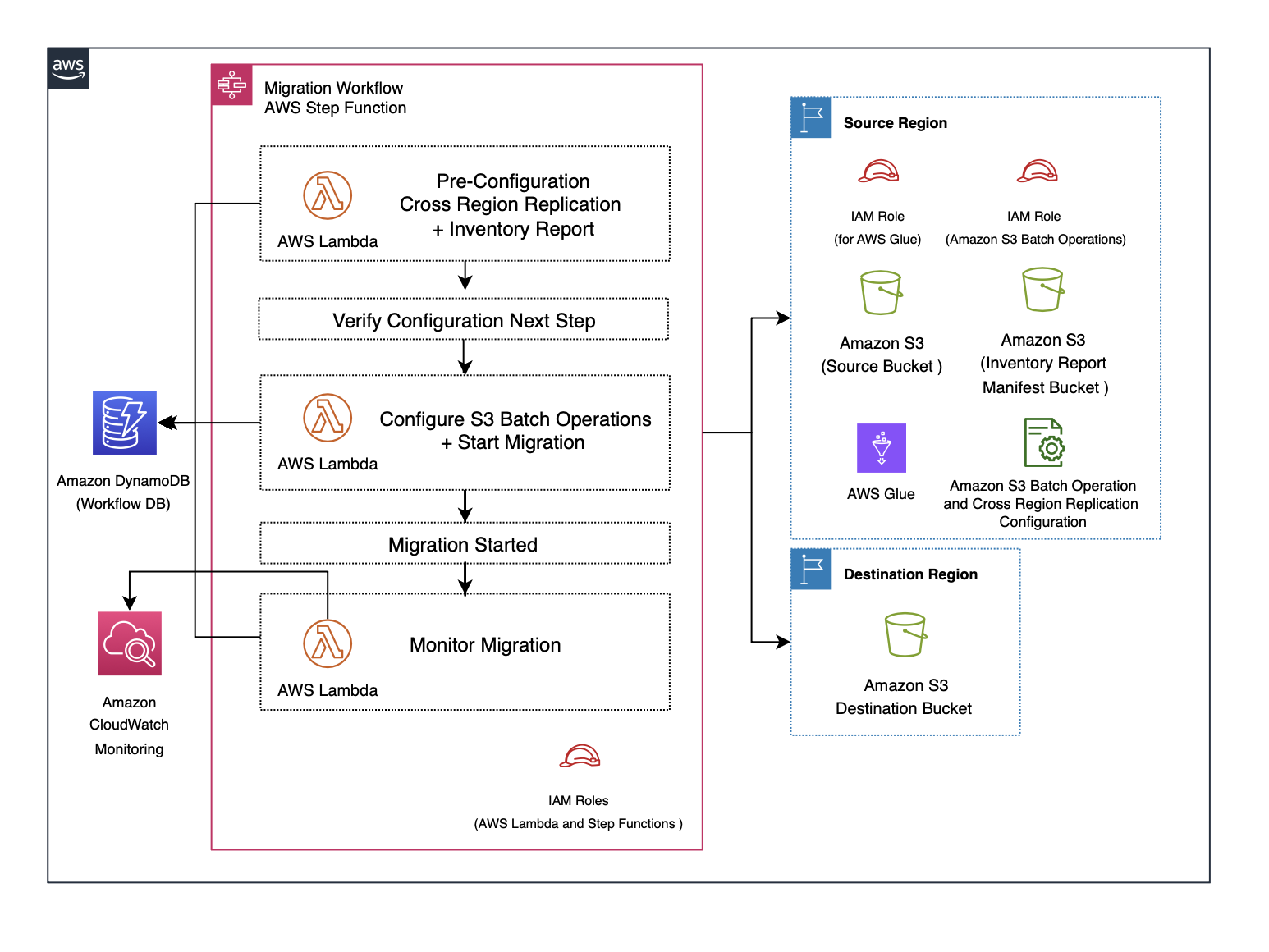
Figure 1: Solution architecture diagram
We provide a full solution that can be deployed into your AWS account, including infrastructure as code (IaC) using the AWS Cloud Development Kit (AWS CDK). Refer to the GitHub repository to access the code.
Using this solution incurs cost due to deployment of AWS resources.
Migration workflow
A Step Functions workflow is used to orchestrate the S3 data migration end to end. This migration workflow combines the following components:
- Cross-Region Replication for real-time ongoing replication
- S3 Inventory and AWS Glue for manifest creation
- S3 Batch Operations for bulk migration of pre-existing objects
- Step Functions for orchestration, monitoring, and error handling
Each step is described in this section.
Step 1. Pre-configuration Cross-Region Replication and inventory report
This step establishes the foundation for data migration by configuring replication and generating inventory reports. The pre-configuration phase includes setting up Cross-Region Replication to handle ongoing changes, generating inventory reports for large buckets, creating manifest files for batch operations, and verifying that all components are properly configured. The following subsections detail each component.
Cross-Region Replication
This step invokes a Lambda function to establish Cross-Region Replication on the source bucket to facilitate live replication between the source and destination buckets. The Cross-Region Replication configuration automatically replicates new objects created or existing objects modified during the migration process to maintain data consistency.
The following table summarizes the AWS Identity and Access Management (IAM) roles required for this solution. We provision these roles using an AWS CDK stack.
| Role | Provisioned by | Purpose |
| S3 bucket permissions role | AWS CDK stack (automatic) | Grants S3 Batch Operations and Cross-Region Replication read/write access to source, destination, and manifest buckets |
| AWS Glue role | AWS CDK stack (automatic) | Grants AWS Glue service permissions to access buckets and process inventory reports |
| S3 Batch Operations role | AWS CDK stack (automatic) | Grants S3 Batch Operations permissions to execute replication jobs |
| Lambda role | AWS CDK stack (automatic) | Grants Lambda functions permissions to orchestrate the workflow |
If the S3 bucket permissions role doesn’t exist when the workflow executes, the Cross-Region Replication configuration and Batch Operations jobs will fail with AccessDenied errors.
Inventory report
Another Lambda function is invoked to verify the number of objects in the source bucket. An S3 Inventory report is generated in a dedicated manifest bucket within the source Region when the number of objects exceeds 20 billion in the source bucket.
This report provides a complete list of existing objects, their metadata, and replication status, which is crucial for planning the bulk migration. If the number of objects in the bucket is less than 20 billion, this step is not required because a single S3 Batch Operations job can handle it; the user still has the option to submit their own manifest files if desired.
Manifest creation using AWS Glue
An AWS Glue job processes the inventory report. The job prepares corresponding manifest files that serve as input to S3 Batch Operations. The manifest files are used by the S3 Batch Operations job to define the scope of operations.
Verification
The workflow validates the configuration:
- Confirms that Cross-Region Replication is enabled correctly
- Verifies that the inventory report and manifest files are successfully generated
- Validates IAM roles and access policies
Upon successful verification, the workflow proceeds to initiate the migration.
Step 2. Configure S3 Batch Operations and start migration
S3 Batch Operations jobs are configured using the manifest file generated by the AWS Glue job in Step 1. S3 Batch Operations runs replication jobs to transfer the listed objects from the source bucket to the destination bucket. This is designed to perform bulk migration of preexisting objects in the source bucket.
When S3 Batch Operations is triggered, the migration job starts:
- Existing objects are copied from the source bucket to the destination bucket.
- Cross-Region Replication continues to handle incremental replication of new or updated objects. This helps minimize downtime and reduce the risk of data loss.
Step 3. Monitor migration
Lambda functions monitor different stages of the workflow. Amazon CloudWatch captures detailed logs and metrics for the following:
- Migration job progress
- Failures or retries
- Performance metrics
The Amazon DynamoDB workflow database maintains the state of the migration and provides checkpoints for troubleshooting or restart if required.
When the S3 Batch Operations jobs are complete and Cross-Region Replication catches up with new object changes, the migration is considered finished. The destination bucket now contains both historical and newly created data from the source bucket.
Prerequisites
To deploy the solution, you must have the following:
- Access to an AWS account with privileges to deploy AWS CloudFormation stacks and create IAM roles
- Java 17 or higher
- Gradle 8.x
- The AWS Command Line Interface (AWS CLI) installed
- The AWS CDK installed
If this is the first time you are executing the AWS CDK to deploy infrastructure, you must bootstrap your environment. For example:
cdk bootstrap --region us-west-2
Clone GitHub repository
Clone the GitHub repository with the following command:
git clone https://github.com/aws-samples/sample-batch-ops-parallelization.git
Deploy AWS CDK stack
Deploy the AWS CDK stack with the following command:
sh ./BOPSParallelization/lib/deploy.sh
Validate solution deployment
Complete the following steps to confirm the solution was deployed successfully:
- On the CloudFormation console, choose Stacks in the navigation pane.
- Open the
BOPSParallelizationstack. - Choose the Resources tab.
The stack and resources status should show as CREATE_COMPLETE (displayed in green). See the following screenshot for reference.
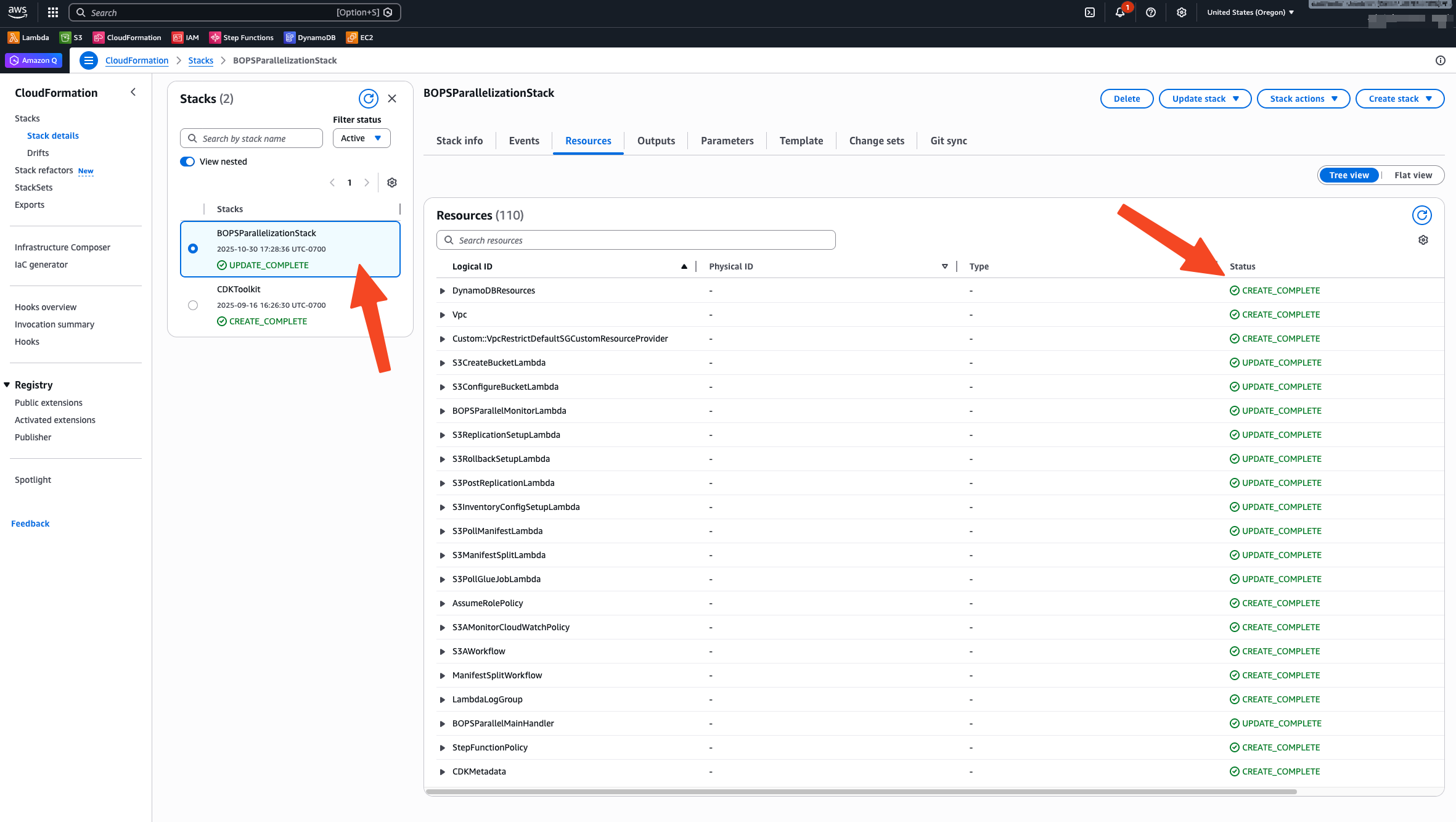
Figure 2: Screenshot showing details of deployed CloudFormation stack
Test solution
After the solution is fully deployed, complete the following steps to test it.
Edit JSON payload
Complete the following steps to edit the JSON payload file:
- Navigate to the cloned repository directory.
- Locate the
invoke-workflow-payload.jsonfile in the root folder. - Edit this file with your bucket and account details.
The following code is a sample payload:
{
  "workflow": {
    "workflowName": "bops-demo-01",
    "namespaceID": "ns202510",
    "destAccountNumber": "<AWS_ACCOUNT>",
    "destBucketARN": "arn:aws:s3:::<DESTINATION_BUCKET>",
    "destRegion": "<REGION>",
    "destRoleARN": "arn:aws:iam::<AWS_ACCOUNT>:role/s3a-bucket-permissions",
    "sourceAccountNumber": "<AWS_ACCOUNT>",
    "sourceBucketARN": "arn:aws:s3:::src-test-bopspar-<AWS_ACCOUNT>-us-west-2",
    "sourceRegion": "<REGION>",
    "sourceRoleARN": "arn:aws:iam::<AWS_ACCOUNT>:role/s3a-bucket-permissions",
    "state": "READY",
    "status": "READY",
    "workflowConfig": {},
    "workflowType": "S3_MIGRATOR"
  }
}
The JSON payload consists of the following key fields:
- workflowName – To identify the migration workflow (combined with
namespaceID) - namespaceID – To identify the migration workflow (combined with
workflowName) - sourceBucketARN – Source S3 bucket Amazon Resource Name (ARN)
- sourceRegion – Source S3 bucket Region
- sourceAccountNumber – Source S3 bucket AWS account number
- sourceRoleARN –
arn:aws:iam::<AWS_ACCOUNT>:role/s3a-bucket-permissions(substitute with your account number) - destBucketARN – Destination S3 bucket ARN where the data will be replicated
- destRegion – Destination S3 bucket Region
- destAccountNumber – Destination S3 bucket AWS account number (same as source bucket)
- destRoleARN –
arn:aws:iam::<AWS_ACCOUNT>:role/s3a-bucket-permissions(substitute with your account number)
Run bucket migration
Run the following script to start the migration workflow:
./invoke-workflow.sh
The script will invoke the main Lambda handler created by the AWS CDK stack, using the JSON payload edited in the previous step. Alternatively, you can invoke the function from the Lambda console directly, passing the JSON payload from the previous step. See the following screenshot for details.
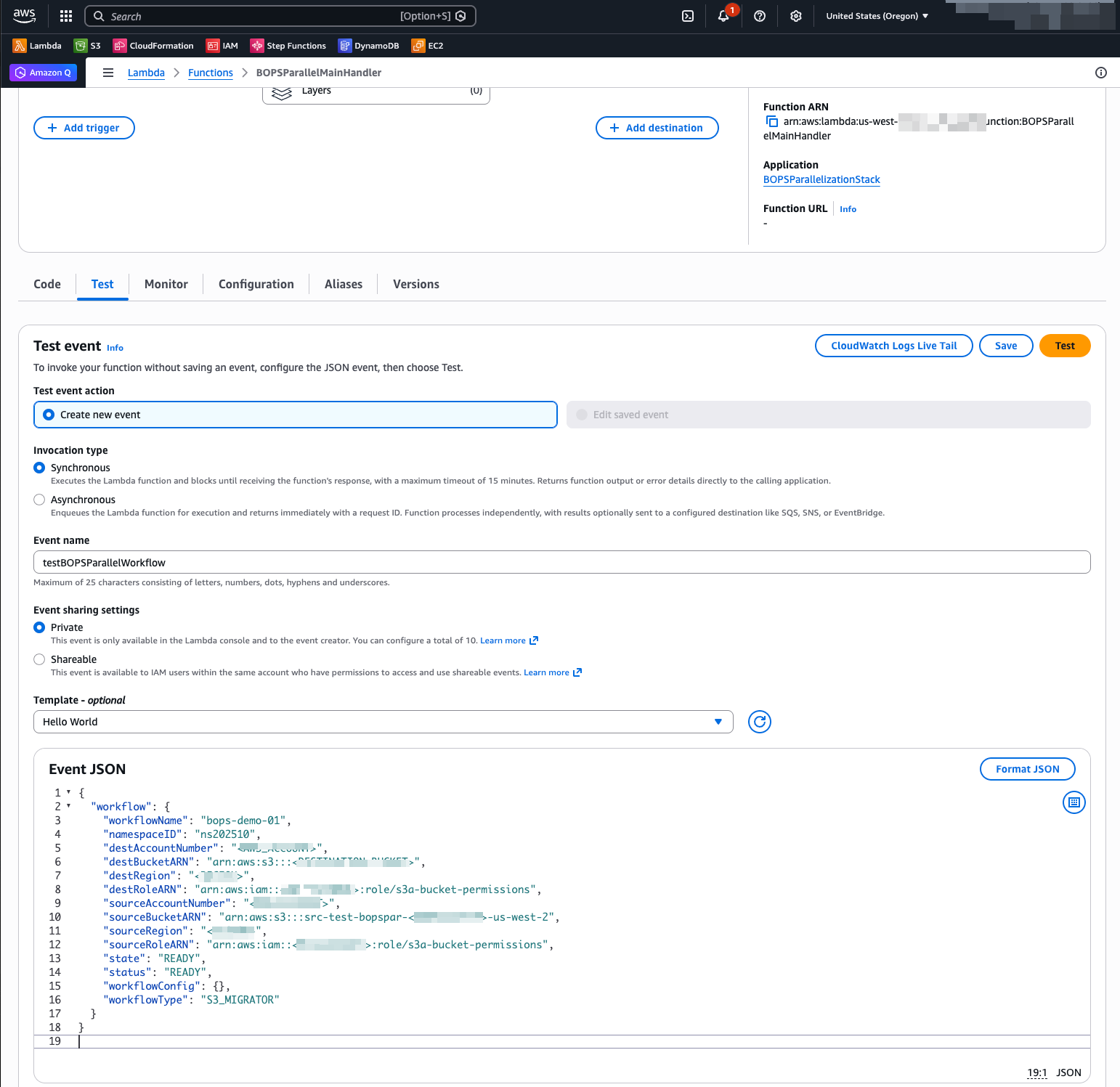
Figure 3: Screenshot of Lambda console with function details
Verify results
The following screenshot of the CloudWatch dashboard deployed as part of this solution showcases the results of a migration of an S3 bucket with over 50 billion objects.
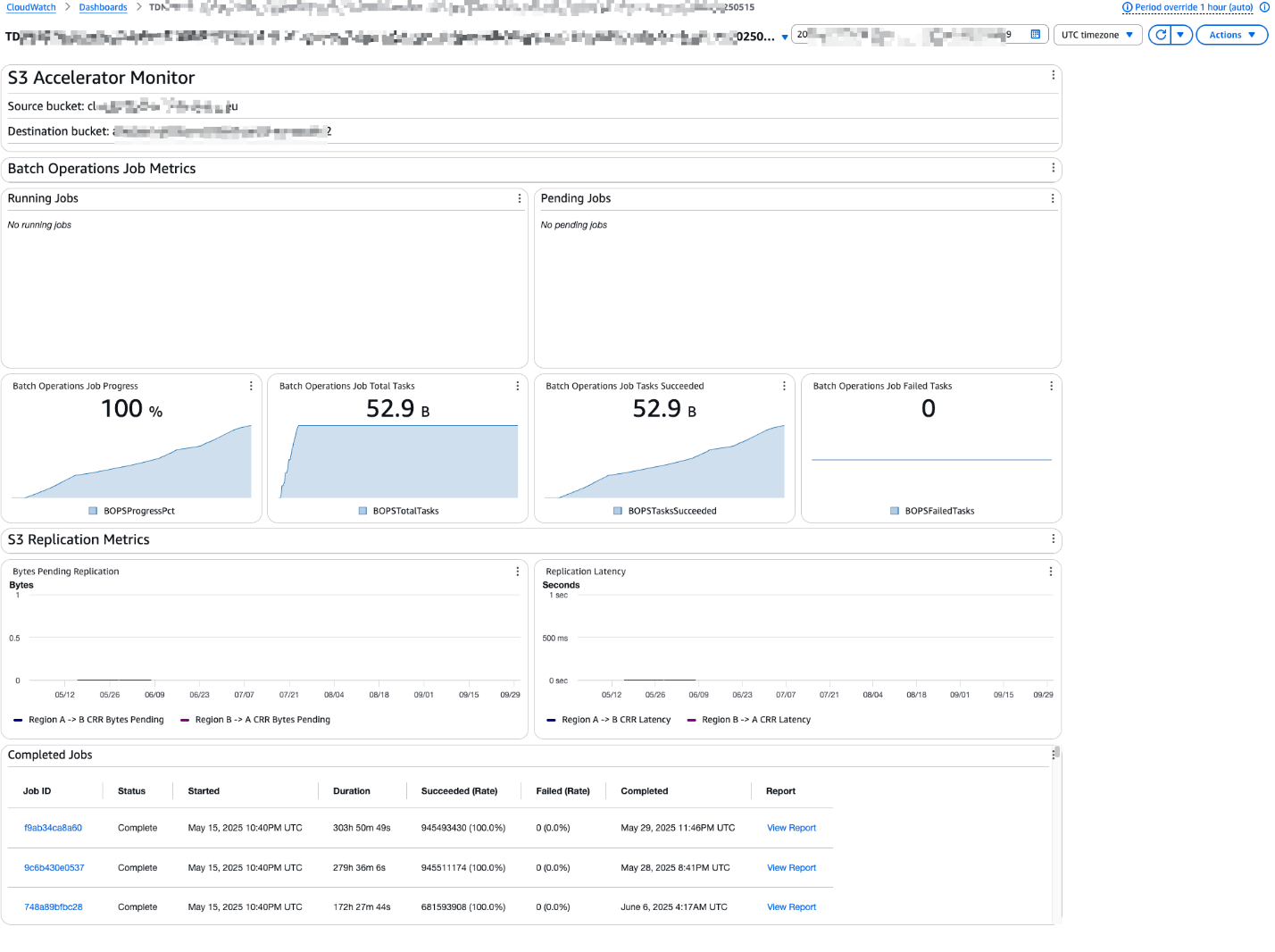
Figure 4: Screenshot of CloudWatch dashboard
Cleaning up
Failing to complete all cleanup steps will result in ongoing AWS charges. S3 buckets, CloudWatch logs, and remaining infrastructure components will continue to incur storage and service costs. Review your AWS billing dashboard after cleanup to verify all resources have been removed.
Deleting the CloudFormation stack will remove the infrastructure but will not automatically delete S3 buckets containing your data. Make sure to empty and delete your S3 buckets as part of the cleanup process.
To remove the resources deployed in this post, complete the following steps:
- Stop any running S3 Batch Operations jobs.
- Delete the CloudFormation stack (
BOPSParallelizationStack). - Confirm IAM roles were deleted: AWS Glue role, S3 Batch Operations role, Lambda role, and
S3 bucket permissions role. - Confirm Lambda functions were deleted from the CloudFormation stack.
- Confirm the DynamoDB workflow database table no longer exists.
- Confirm the Step Functions state machine was deleted from the CloudFormation stack.
- Confirm the AWS Glue job was deleted from the CloudFormation stack.
- Manually empty and delete the source bucket, destination bucket, and manifest bucket.
- Use the following commands to delete the buckets using the AWS CLI:
aws s3 rm s3://your-source-bucket --recursiveaws s3 rm s3://your-destination-bucket --recursiveaws s3 rm s3://your-manifest-bucket --recursive - Alternatively, on the S3 console, navigate to each bucket, select all objects, and choose Delete.
- Use the following commands to delete the buckets using the AWS CLI:
- Remove the Cross-Region Replication configuration.
- Disable the S3 Inventory configuration.
- Delete the CloudWatch log groups if no longer needed.
Conclusion
This solution automates large-scale S3 data replication across Regions and AWS accounts, reducing operational overhead while efficiently handling massive datasets. By using S3 Batch Operations, Step Functions, and Lambda, it implements parallel processing with built-in verification and monitoring mechanisms. The solution scales effectively for buckets exceeding 20 billion objects, helps maintain data consistency through Cross-Region Replication, and deploys resources with IaC using the AWS CDK. Comprehensive logging and monitoring capabilities provide visibility throughout the replication process.
Organizations gain immediate business value through improved compliance management, optimized data locality for better performance, and efficient support for growing data volumes. The automated approach minimizes downtime during migrations and reduces risk through continuous verification and monitoring. This comprehensive solution directly addresses the challenges of large-scale cloud data movement, making it essential for organizations with expanding storage needs and complex data management requirements.
Go ahead and clone the sample GitHub repository, deploy it in a non-production account, and run it against your own buckets to see it in action. We’d love to hear how you tailor this workflow to your environment — drop a comment with your feedback or ideas for extending it further.