AWS Marketplace
Build AWS Marketplace SaaS metering with the metering agent skill
The AWS Marketplace metering agent skill is available through the AWS MCP Server, part of the Agent Toolkit for AWS. The agent skill provides an AI-guided experience that helps sellers with software as a service (SaaS) products build, deploy, and validate SaaS subscriptions (pay-as-you-go) metering integration from inside their AI-assisted coding integrated development environment (IDE). The skill gathers product specific details on usage dimensions, recommends a metering API approach, and generates integration code and AWS Serverless Application Model (AWS SAM) templates based on your configuration. As the seller, you review, adapt, and deploy the integration code and the skill helps you perform dry-run sandbox tests and verify the integration without triggering real billing against your AWS Marketplace listing.
Under the SaaS contract pricing model, when the buyer’s consumption grows mid-term, it’s captured through a new offer and an amendment at the time of renewal. With the SaaS subscriptions pricing model, buyers pay for what they consume instead, so consumption growth can be reflected in your revenue reporting within the hour. The seller’s application takes on the responsibility of reporting consumption every hour through the BatchMeterUsage API operation. The agent skill facilitates the reporting path for SaaS subscriptions and facilitates the SaaS subscriptions pricing model adoption for AWS Marketplace sellers.
In this post, I show how to use the metering agent skill to generate a usage-based metering integration for a SaaS product, then deploy and verify it in your own account. It runs in AI-assisted coding IDEs that support Model Context Protocol (MCP).
You must review the generated code against your own security and compliance requirements before deploying it to production.
Architecture
The skill deploys two AWS SAM templates into your AWS Marketplace seller account as AWS CloudFormation stacks. We recommend that you use a dedicated seller account that you maintain separately from your operational workloads.
The following diagram shows the agreements events flow. The Amazon EventBridge rule matches events from the aws.agreement-marketplace source. The Amazon Simple Queue Service (Amazon SQS) queue buffers those events and routes failures to a dead-letter queue (DLQ). An AWS Lambda function processes each event and stores it in an Amazon DynamoDB subscribers table, one record per agreement, including the licenseArn value required for metering. Three secondary indexes enable querying customerAWSAccountId-index, agreementId-index, and deprovisioning-pending-index.
A second Lambda function runs on an EventBridge schedule, sweeps the deprovisioning-pending-index, and marks a license inactive only after its final metering window has closed.
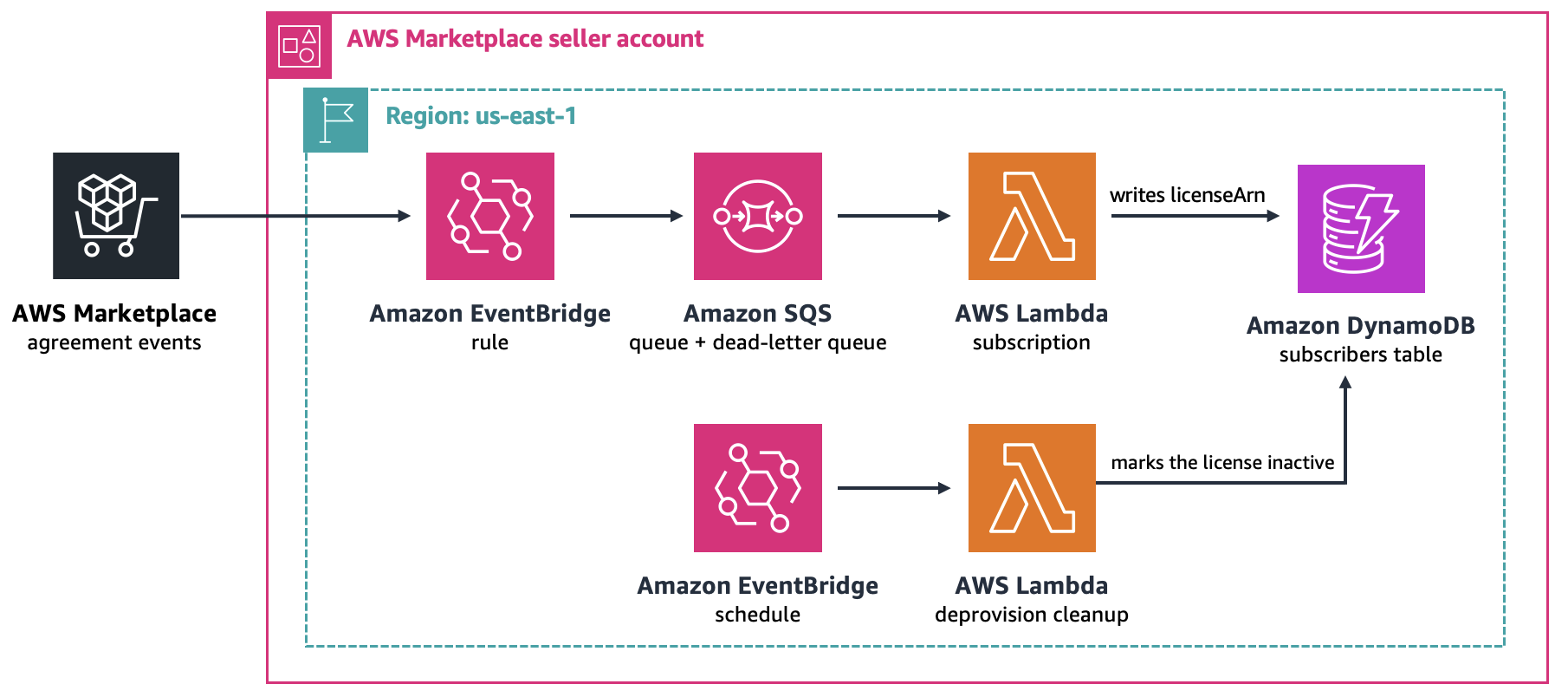
Figure 1: The agreement events flow writes the license Amazon Resource Name (ARN) to a DynamoDB table
The metering stack deploys AWS resources across two paths, the registration path and the metering path, in your chosen AWS Region.
On the registration path, an Amazon API Gateway endpoint protected by AWS WAF receives the registration token when a buyer sets up their account, and a Lambda function exchanges that token for customer identifiers by calling the ResolveCustomer API operation, records them in the subscribers table that the events stack created, and writes any registration fields you collect to a separate DynamoDB customer profile table. This flow is shown in the following diagram.
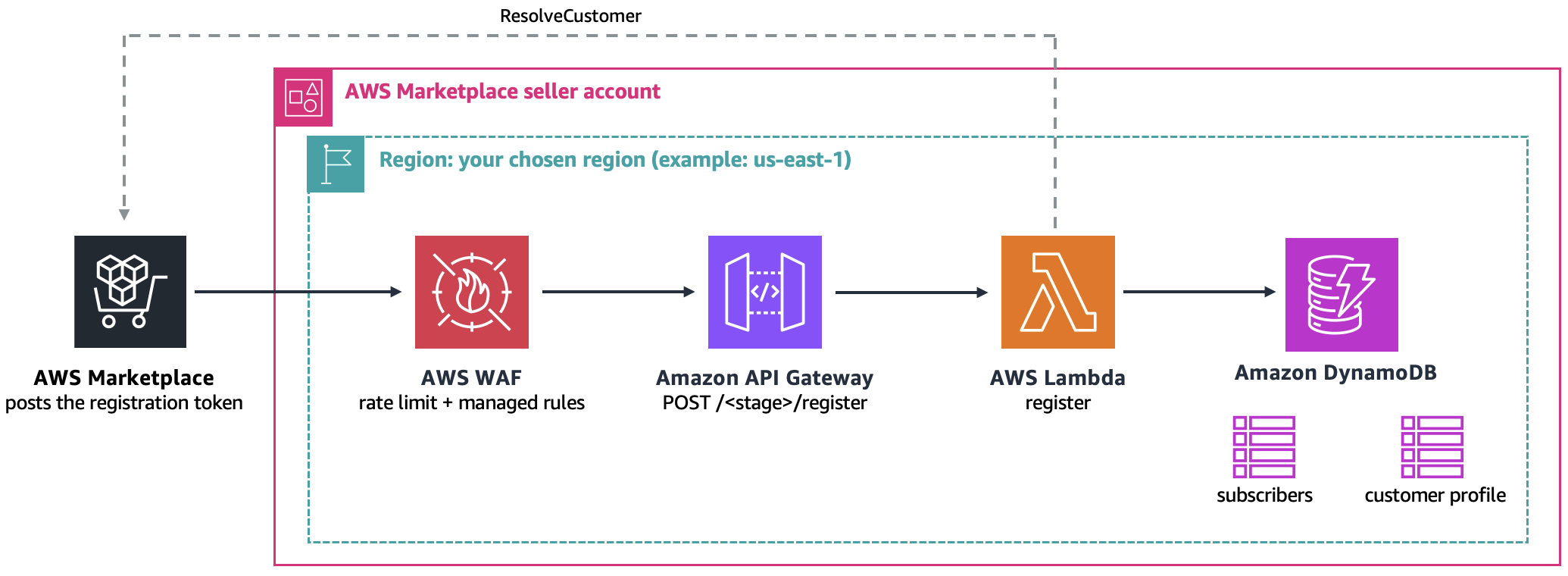
Figure 2: The registration path resolves buyer token and registration fields
On the metering path, an EventBridge schedule starts a discovery Lambda function that searches the DynamoDB secondary index for rows awaiting metering and puts one message per license and per hour on an SQS queue. A second aggregation function sums the rows in each message by license, buyer account, dimension, and hour. It does conditional write to the DynamoDB aggregated usage table, to avoid duplicates. A submission function drains the aggregated usage table and submits batch records per BatchMeterUsage call, recording the result on each record it submits.
Note that your own application writes the usage rows into the DynamoDB usage table from whatever accounts your workload runs in. The metering agent skill doesn’t deploy that part.
The following diagram illustrates this metering path.
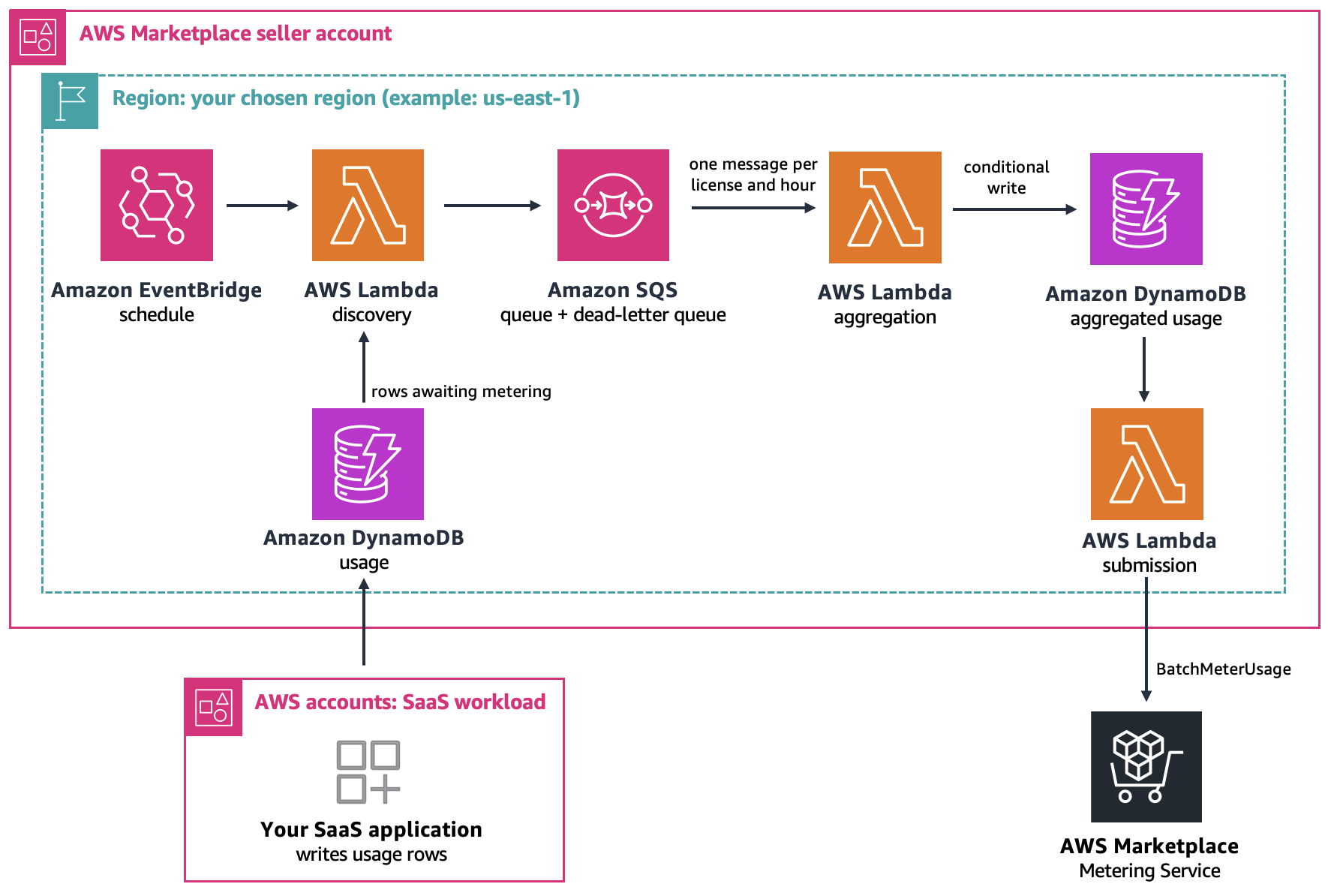
Figure 3: Usage rows are aggregated per hour, then submitted to AWS Marketplace
Prerequisites
To implement this solution, you need the following prerequisites:
- An AWS Marketplace seller account with registration complete, including tax and banking details. For setup steps, refer to Getting started as a seller.
- A SaaS product listing that uses the SaaS subscriptions pricing model and at least one usage dimension, plus the product entity ID from AWS Marketplace Management Portal. Keep the listing at Limited visibility. Limited is the only visibility the skill deploys directly. For a published product, it hands you the code to review and ship through your own deployment pipeline.
- The AWS SAM CLI and AWS Command Line Interface (AWS CLI) with version 2 installed, plus a local Python 3 runtime or Docker for sam build, with credentials for your seller account.
- AWS MCP Server configured in your AI-assisted coding IDE.
AWS Marketplace SaaS metering with the metering agent skill in action
I’m using Kiro CLI with the AWS MCP Server, authenticated with the AWS Marketplace seller account user profile. I’ll tell the agent what to meter by naming the product:
Set up AWS Marketplace metering for my SaaS product prod-EXAMPLE12345, dimension metered_units, in us-east-1, stage api gateway as demo using metering skill.
The following screenshot shows the Kiro interface with the metering instruction.
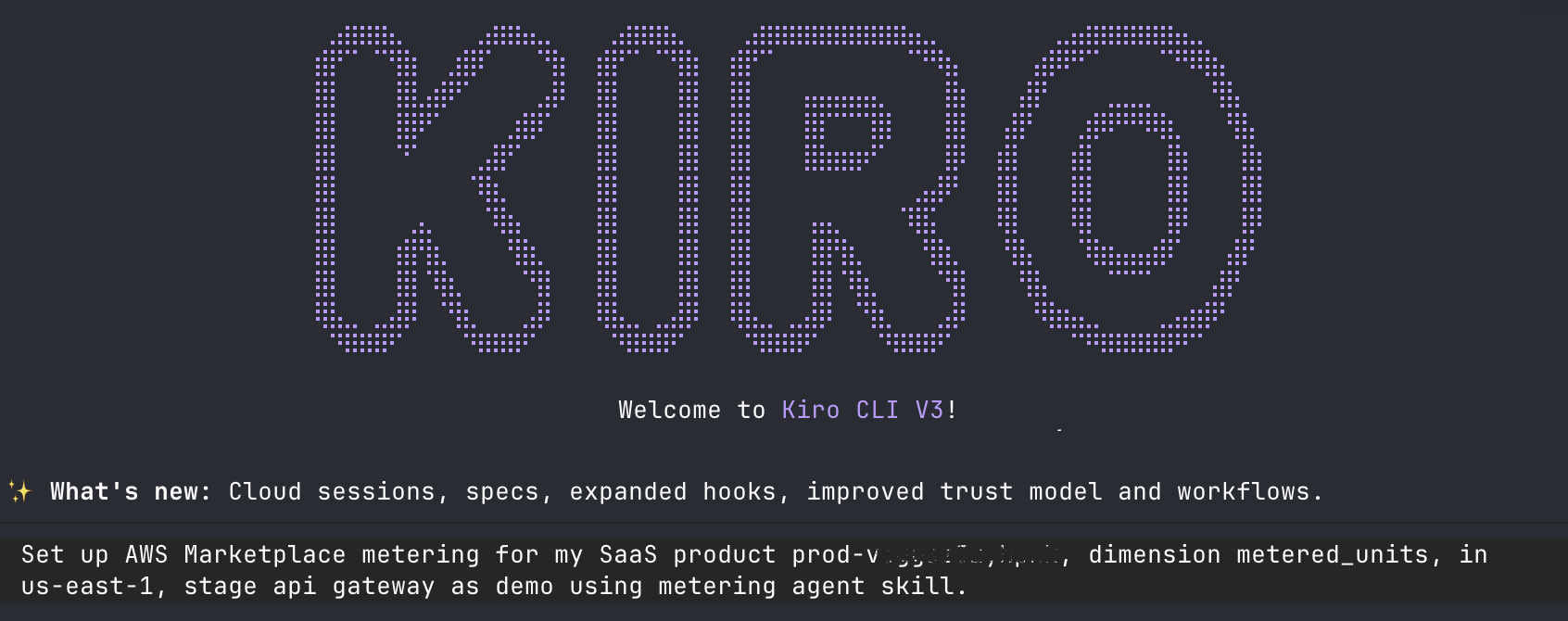
Figure 4: Kiro CLI with instructions to use AWS Marketplace metering skill
The agent skill is a versioned bundle of instructions your agent loads when your request matches the workflow it covers. Kiro uses the aws___retrieve_skill MCP tool to search for the metering skill and retrieves the skill locally. Using the skill, the agent gets the listing details from the AWS Marketplace Catalog API, confirms the product is usage-based, reports which dimensions are externally metered, and resolves the product code.
Next, it proceeds with building the AWS SAM stacks. Deployment to the AWS Marketplace seller account takes place with an AWS Identity and Access Management (IAM) role with a limited permission boundary after user confirmation.
The following screenshot shows the in progress task list in Kiro.
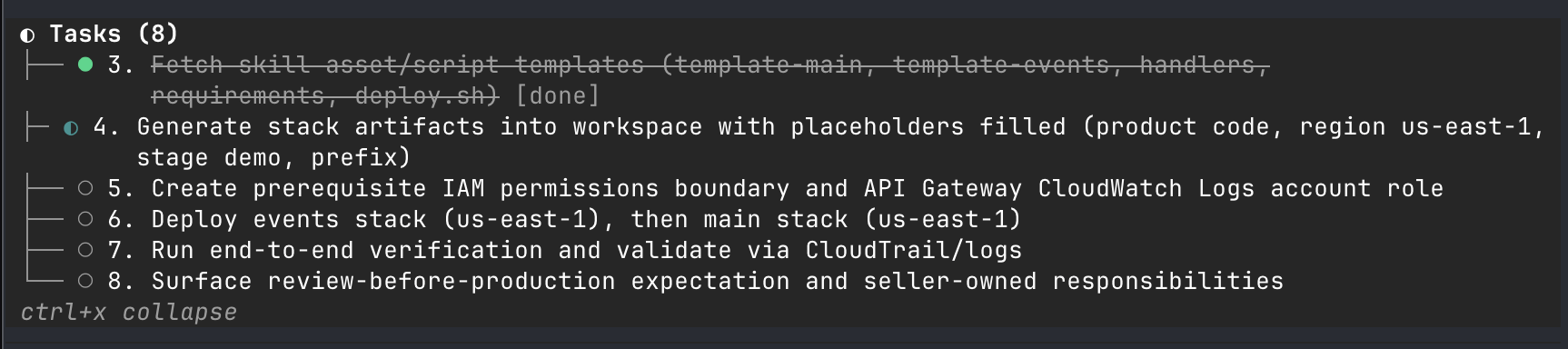
Figure 5: In progress task list guided by the skill
In dry-run mode, the skill validates the flow but doesn’t call the BatchMeterUsage API operation. After you confirm that the dry run is successfully completed, follow the guidance shared by the skill to review resources created and update the product fulfillment URL.
The following screenshot shows the Kiro interface showing that verification passed, with guidance for next steps.
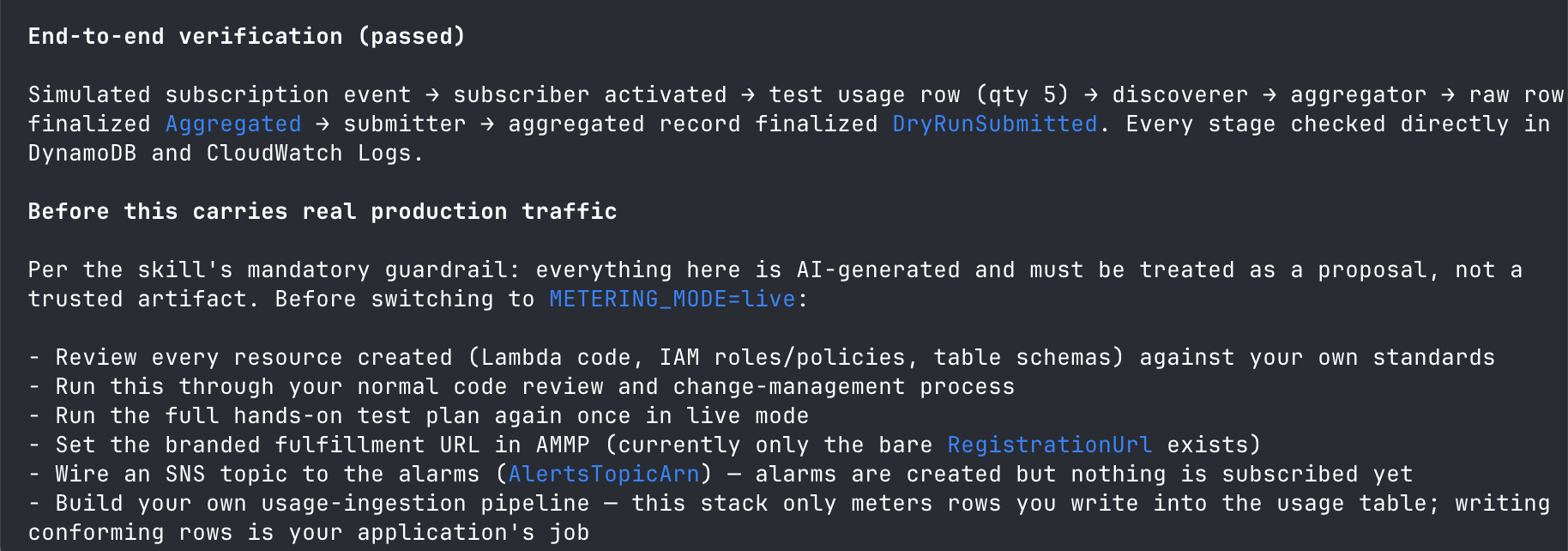
Figure 6: Dry-run mode validation passed
The skill generates a registration backend and can capture extra buyer fields on request. If you want a branded registration page or custom domain, you must build and maintain those components.
The skill provisions the metering backend, but getting usage into it is the part you build. Before you go live, your SaaS application needs to write customer usage records to the DynamoDB usage table, keyed by license ARN with timestamps, following the row format the skill documents. Once you deploy the pipeline, it handles hourly submissions to AWS Marketplace.
For the live test, you can use your AWS Marketplace account or any other AWS account as a test buyer after you add it to the allowlist so you can subscribe to your product while it’s in Limited visibility to do the complete live metering test.
Clean up
If you wish to clean up the resources to avoid charges, you can delete both CloudFormation stacks. By design, the deployment retains the DynamoDB tables when you delete the stacks, so you should delete them separately if you no longer need the data.
Conclusion
The metering agent skill generates a usage-based metering integration so consumption growth can be reflected in your revenue reporting within the hour. To get started, open your AI-assisted coding IDE and ask it to use the AWS Marketplace metering agent skill. If you haven’t listed a product yet, begin with Getting started as a seller.
About the author
© 2026, Amazon Web Services, Inc. or its affiliates. All rights reserved.