AWS Marketplace
Deploy the AWS Marketplace SPG Dashboard for Unified Insights
AWS Marketplace customers, including independent software vendors (ISVs) and consulting partners (CPs), can set up the AWS Marketplace Single Pane of Glass (SPG) dashboard. This dashboard provides our ISV customers with a unified view of their AWS Marketplace operations and cost data. The dashboard offers granular level detailed visibility into third-party software subscriptions and analytics on your AWS Marketplace spend and usage across multiple organization units (OUs). Through this unified view, your procurement teams can monitor and analyze their AWS Marketplace investments effectively.
To complete deployment, you must implement at least one of the foundational Cloud Intelligence Dashboards: Cost and Usage Dashboard Operations Solution (CUDOS), Cost Intelligence Dashboard (CID), or KPI Dashboard. Then, you need to configure critical data collection modules that form the backbone of the data aggregation capabilities of the SPG dashboard.
This post provides detailed, step-by-step instructions that cover both prerequisite setup and the deployment process.
SPG flow
The following is the deployment architecture for the data collection module including the deployment of the read permissions stack and then the deployment of the data collection stack. For more information, refer to Deployment in the Cloud Intelligence Dashboards Implementation Guide.
Solution overview
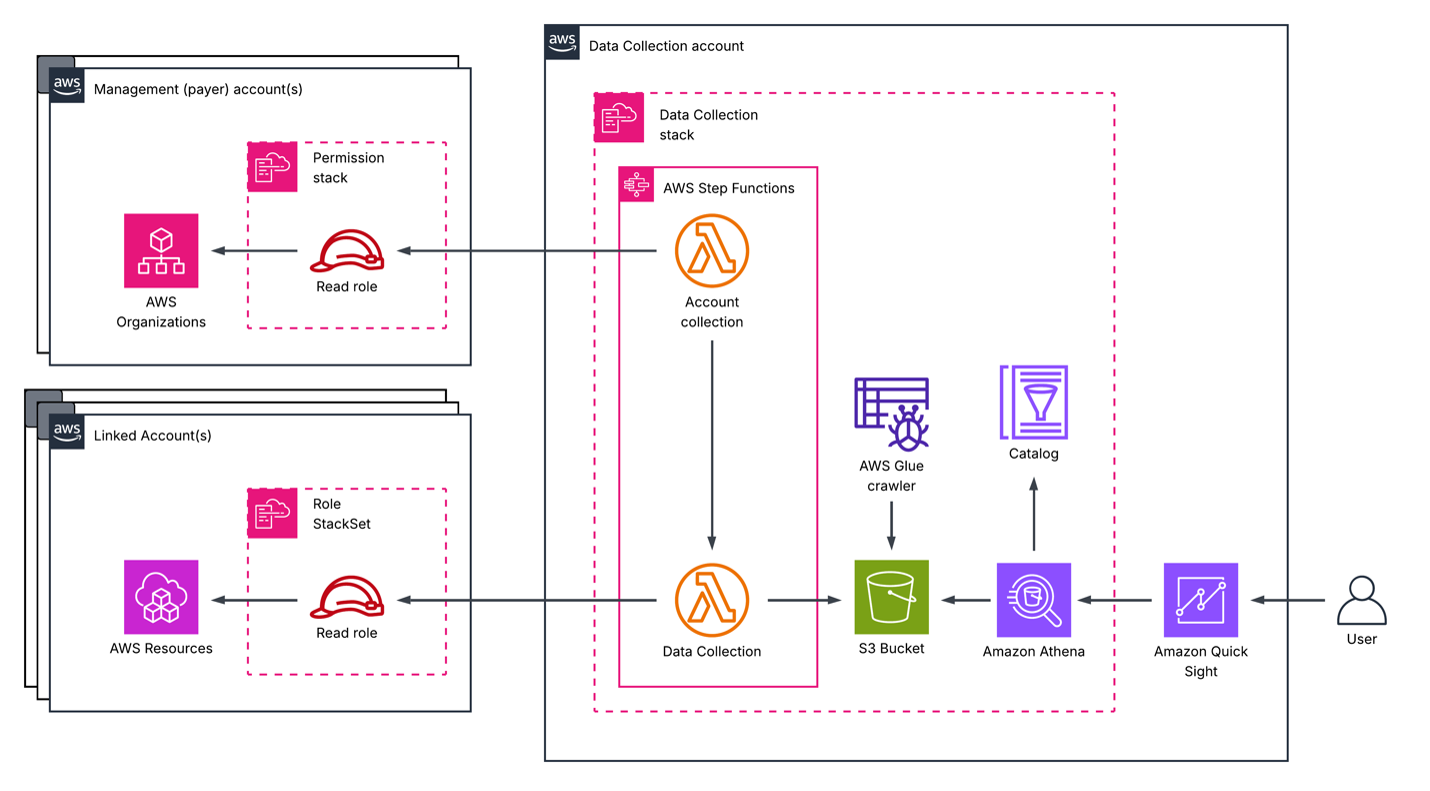
Figure 1: Deployment architecture
Prerequisites for deployment
To set up the SPG dashboard, you must meet the following prerequisites:
- Familiarity with the AWS Management Console, AWS Identity and Access Management (IAM) permissions, and AWS CloudFormation
- Required permissions in the management and payer accounts and the data collection account
You need permission to access the following in the management and payer accounts:
- AWS CloudFormation
- AWS Cost and Usage Reports
- IAM
- AWS Lambda
- Amazon Simple Storage Service (Amazon S3)
You need permission to access the following for the data collection account using both the AWS Management Console and the AWS Command Line Interface (AWS CLI):
- Amazon Athena
- AWS CloudFormation
- AWS Directory Service
- Amazon EventBridge
- AWS Glue
- IAM
- Lambda
- Amazon Quick Sight
- Amazon S3
You can refer to cid-admin-policies for more details on what IAM permissions are needed for the IAM role.
Cost Intelligence Dashboards
You need to set up one of the foundational dashboards, either CUDOS, CID, or KPI Dashboard. To set up the CUDOS foundational dashboard, follow the deployment steps in the CUDOS deployment guidance. Since November 2024, Cloud Intelligence Dashboards use AWS Cost and Usage Report (CUR) 2.0 as the main source for foundational dashboards.
- If you’re deploying in China Regions, follow the Deployment in China instructions.
- If you have Legacy CUR set up, refer to the migration process.
Data collection modules
To deploy the data collection framework, follow the guidance in Deployment in the Cloud Intelligence Dashboards Implementation Guide.
On the Quick create stack screen, in the Include Marketplace Licensing Collection dropdown list, choose yes. In the Include Marketplace Data Collection Module dropdown list, choose yes. These two modules are the backbone of SPG’s data aggregation. Incorrect configuration results in empty or partial dashboards. These settings are shown in the following screenshot.
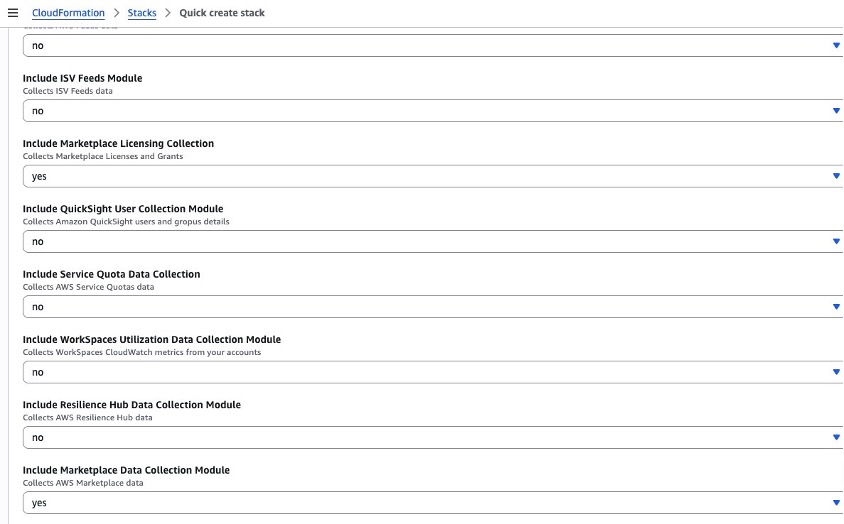
Figure 2: Quick create stack
Walkthrough: How to deploy the SPG dashboard
To deploy the SPG dashboard using the CloudFormation console:
-
-
- Sign in to your data collection account.
- Choose the Launch Stack button to open the prepopulated stack template in CloudFormation, which is shown in the following screenshot.
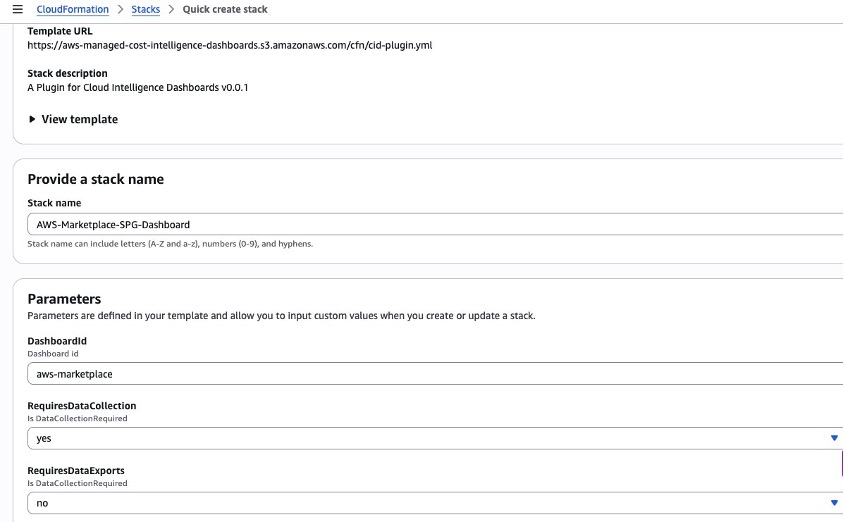
Figure 3: Prepopulated stack template
-
- (Optional) Change the stack name for your template.
- Leave parameter values as they are.
- Review the configuration and choose Create stack.
- The stack status shows CREATE_IN_PROGRESS. After completion, the stack status shows CREATE_COMPLETE. If you see the error “No export named cid-CidExecArn found” during stack deployment, make sure you have completed the prerequisite steps.
- Check the stack output for dashboard URLs.
The following screenshot shows the expected dashboard view.
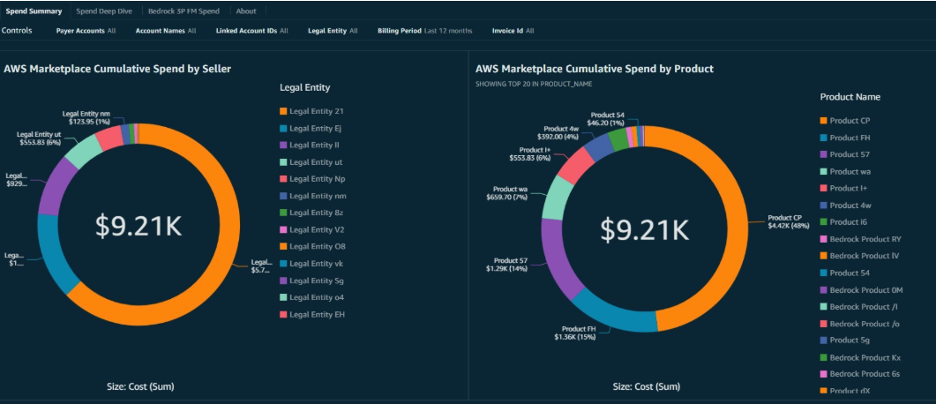
Figure 4: Expected dashboard view
Conclusion
This post showed step-by-step instructions that cover both prerequisite setup and the deployment process for deploying the SPG dashboard. After reading this post, you can independently deploy the Single Pane of Glass dashboard in a self-service manner, eliminating the need for extensive technical support while ensuring proper configuration of all required components. Refer to SPG Dashboard in the Implementation Guide for additional details on the live, interactive demo dashboard, updates, and additional details regarding visualizing third-party software license procurement and AWS Marketplace agreements. Sellers can use the guide’s detailed methodology to quickly establish centralized visibility into their AWS Marketplace metrics and cost optimization opportunities.
Cleanup
To remove the SPG dashboard and its associated resources, delete the CloudFormation stacks in reverse order of deployment:
- Delete the SPG dashboard stack — In the CloudFormation console of your data collection account, select the SPG stack and choose Delete. This removes the dashboard and its supporting resources.
- Delete the data collection modules (optional) — If you no longer need the Marketplace Licensing and Marketplace Data Collection modules, remove them by updating or deleting the data collection framework stack.
- Delete the foundational dashboard (optional) — If you no longer need CUDOS, CID, or KPI Dashboard, delete its corresponding CloudFormation stack.
- Delete the IAM permissions stack (optional) — If you deployed the least-privilege IAM role template, delete that stack from your management/payer account.
Note: Deleting these stacks does not affect your underlying AWS Cost and Usage Report (CUR 2.0) data or your existing AWS Marketplace subscriptions.
Call to Action
- Explore the SPG Dashboard in the Cloud Intelligence Dashboards Implementation Guide for a live, interactive demo dashboard, updates, and additional details on visualizing third-party software license procurement and AWS Marketplace agreements.
- Learn more about Cloud Intelligence Dashboards to gain deeper visibility into your cloud spend and usage.
- Visit AWS Marketplace to discover and manage third-party software subscriptions.
About Authors
-