AWS Big Data Blog
Migrate third-party and self-managed Apache Kafka clusters to Amazon MSK Express and Standard brokers with Amazon MSK Replicator
June 2026: This post was reviewed and updated.
Migrating Apache Kafka workloads to the cloud often involves managing complex replication infrastructure, coordinating application cutovers with extended downtime windows, and maintaining deep expertise in open-source tools like Apache Kafka’s MirrorMaker 2 (MM2). These challenges slow down migrations and increase operational risk. Amazon MSK Replicator addresses these challenges, enabling you to migrate your Kafka deployments (referred to as “external” Kafka clusters) to Amazon MSK Express brokers and Standard brokers with minimal operational overhead and reduced downtime. MSK Replicator supports data migration from Kafka deployments (version 2.8.1 or later) that have SASL/SCRAM authentication or mutual TLS (mTLS) enabled. This includes Kafka clusters running on-premises, on AWS, or other cloud providers, as well as Kafka-protocol-compatible services like Confluent Platform, Confluent Cloud Dedicated/Enterprise/Freight clusters on AWS, Avien, RedPanda, WarpStream, or AutoMQ when configured with SASL/SCRAM or mTLS authentication.
In this post, we walk you through how to replicate Apache Kafka data from your external Apache Kafka deployments to Amazon MSK brokers using MSK Replicator. You will learn how to configure authentication on your external cluster, establish network connectivity, set up bidirectional replication, and monitor replication health to achieve a low-downtime migration.
How it works
MSK Replicator is a fully managed serverless service that replicates topics, configurations, and offsets from cluster to cluster. It alleviates the need to manage complex infrastructure or configure open-source tools.
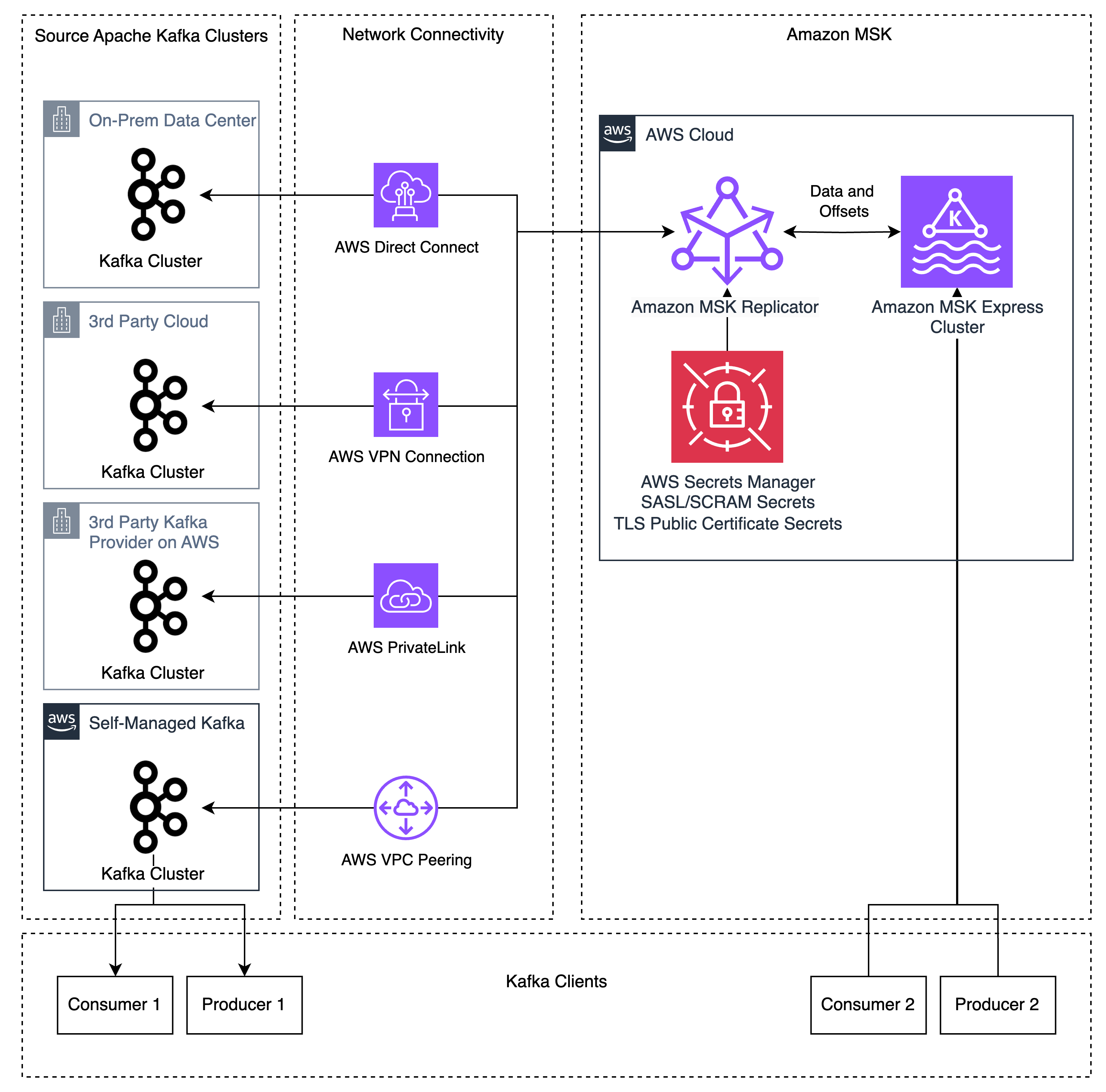
Before MSK Replicator, customers used tools like MM2 for migrations. These tools lack bi-directional topic replication when using the same topic names, creating complex application architectures to consume different topics on different clusters. Custom replication policies in MM2 can allow identical topic names, but MM2 still lacks bidirectional offset replication because the MM2 architecture requires producers and consumers to run on the same cluster to replicate offsets. This created complex migrations that required either migrating consumers before producers or big-bang migrations migrating all applications at once. When customers run into issues during the migration, the rollback process is error-prone and introduces large amounts of duplicate message processing due to the lack of consumer group offset synchronization. These approaches create risk and complexity for customers that make migrations difficult to manage.
MSK Replicator addresses these problems by supporting bidirectional replication of data and enhanced consumer group offset synchronization. MSK Replicator copies topics and offsets from an external Kafka cluster to MSK, allowing you to preserve the same topic and consumer group names on both clusters. MSK Replicator also supports creating a second Replicator instance for bidirectional replication of both data and enhanced offset synchronization, allowing producers and consumers to run independently on different Kafka clusters. Data published or consumed on the Amazon MSK cluster will be replicated back to the external cluster by the second Replicator. This feature works when producers and consumers are migrated regardless of order without worrying about dependencies between applications.
Because MSK Replicator provides bidirectional data replication and enhanced consumer group offset synchronization, you can move producers and consumers at your own pace without data loss. This reduces migration complexity, allowing you to migrate applications between your external Kafka cluster and Amazon MSK regardless of order. If you run into problems during the migration, enhanced offset synchronization allows you to roll back changes by moving applications back to the external Kafka cluster, where they restart from the latest checkpoint from the Amazon MSK cluster.
For example, consider three applications:
- The “Orders” application, which accepts incoming orders and writes them to the orders Kafka topic
- The “Order status” application, which reads from the “orders” Kafka topic and writes status updates to the
order_statustopic - The “Customer notification” application, which reads from the
order_statustopic and notifies customers when status changes
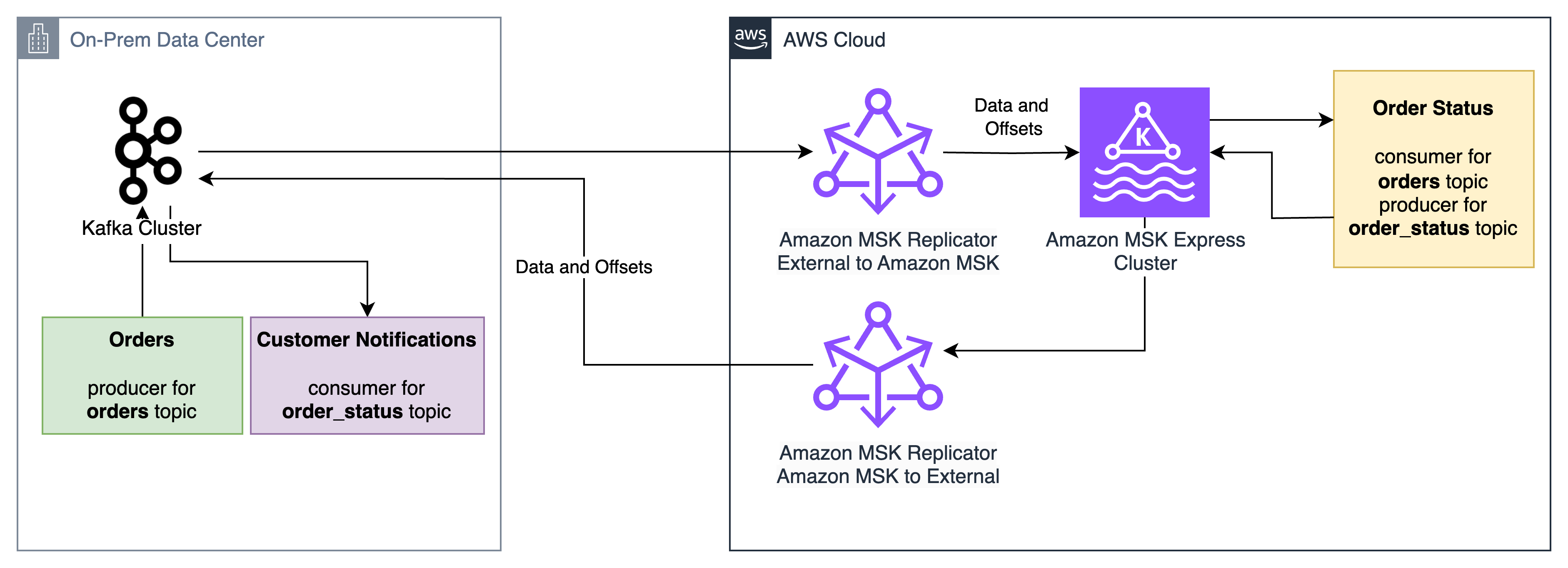
MSK Replicator enables these applications to be migrated between an on-premises Apache Kafka cluster and Amazon MSK Express and Standard clusters with low downtime and no data loss, regardless of order. The “Order status” application can migrate first, receive orders from the on-premises “Orders” application, and send status updates to the on-premises “Customer notification” application. If issues arise during the migration, the “Order status” application can roll back to the on-premises cluster and its consumer group offsets for the orders topic will be ready for it to pick up from where it left off on the Amazon MSK cluster.
MSK Replicator supports data distribution across hybrid and multi-cloud environments for analytics, compliance, and business continuity. It is also configured for disaster recovery scenarios where Amazon MSK serves as a resilient target for your external Kafka clusters.
If you are currently using MM2 for replication, see Amazon MSK Replicator and MirrorMaker2: Choosing the right replication strategy for Apache Kafka disaster recovery and migrations to understand which solution best fits your use case.
Solution overview
MSK Replicator supports Kafka deployments running version 2.8.1 or later as a source, including 3rd party managed Kafka services, self-managed Kafka, and on-premises or third-party cloud-hosted Kafka. MSK Replicator automatically handles data transfer, uses SASL/SCRAM authentication with SSL encryption, and maintains consumer group positions across both clusters. If you do not use SASL/SCRAM today, this can be configured as a new listener used for MSK Replicator allowing current clients to use their existing authentication mechanisms alongside MSK Replicator. While this post demonstrates replication using SASL/SCRAM authentication, MSK Replicator also supports mTLS authentication for source clusters. Refer to Migrate from non-MSK Apache Kafka clusters to Amazon MSK Express brokers for more information.
Prerequisites
To follow along with this walkthrough, you need the following resources in place:
- A source Kafka cluster using Kafka version 2.8.1 or above
- Network connectivity between your external Kafka cluster and AWS (for example, using AWS Direct Connect, Site-to-Site VPN, or Amazon Virtual Private Cloud (VPC) peering or AWS Transit Gateway for connections between AWS VPCs) so that MSK Replicator can reach your source brokers
- SASL/SCRAM authentication configured on your external cluster (SHA-256 or SHA-512), which MSK Replicator uses to authenticate with external clusters
- An admin user configured on your external cluster with permissions to describe the external cluster and create and modify users/ACLs
- An Amazon MSK Express or Standard cluster with IAM authentication enabled to serve as your target
- AWS Secrets Manager configured to store your SASL/SCRAM credentials for the external cluster so that MSK Replicator can securely retrieve them at runtime
- An Amazon CloudWatch log group for MSK Replicator logs
- Appropriate IAM permissions for creating and managing MSK Replicator resources
Setting up replication
Step 1: Configure network connectivity
You can set up network connectivity between your external Kafka cluster and your AWS VPC using methods such as AWS Direct Connect for dedicated network connections, AWS Site-to-Site VPN for encrypted connections over the internet, and AWS VPC peering or AWS Transit Gateway for connections between AWS VPCs. Verify that IP routing and DNS resolution are properly configured between your external cluster and AWS.
To verify IP routing and DNS resolution, connect to your external Kafka cluster from inside of your VPC by using the Kafka CLI to list topics on the external cluster. If you can list topics from your VPC using the Kafka CLI, this means DNS resolution and IP routing are working successfully. If it fails, work with your network admins to troubleshoot network connectivity issues.
Step 2: Configure external cluster
In this step, you will set up authentication on your external Kafka cluster and store the credentials in AWS Secrets Manager so that MSK Replicator can connect securely.
Configure authentication
Using the external cluster admin user, configure SASL/SCRAM authentication for MSK Replicator using SHA-256 or 512 on your external Kafka cluster. Create a SASL/SCRAM user for MSK Replicator and give the user the following ACL permissions:
- Topic operations – Alter, AlterConfigs, Create, Describe, DescribeConfigs, Read, Write
- Group operations – Read, Describe
- Cluster operations – Create, ClusterAction, Describe, DescribeConfigs
Configure SecretsManager
AWS Secrets Manager stores your SASL/SCRAM credentials securely so that MSK Replicator can retrieve them at runtime. The secret must use JSON format and have the following keys:
username– The SCRAM username that you configured in the authentication step abovepassword– The SCRAM password that you configured in the authentication step abovecertificate– The public root CA certificate (the top-level certificate authority that issued your cluster’s TLS certificate) and the intermediate CA chain (intermediate certificates between the root and your cluster’s certificate), used for SSL handshakes with the external cluster
Optionally, you may create separate secrets for SCRAM credentials and the SSL certificate. This approach is useful when secrets for SCRAM credentials and certificates are provisioned in different stages, such as in Infrastructure as Code (IaC) pipelines.
Retrieve the cluster ID
As the admin user, use the Kafka CLI tools to retrieve the cluster ID of your external cluster. Run the following command, replacing your-broker-host:9096 with the address of one of your external cluster’s bootstrap servers:
bin/kafka-cluster.sh cluster-id --bootstrap-server your-broker-host:9096 --config admin.propertiesThe command returns a cluster ID string such as lkc-abc123. Take note of this value because you will need it when creating the replicator in Step 4.
Step 3: Create your MSK Express or Standard target cluster
With your external cluster configured, you can now set up the target. Create an Amazon MSK Express or Standard cluster with IAM authentication enabled. Make sure that the cluster is in subnets that have access to AWS Secrets Manager endpoints. See Get started using Amazon MSK for more information on creating an MSK cluster.
Step 4: Create the replicator
Now that both clusters are ready, you can connect them by setting up the MSK Replicator with the appropriate IAM role and replication configuration.
Set up an IAM role for MSK Replicator
MSK Replicator needs an IAM role to interact with your MSK cluster and retrieve secrets. Set up a service execution IAM role with a trust policy allowing kafka.amazonaws.com and attach the AWSMSKReplicatorExecutionRole permissions policy. Take note of the role ARN for creating the replicator.
Create and attach a policy for accessing your Secrets Manager secrets and reading/writing data in your MSK cluster. See Creating roles and attaching policies (console) for more information on creating IAM roles and policies.
The following is an example policy for reading and writing data to your MSK cluster and reading KMS-encrypted Secrets Manager secrets:
{
    "Version": "2012-10-17",
    "Statement": [
        {
            "Sid": "SecretsManagerAccess",
            "Effect": "Allow",
            "Action": [
                "secretsmanager:GetSecretValue",
                "secretsmanager:DescribeSecret"
            ],
            "Resource": [
                "<SCRAM_SECRET_ARN>",
                "<CERT_SECRET_ARN>"
            ]
        },
        {
            "Sid": "KMSDecrypt",
            "Effect": "Allow",
            "Action": "kms:Decrypt",
            "Resource": "<SECRETSMANAGER_KMS_KEY_ARN>"
        },
        {
            "Sid": "TargetClusterAccess",
            "Effect": "Allow",
            "Action": [
                "kafka-cluster:Connect",
                "kafka-cluster:DescribeCluster",
                "kafka-cluster:AlterCluster",
                "kafka-cluster:DescribeClusterDynamicConfiguration",
                "kafka-cluster:AlterClusterDynamicConfiguration",
                "kafka-cluster:DescribeTopic",
                "kafka-cluster:CreateTopic",
                "kafka-cluster:AlterTopic",
                "kafka-cluster:DescribeTopicDynamicConfiguration",
                "kafka-cluster:AlterTopicDynamicConfiguration",
                "kafka-cluster:WriteData",
                "kafka-cluster:WriteDataIdempotently",
                "kafka-cluster:ReadData",
                "kafka-cluster:DescribeGroup",
                "kafka-cluster:AlterGroup"
            ],
            "Resource": [
                "arn:aws:kafka:<REGION>:<ACCOUNT_ID>:cluster/<MSK_CLUSTER_NAME>*/*",
                "arn:aws:kafka:<REGION>:<ACCOUNT_ID>:topic/<MSK_CLUSTER_NAME>/*",
                "arn:aws:kafka:<REGION>:<ACCOUNT_ID>:group/<MSK_CLUSTER_NAME>*/*"
            ]
        },
        {
            "Sid": "CloudWatchLogsAccess",
            "Effect": "Allow",
            "Action": [
                "logs:CreateLogStream",
                "logs:PutLogEvents",
                "logs:DescribeLogStreams"
            ],
            "Resource": "<MSK_REPLICATOR_LOG_GROUP_ARN>"
        }
    ]
}
Create the replicator for external to MSK replication
Use the AWS CLI, API, or Console to create your replicator. Here’s an example using the AWS CLI:
aws kafka create-replicator \
  --replicator-name external-to-msk \
  --service-execution-role-arn "arn:aws:iam::123456789012:role/MSKReplicatorRole" \
  --kafka-clusters file://./kafka-clusters.json \
  --replication-info-list file://./replication-info.json \
  --log-delivery file://./log-delivery.json \
  --region us-east-1
The kafka-clusters.json file defines the source and target Kafka cluster connection information, replication-info.json specifies which topics to replicate and how to handle consumer group offset synchronization, and log-delivery.json specifies the CloudWatch logging configuration. The following tables describe the required parameters:
CLI inputs:
| CLI Parameter | Description | Example |
| replicator-name | The name of the replicator | external-to-msk |
| service-execution-role-arn | The ARN for the service execution IAM role you created | arn:aws:iam::123456789012:role/MSKReplicatorRole |
| kafka-clusters | The Kafka cluster connection info | See below |
| replication-info-list | The replication configuration | See below |
| log-delivery | The logging configuration | See below |
Key kafka-clusters.json inputs:
| CLI Parameter | Description | Example |
| ApacheKafkaClusterId | The cluster ID retrieved in Step 2 | lkc-abc123 |
| RootCaCertificate | The Secrets Manager ARN containing the public CA certificate and intermediate CA chain | arn:aws:secretsmanager:<REGION>:<ACCOUNT_ID>:secret:my-cert |
| MskClusterArn | The ARN for the MSK cluster | arn:aws:kafka:<REGION>:<ACCOUNT_ID>:cluster/my-cluster/abc-123 |
| SecretArn | The Secrets Manager ARN containing the SASL/SCRAM username and password | arn:aws:secretsmanager:<REGION>:<ACCOUNT_ID>:secret:my-creds |
| SecurityGroupIds | The security group IDs for MSK Replicator | sg-0123456789abcdef0 |
Key replication-info.json inputs:
| CLI Parameter | Description | Example |
| TargetCompressionType | The compression type to use for replicating data | LZ4 |
| TopicsToReplicate | The list of topics to replicate (use [“.*”] for all topics) | [“my-topic”] |
| ConsumerGroupsToReplicate | The list of consumer groups to replicate | [“my-group”] |
| StartingPosition | The point in the Kafka topics to begin replication from (either EARLIEST or LATEST) | EARLIEST |
| ConsumerGroupOffsetSyncMode | Whether or not to use enhanced bidirectional consumer group offset synchronization | ENHANCED |
Note that startingPosition is set to EARLIEST in the configuration below, which means the replicator begins reading from the oldest available offset on each topic. This is the recommended setting for migrations to avoid data loss.
Key log-delivery.json inputs:
| CLI Parameter | Description | Example |
| Enabled | Allows you to enable CloudWatch logging | true |
| LogGroup | The CloudWatch logs log group name to log to | /msk/replicator/my-replicator |
Additional log delivery methods for Amazon S3 and Amazon Data Firehose are supported. In this post, we use CloudWatch logging.
The configs should look like the following for external to MSK replication.
kafka-clusters.json:
[
  {
    "ApacheKafkaCluster": {
      "ApacheKafkaClusterId": "lkc-abc123",
      "BootstrapBrokerString": "broker1.example.com:9096"
    },
    "ClientAuthentication": {
      "SaslScram": {
        "Mechanism": "SHA512",
        "SecretArn": "arn:aws:secretsmanager:<REGION>:<ACCOUNT_ID>:secret:my-creds"
      }
    },
    "EncryptionInTransit": {
      "EncryptionType": "TLS",
      "RootCaCertificate": "arn:aws:secretsmanager:<REGION>:<ACCOUNT_ID>:secret:my-cert"
    }
  },
  {
    "AmazonMskCluster": {
      "MskClusterArn": "arn:aws:kafka:<REGION>:<ACCOUNT_ID>:cluster/my-cluster/abc-123"
    },
    "VpcConfig": {
      "SecurityGroupIds": ["sg-0123456789abcdef0"],
      "SubnetIds": ["subnet-abc123", "subnet-abc124", "subnet-abc125"]
    }
  }
]
replication-info.json:
[
  {
    "SourceKafkaClusterId": "lkc-abc123",
    "TargetKafkaClusterArn": "arn:aws:kafka:<REGION>:<ACCOUNT_ID>:cluster/my-cluster/abc-123",
    "TargetCompressionType": "LZ4",
    "TopicReplication": {
      "TopicsToReplicate": ["my-topic"],
      "CopyTopicConfigurations": true,
      "CopyAccessControlListsForTopics": true,
      "DetectAndCopyNewTopics": true,
      "StartingPosition": {"Type": "EARLIEST"},
      "TopicNameConfiguration": {"Type": "IDENTICAL"}
    },
    "ConsumerGroupReplication": {
      "ConsumerGroupsToReplicate": ["my-group"],
      "SynchroniseConsumerGroupOffsets": true,
      "DetectAndCopyNewConsumerGroups": true,
      "ConsumerGroupOffsetSyncMode": "ENHANCED"
    }
  }
]
log-delivery.json:
{
  "ReplicatorLogDelivery": {
     "CloudWatchLogs": {
       "Enabled": true,
       "LogGroup": "<LOG_GROUP_NAME>"
     }
  }
}
Configure bidirectional replication from MSK to the external cluster
To enable bidirectional replication, create a second replicator that replicates in the opposite direction. Use the same IAM role and network configuration from Step 4, but swap the source and target. Replace SourceKafkaClusterId with TargetKafkaClusterId and TargetKafkaClusterArn with SourceKafkaClusterArn in a new msk-to-external-replication-info.json file:
aws kafka create-replicator \
  --replicator-name msk-to-external \
  --service-execution-role-arn "arn:aws:iam::123456789012:role/MSKReplicatorRole" \
  --kafka-clusters file:///./kafka-clusters.json \
  --replication-info-list file:///./msk-to-external-replication-info.json \
  --log-delivery file:///./log-delivery.json \
  --region us-east-1
Monitoring replication health
Monitor your replication using Amazon CloudWatch metrics. Three key metrics to understand are MessageLag, SumOffsetLag, and ReplicationLatency. MessageLag measures how far behind the replicator is from the external cluster in terms of messages not yet replicated, while SumOffsetLag measures how far behind a consumer group is from the latest message in a topic. ReplicationLatency is the amount of latency between the source and target clusters in data replication. When the three reach a sustained low level, your clusters are fully synchronized for both data and consumer group offsets.
To troubleshoot MSK Replicator replication or errors, use the CloudWatch logs to get more details about the health of the replicator. MSK Replicator logs status and troubleshooting information which can be helpful in diagnosing issues like connectivity, authentication, and SSL errors.
Note that the replication is asynchronous, so there will be some lag during replication. The lag will reach zero once a client is shut down during migration to the target cluster. This takes about 30 seconds under normal operations, allowing a low downtime migration without data loss. If your lag is continually increasing or does not reach a sustained low level, this indicates that you have insufficient partitions for high-throughput replication. Refer to Troubleshoot MSK Replicator for more information on troubleshooting replication throughput and lag.
Key metrics include:
- MessageLag – Monitors the sync between the MSK Replicator and the source cluster. MessageLag indicates the lag between the messages produced to the source cluster and messages consumed by the replicator. It is not the lag between the source and target cluster.
- ReplicationLatency – Time taken for records to replicate from source to target cluster (ms)
- ReplicatorThroughput – Average number of bytes replicated per second
- ReplicatorFailure – Number of failures the replicator is experiencing
- KafkaClusterPingSuccessCount – Connection health indicator (1 = healthy, 0 = unhealthy)
- ConsumerGroupCount – Total consumer groups being synchronized
- ConsumerGroupOffsetSyncFailure – Failures during offset synchronization
- AuthError – Number of connections with failed authentication per second, by cluster
- ThrottleTime – Average time in ms a request was throttled by brokers, by cluster
- SumOffsetLag – Aggregated offset lag across partitions for a consumer group on a topic (MSK cluster-level metric)
For more details on these metrics, see the MSK Replicator metrics documentation.
Your applications are ready to migrate when the following conditions are met. For most workloads, you should expect these metrics to stabilize within a few hours of starting replication. High-throughput clusters may take longer depending on topic volume and partition count.
- ReplicatorFailure = 0
- ConsumerGroupOffsetSyncFailure = 0
- KafkaClusterPingSuccessCount = 1 for both source and target clusters
- MessageLag < 1,000
- Your sustained lag may be lower or higher depending on your throughput per partition, message size, and other factors
- Sustained high message lag usually indicates insufficient partitions for high-throughput replication
- ReplicationLatency < 90 seconds
- Your sustained latency may be lower or higher depending on your throughput per partition, message size, and other factors
- Sustained high latency usually indicates insufficient partitions for high-throughput replication
- SumOffsetLag is at a sustained low level on both clusters
- Offset values on the two clusters may not be numerically identical.
- MSK Replicator translates offsets between clusters so that consumers resume from the correct position, but the raw offset numbers can differ due to how offset translation works. What matters is that SumOffsetLag is at a sustained low level.
- ConsumerGroupCount (MSK) = Expected count (external cluster)
- If ConsumerGroupCount is zero or does not match the expected count, then there is an issue in the Replicator configuration or a permissions issue preventing consumer group synchronization
Migrating your applications
With bidirectional consumer offset synchronization, you can migrate your producers and consumers regardless of order. Start by monitoring replication metrics until they reach the target values described in the previous section. Then migrate your applications (producers or consumers) to use the MSK cluster endpoints and verify that they are producing and consuming as expected. If you encounter issues, you can roll back by switching applications back to the external cluster. The consumer offset synchronization makes sure that your applications resume from their last committed position regardless of which cluster they connect to.
For a comprehensive, hands-on walkthrough of the end-to-end migration process, explore the MSK Migration Workshop, which provides step-by-step guidance for migrating your Kafka workloads to Amazon MSK.
Security considerations
MSK Replicator uses SASL/SCRAM authentication with SSL encryption for secure data transfer between your external cluster and AWS. The solution supports both publicly trusted certificates and private or self-signed certificates. Credentials are stored securely in AWS Secrets Manager, and the target MSK cluster uses IAM authentication for access control.
When configuring security, keep the following in mind:
- Make sure that the IAM role you create in Step 4 follows the principle of least privileges. Only attach
AWSMSKReplicatorExecutionRoleand an IAM policy for Secrets Manager with least-privileges access to read secret values and avoid adding broader permissions. - Verify that your Secrets Manager secret is encrypted with an AWS KMS key that the MSK Replicator service execution role has permission to decrypt.
- Confirm that the security groups assigned to MSK Replicator allow outbound traffic to your external cluster’s broker ports (typically 9096 for SASL/SCRAM with TLS) and to the MSK cluster.
- Rotate your SASL/SCRAM credentials periodically and update the corresponding Secrets Manager secret. MSK Replicator picks up the new credentials automatically on the next connection attempt.
Under the AWS shared responsibility model, AWS is responsible for securing the underlying infrastructure that runs MSK Replicator, including the compute, storage, and networking resources. You are responsible for configuring authentication mechanisms (SASL/SCRAM), managing credentials in AWS Secrets Manager, configuring network security (security groups and VPC settings), implementing IAM policies following least privilege, and rotating credentials. For more information, see Security in Amazon MSK in the Amazon MSK Developer Guide.
Cleanup
To avoid ongoing charges, delete the resources you created during this walkthrough. Start by deleting the replicators first, because they depend on the other resources:
aws kafka delete-replicator --replicator-arn <replicator-arn>
After both replicators are deleted, you can remove the following resources if they were created solely for this walkthrough:
- The MSK cluster (deleting a cluster also removes its stored data, so verify that your applications have fully migrated before proceeding)
- The Secrets Manager secrets containing your SASL/SCRAM credentials and certificates
- The IAM role and policies created for MSK Replicator
You can verify that a replicator has been fully deleted by running aws kafka list-replicators and confirming it no longer appears in the output.
Conclusion
Amazon MSK Replicator simplifies the process of migrating to Amazon MSK Express and Standard brokers and establishes hybrid Kafka architectures. The fully managed service alleviates the operational complexity of managing replication while bidirectional consumer offset synchronization enables flexible, low-risk application migration.
Next Steps
To get started using MSK Replicator to migrate applications to MSK Express or Standard brokers, use the MSK Migration Workshop for a hands-on, end-to-end migration walkthrough. The Amazon MSK Replicator documentation includes detailed configuration details to help configure MSK Replicator for your use case. From there, use MSK Replicator to migrate your Apache Kafka workloads to MSK Express broker.
Once your migration is complete, consider exploring multi-region replication patterns for disaster recovery or integrating your MSK cluster with AWS analytics services such as Amazon Data Firehose and Amazon Athena. If you need help planning your migration, reach out to your AWS account team, AWS Support or AWS Professional Services.