AWS Database Blog
Fail back from Amazon RDS for Db2 to on-premises AIX Db2 using DMS
In this post, you learn how to set up CDC-only reverse replication from Amazon Relational Database Service (Amazon RDS) for Db2 back to your on-premises AIX Db2 instance using AWS Database Migration Service (AWS DMS).
After migrating your Db2 workload from on-premises AIX to Amazon RDS for Db2, you need a tested fail-back path that maintains data integrity if issues arise during the critical post-cutover validation window. A tested fail-back strategy helps you roll back quickly while preserving transactions that applications commit after cutover. Standard backup and restore approaches can take hours and might not capture the most recent changes. The setup described in this post takes approximately two to three hours to configure and validate.
You can configure a change data capture (CDC) only reverse replication path from Amazon Relational Database Service (Amazon RDS) for Db2 back to your on-premises AIX Db2 instance through DMS. This approach is designed to give you a bounded, time-limited safety net during your migration to AWS, helping to support reversion to your on-premises environment if issues arise after switching production workloads.
Forward migration patterns from on-premises Db2 to Amazon RDS have extensive documentation. For more information, refer to Migrate from self managed Db2 to Amazon RDS using DMS and Migrate from self managed Db2 to Amazon RDS using native tools. Reverse replication patterns for Db2 are less documented than forward migrations. With the approach in this post, you can implement a tested fail-back strategy specifically for Db2 workloads originating from AIX environments. Rolling back from a migration with AWS DMS.
For the conceptual framework on rollback strategies during migrations, see Rolling back from a migration with DMS, which describes four strategies: basic fallback, fall forward, dual write, and bidirectional replication. This post focuses on implementing the unidirectional reverse replication pattern for Db2, through a CDC only task to maintain a tested fail-back path.
Solution overview
During migration validation, you need confidence that you can safely roll back if issues arise. This reverse replication is designed to help provide that safety net. Every database migration to AWS follows a lifecycle: plan, migrate, validate, and complete. This reverse replication supports the validate phase. It runs only during the post cutover validation window (typically two to four weeks) and is decommissioned when validation succeeds. This is not an ongoing replication pattern; it is a temporary safety measure that gives you confidence to complete your migration. For cost details, see the Cost considerations section later in this post.
With this approach, you can help maintain a tested fail-back path by running an AWS DMS CDC only replication task with Amazon RDS as the source and an on-premises self managed AIX Db2 instance as the target. You replicate only ongoing changes (no full load), which avoids redundant data transfer. The on-premises database already contains the complete dataset from before the cutover. Connectivity remains private: no public subnets, no public IP addresses, and no internet gateway. Your data flows exclusively through AWS Direct Connect.
Notice how data flows through private connections with no internet gateway. The following diagram illustrates this architecture:
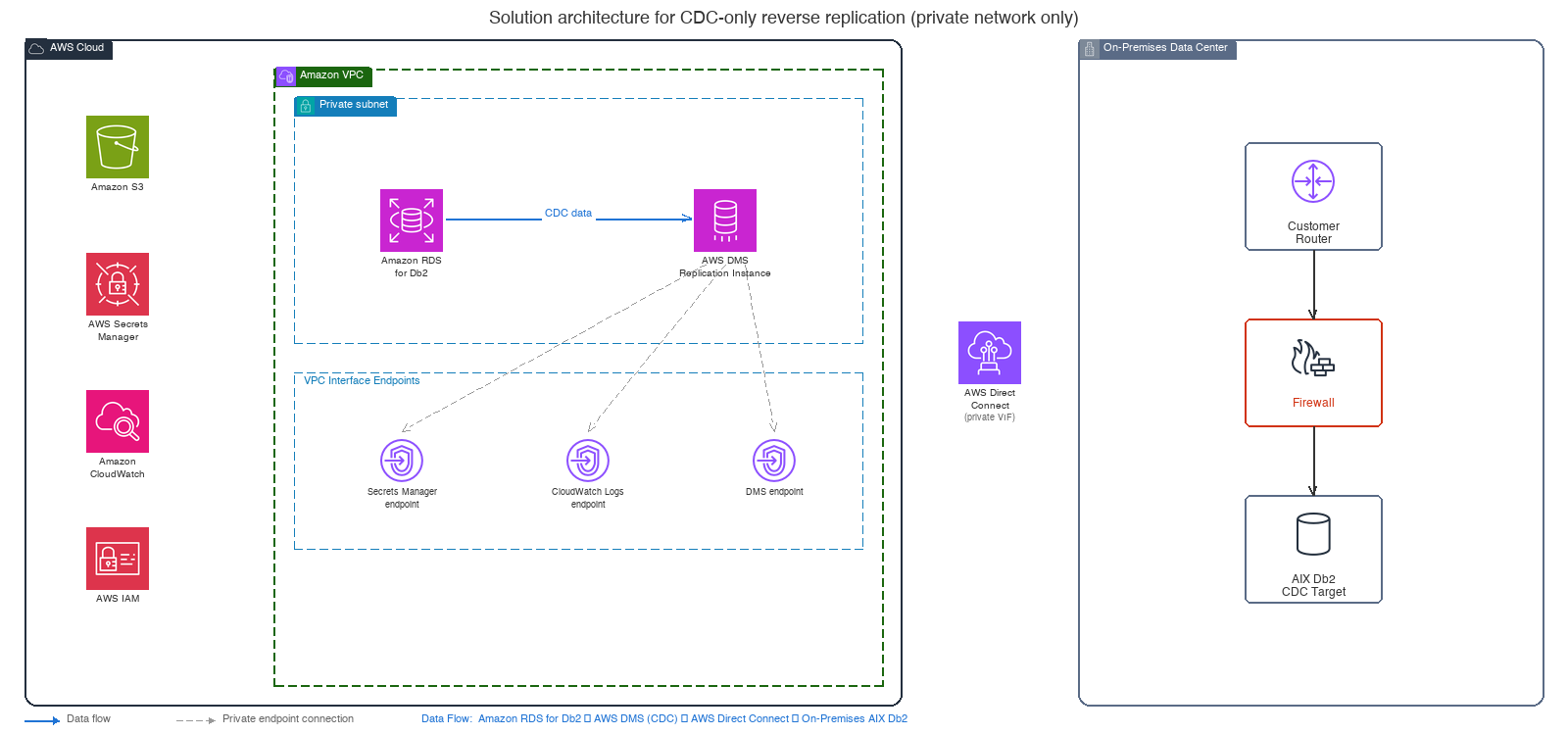
Figure 1: Solution architecture for CDC only reverse replication (private network only)
Key design decisions
- CDC only, no full load: Because the on-premises database already holds the complete dataset from before cutover, you avoid the time and cost of a full data reload. Only incremental changes made in Amazon RDS after cutover flow back.
- Private only network architecture: Your data doesn’t traverse the public internet. No public subnets, no public IP addresses on DMS or Amazon RDS instances. AWS service access is through Amazon Virtual Private Cloud (Amazon VPC) endpoints (AWS PrivateLink), and data transits through an AWS Direct Connect private VIF.
- Unidirectional reverse replication: During the post cutover validation window, applications write exclusively to Amazon RDS. The reverse CDC task replicates changes to the on-premises database.
- AWS Direct Connect for connectivity: A dedicated, private connection between your Amazon VPC and on-premises data center with no internet path involved.
Prerequisites
This walkthrough requires intermediate knowledge of Db2 administration and AWS networking. Allow approximately two to three hours to configure and validate the complete setup. Before you configure reverse replication, verify that you meet these requirements:
Required before you begin
- Forward migration is complete: You have successfully migrated your Db2 workload from on-premises AIX to Amazon RDS using DMS (full load + CDC) or native tools.
- Amazon RDS instance: A running Amazon RDS instance in an Amazon Virtual Private Cloud (Amazon VPC) with
PubliclyAccessibleset tofalse(private endpoint only). - On-premises AIX Db2 instance: The original source database is intact and accessible, running Db2 LUW version 10.5 or later.
- AWS Direct Connect: An established AWS Direct Connect connection with a private virtual interface (VIF) between your on-premises data center and AWS. No VPN over the public internet.
Created in this walkthrough
- DMS replication instance: Version 3.5.4 or later, deployed in a private subnet with Publicly Accessible set to
false. - VPC endpoints: Interface endpoints for AWS Secrets Manager, Amazon CloudWatch Logs, and DMS, so the DMS instance can access AWS services without an internet gateway.
- AWS Identity and Access Management (IAM) permissions: An IAM role granting DMS access to Amazon RDS for Db2, AWS Secrets Manager, and Amazon CloudWatch.
- Database user privileges: Appropriate grants on both source (Amazon RDS for Db2) and target (on-premises AIX Db2) endpoints.
Network architecture: private only AWS Direct Connect connectivity
The entire network architecture uses private connectivity only. The architecture doesn’t include an internet gateway. You deploy the DMS replication instance and Amazon RDS in private subnets with no public IP addresses. Amazon VPC endpoints (AWS PrivateLink) connect to AWS services such as Amazon CloudWatch and AWS Secrets Manager. Data flows to the on-premises environment exclusively through AWS Direct Connect, using a private virtual interface.
Security group configuration
Create the following security groups to restrict communication to private subnets only.
DMS replication instance security group (dms-reverse-repl-sg):
Amazon RDS security group (rds-db2-sg):
VPC endpoints for private AWS service access
The Amazon VPC has no internet gateway, so create Amazon VPC endpoints so the DMS replication instance can access AWS services privately:
VPC route table configuration
Connectivity verification
Before creating the DMS task, verify private connectivity between the DMS instance, source, and target:
- Test reachability: Use Amazon VPC Reachability Analyzer to validate the network path from the DMS subnet to the on-premises IP () on port <db-port>.
- Verify firewall rules: Confirm that the on-premises firewall accepts inbound TCP traffic on port <db-port> from the Amazon VPC CIDR range ().
- Test endpoint connections: After creating the endpoints, use the DMS connection test:
Expected output:
Configure Amazon RDS for Db2 as a CDC source
To prepare Amazon RDS as a CDC source, complete the following three configuration steps.
Connect to your Amazon RDS for Db2 instance using the master user (the administrative user you specified when creating the instance). The following commands require rdsadmin authorization, so a standard database user won’t have sufficient privileges.
Enable archive log retention
Important: Set the archive log retention to at least 24 hours. If the DMS task falls behind and required logs have been purged, the task fails and must restart from a new position.
Enable DATA CAPTURE CHANGES
Grant DMS user privileges
Configure the on-premises AIX Db2 as a target
Prepare the on-premises target database to receive CDC changes from AWS DMS.
Connect to your on-premises AIX Db2 instance using a user with SYSADM or SECADM authority. The following GRANT statements require administrative privileges on the target database.
Grant target database privileges
Prepare the target tables
- Drop or disable foreign key constraints: AWS DMS applies changes in transaction log order, not in parent-child relationship order. Without disabling foreign keys, an INSERT into a child table might arrive before the corresponding parent row, causing referential integrity violations that fail the replication task. Re-enable constraints after you validate the fail-back.
- Disable triggers: Helps prevent unintended side effects from CDC apply.
- Reset sequences: Capture current values from RDS source and reset on target:
Step-by-step: Create the reverse CDC only replication
The following seven steps walk you through creating the DMS resources for reverse CDC only replication. In the following commands, replace placeholder values (such as vpc-xxxxxxxxx and sg-dms-xxxxxxxxx) with your actual resource identifiers.
Step 1: Create the IAM role
Step 2: Create the DMS replication instance (private)
Important: The --no-publicly-accessible flag is critical. The DMS instance is deployed in a private subnet with no public IP. Connectivity to on-premises is through AWS Direct Connect through the virtual private gateway (VGW).
Step 3: Create the source endpoint (Amazon RDS for Db2)
| Setting | Value | Purpose |
CurrentLsn |
scan |
Scans Db2 logs to determine the current log sequence number (LSN) position |
SetDataCaptureChanges |
true |
Automatically sets DATA CAPTURE CHANGES on tables |
StartFromContext |
NOW |
Starts capturing from the latest log sequence offset |
Step 4: Create the target endpoint (on-premises AIX Db2)
Step 5: Test endpoint connections
Step 6: Create the CDC only replication task
Key replication task settings
| Setting | Value | Purpose |
migration-type |
cdc |
CDC-only — no full load |
TargetTablePrepMode |
DO_NOTHING |
Preserves existing data on target |
BatchApplyEnabled |
true |
Groups transactions for better throughput |
EnableValidation |
true |
Compares source/target data |
ApplyErrorDeletePolicy |
IGNORE_RECORD |
Skips delete operations for rows missing on target — avoids task failures; trade-off is minor inconsistencies during CDC |
cdc-start-position |
scan |
Starts from current LSN in Db2 logs |
Note: Pass these settings in the --replication-task-settings JSON parameter when creating the task. The CLI command in Step 6 uses a simplified form; adjust the JSON configuration to match your environment.
Step 7: Start the replication task
Monitoring and validation
After you start the replication task, monitor these key Amazon CloudWatch metrics. The following table shows the metrics, their thresholds, and recommended actions. You can also configure Amazon CloudWatch alarms that send notifications through Amazon Simple Notification Service (Amazon SNS) when metrics exceed thresholds.
| Metric | Threshold | Action |
CDCLatencySource (seconds of lag between the source database and AWS DMS) |
> 120 seconds | Check archive log retention and DMS instance CPU |
CDCLatencyTarget (seconds of lag between DMS and the target database) |
> 120 seconds | Check on-premises Db2 performance, AWS Direct Connect latency |
CDCIncomingChanges (number of change events waiting to be applied) |
Sustained high | Task falling behind – scale up replication instance |
CDCChangesDiskSource (change events that DMS writes to disk when replication instance memory is insufficient) |
> 0 sustained | Increase instance memory or MemoryLimitTotal task setting (controls the maximum memory (MiB), replication task can consume) |
CPUUtilization |
> 80% | Scale up to larger instance class |
Fail-back procedures
When you need to fail back to your on-premises environment, follow this procedure to minimize downtime and maintain data integrity.
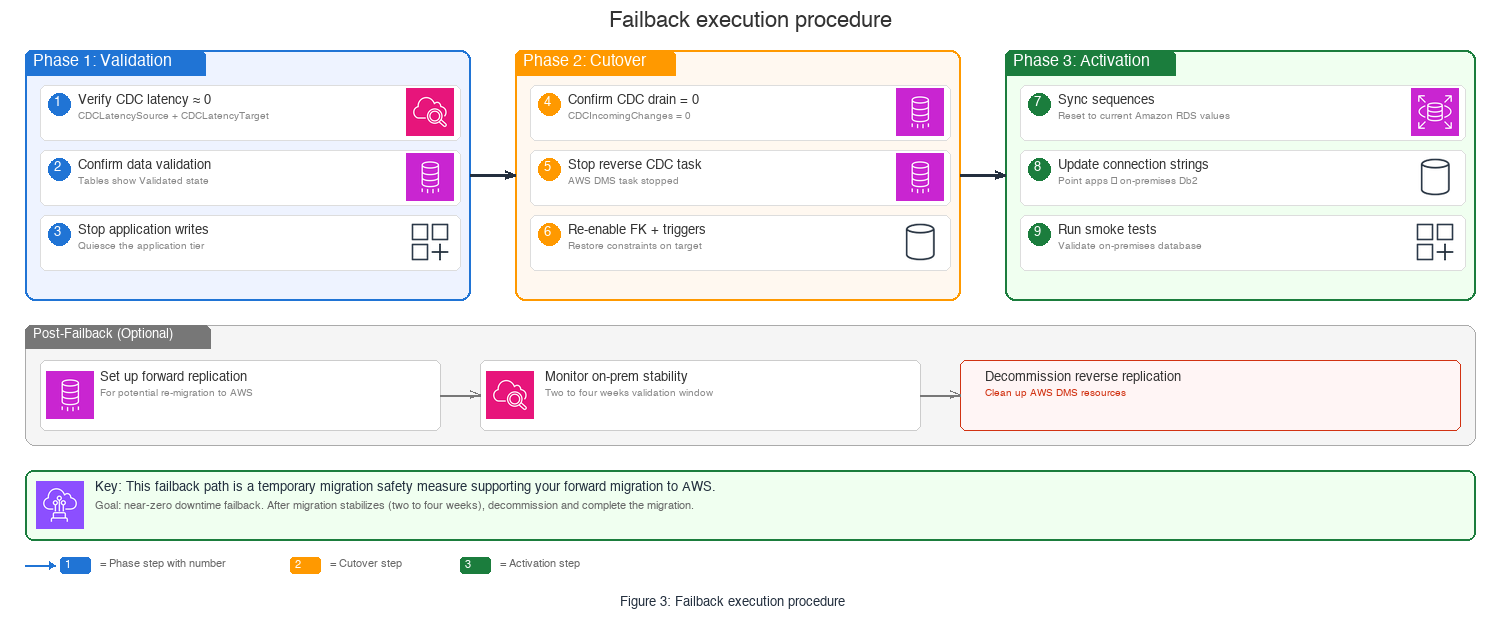
Figure 3: Fail-back execution procedure
Pre fail-back checklist
- Verify CDC latency is near zero:
CDCLatencySourceandCDCLatencyTarget≈ 0 - Confirm data validation passes: Tables show Validated state
- Stop application writes to RDS: Quiesce the application tier
- Confirm the CDC task has drained:
CDCIncomingChanges= 0
Fail-back execution
- Stop the reverse CDC task.
- Re-enable foreign key constraints on the target.
- Re-enable triggers on target tables.
- Reset sequences to current values from Amazon RDS for Db2.
- Update application connection strings to point to on-premises Db2 (:).
- Run smoke tests against the on-premises database.
- Optional: Set up forward replication again for remigration.
Clean up resources
This reverse replication exists only to support the migration validation phase. It is not designed for ongoing use. Plan to decommission when the application runs two to four weeks without issues, relevant teams sign off, and change management approves. After decommissioning, delete the DMS replication instance, endpoints, and associated IAM roles to stop incurring charges.
After decommissioning, revert the archive log retention on your Amazon RDS for Db2 instance to the default value if you no longer need extended retention. This reduces storage costs from retained archive logs.
Limitations
- DMS supports IBM Db2 for LUW as a CDC source. In this architecture, the on-premises AIX Db2 instance is configured as a target endpoint, which receives changes through standard Db2 connectivity.
- DMS doesn’t support full large object (LOB) mode for Db2 LUW targets. Use limited LOB mode instead.
- DMS doesn’t support the Boolean data type in Db2 LUW sources.
- DMS ignores DECFLOAT column changes during replication.
- DMS doesn’t replicate certain DDL operations (partitioned table ALTER, RENAME COLUMN). Apply these manually on the target.
- Multidimensional clustering (MDC) table updates appear as INSERT + DELETE pairs.
- DMS doesn’t replicate sequence values. Synchronize them manually before fail-back.
- CDC doesn’t capture the Db2 LOAD utility’s page level loads. Use IMPORT instead.
Cost considerations
Consider the following cost factors when you plan your reverse replication setup:
- DMS replication instance hours (based on instance class).
- Data transfer through AWS Direct Connect.
- VPC endpoint charges per hour per Availability Zone.
- Amazon CloudWatch metrics and alarms.
- AWS Secrets Manager secret storage and API calls.
For current pricing, see the DMS pricing page, the AWS Direct Connect pricing page, and the AWS PrivateLink pricing page. Because this is a temporary migration safety measure, you can minimize costs by decommissioning the replication infrastructure after the validation window closes.
Best practices
- Before your production cutover, dry run the complete fail-back procedure in a non-production environment to validate each step.
- Store database credentials in AWS Secrets Manager with auto-rotation enabled. This approach improves your security posture by removing hard-coded passwords.
- Set up Amazon CloudWatch alarms on
CDCLatencySourceandCDCLatencyTargetmetrics so you’re alerted when replication lag increases beyond acceptable thresholds. - Maintain archive log retention at 24 hours or longer. If required logs are purged before DMS reads them, the task fails and you must restart from a new position.
- After 48 to 72 hours of stable replication, reduce the DMS log verbosity from
DETAILED_DEBUGtoDEFAULTto lower Amazon CloudWatch Logs costs. - For sizing, a
c6i.xlargeinstance handles fewer than 1,000 transactions per second (TPS). If your workload exceeds that, scale up to ac6i.2xlarge. - Schedule weekly data validation with independent row count and checksum comparisons between source and target databases.
Conclusion
In this post, you learned how to configure CDC-only reverse replication from Amazon RDS for Db2 to an on-premises AIX Db2 instance using AWS DMS over a private-only network. You set up VPC interface endpoints, configured source and target Db2 endpoints, created a CDC-only replication task, and validated the data flow through AWS Direct Connect. This temporary fail-back path helps you meet strict RTO and RPO requirements during migration cutover windows. After your migration stabilizes, decommission the reverse replication and transition to your permanent architecture on AWS.