AWS Database Blog
How to stream PostgreSQL changes to Amazon S3 with AWS Fargate
In this post, we show you how to build a fully managed, event-driven change data capture (CDC) pipeline. It streams row-level changes from Amazon Relational Database Service (Amazon RDS) for PostgreSQL or Amazon Aurora PostgreSQL-Compatible Edition to Amazon Simple Storage Service (Amazon S3) in near real time. You deploy the entire pipeline with a single AWS CloudFormation template, and it can run in private subnets with no internet gateway without exposing resources to the public internet.
Many teams need their database changes in a data lake, an auditing system, or a downstream API without waiting for nightly batch jobs. Polling the database on a timer misses changes and adds load. The architecture in this post gives you a simpler operational surface and a pay-per-use cost model.
Solution overview
The pipeline uses AWS Fargate, Amazon EventBridge, Amazon Simple Queue Service (Amazon SQS), and AWS Lambda. It builds on PostgreSQL’s native Write-Ahead Log (WAL) and logical replication capabilities to take change data outside of PostgreSQL entirely, landing it in S3 where you can query it with Amazon Athena, feed it into AWS Glue, or hand it off to any downstream consumer.
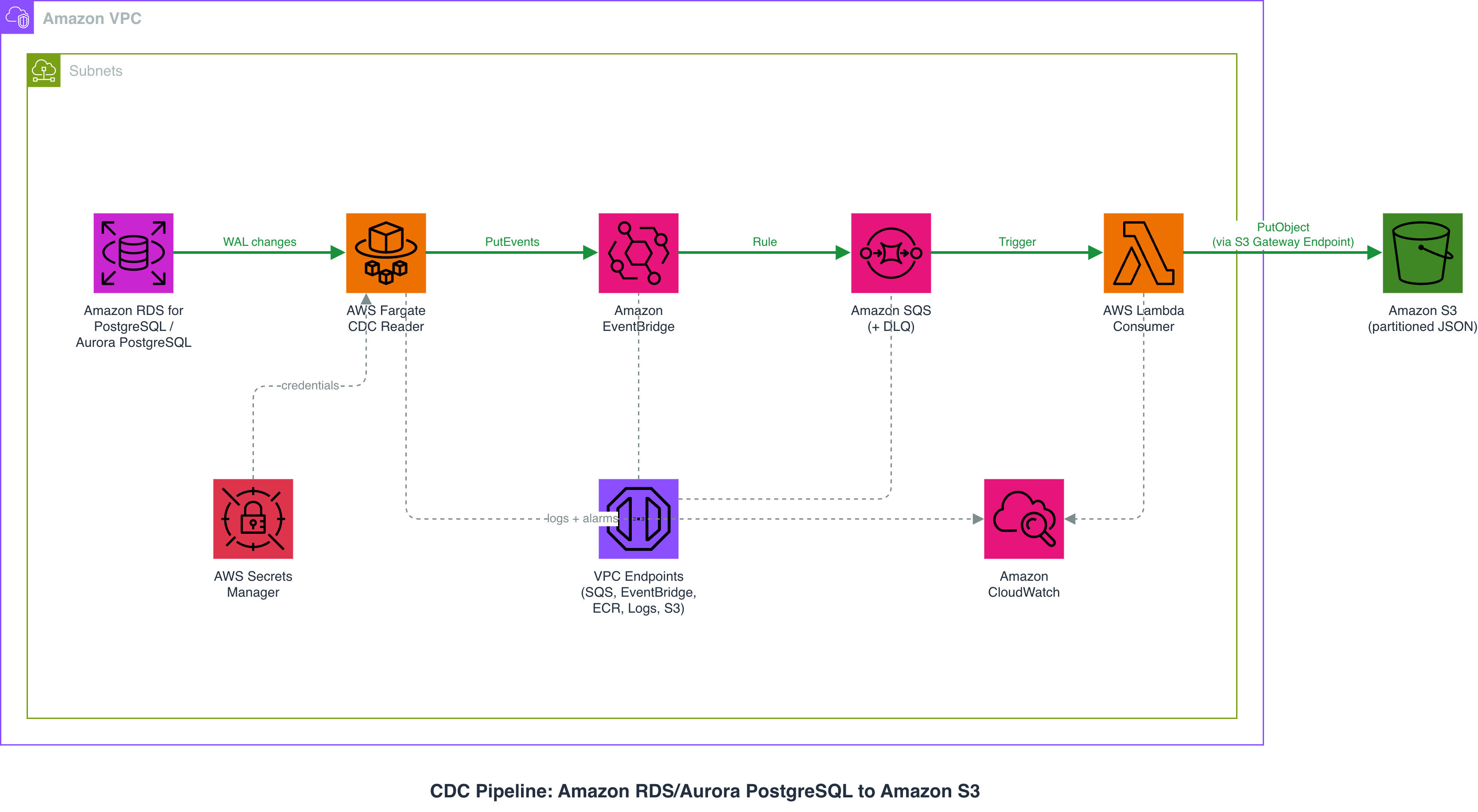
The pipeline has six components:
- The source database (Amazon RDS for PostgreSQL or Aurora PostgreSQL) writes changes to its WAL. A replication slot and publication define what to capture.
- A CDC reader container on Fargate polls the replication slot every few seconds, grabs new changes, and publishes them as events to EventBridge.
- EventBridge receives events on a custom bus and routes them to an Amazon SQS queue. You can add more targets later without touching the CDC reader.
- Amazon SQS buffers events. If the downstream Lambda is slow or fails, messages wait safely. After three failed attempts, they move to a Dead Letter Queue (DLQ).
- A Lambda function consumes messages in batches, makes an API call (or any enrichment logic), and writes the result to S3.
- Amazon S3 stores the final records as partitioned JSON files (year/month/day), ready for querying with Athena.
Why Fargate for the CDC reader
Reading a PostgreSQL replication slot requires a persistent database connection. AWS Lambda recently introduced durable functions (for fault-tolerant workflows with checkpointing) and Lambda MicroVMs (stateful sandboxes with up to 8-hour runtimes). However, Lambda MicroVMs auto-suspend when idle and resume on demand, which would disconnect the replication slot during quiet periods. WAL streaming works best with a truly persistent connection that never drops. Fargate lets the reader run continuously as a long-lived service without suspend/resume complexity, making it the simpler fit for this workload.
When to use this approach
If your organization already runs Apache Kafka or Amazon Managed Streaming for Apache Kafka (Amazon MSK), Debezium via Amazon MSK Connect is the established approach for CDC. For an end-to-end example that streams to S3 using Debezium with Amazon Data Firehose, refer to Real-time CDC from Aurora PostgreSQL to Amazon S3 Tables using Debezium and Firehose. Use the approach in this post if you want a CDC pipeline without introducing Kafka.
- No Kafka dependency. The pipeline uses only managed services with no servers to maintain.
- Pay-per-use cost model. Fargate charges by the second, Lambda per invocation, SQS per message.
- Simpler operational surface. Fewer moving parts to monitor.
- Private networking by default. Everything stays in your virtual private cloud (VPC).
Cost considerations
The main cost drivers are the Fargate task (runs 24/7) and VPC endpoints (if used). For a low-write-volume database (under 1,000 changes per hour) in the N. Virginia Region (us-east-1), expect roughly:
- Fargate (0.25 vCPU, 0.5 GB): approximately $9/month.
- Lambda invocations: under $1/month at low volume.
- SQS: under $1/month at low volume.
- S3 storage: depends on data volume, $0.023 per GB for S3 Standard storage.
- VPC endpoints (if used): approximately $7/month per endpoint (7 endpoints = ~$50/month).
For testing or low-volume workloads, you can skip VPC endpoints by using subnets with internet access (set CreateVpcEndpoints=false). This reduces the monthly cost significantly.
Prerequisites
This post is self-contained. You can read through it without any setup. If you want to run the examples yourself, you need:
- An Amazon RDS for PostgreSQL or Aurora PostgreSQL instance (PostgreSQL 14 or later). For instructions, refer to Creating an Amazon RDS DB instance.
- A VPC with at least two subnets in different Availability Zones. Refer to Create a VPC.
- The AWS Command Line Interface (AWS CLI) installed and configured.
- A container build tool (Docker or Finch) to build and push the CDC reader image to Amazon Elastic Container Registry (Amazon ECR).
- A PostgreSQL client such as psql to connect to your source database.
- A source instance with logical replication enabled. Set
rds.logical_replication = 1in your custom parameter group and reboot.
Setting up the test environment
We tested on an Amazon RDS for PostgreSQL 16.8 instance in the N. Virginia Region (us-east-1). We connected from an Amazon Elastic Compute Cloud (Amazon EC2) bastion host accessed through AWS Systems Manager Session Manager. Our test environment used private subnets with VPC endpoints. This is not a requirement. If your subnets have internet access, set CreateVpcEndpoints=false when deploying.
Step 1: Enable logical replication on the source
For Amazon RDS for PostgreSQL:
For Amazon Aurora PostgreSQL-Compatible Edition:
Reboot the instance (for Aurora, reboot the writer instance), then verify:
Step 2: Create the replication slot and publication
Create a logical replication slot using the wal2json output plugin, which produces structured JSON with column names and values:
Create a publication:
Step 3: Deploy the pipeline with CloudFormation
Clone the GitHub repository that accompanies this post:
Deploy the stack:
Set CreateVpcEndpoints to true if your subnets are private and have no internet access. The stack takes about 8 minutes to deploy.
Step 4: Build and push the CDC reader container
Build and push the image to Amazon ECR:
Step 5: Store credentials and start the service
Create a secret in AWS Secrets Manager:
Scale up the service:
Verify:
Step 6: Test the pipeline end to end
Create a test table and insert a row:
Within 10 seconds, the CDC reader logs show:
After about 30 seconds, check S3:
Download the file:
Note: This output uses the wal2json output plugin, which produces structured JSON with column names and values. If you use the default pgoutput plugin, the original_db_record field contains hex-encoded binary data that requires a decoder. Refer to the Alternative output plugins section for details.
Operational guidance and failure modes
Running this pipeline in production means watching for a few specific failure modes: replication lag, Fargate task restarts, Lambda delivery failures, and duplicate processing. The following sections cover each one and how to respond.
Replication lag monitoring
Monitor how far behind the CDC reader is:
We recommend creating an Amazon CloudWatch alarm on the Amazon RDS FreeStorageSpace metric. If the CDC reader stops consuming, WAL files accumulate and can fill up storage. For Amazon RDS, the max_slot_wal_keep_size parameter can cap WAL retention per slot.
Important: If max_slot_wal_keep_size is set and the consumer falls too far behind, PostgreSQL invalidates the slot to protect database storage. When this happens, you must recreate the slot and perform an initial data sync. Monitor the pg_replication_slots view and set alarms before this threshold is reached.
Fargate task recovery
Amazon Elastic Container Service (Amazon ECS) automatically restarts the Fargate task if it exits. When the new task starts, it connects to the same replication slot and picks up from the last confirmed log sequence number (LSN). As long as PostgreSQL has not invalidated the slot, you don’t lose data. If you set max_slot_wal_keep_size and the task is down longer than the WAL retention allows, the slot is invalidated. You then need to recreate it with a fresh initial sync.
Lambda failures and the Dead Letter Queue
If the Lambda function fails three times, the message moves to the DLQ. Set a CloudWatch alarm on ApproximateNumberOfMessagesVisible for the DLQ so you are notified immediately. If your workload cannot tolerate data loss, process DLQ messages manually or with a separate Lambda that retries with backoff.
Idempotency
Amazon SQS provides at-least-once delivery. In rare cases, the Lambda function might process the same message twice. The most direct approach is to use the S3 key path (which includes the LSN) as a natural deduplication mechanism. Writing the same file to the same S3 key is an idempotent operation and does not create duplicates.
Alternative output plugins
PostgreSQL supports three output plugins for logical replication slots:
- pgoutput is PostgreSQL’s native binary output plugin (used by default). It is the most efficient on the wire but requires a decoder to parse the binary protocol into readable column values. Choose this if you plan to build or use a decoder library in your CDC reader.
- wal2json produces structured JSON with column names, types, and values. Create the slot with
SELECT * FROM pg_create_logical_replication_slot('cdc_pipeline_slot', 'wal2json');. It produces the most readable output in S3. - test_decoding produces plain text output such as “table public.cdc_test: INSERT: id[integer]:1 name[character varying]:‘CDC Test User’”. It is built into PostgreSQL and useful for debugging and inspecting changes manually. We don’t recommend it for production pipelines because the plain-text format is harder to parse programmatically than JSON. Its output format is also not guaranteed to be stable across PostgreSQL versions.
All three plugins are available on Amazon RDS for PostgreSQL and Aurora PostgreSQL.
Cleanup
To avoid ongoing charges:
- Scale down the ECS service:
- Drop the replication slot:
- Drop the publication:
- Delete the CloudFormation stack:
- Delete the Secrets Manager secret:
- Empty and delete the S3 bucket (if no longer needed):
If you created a dedicated RDS instance, delete the DB instance through the AWS Management Console or AWS CLI to stop incurring charges.
Conclusion
In this post, you learned how to build a CDC pipeline that streams PostgreSQL changes to Amazon S3 in near real time using Fargate, EventBridge, Amazon SQS, and Lambda. The pipeline supports private subnet deployments with VPC endpoints, and stores credentials in Secrets Manager.
The same pattern applies whether your source is Amazon RDS for PostgreSQL or Amazon Aurora PostgreSQL-Compatible Edition. The only difference is whether you set rds.logical_replication in an instance parameter group (Amazon RDS) or a cluster parameter group (Aurora).
To get started, clone the GitHub repository and deploy the pipeline in your account.