AWS Database Blog
Preserving custom domain names for Amazon RDS for Db2
Customers migrating IBM Db2 workloads from on-premises to Amazon Relational Database Service (Amazon RDS) for Db2 frequently ask how to keep their existing application connection strings unchanged. Amazon RDS for Db2 natively supports end-to-end encryption by setting the ssl_svcename parameter in the DB parameter group and the db2comm registry variable to SSL or SSL,TCP, but applications must connect to the predefined RDS endpoint (for example, mydb.abc123.us-east-1.rds.amazonaws.com:50000). Rewriting hundreds of application connection strings to switch from proddb.company.com:1443 to an RDS endpoint is costly, error-prone, and slows down lift-and-shift migrations.
In this post, we introduce a modular Terraform template, published in the aws-samples/sample-rds-db2-tools repository, that lets your applications keep their existing custom domain names and ports while preserving end-to-end TLS encryption to Amazon RDS for Db2. The template deploys a Server Name Indication (SNI) based TLS proxy that forwards encrypted traffic without ever decrypting it.
Solution overview
The template is split into five numbered Terraform modules, as depicted in the following diagram.
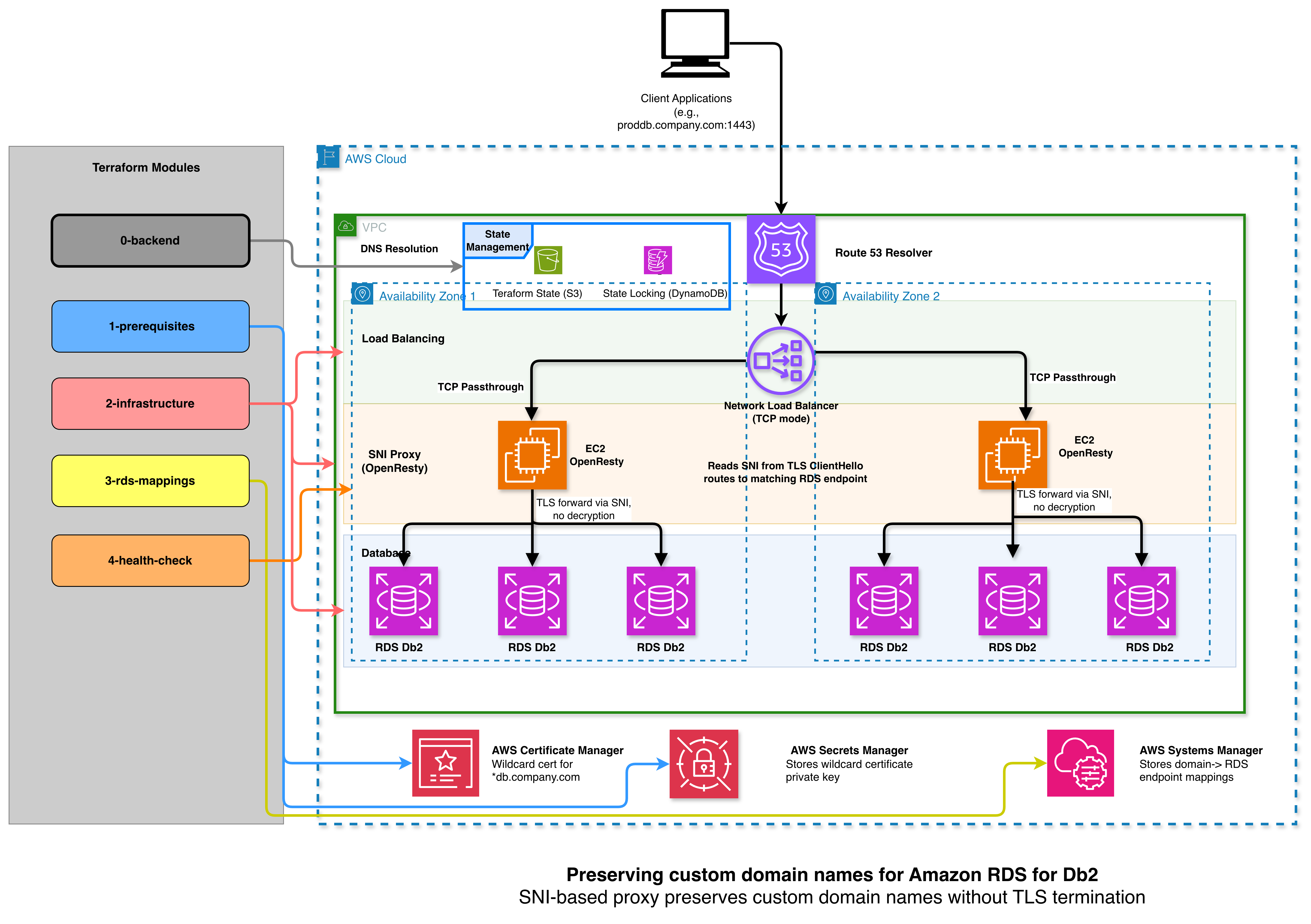
Each module owns a focused piece of the stack and keeps its own remote state, so you can iterate on one module without affecting the others. The template uses Amazon Simple Storage Service (Amazon S3) and Amazon DynamoDB for state and locking, and AWS Secrets Manager and AWS Certificate Manager (ACM) for certificate storage.
| Module | What it creates |
| 0-backend-setup | Amazon S3 bucket and Amazon DynamoDB table for Terraform remote state |
| 1-prerequisites | Self-signed SSL certificates stored in AWS Secrets Manager and ACM |
| 2-infrastructure | Amazon Elastic Compute Cloud (Amazon EC2) instance running OpenResty (Nginx), Amazon Network Load Balancer (NLB), and Amazon Route 53 private hosted zone |
| 3-mappings | Custom domain to RDS endpoint mappings in AWS Systems Manager Parameter Store, plus dynamically created NLB listeners and target groups for each port |
| 4-health-check | Validation of the deployment (EC2 status, listening ports, target group health, configuration files) |
The proxy reads the SNI field from the TLS ClientHello and forwards the encrypted stream to the matching RDS endpoint. Traffic is never decrypted on the proxy, so end-to-end encryption is preserved from client to RDS. A cron job on the EC2 instance refreshes the proxy configuration from Parameter Store every five minutes, so adding or removing a database does not require redeploying infrastructure.
Prerequisites
To follow along, you need:
- An AWS account with permissions to create Amazon EC2, NLB, Route 53, AWS Identity and Access Management (IAM), AWS Secrets Manager, ACM, Amazon S3, and Amazon DynamoDB resources. The repository ships terraform-service-account-policy.json and a service account setup guide.
- Terraform 1.5 or later, the AWS Command Line Interface (AWS CLI), and
jqinstalled locally. - An existing Amazon Virtual Private Cloud (Amazon VPC) with private subnets in at least two Availability Zones, with DNS hostnames and DNS resolution enabled.
- One or more Amazon RDS for Db2 instances configured for SSL access. Set
db2commtoSSLorSSL,TCPand define an SSL port throughssl_svcenamein the DB parameter group. For details, see Using SSL/TLS with an Amazon RDS for Db2 DB instance.
Clone the repository:
Walkthrough
The following subsections summarize each step. Full commands, variable descriptions, and sample tfvars files are in the per-module READMEs linked from the repository README.
Step 1: Initialize remote state
Create the S3 bucket and DynamoDB table that hold state for the remaining modules:
The configure-modules.sh script writes a backend.tf into modules 1 through 4 so they all use the same shared state bucket.
Step 2: Generate certificates
Module 1 generates a self-signed certificate for your wildcard custom domain (for example, *.db.mycompany.com) and stores the private key in AWS Secrets Manager and the certificate in ACM. Edit terraform.tfvars with aws_region, domain_name, and organization, then run terraform init && terraform apply --auto-approve.
For production, replace the self-signed certificate with one issued by your enterprise certificate authority. The self-signed flow is intended for development and testing.
Step 3: Deploy the proxy infrastructure
Module 2 deploys the EC2 proxy, the NLB, and the Route 53 private hosted zone. Run ./configure-infrastructure.sh to interactively select your VPC, subnets, and security groups, or write terraform.tfvars manually. The script generates the file for you and module 2 wires the NLB to the EC2 proxy, attaches an instance profile that allows reading certificates and Parameter Store, and creates a wildcard DNS record under your custom domain that points at the NLB.
Step 4: Configure RDS mappings
Module 3 is where you describe which custom domain and port should route to which RDS endpoint:
The module extracts the unique client ports (1443, 50443 in the example), creates one NLB listener and target group per port, registers the EC2 proxy, and writes each mapping to Parameter Store under /rds/proxy/mappings/<domain>. The cron job on the EC2 instance picks up the new mappings within five minutes and reloads the proxy configuration.
To add or remove a database later, edit rds_mappings, run terraform apply, and wait for the cron job. No infrastructure redeployment is needed.
Step 5: Validate the deployment
Module 4 runs a scripted health check that verifies the EC2 instance is running, the SSM agent is online, OpenResty is active, every mapped port is listening, every NLB target group is healthy, and the proxy configuration and certificates are present on the instance. Run terraform init && terraform apply --auto-approve from 4-health-check. A successful run prints a summary similar to this:
Step 6: Connect from a Db2 client
From a Db2 client in the same VPC (or an Amazon VPC peered with the proxy VPC), download the Region-specific RDS certificate bundle (for example, us-east-1-bundle.pem) and configure db2dsdriver.cfg to use the custom domain and port:
Then connect:
Because the proxy never decrypts the stream, the certificate that the client validates is the RDS certificate, which confirms the connection is encrypted end to end. For a Java client recipe that avoids Java KeyStore configuration entirely, see Create an SSL connection to Amazon RDS for Db2 in Java without KeyStore or Keytool.
Clean up
To avoid incurring ongoing charges, destroy the modules in reverse order:
The script destroys modules 3 through 1, removes the rdsdb2-proxy/* prefix from the state bucket, and resets the local Terraform files. The state bucket and DynamoDB table from module 0 are preserved so other Terraform projects in the same account are not affected. Remove them manually if you no longer need them.
Considerations and limitations
We designed this template as a transitional solution. The goal is to give you time to migrate to Amazon RDS for Db2 without rewriting application connection strings on day one, and then to retire the proxy as your applications adopt the native RDS endpoints. If your applications truly cannot be modified (for example, a third-party application with hardcoded connection strings), the proxy can run indefinitely, but you should treat it as additional infrastructure to operate, monitor, and patch.
Cost. The proxy adds the following on top of your RDS for Db2 charges, in us-east-1 list pricing as a reference:
- One Amazon EC2 instance: approximately $30/month for
t3.medium(development) or $55/month forc8i.large(production baseline). Two instances across Availability Zones for high availability roughly doubles this. - One Network Load Balancer: approximately $16/month per Availability Zone, plus $0.006 per LCU-hour and per-GB data processing. With one or two custom ports on a low-volume workload, NLB charges typically stay under $25/month.
- Amazon Route 53 private hosted zone: $0.50/month per zone plus $0.40 per million queries.
- AWS Secrets Manager and AWS Systems Manager Parameter Store: under $1/month for the certificate secret and the standard-tier mapping parameters.
A single-instance reference deployment usually lands between $50 and $100/month. A two-Availability Zone production deployment with a c8i.large Auto Scaling group lands between $140 and $200/month, before any data transfer.
Operational considerations. Keep these points in mind as you plan the deployment:
- Single point of failure in the reference architecture. Module 2 deploys one EC2 instance. For production, replace it with an Auto Scaling group that registers two or more instances across Availability Zones to the same NLB target groups. The proxy is stateless, so scaling out is straightforward.
- Self-signed certificates by default. Module 1 generates a self-signed wildcard certificate so the walkthrough is self-contained. For production, replace it with a certificate issued by your enterprise certificate authority and import it into AWS Certificate Manager and AWS Secrets Manager using the same parameter names.
- SNI is required. The proxy routes connections by reading the SNI extension in the TLS
ClientHello. Modern Db2 clients send SNI when SSL is configured, but legacy clients that do not send SNI cannot be routed and must use a port that maps to a single RDS endpoint. - Configuration refresh lag. New entries in
rds_mappingsare picked up by the EC2 cron job within five minutes. Plan changes accordingly, or run/usr/local/bin/update-nginx-config.shon the instance for an immediate refresh. - DNS scope. The Route 53 hosted zone is private. Clients must resolve the custom domain from a VPC associated with the zone (the proxy VPC, a peered VPC, or one reachable through AWS Transit Gateway with a Route 53 Resolver rule). Public DNS resolution is intentionally not exposed.
- Single-region deployment. The template deploys to one AWS Region. For multi-region disaster recovery, deploy the template independently in each Region and use Route 53 health checks for failover.
- Capacity planning.
OpenRestyis efficient with TCP passthrough, and ac8i.largeinstance comfortably handles thousands of concurrent connections, but you should still monitorCPUUtilization,NetworkIn,NetworkOut, and NLBHealthyHostCountandActiveFlowCountso the proxy is sized for your aggregate workload. - Migration path off the proxy. As applications are updated to connect to native RDS endpoints, remove the corresponding entry from
rds_mappingsand runterraform apply. When the last entry is removed, runcleanup.shto retire the proxy infrastructure.
Conclusion
This modular Terraform template lets you lift and shift IBM Db2 workloads to Amazon RDS for Db2 without rewriting a single application connection string, while preserving true end-to-end TLS encryption. The proxy uses SNI routing rather than TLS termination, so the encrypted stream is forwarded byte-for-byte to RDS. Each module is small, focused, and idempotent, so you can adopt them incrementally and adapt the networking layer to single-VPC, multi-VPC, AWS Transit Gateway, AWS PrivateLink, or hybrid deployment patterns without changing the proxy logic.
Get the full template, parameter reference, troubleshooting guide, and sample tfvars files at aws-samples/sample-rds-db2-tools.
For related Db2 content on AWS, see Deploying Amazon RDS for Db2 using Terraform, the Amazon RDS for Db2 User Guide, and the AWS Database Blog.
Acknowledgements
Sincere thanks to Rajib Sarkar and Kshitoj Sanghoi for reviewing the post and Muhammad Gaballah for thoroughly testing the solution.