AWS DevOps & Developer Productivity Blog
Automated Incident Remediation with AWS DevOps Agent and Kiro CLI
Introduction
Automated incident remediation – turning investigation findings into deployed fixes without manual toil – is the next frontier for operations teams running distributed workloads on AWS. Today, when an incident fires at 2 AM, the on-call engineer must correlate telemetry across Amazon CloudWatch, deployment pipelines, and application logs, then manually write and deploy a fix – a process that routinely takes hours. AWS DevOps Agent addresses the first half by autonomously investigating incidents, identifying root causes, and generating mitigation plans in minutes. During preview, customers and partners reported up to 75% lower MTTR, 80% faster investigations, and 94% root cause accuracy.
But investigation and mitigation recommendations are only half the story. Someone still has to read the findings, write the fix, test it, and deploy it. What if that second half could be automated too?
In a previous post, Leverage Agentic AI for Autonomous Incident Response with AWS DevOps Agent, we demonstrated how to configure AWS DevOps Agent to monitor your applications, trigger autonomous investigations, and follow best practices for production deployments. We also published this code sample which demonstrates how investigations could be wired to be triggered automatically when a Amazon CloudWatch alarm is raised. These two articles now allow you to trigger AWS DevOps Agent investigation on a Amazon CloudWatch alarm and produce a mitigation plan.
In this post, we demonstrate how to integrate AWS DevOps Agent mitigation plan output with Kiro CLI – running in headless mode on AWS CodeBuild – to close the remediation loop end-to-end. When AWS DevOps Agent completes a mitigation analysis, an event-driven pipeline automatically routes the findings to Kiro CLI, which applies the fix to your codebase, creates a pull request for human review, and triggers deployment upon approval. The result: L1/L2 incidents go from detection to deployed fix with minimal manual intervention – the only human touchpoint is the pull request approval.
We walk through the complete solution using a sample CloudFormation application, including the infrastructure code, anomaly generation scripts, event routing, and the Kiro CLI steering configuration that makes it all work. All source code is available in the accompanying aws-samples repository.
Solution Overview
Consider a typical web application running on AWS — a frontend behind an Application Load Balancer, backend compute on Amazon EC2, and an Amazon RDS database, with source code and CloudFormation templates in AWS CodeCommit. When something goes wrong in this environment, the solution chains two AWS frontier agents —AWS DevOps Agent for autonomous investigation and mitigation, and Kiro CLI for automated code remediation — through a fully serverless event-driven bridge to take the application from incident to deployed fix.
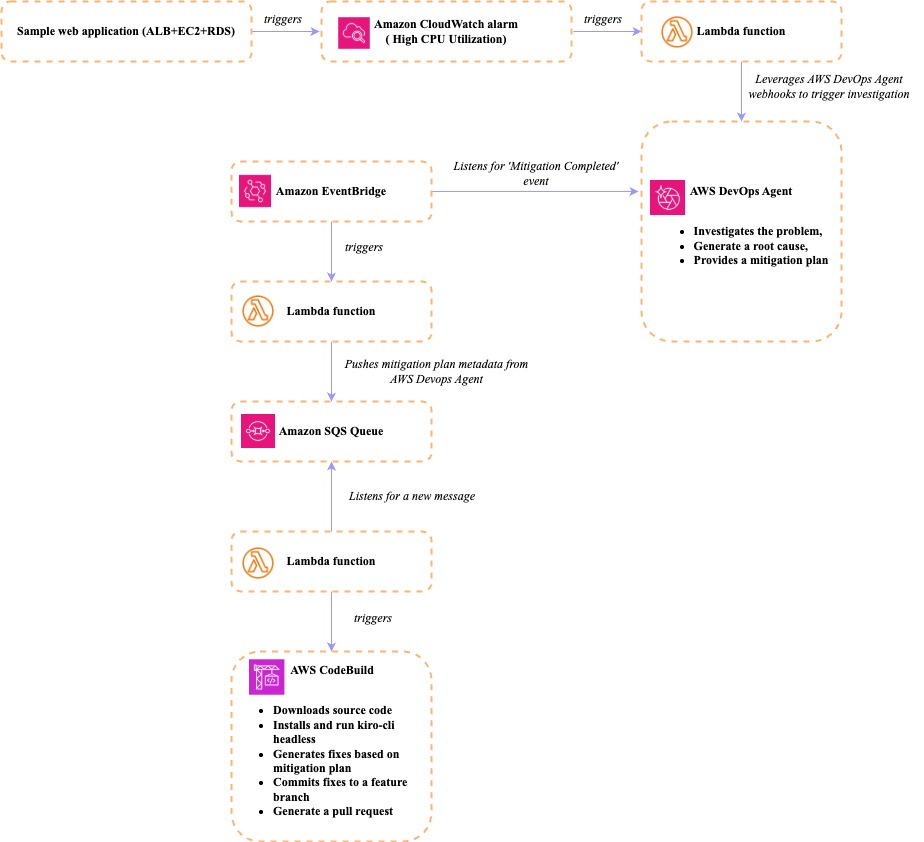
Fig 1 – Solution architecture
How it works
- An incident occurs – Your application experiences an issue – high CPU utilization, elevated error rates, slow response times. Amazon CloudWatch alarms fire.
- DevOps Agent investigates – AWS DevOps Agent, which has your application onboarded into an Agent Space, autonomously correlates metrics, logs, and deployment history to identify root cause and generate a mitigation plan.
- EventBridge routes the signal – An Amazon EventBridge rule captures Mitigation Completed events (source: aws.aidevops) and invokes a AWS Lambda function.
- Lambda extracts and queues – The AWS Lambda function calls the AWS DevOps Agent API to retrieve the mitigation summary and execution plan, then publishes the payload to Amazon SQS queue.
- CodeBuild runs Kiro CLI – When a message arrives in the Amazon SQS queue, a AWS Lambda function with an SQS event source mapping triggers a AWS CodeBuild execution, passing the message content as an environment variable. AWS CodeBuild runs Kiro CLI in headless mode (–no-interactive –trust-tools=read,write,grep,shell), using the mitigation payload as a remediation prompt.
- Kiro CLI applies the fix – Guided by a steering file that describes the repository structure and remediation conventions, Kiro CLI modifies the CloudFormation template or application code, commits to a feature branch, and creates a pull request.
- Human approves, pipeline deploys – A developer reviews the pull request. Upon approval and merge, the associated deployment pipeline gets triggered to execute the change.
Prerequisites
To follow along with this walkthrough, you need:
- An AWS account for AWS DevOps Agent access
- An Agent Space configured
- Kiro CLI with a Pro, Pro+, or Power subscription (required for headless mode API keys)
- AWS CLI configured with appropriate credentials
- The sample repository pushed to your account’s AWS CodeCommit repository
Once completed, follow along the Readme file to setup the components which allow you to implement and execute the above architecture. The sections below provide an explanation of the components that have been built to support the architecture.
Capturing mitigation events
AWS DevOps Agent publishes lifecycle events to the Amazon EventBridge default event bus whenever an investigation or mitigation changes state. Each event uses the source aws.aidevops and a detail-type that identifies the specific like Mitigation Completed, Investigation Completed, or Mitigation Failed. The post focuses on a single signal: the moment a mitigation finishes successfully.
EventBridge rule and Lambda extraction
An Amazon EventBridge rule matching the Mitigation Completed detail-type invokes a AWS Lambda function. The event payload contains metadata (agent_space_id, task_id, and execution_id) which allows the AWS Lambda function to call the AWS DevOps Agent and extracts two key objects: the mitigation summary (what action to take and why) and the execution plan (step-by-step instructions). It publishes this structured payload to an Amazon SQS queue for downstream processing.
Headless remediation with Kiro CLI
With mitigation payloads landing in the Amazon SQS queue, we need a compute environment that can check out the application and infrastructure repository, run Kiro CLI agent against the codebase, and push changes back. AWS CodeBuild is a natural fit — it provides on-demand compute, integrates natively with AWS CodeCommit and requires no persistent infrastructure.
Kiro CLI 2.0 introduced headless mode, which allows it to run programmatically in deployment pipelines without an interactive terminal. You authenticate with an API key (stored in AWS Secrets Manager), pass a prompt, and Kiro CLI executes end-to-end — same tools, same agents, same capabilities as the interactive experience.
How CodeBuild orchestrates the fix
When a message arrives in the Amazon SQS queue, a trigger AWS Lambda function starts a AWS CodeBuild execution, passing the Amazon SQS message body as an environment variable. The AWS CodeBuild buildspec follows a straightforward sequence:
- Install : Installs Kiro CLI and configures the environment. The KIRO_API_KEY is pulled automatically from AWS Secrets Manager ,never hardcoded.
- Generate prompt : A Python script converts the structured mitigation payload into a natural-language remediation prompt. It inspects the content to classify whether the change targets infrastructure (or application code, then generates a focused prompt with the action, reasoning, and specific instructions.
- Create feature branch : Checks out a new branch named after the agent space and execution IDs for traceability.
- Run Kiro CLI : Invokes Kiro CLI chat –no-interactive –trust-tools=read,write,grep,shell with the generated prompt. The –trust-tools flag auto-approves specific tool categories following least-privilege, since there is no human to confirm.
- Validate and commit : Guardrails check the changes: file count limits, protected file detection, Python syntax validation (py_compile), and YAML linting. If all checks pass, the changes are committed and pushed.
- Create pull request : Creates an AWS CodeCommit pull request with the mitigation action as the title and the AWS DevOps Agent reasoning in the description.
The steering file
What makes Kiro CLI effective at remediation – rather than just generating generic code – is the steering file. Steering gives Kiro persistent knowledge about your project: repository structure, coding conventions, and decision frameworks.
For this solution, the steering file serves as the guardrails for automated remediation. It defines:
- Repository structure – Maps each directory to its purpose.
- Decision framework – Rules for classifying changes as infrastructure vs. application.
- Scope constraints – Maximum 3 files per remediation, no new files, no new dependencies, no deletions.
- Protected files – The buildspec, infrastructure pipeline templates, bridge code, and steering files themselves are explicitly off-limits.
- Fail-safe – If the prompt is ambiguous or Kiro cannot determine what to change, it makes no changes rather than guessing.
This steering file is committed to the repository, so every AWS CodeBuild execution picks it up automatically. It ensures Kiro CLI makes targeted, predictable changes rather than broad refactors.
From pull request to deployment
At this point, the automated pipeline has done its work – Kiro CLI has analyzed the mitigation plan, modified the appropriate files, and created a pull request on a feature branch. The pull request description includes what was changed, why (directly from the AWS DevOps Agent’s reasoning), and the agent space and execution IDs for full traceability back to the original incident.
This is where the human-in-the-loop gate comes in. A developer reviews the pull request -verifying that the change is correct, scoped appropriately, and safe to deploy. This approval step is deliberate: while we trust the agents to investigate, analyze, and propose fixes, a human makes the final deployment decision.
Once the pull request is approved and merged into the main branch, the deployment pipelines implement the approved changes in the target environment.
The entire cycle – from CloudWatch alarm to deployed fix – completes in minutes rather than hours, with the only manual step being the pull request review. For organizations handling high volumes of L1/L2 incidents, this translates directly into reduced operational toil and faster recovery.
Cleanup
To avoid ongoing charges, remove the resources created during this walkthrough. Refer to the Readme for the complete teardown sequence.
Conclusion
In this post, we demonstrated how to integrate AWS DevOps Agent mitigation outputs with [1] Kiro CLI to build a closed-loop incident remediation pipeline. By connecting these two frontiers agents’ operations teams can go from incident detection to deployed fix with a single human touchpoint: the pull request approval.
This approach delivers measurable impact for enterprise operations:
- Reduced MTTR – L1/L2 incidents that previously required hours of manual investigation and remediation can now resolve in minutes.
- Improved operator productivity – Engineers shift from reactive firefighting to reviewing and approving targeted, AI-generated fixes.
- Consistent remediation – Steering files codify your team’s conventions and decision frameworks, ensuring every automated fix follows the same standards regardless of when or how often incidents occur.
Ready to get started? Clone the aws-samples repository for the complete implementation, visit the AWS DevOps Agent documentation to configure your first Agent Space, and explore the Kiro CLI documentation to learn more about steering-file-driven code generation. Have questions or want to share how you’ve adapted this pattern? Leave a comment below or open an issue in the repository