Artificial Intelligence
Introducing multimodal retrieval for Amazon Bedrock Knowledge Bases
We are excited to announce the general availability of multimodal retrieval for Amazon Bedrock Knowledge Bases. This new capability adds native support for video and audio content, on top of text and images. With it you can build Retrieval Augmented Generation (RAG) applications that can search and retrieve information across text, images, audio, and video—all within a fully managed service.
Modern enterprises store valuable information in multiple formats. Product documentation includes diagrams and screenshots, training materials contain instructional videos, and customer insights are captured in recorded meetings. Until now, building artificial intelligence (AI) applications that could effectively search across these content types required complex custom infrastructure and significant engineering effort.
Previously, Bedrock Knowledge Bases used text-based embedding models for retrieval. While it supported text documents and images, images had to be processed using foundation models (FM) or Bedrock Data Automation to generate text descriptions—a text-first approach that lost visual context and prevented visual search capabilities. Video and audio required custom preprocessing external pipelines. Now, with multimodal embeddings, the retriever natively supports text, images, audio, and video within a single embedding model.
With multimodal retrieval in Bedrock Knowledge Bases, you can now ingest, index, and retrieve information from text, images, video, and audio using a single, unified workflow. Content is encoded using multimodal embeddings that preserve visual and audio context, enabling your applications to find relevant information across media types. You can even search using an image to find visually similar content or locate specific scenes in videos.
In this post, we’ll guide you through building multimodal RAG applications. You’ll learn how multimodal knowledge bases work, how to choose the right processing strategy based on your content type, and how to configure and implement multimodal retrieval using both the console and code examples.
Understanding multimodal knowledge bases
Amazon Bedrock Knowledge Bases automates the complete RAG workflow: ingesting content from your data sources, parsing and chunking it into searchable segments, converting chunks to vector embeddings, and storing them in a vector database. During retrieval, user queries are embedded and matched against stored vectors to find semantically similar content, which augments the prompt sent to your foundation model.
With multimodal retrieval, this workflow now handles images, video, and audio alongside text through two processing approaches. Amazon Nova Multimodal Embeddings encodes content natively into a unified vector space, for cross-modal retrieval where you can query with text and retrieve videos, or search using images to find visual content.
Alternatively, Bedrock Data Automation converts multimedia into rich text descriptions and transcripts before embedding, providing high-accuracy retrieval over spoken content. Your choice depends on whether visual context or speech precision matters most for your use case.
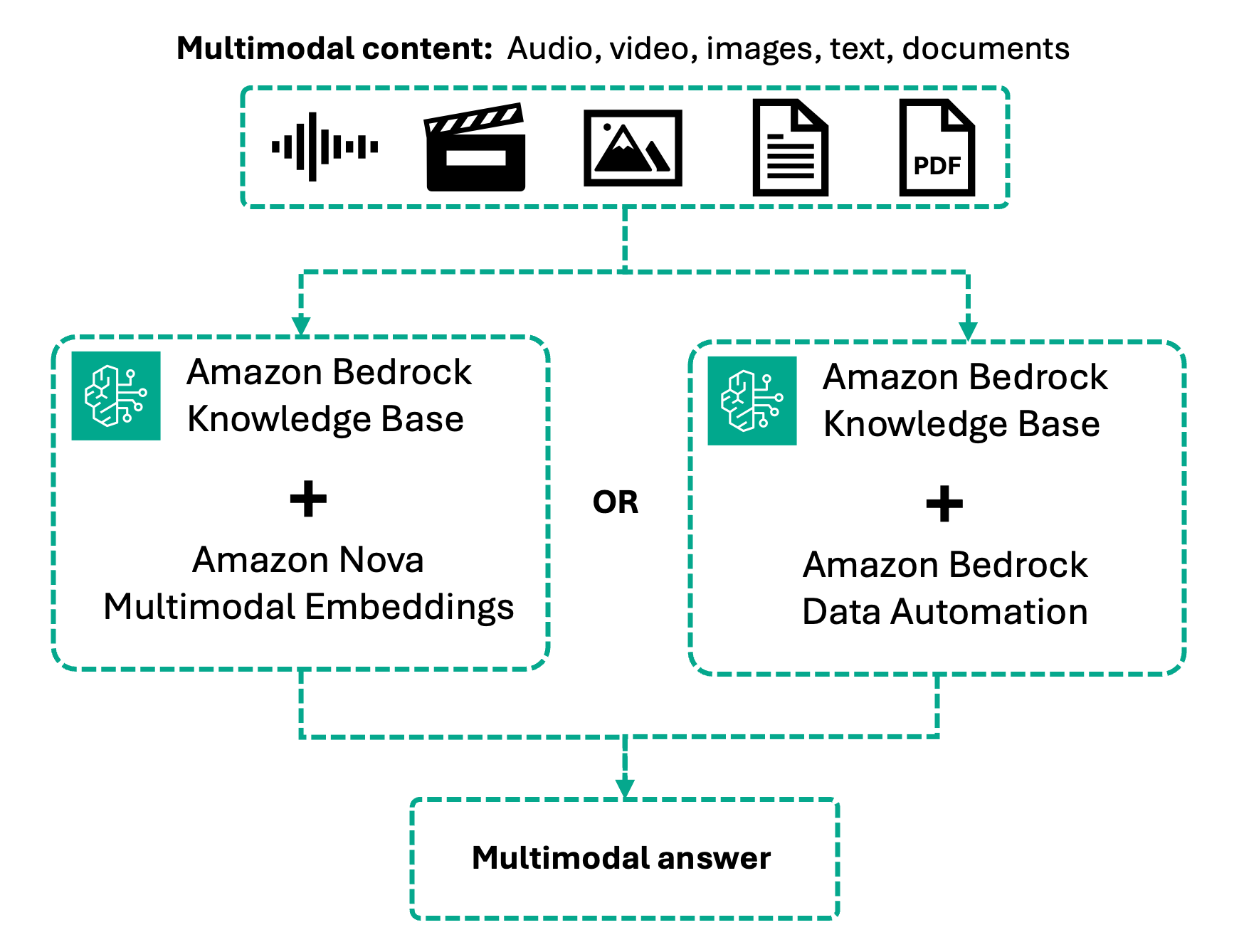
We explore each of these approaches in this post.
Amazon Nova Multimodal Embeddings
Amazon Nova Multimodal Embeddings is the first unified embedding model that encodes text, documents, images, video, and audio into a single shared vector space. Content is processed natively without text conversion. The model supports up to 8,172 tokens for text and 30 seconds for video/audio segments, handles over 200 languages, and offers four embedding dimensions (with 3072-dimension as default, 1,024, 384, 256) to balance accuracy and efficiency. Bedrock Knowledge Bases segments video and audio automatically into configurable chunks (5-30 seconds), with each segment independently embedded.
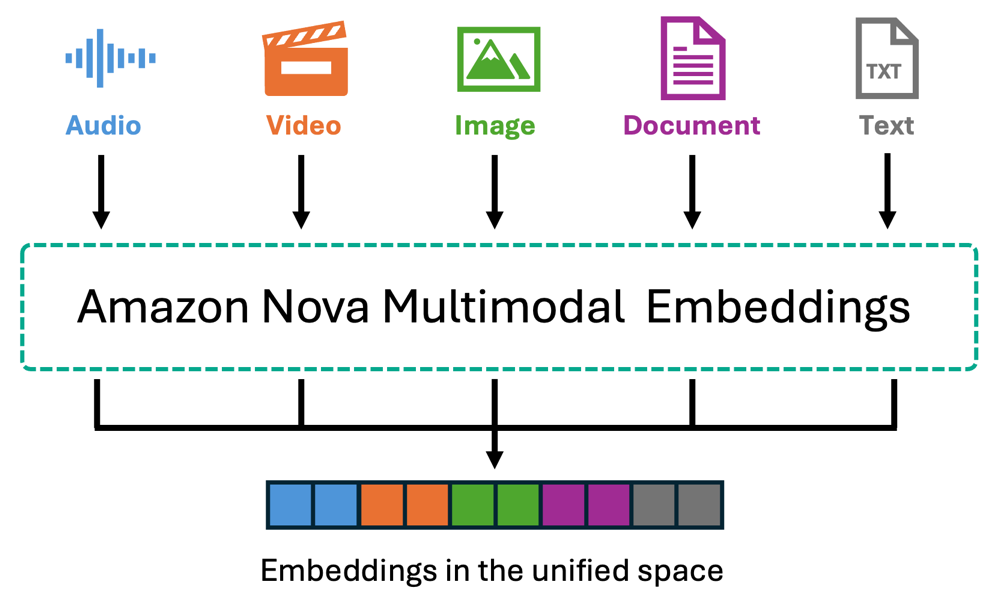
For video content, Nova embeddings capture visual elements—scenes, objects, motion, and actions—as well as audio characteristics like music, sounds, and ambient noise. For videos where spoken dialogue is important to your use case, you can use Bedrock Data Automation to extract transcripts alongside visual descriptions. For standalone audio files, Nova processes acoustic features such as music, environmental sounds, and audio patterns. The cross-modal capability enables use cases such as describing a visual scene in text to retrieve matching videos, upload a reference image to find similar products, or locate specific actions in footage—all without pre-existing text descriptions.
Best for: Product catalogs, visual search, manufacturing videos, sports footage, security cameras, and scenarios where visual content drives the use case.
Amazon Bedrock Data Automation
Bedrock Data Automation takes a different approach by converting multimedia content into rich textual representations before embedding. For images, it generates detailed descriptions including objects, scenes, text within images, and spatial relationships. For video, it produces scene-by-scene summaries, identifies key visual elements, and extracts the on-screen text. For audio and video with speech, Bedrock Data Automation provides accurate transcriptions with timestamps and speaker identification, along with segment summaries that capture the key points discussed.
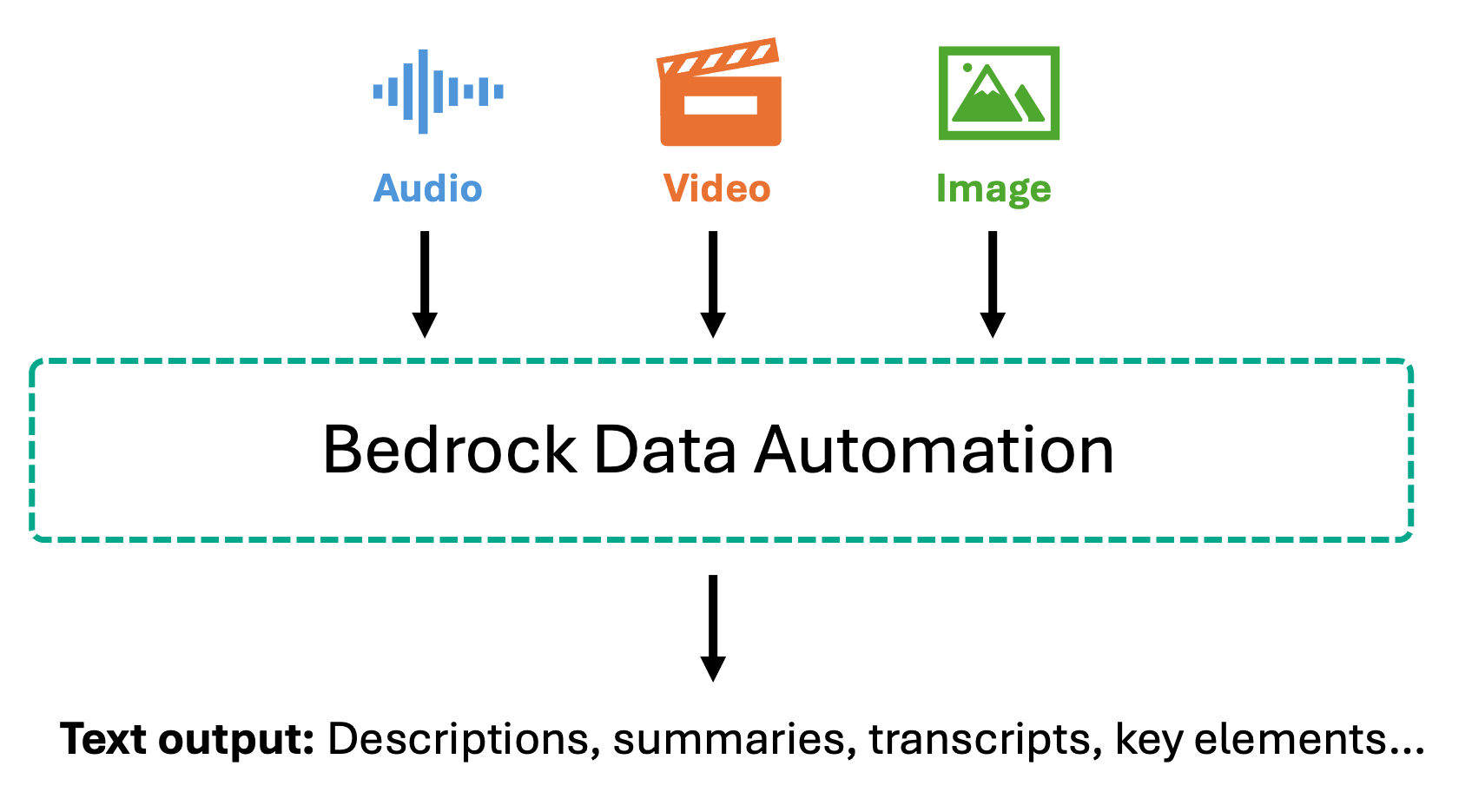
Once converted to text, this content is chunked and embedded using text embedding models like Amazon Titan Text Embeddings or Amazon Nova Multimodal Embeddings. This text-first approach enables highly accurate question-answering over spoken content—when users ask about specific statements made in a meeting or topics discussed in a podcast, the system searches through precise transcripts rather than audio embeddings. This makes it particularly valuable for compliance scenarios where you need exact quotes and verbatim records for audit trails, meeting analysis, customer support call mining, and use cases where you need to retrieve and verify specific spoken information.
Best for: Meetings, webinars, interviews, podcasts, training videos, support calls, and scenarios requiring precise retrieval of specific statements or discussions.
Use case scenario: Visual product search for e-commerce
Multimodal knowledge bases can be used for applications ranging from enhanced customer experiences and employee training to maintenance operations and legal analysis. Traditional e-commerce search relies on text queries, requiring customers to articulate what they’re looking for with the right keywords. This breaks down when they’ve seen a product elsewhere, have a photo of something they like, or want to find items similar to what appears in a video. Now, customers can search your product catalog using text descriptions, upload an image of an item they’ve photographed, or reference a scene from a video to find matching products. The system retrieves visually similar items by comparing the embedded representation of their query—whether text, image, or video—against the multimodal embeddings of your product inventory. For this scenario, Amazon Nova Multimodal Embeddings is the ideal choice. Product discovery is fundamentally visual—customers care about colors, styles, shapes, and visual details. By encoding your product images and videos into the Nova unified vector space, the system matches based on visual similarity without relying on text descriptions that might miss subtle visual characteristics. While a complete recommendation system would incorporate customer preferences, purchase history, and inventory availability, retrieval from a multimodal knowledge base provides the foundational capability: finding visually relevant products regardless of how customers choose to search.
Console walkthrough
In the following section, we walk through the high-level steps to set up and test a multimodal knowledge base for our e-commerce product search example. We create a knowledge base containing smartphone product images and videos, then demonstrate how customers can search using text descriptions, uploaded images, or video references. The GitHub repository provides a guided notebook that you can follow to deploy this example in your account.
Prerequisites
Before you get started, make sure that you have the following prerequisites:
- An AWS Account with appropriate service access
- An AWS Identity and Access Management (IAM) role with the appropriate permissions to access Amazon Bedrock and Amazon Simple Storage Service (Amazon S3)
Provide the knowledge base details and data source type
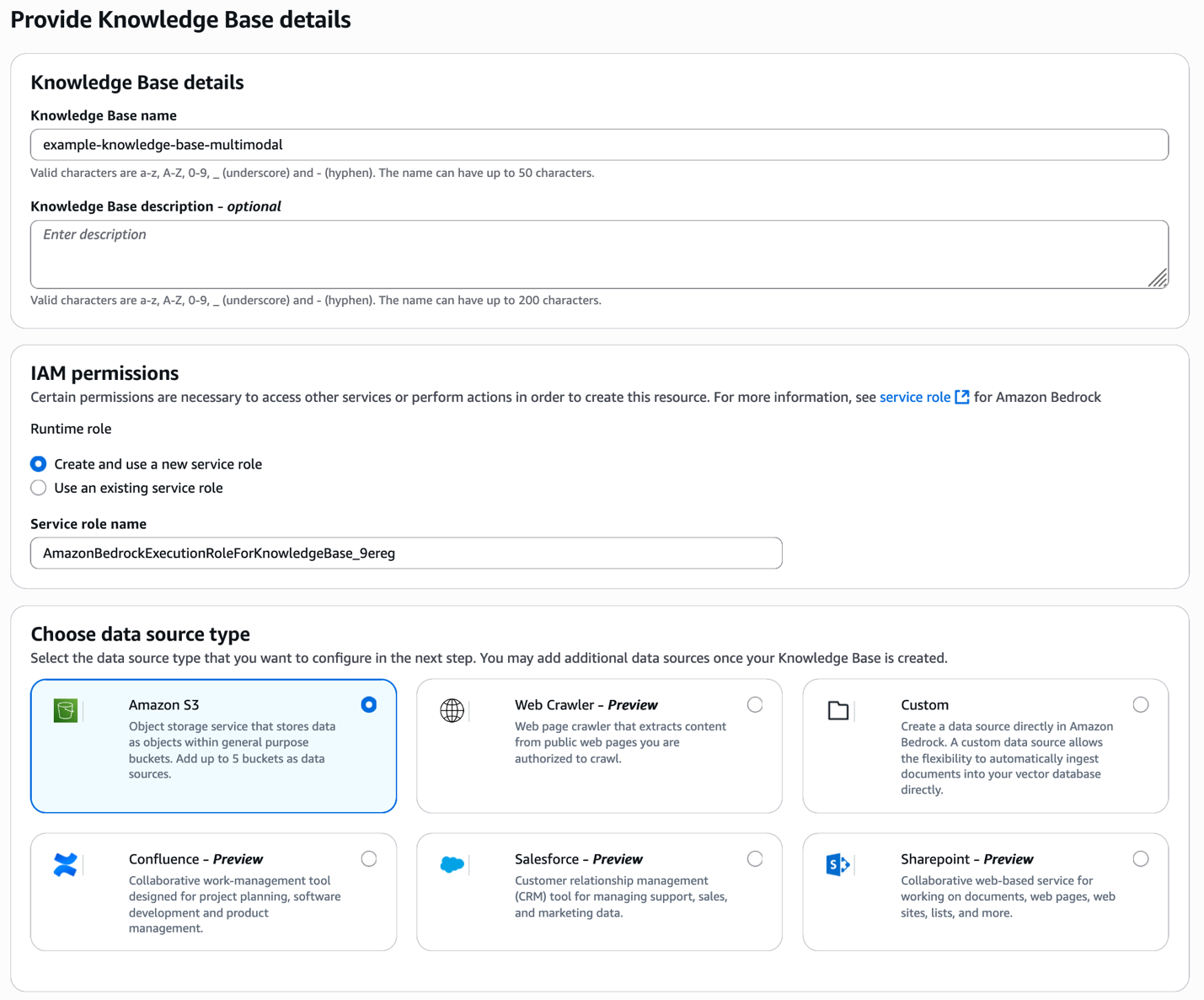
Start by opening the Amazon Bedrock console and creating a new knowledge base. Provide a descriptive name for your knowledge base and select your data source type—in this case, Amazon S3 where your product images and videos are stored.
Configure data source
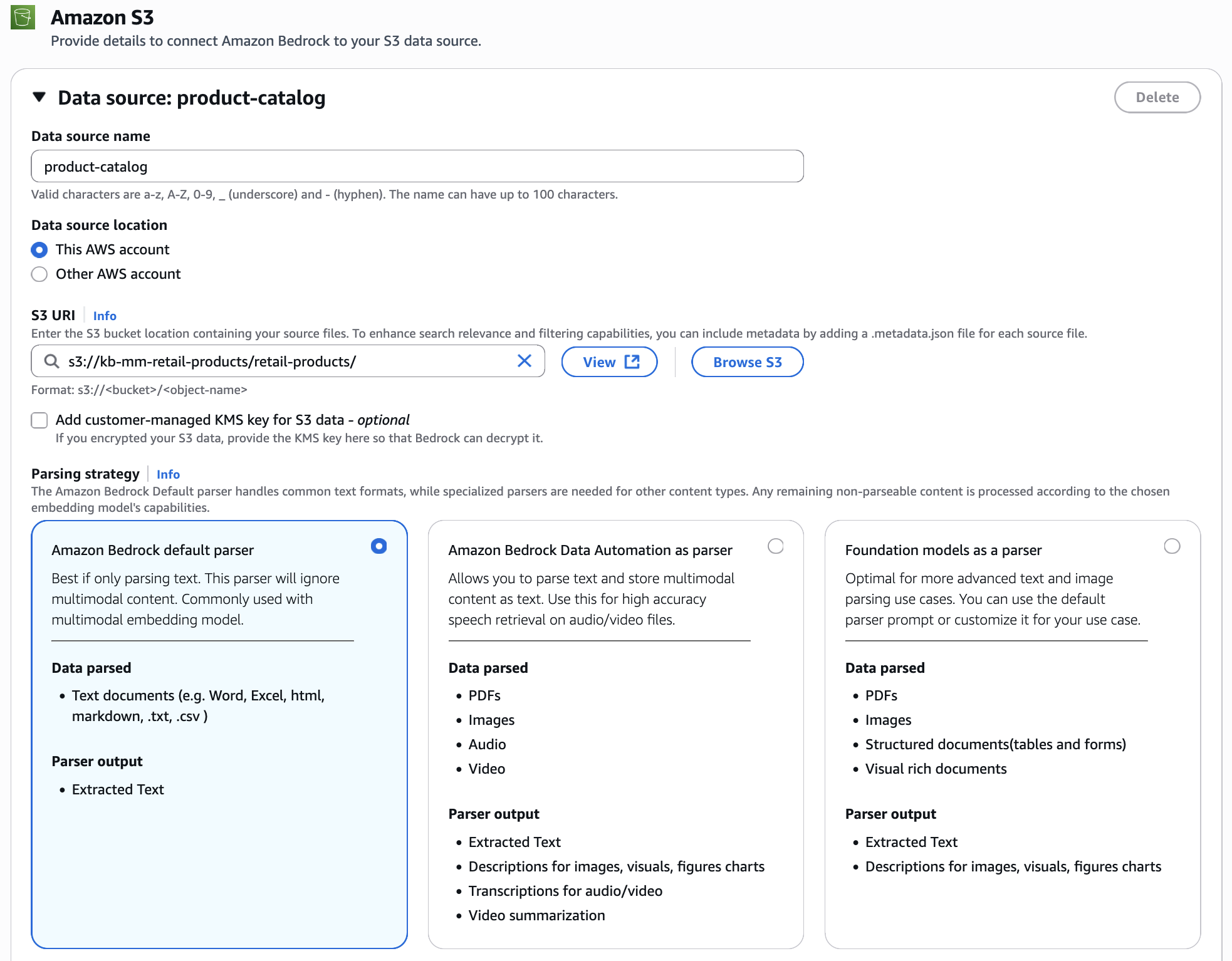
Connect your S3 bucket containing product images and videos. For the parsing strategy, select Amazon Bedrock default parser. Since we’re using Nova Multimodal Embeddings, the images and videos are processed natively and embedded directly into the unified vector space, preserving their visual characteristics without conversion to text.
Configure data storage and processing
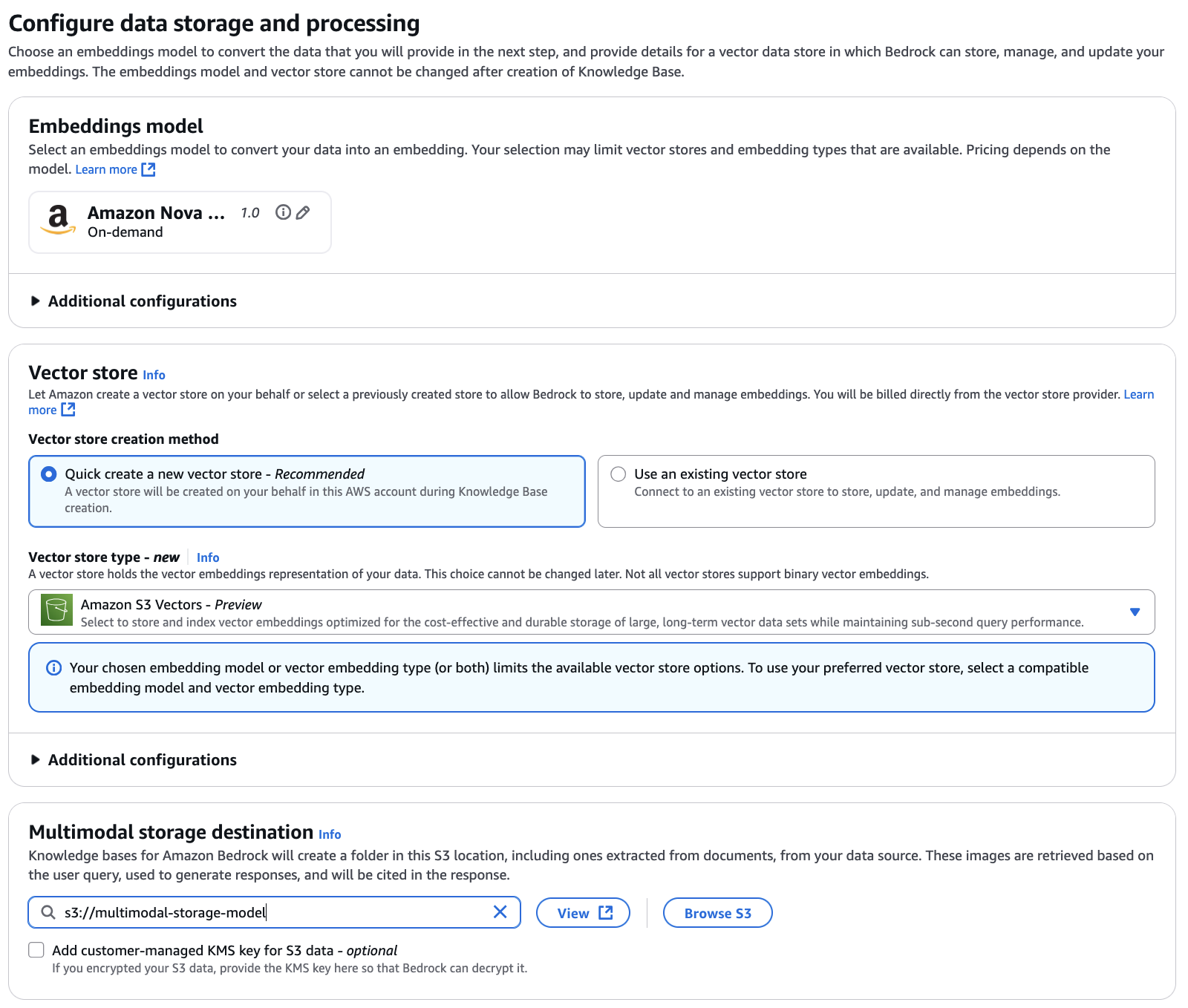
Select Amazon Nova Multimodal Embeddings as your embedding model. This unified embedding model encodes both your product images and customer queries into the same vector space, enabling cross-modal retrieval where text queries can retrieve images and image queries can find visually similar products. For this example, we use Amazon S3 Vectors as the vector store (you could optionally use other available vector stores), which provides cost-effective and durable storage optimized for large-scale vector data sets while maintaining sub-second query performance. You also need to configure the multimodal storage destination by specifying an S3 location. Knowledge Bases uses this location to store extracted images and other media from your data source. When users query the knowledge base, relevant media is retrieved from this storage.
Review and create
Review your configuration settings including the knowledge base details, data source configuration, embedding model selection—we’re using Amazon Nova Multimodal Embeddings v1 with 3072 vector dimensions (higher dimensions provide richer representations; you can use lower dimensions like 1,024, 384, or 256 to optimize for storage and cost) —and vector store setup (Amazon S3 Vectors). Once everything looks correct, create your knowledge base.
Create an ingestion job
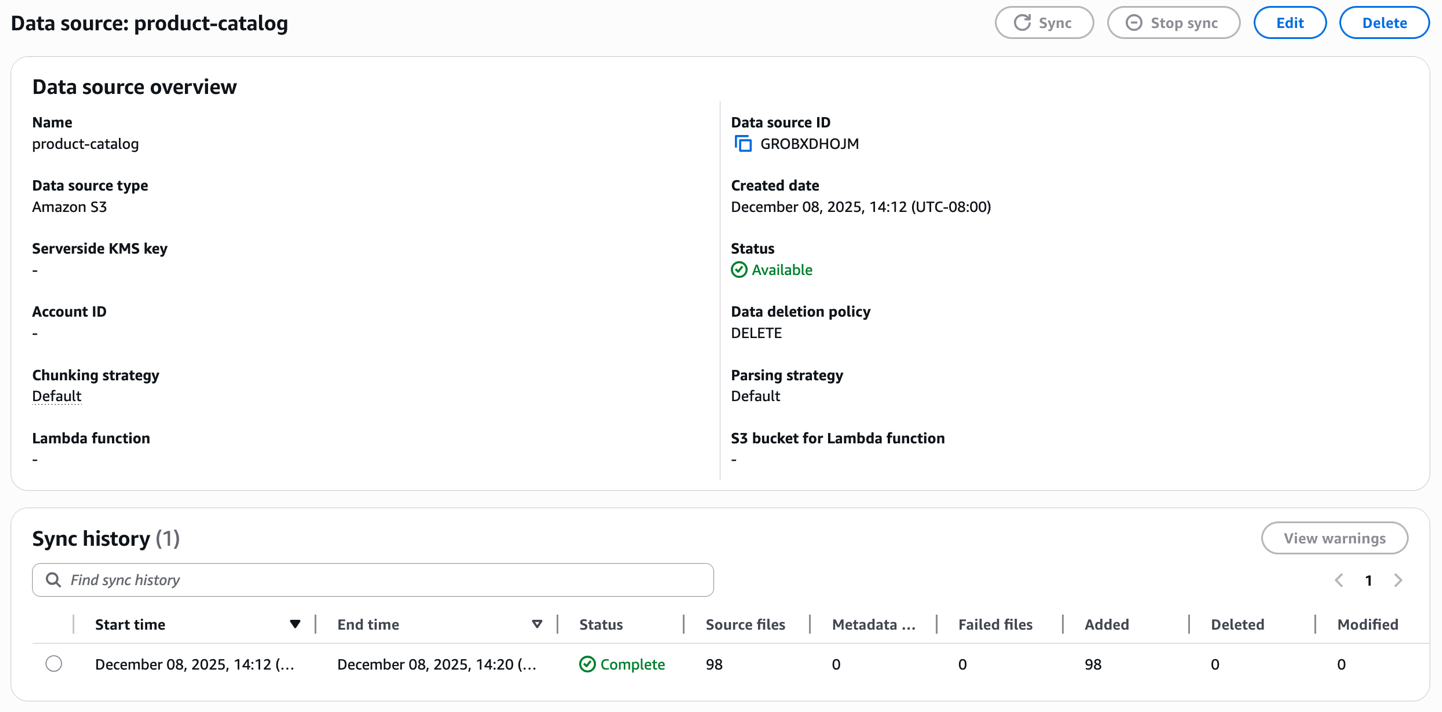
Once created, initiate the sync process to ingest your product catalog. The knowledge base processes each image and video, generates embeddings and stores them in the managed vector database. Monitor the sync status to confirm the documents are successfully indexed.
Test the knowledge base using text as input in your prompt
With your knowledge base ready, test it using a text query in the console. Search with product descriptions like “A metallic phone cover” (or anything equivalent that could be relevant for your products media) to verify that text-based retrieval works correctly across your catalog.

Test the knowledge base using a reference image and retrieve different modalities
Now for the powerful part—visual search. Upload a reference image of a product you want to find. For example, imagine you saw a cell phone cover on another website and want to find similar items in your catalog. Simply upload the image without additional text prompt.
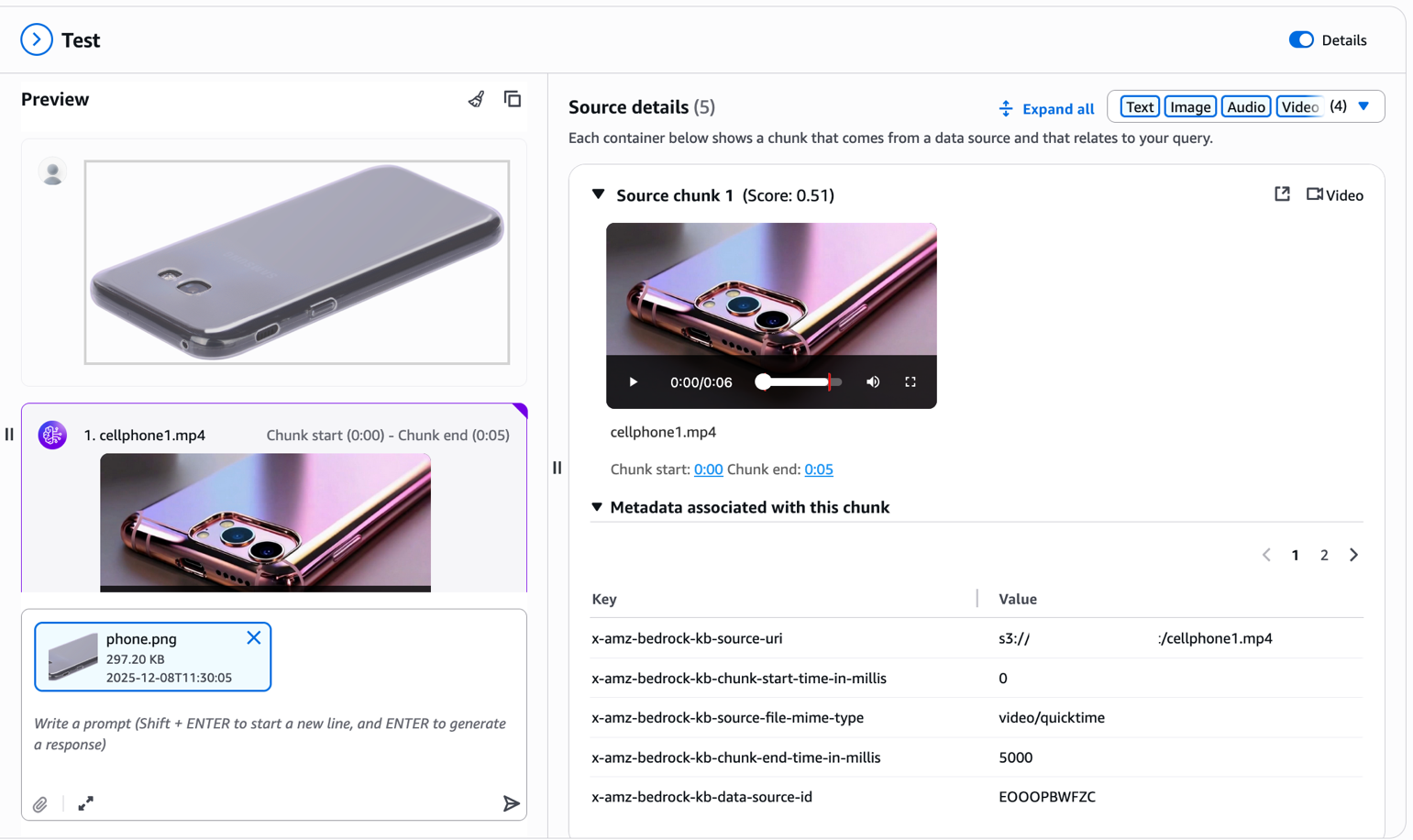
The multimodal knowledge base extracts visual features from your uploaded image and retrieves visually similar products from your catalog. As you can see in the results, the system returns phone covers with similar design patterns, colors, or visual characteristics. Notice the metadata associated with each chunk in the Source details panel. The x-amz-bedrock-kb-chunk-start-time-in-millis and x-amz-bedrock-kb-chunk-end-time-in-millis fields indicate the exact temporal location of this segment within the source video. When building applications programmatically, you can use these timestamps to extract and display the specific video segment that matched the query, enabling features like “jump to relevant moment” or clip generation directly from your source videos. This cross-modal capability transforms the shopping experience—customers no longer need to describe what they’re looking for with words; they can show you.
Test the knowledge base using a reference image and retrieve different modalities using Bedrock Data Automation
Now we look at what the results would look like if you configured Bedrock Data Automation parsing during the data source setup. In the following screenshot, notice the transcript section in the Source details panel.
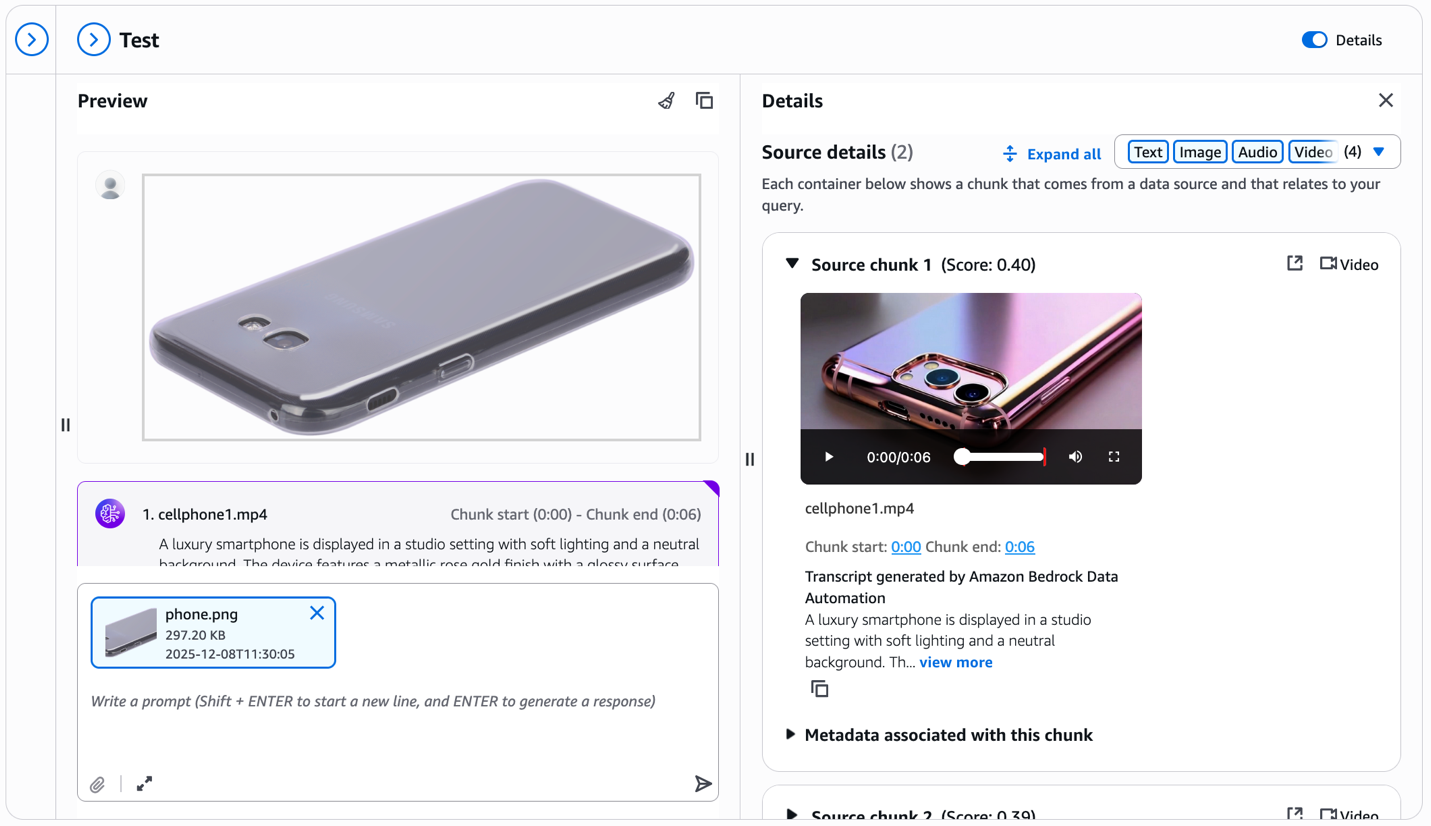
For each retrieved video chunk, Bedrock Data Automation automatically generates a detailed text description—in this example, describing the smartphone’s metallic rose gold finish, studio lighting, and visual characteristics. This transcript appears directly in the test window alongside the video, providing rich textual context. You get both visual similarities matching from the multimodal embeddings and detailed product descriptions that can answer specific questions about features, colors, materials, and other attributes visible in the video.
Clean-up
To clean up your resources, complete the following steps, starting with deleting the knowledge base:
- On the Amazon Bedrock console, choose Knowledge Bases
- Select your Knowledge Base and note both the IAM service role name and S3 Vector index ARN
- Choose Delete and confirm
To delete the S3 Vector as a vector store, use the following AWS Command Line Interface (AWS CLI) commands:
- On the IAM console, find the role noted earlier
- Select and delete the role
To delete the sample dataset:
- On the Amazon S3 console, find your S3 bucket
- Select and delete the files you uploaded for this tutorial
Conclusion
Multimodal retrieval for Amazon Bedrock Knowledge Bases removes the complexity of building RAG applications that span text, images, video, and audio. With native support for video and audio content, you can now build comprehensive knowledge bases that unlock insights from your enterprise data—not just text documents.
The choice between Amazon Nova Multimodal Embeddings and Bedrock Data Automation gives you flexibility to optimize for your specific content. The Nova unified vector space enables cross-modal retrieval for visual-driven use cases, while the Bedrock Data Automation text-first approach delivers precise transcription-based retrieval for speech-heavy content. Both approaches integrate seamlessly into the same fully managed workflow, alleviating the need for custom preprocessing pipelines.
Availability
Region availability is dependent on the features selected for multimodal support, please refer to the documentation for details.
Next steps
Get started with multimodal retrieval today:
- Explore the documentation: Review the Amazon Bedrock Knowledge Bases documentation and Amazon Nova User Guide for additional technical details.
- Experiment with code examples: Check out the Amazon Bedrock samples repository for hands-on notebooks demonstrating multimodal retrieval.
- Learn more about Nova: Read the Amazon Nova Multimodal Embeddings announcement for deeper technical insights.
About the authors
 Dani Mitchell is a Generative AI Specialist Solutions Architect at Amazon Web Services (AWS). He is focused on helping accelerate enterprises across the world on their generative AI journeys with Amazon Bedrock and Bedrock AgentCore.
 Pallavi Nargund is a Principal Solutions Architect at AWS. She is a generative AI lead for US Greenfield and leads the AWS for Legal Tech team. She is passionate about women in technology and is a core member of Women in AI/ML at Amazon. She speaks at internal and external conferences such as AWS re:Invent, AWS Summits, and webinars. Pallavi holds a Bachelor’s of Engineering from the University of Pune, India. She lives in Edison, New Jersey, with her husband, two girls, and her two pups.
 Jean-Pierre Dodel is a Principal Product Manager for Amazon Bedrock, Amazon Kendra, and Amazon Quick Index. He brings 15 years of Enterprise Search and AI/ML experience to the team, with prior work at Autonomy, HP, and search startups before joining Amazon 8 years ago. JP is currently focusing on innovations for multimodal RAG, agentic retrieval, and structured RAG.