AWS Cloud Operations Blog
Scaling AWS Governance: How Moeve reduced response times with automated notifications
Moeve, formerly known as Cepsa, is a global integrated energy company with over 90 years of experience and more than 11,000 employees. Moeve is committed to driving Europe’s energy transition and accelerating decarbonization efforts. The company has embraced digital transformation to enhance energy efficiency, safety, and sustainability, focusing on investments in green hydrogen, second-generation biofuels, and ultra-fast electric vehicle charging infrastructure.
Since 2020, Moeve has put a lot of focus on Governance topics, becoming AWS Control Tower heavy users and early adopters of its features. In a continuous effort to customize their environment, they recently started using AWS CloudFormation hooks to have more flexibility while trying to make their organization compliant with their rules.
Introduction
The importance of a notification system
Operating in a multi-account AWS environment brings flexibility, but requires a mature governance strategy as you scale. Gaining real-time visibility into what’s happening across the organization is a constant challenge. Whether it’s a security event, a misconfiguration, a cost anomaly, or an infrastructure change, being able to notify the right team at the right time is critical for operational excellence and in time remediation.
Key foundations for implementing a notification system
To notify to the right team or individual, you first need clear ownership: who is responsible for each resource, system, or workload? That requires an up-to-date, automated inventory of your environment, one that includes resource metadata, owner attribution and contextual tagging.
Something to consider is signal versus noise. Not every event should trigger a notification. Bombarding teams with irrelevant alerts leads to fatigue and blind spots. Therefore, a well-designed notification system must include filtering logic to determine what must be notified, how, and to whom.
Prerequisites
In this blog post, you will see how Moeve implemented a notification system by leveraging specific AWS services. The following components were in place for it:
AWS Environment Setup
- AWS Organizations with multi-account structure set up
- AWS Control Tower deployed at the organization level with:
- AWS Config aggregator configured
- AWS CloudTrail enabled across the organization
- Administrative access to your AWS Management Console and programmatic access with appropriate permissions
AWS Services
- AWS Config with multi-account aggregator enabled
- Amazon EventBridge with cross-account event bus sharing permissions
- AWS Lambda for processing events and notifications
- Amazon S3 buckets for storing inventory data
- AWS Glue for cataloging inventory data
- Amazon Athena for querying inventory data
- Amazon DynamoDB for storing ownership and notification metadata
- Amazon Simple Email Service (Amazon SES) configured and verified for sending notifications
- AWS Security Hub enabled across your organization
- AWS Trusted Advisor with Business or Enterprise Support subscription
- AWS Cost Anomaly Detection configured for cost monitoring
Tagging Strategy
- Established tagging strategy with mandatory tags including:
- Owner/Team tags
- Project tags
- Business Unit tags
- Environment tags (e.g., dev, test, prod)
- AWS Organizations tag policies implemented at the organization and account levels
- Service Control Policies (SCPs) for enforcing tagging compliance
Technical Knowledge
- Familiarity with AWS Well-Architected Framework pillars
- Experience with Infrastructure as Code (AWS CloudFormation, Terraform, or AWS Cloud Development Kit (AWS CDK))
- Understanding of AWS Identity and Access Management (IAM)
- Basic knowledge of Python for Lambda functions
- SQL knowledge for writing Athena queries
- Understanding of EventBridge rules and patterns
Resource Inventory System
- Centralized resource inventory mechanism
- Mapping between resource tags and ownership information
- Process for keeping inventory data current and accurate
Additional Requirements
- Email distribution lists or notification channels for different teams
- Defined notification priorities and schedules aligned with Well-Architected pillars
- Established remediation procedures for common issues
Tagging and Inventory as the foundations of a notification system
A. Tagging for governance
In order to create AWS notifications, you need to identity owners to the resource. Without clear ownership, alerts become spam. Moeve embed ownership through consistent tagging using technical enforcement, deployment discipline, and cultural alignment:
- Tagging Culture: They established that tagging (Owner, Team, Application, Environment) is mandatory infrastructure hygiene, integrated into their development.
- Infrastructure as Code: Moeve uses AWS CloudFormation, Terraform, and AWS CDK to enforce tagging at deployment, minimizing human error and ensuring consistency.
- AWS Tag Policies: They implemented organization-wide tag policies requiring specific keys (Project, Business Unit) with defined values, enforced through layered policies at the Organization Unit level. “Lifecycle from day one.”
{
	  "tags": {
	    "global:bu": {
	      "tag_key": {
	        "@@assign": "bu"
	      },
	      "tag_value": {
	        "@@assign": [
	          "bu_value"
	        ]
	      },
	      "enforced_for": {
	        "@@assign": [
                  "aoss:ALL_SUPPORTED",
	          "amplifyuibuilder:ALL_SUPPORTED",
	          "apigateway:ALL_SUPPORTED",
	          "appmesh:ALL_SUPPORTED",
	          "appconfig:application",
	          "appconfig:application/configurationprofile",
			  All availabled resources

			  ...
			  "workspaces:*"
	        ]
	      }
	    }
	  }
}
They also leveraged the new wildcard support in AWS Organizations Tag Policies to simplify and scale their tagging enforcement across all resource types within each service. Then at the account level, they add a tag policy that includes the permitted tags for the projects hosted in that account, as illustrated in the next example.
{
	  "tags": {
	    "global:bu": {
	      "tag_key": {
	        "@@assign": "bu"
	      },
	      "tag_value": {
	        "@@append": [
	          "project_bu_value"
	        ]
	      }
	    }
	  }
}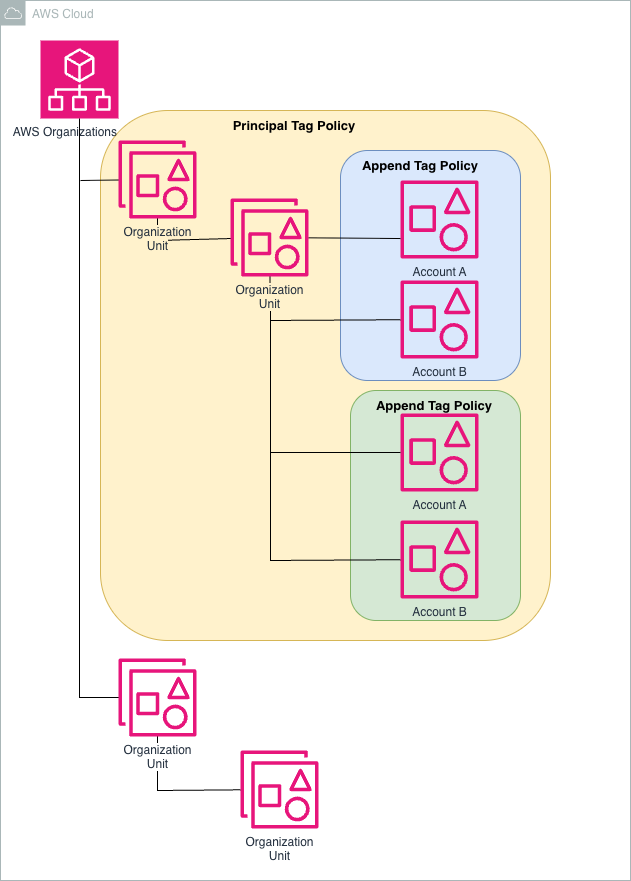
Figure 1. Organization Unit setup and tagging
- Preventing untagged resources with Service Control Policies (SCPs)
- In some cases, they needed stricter enforcement. They used SCPs to prevent the creation of resources if critical tags are missing or malformed. For instance, they blocked AWS CloudFormation Stacksets from being created that didn’t include a BU.
{
	      "Sid": "SCPBUTag",
	      "Effect": "Deny",
	      "Action": [
	        "cloudformation:UpdateStackSet",
	        "cloudformation:CreateStack",
	        "cloudformation:UpdateStack"
	      ],
	      "Resource": [
	        "arn:aws:cloudformation:*:*:stack/*/*",
	        "arn:aws:cloudformation:*:*:stackset/*:*"
	      ],
	      "Condition": {
	        "ForAllValues:StringNotEquals": {
	          "aws:TagKeys": [
	            ":bu"
	         ]
	        }
	      }
}
This creates an environment where every resource has traceable ownership, enabling targeted notifications routed directly to those who can act on them.
From Tagging to Targeted Notifications
Once they have achieved consistent resource tagging and built an up-to-date project inventory, they moved from generic alerts to precise, actionable notifications.
Their inventory maps Resource Tags (like Project, Owner, Team, Environment) to metadata such as contact information or ticketing queues. With this mapping in place, the notification logic can automatically answer critical questions such as:
- What team owns the Amazon Elastic Compute Cloud (EC2) instance that just triggered an Amazon CloudWatch alarm?
- Who should be notified when a public S3 bucket is created in a specific environment?
This tag-to-owner resolution layer has become the heart of their routing mechanism. It allows their system to dynamically look up the right recipients, even in a fast-changing cloud environment. By doing this, they decouple infrastructure events from hardcoded recipient lists and create a notification system that is automated, scalable, and ready to maintain.
B. Inventory
A centralized inventory is key to deliver alerts to the right people. Moeve implemented AWS Control Tower at the organization level that allowed them to have a centralized AWS Config aggregator. This gives them near real-time visibility into all the resources provisioned in our environment, including their configurations and compliance status. This is the backbone of their inventory strategy.
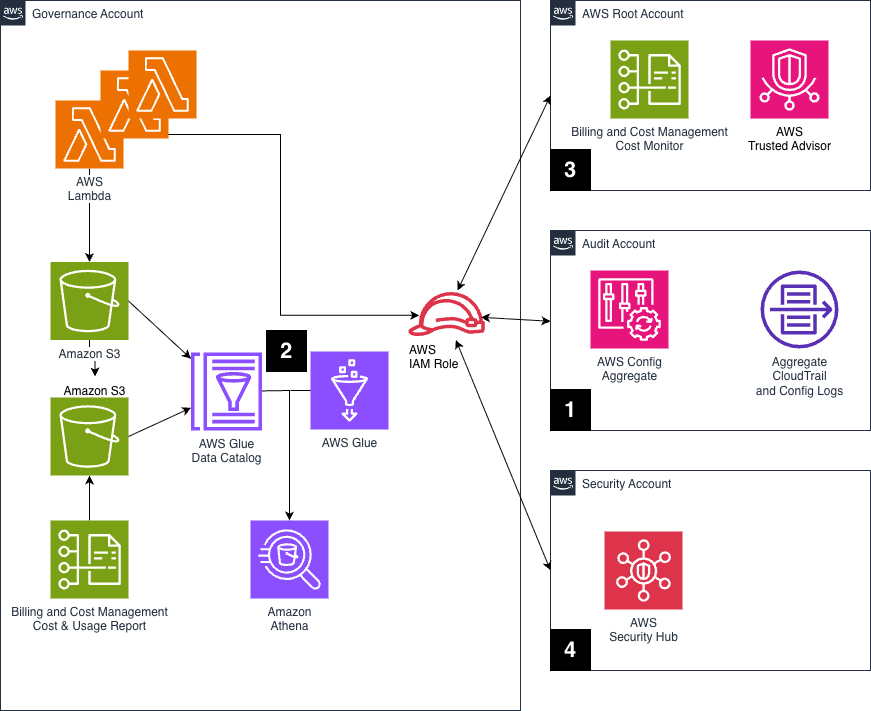
Figure 2. Notification system architecture
For notifications to be useful, they combined inventory data with real-time event signals. They integrated different sources of truth into our notification pipeline, as described in Figure 2:
- AWS Config: Central aggregator tracks resource state and changes across accounts and regions, helping them identify misconfigurations or policy violations. Here’s a simplified example of how they pull inventory data programmatically from the aggregator and push it to S3:
	def get_resource_types(config, aggregator_name):
	    resource_types = set()
	    paginator = config.get_paginator('describe_aggregate_discovered_resource_counts')
	    for page in paginator.paginate(ConfigurationAggregatorName=aggregator_name):
	        for group in page.get('GroupedResourceCounts', []):
	            resource_types.add(group['GroupName'])
	    return list(resource_types)
	def get_resources_by_type(config, aggregator_name, resource_type, accounts_filter=None, regions_filter=None):
	    resources = []
	    paginator = config.get_paginator('list_aggregate_discovered_resources')
	    for page in paginator.paginate(ConfigurationAggregatorName=aggregator_name, ResourceType=resource_type):
	        for res in page.get('ResourceIdentifiers', []):
	            if accounts_filter and res['SourceAccountId'] not in accounts_filter:
	                continue
	            if regions_filter and res['Region'] not in regions_filter:
	                continue
	            resources.append(res)
	    return resources
Scalability Note: If you’re querying many resource types or large datasets, Lambda may not be enough due to timeout limits. In their case, for heavy operations like full inventory exports, they use containerized workloads in Amazon EKS to run asynchronously and at scale. Once the data lands in an S3 bucket, they use AWS Glue Crawlers to catalog it into a table and query it with Amazon Athena.
- Amazon EventBridge: It defines a set of rules to capture key operational and security-related events in real time, things like EC2 instance changes, public S3 bucket creations, and IAM modifications. Each rule is designed to match specific events and forward them to a central Amazon EventBridge bus, where you can fan out processing and notify the right owners.
Here’s a simplified example of the pattern:
EventBridge Rule (Account A)
{
  "detail-type": ["AWS API Call via CloudTrail"],
  "source": ["aws.elasticloadbalancing"],
  "detail": {
    "eventSource": ["elasticloadbalancing.amazonaws.com"],
    "requestParameters": {
      "scheme": ["internet-facing"],
      "type": ["application"]
    },
    "eventName": ["CreateLoadBalancer"]
  }
}
This rule targets a central bus in another account using event bus sharing:
Target: Event bus in notification-core account
{
  "Arn": "arn:aws:events:us-east-1:123456789012:event-bus/central-notifications",
  "RoleArn": "arn:aws:iam::123456789012:role/EventBridgeForwarderRole"
}
In the receiving account, Lambda processed the events. These processors enrich the events with metadata (tags, owners, compliance status) before sending notifications.
- AWS Security Hub: This consolidates security findings from different AWS services. It’s important for surfacing critical vulnerabilities or misconfigurations to the teams that can respond.
- AWS Trusted Advisor: It provides high-value insights for cost optimization, fault tolerance, performance, and to generate scheduled recommendations and notify the relevant owners.
A Lambda function would then retrieve all findings or recommendations and store them in S3. Ultimately, the key is to have all the information in S3 and make it queryable via Amazon Athena.
- AWS Cost Anomaly Detection: At creation time all accounts go through an onboarding phase where a cost anomaly monitor is set up. This is used by the notification tool to alert the account owners about any anomalies.
Their project inventory enriches events with context to automatically route notifications to the right people, creating targeted alerts instead of organizational spam. With this foundation, the next challenge is deciding what’s worth notifying to avoid alert fatigue and keep teams focused.
The notification system solution
Choosing What and When to Notify
At this stage, the data layer is in place, resource ownership resolved, inventory sources integrated, and events flowing in. Next step is to decide what is worth notifying about, and what isn’t.
One of Moeve’s learnings on this topic is that without careful filtering and prioritization, there is a risk of overwhelming teams with spam, leading to alert fatigue and, ultimately, ignored messages. They defined a clear strategy for both what to notify and how to notify, based on the nature and criticality of each event.
Here’s the approach:
- a) Classify Events by Criticality
They started by categorizing their event sources into critical, important, and informational, depending on their potential impact:
- Critical: Events that require immediate action: security findings, high-risk configuration drifts, failures affecting production workloads or big cost anomalies. These are notified in real time at detection.
- Important: Events that need attention but don’t require immediate reaction, AWS Trusted Advisor checks, medium-severity security issues, resource changes in non-prod environments or cost recommendations. These go into weekly summaries.
- Informational: All Health events are notified in real time.
- b) Contextualize Every Message
They adopted as a rule not to send raw events. Every notification includes enriched metadata, like project name, owner, environment, severity, and suggested action, so recipients can immediately understand the relevance and respond (or ignore) accordingly.
By doing this, they created a system where alerts are timely, relevant, and targeted. Teams don’t get flooded, and when something does show up in their inbox, they know it’s worth paying attention to.
Next, you’ll dive into how Moeve structured the notification engine itself, how they route, enrich, and deliver the messages using AWS services and serverless components.
Notification approaches
One of the foundations for notifications is a reliable inventory of resources. In their implementation, they operate with two different notification approaches. Let’s walk through the first one.
1.- Scheduled Notifications Based on Inventory Queries
For predictable, non-urgent insights, they run scheduled queries against our resource inventory. These queries are executed via Amazon Athena, usually once per day, with a cadence aligned to those AWS Well-Architected Framework pillars most relevant for Moeve. That is:
- Monday → Operational Excellence
- Tuesday → Security
- Wednesday → Reliability
- Thursday → Performance Efficiency
- Friday → Cost Optimization
This way, they cycled through key areas of cloud health every week, distributing notifications in a focused and manageable way.
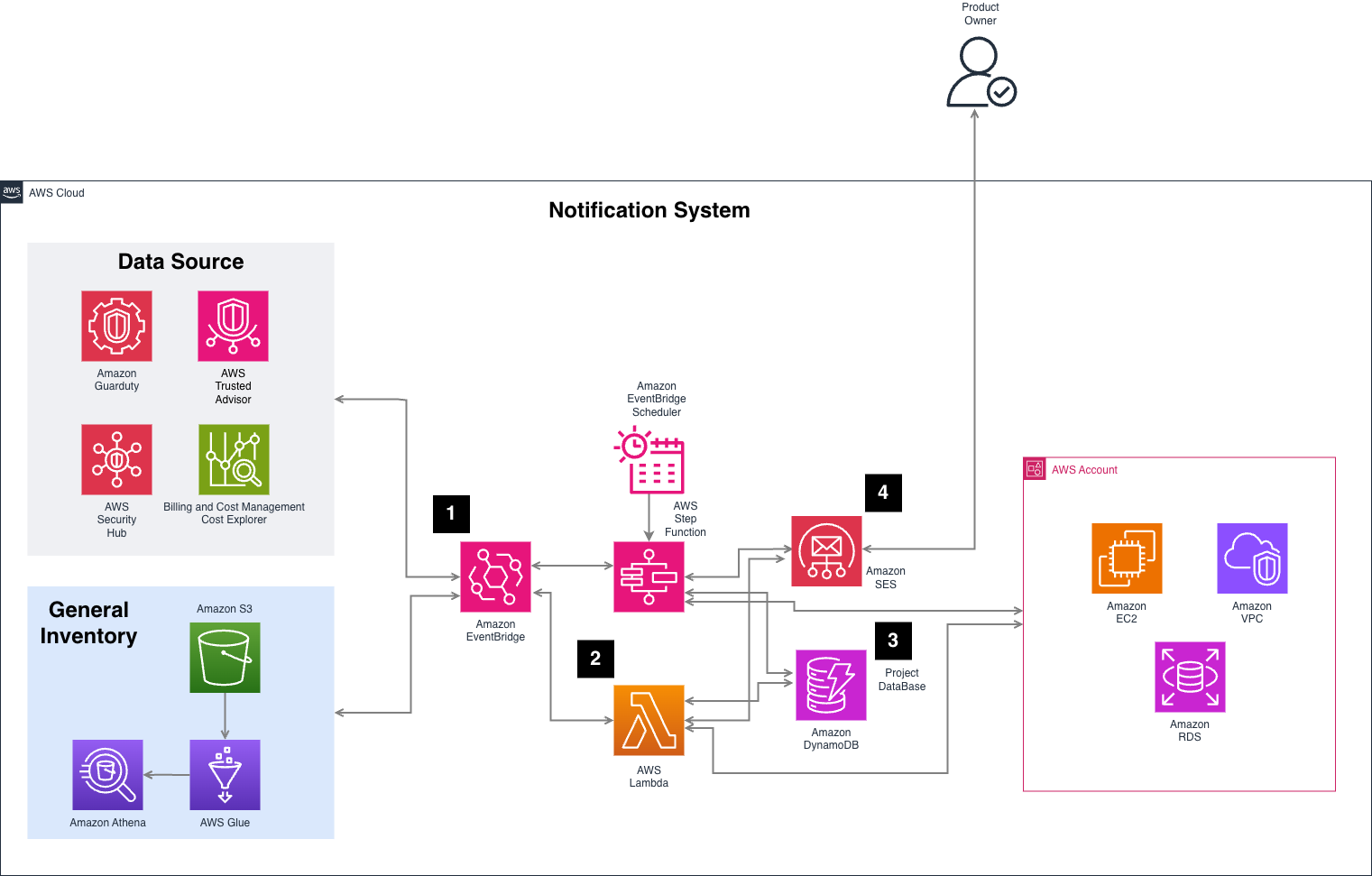
Figure 3. Notification system architecture
Here’s how it works:
Athena Query (Number 1 in Figure 3): Every day, they launched a query against our Glue-cataloged inventory to find resources that match the criteria for that day’s pillar. For example, publicly exposed Snapshots for Security Day.
SELECT
region,
	account_id,
	accountname,
	checkname,
	category,
	timestamp,
	issuppressed,
	resourceid,
	status,
	metadata
FROM inventory
where checkname = 'RDS snapshot should be private'
and status != 'ok'
Resource Tag Lookup: For every resource returned, they invoke a Lambda in the owning account to get its current tags. This ensures the most up-to-date information (not what was in the last inventory snapshot).
Ownership Resolution: With the tag data, they consult with their internal project database, which maps tags like Project, Team, or Environment to real owners, email groups, or ticket queues.
Email Notification: Then they built a custom notification—often in email format—with all the relevant context: resource ID, issue found, owning team, and even remediation tips if available.
2.- Near Real Time Notifications Based on Events
The second approach is with Real Time Notifications. In this case, they focus on events that were identified as critical or high-priority, things that require immediate attention and should be notified as soon as they are detected. These include events like public S3 bucket creation, IAM policy changes, VPC changes or non-compliant resource deployments.
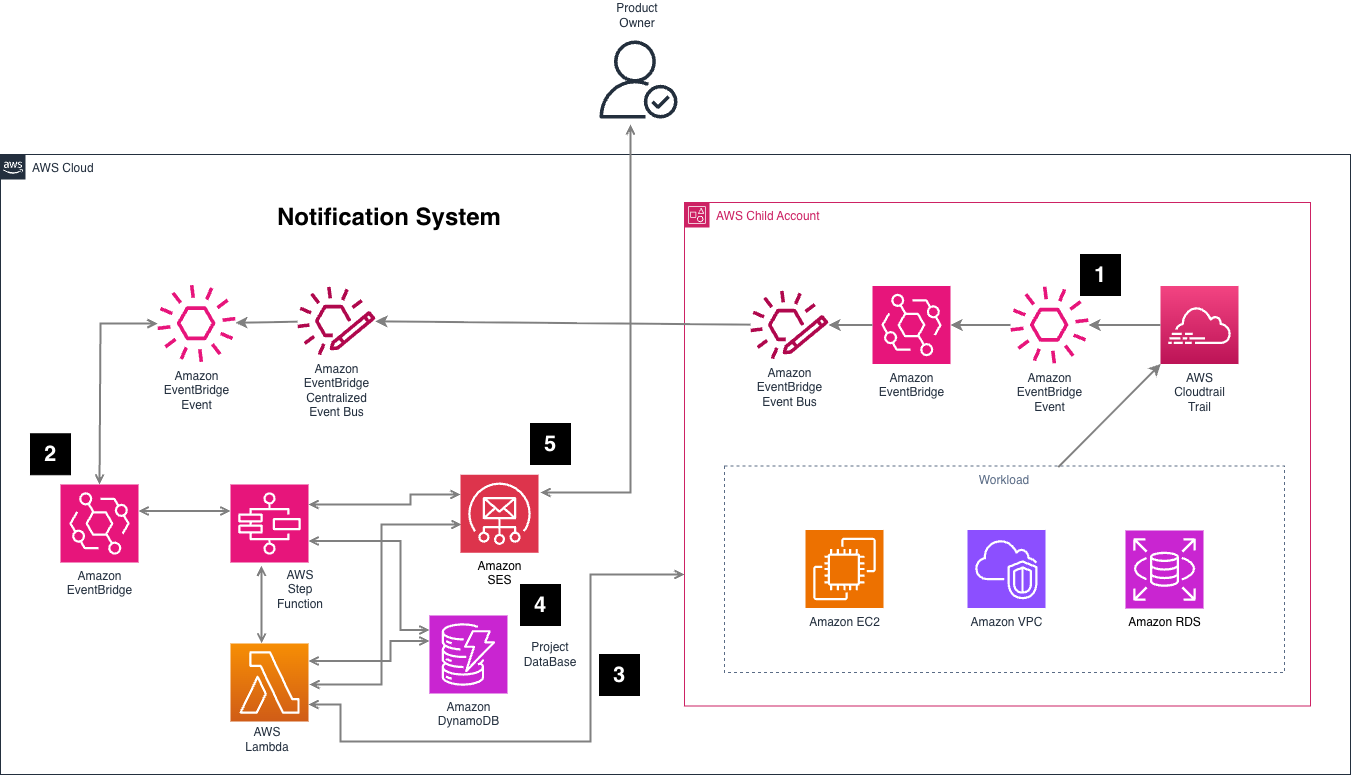
Figure 4. Notification System Architecture – real time notifications
To detect those events, Amazon EventBridge rules were created in individual accounts – Number 1 in Figure 4 – . When one of these events occurs, the rule targets a central Amazon EventBridge bus in their core notifications account. This allowed them to centralize detection and decouple it from processing.
Once the event reaches the central bus – Number 2 in Figure 4 -, it would trigger a processing pipeline that follows a similar enrichment process than our inventory-based approach:
Tag Resolution – Number 3 Figure 4 -: A Lambda would be invoked in the source account to get the current tags of the affected resource. This step is important for accuracy, as they always wanted to notify based on the resource’s latest state, not on cached metadata.
Ownership Lookup – Number 4 Figure 4 -: Using the tag values to query their internal project ownership database to determine who is responsible for that resource.
Notification Generation – Number 5 in Figure 4 -: With that context, they constructed and sent a targeted email notification, including relevant event details, resource metadata, and ownership information.
Bonus: Real-Time Auto Remediation for Critical Events
In some high-severity cases, detection and notification are not enough—you also want to automatically remediate the issue as soon as it’s detected.
For a subset of critical events (such as publicly exposed S3 buckets, insecure IAM policies, or untagged resources in sensitive environments), they had an automatic remediation enabled.
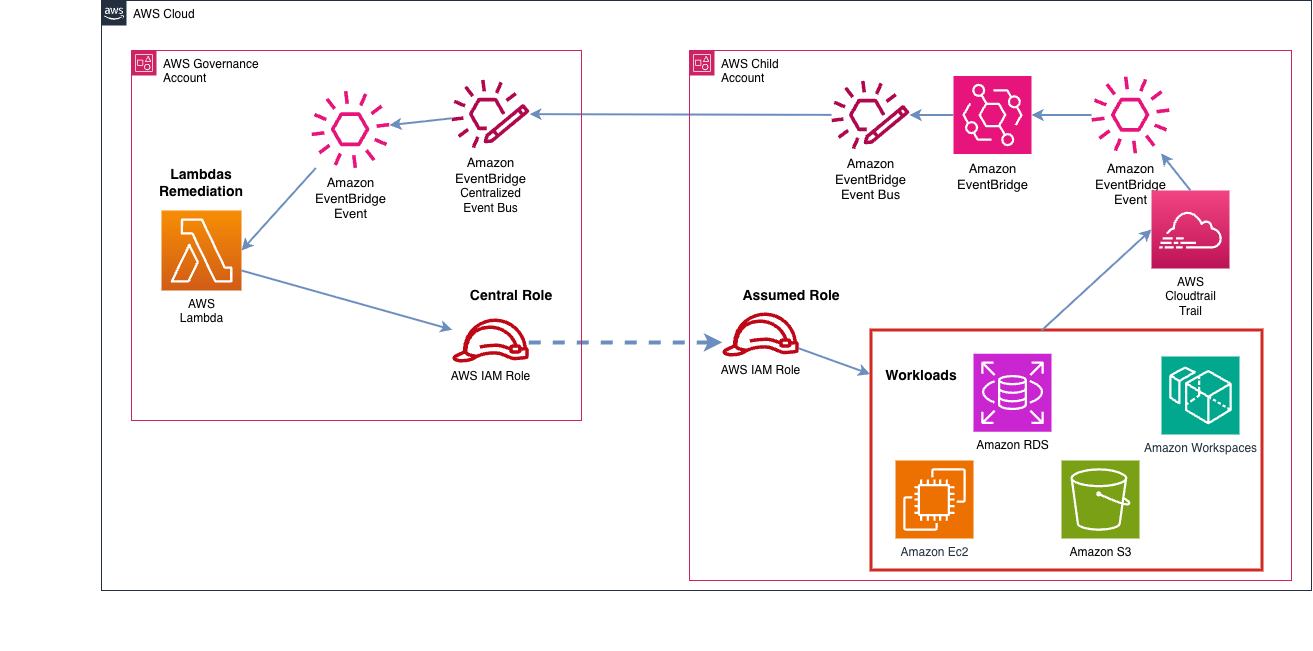
Figure 5. Automatic remediations solution architecture
Event Detection: A critical event is captured by Amazon EventBridge rule and forwarded to the central bus.
Remediation Lambda: Before sending any notification, a Lambda is invoked to remediate the resource and, if needed, takes immediate action. This could mean, for example, blocking or removing public access from a snapshot.
Notification with Remediation Info: If a remediation is applied, include that detail in the notification.
This approach gives a layer of proactive protection, ensuring that certain violations are detected and immediately corrected, while keeping the owners informed.
This helps reduce response time, enforce policy automatically, and maintain a high standard of security and compliance without human bottlenecks.
The following animation shows an end-to-end demo for a notification and remediation following a deployment of an AWS Key Management Service (KMS) key without automatic rotation.
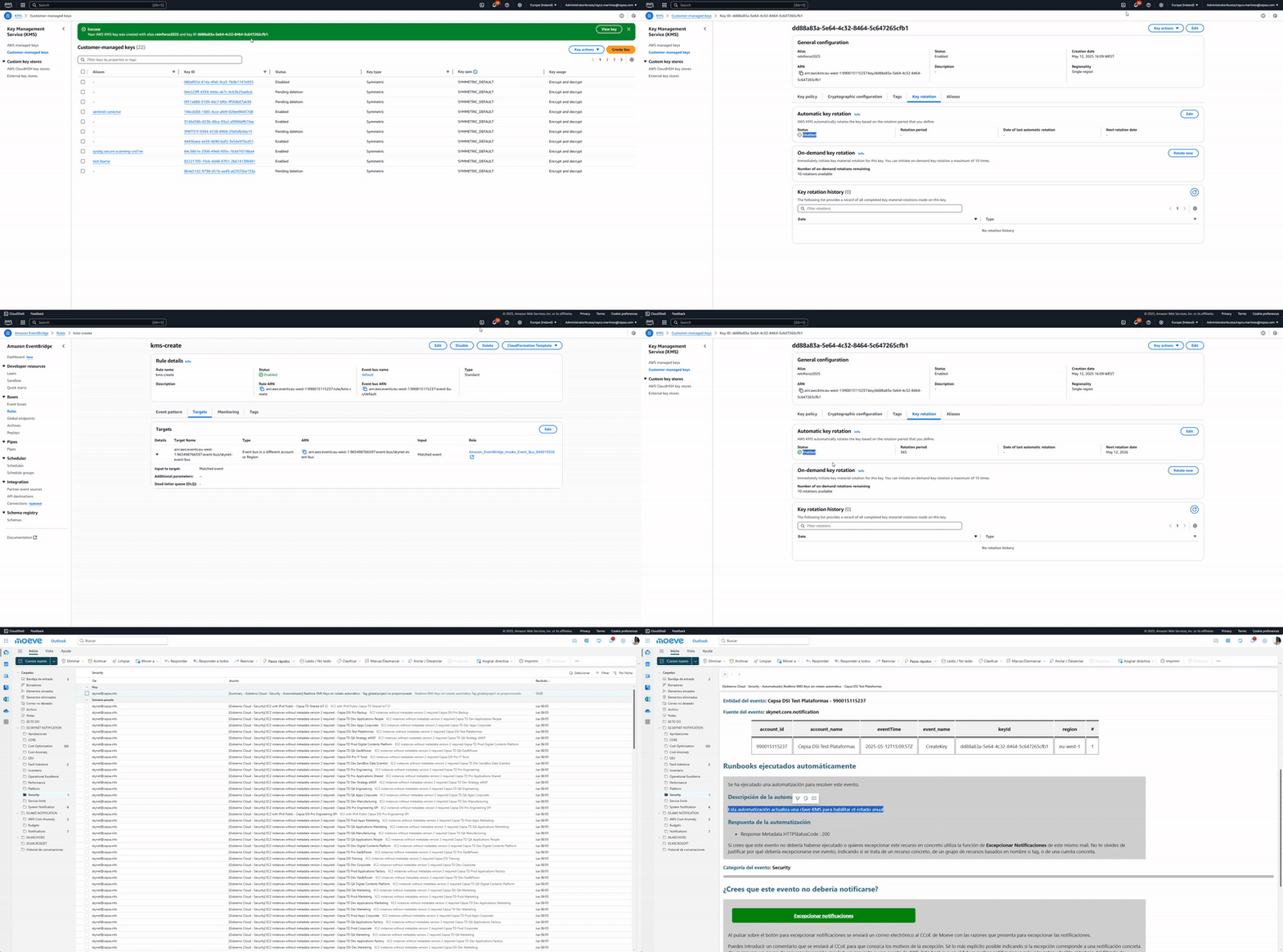
Animation 1. Real-time notification and auto-remediation workflow
Business impact
Having a notification system in place is a step forward—but its real value lies in how it influences behavior across the organization for performance of the system. Moeve created a set of Amazon Quick Sight dashboards, which gave them visibility into key metrics and trends.
Key Performance Indicators (KPIs)
To validate these benefits and keep improving, they tracked a set of KPIs:
- Notification volume by day, source, and severity
- Auto-remediation success rate
- Coverage: how many events are traceable to an owner
- Recurrence of issues (e.g., how often the same team gets notified for the same problem)
Benefits
After running the notification system at scale, here are some of the benefits that were achieved over the past year:
- 45% reduction in staff needs thanks to automations.
- Over 13,000 notifications sent across all teams and accounts in the last 12 months.
- 50% of all cost and security notifications include automated remediation, ensuring that issues are addressed before they escalate.
- Over 85% adoption rate across all notifications, showing high engagement and accountability from teams.
- 5% savings on committed cloud spend, directly attributed to insights surfaced through cost-related notifications and follow-up actions.
These numbers validate that notifications are tools to drive action, prevent incidents, and optimize their cloud footprint.
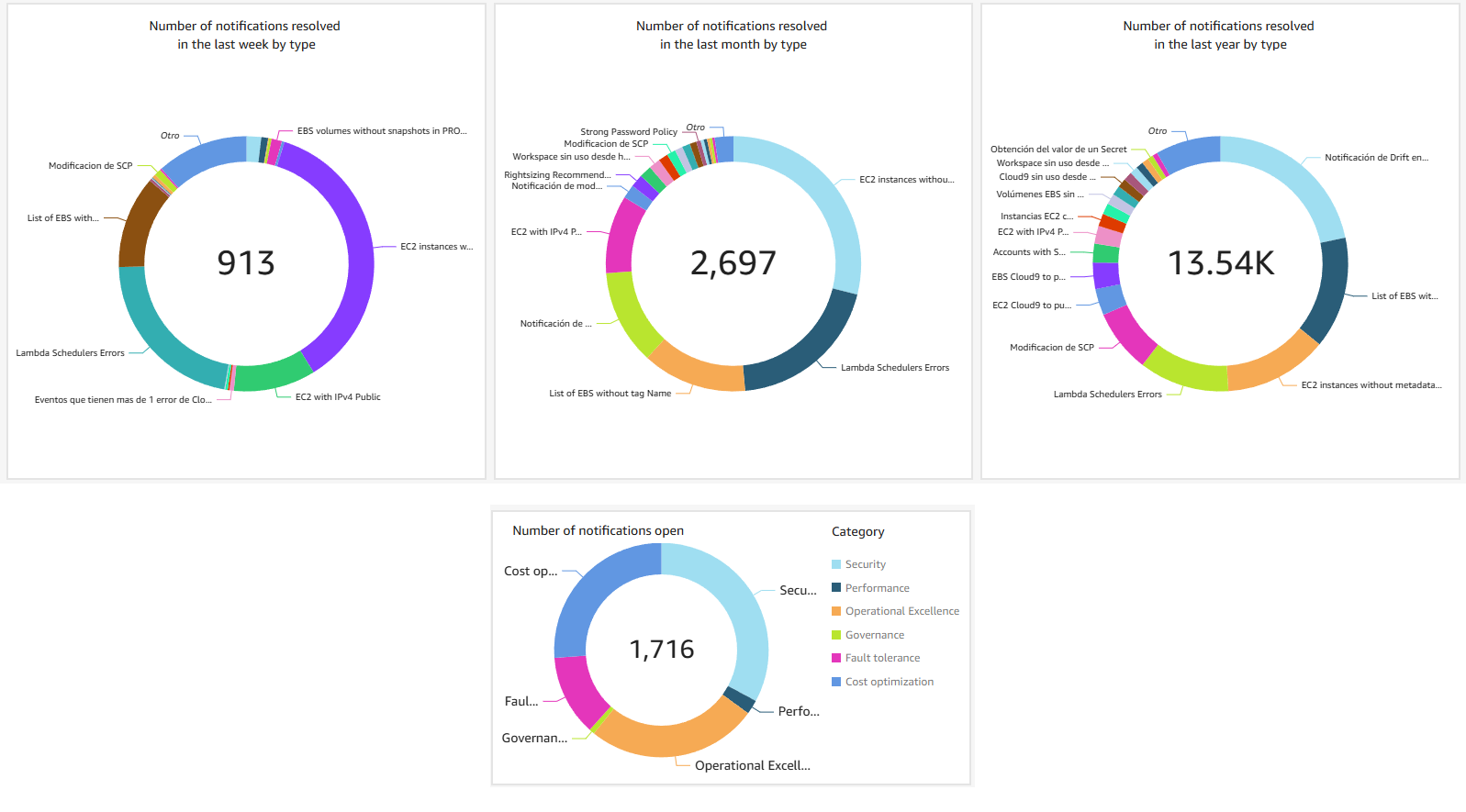
Figure 6. Dashboards of notifications
Conclusion
A centralized, automated notification system in AWS provides scalable governance by delivering context-aware alerts through consistent tagging, directly engaging resource owners to drive accountability and faster response. Moeve has cut response times, reduced risk, and removed manual effort by embedding remediation into the event pipeline. By combining inventory data with real-time signals, enriched with ownership metadata and tracked for outcomes, such a system evolves from a simple tool into a cornerstone of secure, efficient, and scalable cloud operations.
You can now take your cloud governance to the next level and implement your notification system.
- AWS Control Tower Setup
- Start here: AWS Control Tower Getting Started Guide
- Multi-account setup: Setting up AWS Control Tower with Security and Compliance
- Ready-to-Use GitHub Repositories (Sample Code & Templates):
- Watch the Complete Demo
- See Moeve’s notification system in action at AWS re:Inforce 2025 Session: Empowering Critical Infrastructure Through Cloud Governance (GRC303)