AWS Public Sector Blog
Bringing agentic AI into spreadsheets for planning tactical electrical power
Logistics and energy professionals in the military and other organizations increasingly adopt batteries for electrical power in the field. In support of this mission, Sentient Industries designs and manufactures rugged electrical energy modules. Before each deployment, logistics officers (LOs) rely on Excel spreadsheets for planning the electrical system based on the equipment connected to it. Such planning is protracted because each piece of equipment has its own unique power needs and LOs must look up the information across many documents.
Teams from Amazon Web Services (AWS), working with Sentient, brought the power of AI directly into Excel spreadsheets. LOs can now type the device description in Excel and have the power specs retrieved from a knowledge base in Amazon Bedrock. Unlike a chat-based solution, the AI directly loads the data into spreadsheet cells, creating a streamlined and efficient user workflow. The AI meets the users where they are, and this capability is now being commercialized by Sentient.
Background
In recent years, the increasing reliance on advanced technology in military operations has highlighted a critical vulnerability in energy management systems. Modern military forces require resilient and adaptable power solutions to maintain essential systems, communications, and complex equipment in forward-deployed settings. However, current energy infrastructures and sustainment systems struggle to meet the demands of unpredictable and contested environments, creating a significant capability gap. Conventional fuel and energy resupply chains are exposed to interruption and attack, jeopardizing consistent power for critical systems. These vulnerable supply lines not only create logistical burdens, but also divert valuable resources away from mission-critical areas.
Sentient’s tactical power solution
Sentient’s Modular Energy for Tactical Expeditionary Operations Resource (METEOR) system revolutionizes battlefield power delivery through innovative modular design (Figure 1). This solution provides reliable, scalable power while significantly reducing operational footprint and enhancing mission survivability. The system dramatically reduces the logistical burden through decreased maintenance requirements, quick-swap capability, and a reduction of fuel supply chains. Its clean, uninterrupted power delivery supports both indoor and outdoor operations, and its modular scaling meets diverse mission requirements. Sentinel enhances METEOR with an integrated intelligent power management system that predicts energy demands and optimizes power distribution based on real-time operational data.

Figure 1: Sentient Industries’ METEOR tactical power system
Problem statement
Logistics officers are responsible for planning the deployment of Sentient’s METEOR, and they must consider the likely electrical loads on each microgrid. Ideally, by carefully considering data on each load, they can calculate how much instant power is needed and the total number of batteries needed for the duration of the mission. This will minimize the amount of energy brought into the mission.
However, logistics officers (LOs) face significant challenges when planning deployments:
- Diversity of device specs: LOs must plan for thousands of devices, variants, and accessories with unique power requirements such as electric vehicles (EVs), computers and computer monitors, networking and connectivity devices, and sensors. Individual devices have different operating modes. It’s common for a device to use 90% less power when on standby or idle.
- Mix of source documents: It’s time-consuming to manually search through equipment manuals, data sheets, and technical documentation in diverse formats.
- Misleading specs: Manufacturers routinely report power requirements greater than true device needs to provide a margin of safety or alignment with typical values like 1500 W. To address inaccurate information, LOs are forced to maintain records of field-measured values and look them up during planning.
Generative AI shows great potential in assisting Logistics officers’ workflow particularly managing and mining large repositories of specifications and field reports using the RAG architecture. Additionally, large language models (LLMs) and tools can perform estimation when detailed specs are not available, and calculations such as conversion of energy units (kWh to kJ). However, while generative AI is normally accessed through chat user interfaces, many logistics officers and enterprise users prefer spreadsheets such as Microsoft Excel or Google Sheets. Logistics officers use the spreadsheets to tabulate tactical deployments, list the power loads in each microgrid, and calculate the total power and energy requirements in each microgrid. From that, they arrive at the number of power units needed and the required replenishment schedule.
Solution overview
Working with Sentient, the AWS engineers have developed a Power Consumption Knowledge Base System supporting tactical missions. When using this solution, you can obtain power data from a rich knowledge base and can also upload notes from the field to expand the knowledge base using a spreadsheet environment.
Prerequisites
To implement the approach outlined in the post, you must have the following:
- An existing Amazon Bedrock Knowledge Base with two data sources and Amazon Simple Storage Service (Amazon S3), which includes the specification files and PDFs for power consumption and a Custom Type Data Source for ingestion via agents.
- An AWS Identity and Access Management (IAM) role in the account that has sufficient permissions to create the necessary resources following the AWS suggested guidelines.
- An identity provider service set up to manage user identities and grant access to the application. For example, you may use Amazon Cognito to handle user authentication and authorization, although configuring the service is out of scope for this post.
- A runtime to deploy the agents like AWS Lambda (see Runtime layer below).
Other technologies used include:
- Amazon Bedrock, knowledge bases, and agents using Strands Agents
- Amazon OpenSearch Service, Amazon S3
- AWS Lambda
- Suggested: Responsible AI evaluation and risk management toolkit
- Optional: AWS Wickr, Amazon Cognito
- Microsoft Excel or similar spreadsheet
This project implements an intelligent power consumption planning AI agent using Strands Agents and Amazon Bedrock, deployed on AWS Lambda, to interact using APIs with an Excel-based UI (Figure 2). We have also provided an open source sample of the core functionality (code on GitHub).
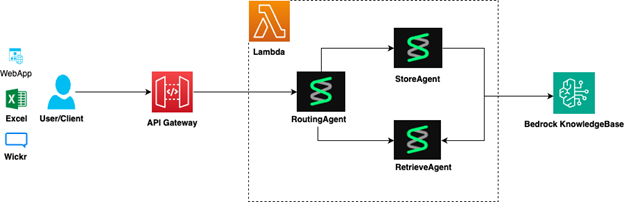
Figure 2: High-level Architecture diagram of the solution
The architecture consists of four layers: knowledge base layer, agentic layer, runtime layer, and UI layer.
Knowledge base layer
At the foundation of the system lies Amazon Bedrock Knowledge Bases, which serves as the intelligent data repository for all power consumption information. This layer handles the complex task of ingesting, processing, and indexing diverse data sources:
- Document processing – Extracts and processes power specifications from PDF manuals, technical datasheets, and manufacturer documentation by using the indexing capabilities of Amazon Bedrock Knowledge Bases.
- Semantic indexing – Uses Amazon OpenSearch Service with vector embeddings to enable intelligent hybrid and semantic search across technical specifications.
- Agent-driven updates – Enables AI agents to programmatically update the knowledge base with new power consumption data, field measurements, and corrections.
- Intelligent estimation – When specific device data isn’t available in the knowledge base, AI agents generate power consumption estimates based on similar devices and equipment categories, clearly notifying users that the values are estimates and encouraging verification.
To initialize the system, follow these steps:
- Create an S3 bucket with the specification documents or manuals
- Create a knowledge base with vector store in Amazon Bedrock Knowledge Bases using S3 and Custom Type data sources.
- Integrate the knowledge base ID with Strands Agents
Use the following code:
result = agent.tool.retrieve(
text=query,
knowledgeBaseId=STRANDS_KNOWLEDGE_BASE_ID,
region="us-east-1"
)
Agents can now retrieve data from the knowledge base and store new information. In the absence of data, agents fall back to estimation based on information embedded in the LLM’s network. We found this estimation ability to be useful but sometimes unreliable, and so we prompt the agent to advise the user when the agent is guessing (see the sample code).
Agentic layer
The core intelligence of the system resides in the agentic layer, built using the Strands Agents framework, an open source multi-agent orchestration SDK. This layer implements three specialized AI agents that work collaboratively: the routing agent, the retrieve agent, and the store agent.
The routing agent analyzes incoming user requests to determine the appropriate action (retrieve existing data or store new data) and routes requests to the appropriate specialized agent.
The retrieve agent specializes in querying the knowledge base using hybrid and semantic search to find relevant power consumption data. It formats results for structured output as JSON, which is subsequently processed in Excel. The agent is instructed to be accurate and transparent in its responses.
The store agent manages the ingestion and storage of new power consumption data into the knowledge base, validates data quality and format consistency, and handles override scenarios where field-measured values supersede manufacturer specifications.
For more details, see the sample code.
Runtime layer
The runtime layer provides a scalable, serverless interface to host agents that can be invoked using RESTful APIs. The agents are implemented using Strands and deployed in a Lambda function, providing automatic scaling and cost optimization. The function is configured with appropriate memory and timeout settings to handle all agent operations efficiently. Similar functionality is available in Amazon Bedrock AgentCore Runtime, and is recommended in AWS regions where the service is available. Connections to the agents is mediated by Amazon API Gateway, which open secure HTTPS endpoints, with built-in throttling and authentication.
Configuration and deployment of runtime is out of scope for this blog.
UI layer and the Microsoft Excel-based UI
Generally, the system can support a variety of UIs, including AWS Wickr bot, Microsoft Excel, and RESTful APIs using the command line (for example, curl) or programmatically.
When using Excel, you can enter a freeform description of the equipment in a cell, and then choose a button to retrieve the AI agent’s analysis. Alternatively, you can describe the equipment and its power requirements and store them.
To securely connect Excel to the agents, we use Excel’s built-in Power Query functionality. Power Query is designed to connect Excel to external data sources including web API endpoints using HTTP or HTTPS. It supports encryption and authentication headers but not signing requests (that is, SIGv4), preventing directly calling AWS APIs. Therefore, you need to implement an Amazon API gateway to receive and approve authentication headers.
To make the Excel notebook interactive, we use Excel macros that are triggered when you choose a button. The macros are written in Visual Basic for Applications (VBA) and implement:
- Reading the input data from the current Excel workbook
- Generating a Power Query call and calling it
- Processing the response and writing it to the Excel workbook
When you choose the button, the following code is invoked:
'triggered by button pressed'
Sub GetPowerData()
On Error GoTo ErrorHandler
Dim deviceName As String
Dim currentRow As Long
currentRow = ActiveCell.row
deviceName = Trim(ActiveSheet.Cells(currentRow, 2).Value)
Call ChangeParameterValue("equipment", deviceName)
The last line invokes the subroutine for refreshing the Power Query with the equipment parameter:
Sub ChangeParameterValue(ParameterName As String, ParameterValue As String)
Dim qry As WorkbookQuery
Dim formula As String
Set qry = ThisWorkbook.Queries(ParameterName)
formula = Chr(34) & ParameterValue & Chr(34) & " meta [IsParameterQuery = true, IsParameterQueryRequired = true, Type = ""Text""]"
qry.formula = formula
End Sub
Power Queries are implemented in a specialized Power Query M formula language that includes functions for parsing JSON values received from the agent and handling errors. Authentication requires a copy of the GATEWAY_API_KEY. The following is the Power Query code for retrieving power data, where GATEWAY_URL is the URL of the API gateway and equipment is a parameter of the query. The parameters’ values are modified by the VBA script before invocation:
let
url = "https://GATEWAY_URL.execute-api.us-east-1.amazonaws.com/prod/retrieve",
Headers = [
#"x-api-key" = "GATEWAY_API_KEY",
#"Content-Type" = "application/json"
],
content = Json.FromValue([#"prompt" = equipment]),
bd_result = Json.Document(Web.Contents(url,
[
Headers = Headers,
Content = content,
ManualStatusHandling = {400, 401, 403, 404, 500}
]
)),
data_string = bd_result[data],
parsed_data = Json.Document(Text.ToBinary(data_string)),
src1 = Record.ToTable(parsed_data),
src2 = Table.Transpose(src1),
src3 = Table.PromoteHeaders(src2)
in
src3
The GATEWAY_API_KEY must be provided to the Excel user and entered into the configuration of the notebook. For evaluation, the key can be manually provisioned, but in production the recommended secure design is to provision short-lived keys using Amazon Cognito.
Using the Excel UI
The Excel UI (shown in Figure 3) provides you with two AI-powered functionalities: retrieval of stored energy specs and storage of energy specs.
To retrieve stored energy specs about a device, or use the AI for estimation:
- Enter the device name in a cell, such as
Amazon Leo Pro Terminal. The description can omit details about the model number or provide a generic device type such asSatellite Terminal, inviting the AI agent to estimate. - Choose Get Power Data.
- The system queries the knowledge base. If the information doesn’t exist in the knowledge base, the model will make an estimate.
- The model returns structured data including peak power, active power, and idle power.
- Excel displays results with color coding.
To store or update data about equipment:
- Enter complete power data in a row in your Excel sheet.
- Choose Store in KB.
- Data is stored in the knowledge base.
- The Status column indicates that storage was successful.
Finally, you can use this Excel spreadsheet to execute your full scope of logistics planning workflows, as you did in the past. The spreadsheet maintains all standard Excel functionality you rely on for data analysis and calculations while adding AI capabilities.

Figure 3: Logistics officer’s AI-powered Excel worksheet
Conclusion
In this post, we describe how solution architects can connect Excel spreadsheets to Amazon’s AI stack and describe how Sentient Industries used this capability in its logistics software. The integration can benefit users across the public sector that use Excel for their planning, data analysis and visualization. To get started, contact your AWS account team or the AWS Public Sector team.
Resources
- AWS sample code for this blog on GitHub
- Read the AWS whitepaper on Navigating the security landscape of generative AI