AWS Storage Blog
Build cost-effective semantic search for documents stored in Amazon S3
Organizations accumulate vast amounts of unstructured data (contracts, research papers, support tickets, and regulatory filings), yet much of it remains hard to search effectively. Traditional keyword search may miss a document about “intellectual property transfer” when the query is “patent assignment clauses,” because it matches the search terms rather than their meaning. Semantic search addresses this by encoding text as vector embeddings and ranking results by similarity in that embedding space. Historically, deploying semantic search required provisioning and operating a dedicated vector database alongside existing storage.
Amazon S3 Vectors delivers purpose-built, cost-optimized vector storage that inherits the durability and elasticity of Amazon S3, with warm queries typically returning in under 100 ms. It is optimized for storing large vector datasets that are queried infrequently, and it works alongside services such as Amazon Textract for text extraction and Amazon Bedrock for embedding generation. It removes the need to provision, scale, and manage a separate vector database, and gives you pay-per-query pricing and access control through AWS Identity and Access Management (IAM).
In this post, I walk through building a serverless pipeline that generates embeddings on document upload, stores them in S3 Vectors, and exposes a semantic search API. Unlike a basic integration demo, the pipeline keeps the vector index in sync with your S3 documents, handling uploads, deletions, and backfills automatically. By the end, you will know how to stand up semantic search over your own documents without running a dedicated vector database. You will also have a reusable pattern you can adapt to use cases such as insurance claims, legal discovery, or research retrieval. The complete, runnable source code (CDK stack, Lambda functions, tests, and examples) is available in the AWS Samples repository sample-s3-vectors-insurance-claims. This post explains the design and key decisions and points to the repository for implementation details.
Understanding S3 Vectors
Amazon S3 Vectors supports use cases such as AI agents, inference, Retrieval Augmented Generation (RAG), and semantic search. It introduces two key concepts:
- Vector buckets: A new bucket type purpose-built to store and query vectors, separate from regular S3 buckets. Each vector bucket holds up to 10,000 indexes.
- Vector indexes: Within a vector bucket, you organize your vector data in indexes and perform similarity queries against them. Each index is configured with a fixed dimension and distance metric at creation time and can store up to 2 billion vectors.
You interact with vectors through a dedicated set of APIs: PutVectors, QueryVectors, GetVectors, and DeleteVectors, accessed through the s3vectors client in the AWS SDK. Writes are strongly consistent, so newly added vectors are immediately searchable. You can also attach metadata to each vector for filtering during queries.
You get pay-per-use pricing, S3-level durability, and access control through familiar IAM policies, all without a separate operational surface to maintain. For more details, see the Amazon S3 Vectors documentation.
Solution architecture
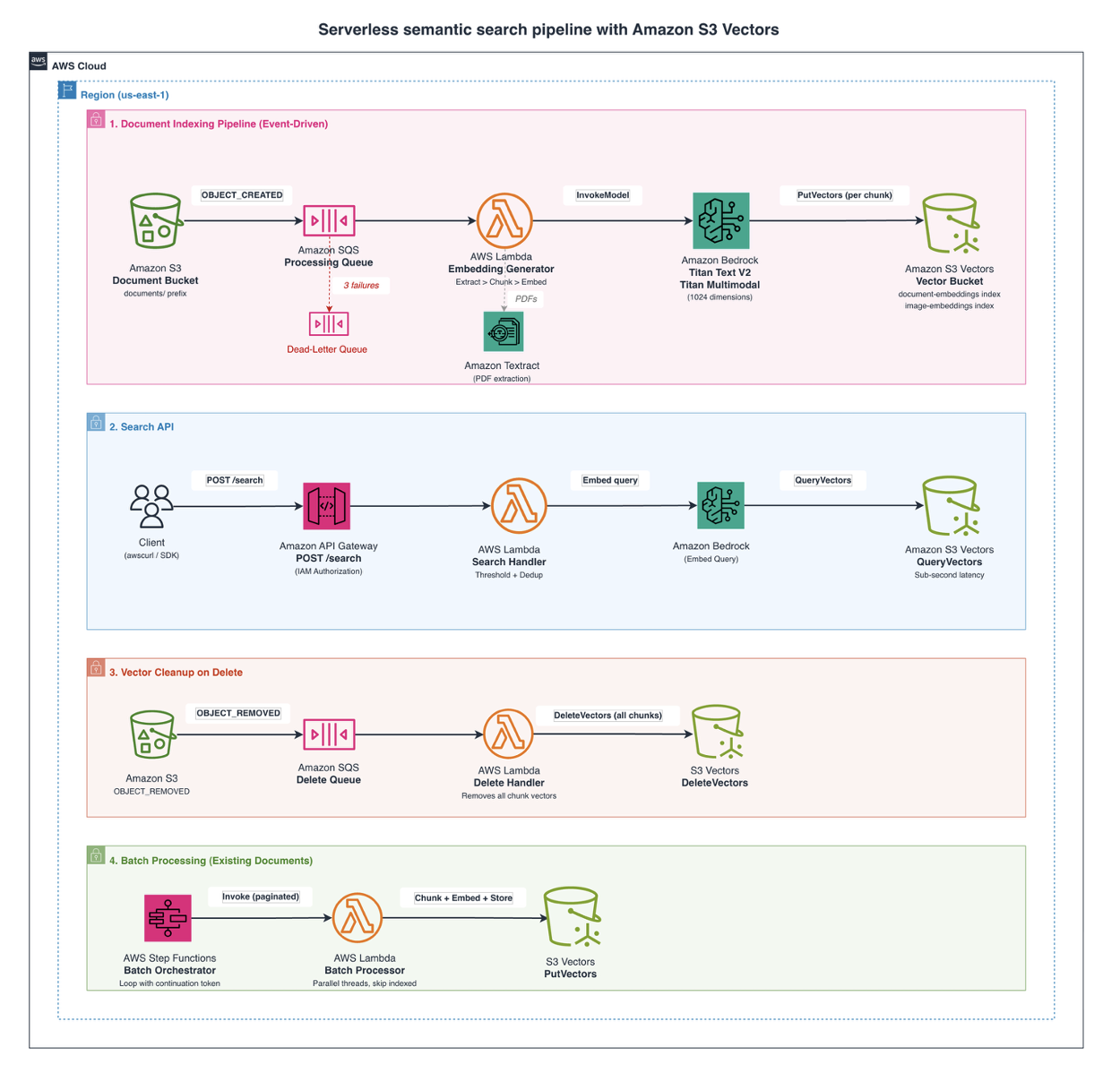
The solution is a fully serverless pipeline that ingests documents, converts them into vector embeddings, stores those embeddings for fast retrieval, and exposes a search interface, all without provisioned infrastructure. At a high level, documents land in Amazon S3, and text is extracted using Amazon Textract (for PDFs) or direct reads (for text/JSON). Embeddings are generated with the Amazon Titan Text Embeddings V2 model in Amazon Bedrock, and the resulting vectors are stored in Amazon S3 Vectors for similarity queries. Amazon SQS buffers events and provides retry/dead-letter handling, AWS Lambda runs all processing logic, AWS Step Functions orchestrates batch workloads, and Amazon API Gateway exposes the search endpoint. The entire stack is defined as infrastructure as code using the AWS CDK (Python).
The solution breaks down into four functional components:
- Automated indexing pipeline: When a document is uploaded to S3, an event notification triggers a Lambda function that extracts text, chunks it into semantically meaningful segments, generates embeddings via Amazon Bedrock, and stores them in an S3 Vectors index.
- Vector cleanup on delete: When a document is removed from S3, a separate Lambda function automatically removes all corresponding vectors (including all chunks) from the index.
- Batch processing: A Step Functions workflow processes existing document backlogs by iterating through S3 objects in pages, indexing any that haven’t been processed yet.
- Search API: An API Gateway endpoint backed by a Lambda function converts natural language queries into embeddings and performs similarity search against the vector index, with confidence thresholds and per-document deduplication.
Architecture flow
The solution is based on a serverless architecture, with four functional components (indexing pipeline, search API, vector cleanup on delete, and batch processing) outlined in the following diagram:
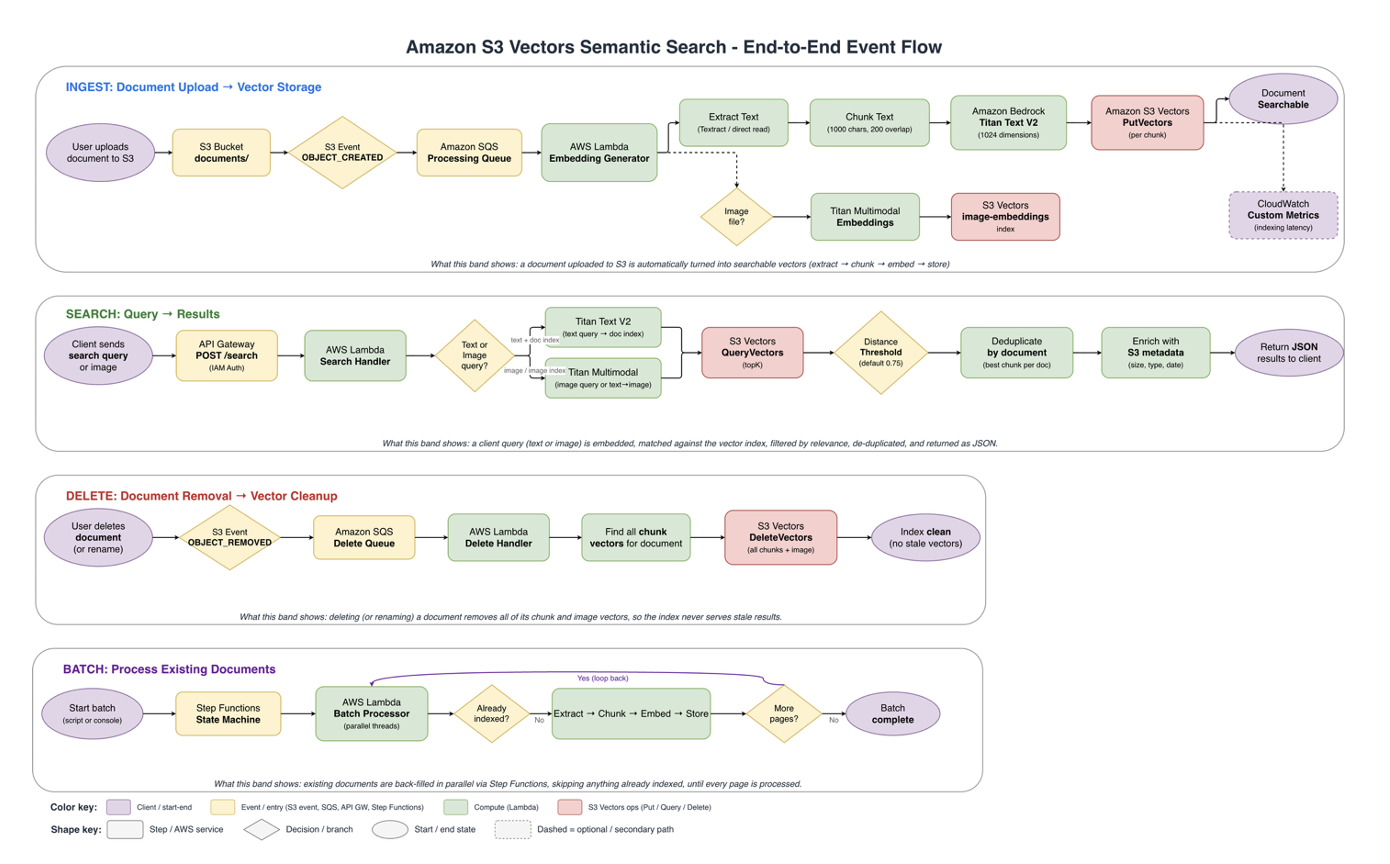
In the following diagram, you can see how a document moves through ingest, search, delete, and batch processing.
Choosing the right approach
AWS offers multiple paths for building semantic search and RAG applications. The right choice depends on your requirements for control, customization, and operational overhead.
Use Amazon Bedrock Knowledge Bases when:
- You want a fully managed experience with minimal code and no infrastructure to run
- Your documents are in standard formats and built-in chunking meets your needs
- Scheduled synchronization is sufficient; you don’t need real-time indexing
Use this custom serverless pipeline when:
- You need fine-grained control over text extraction and chunking (e.g., Textract for complex PDFs, chunking tuned to your document structure)
- You require real-time, event-driven indexing with automatic vector cleanup on deletion or rename
- You need custom metadata filtering, idempotent backlog processing, or full CDK control for compliance and governance
- You want multimodal search across text and images (e.g., damage photos in insurance claims)
Both approaches can use S3 Vectors as the underlying vector store (Bedrock Knowledge Bases also supports several other vector stores). The difference is how much of the surrounding pipeline you manage yourself versus delegate to a managed service.
Walkthrough
This walkthrough explains what each stage of the pipeline does and the decisions behind it. The runnable code (CDK stack, Lambda handlers, scripts, and tests) lives in the repository. Each step points to the relevant path instead of reproducing the code here. Full prerequisites and a clone-to-search quickstart are in the repository README, and detailed deployment and cleanup steps are in DEPLOYMENT.md.
Prerequisites
To follow along, you need the following in place. Full setup details are in the README.
- An AWS account with permissions to deploy the services used here (S3, Lambda, SQS, Step Functions, API Gateway, Textract, and Amazon Bedrock).
- The AWS CDK installed and bootstrapped in your target account and Region.
- Amazon Bedrock model access enabled for Titan Text Embeddings V2 in that Region.
- Permissions for Amazon Textract so the pipeline can extract text from PDF documents.
Step 1. Set up the infrastructure
A single cdk deploy command provisions everything: the S3 Vectors bucket and index, an S3 bucket for source documents with event notifications wired to SQS queues (one for OBJECT_CREATED and one for OBJECT_REMOVED), the four Lambda functions, the Step Functions state machine, and the API Gateway endpoint. The vector index is created with 1,024 dimensions and cosine distance. Cosine distance measures the angle between vectors, which makes it well suited to text similarity, where document length shouldn’t affect relevance. Because the vector bucket is new, the index inherits the bucket’s default ENHANCED index mode, which enables metadata pre-filtering (covered in Step 5). The source_text metadata key is marked non-filterable, so it’s stored alongside each vector for retrieval but doesn’t consume a filterable-metadata slot. Each Lambda function receives least-privilege IAM permissions for only the specific s3vectors actions it needs. See code/infrastructure/stacks/vector_search_stack.py.
Step 2. Build the embedding pipeline
When a document lands under the documents/ prefix, the embedding generator Lambda function handles four tasks. First, it extracts text, routing by file type. Text, Markdown, and JSON files are read directly, while PDFs go through Amazon Textract (using the synchronous DetectDocumentText API for files under 10 MB and automatically switching to the asynchronous API with pagination for larger files). Second, it chunks the text on paragraph boundaries with configurable overlap, so long documents map back to specific passages rather than a single coarse vector. Third, it generates embeddings by sending each chunk to Titan Text Embeddings V2, which returns a 1,024-dimension normalized vector. Fourth, it stores the vectors with put_vectors, keyed as {document_key}#chunk-{index} and enriched with both filterable metadata (file_type, document_key) and non-filterable metadata (source_text).
Chunking is the one design decision worth showing in code, because it determines retrieval granularity. The pipeline splits on paragraph boundaries and carries a configurable overlap between chunks so context isn’t lost at the seams. The overlap is trimmed to start on a word boundary, so chunks (and the summaries returned by search) don’t begin mid-word:
def _overlap_tail(text: str, overlap: int) -> str:
    """Return up to `overlap` trailing characters, starting on a word boundary."""
    if overlap <= 0 or not text:
        return ""
    if len(text) <= overlap:
        return text.strip()
    tail = text[-overlap:]
    if not text[-overlap - 1].isspace():  # slice started mid-word
        cut = next((i for i, c in enumerate(tail) if c.isspace()), len(tail))
        tail = tail[cut:]
    return tail.strip()

def chunk_text(text: str, chunk_size: int = 1000, chunk_overlap: int = 200) -> list[dict]:
    """Split text into overlapping chunks for embedding.
    Uses paragraph boundaries when possible, with overlap for context continuity.
    """
    chunks = []
    paragraphs = text.split("\n\n")
    current_chunk = ""
    chunk_index = 0

    for paragraph in paragraphs:
        if len(current_chunk) + len(paragraph) > chunk_size and current_chunk:
            chunks.append({"text": current_chunk.strip(), "chunk_index": chunk_index})
            overlap = _overlap_tail(current_chunk, chunk_overlap)
            current_chunk = f"{overlap}\n\n{paragraph}" if overlap else paragraph
            chunk_index += 1
        else:
            current_chunk += ("\n\n" if current_chunk else "") + paragraph

    if current_chunk.strip():
        chunks.append({"text": current_chunk.strip(), "chunk_index": chunk_index})
    return chunks
Because PutVectors uses upsert semantics, re-uploading a document with the same key updates all its chunk vectors. If the new version has fewer chunks, the pipeline deletes the orphaned vectors by comparing the chunk count against the stored total_chunks. Failed messages are retried up to three times before landing in a dead-letter queue. The full chunking and embedding logic is in code/lambda/embedding_generator/.
Step 3. Handle document deletions
Keeping the index in sync on delete matters because S3 has no native rename: a rename is a copy to the new key plus a delete of the old key, which emits both an OBJECT_CREATED and an OBJECT_REMOVED event. A dedicated delete handler Lambda function listens to the OBJECT_REMOVED queue, finds all chunk vectors for the removed key, and deletes them with delete_vectors. The operation is idempotent, so deleting a key that doesn’t exist is a harmless no-op. This design is also version-safe. With S3 Versioning enabled, a delete emits an ObjectRemoved:DeleteMarkerCreated event, so cleanup still runs, and the handler checks whether the object still exists before deleting anything. Removing a noncurrent version leaves the current object’s vectors in place. Restoring an object, either by copying an old version back (OBJECT_CREATED) or by removing its delete marker, re-indexes it automatically. See code/lambda/delete_handler/.
Step 4. Process existing document backlogs
For organizations with thousands or millions of existing documents, uploading them one by one isn’t practical. A batch processor Lambda function, orchestrated by a Step Functions state machine, lists S3 objects under a prefix in pages, checks which objects already have vectors (so re-runs are idempotent), and processes only the unindexed ones using a thread pool per batch. Step Functions loops with a continuation token until the backlog is drained, pausing briefly between batches to avoid throttling. To start it, run python code/scripts/start_batch_processing.py <state-machine-arn> "documents/", and then monitor the processed, skipped, and failed counts in the Step Functions console. See code/lambda/batch_processor/.
Step 5. Query the semantic search API
The search handler Lambda function embeds the incoming query with the same Titan model used at indexing time, calls query_vectors to find the closest matches, applies a confidence threshold to drop low-relevance hits, deduplicates by document_key so one large document can’t dominate the results, and enriches each hit with S3 metadata before returning the results. The core similarity search is a single API call:
response = s3vectors_client.query_vectors(
    vectorBucketName=VECTOR_BUCKET_NAME,
    indexName=VECTOR_INDEX_NAME,
    queryVector={"float32": query_embedding},
    topK=top_k,
    returnDistance=True,
    returnMetadata=True,
)
The following example shows a request to the deployed API and its response:
awscurl --service execute-api --region us-east-1 \
    -X POST "${API_URL}search" \
    -H "Content-Type: application/json" \
    -d '{"query": "vehicle theft with keyless entry system", "top_k": 10}'
{
  "query": "vehicle theft with keyless entry system",
  "result_count": 1,
  "latency_ms": 245.3,
  "distance_threshold": 0.75,
  "raw_matches": 3,
  "results": [
    {
      "document_key": "documents/claims/claim-003-theft-vehicle.txt",
      "chunk_index": 0,
      "distance": 0.0812,
      "summary": "INSURANCE CLAIM REPORT Claim Number: CLM-2025-003...",
      "content_type": "text/plain",
      "last_modified": "2026-02-28T05:00:00+00:00",
      "size_bytes": 2150
    }
  ]
}
With cosine distance, lower values mean higher similarity (0 = identical). The API uses IAM authorization, so requests must be signed; awscurl handles that automatically. You can also pass metadata filters (e.g., {"filters": {"file_type": "pdf"}}) to combine semantic search with metadata filtering. With metadata pre-filtering (generally available since September 30, 2026), S3 Vectors evaluates the filter before the similarity search, so your top_k results come from the full matching subset. This matters most for narrowly scoped queries, such as one claim folder, policy type, or date range, where pre-filtering returns substantially more of the relevant matches. On a CLASSIC index, the filter and the search are evaluated together, which can return fewer matches for narrow filters. Pre-filtering applies to indexes in ENHANCED mode, which is the default for indexes in new vector buckets. If you point the pipeline at a vector bucket created before September 30, 2026, its indexes use CLASSIC mode, and you need to call UpdateIndexMode first. Alternatively, you can set queryMode to ENHANCED on each QueryVectors request, but because this sample’s search handler doesn’t set it, calling UpdateIndexMode is the simpler fix. See Vector index mode for more details. For the insurance use case, you can scope a search to a single claim with a key prefix ({"document_key": {"$startsWith": "documents/claims/claim-003"}}) and still get the closest chunks from within that claim. A note on thresholds: even a query whose text appears verbatim in a document rarely scores zero, because the embedding captures the meaning of the full ~1,000-character chunk, not an individual phrase. A default cosine distance threshold of 0.75 (on a 0–2 scale, where lower is more similar) balances precision and recall. You can override it per request with the distance_threshold parameter. See code/lambda/search_handler/.
Step 6. Clean up resources
To avoid ongoing charges, empty the versioned document bucket, delete the vector indexes and vector bucket, and then run cdk destroy. The document bucket uses a retain policy, so you may need to remove it manually afterward. The exact commands, including handling versioned objects and delete markers, are in DEPLOYMENT.md.
Performance and scale
This architecture scales without requiring you to manage the scaling. There is no vector database cluster to size and no index capacity to provision: each index holds up to 2 billion vectors, and writes are strongly consistent, so newly indexed documents are immediately searchable. Because the pipeline is event-driven and stateless, throughput scales horizontally with Lambda concurrency. A backlog of thousands of documents fans out across parallel invocations, SQS absorbs bursts, and the dead-letter queue isolates failures for retry.
Ingestion is near-real-time: a small text file is typically searchable within about 30 to 45 seconds of upload, most of which is the SQS batching window (30 seconds by default; you can shorten it in the stack to lower latency at the cost of more Lambda invocations). Larger PDFs take longer because Textract processing dominates; chunking and embedding add only a few hundred milliseconds per chunk. On the read path, searches return in a few hundred milliseconds end-to-end (including query embedding, the vector query, and metadata enrichment), with S3 Vectors itself typically responding in under 100 ms for warm queries. The stack emits custom Amazon CloudWatch metrics such as IndexingLatencyMs and SearchLatencyMs and sets alarms on dead-letter queue depth.
Cost scales with what you store and query, not with capacity you provision in advance. The following table estimates monthly costs for a representative deployment in us-east-1 at published rates: 100,000 documents at about 5 chunks each (500,000 vectors) and 1,000 search queries per day, with query embeddings generated by Titan Text Embeddings V2.
| Component | Monthly Cost (us-east-1) |
| S3 Vectors (storage + queries + writes) | ~$3.90 |
| Bedrock Titan embeddings (queries) | ~$0.60 |
| Lambda + API Gateway | ~$1.55 |
| S3 storage + SQS | ~$1.16 |
| Total | ~$7.21 |
Because you pay per query rather than per provisioned node, the same stack scales up under load and down to near zero when idle, with no capacity decision on your part either way. These estimates are based on published rates and vary by Region and usage; see the S3 Vectors pricing page for current rates.
Going further
The repository extends the core pipeline with several capabilities:
- Multimodal search: The pipeline can use Titan Multimodal Embeddings to embed images, such as vehicle or property damage photos and medical documentation, into a separate image index, enabling text-to-image and image-to-image search. A separate index is required because the text and multimodal models produce vectors in different embedding spaces.
- Real-world applications: Worked examples for legal document discovery, insurance claims processing with RAG, and cross-disciplinary research retrieval are in code/examples/. The RAG example is illustrative, not a production decision system: it constrains the model to retrieved context, applies a stricter distance threshold, and routes low-confidence claims to human review, but a person must remain accountable for any determination in regulated domains.
- Security and network isolation: Least-privilege IAM per function, SSE-S3 (or SSE-KMS) encryption, IAM-authorized API, and private connectivity to S3 Vectors through AWS PrivateLink if you need to keep traffic off the public internet.
- Monitoring, testing, and troubleshooting: A pre-built CloudWatch dashboard, custom latency metrics, DLQ alarms, unit tests, and an end-to-end test suite. See the repository README.md.
Conclusion
Amazon S3 Vectors gives you purpose-built vector storage with S3-level durability and warm queries that typically return in under 100 ms, without the overhead of running a separate vector database. The serverless pipeline in this post indexes documents on upload, keeps the index in sync through deletions and backfills, and exposes a semantic search API with no infrastructure to manage, all for roughly $7 per month for 100,000 documents and 1,000 daily queries. If you’re ready to build, clone the sample-s3-vectors-insurance-claims repository, deploy the CDK stack, and upload your documents; the README walks you from clone to first search. If you’re evaluating S3 Vectors, the same repository shows how an operationally complete semantic search pipeline fits together on S3 Vectors.