AWS Storage Blog
Implement single-exchange tokens for short-lived Amazon S3 presigned URLs with Terraform
Organizations across industries use signed URLs to grant temporary, credential-less access to private resources such as receipts, medical or financial records, legal files, or confidential reports. However, signed URLs can be reused by anyone until they expire, creating security risks if a URL is shared or inadvertently disclosed. This risk can be mitigated by vending the signed URL only when needed and making it as short-lived as possible.
Amazon S3 offers presigned URLs for granting time-limited access to private objects without requiring AWS credentials. Using services like Amazon API Gateway, AWS Lambda, and Amazon DynamoDB, organizations can build applications that vend presigned URLs on demand, tailored to their requirements, such as custom expiration times or network-level access restrictions, while taking advantage of the performance and availability of AWS.
In this post, we implement a serverless application that generates single-use tokens for controlled access to S3 objects. The sample solution, which is deployable with Terraform and available in the accompanying GitHub repository, produces configurable, long-lived access tokens that can be exchanged exactly once for a very-short-duration presigned URL. This enables credential-less access tokens that can outlive the 7-day maximum expiration of presigned URLs, while exposing the actual presigned URL only briefly to minimize its window of public availability. Other posts have addressed presigned URL management for specific use cases. This solution and its deployable sample offer a simple way to manage presigned URLs at scale across a broad set of requirements.
Solution overview
This solution, deployable with Terraform, shows how to set up a serverless application designed to exchange single-use tokens for short-lived S3 presigned URLs. The following diagram illustrates this workflow.
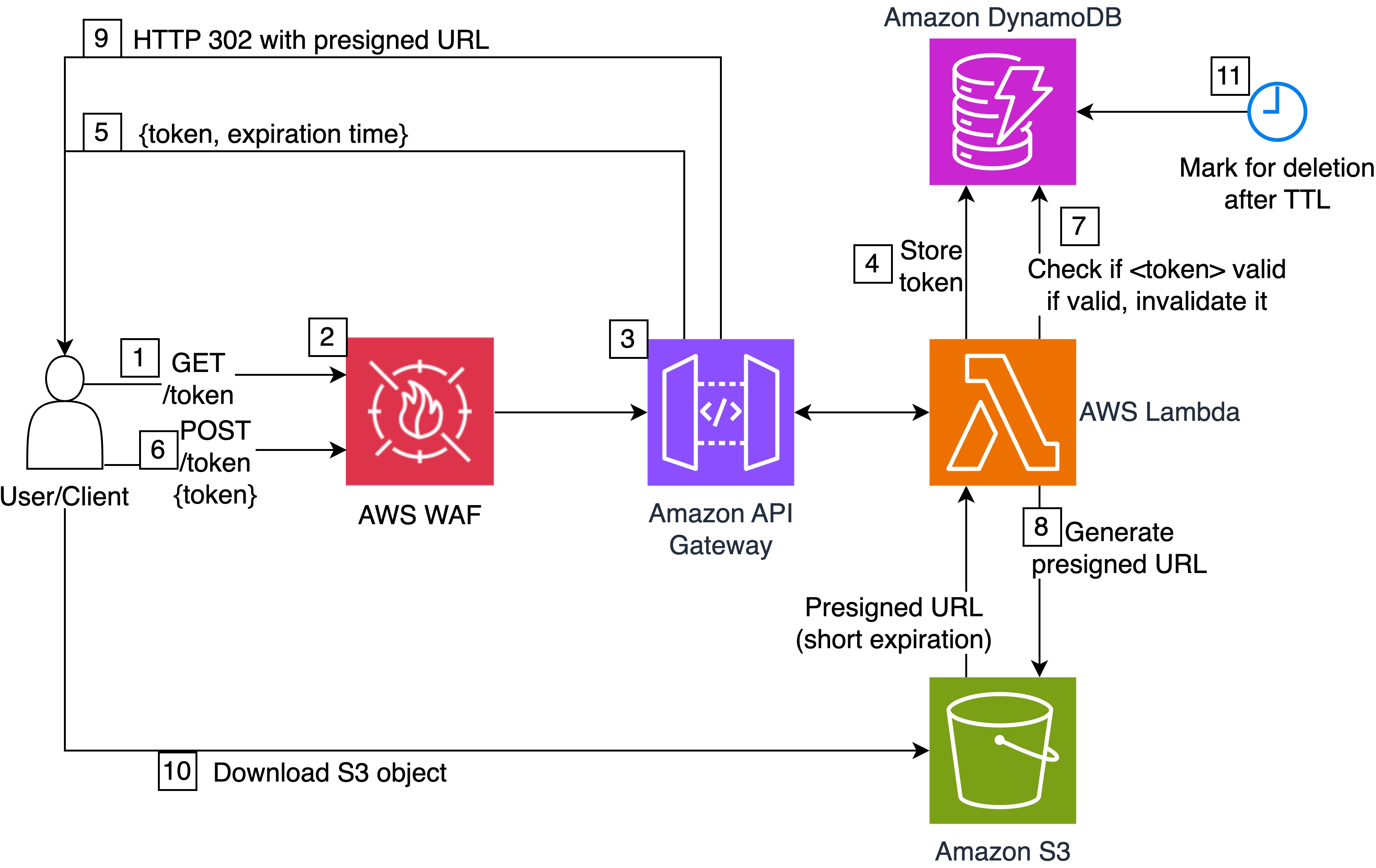
The detailed workflow steps are as follows:
- A user authenticated with AWS Signature Version 4 (AWS SigV4) AWS Identity and Access Management (IAM) credentials makes a GET call to the
/tokenresource of the REST API on API Gateway. This GET method is purely demonstrative. In a real application, the client or user would receive a single-use token according to the intended solution logic and authorization requirements. - AWS WAF evaluates the request against configured rules, such as rate limiting and managed rule sets, to protect the API from unintended use, which is especially important if the API endpoint is publicly accessible.
- The REST API validates the request structure and authorization.
- The Lambda function generates a single-use, securely randomized token using Python’s
secretsmodule and stores it in DynamoDB with metadata including the S3 object URI and the expiration timestamp or time to live (TTL). - The API returns the token and expiration time to the user.
- The user submits the single-use token to the POST method of the
/tokenresource. - The Lambda function retrieves the token from DynamoDB and checks if it has been used before. If so, the solution returns an error to the user. Otherwise, the Lambda function marks the token as used with DynamoDB conditional writes to prevent race conditions.
- The Lambda function generates an S3 presigned URL with a short expiration.
- The API returns the presigned URL.
- The user can immediately download the object (possibly using an HTTP 302 redirect within the browser) and therefore the presigned URL expiration can be very short.
- After the configured TTL elapses after the time of token generation, DynamoDB marks the token for deletion, regardless of whether it was used. The TTL controls the long-term validity of the token and is configurable at deployment time.
The solution generates a single-use, securely randomized token to mitigate brute-force attacks. The token can be used until deletion through DynamoDB’s TTL, which is configurable at deployment time. At the same time, this approach makes it possible for the public accessibility window of the underlying presigned URL, also configurable during deployment, to be very short-lived.
In the following sections, we show how to deploy the solution.
Prerequisites
You must have the following prerequisites:
- An active AWS account and credentials with appropriate permissions to deploy the solution
- Terraform v1.0 or later
- The AWS Command Line Interface (AWS CLI) v2.0 or later
- Docker installed and running locally
- Python v3.13 or later
- Git
Deploy the solution
Complete the following steps to deploy the solution to your AWS account:
- Clone the GitHub repository.
- Follow the detailed instructions in the README file to deploy the stack using Terraform and the AWS CLI.
Test the solution
You can test the solution using AWS CloudShell, which provides a pre-authenticated, browser-based shell environment with the AWS CLI pre-installed.
Open CloudShell
Open CloudShell with the following steps:
- Log in to the API Gateway console.
- Make sure to choose the same AWS Region as the Region where you previously deployed the solution.
- In the navigation pane, choose APIs.
- Identify the row for the
single-use-presigned-urls-apiREST API. - Note the REST API ID.
- Choose the CloudShell icon (terminal icon) in the navigation bar.
- Wait for the shell to initialize.
Generate token
Enter the following commands in the CloudShell terminal to generate a single-use token:
# Set your API Gateway ID
API_ID="<id_of_your_rest_api_placeholder>"

# Get the resource ID for the /token endpoint
export RESOURCE_ID=$(aws apigateway get-resources \
  --rest-api-id $API_ID \
  --region $AWS_REGION \
  --query "items[?path=='/token'].id" \
  --output text)

echo "Resource ID: $RESOURCE_ID"

# Generate a token using AWS SigV4 signing
aws apigateway test-invoke-method \
  --rest-api-id $API_ID \
  --resource-id $RESOURCE_ID \
  --http-method GET \
  --path-with-query-string /token \
  --region $AWS_REGION \
  > get_response.json

# View the response from Lambda
jq -r '.body | fromjson' get_response.json
Following is an example of the expected response:
{
  "statusCode": 200,
  "body": {
    "token": "<TOKEN_PLACEHOLDER>",
    "expires_at": 1700003600
  }
}
Exchange token for presigned URL
Enter the following commands in the CloudShell terminal to exchange the token for an S3 presigned URL:
# Extract the token from the response
TOKEN=$(jq -r '.body | fromjson | .body.token' get_response.json)

# Exchange the token for a presigned URL
aws apigateway test-invoke-method \
  --rest-api-id $API_ID \
  --resource-id $RESOURCE_ID \
  --http-method POST \
  --path-with-query-string /token \
  --body "{\"token\":\"$TOKEN\"}" \
  --region $AWS_REGION \
  > exchange_response.json

# View the response containing the presigned URL
jq '.body | fromjson | .body' exchange_response.json
Following is an example of the expected response:
{
  "presigned_url": "https://amzn-s3-demo-bucket.s3.amazonaws.com/sample-image.png?X-Amz-Algorithm=..."
}
Copy and paste the URL from the CloudShell terminal into the URL bar of your browser to access the sample object from the solution’s S3 bucket. Make sure to access the object within the presigned URL expiration time that you set during deployment.
Verify single-use behavior
Try to exchange the same token again to verify that the solution is designed to prevent reuse:
# Try to exchange again the same token as before
aws apigateway test-invoke-method \
  --rest-api-id $API_ID \
  --resource-id $RESOURCE_ID \
  --http-method POST \
  --path-with-query-string /token \
  --body "{\"token\":\"$TOKEN\"}" \
  | jq '.body' | jq -r . | jq -r '.'
Following is an example of the expected response:
{
  "statusCode": 403,
  "body": {
    "error": "Token is invalid, expired, or already used"
  }
}
Best practices and considerations
Consider the following additional ideas to adapt the solution to your needs and further improve its security posture:
- Response format – Modify and extend the REST API to integrate as desired into your application and meet your business requirements, for instance, to generate valid tokens for your users based on your authorization logic.
- Custom domain with TLS – Use API Gateway custom domains and AWS Certificate Manager for branded and easily recognizable endpoints with a domain aligned with your other applications.
- Customize encryption – Consider using a customer managed key on AWS Key Management Service (AWS KMS) to encrypt data at rest on S3 buckets and DynamoDB tables.
- VPC integration – Attach Lambda functions to a virtual private cloud (VPC) for additional network isolation. Additionally, you can use private REST API endpoints on API Gateway for serving traffic over a private network.
- Authorization – If your API serves authenticated users, add an Amazon Cognito authorizer to the REST API, federated with your identity provider of choice.
- Observability – Trigger downstream processes when tokens are generated or exchanged with Amazon EventBridge, debug bottlenecks and failures with AWS X-Ray, track usage metrics of S3 GET operations and set alarms with Amazon CloudWatch, then send notifications of anomalous activity to your team with Amazon Simple Notification Service.
- Expiration policies – Adjust token and presigned URL expirations based on your security and application requirements. For example, if the size of the file to download is large, consider adjusting the expiration of the S3 presigned URL to allow sufficient time for a potential retry in case of network interruptions.
- CI/CD integration – Integrate Terraform deployment in your continuous integration and continuous deployment (CI/CD) environment to make consistent and repeatable deployments in your environments.
Cleaning up
To clean up your resources, run the following command:
terraform -chdir="./terraform" destroy
Enter yes when prompted. Verify that the resources have been deleted from the console of the respective AWS services.
Conclusion
This solution demonstrates how to create a serverless application to provide long-lived, anonymous S3 object access using short-duration presigned URLs. By combining API Gateway, Lambda, DynamoDB, and S3, you can create a system designed to use each token only one time while maintaining the performance and availability capabilities of AWS services.
To further customize this solution to meet your organization’s standards, discover how to accelerate your journey on the cloud with the help of AWS Professional Services.
We encourage you to learn more from the Amazon S3 User Guide. Additionally, refer to the following resources for more examples of using S3 presigned URLs and Terraform on AWS: