AWS Storage Blog
Orchestrating multi-agent AI architectures with Amazon S3 Files
Organizations are moving beyond single-model AI toward multi-agent architectures. In these systems, agents offload intermediate results to files rather than carrying everything in the prompt, because a large prompt inflates cost and degrades quality. A model’s context window is finite, so files become working memory that persists after a session ends. In multi-agent systems, a shared file system becomes the handoff layer: one agent writes its output to a directory, the next reads it, with no custom integration code between steps. Consider a document processing pipeline at a financial services firm. Five agents handle classification, risk scoring, compliance validation, report assembly, and executive summarization, often running concurrently against the same documents. They need shared access to a common data layer with clear handoff boundaries between stages. Without a shared file system, every handoff turns into API calls, pagination, and retries that multiply with scale.
Amazon S3 Files provides exactly this: a shared file system over your S3 data with POSIX semantics, so agents get the common data layer and directory-convention handoffs the pipeline needs. Agents on Amazon EC2, AWS Lambda, Amazon EKS, Amazon ECS on AWS Fargate, and Amazon Bedrock AgentCore Runtime all mount the same file system using standard file operations like open(), os.listdir(), and write(). Access points let you scope each agent to a portion of the file system under its own POSIX identity, so you can enforce per-agent isolation via separate access points with non-overlapping directory scopes as your security requirements grow. In this walkthrough, agents share a single access point because they all operate on the same pipeline data and coordinate through shared directories, so a single POSIX identity is sufficient. Each agent reads from a designated input directory and writes to an output directory, skipping files it has already processed. Lambda, ECS on Fargate, and AgentCore Runtime mount through the access point. EC2 and EKS mount the file system directly. And because the data lives in S3, you retain S3’s event-driven capabilities. When a document lands in the bucket, an event notification routes to an Amazon SQS queue, triggering the first agent. Without S3 Files, each handoff would need s3.list_objects_v2() to discover files and s3.put_object() to write results. With S3 Files, agents read and write with open() and json.dump().
You can run your agents fully managed on Amazon Bedrock AgentCore or on AWS compute you already operate. This post walks through the second path: a five-stage document intelligence pipeline with each agent on a different compute service. After the initial SQS trigger, agents hand off through shared directories using directory polling or Amazon EventBridge Scheduler, and every agent uses the Strands Agents SDK with Amazon Bedrock for inference. We deliberately place each stage on a different compute service to show the range of what can mount S3 Files. A real pipeline would choose compute per stage on its own merits, not spread it across five.
Solution overview
The following diagram shows the handoff flow: each agent reads from one shared directory and writes to the next, passing documents through intake/, analyzed/, validated/, reports/, and summaries/ without direct agent-to-agent communication.
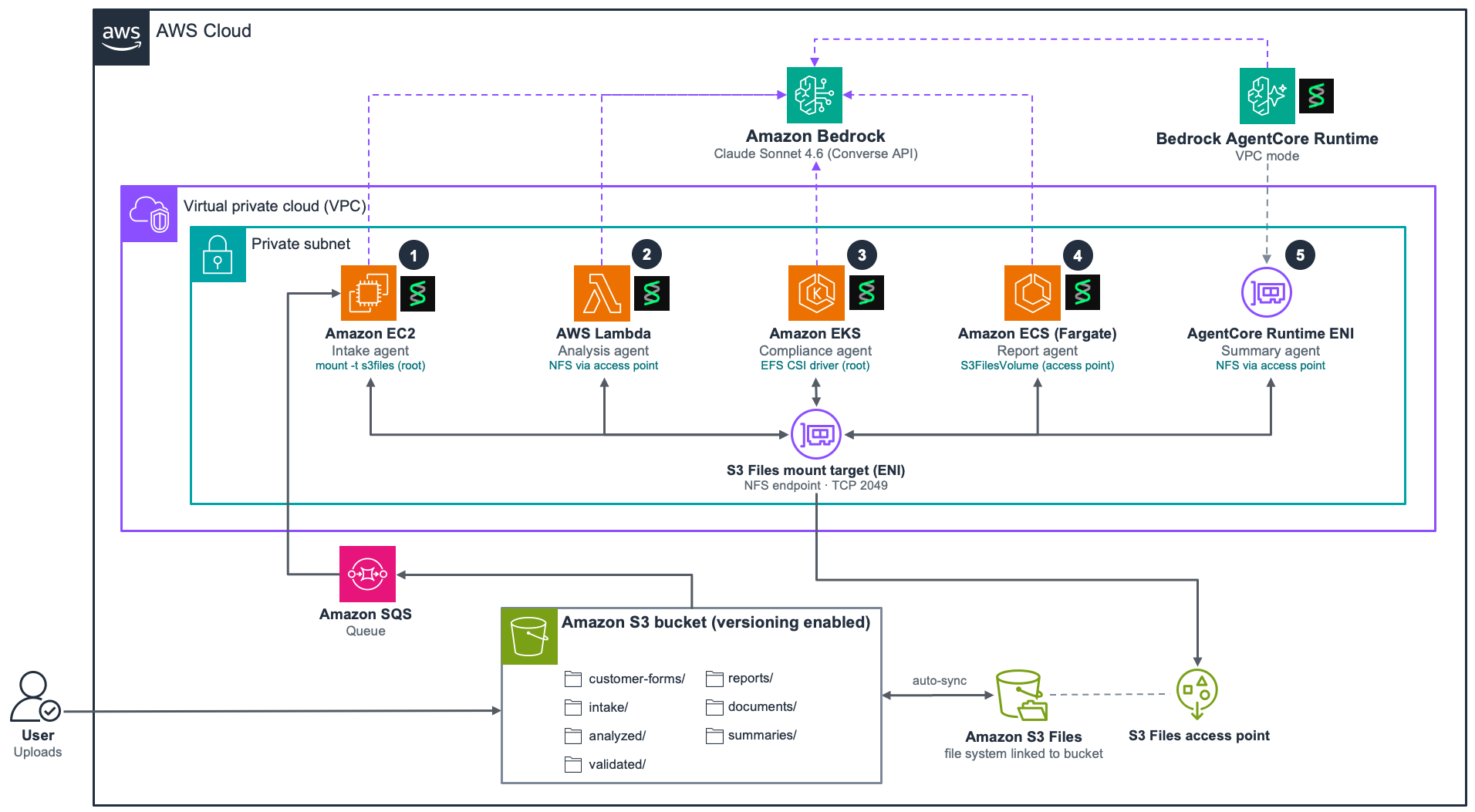
Figure 1: Multi-agent document processing pipeline with five AI agents running on different AWS compute services, sharing a single S3 Files file system
The pipeline starts with an event-driven trigger: when a customer form is uploaded to S3, an S3 event notification delivers a message to an SQS queue, and the EC2 intake agent picks it up on its next poll. The intake agent receives the SQS message to learn a new document has landed, then reads it from the shared mount using the filename derived from the S3 key, and writes the structured output to the intake/ directory. From that point on, downstream handoffs happen through the file system. Downstream handoffs use directory polling or scheduled triggers. Long-running services (Amazon EKS, Amazon ECS) run a loop that calls os.listdir() every 10-15 seconds. Lambda and AgentCore Runtime are both invoked by EventBridge on a 1-minute schedule. A file is visible to other mounted agents immediately on close (close-to-open consistency). It appears as an object in the S3 bucket about a minute later, after the mount exports it. Downstream agents read from the mount, so they see it on close, not after the export. Downstream agents poll the mount directly. S3 Files provides close-to-open consistency, so a file written by one agent is visible to other agents immediately after close. The Strands agent is stateless per invocation. The surrounding application code handles polling and deduplication.
Agents follow the same code pattern. The following example shows how the risk analysis agent (Stage 2) reads from the shared file system, processes a document with the Strands SDK, and writes the result back:
The only difference between agents is the system prompt and which directory they read from and write to.
The shared file system
Agents in the pipeline read and write to the same S3 Files file system mounted at /mnt/s3files/. Each agent owns a specific directory prefix where it writes output. The next agent in the pipeline reads from that prefix as its input. This directory-based handoff replaces the need for message queues or event-driven coordination between downstream stages.
Because every agent lists its input directory on a fixed interval or per-trigger, each stage needs a way to skip files it has already processed. The pipeline uses two approaches: The EKS agent runs parallel replicas that coordinate with atomic claim markers so each document is processed by exactly one replica, and the ECS agent (a single task) persists deduplication state on the mount. The remaining agents (EC2, Lambda, AgentCore) skip any input whose expected output file already exists. Both patterns ensure that repeated directory listings don’t trigger duplicate work.
The following diagram shows the five-stage pipeline flow. A customer form is uploaded to S3, which triggers an event notification to an SQS queue. The EC2 intake agent receives the SQS message, reads the raw document from the mount, classifies it, and writes a structured JSON envelope to intake/. The Lambda risk agent reads from intake/ and writes risk assessments to analyzed/. The EKS compliance agent reads from analyzed/ and writes validation results to validated/. The ECS report agent reads from validated/ and assembles a JSON report and Word document into reports/ and documents/. The AgentCore summary agent reads from reports/ and writes a final executive summary to summaries/.
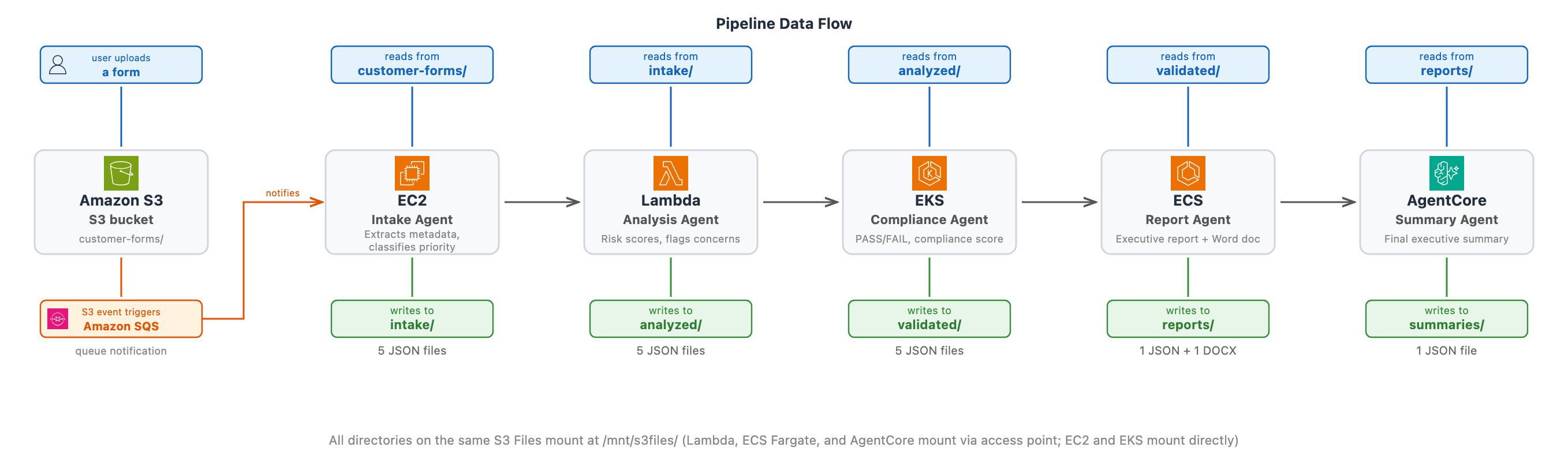 Figure 2: Five-stage pipeline flow showing how each agent reads from and writes to designated directories on the shared S3 Files mount at /mnt/s3files/
Two mount targets (one per Availability Zone (AZ)) provide high availability. The file system scales automatically with no capacity planning required. For more information about S3 Files performance thresholds, refer to Performance specifications. The workload in this post stays within these thresholds, so it runs without hitting performance bottlenecks.
Prerequisites
To follow along with this post, you need the following:
-
- An AWS account
-
- An S3 bucket with versioning enabled
-
- A virtual private cloud (VPC) with subnets in at least two AZs. Mount targets must exist in the AZs where your compute runs
-
- A compute role (instance profile, execution role, task role, or runtime role) with AWS IAM permissions and a file system policy configured for S3 Files access (including mount, write, and root access as needed), plus
bedrock:InvokeModelandbedrock:InvokeModelWithResponseStreamfor model invocation through the Strands SDK
- A compute role (instance profile, execution role, task role, or runtime role) with AWS IAM permissions and a file system policy configured for S3 Files access (including mount, write, and root access as needed), plus
-
- Python 3.10 or later with
strands-agentsinstalled (pip install strands-agents). Bedrock model support is included. Additional packages vary by stage (for example, python-docx for the report agent)
- Python 3.10 or later with
-
- Basic understanding of NFS and POSIX file permissions
EC2 and EKS (using static provisioning), mount the file system directly without an access point and run as root. Lambda, ECS on Fargate, and AgentCore Runtime mount through a shared S3 Files access point configured with UID 1000 and GID 1000. File operations through the access point run as UID 1000. EC2 creates the pipeline directories with 777 permissions so that both root (UID 0) and the access point identity (UID 1000) can read and write.
Stage 1: Amazon EC2
A customer form is uploaded to the S3 bucket. An S3 event notification delivers a message to an SQS queue, and the EC2 intake agent receives the message to know a new document has landed. EC2 suits this stage because intake needs a long-lived poller that processes events continuously.
The following commands install the mount helper, create the mount point, and mount the S3 Files on EC2:
The instance profile handles authentication. You don’t need access keys or separate SDK configuration for file access. The amazon-efs-utils package is pre-installed on Amazon Linux 2023 AMIs but must be installed manually on other distributions. The S3 Files mount helper requires botocore on the mounting host. For details, see Mounting S3 file systems on Amazon EC2.
Sample agent code:
Stage 2: AWS Lambda
Risk analysis is schedule-driven. Lambda is invoked by EventBridge on a 1-minute schedule, checks for new intake documents, and processes those it finds.
Lambda gets persistent shared storage that survives across invocations and is visible to other agents. The handler reads from intake/ and writes to analyzed/. The EKS agent picks up those files on its own mount within seconds.
Lambda can’t run mount commands, so it uses an S3 Files access point configured in the function’s FileSystemConfigs. The following configuration attaches the file system to the Lambda function:
The mount happens before the handler runs. By the time your code runs, /mnt/s3files is ready.
The execution role additionally needs standard Lambda VPC execution permissions. We configured the function with 2048 MB memory and a 10-minute timeout because the Strands SDK at cold start and Bedrock inference calls require more time and memory than a typical Lambda function. For the full list of prerequisites, see Configuring Amazon S3 Files access.
The following is our sample agent code:
Stage 3: Amazon EKS
Compliance validation benefits from horizontal scaling. Two pod replicas process documents in parallel, both sharing the same file system mount. This example uses static provisioning for mounting S3 Files as a persistent volume in the EKS cluster, but you can also use dynamic provisioning.
EKS uses the Amazon Elastic File System (Amazon EFS) Container Storage Interface (CSI) driver to mount S3 Files as a PersistentVolume. This survives pod restarts, node replacements, and cluster upgrades.
The following YAML defines the StorageClass and PersistentVolume for S3 Files:
Application pods require a PersistentVolumeClaim (PVC) to mount the volume (refer to the EFS CSI driver static provisioning claim example). Pods mount the PersistentVolumeClaim at /mnt/s3files. Multiple replicas share the same mount point with ReadWriteMany access mode.
The EKS cluster needs the EFS CSI driver add-on installed, with an IRSA role for the CSI controller that includes the AmazonS3FilesCSIDriverPolicy (this handles provisioning only). The worker node role (or the efs-csi-node service account) additionally needs s3files:ClientMount and s3files:ClientWrite permissions (for example using AmazonS3FilesClientFullAccess), because the CSI node component performs the actual mount using the node identity, not the controller service account. Agent pods require a separate IRSA role for Bedrock access. StorageClass, PersistentVolume, and PersistentVolumeClaim resources must be configured. For details, see Mounting S3 file systems on Amazon EKS.
The following is our sample agent code:
With two replicas sharing the same mount, both pods see the same analyzed/ directory. Before working on a document, a replica claims it by atomically creating a small marker file on the shared mount using an exclusive create. Only one replica can win that create, so the other skips the document and moves on. This means each document is validated exactly once, and the two pods coordinate purely through the file system with no message queue. Each validated document is written to a deterministic path such as compliance-a3f8b2c1.json, so if the same input is processed again the output is overwritten in place rather than duplicated.
Stage 4: Amazon ECS on AWS Fargate
Report assembly needs more memory and longer runtime than Lambda allows. ECS on Fargate provides container-level control without managing instances.
ECS on Fargate uses S3FilesVolumeConfiguration in the task definition. The following JSON shows the volume configuration:
The task uses S3FilesVolumeConfiguration in the task definition with the same access point as Lambda. The task execution role requires AmazonECSTaskExecutionRolePolicy. The task role additionally needs s3files:ClientMount, s3files:ClientWrite, and s3:GetObject permissions on the file system resource, plus bedrock:InvokeModel and bedrock:InvokeModelWithResponseStream for Strands SDK inference calls. Include Python 3.10 or later with python-docx in the container image for Word document generation. For details, see Mounting S3 file systems on Amazon ECS.
The following is our sample agent code:
Writing a Word document is as simple as calling report_doc.save('/mnt/s3files/documents/report-{id}.docx'). These documents are for human stakeholders to download and review, they are not consumed by downstream agents. The .docx file is accessible to anyone who mounts the file system or accesses the bucket through the S3 API. This deduplication approach assumes a single ECS task; if you scale the service to multiple tasks, switch to the atomic claim pattern shown for EKS, because a shared read-modify-write state file loses updates under concurrency.
Stage 5: Amazon Bedrock AgentCore Runtime
AgentCore Runtime is fully managed, meaning you deploy agent code and AWS handles scaling, patching, and compute provisioning. Unlike the other compute services where you configure the NFS mount yourself, AgentCore mounts the S3 Files access point automatically inside its microVM before your agent code runs. You declare the mount in the runtime configuration and the file system is ready at your specified path from the first line of code.
The mount is declarative. You specify the access point Amazon Resource Name (ARN) and mount path when creating the runtime, and AgentCore handles the rest. The following command shows the runtime creation with file system configuration:
AgentCore Runtime must use networkMode: VPC with subnets in AZs where AgentCore is supported and mount targets exist. The runtime’s security group must allow outbound TCP 2049 to the mount target; this NFS traffic stays in-VPC. Because AgentCore runs on private ENIs with no internet by default, its service-side calls need the VPC endpoints listed in the Considerations section. The runtime role needs S3 Files client permissions (s3files:ClientMount, s3files:ClientWrite), s3:GetObject, s3files:GetAccessPoint, and bedrock:InvokeModel with bedrock:InvokeModelWithResponseStream. Bundle strands-agents and bedrock-agentcore in the deployment artifact, because AgentCore doesn’t install packages at runtime. For details, see File system configurations for AgentCore Runtime.
To trigger the agent on a schedule, create an EventBridge rule that invokes the AgentCore runtime endpoint every 1 minute. This mirrors the Lambda scheduling pattern but targets the AgentCore runtime ARN as the EventBridge target.
The following is our sample agent code:
The agent code is identical in structure to other stages. It reads from one directory and writes to another using standard file operations. The only difference is the @app.entrypoint decorator and the BedrockAgentCoreApp wrapper, which are specific to the AgentCore Runtime SDK.
Benefits of S3 Files
What this architecture looks like in practice:
- One bucket serves as the single source of truth for all agents
- The pipeline state is observable by running
ls /mnt/s3files/on a mounted instance - Intermediate files can be read directly for debugging
Considerations
Keep in mind the following:
- IAM permissions span two namespaces – Mounting the file system requires
s3files:ClientMountands3files:ClientWritepermissions. Reading the underlying data requiress3:GetObject. Both sets of permissions must be on the same IAM role. Missing either namespace results in access errors that can be difficult to diagnose. - Strands SDK uses the Converse API – The Converse calls authorize against
bedrock:InvokeModelandbedrock:InvokeModelWithResponseStream. Those two actions are sufficient across all five compute types. Thebedrock:Converseandbedrock:ConverseStreamaren’t required. - Close-to-open consistency and out-of-band imports – S3 Files follows NFS close-to-open semantics: changes to a file become visible to other clients after the writer closes the file and a reader opens it. For out-of-band S3
PutObjects, the first directory listing imports the object’s metadata, so it appears in directory listings (os.listdir), while file data is loaded on demand on first read. Writes through the mount are exported back to S3 after 60 seconds of write inactivity, so a newly written file typically appears in the bucket about a minute after it’s closed. NFS writes don’t trigger S3 event notifications. Keep the default import behavior (metadata for all files in a directory is imported when any client first lists that directory) rather than switching to on-demand per-file imports. Set polling intervals to tolerate the import latency. - Access point POSIX identity matters – The access point’s UID/GID determines the effective user for all file operations. AgentCore, Lambda, and ECS on Fargate adopt the access point’s identity (configure UID 1000 / GID 1000 to match AgentCore’s container user), while EC2 and EKS mount directly as root. Directories that these agents write to must have permissions that allow UID 1000 (for example, 777), or writes fail with Permission denied.
- Synchronization defaults may need tuning for larger files – Files smaller than the import-size threshold are cached locally on the high-performance storage layer when first listed, so subsequent reads are fast. Files above that threshold stream directly from S3 on each read, which adds latency. If your agents routinely read larger documents, raise the threshold so those files are also cached locally instead of streamed on every access. Infrequently accessed data expires from the cache automatically; the underlying S3 objects remain intact. For current defaults, see Performance specifications.
- VPC required for NFS – The compute services (EC2, Lambda, EKS, ECS, and AgentCore Runtime) must be in a VPC with security group rules allowing TCP 2049 to mount targets. AgentCore in VPC mode uses private ENIs with no internet by default; its service-side calls (container image pull, logging, Bedrock inference) require a NAT gateway or VPC endpoints for
ecr.dkr,ecr.api,s3 (gateway),logs, andbedrock-runtime. S3 Files data traffic uses the in-VPC NFS path and doesn’t need NAT. - Lambda cold start with Strands – For production, bundle strands-agents in a Lambda layer or container image to avoid cold-start latency. If you instead install the package at runtime (
pip installinto/tmpon first invocation), expect approximately 10 seconds of additional cold start per execution environment, and your VPC must have outbound internet access (NAT gateway) to reach PyPI.
Cleaning up
To avoid ongoing charges, delete the resources you created if you no longer need them:
- Delete the S3 Files mount targets.
- Delete the S3 Files access point.
- Delete the S3 Files file system.
- Terminate the EC2 instance.
- Delete the Lambda function.
- Delete the EKS pods and cluster resources.
- Stop and delete the ECS on Fargate tasks.
- Delete the AgentCore runtime.
- Delete the SQS queue and EventBridge schedule.
- Delete the S3 bucket (if no longer needed).
Conclusion
Agents reach for a file system because context windows are finite and files persist across sessions. In multi-agent systems, a shared file system becomes the handoff layer. S3 Files gives you that layer over your existing S3 data, with agents on any AWS compute, from fully managed AgentCore to self-hosted EC2, reading and writing through standard POSIX operations.
To get started, create an S3 Files file system from a versioned S3 bucket, deploy mount targets in your VPC, and mount it from your compute. Refer to Working with Amazon S3 Files for setup instructions, the Strands Agents SDK for building agents, and the Amazon Bedrock AgentCore Developer Guide for managed agent hosting.
Tell us in the comments how you’re using S3 Files with your agent pipelines, or what patterns you’d like us to cover next.