AWS Marketplace
How you can embed procurement into your workflows with AWS Marketplace APIs
AWS Marketplace gives you consolidated billing, pre-negotiated terms, vendor diversity, and compliance controls for your software purchases. These capabilities are why many customers centralize their third-party software buying in AWS Marketplace.
Customers told us they wanted a more tailored experience that didn’t require switching to the AWS Management Console for routine tasks like discovering products, comparing offers, and managing subscriptions. They wanted to see these workflows brought into a single place so teams can stay in their flow and keep procurement moving quickly.
With the AWS Marketplace Discovery API and the programmatic procurement capabilities of the Agreement API, you can bring AWS Marketplace into the tools your teams already use whether that’s a Slack bot for quick product lookups, a ServiceNow integration for IT approvals, or a custom dashboard for procurement reporting.
In this post, I show you MP-Buyer portal a serverless reference solution that demonstrates what’s possible when you extend AWS Marketplace into your own workflows. The solution shows how to use Discovery API for product filtering and comparison, Agreement API for subscription management, and how to integrate these capabilities while maintaining the AWS Marketplace benefits you rely on standardized agreements, AWS billing integration, and vendor consolidation.
If you’re curious about solutions in AWS Marketplace you can explore AWS Marketplace or subscribe to a product to get started.
Overview
The MP-Buyer portal provides three capabilities through a single web interface:
- Agreements management – View, filter, and inspect AWS Marketplace subscriptions with product names, status, and terms.
- Product discovery – Search the catalog, compare offers, and subscribe programmatically.
- Reporting – Generate spend summaries, expiration alerts, portfolio inventories, and compliance audits with optional AI-powered insights through Strands Agents (a third-party tool).
The architecture leverages serverless AWS services, requiring no infrastructure management and incurring near-zero cost at idle. These include Amazon CloudFront for content delivery, Amazon Simple Storage Service (Amazon S3) for static hosting, Amazon API Gateway for routing, AWS Lambda for compute, Amazon DynamoDB for caching, and Amazon Cognito for authentication.
The following diagram shows the solution architecture. Amazon CloudFront routes static content from Amazon S3 and API calls through Amazon API Gateway to AWS Lambda functions backed by Amazon DynamoDB.
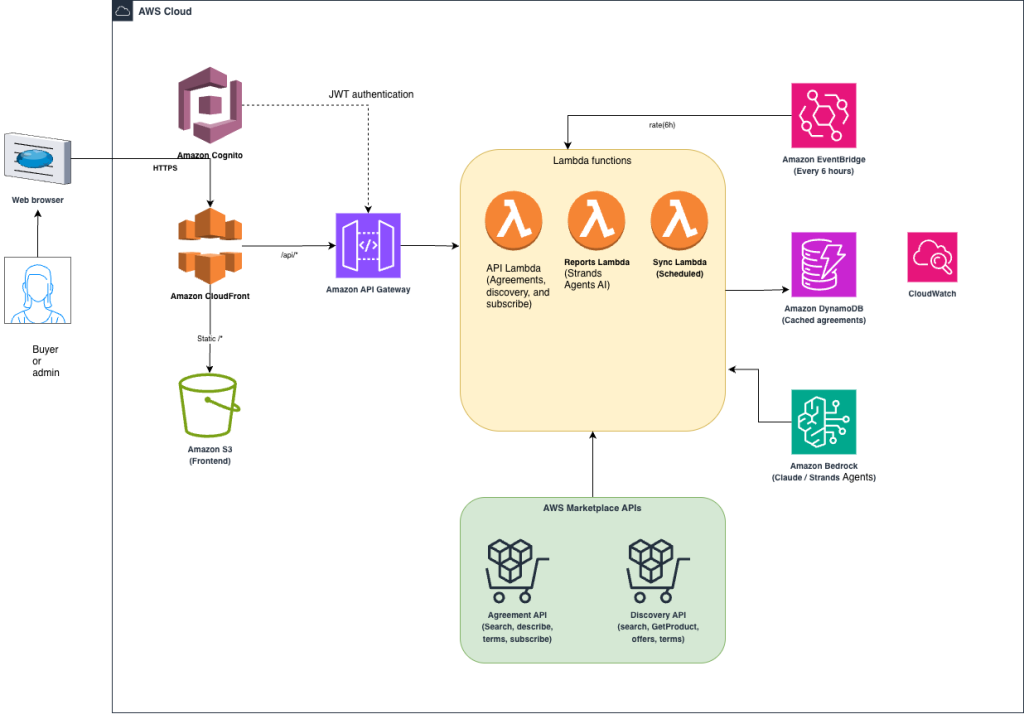
Figure 1: MP-Buyer portal serverless architecture
Prerequisites
Before you begin, you need:
- An AWS account with an admin IAM role is required for deployment. For a more detailed list of policies, you can view the template used for deployment.
- AWS Command Line Interface (AWS CLI) configured with appropriate credentials
- Python 3.10 or higher with pip
- AWS Identity and Access Management (IAM) permissions for AWS CloudFormation, Lambda, API Gateway, Amazon S3, CloudFront, DynamoDB, Amazon Cognito, AWS Marketplace, and AWS Marketplace APIs
Solution walkthrough: Embed procurement into your workflows with AWS Marketplace APIs
The MP-Buyer portal is built entirely on serverless. The following table describes each service and its role in the solution.
| Resource | Purpose | Documentation |
|---|---|---|
| Amazon CloudFront | HTTPS, CDN, routes static and API traffic | What is Amazon CloudFront? |
| Amazon S3 | Hosts the single-page frontend application | What is Amazon S3? |
| Amazon API Gateway | REST API with Amazon Cognito authorization | What is Amazon API Gateway? |
| AWS Lambda (API) | Handles agreements, product search, and subscriptions | What is AWS Lambda? |
| AWS Lambda (Reports) | Generates reports with Strands Agents AI analysis | What is AWS Lambda? |
| AWS Lambda (Sync) | Syncs agreement data to Amazon DynamoDB on schedule | What is AWS Lambda? |
| Amazon DynamoDB | Caches agreement data for fast report generation | What is Amazon DynamoDB? |
| Amazon Cognito | User authentication with JSON Web Tokens (JWT) | What is Amazon Cognito? |
| Amazon EventBridge | Triggers data sync every 6 hours | What is Amazon EventBridge? |
Deploy the solution
To deploy the solution, complete the following steps:
- Clone the repository:
git clone https://github.com/aws-samples/sample-aws-marketplace-agreements-api
cd sample-aws-marketplace-agreements-api
- Deploy everything with a single command, replacing your@email.com with your own email address:
chmod +x deploy_all.sh
./deploy_all.sh us-east-1 admin your@email.com
The script performs these steps:
- Deploys the CloudFormation stack (all infrastructure)
- Packages and deploys the Lambda functions with required dependencies
- Generates a frontend configuration file with Amazon Cognito pool details
- Adds IAM permissions for Discovery and Agreement APIs
- Uploads the frontend to Amazon S3
- Invalidates the Amazon CloudFront cache.
- Triggers an initial data sync to populate DynamoDB
- Verifies the deployment with a health check
After deployment, you receive a CloudFront URL for the portal and a temporary password through email for the admin user.
Agreements Management
The Agreements tab displays AWS Marketplace subscriptions with product names resolved from the Discovery API. You can filter by party type (buyer or seller), status, account ID, and offer ID.
Sign in to the application
Follow these steps to sign in for the first time:
- On the CloudFormation console, choose the stack you deployed and choose the Outputs tab.
- Find the CloudFrontUrl value and open the provided link.
- When the sign-in screen displays, enter the AdminEmail you specified during deployment.
- Enter the temporary password that was sent to your email address.
- After you sign in, follow the prompts to change your password.
- Choose Send to confirm your new credentials.
The following screenshot shows the Outputs tab where you’ll find the CloudFrontUrl value.
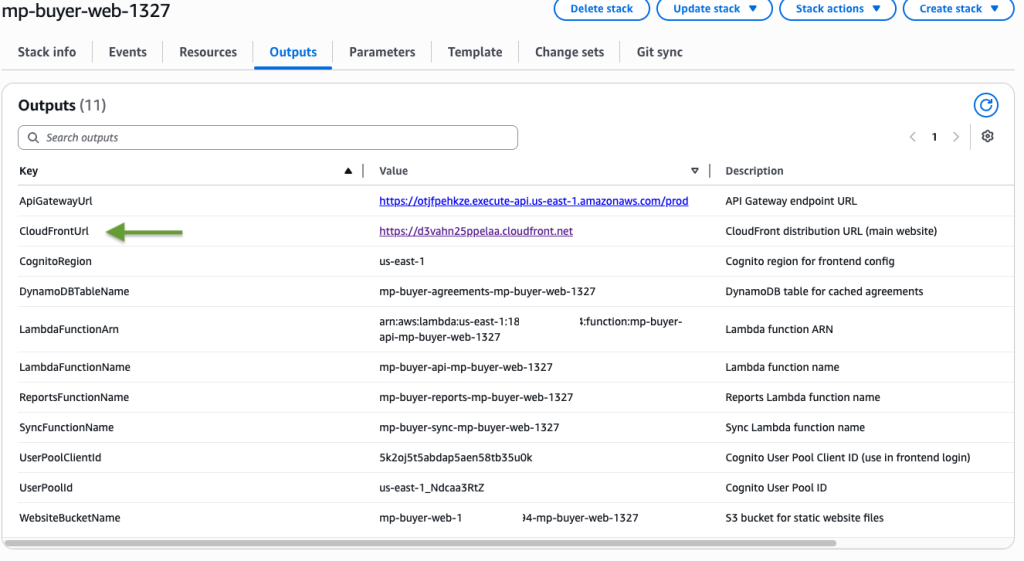
Figure 3: Outputs tab
After you authenticate, the MP-Buyer portal dashboard opens, as shown in the following screenshot.
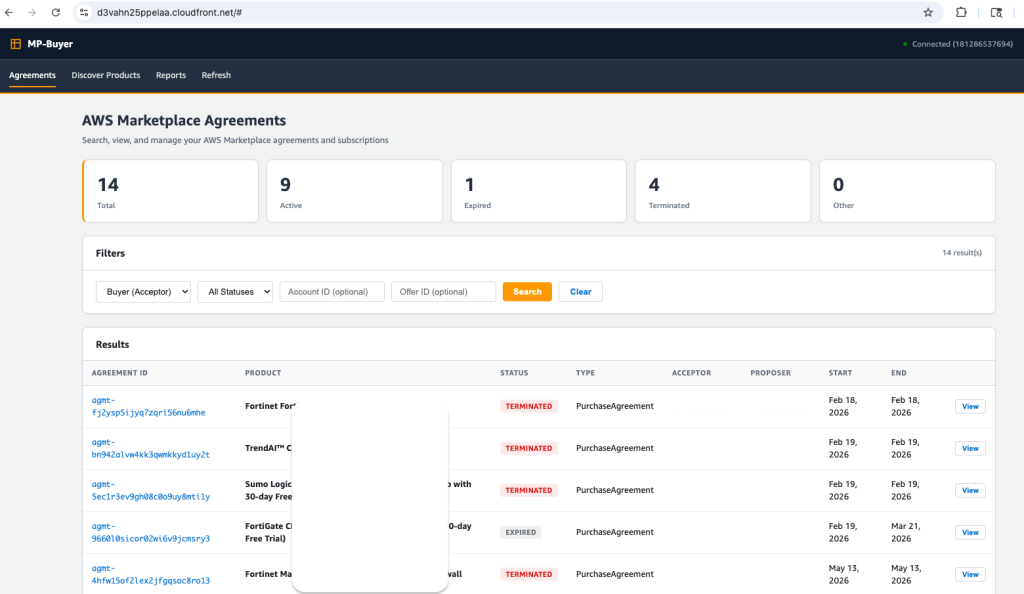
Figure 4: MP-Buyer portal
Viewing agreements
When you choose an agreement, a detail modal opens showing:
- Agreement parties (acceptor and proposer accounts)
- Start, end, and acceptance dates
- Estimated charges and currency
- Offer and resource details with product names
- Full agreement terms (legal, pricing, renewal, and support)
Product names are resolved using the Discovery API’s GetProduct operation, which works from the buyer side .
Discover and subscribe to products
The Discover Products tab provides AWS Marketplace search through the Discovery API’s SearchListings operation. Users can search by keyword and view results with publisher, categories, pricing models, and fulfillment options. The Discovery API gives you programmatic access to thousands of vetted solutions across multiple categories in AWS Marketplace.
The subscription flow uses these API operations:
- ListPurchaseOptions retrieves available offers for the product.
- GetOffer gets the agreementProposalId needed for subscription.
- GetOfferTerms retrieves all term IDs and pricing details.
- CreateAgreementRequest generates a quote with charge estimates.
- AcceptAgreementRequest finalizes the subscription after user confirmation.
This follows the same flow as the AWS Management Console but runs programmatically through your own interface. Benefits customers can get from this include customizing the view to suit their needs, giving access to non-AWS Console users, and applying their own operational guardrails.
Generate reports
The Reports tab provides five report types, all reading from DynamoDB for responsive report generation:
- Portfolio – Full inventory of active subscriptions with product names and dates
- Spend Summary – Total estimated value by vendor, product type, and status
- Expiring Soon – Agreements ending within a window that can be configured to be 30, 60, 90, or 180 days
- Lifecycle – Trends, churn rate, and monthly creation and termination counts
- Compliance – Terms audit showing EULA, support, renewal, and pricing coverage
When the AI Insights option is enabled, the Reports Lambda function uses Strands Agents with Amazon Bedrock to analyze the report data and provide an executive summary, key findings, cost optimization recommendations, and action items. The solution uses Claude by Anthropic in Amazon Bedrock.
Data synchronization
The Sync Lambda function runs every 6 hours through Amazon EventBridge and performs a full refresh:
- Fetches all agreements (both Acceptor and Proposer views).
- For each agreement, it calls DescribeAgreement, GetProduct, and GetAgreementTerms.
- Writes metadata, terms, and history records to Amazon DynamoDB.
- Records sync timestamp for monitoring.
This design enables reports to generate more efficiently for large portfolios through DynamoDB scans, rather than requiring multiple API calls per agreement which would be considerably slower. Historical records help track status changes over time.
Security
The solution includes these security controls:
- Amazon Cognito authentication – API endpoints, except health and cross-origin resource sharing (CORS) preflight, require a valid JWT.
- CloudFront HTTPS – Traffic is encrypted using HTTPS, with HTTP redirected to HTTPS.
- Private S3 bucket – The bucket is configured with private access using Amazon CloudFront origin access control (OAC).
- Least-privilege IAM – The Lambda role has only the specific AWS Marketplace and DynamoDB actions needed.
- IAM based authentication – Authentication is handled through IAM roles and Amazon Cognito tokens rather than embedded credentials.
For production hardening, consider adding AWS WAF to CloudFront, restricting CORS origins, enabling API Gateway throttling, and adding CloudWatch alarms. Security and compliance is a shared responsibility between AWS and the customer. The controls are included in this post for your reference, but customers are responsible for securing their own content and meeting their compliance requirements. For more information about security best practices, refer to the AWS Shared Responsibility Model.
Conclusion
You can deploy MP-Buyer portal in about 10 minutes. The solution combines the AWS Marketplace Discovery API for product search, the AWS Marketplace Agreement API for subscription management, DynamoDB for performance, and Strands Agents for AI-powered insights. The solution runs serverless with minimal idle cost.
The portal gives procurement teams self-service access to AWS Marketplace operations that previously required console navigation or manual processes. By caching data in DynamoDB and syncing on schedule, reports generate instantly even for large portfolios.
Clean up
To avoid incurring costs, delete resources when you no longer need them. If you no longer need the solution, run the following command to delete all resources from your AWS account:
./teardown.sh us-east-1
What’s next
Now that you’ve seen how to integrate AWS Marketplace APIs, explore solutions you can subscribe to:
- Leverage the MP Buyer Portal application with different personas across your organization to maximize the portal’s benefits.
- Browse the AWS Marketplace security category for compliance and threat detection tools.
- Discover AWS Marketplace machine learning solutions to accelerate your AI initiatives.
- Find AWS Marketplace business applications that integrate with your AWS environment.
Subscribe to your first product in the AWS Management Console or use the MP-Buyer portal you just deployed.